door lock LINCOLN MKX 2018 User Guide
[x] Cancel search | Manufacturer: LINCOLN, Model Year: 2018, Model line: MKX, Model: LINCOLN MKX 2018Pages: 603, PDF Size: 4.94 MB
Page 79 of 603
Autolock repeats when:
•You open then close any door while theignition is on and your vehicle's speed isless than 9 mph (15 km/h).
•Your vehicle's speed is greater than12 mph (20 km/h).
Enabling or Disabling
To enable or disable the autolock feature,contact an authorized dealer.
Autounlock
Autounlock unlocks all the doors when all ofthe following occur:
•The ignition is on, all the doors areclosed, and your vehicle has beenmoving at a speed greater than 12 mph(20 km/h).
•You stop your vehicle and switch theignition off or to accessory.
•You open the driver door within 10minutes of switching the ignition off or toaccessory.
Note:The doors do not autounlock if youelectronically lock your vehicle after youswitch the ignition off and before you openthe driver door.
Enabling or Disabling
You can enable or disable the autounlockfeature in the information display or anauthorized dealer can do it for you. SeeGeneral Information (page 118).
Illuminated Entry
The interior lamps and some exterior lampsilluminate when you unlock the doors withthe remote control.
The lamps turn off if:
•The ignition is on.
•You press the remote control lock button.
•25 seconds have elapsed.
The lamps do not turn off if:
•You turn them on with the lamp control.
•Any door is open.
Illuminated Exit
The interior lamps and some exterior lampsilluminate when all doors are closed and youswitch the ignition off.
The lamps will turn off if all the doors remainclosed and:
•25 seconds have elapsed.
•You press the push button ignitionswitch.
Battery Saver
If you leave the courtesy lamps, interiorlamps or headlamps on, the battery savershuts them off 10 minutes after you switchthe ignition off.
Battery Saver for Intelligent Access Keys
If you leave the ignition switched on, it shutsoff when it detects a certain amount ofbattery drain, or after 45 minutes.
76
MKX (CD9) Canada/United States of America, enUSA, Edition date: 201707, First Printing
Doors and Locks
Page 80 of 603
KEYLESS ENTRY
SECURICODE™ Keyless Entry Keypad
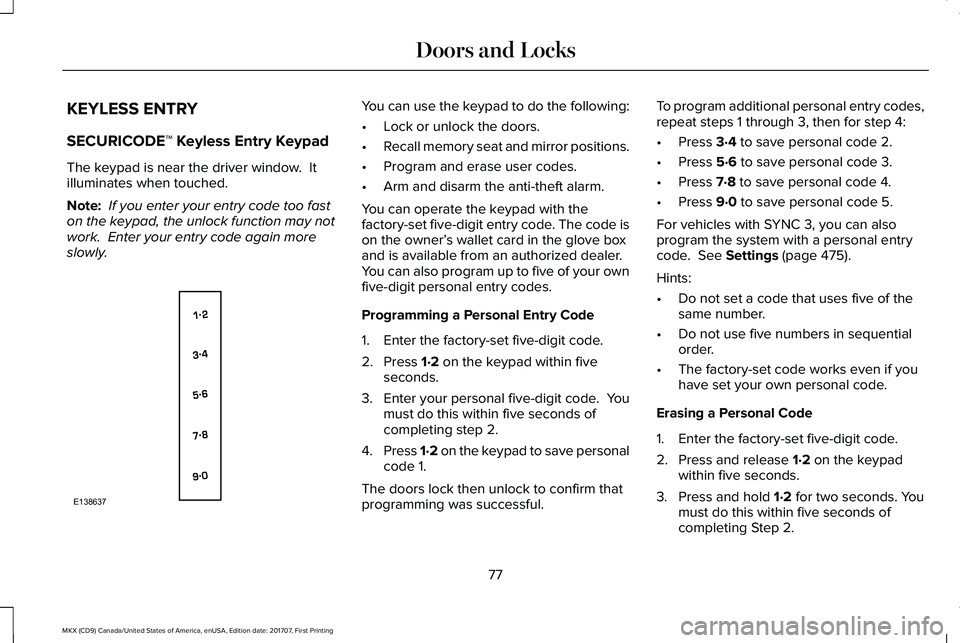
The keypad is near the driver window. Itilluminates when touched.
Note: If you enter your entry code too faston the keypad, the unlock function may notwork. Enter your entry code again moreslowly.
You can use the keypad to do the following:
•Lock or unlock the doors.
•Recall memory seat and mirror positions.
•Program and erase user codes.
•Arm and disarm the anti-theft alarm.
You can operate the keypad with thefactory-set five-digit entry code. The code ison the owner’s wallet card in the glove boxand is available from an authorized dealer.You can also program up to five of your ownfive-digit personal entry codes.
Programming a Personal Entry Code
1. Enter the factory-set five-digit code.
2. Press 1·2 on the keypad within fiveseconds.
3.Enter your personal five-digit code. Youmust do this within five seconds ofcompleting step 2.
4.Press 1·2 on the keypad to save personalcode 1.
The doors lock then unlock to confirm thatprogramming was successful.
To program additional personal entry codes,repeat steps 1 through 3, then for step 4:
•Press 3·4 to save personal code 2.
•Press 5·6 to save personal code 3.
•Press 7·8 to save personal code 4.
•Press 9·0 to save personal code 5.
For vehicles with SYNC 3, you can alsoprogram the system with a personal entrycode. See Settings (page 475).
Hints:
•Do not set a code that uses five of thesame number.
•Do not use five numbers in sequentialorder.
•The factory-set code works even if youhave set your own personal code.
Erasing a Personal Code
1. Enter the factory-set five-digit code.
2. Press and release 1·2 on the keypadwithin five seconds.
3. Press and hold 1·2 for two seconds. Youmust do this within five seconds ofcompleting Step 2.
77
MKX (CD9) Canada/United States of America, enUSA, Edition date: 201707, First Printing
Doors and LocksE138637
Page 81 of 603
All personal codes erase and only thefactory-set five-digit code works.
Anti-Scan Feature
The keypad goes into an anti-scan mode ifyou enter the wrong code seven times. Thismode turns off the keypad for one minuteand the keypad lamp flashes.
The anti-scan feature turns off after:
•One minute of keypad inactivity.
•You press the unlock button on theremote control.
•You switch the ignition on.
•You unlock your vehicle using intelligentaccess.
Locking and Unlocking the Doors
Locking All Doors
Press and hold 7·8 and 9·0 simultaneouslywith the driver door closed. You do not needto enter the keypad code first.
Unlocking the Driver Door
Enter the factory-set or your personalfive-digit code. You must press each numberwithin five seconds of each other. Theinterior lamps illuminate.
Note:All doors unlock if you switch on theall-door unlocking mode. See Locking andUnlocking (page 72).
Unlocking All Doors
Enter the factory-set or your personalfive-digit code, then press 3·4 within fiveseconds.
Displaying the Factory-Set Code
Note:You need to have two programmedintelligent access keys for this procedure.
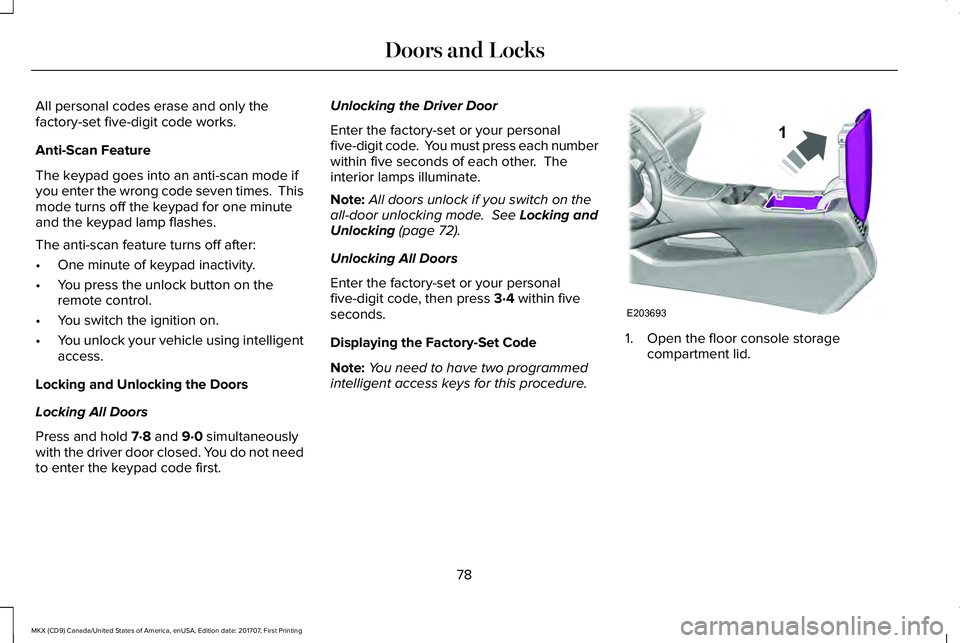
1. Open the floor console storagecompartment lid.
78
MKX (CD9) Canada/United States of America, enUSA, Edition date: 201707, First Printing
Doors and LocksE203693
1
Page 82 of 603
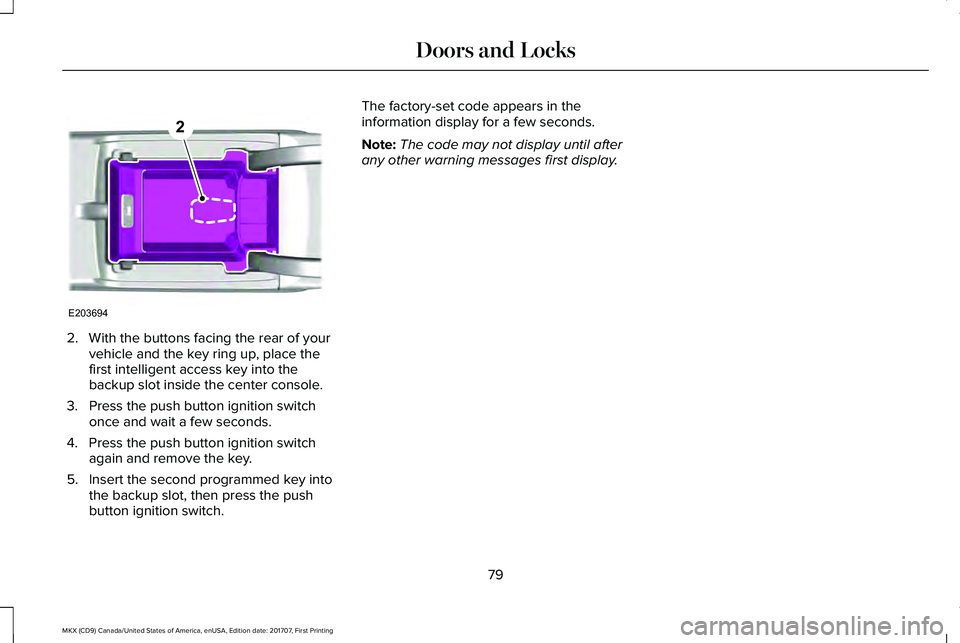
2. With the buttons facing the rear of yourvehicle and the key ring up, place thefirst intelligent access key into thebackup slot inside the center console.
3. Press the push button ignition switchonce and wait a few seconds.
4. Press the push button ignition switchagain and remove the key.
5. Insert the second programmed key intothe backup slot, then press the pushbutton ignition switch.
The factory-set code appears in theinformation display for a few seconds.
Note:The code may not display until afterany other warning messages first display.
79
MKX (CD9) Canada/United States of America, enUSA, Edition date: 201707, First Printing
Doors and LocksE203694
2
Page 85 of 603
Three warning tones sound as the liftgatebegins to power close. If there is a problemwith the open or close request, one of thefollowing may occur:
•A tone sounds if the ignition is on andthe transmission is not in park (P).
•A tone sounds if the battery voltage isbelow the minimum operating voltage.
•A tone sounds if the liftgate is not fullyclosed and your vehicle is moving at aspeed greater than 3 mph (5 km/h).
If the liftgate starts to close after it has fullyopened, this indicates there may beexcessive weight on the liftgate or a possiblestrut failure. A repetitive tone sounds andthe liftgate closes under control. Removeany excessive weight from the liftgate. If theliftgate continues to close after opening,have the system checked by an authorizeddealer.
Opening and Closing the Liftgate
WARNING
Make sure all persons are clear of thepower liftgate area before using thepower liftgate control.
Note: Make sure the area behind yourvehicle is free from obstruction and thatthere is enough room for you to operate theliftgate. Objects too close to your vehicle,for example a wall, garage door or anothervehicle may come into contact with themoving liftgate. This could damage theliftgate and its components.
Note:Be careful when opening or closingthe liftgate in a garage or other enclosedarea to avoid damaging the liftgate.
Note: Do not leave the liftgate open whiledriving. This could damage the liftgate andits components.
From the Instrument Panel
With the transmission in park (P),press the button on the instrumentpanel.
Remote Control
Press the button twice within threeseconds.
Outside Control Button
Opening the Liftgate
1. Unlock the liftgate with the remotecontrol or power door unlock control. Ifa passive key is within 3 ft (1 m) of theliftgate, the liftgate unlocks when youpress the liftgate release button.
82
MKX (CD9) Canada/United States of America, enUSA, Edition date: 201707, First Printing
LiftgateE138633 E138630
Page 89 of 603
PASSIVE ANTI-THEFT SYSTEM
Note: The system is not compatible withnon-Ford aftermarket remote start systems. Use of these systems may result in enginestarting problems and a loss of securityprotection.
Note: Metallic objects, electronic devicesor a second coded key on the same keychain may result in vehicle starting problems,especially if they are too close to the keywhen starting your vehicle. Prevent theseobjects from touching the coded key whenstarting your vehicle. Switch the ignition off,move all objects on the key chain away fromthe coded key and restart your vehicle if aproblem occurs.
Note: Do not leave a duplicate coded keyin your vehicle. Always take your keys andlock all doors when leaving your vehicle.
SecuriLock™
The system helps prevent the engine fromstarting unless you use a coded keyprogrammed to your vehicle. Using thewrong key may prevent your vehicle fromstarting. A message may appear in theinformation display.
If you are unable to start your vehicle with acoded key, it is not operating correctly. Amessage may appear in the informationdisplay.
Automatic Arming
The system arms when you switch theignition off.
Automatic Disarming
The system disarms when you switch theignition on with a coded key.
Replacement Keys
Note:Your vehicle comes with two keys.
The intelligent access key functions as aprogrammed key that operates the driverdoor lock and turns on the intelligent accesswith push button start system, as well as aremote control.
If your coded keys are lost or stolen and youdo not have an extra coded key, you needto erase the key codes from your vehicle andprogram new coded keys. Contact anauthorized dealer.
Store a spare intelligent access key awayfrom your vehicle in a safe place. You canpurchase replacement keys or remotecontrols from an authorized dealer.
Programming a Spare Intelligent AccessKey
Note:You can program a maximum of fourintelligent access keys to your vehicle.
You must have two previously programmedintelligent access keys inside your vehicleand the new unprogrammed intelligentaccess keys readily accessible. Contact anauthorized dealer to have the spare keyprogrammed if two previously programmedkeys are not available.
86
MKX (CD9) Canada/United States of America, enUSA, Edition date: 201707, First Printing
Security
Page 91 of 603
ANTI-THEFT ALARM
The system will warn you of an unauthorizedentry to your vehicle. It will be triggered ifany door, the luggage compartment or thehood is opened without using the key,remote control or keyless entry keypad.
The direction indicators will flash and thehorn will sound if unauthorized entry isattempted while the alarm is armed.
Take all remote controls to an authorizeddealer if there is any potential alarm problemwith your vehicle.
Arming the Alarm
The alarm is ready to arm when there is nota key in your vehicle. Electronically lock yourvehicle to arm the alarm.
Disarming the Alarm
Disarm the alarm by any of the followingactions:
•Unlock the doors or luggagecompartment with the remote control orkeyless entry keypad.
•Switch your vehicle on or start yourvehicle.
•Use a key in the driver door to unlockyour vehicle, then switch your vehicle onwithin 12 seconds.
Note:Pressing the panic button on theremote control will stop the horn and signalindicators, but will not disarm the system.
88
MKX (CD9) Canada/United States of America, enUSA, Edition date: 201707, First Printing
Security
Page 104 of 603
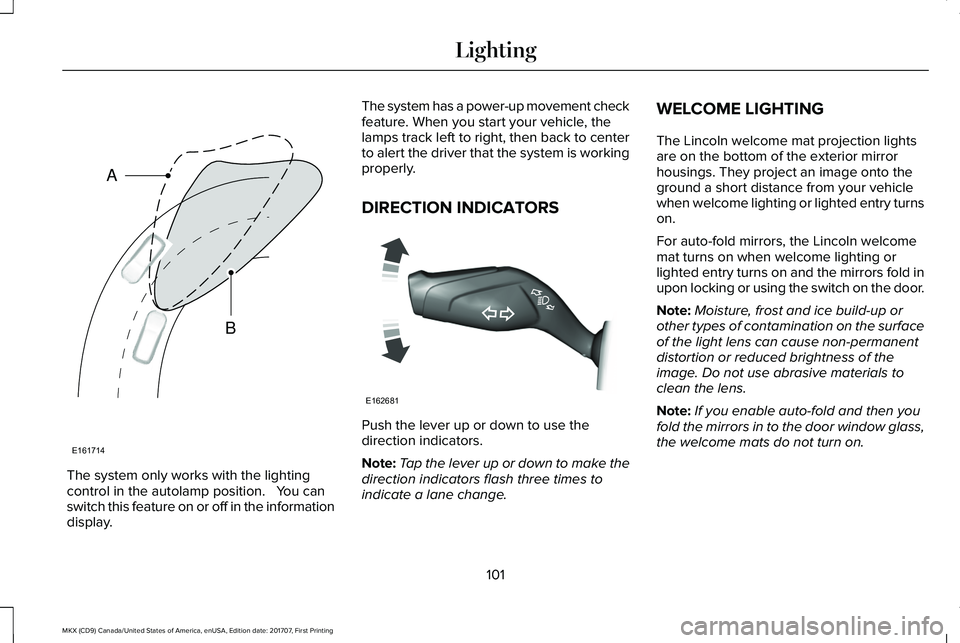
The system only works with the lightingcontrol in the autolamp position. You canswitch this feature on or off in the informationdisplay.
The system has a power-up movement checkfeature. When you start your vehicle, thelamps track left to right, then back to centerto alert the driver that the system is workingproperly.
DIRECTION INDICATORS
Push the lever up or down to use thedirection indicators.
Note:Tap the lever up or down to make thedirection indicators flash three times toindicate a lane change.
WELCOME LIGHTING
The Lincoln welcome mat projection lightsare on the bottom of the exterior mirrorhousings. They project an image onto theground a short distance from your vehiclewhen welcome lighting or lighted entry turnson.
For auto-fold mirrors, the Lincoln welcomemat turns on when welcome lighting orlighted entry turns on and the mirrors fold inupon locking or using the switch on the door.
Note:Moisture, frost and ice build-up orother types of contamination on the surfaceof the light lens can cause non-permanentdistortion or reduced brightness of theimage. Do not use abrasive materials toclean the lens.
Note:If you enable auto-fold and then youfold the mirrors in to the door window glass,the welcome mats do not turn on.
101
MKX (CD9) Canada/United States of America, enUSA, Edition date: 201707, First Printing
LightingE161714
B
A E162681
Page 108 of 603
Pull up the window switch and hold within afew seconds of the window reaching thebounce-back position. The window travelsup with no bounce-back protection. Thewindow stops if you release the switchbefore the window fully closes.
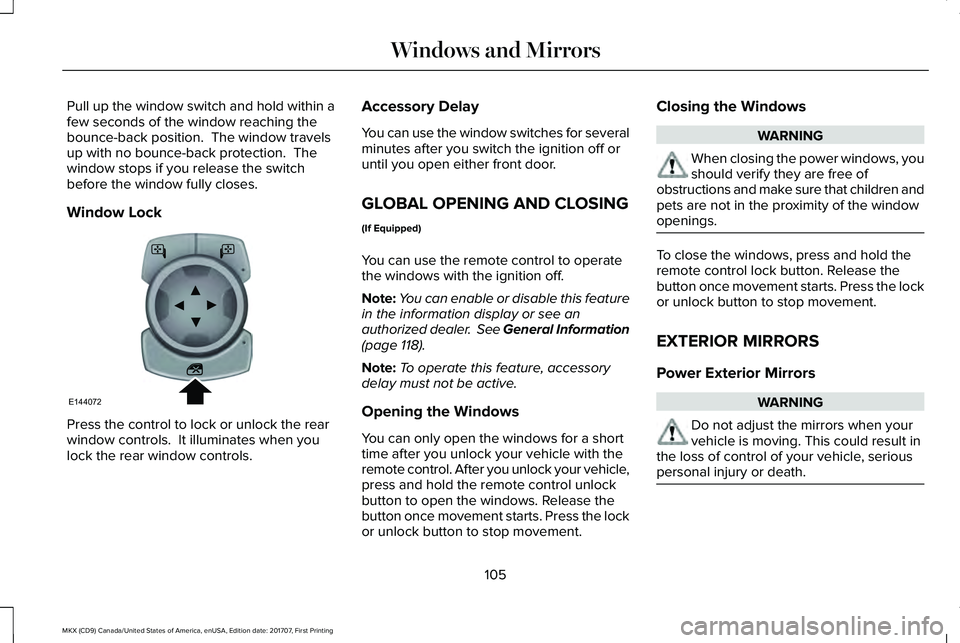
Window Lock
Press the control to lock or unlock the rearwindow controls. It illuminates when youlock the rear window controls.
Accessory Delay
You can use the window switches for severalminutes after you switch the ignition off oruntil you open either front door.
GLOBAL OPENING AND CLOSING
(If Equipped)
You can use the remote control to operatethe windows with the ignition off.
Note:You can enable or disable this featurein the information display or see anauthorized dealer. See General Information(page 118).
Note:To operate this feature, accessorydelay must not be active.
Opening the Windows
You can only open the windows for a shorttime after you unlock your vehicle with theremote control. After you unlock your vehicle,press and hold the remote control unlockbutton to open the windows. Release thebutton once movement starts. Press the lockor unlock button to stop movement.
Closing the Windows
WARNING
When closing the power windows, youshould verify they are free ofobstructions and make sure that children andpets are not in the proximity of the windowopenings.
To close the windows, press and hold theremote control lock button. Release thebutton once movement starts. Press the lockor unlock button to stop movement.
EXTERIOR MIRRORS
Power Exterior Mirrors
WARNING
Do not adjust the mirrors when yourvehicle is moving. This could result inthe loss of control of your vehicle, seriouspersonal injury or death.
105
MKX (CD9) Canada/United States of America, enUSA, Edition date: 201707, First Printing
Windows and MirrorsE144072
Page 109 of 603
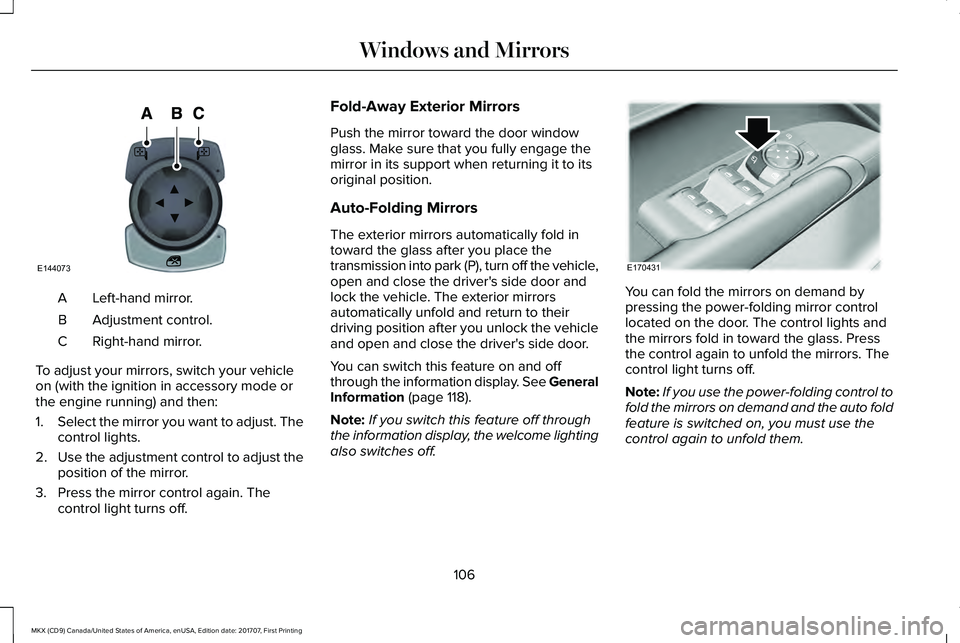
Left-hand mirror.A
Adjustment control.B
Right-hand mirror.C
To adjust your mirrors, switch your vehicleon (with the ignition in accessory mode orthe engine running) and then:
1.Select the mirror you want to adjust. Thecontrol lights.
2.Use the adjustment control to adjust theposition of the mirror.
3. Press the mirror control again. Thecontrol light turns off.
Fold-Away Exterior Mirrors
Push the mirror toward the door windowglass. Make sure that you fully engage themirror in its support when returning it to itsoriginal position.
Auto-Folding Mirrors
The exterior mirrors automatically fold intoward the glass after you place thetransmission into park (P), turn off the vehicle,open and close the driver's side door andlock the vehicle. The exterior mirrorsautomatically unfold and return to theirdriving position after you unlock the vehicleand open and close the driver's side door.
You can switch this feature on and offthrough the information display. See GeneralInformation (page 118).
Note:If you switch this feature off throughthe information display, the welcome lightingalso switches off.
You can fold the mirrors on demand bypressing the power-folding mirror controllocated on the door. The control lights andthe mirrors fold in toward the glass. Pressthe control again to unfold the mirrors. Thecontrol light turns off.
Note:If you use the power-folding control tofold the mirrors on demand and the auto foldfeature is switched on, you must use thecontrol again to unfold them.
106
MKX (CD9) Canada/United States of America, enUSA, Edition date: 201707, First Printing
Windows and MirrorsE144073 E170431