instrument panel LINCOLN MKX 2018 User Guide
[x] Cancel search | Manufacturer: LINCOLN, Model Year: 2018, Model line: MKX, Model: LINCOLN MKX 2018Pages: 603, PDF Size: 4.94 MB
Page 172 of 603
GLOVE BOX
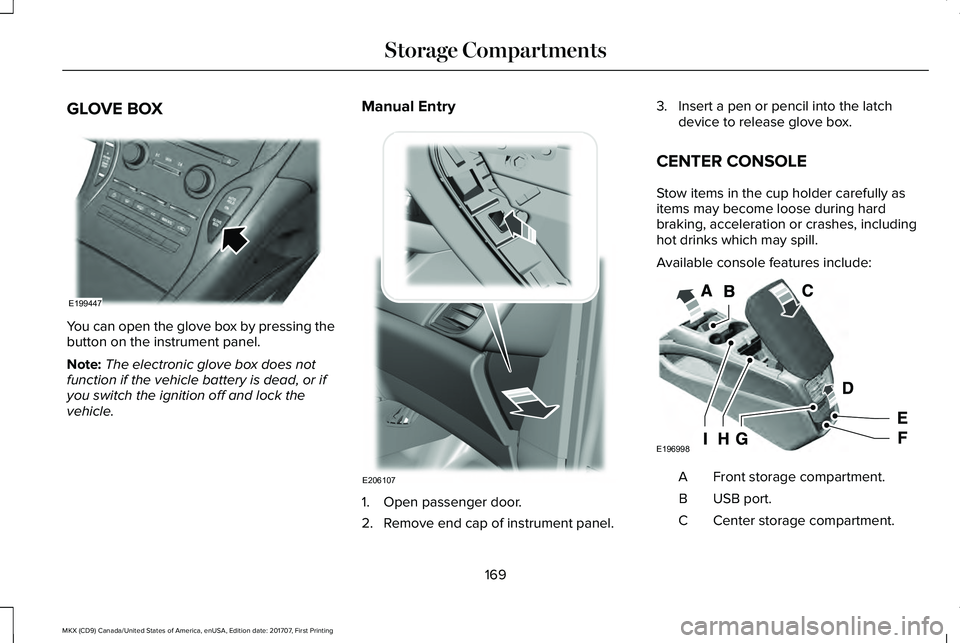
You can open the glove box by pressing thebutton on the instrument panel.
Note:The electronic glove box does notfunction if the vehicle battery is dead, or ifyou switch the ignition off and lock thevehicle.
Manual Entry
1. Open passenger door.
2. Remove end cap of instrument panel.
3. Insert a pen or pencil into the latchdevice to release glove box.
CENTER CONSOLE
Stow items in the cup holder carefully asitems may become loose during hardbraking, acceleration or crashes, includinghot drinks which may spill.
Available console features include:
Front storage compartment.A
USB port.B
Center storage compartment.C
169
MKX (CD9) Canada/United States of America, enUSA, Edition date: 201707, First Printing
Storage CompartmentsE199447 E206107 E196998
Page 191 of 603
AUTOMATIC TRANSMISSION
WARNINGS
Always fully apply the parking brakeand make sure you shift into park (P).Failure to follow this instruction could resultin personal injury or death.
Do not apply the brake pedal andaccelerator pedal simultaneously.Applying both pedals simultaneously formore than a few seconds will limit engineperformance, which may result in difficultymaintaining speed in traffic and could leadto serious injury.
Note:You may not be able to shift out ofpark (P) unless the intelligent access key isinside the vehicle.
Push Button Shift Transmission
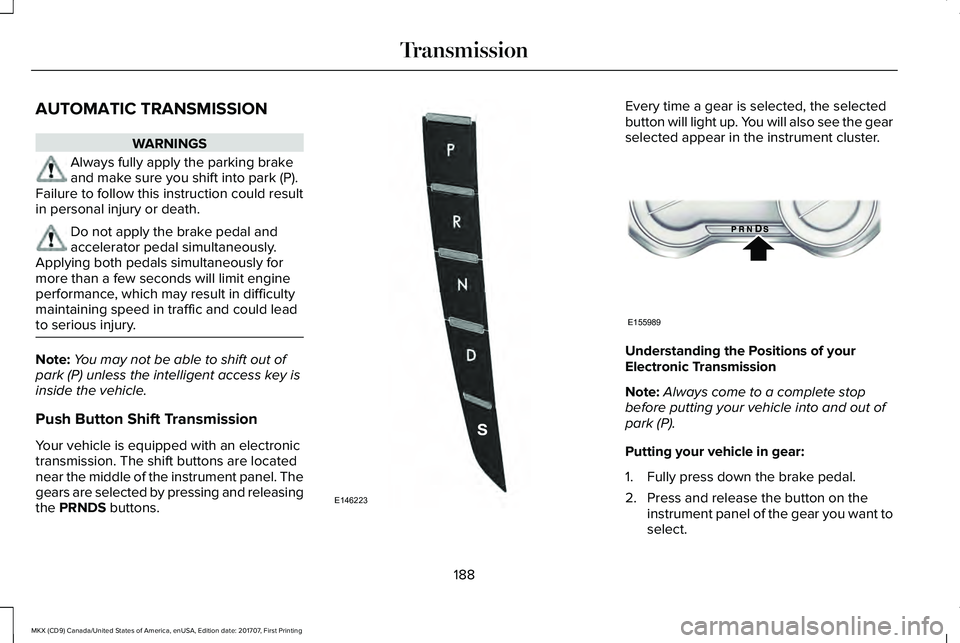
Your vehicle is equipped with an electronictransmission. The shift buttons are locatednear the middle of the instrument panel. Thegears are selected by pressing and releasingthe PRNDS buttons.
Every time a gear is selected, the selectedbutton will light up. You will also see the gearselected appear in the instrument cluster.
Understanding the Positions of yourElectronic Transmission
Note:Always come to a complete stopbefore putting your vehicle into and out ofpark (P).
Putting your vehicle in gear:
1. Fully press down the brake pedal.
2. Press and release the button on theinstrument panel of the gear you want toselect.
188
MKX (CD9) Canada/United States of America, enUSA, Edition date: 201707, First Printing
TransmissionE146223 E155989
Page 193 of 603
Stay in Neutral mode
Stay in Neutral mode allows your vehicle tostay in neutral (N) when you exit the vehicle.Your vehicle must be stationary to enter thismode.
To enter Stay in Neutral mode:
1. Press the neutral (N) button on theinstrument panel.
2. A message will appear in yourinformation display screen prompting youto press the neutral (N) button again toenter Stay in Neutral mode.
3. Press the neutral (N) button again toenter Stay in Neutral mode.
A message will appear in your informationdisplay screen when your vehicle hasentered Stay in Neutral mode.
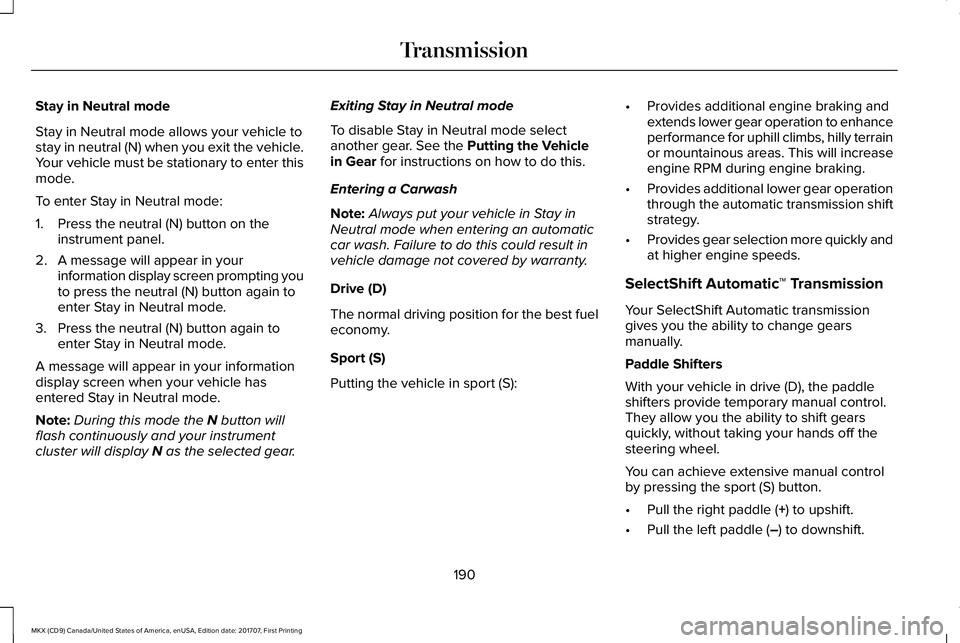
Note:During this mode the N button willflash continuously and your instrumentcluster will display N as the selected gear.
Exiting Stay in Neutral mode
To disable Stay in Neutral mode selectanother gear. See the Putting the Vehiclein Gear for instructions on how to do this.
Entering a Carwash
Note:Always put your vehicle in Stay inNeutral mode when entering an automaticcar wash. Failure to do this could result invehicle damage not covered by warranty.
Drive (D)
The normal driving position for the best fueleconomy.
Sport (S)
Putting the vehicle in sport (S):
•Provides additional engine braking andextends lower gear operation to enhanceperformance for uphill climbs, hilly terrainor mountainous areas. This will increaseengine RPM during engine braking.
•Provides additional lower gear operationthrough the automatic transmission shiftstrategy.
•Provides gear selection more quickly andat higher engine speeds.
SelectShift Automatic™ Transmission
Your SelectShift Automatic transmissiongives you the ability to change gearsmanually.
Paddle Shifters
With your vehicle in drive (D), the paddleshifters provide temporary manual control.They allow you the ability to shift gearsquickly, without taking your hands off thesteering wheel.
You can achieve extensive manual controlby pressing the sport (S) button.
•Pull the right paddle (+) to upshift.
•Pull the left paddle (–) to downshift.
190
MKX (CD9) Canada/United States of America, enUSA, Edition date: 201707, First Printing
Transmission
Page 195 of 603

2. Locate your brake-shift interlock accessslot. The slot is located below the mediahub, in your center console storage bin.The access slot does not have a label.
Note:Make sure that you correctly identifythe access hole as not to damage the mediahub.
3. Using a tool, press and hold the brakeshift interlock switch. The shift buttonson the instrument panel will flash whenyour vehicle is in override mode.
4. With the override switch still held, pressthe neutral (N) button to shift from park.
5. Release the override button.
6.Your vehicle will remain in neutral (N) forwrecker towing purposes or can beshifted to the desired gear and driven (ifpossible).
7. Release the parking brake.
Automatic Transmission AdaptiveLearning
This feature increases durability and providesconsistent shift feel over the life of yourvehicle. A new vehicle or transmission mayhave firm or soft shifts. This operation willnot affect function or durability of yourtransmission and is normal. Over time, theadaptive learning process will fully updatetransmission operation. Additionally, thestrategy must be relearned whenever thebattery is disconnected or a new battery isinstalled.
If Your Vehicle Gets Stuck In Mud orSnow
Note:Do not rock your vehicle if your engineis not at normal operating temperature ordamage to your transmission may occur.
Note:Do not rock your vehicle for more thana minute or damage to your transmissionand tires may occur, or your engine mayoverheat.
Note:If your vehicle is equipped withAdvanceTrac with Roll Stability Control, itmay be beneficial to disengage theAdvanceTrac with Roll Stability Controlsystem while attempting to rock the vehicle.
If your vehicle gets stuck in mud or snow,you can help rock your vehicle out by shiftingbetween forward and reverse gears,stopping between shifts in a steady pattern.Press lightly on the accelerator in each gear.
192
MKX (CD9) Canada/United States of America, enUSA, Edition date: 201707, First Printing
TransmissionE221505
Page 203 of 603
HINTS ON DRIVING WITH ANTI-
LOCK BRAKES
The anti-lock braking system does noteliminate the risks when:
•You drive too closely to the vehicle infront of you.
•Your vehicle is hydroplaning.
•You take corners too fast.
•The road surface is poor.
Note: If the system activates, the brakepedal may pulse and may travel further. Maintain pressure on the brake pedal. Youmay also hear a noise from the system. Thisis normal.
ELECTRIC PARKING BRAKE
The electric parking brake replaces theconventional handbrake. The operatingswitch is on the instrument panel.
WARNING
Always fully apply the parking brakeand make sure you shift into park (P).Failure to follow this instruction could resultin personal injury or death.
Note:When you apply the electric parkingbrake in certain conditions, for example, ona steep hill, the electric parking brake mayreapply the brakes within three to tenminutes.
Note:You may notice various noises whenyou apply and release the electric parkingbrake. This is normal and no cause forconcern.
Note:After a determined period of time, theparking brake automatically recalibrates.This process is short and only performedwhen you switch the vehicle off.
Applying the Electric Parking Brake
WARNING
The brake system warning lamp willflash when applying the electricparking brake. If the brake system warninglamp continues to flash there could be aproblem with your electric parking brake.Have your vehicle checked as soon aspossible.
Note:The brake system warning lampilluminates for ten seconds if you switch theignition off after you apply the electricparking brake, or you apply the electricparking brake after you switch the ignitionoff.
Note:The electric parking brake will notautomatically apply when you park thevehicle. You must apply the electric parkingbrake using the electric parking brakeswitch.
200
MKX (CD9) Canada/United States of America, enUSA, Edition date: 201707, First Printing
Brakes
Page 209 of 603
PRINCIPLE OF OPERATION
The traction control system helps avoid drivewheel spin and loss of traction.
If your vehicle begins to slide, the systemapplies the brakes to individual wheels and,when needed, reduces engine power at thesame time. If the wheels spin whenaccelerating on slippery or loose surfaces,the system reduces engine power in orderto increase traction.
USING TRACTION CONTROL
WARNING
The stability and traction control lightilluminates steadily if the systemdetects a failure. Make sure you did notmanually disable the traction control systemusing the information display controls or theswitch. If the stability control and tractioncontrol light is still illuminating steadily, havethe system serviced by an authorized dealerimmediately. Operating your vehicle with thetraction control disabled could lead to anincreased risk of loss of vehicle control,vehicle rollover, personal injury and death.
The system automatically turns on each timeyou switch the ignition on.
If your vehicle is stuck in mud or snow,switching traction control off may bebeneficial as this allows the wheels to spin.
Note:When you switch traction control off,stability control remains fully active.
Switching the System Off
When you switch the system off or on, amessage appears in the information displayshowing system status.
You can switch the system off by either usingthe information display controls or the switch.
Using the Information Display Controls
You can switch this feature off or on in theinformation display. See General Information(page 118).
Using a Switch (If Equipped)
Use the traction control switch on theinstrument panel to switch the system off oron.
System Indicator Lights and Messages
The stability and traction controllight:
206
MKX (CD9) Canada/United States of America, enUSA, Edition date: 201707, First Printing
Traction ControlE138639
Page 229 of 603
Note:You may not see objects that are closeto either corner of the bumper or under thebumper due to the limited coverage of thecamera system.
The 360 degree camera system consists offront, side and rear cameras. The system:
•Allows you to see what is directly in frontor behind your vehicle.
•Provides cross traffic view in front andbehind your vehicle.
•Allows you to see a top-down view of thearea outside your vehicle, including theblind spots.
•Provides visibility around your vehicle toyou in parking maneuvers such as:
•Centering in a parking space.
•Obstacles near vehicle.
•Parallel parking.
The 360 degree camera systembutton is located on the instrumentpanel and allows you to togglethrough different camera views.
The front and rear cameras have multiplescreens which consist of: Normal view with360, Normal view, and split view. When inpark (P), neutral (N) or drive (D), only the frontimages will be displayed when the button ispressed. When in reverse (R), only the rearimages will be displayed when the button ispressed.
Note:The 360 degree camera system willturn OFF when your vehicle is in motion atlow speed, except when in reverse (R).
Camera Views
The small vehicle icon displayed on the topleft corner of the image illustrates the cameraview being displayed. Camera views are laidout in the order the screens will appear oncethe button is pressed.
Note:The front video image will be disabledwhen your vehicle is in motion at low speed,except when in reverse (R).
•Front 360 + Normal: Contains the normalfront camera view next to a 360 degreecamera view. This view will appear onthe screen when the button is pressedin any gear other than reverse (R).
•Front Normal View: Provides an imageof what is directly in front of your vehicle.Access this view by pressing the camerabutton from the Front 360 + Normal Viewscreen.
•Front Split View: Provides an extendedview of what is in front of your vehicle.Access this view by pressing the camerabutton from the Front Normal Viewscreen.
•Rear 360 + Normal: Contains the normalrear camera view next to a 360 degreecamera view. This view can be accessedby putting your vehicle in reverse (R), orby pressing the camera button from theRear Split View screen.
226
MKX (CD9) Canada/United States of America, enUSA, Edition date: 201707, First Printing
Parking AidsE205884
Page 278 of 603
If you need to arrange roadside assistancefor yourself, Lincoln Motor Companyreimburses a reasonable amount for towingto the nearest Lincoln dealership within100 mi (160 km). To obtain reimbursementinformation, United States clients, call1-800-521-4140. Clients need to submit theiroriginal receipts.
Vehicles Sold in Canada: GettingRoadside Assistance
To fully assist you should you have a vehicleconcern, Lincoln Motor Company offers acomplimentary roadside assistance program. This program is eligible within Canada or thecontinental United States.
This program is separate from the NewVehicle Limited Warranty, beginning fromthe original warranty start date and lasts thelife of the vehicle for the original owner.Subsequent owners receive coverage thatis concurrent with the 6 years or 70,000 mi(110,000 km) (whichever occurs first)powertrain warranty coverage period.
If you purchased your vehicle in Canada andrequire roadside assistance, please call1-800-387-9333.
Vehicles Sold in Canada: UsingRoadside Assistance
Complete the roadside assistanceidentification card and place it in your walletfor quick reference.
In Canada, this card is found in the WarrantyGuide in the glove compartment of yourvehicle.
Vehicles Sold in Canada: RoadsideAssistance Program Coverage
The service is available 24 hours a day,seven days a week.
Canadian roadside coverage and benefitsmay differ from the U.S. coverage.
For complete program coverage detailsreview your warranty guide, contact yourdealer, call us in Canada at 1-800-387-9333,or visit our website atwww.lincolncanada.com.
HAZARD FLASHERS
Note:The hazard flashers operate when theignition is in any position, or if the key is notin the ignition. If used when the vehicle is notrunning, the battery loses charge. As a result,there may be insufficient power to restartyour vehicle.
The flasher control is on theinstrument panel. Use your hazardflashers when your vehicle iscreating a safety hazard for other motorists.
•Press the flasher control and all front andrear direction indicators flash.
•Press the button again to switch them off.
FUEL SHUTOFF
WARNING
If your vehicle has been involved in acrash, have the fuel system checked.Failure to follow this instruction could resultin fire, personal injury or death.
275
MKX (CD9) Canada/United States of America, enUSA, Edition date: 201707, First Printing
Roadside Emergencies
Page 302 of 603
Protected ComponentsFuse RatingFuse or Relay Number
Wiper motor 2.25A 180
110 volt inverter.40A 181
Not used.–82
TRCM (iShifter).20A 183
Starter solenoid.30A 184
Not used (spare).30A 185
Anti-lock brake system pump.60A 287
1 M case fuse.2 J case fuse.
Passenger Compartment Fuse Panel
The fuse panel is located under theinstrument panel to the left of the steeringcolumn.
Note:It may be easier to access the fusepanel if you remove the finish trim piece.
299
MKX (CD9) Canada/United States of America, enUSA, Edition date: 201707, First Printing
Fuses
Page 311 of 603
GENERAL INFORMATION
Have your vehicle serviced regularly to helpmaintain its roadworthiness and resale value.There is a large network of authorizeddealers that are there to help you with theirprofessional servicing expertise. We believethat their specially trained technicians arebest qualified to service your vehicle properlyand expertly. They are supported by a widerange of highly specialized tools developedspecifically for servicing your vehicle.
If your vehicle requires professional service,an authorized dealer can provide thenecessary parts and service. Check yourwarranty information to find out which partsand services are covered.
Use only recommended fuels, lubricants,fluids and service parts conforming tospecifications. Motorcraft® parts aredesigned and built to provide the bestperformance in your vehicle.
Precautions
•Do not work on a hot engine.
•Make sure that nothing gets caught inmoving parts.
•Do not work on a vehicle with the enginerunning in an enclosed space, unless youare sure you have enough ventilation.
•Keep all open flames and other burningmaterial (such as cigarettes) away fromthe battery and all fuel related parts.
Working with the Engine Off
1. Set the parking brake and shift to park(P).
2. Switch off the engine.
3. Block the wheels.
Working with the Engine On
WARNING
To reduce the risk of vehicle damageand/or personal burn injuries, do notstart your engine with the air cleanerremoved and do not remove it while theengine is running.
1. Set the parking brake and shift to park(P).
2. Block the wheels.
OPENING AND CLOSING THE
HOOD
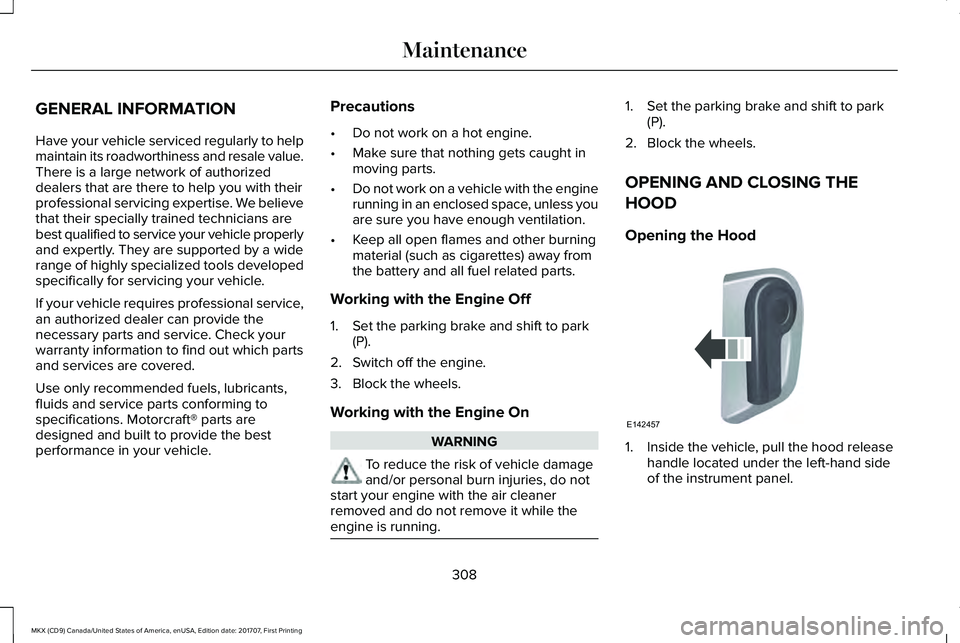
Opening the Hood
1. Inside the vehicle, pull the hood releasehandle located under the left-hand sideof the instrument panel.
308
MKX (CD9) Canada/United States of America, enUSA, Edition date: 201707, First Printing
MaintenanceE142457