reset LINCOLN MKX 2018 User Guide
[x] Cancel search | Manufacturer: LINCOLN, Model Year: 2018, Model line: MKX, Model: LINCOLN MKX 2018Pages: 603, PDF Size: 4.94 MB
Page 126 of 603
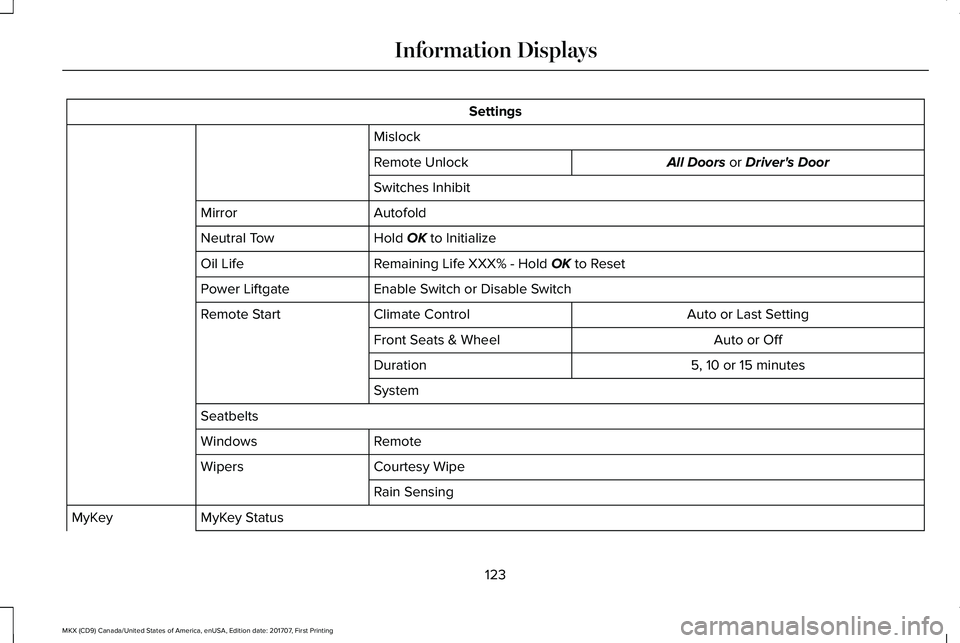
Settings
Mislock
All Doors or Driver's DoorRemote Unlock
Switches Inhibit
AutofoldMirror
Hold OK to InitializeNeutral Tow
Remaining Life XXX% - Hold OK to ResetOil Life
Enable Switch or Disable SwitchPower Liftgate
Auto or Last SettingClimate ControlRemote Start
Auto or OffFront Seats & Wheel
5, 10 or 15 minutesDuration
System
Seatbelts
RemoteWindows
Courtesy WipeWipers
Rain Sensing
MyKey StatusMyKey
123
MKX (CD9) Canada/United States of America, enUSA, Edition date: 201707, First Printing
Information Displays
Page 136 of 603
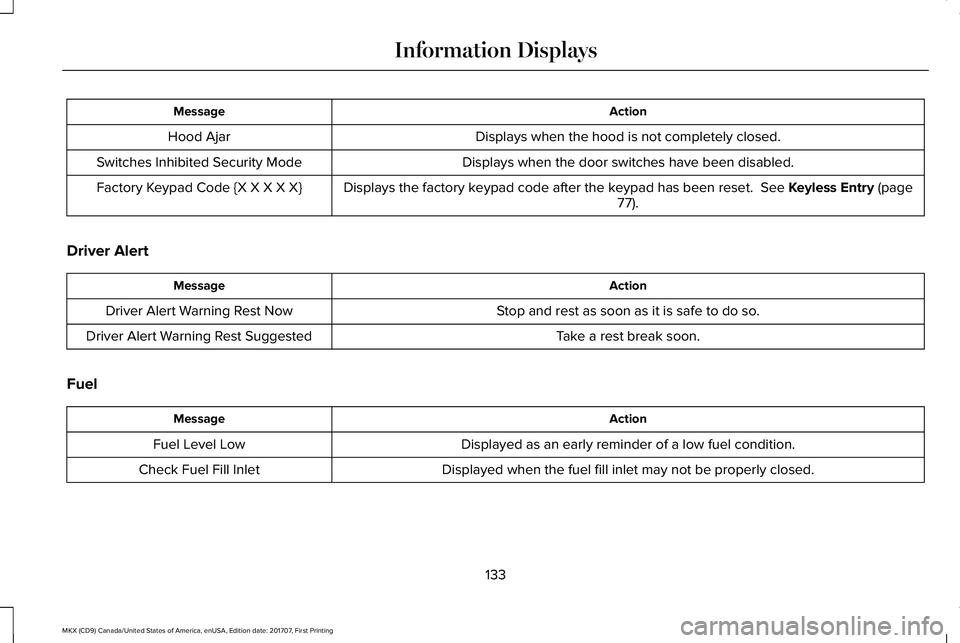
ActionMessage
Displays when the hood is not completely closed.Hood Ajar
Displays when the door switches have been disabled.Switches Inhibited Security Mode
Displays the factory keypad code after the keypad has been reset. See Keyless Entry (page77).Factory Keypad Code {X X X X X}
Driver Alert
ActionMessage
Stop and rest as soon as it is safe to do so.Driver Alert Warning Rest Now
Take a rest break soon.Driver Alert Warning Rest Suggested
Fuel
ActionMessage
Displayed as an early reminder of a low fuel condition.Fuel Level Low
Displayed when the fuel fill inlet may not be properly closed.Check Fuel Fill Inlet
133
MKX (CD9) Canada/United States of America, enUSA, Edition date: 201707, First Printing
Information Displays
Page 149 of 603
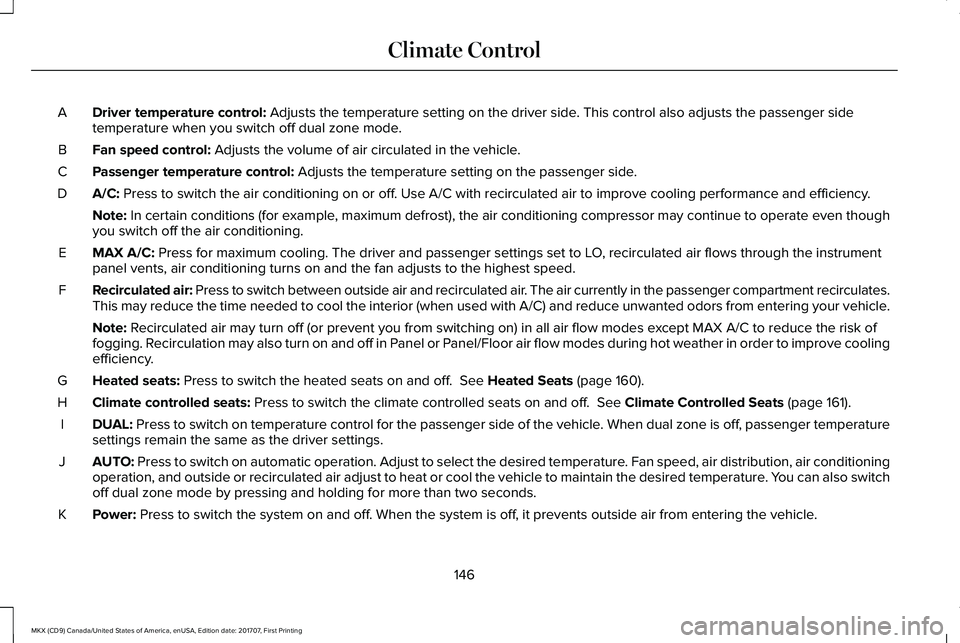
Driver temperature control: Adjusts the temperature setting on the driver side. This control also adjusts the passenger sidetemperature when you switch off dual zone mode.A
Fan speed control: Adjusts the volume of air circulated in the vehicle.B
Passenger temperature control: Adjusts the temperature setting on the passenger side.C
A/C: Press to switch the air conditioning on or off. Use A/C with recirculated air to improve cooling performance and efficiency.D
Note: In certain conditions (for example, maximum defrost), the air conditioning compressor may continue to operate even thoughyou switch off the air conditioning.
MAX A/C: Press for maximum cooling. The driver and passenger settings set to LO, recirculated air flows through the instrumentpanel vents, air conditioning turns on and the fan adjusts to the highest speed.E
Recirculated air: Press to switch between outside air and recirculated air. The air currently in the passenger compartment recirculates.This may reduce the time needed to cool the interior (when used with A/C) and reduce unwanted odors from entering your vehicle.F
Note: Recirculated air may turn off (or prevent you from switching on) in all air flow modes except MAX A/C to reduce the risk offogging. Recirculation may also turn on and off in Panel or Panel/Floor air flow modes during hot weather in order to improve coolingefficiency.
Heated seats: Press to switch the heated seats on and off. See Heated Seats (page 160).G
Climate controlled seats: Press to switch the climate controlled seats on and off. See Climate Controlled Seats (page 161).H
DUAL: Press to switch on temperature control for the passenger side of the vehicle. When dual zone is off, passenger temperaturesettings remain the same as the driver settings.I
AUTO: Press to switch on automatic operation. Adjust to select the desired temperature. Fan speed, air distribution, air conditioningoperation, and outside or recirculated air adjust to heat or cool the vehicle to maintain the desired temperature. You can also switchoff dual zone mode by pressing and holding for more than two seconds.
J
Power: Press to switch the system on and off. When the system is off, it prevents outside air from entering the vehicle.K
146
MKX (CD9) Canada/United States of America, enUSA, Edition date: 201707, First Printing
Climate Control
Page 155 of 603
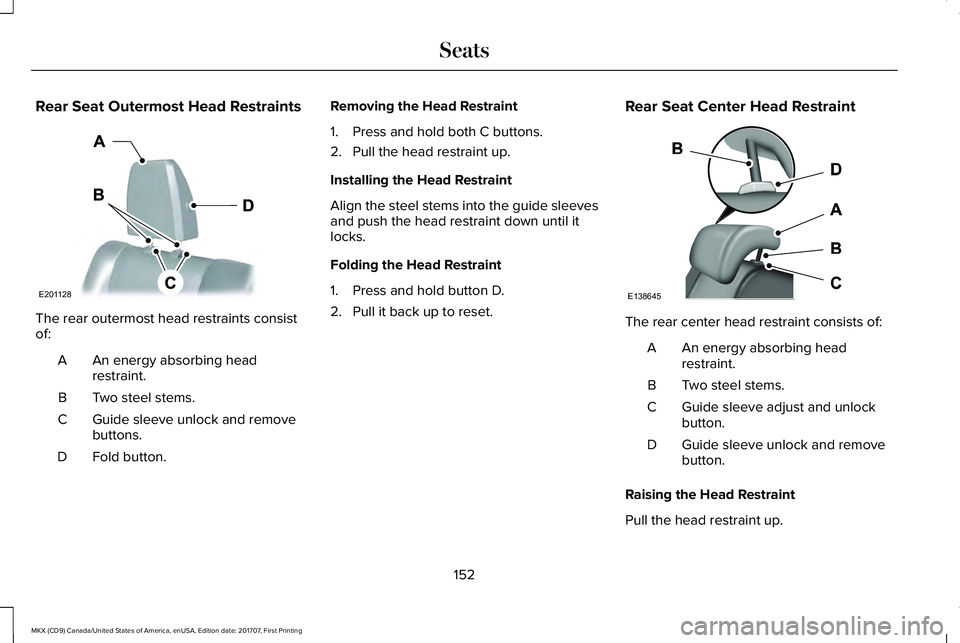
Rear Seat Outermost Head Restraints
The rear outermost head restraints consistof:
An energy absorbing headrestraint.A
Two steel stems.B
Guide sleeve unlock and removebuttons.C
Fold button.D
Removing the Head Restraint
1. Press and hold both C buttons.
2. Pull the head restraint up.
Installing the Head Restraint
Align the steel stems into the guide sleevesand push the head restraint down until itlocks.
Folding the Head Restraint
1. Press and hold button D.
2. Pull it back up to reset.
Rear Seat Center Head Restraint
The rear center head restraint consists of:
An energy absorbing headrestraint.A
Two steel stems.B
Guide sleeve adjust and unlockbutton.C
Guide sleeve unlock and removebutton.D
Raising the Head Restraint
Pull the head restraint up.
152
MKX (CD9) Canada/United States of America, enUSA, Edition date: 201707, First Printing
SeatsE201128 E138645
Page 161 of 603
WARNINGS
Do not use the memory function whenyour vehicle is moving.
This feature automatically recalls the positionof the following:
•Driver seat.
•Power mirrors.
•Optional power adjustable foot pedals.
•Optional power steering column.
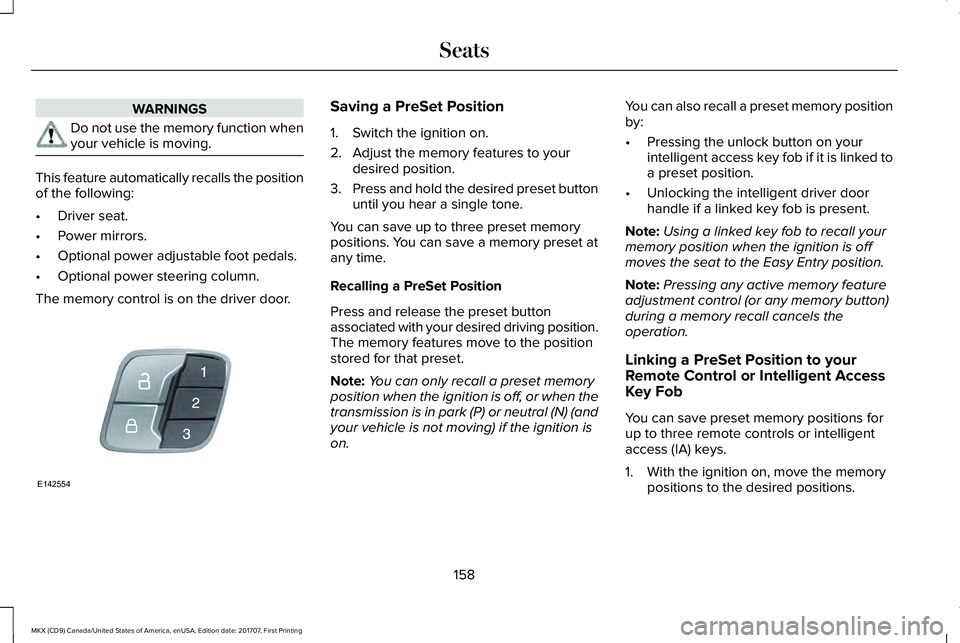
The memory control is on the driver door.
Saving a PreSet Position
1. Switch the ignition on.
2. Adjust the memory features to yourdesired position.
3.Press and hold the desired preset buttonuntil you hear a single tone.
You can save up to three preset memorypositions. You can save a memory preset atany time.
Recalling a PreSet Position
Press and release the preset buttonassociated with your desired driving position.The memory features move to the positionstored for that preset.
Note:You can only recall a preset memoryposition when the ignition is off, or when thetransmission is in park (P) or neutral (N) (andyour vehicle is not moving) if the ignition ison.
You can also recall a preset memory positionby:
•Pressing the unlock button on yourintelligent access key fob if it is linked toa preset position.
•Unlocking the intelligent driver doorhandle if a linked key fob is present.
Note:Using a linked key fob to recall yourmemory position when the ignition is offmoves the seat to the Easy Entry position.
Note:Pressing any active memory featureadjustment control (or any memory button)during a memory recall cancels theoperation.
Linking a PreSet Position to yourRemote Control or Intelligent AccessKey Fob
You can save preset memory positions forup to three remote controls or intelligentaccess (IA) keys.
1. With the ignition on, move the memorypositions to the desired positions.
158
MKX (CD9) Canada/United States of America, enUSA, Edition date: 201707, First Printing
SeatsE142554
Page 162 of 603
2.Press and hold the desired preset buttonfor about five seconds. A tone soundsafter about two seconds. Continueholding until you hear a second tone.
3. Within three seconds, press the lockbutton on the remote control you arelinking.
To unlink a remote control, follow the sameprocedure – except in step 3, press theunlock button on the remote control.
Note:If more than one linked remote controlor intelligent access key is in range, thememory function moves to the settings ofthe first key to initiate a memory recall.
Easy Entry and Exit Feature
If you enable the easy entry and exit feature,it automatically moves the driver seatposition rearward up to 2 in (5 cm) when youswitch the ignition off.
The driver seat will return to its previousposition when you switch the ignition on.
You can enable or disable this feature in theinformation display. See InformationDisplays (page 118).
REAR SEATS
Adjusting the Rear Seats
WARNING
To prevent possible damage to theseat or safety belts, make sure that thesafety belts are not buckled when foldingthe seatback.
Folding the Seatback
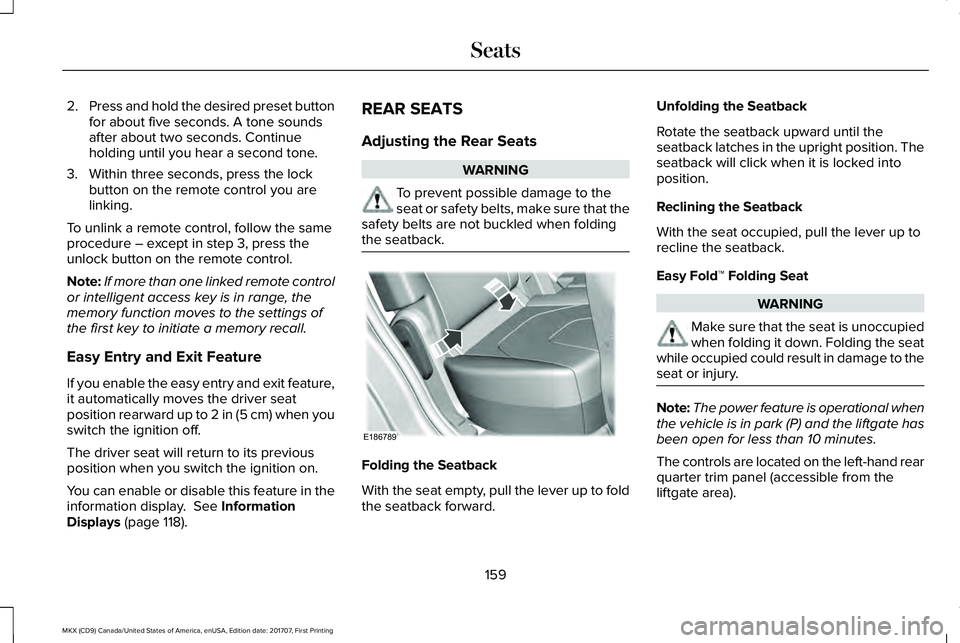
With the seat empty, pull the lever up to foldthe seatback forward.
Unfolding the Seatback
Rotate the seatback upward until theseatback latches in the upright position. Theseatback will click when it is locked intoposition.
Reclining the Seatback
With the seat occupied, pull the lever up torecline the seatback.
Easy Fold™ Folding Seat
WARNING
Make sure that the seat is unoccupiedwhen folding it down. Folding the seatwhile occupied could result in damage to theseat or injury.
Note:The power feature is operational whenthe vehicle is in park (P) and the liftgate hasbeen open for less than 10 minutes.
The controls are located on the left-hand rearquarter trim panel (accessible from theliftgate area).
159
MKX (CD9) Canada/United States of America, enUSA, Edition date: 201707, First Printing
SeatsE186789
Page 171 of 603
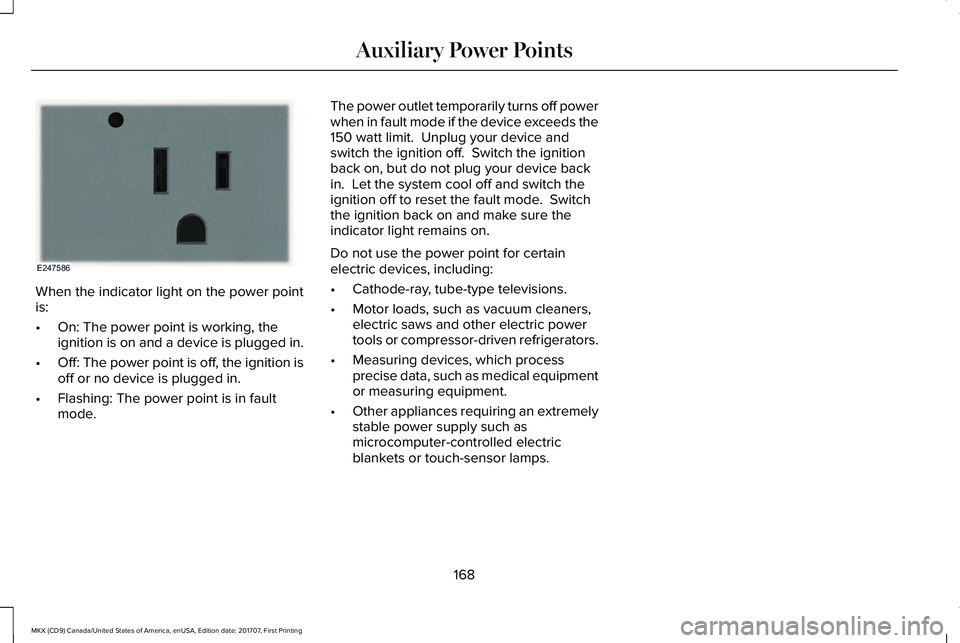
When the indicator light on the power pointis:
•On: The power point is working, theignition is on and a device is plugged in.
•Off: The power point is off, the ignition isoff or no device is plugged in.
•Flashing: The power point is in faultmode.
The power outlet temporarily turns off powerwhen in fault mode if the device exceeds the150 watt limit. Unplug your device andswitch the ignition off. Switch the ignitionback on, but do not plug your device backin. Let the system cool off and switch theignition off to reset the fault mode. Switchthe ignition back on and make sure theindicator light remains on.
Do not use the power point for certainelectric devices, including:
•Cathode-ray, tube-type televisions.
•Motor loads, such as vacuum cleaners,electric saws and other electric powertools or compressor-driven refrigerators.
•Measuring devices, which processprecise data, such as medical equipmentor measuring equipment.
•Other appliances requiring an extremelystable power supply such asmicrocomputer-controlled electricblankets or touch-sensor lamps.
168
MKX (CD9) Canada/United States of America, enUSA, Edition date: 201707, First Printing
Auxiliary Power PointsE247586
Page 177 of 603
4. Keep the accelerator pedal fullydepressed and press the push buttonignition switch until the engine starts.
Automatic Engine Shutdown
This feature automatically shuts down theengine if it has been idling for an extendedperiod. The ignition also turns off to savebattery power. Before your vehicle shutsdown, a message appears in the informationdisplay showing a timer counting down. Ifyou do not intervene within 30 seconds, yourvehicle shuts down. Another messageappears in the information display to informyou that your vehicle has shut down to savefuel. Start your vehicle as normal.
Automatic Engine Shutdown Override
Note: You cannot permanently switch offthe automatic shutdown. When you switchit off temporarily, it turns on at the nextignition cycle.
You can stop the shutdown, or reset thetimer, at any point before the 30-secondcountdown has expired by doing any of thefollowing:
•Reset the timer by pressing the brake oraccelerator pedal.
•Temporarily switch off the shutdownfeature during the current ignition cycleusing the information display. SeeGeneral Information (page 118).
•Press OK or RESET to temporarily switchthe feature off during the current ignitioncycle.
Stopping the Engine When YourVehicle is Stationary
1. Shift into park (P).
2. Press the push button ignition switch.
3. Apply the parking brake.
Note:The ignition, all electrical circuits andall warning lamps and indicators will beturned off.
Note:If the engine is idling for 30 minutes,the ignition and engine automatically shutsdown.
Stopping the Engine When YourVehicle is Moving
WARNING
Switching off the engine when thevehicle is still moving will result in aloss of brake and steering assistance. Thesteering will not lock, but higher effort willbe required. When the ignition is switchedoff, some electrical circuits, including airbags, warning lamps and indicators may alsobe off. If the ignition was turned offaccidentally, you can shift into neutral (N) andre-start the engine.
1.Put the transmission into neutral (N) anduse the brakes to bring your vehicle to asafe stop.
2.When your vehicle has stopped, shift intopark (P).
3. Press and hold the push button ignitionswitch until the engine stops, or press itthree times within two seconds.
4. Apply the parking brake.
174
MKX (CD9) Canada/United States of America, enUSA, Edition date: 201707, First Printing
Starting and Stopping the Engine
Page 185 of 603
Note: Do not attempt to start the engine ifyou have filled the fuel tank with incorrectfuel. Incorrect fuel use can cause damagenot covered by the vehicle Warranty. Haveyour vehicle immediately checked.
System Warnings (If Equipped)
If the fuel filler inlet does not fully close awarning message appears in the informationdisplay.
1.Stop your vehicle as soon as it is safe todo so and switch the engine off.
2. Shift into park (P) or neutral (N).
3. Apply the parking brake.
4. Fully open the fuel filler door.
5. Check the fuel filler inlet and the areaaround it for any items or debris that maybe obstructing its movement.
6.Fully insert a fuel pump nozzle or the fuelfiller funnel provided with your vehicleinto the fuel filler inlet. This action shoulddislodge any debris that may bepreventing the fuel filler inlet from fullyclosing.
7. Fully close the fuel filler door.
Note:If this action corrects the problem themessage may not immediately reset. If themessage remains and a warning lampilluminates, have your vehicle checked assoon as possible.
FUEL CONSUMPTION
The advertised capacity is the maximumamount of fuel that you can add to the fueltank after running out of fuel. Included in theadvertised capacity is an empty reserve. Theempty reserve is an unspecified amount offuel that remains in the fuel tank when thefuel gauge indicates empty.
Note:The amount of fuel in the emptyreserve varies and should not be relied uponto increase driving range.
Filling the Fuel Tank
For consistent results when refueling:
•Turn the ignition off before fueling; aninaccurate reading results if the engineis left running.
•Use the same fill rate (low-medium-high)each time the tank is filled.
•Allow no more than one automaticshut-off when refueling.
Results are most accurate when the fillingmethod is consistent.
Calculating Fuel Economy
Do not measure fuel economy during thefirst 1,000 mi (1,600 km) of driving (this is yourengine’s break-in period). A more accuratemeasurement is obtained after 2,000 mi(3,200 km) to 3,000 mi (4,800 km). Also, fuelexpense, frequency of fill ups or fuel gaugereadings are not accurate ways to measurefuel economy.
1. Fill the fuel tank completely and recordthe initial odometer reading.
182
MKX (CD9) Canada/United States of America, enUSA, Edition date: 201707, First Printing
Fuel and Refueling
Page 234 of 603
The indicator, current gap settingand set speed appear in theinformation display.
Setting the Adaptive Cruise Speed
Note:When adaptive cruise control is active,the speedometer may vary slightly from theset speed displayed in the informationdisplay.
1. Drive to desired speed.
2. Press SET+ or SET-.
3. A green indicator light, the current gapsetting and your set speed appear in theinformation display.
4.Take your foot off the accelerator pedal.
5.A vehicle graphic illuminates if there is avehicle detected in front of you.
Following a Vehicle
WARNINGS
When following a vehicle, your vehicledoes not decelerate automatically to astop, nor does your vehicle alwaysdecelerate quickly enough to avoid a crashwithout driver intervention. Always apply thebrakes when necessary. Failing to do so mayresult in a crash, serious injury or death.
Adaptive cruise control only warns ofvehicles detected by the radar sensor.In some cases there may be no warning ora delayed warning. You should always applythe brakes when necessary. Failure to do somay result in a crash, serious injury or death.
Note:When you are following a vehicle andyou switch on a direction indicator, adaptivecruise control may provide a small temporaryacceleration to help you pass.
Note:The brakes may emit noise whenapplied by the system.
When a vehicle ahead of you enters thesame lane or a slower vehicle is ahead in thesame lane, the vehicle speed adjusts tomaintain a preset gap distance. A vehiclegraphic illuminates in the instrument cluster.
Your vehicle maintains a consistent gap fromthe vehicle ahead until:
•The vehicle in front of you accelerates toa speed above the set speed.
•The vehicle in front of you moves out ofthe lane you are in.
•Your vehicle speed falls below 12 mph(20 km/h).
•You set a new gap distance.
The system applies the brakes to slow yourvehicle to maintain a safe gap distance fromthe vehicle in front. The system only applieslimited braking. You can override the systemby applying the brakes.
231
MKX (CD9) Canada/United States of America, enUSA, Edition date: 201707, First Printing
Cruise ControlE144529 E164805 E164805