change time LINCOLN MKX 2018 Owner's Manual
[x] Cancel search | Manufacturer: LINCOLN, Model Year: 2018, Model line: MKX, Model: LINCOLN MKX 2018Pages: 603, PDF Size: 4.94 MB
Page 254 of 603
Adaptive Learning
The electronic power steering systemadaptive learning helps correct roadirregularities and improves overall handlingand steering feel. It communicates with thebrake system to help operate advancedstability control and accident avoidancesystems. Additionally, whenever the batteryis disconnected or a new battery installed,you must drive your vehicle a short distancebefore the system relearns the strategy andreactivates all systems.
Adaptive Steering (If Equipped)
Note:The adaptive steering system hasdiagnostic checks that continuously monitorthe system. If a fault is detected a messagedisplays in the information display. If a redwarning message displays, stop your vehicleas soon as it is safe to do so. The messagemay clear if the fault is no longer present. Ifan adaptive steering system warningmessage appears each time you start yourvehicle, have the system checked as soonas possible.
The adaptive steering system continuallychanges the steering ratio with changes tovehicle speed, optimizing the steeringresponse in all conditions.
The adaptive steering system is designedwith a locking device. While the lock isengaged, your vehicle returns to a fixedsteering ratio. You may also notice a soundwhen you start or turn off your vehicle as thelock is disengaged or engaged. If yourvehicle loses electrical power or detects afault while you are driving, the lock engagesand you are able to continue steering. Duringthis time it is possible that the steering wheelmay not be straight when the vehicle isdriving straight ahead. During this time youmay notice that the steering wheel anglerequired to steer the vehicle may bedifferent. Extreme operating conditions mayalso cause the lock to engage. This strategyprevents overheating and permanentdamage to the adaptive steering system.Typical steering and driving maneuvers allowthe system to cool and return to normaloperation.
PRE-COLLISION ASSIST (If Equipped)
WARNINGS
At all times, you are responsible forcontrolling your vehicle, supervisingthe system and intervening, if required.Failure to take care may result in the loss ofcontrol of your vehicle, serious personalinjury or death.
The system is designed to aid thedriver. It is not intended to replace yourattention and judgment. You are stillresponsible to drive with due care andattention.
The system does not detect vehiclesthat are driving in a different direction,pedestrians at night, cyclists or animals.Failure to take care may result in the loss ofcontrol of your vehicle, serious personalinjury or death.
The system does not operate duringhard acceleration or steering. Failureto take care may lead to a crash or personalinjury.
251
MKX (CD9) Canada/United States of America, enUSA, Edition date: 201707, First Printing
Driving Aids
Page 258 of 603
Note:If something hits the front end of yourvehicle or damage occurs, the radar sensingzone may change. This could cause missedor false vehicle detections. Contact anauthorized dealer to have the radar checkedfor proper coverage and operation.
Note:If your vehicle detects excessive heatat the camera or a potential misalignmentcondition, a message may display in theinformation display indicating temporarysensor unavailability. This messagedeactivates automatically when operationalconditions are correct. For example, whenthe ambient temperature around the sensordecreases or the sensor automaticallyrecalibrates.
DRIVE CONTROL (If Equipped)
LINCOLN DRIVE CONTROL
The system delivers a driving experiencethrough a suite of sophisticated electronicvehicle systems. These systems continuouslymonitor your driving inputs and the roadconditions to optimize ride comfort, steering,handling, powertrain response and sound.
You can preset your preferences for thesesystems within the information display. Thesystem responds to your preferences basedon what gear position you select. Thisprovides a single location to control multiplesystems performance settings.
Lincoln Drive Control consists of thefollowing systems:
•Continuously controlled dampingdynamically adjusts the shock absorbersstiffness in real time to match the roadsurface and driver inputs. This systemcontinuously monitors your vehicle’smotion (roll, pitch, bounce), suspensionposition, load, speed, road conditions,and steering to adjust the suspensiondamping for optimal vehicle control.
•Electronically power-assisted steeringadjusts steering effort and feel based onyour vehicle speed and your inputs.
•Adaptive steering optimizes yourvehicle's steering response based onyour steering wheel input, changes invehicle speed and other conditions.
•Active noise control utilizes your vehicleelectronics to enhance the acousticexperience.
•Electronic stability control and tractioncontrol maintain your vehicle control inadverse conditions or high performancedriving.
•Electronic throttle control enhances thepowertrain response to your inputs.
Using Lincoln Drive Control
You can configure which of the Drive Controlmodes are active when your vehicle is indrive (D) or in sport (S). The configurationremains active until modified from the mainmenu on the information display.
255
MKX (CD9) Canada/United States of America, enUSA, Edition date: 201707, First Printing
Driving Aids
Page 274 of 603
BREAKING-IN
You need to break in new tires forapproximately 300 mi (480 km). During thistime, your vehicle may exhibit some unusualdriving characteristics.
Avoid driving too fast during the first 1,000 mi(1,600 km). Vary your speed frequently andchange up through the gears early. Do notlabor the engine.
Do not tow during the first 1,000 mi(1,600 km).
REDUCED ENGINE PERFORMANCE
WARNING
If you continue to drive your vehiclewhen the engine is overheating, theengine could stop without warning. Failureto follow this instruction could result in theloss of control of your vehicle.
If the engine coolant temperature gaugeneedle moves to the upper limit position, theengine is overheating. See Gauges (page111).
You must only drive your vehicle for a shortdistance if the engine overheats. Thedistance you can travel depends on ambienttemperature, vehicle load and terrain. Theengine continues to operate with limitedpower for a short period of time.
If the engine temperature continues to rise,the fuel supply to the engine reduces. Theair conditioning switches off and the enginecooling fan operates continually.
1. Gradually reduce your speed and stopyour vehicle as soon as it is safe to doso.
2. Immediately switch the engine off toprevent severe engine damage.
3. Wait for the engine to cool down.
4. Check the coolant level. See EngineCoolant Check (page 316).
5. Have your vehicle checked as soon aspossible.
ECONOMICAL DRIVING
Fuel economy is affected by several thingssuch as how you drive, the conditions youdrive under and how you maintain yourvehicle.
There are some things to keep in mind thatmay improve your fuel economy:
•Accelerate and slow down in a smooth,moderate fashion.
•Drive at steady speeds.
•Anticipate stops; slowing down mayeliminate the need to stop.
•Combine errands and minimizestop-and-go driving (When runningerrands, go to the furthest destinationfirst and then work your way back home).
•Close the windows for high-speeddriving.
•Drive at reasonable speeds.
•Keep the tires properly inflated and useonly the recommended size.
•Use the recommended engine oil.
•Perform all regularly scheduledmaintenance.
271
MKX (CD9) Canada/United States of America, enUSA, Edition date: 201707, First Printing
Driving Hints
Page 286 of 603
Disputes submitted to the BBB AUTO LINEprogram are usually decided within forty daysafter you file your claim with the BBB. Youare not bound by the decision, and mayreject the decision and proceed to courtwhere all findings of the BBB Auto Linedispute, and decision, are admissible in thecourt action. Should you choose to acceptthe BBB AUTO LINE decision, Ford is thenbound by the decision, and must comply withthe decision within 30 days of receipt of youracceptance letter.
BBB AUTO LINE Application: Using theinformation provided below, please call orwrite to request a program application. Youwill be asked for your name and address,general information about your new vehicle,information about your warranty concerns,and any steps you have already taken to tryto resolve them. A Customer Claim Form willbe mailed that will need to be completed,signed and returned to the BBB along withproof of ownership. Upon receipt, the BBBwill review the claim for eligibility under theProgram Summary Guidelines.
You can get more information by callingBBB AUTO LINE at 1-800-955-5100, orwriting to:
BBB AUTO LINE3033 Wilson Boulevard, Suite 600Arlington, Virginia 22201
BBB AUTO LINE applications can also berequested by calling the Ford MotorCompany Customer Relationship Center at1-800-392-3673.
Note:Ford Motor Company reserves theright to change eligibility limitations, modifyprocedures, or to discontinue this processat any time without notice and withoutobligation.
UTILIZING THE
MEDIATION/ARBITRATION
PROGRAM (CANADA ONLY)
For vehicles delivered to authorizedCanadian dealers. In those cases where youcontinue to feel that the efforts by Ford ofCanada and the authorized dealer to resolvea factory-related vehicle service concernhave been unsatisfactory, Ford of Canadaparticipates in an impartial third partymediation/arbitration program administeredby the Canadian Motor Vehicle ArbitrationPlan (CAMVAP).
The CAMVAP program is a straight forwardand relatively speedy alternative to resolvea disagreement when all other efforts toproduce a settlement have failed. Thisprocedure is without cost to you and isdesigned to eliminate the need for lengthyand expensive legal proceedings.
283
MKX (CD9) Canada/United States of America, enUSA, Edition date: 201707, First Printing
Customer Assistance
Page 320 of 603
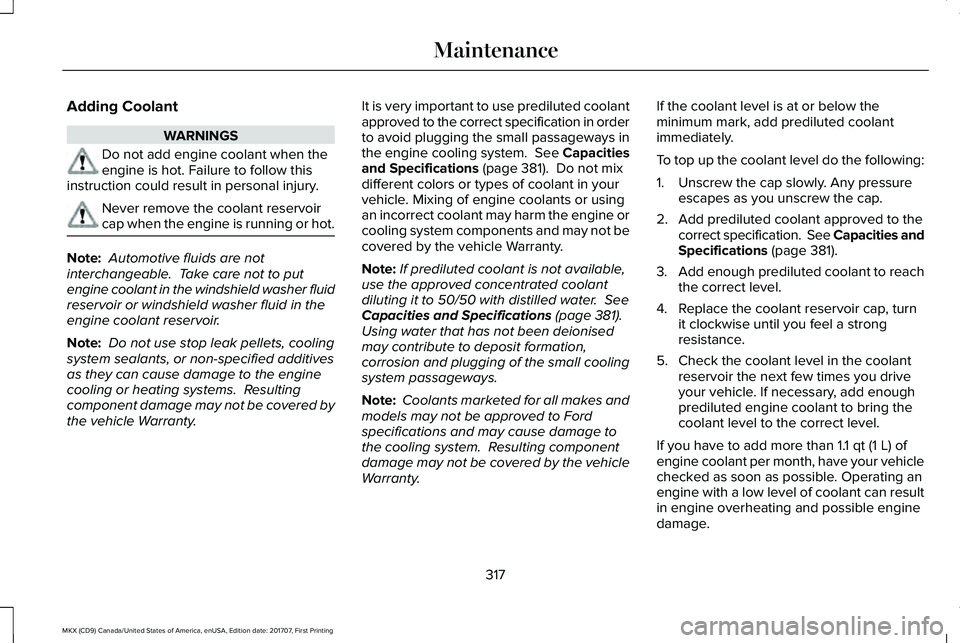
Adding Coolant
WARNINGS
Do not add engine coolant when theengine is hot. Failure to follow thisinstruction could result in personal injury.
Never remove the coolant reservoircap when the engine is running or hot.
Note: Automotive fluids are notinterchangeable. Take care not to putengine coolant in the windshield washer fluidreservoir or windshield washer fluid in theengine coolant reservoir.
Note: Do not use stop leak pellets, coolingsystem sealants, or non-specified additivesas they can cause damage to the enginecooling or heating systems. Resultingcomponent damage may not be covered bythe vehicle Warranty.
It is very important to use prediluted coolantapproved to the correct specification in orderto avoid plugging the small passageways inthe engine cooling system. See Capacitiesand Specifications (page 381). Do not mixdifferent colors or types of coolant in yourvehicle. Mixing of engine coolants or usingan incorrect coolant may harm the engine orcooling system components and may not becovered by the vehicle Warranty.
Note:If prediluted coolant is not available,use the approved concentrated coolantdiluting it to 50/50 with distilled water. SeeCapacities and Specifications (page 381).Using water that has not been deionisedmay contribute to deposit formation,corrosion and plugging of the small coolingsystem passageways.
Note: Coolants marketed for all makes andmodels may not be approved to Fordspecifications and may cause damage tothe cooling system. Resulting componentdamage may not be covered by the vehicleWarranty.
If the coolant level is at or below theminimum mark, add prediluted coolantimmediately.
To top up the coolant level do the following:
1. Unscrew the cap slowly. Any pressureescapes as you unscrew the cap.
2. Add prediluted coolant approved to thecorrect specification. See Capacities andSpecifications (page 381).
3.Add enough prediluted coolant to reachthe correct level.
4. Replace the coolant reservoir cap, turnit clockwise until you feel a strongresistance.
5. Check the coolant level in the coolantreservoir the next few times you driveyour vehicle. If necessary, add enoughprediluted engine coolant to bring thecoolant level to the correct level.
If you have to add more than 1.1 qt (1 L) ofengine coolant per month, have your vehiclechecked as soon as possible. Operating anengine with a low level of coolant can resultin engine overheating and possible enginedamage.
317
MKX (CD9) Canada/United States of America, enUSA, Edition date: 201707, First Printing
Maintenance
Page 360 of 603
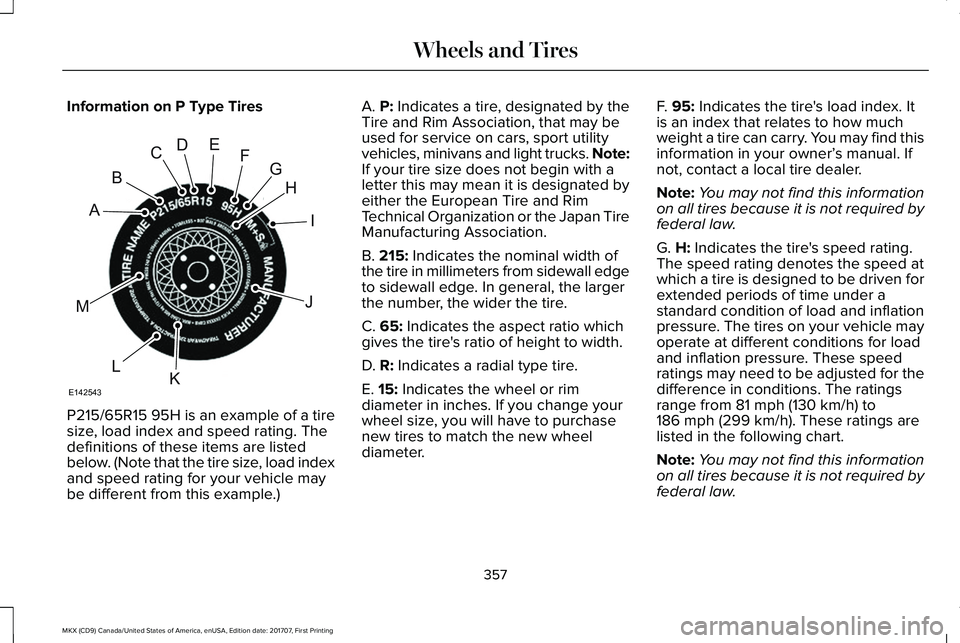
Information on P Type Tires
P215/65R15 95H is an example of a tiresize, load index and speed rating. Thedefinitions of these items are listedbelow. (Note that the tire size, load indexand speed rating for your vehicle maybe different from this example.)
A. P: Indicates a tire, designated by theTire and Rim Association, that may beused for service on cars, sport utilityvehicles, minivans and light trucks. Note:If your tire size does not begin with aletter this may mean it is designated byeither the European Tire and RimTechnical Organization or the Japan TireManufacturing Association.
B. 215: Indicates the nominal width ofthe tire in millimeters from sidewall edgeto sidewall edge. In general, the largerthe number, the wider the tire.
C. 65: Indicates the aspect ratio whichgives the tire's ratio of height to width.
D. R: Indicates a radial type tire.
E. 15: Indicates the wheel or rim
diameter in inches. If you change yourwheel size, you will have to purchasenew tires to match the new wheeldiameter.
F. 95: Indicates the tire's load index. Itis an index that relates to how muchweight a tire can carry. You may find thisinformation in your owner’s manual. Ifnot, contact a local tire dealer.
Note:You may not find this informationon all tires because it is not required byfederal law.
G. H: Indicates the tire's speed rating.The speed rating denotes the speed atwhich a tire is designed to be driven forextended periods of time under astandard condition of load and inflationpressure. The tires on your vehicle mayoperate at different conditions for loadand inflation pressure. These speedratings may need to be adjusted for thedifference in conditions. The ratings
range from 81 mph (130 km/h) to186 mph (299 km/h). These ratings arelisted in the following chart.
Note:You may not find this informationon all tires because it is not required byfederal law.
357
MKX (CD9) Canada/United States of America, enUSA, Edition date: 201707, First Printing
Wheels and TiresH
I
J
KL
M
A
B
CDEFG
E142543
Page 378 of 603
When driving with the full-size dissimilarspare wheel and tire assembly, do not:
•Exceed 70 mph (113 km/h).
•Use more than one dissimilar sparewheel and tire assembly at a time.
•Use commercial car washing equipment.
•Use snow chains on the end of thevehicle with the dissimilar spare wheeland tire assembly.
The usage of a full-size dissimilar sparewheel and tire assembly can lead toimpairment of the following:
•Handling, stability and brakingperformance.
•Comfort and noise.
•Ground clearance and parking at curbs.
•Winter weather driving capability.
•Wet weather driving capability.
•All-wheel driving capability.
When driving with the full-size dissimilarspare wheel and tire assembly additionalcaution should be given to:
•Towing a trailer.
•Driving vehicles equipped with a camperbody.
•Driving vehicles with a load on the cargorack.
Drive cautiously when using a full-sizedissimilar spare wheel and tire assembly andseek service as soon as possible.
Tire Change Procedure
WARNINGS
When one of the front wheels is off theground, the transmission alone will notprevent the vehicle from moving or slippingoff the jack, even if the transmission is in park(P).
WARNINGS
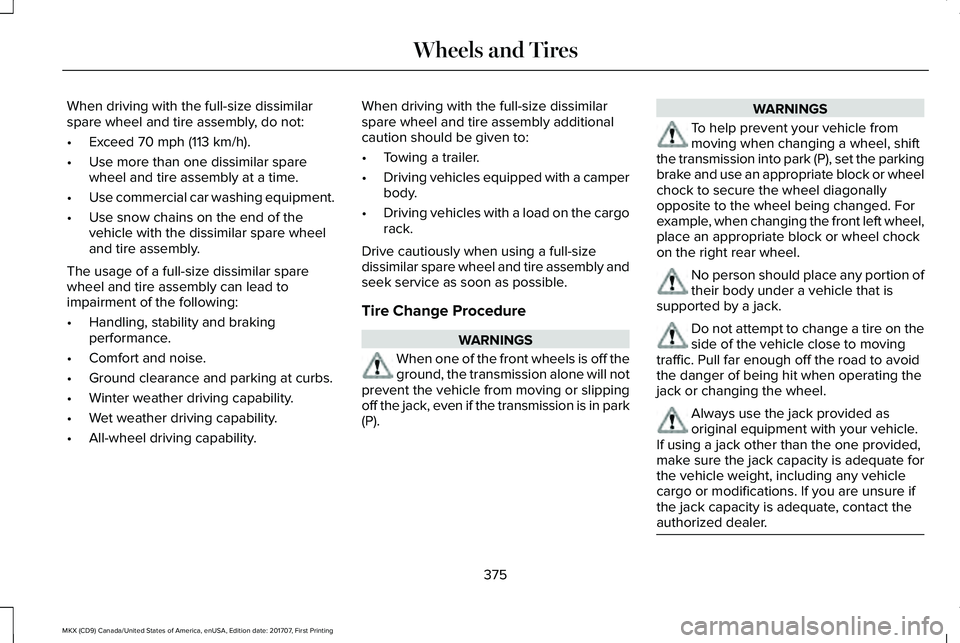
To help prevent your vehicle frommoving when changing a wheel, shiftthe transmission into park (P), set the parkingbrake and use an appropriate block or wheelchock to secure the wheel diagonallyopposite to the wheel being changed. Forexample, when changing the front left wheel,place an appropriate block or wheel chockon the right rear wheel.
No person should place any portion oftheir body under a vehicle that issupported by a jack.
Do not attempt to change a tire on theside of the vehicle close to movingtraffic. Pull far enough off the road to avoidthe danger of being hit when operating thejack or changing the wheel.
Always use the jack provided asoriginal equipment with your vehicle.If using a jack other than the one provided,make sure the jack capacity is adequate forthe vehicle weight, including any vehiclecargo or modifications. If you are unsure ifthe jack capacity is adequate, contact theauthorized dealer.
375
MKX (CD9) Canada/United States of America, enUSA, Edition date: 201707, First Printing
Wheels and Tires
Page 409 of 603
GENERAL INFORMATION
WARNING
Driving while distracted can result inloss of vehicle control, crash and injury.We strongly recommend that you useextreme caution when using any device thatmay take your focus off the road. Yourprimary responsibility is the safe operationof your vehicle. We recommend against theuse of any hand-held device while drivingand encourage the use of voice-operatedsystems when possible. Make sure you areaware of all applicable local laws that mayaffect the use of electronic devices whiledriving.
Getting to Know Your System
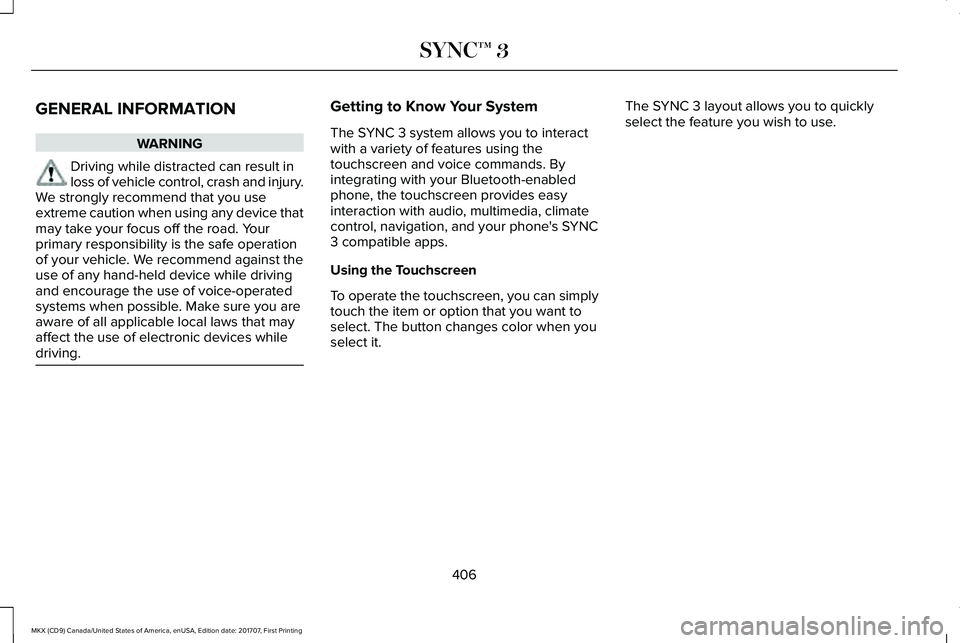
The SYNC 3 system allows you to interactwith a variety of features using thetouchscreen and voice commands. Byintegrating with your Bluetooth-enabledphone, the touchscreen provides easyinteraction with audio, multimedia, climatecontrol, navigation, and your phone's SYNC3 compatible apps.
Using the Touchscreen
To operate the touchscreen, you can simplytouch the item or option that you want toselect. The button changes color when youselect it.
The SYNC 3 layout allows you to quicklyselect the feature you wish to use.
406
MKX (CD9) Canada/United States of America, enUSA, Edition date: 201707, First Printing
SYNC™ 3
Page 425 of 603
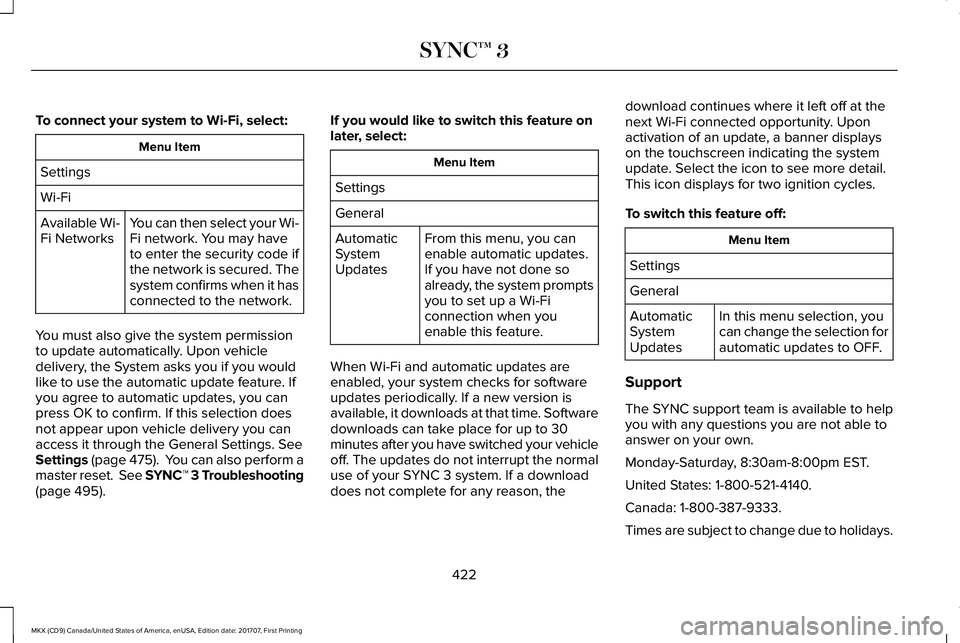
To connect your system to Wi-Fi, select:
Menu Item
Settings
Wi-Fi
You can then select your Wi-Fi network. You may haveto enter the security code ifthe network is secured. Thesystem confirms when it hasconnected to the network.
Available Wi-Fi Networks
You must also give the system permissionto update automatically. Upon vehicledelivery, the System asks you if you wouldlike to use the automatic update feature. Ifyou agree to automatic updates, you canpress OK to confirm. If this selection doesnot appear upon vehicle delivery you canaccess it through the General Settings. SeeSettings (page 475). You can also perform amaster reset. See SYNC™ 3 Troubleshooting(page 495).
If you would like to switch this feature onlater, select:
Menu Item
Settings
General
From this menu, you canenable automatic updates.If you have not done soalready, the system promptsyou to set up a Wi-Ficonnection when youenable this feature.
AutomaticSystemUpdates
When Wi-Fi and automatic updates areenabled, your system checks for softwareupdates periodically. If a new version isavailable, it downloads at that time. Softwaredownloads can take place for up to 30minutes after you have switched your vehicleoff. The updates do not interrupt the normaluse of your SYNC 3 system. If a downloaddoes not complete for any reason, the
download continues where it left off at thenext Wi-Fi connected opportunity. Uponactivation of an update, a banner displayson the touchscreen indicating the systemupdate. Select the icon to see more detail.This icon displays for two ignition cycles.
To switch this feature off:
Menu Item
Settings
General
In this menu selection, youcan change the selection forautomatic updates to OFF.
AutomaticSystemUpdates
Support
The SYNC support team is available to helpyou with any questions you are not able toanswer on your own.
Monday-Saturday, 8:30am-8:00pm EST.
United States: 1-800-521-4140.
Canada: 1-800-387-9333.
Times are subject to change due to holidays.
422
MKX (CD9) Canada/United States of America, enUSA, Edition date: 201707, First Printing
SYNC™ 3
Page 442 of 603
SiriusXM satellite radio is asubscription-based satellite radio service thatbroadcasts a variety of music, sports, news,weather, traffic and entertainmentprogramming. Your factory-installed SiriusXMsatellite radio system includes hardware anda limited subscription term that begins onthe date of sale or lease of your vehicle. Seean authorized dealer for availability.
For more information on extendedsubscription terms (a service fee is required),the online media player and a list of SiriusXMsatellite radio channels, and other features,please visit www.siriusxm.com in the UnitedStates, www.siriusxm.ca in Canada, or callSiriusXM at 1-888-539-7474.
Note:SiriusXM reserves the unrestrictedright to change, rearrange, add or deleteprogramming. This includes canceling,moving or adding particular channels, andits prices, at any time, with or without noticeto you. Ford Motor Company shall not beresponsible for any such programmingchanges.
Note:This receiver includes the eCosreal-time operating system. eCos ispublished under the eCos License.
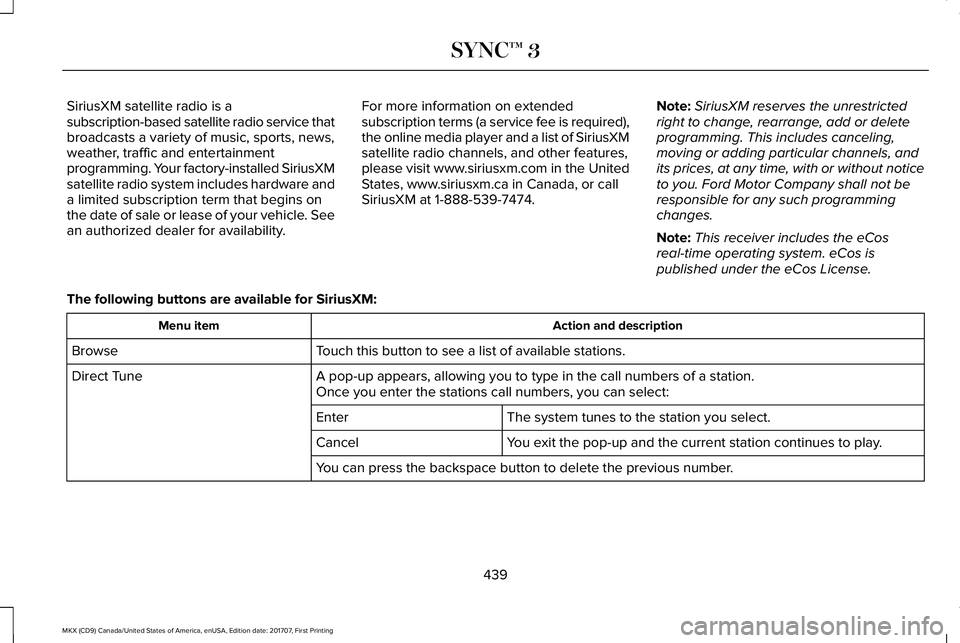
The following buttons are available for SiriusXM:
Action and descriptionMenu item
Touch this button to see a list of available stations.Browse
A pop-up appears, allowing you to type in the call numbers of a station.Direct TuneOnce you enter the stations call numbers, you can select:
The system tunes to the station you select.Enter
You exit the pop-up and the current station continues to play.Cancel
You can press the backspace button to delete the previous number.
439
MKX (CD9) Canada/United States of America, enUSA, Edition date: 201707, First Printing
SYNC™ 3