lights LINCOLN MKX 2018 Owner's Manual
[x] Cancel search | Manufacturer: LINCOLN, Model Year: 2018, Model line: MKX, Model: LINCOLN MKX 2018Pages: 603, PDF Size: 4.94 MB
Page 275 of 603
There are also some things you may want toavoid doing because they reduce your fueleconomy:
•Avoid sudden or hard accelerations.
•Avoid revving the engine before turningoff the car.
•Avoid long idle periods.
•Do not warm up your vehicle on coldmornings.
•Reduce the use of air conditioning andheat.
•Avoid using speed control in hilly terrain.
•Do not rest your foot on the brake pedalwhile driving.
•Avoid carrying unnecessary weight.
•Avoid adding particular accessories toyour vehicle (e.g. bug deflectors,rollbars/light bars, running boards, skiracks).
•Avoid driving with the wheels out ofalignment.
DRIVING THROUGH WATER
WARNING
Do not drive through flowing or deepwater as you may lose control of yourvehicle.
Note:Driving through standing water cancause vehicle damage.
Note:Engine damage can occur if waterenters the air filter.
Before driving through standing water, checkthe depth. Never drive through water that ishigher than the bottom of the front rockerarea of your vehicle.
When driving through standing water, drivevery slowly and do not stop your vehicle. Your brake performance and traction maybe limited. After driving through water andas soon as it is safe to do so:
•Lightly press the brake pedal to dry thebrakes and to check that they work.
•Check that the horn works.
•Check that the exterior lights work.
•Turn the steering wheel to check that thesteering power assist works.
272
MKX (CD9) Canada/United States of America, enUSA, Edition date: 201707, First Printing
Driving HintsE259345
Page 349 of 603
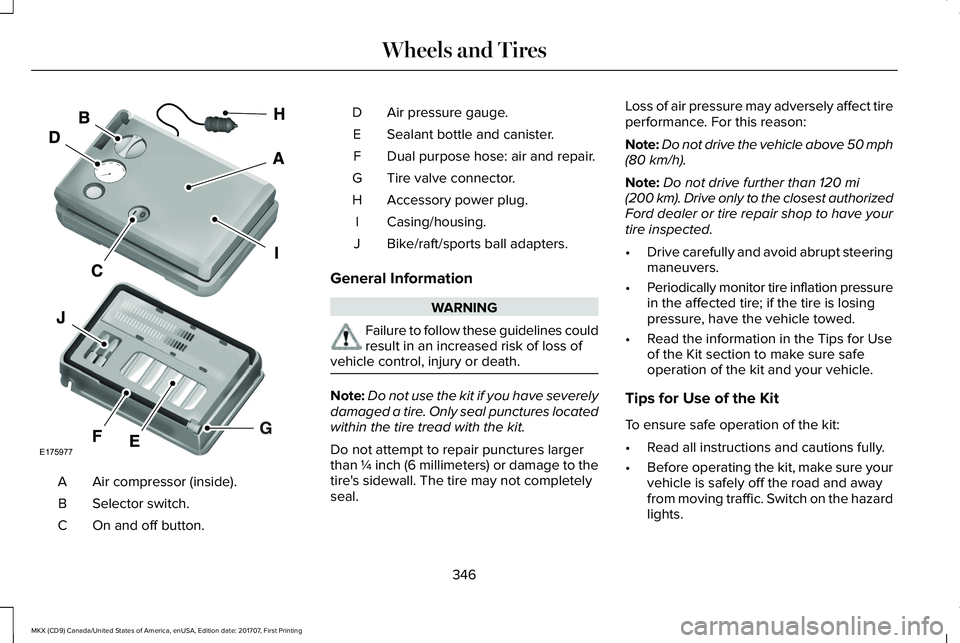
Air compressor (inside).A
Selector switch.B
On and off button.C
Air pressure gauge.D
Sealant bottle and canister.E
Dual purpose hose: air and repair.F
Tire valve connector.G
Accessory power plug.H
Casing/housing.I
Bike/raft/sports ball adapters.J
General Information
WARNING
Failure to follow these guidelines couldresult in an increased risk of loss ofvehicle control, injury or death.
Note:Do not use the kit if you have severelydamaged a tire. Only seal punctures locatedwithin the tire tread with the kit.
Do not attempt to repair punctures largerthan ¼ inch (6 millimeters) or damage to thetire's sidewall. The tire may not completelyseal.
Loss of air pressure may adversely affect tireperformance. For this reason:
Note:Do not drive the vehicle above 50 mph(80 km/h).
Note:Do not drive further than 120 mi(200 km). Drive only to the closest authorizedFord dealer or tire repair shop to have yourtire inspected.
•Drive carefully and avoid abrupt steeringmaneuvers.
•Periodically monitor tire inflation pressurein the affected tire; if the tire is losingpressure, have the vehicle towed.
•Read the information in the Tips for Useof the Kit section to make sure safeoperation of the kit and your vehicle.
Tips for Use of the Kit
To ensure safe operation of the kit:
•Read all instructions and cautions fully.
•Before operating the kit, make sure yourvehicle is safely off the road and awayfrom moving traffic. Switch on the hazardlights.
346
MKX (CD9) Canada/United States of America, enUSA, Edition date: 201707, First Printing
Wheels and TiresE175977
Page 351 of 603
WARNINGS
Do not run the engine when operatingthe air compressor unless the vehicleis outdoors or in a well-ventilated area.
Preparation: Park the vehicle in a safe, leveland secure area, away from moving traffic.
Switch the hazard lights on. Apply theparking brake and switch the engine off.Inspect the flat tire for visible damage.
Sealant compound contains latex. Useappropriate precautions to avoid any allergicreactions.
Do not remove any foreign object that haspierced the tire. If a puncture is located inthe tire sidewall, stop and call roadsideassistance.
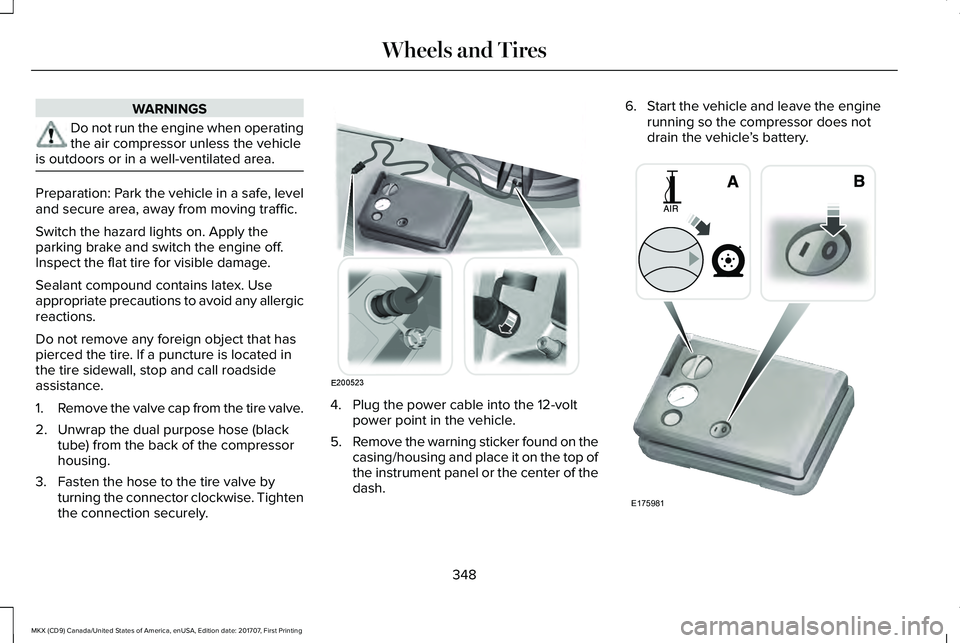
1.Remove the valve cap from the tire valve.
2. Unwrap the dual purpose hose (blacktube) from the back of the compressorhousing.
3. Fasten the hose to the tire valve byturning the connector clockwise. Tightenthe connection securely.
4. Plug the power cable into the 12-voltpower point in the vehicle.
5.Remove the warning sticker found on thecasing/housing and place it on the top ofthe instrument panel or the center of thedash.
6. Start the vehicle and leave the enginerunning so the compressor does notdrain the vehicle’s battery.
348
MKX (CD9) Canada/United States of America, enUSA, Edition date: 201707, First Printing
Wheels and TiresE200523 E175981
Page 454 of 603
Note: This feature only functions when you switch the engine on.
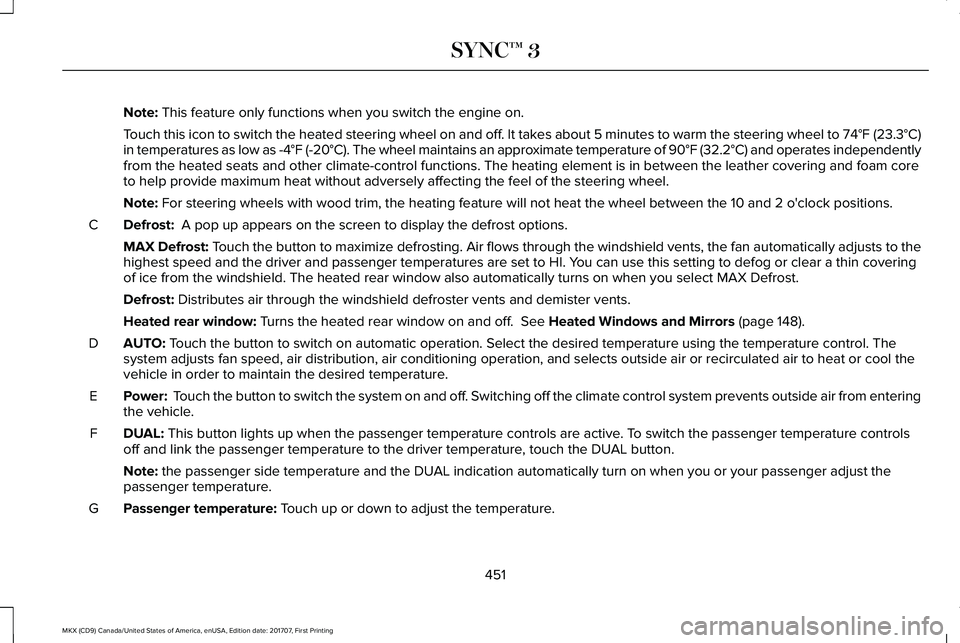
Touch this icon to switch the heated steering wheel on and off. It takes about 5 minutes to warm the steering wheel to 74°F (23.3°C)in temperatures as low as -4°F (-20°C). The wheel maintains an approximate temperature of 90°F (32.2°C) and operates independentlyfrom the heated seats and other climate-control functions. The heating element is in between the leather covering and foam coreto help provide maximum heat without adversely affecting the feel of the steering wheel.
Note: For steering wheels with wood trim, the heating feature will not heat the wheel between the 10 and 2 o'clock positions.
Defrost: A pop up appears on the screen to display the defrost options.C
MAX Defrost: Touch the button to maximize defrosting. Air flows through the windshield vents, the fan automatically adjusts to thehighest speed and the driver and passenger temperatures are set to HI. You can use this setting to defog or clear a thin coveringof ice from the windshield. The heated rear window also automatically turns on when you select MAX Defrost.
Defrost: Distributes air through the windshield defroster vents and demister vents.
Heated rear window: Turns the heated rear window on and off. See Heated Windows and Mirrors (page 148).
AUTO: Touch the button to switch on automatic operation. Select the desired temperature using the temperature control. Thesystem adjusts fan speed, air distribution, air conditioning operation, and selects outside air or recirculated air to heat or cool thevehicle in order to maintain the desired temperature.
D
Power: Touch the button to switch the system on and off. Switching off the climate control system prevents outside air from enteringthe vehicle.E
DUAL: This button lights up when the passenger temperature controls are active. To switch the passenger temperature controlsoff and link the passenger temperature to the driver temperature, touch the DUAL button.F
Note: the passenger side temperature and the DUAL indication automatically turn on when you or your passenger adjust thepassenger temperature.
Passenger temperature: Touch up or down to adjust the temperature.G
451
MKX (CD9) Canada/United States of America, enUSA, Edition date: 201707, First Printing
SYNC™ 3
Page 465 of 603
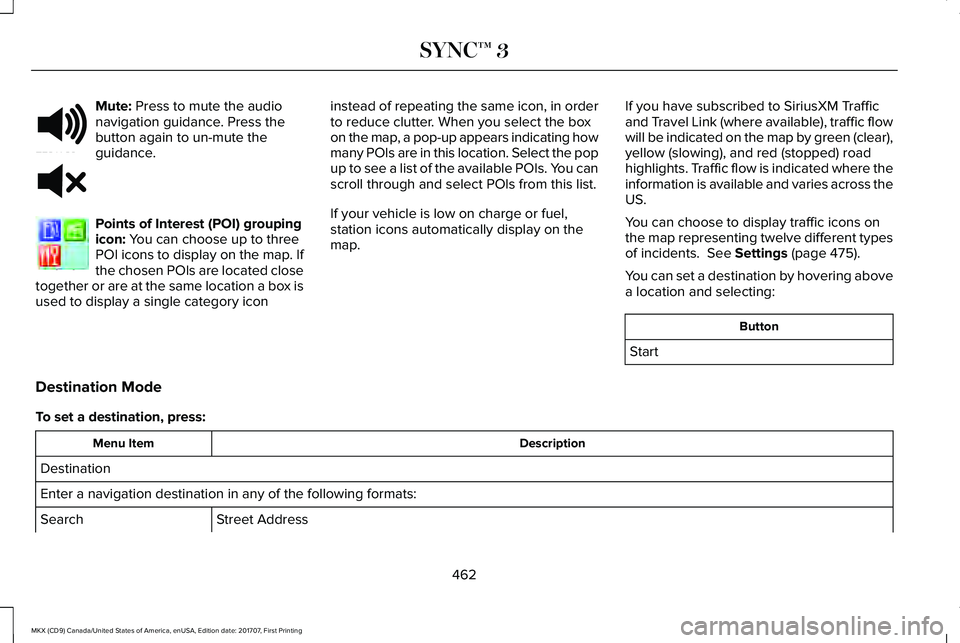
Mute: Press to mute the audionavigation guidance. Press thebutton again to un-mute theguidance.
Points of Interest (POI) groupingicon: You can choose up to threePOI icons to display on the map. Ifthe chosen POIs are located closetogether or are at the same location a box isused to display a single category icon
instead of repeating the same icon, in orderto reduce clutter. When you select the boxon the map, a pop-up appears indicating howmany POIs are in this location. Select the popup to see a list of the available POIs. You canscroll through and select POIs from this list.
If your vehicle is low on charge or fuel,station icons automatically display on themap.
If you have subscribed to SiriusXM Trafficand Travel Link (where available), traffic flowwill be indicated on the map by green (clear),yellow (slowing), and red (stopped) roadhighlights. Traffic flow is indicated where theinformation is available and varies across theUS.
You can choose to display traffic icons onthe map representing twelve different typesof incidents. See Settings (page 475).
You can set a destination by hovering abovea location and selecting:
Button
Start
Destination Mode
To set a destination, press:
DescriptionMenu Item
Destination
Enter a navigation destination in any of the following formats:
Street AddressSearch
462
MKX (CD9) Canada/United States of America, enUSA, Edition date: 201707, First Printing
SYNC™ 3E251780 E251779 E207754
Page 522 of 603
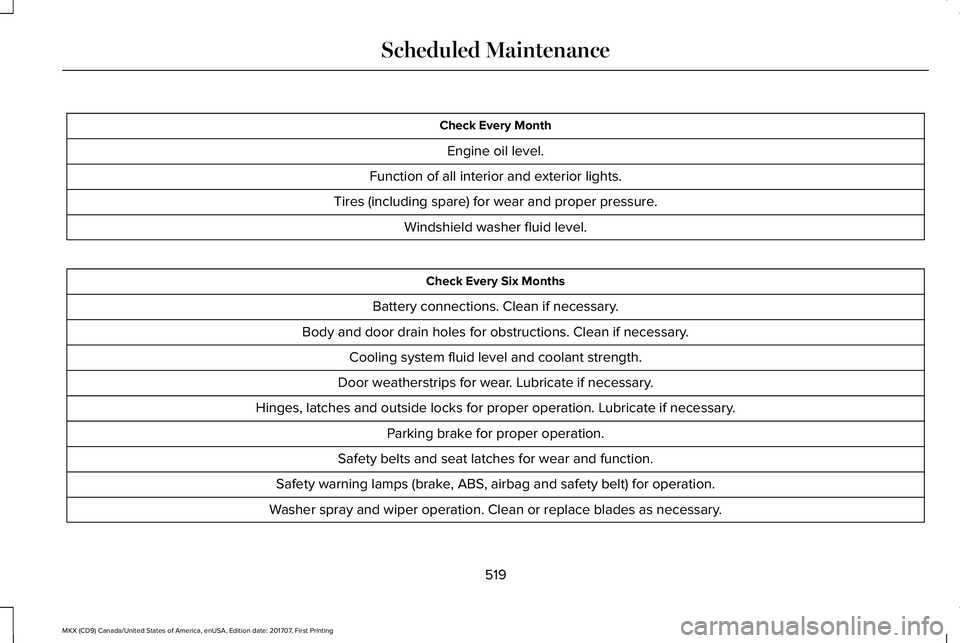
Check Every Month
Engine oil level.
Function of all interior and exterior lights.
Tires (including spare) for wear and proper pressure.
Windshield washer fluid level.
Check Every Six Months
Battery connections. Clean if necessary.
Body and door drain holes for obstructions. Clean if necessary.
Cooling system fluid level and coolant strength.
Door weatherstrips for wear. Lubricate if necessary.
Hinges, latches and outside locks for proper operation. Lubricate if necessary.
Parking brake for proper operation.
Safety belts and seat latches for wear and function.
Safety warning lamps (brake, ABS, airbag and safety belt) for operation.
Washer spray and wiper operation. Clean or replace blades as necessary.
519
MKX (CD9) Canada/United States of America, enUSA, Edition date: 201707, First Printing
Scheduled Maintenance
Page 594 of 603
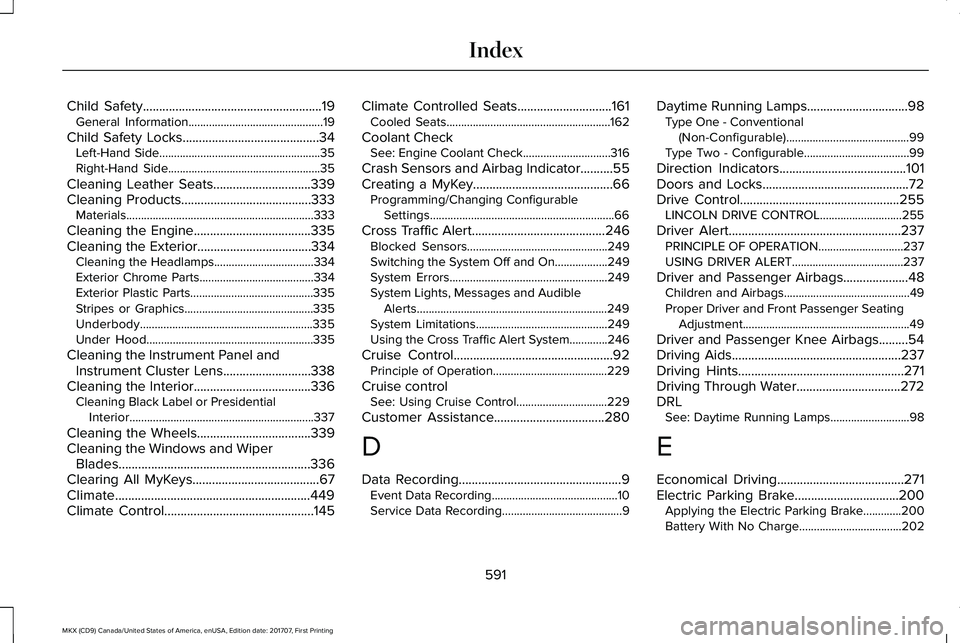
Child Safety.......................................................19General Information..............................................19
Child Safety Locks..........................................34Left-Hand Side.......................................................35Right-Hand Side....................................................35
Cleaning Leather Seats..............................339Cleaning Products........................................333Materials................................................................333
Cleaning the Engine....................................335Cleaning the Exterior...................................334Cleaning the Headlamps..................................334Exterior Chrome Parts.......................................334Exterior Plastic Parts..........................................335Stripes or Graphics............................................335Underbody...........................................................335Under Hood.........................................................335
Cleaning the Instrument Panel andInstrument Cluster Lens...........................338Cleaning the Interior....................................336Cleaning Black Label or PresidentialInterior...............................................................337
Cleaning the Wheels...................................339Cleaning the Windows and WiperBlades...........................................................336Clearing All MyKeys.......................................67Climate............................................................449Climate Control..............................................145
Climate Controlled Seats.............................161Cooled Seats........................................................162
Coolant CheckSee: Engine Coolant Check..............................316
Crash Sensors and Airbag Indicator..........55Creating a MyKey...........................................66Programming/Changing ConfigurableSettings...............................................................66
Cross Traffic Alert.........................................246Blocked Sensors................................................249Switching the System Off and On..................249System Errors......................................................249System Lights, Messages and AudibleAlerts.................................................................249System Limitations.............................................249Using the Cross Traffic Alert System.............246
Cruise Control.................................................92Principle of Operation.......................................229
Cruise controlSee: Using Cruise Control...............................229
Customer Assistance..................................280
D
Data Recording..................................................9Event Data Recording...........................................10Service Data Recording.........................................9
Daytime Running Lamps...............................98Type One - Conventional(Non-Configurable)..........................................99Type Two - Configurable....................................99
Direction Indicators.......................................101Doors and Locks.............................................72Drive Control.................................................255LINCOLN DRIVE CONTROL............................255
Driver Alert.....................................................237PRINCIPLE OF OPERATION.............................237USING DRIVER ALERT......................................237
Driver and Passenger Airbags....................48Children and Airbags...........................................49Proper Driver and Front Passenger SeatingAdjustment.........................................................49
Driver and Passenger Knee Airbags.........54Driving Aids....................................................237Driving Hints...................................................271Driving Through Water................................272DRLSee: Daytime Running Lamps...........................98
E
Economical Driving.......................................271Electric Parking Brake................................200Applying the Electric Parking Brake.............200Battery With No Charge...................................202
591
MKX (CD9) Canada/United States of America, enUSA, Edition date: 201707, First Printing
Index
Page 602 of 603
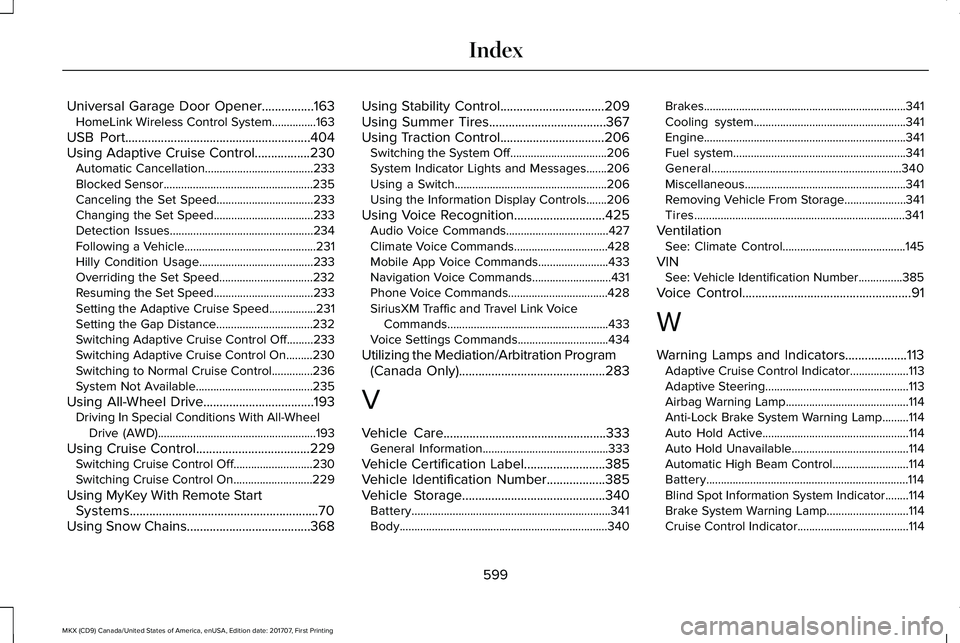
Universal Garage Door Opener................163HomeLink Wireless Control System...............163
USB Port.........................................................404Using Adaptive Cruise Control.................230Automatic Cancellation.....................................233Blocked Sensor...................................................235Canceling the Set Speed.................................233Changing the Set Speed..................................233Detection Issues.................................................234Following a Vehicle.............................................231Hilly Condition Usage.......................................233Overriding the Set Speed................................232Resuming the Set Speed..................................233Setting the Adaptive Cruise Speed................231Setting the Gap Distance.................................232Switching Adaptive Cruise Control Off.........233Switching Adaptive Cruise Control On.........230Switching to Normal Cruise Control..............236System Not Available........................................235
Using All-Wheel Drive..................................193Driving In Special Conditions With All-WheelDrive (AWD)......................................................193
Using Cruise Control...................................229Switching Cruise Control Off...........................230Switching Cruise Control On...........................229
Using MyKey With Remote StartSystems..........................................................70Using Snow Chains......................................368
Using Stability Control................................209Using Summer Tires....................................367Using Traction Control................................206Switching the System Off.................................206System Indicator Lights and Messages.......206Using a Switch....................................................206Using the Information Display Controls.......206
Using Voice Recognition............................425Audio Voice Commands...................................427Climate Voice Commands................................428Mobile App Voice Commands........................433Navigation Voice Commands...........................431Phone Voice Commands..................................428SiriusXM Traffic and Travel Link VoiceCommands.......................................................433Voice Settings Commands...............................434
Utilizing the Mediation/Arbitration Program(Canada Only).............................................283
V
Vehicle Care..................................................333General Information...........................................333
Vehicle Certification Label.........................385Vehicle Identification Number..................385Vehicle Storage............................................340Battery....................................................................341Body.......................................................................340
Brakes.....................................................................341Cooling system....................................................341Engine.....................................................................341Fuel system...........................................................341General.................................................................340Miscellaneous.......................................................341Removing Vehicle From Storage.....................341Tires........................................................................341
VentilationSee: Climate Control..........................................145
VINSee: Vehicle Identification Number...............385
Voice Control....................................................91
W
Warning Lamps and Indicators...................113Adaptive Cruise Control Indicator....................113Adaptive Steering.................................................113Airbag Warning Lamp..........................................114Anti-Lock Brake System Warning Lamp.........114Auto Hold Active..................................................114Auto Hold Unavailable........................................114Automatic High Beam Control..........................114Battery.....................................................................114Blind Spot Information System Indicator........114Brake System Warning Lamp............................114Cruise Control Indicator......................................114
599
MKX (CD9) Canada/United States of America, enUSA, Edition date: 201707, First Printing
Index