seats LINCOLN MKX 2018 Owner's Manual
[x] Cancel search | Manufacturer: LINCOLN, Model Year: 2018, Model line: MKX, Model: LINCOLN MKX 2018Pages: 603, PDF Size: 4.94 MB
Page 84 of 603
2. Pull the liftgate upward.
With the Remote Control
Press the button twice within threeseconds, and then pull on theoutside handle.
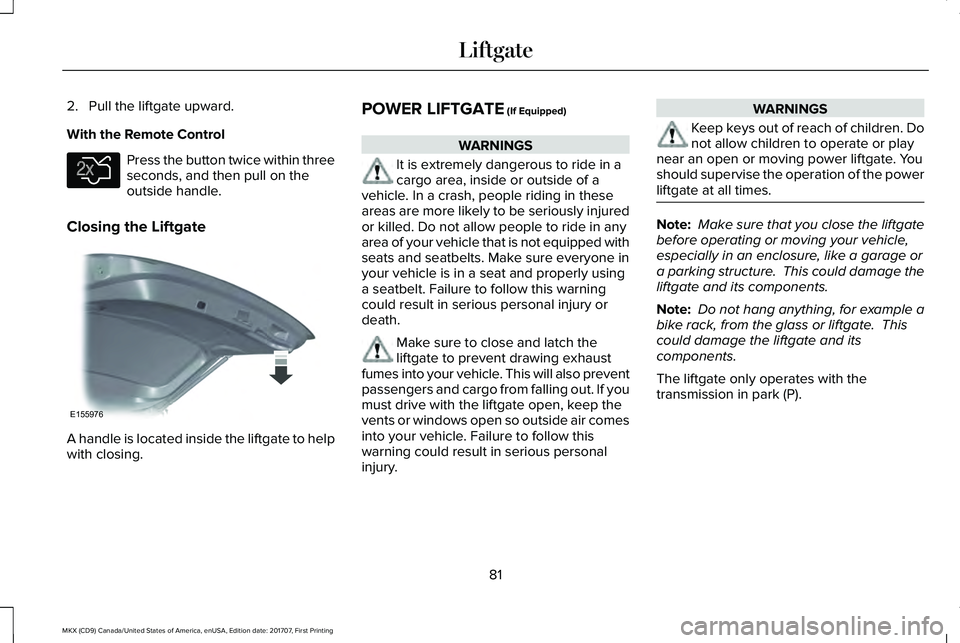
Closing the Liftgate
A handle is located inside the liftgate to helpwith closing.
POWER LIFTGATE (If Equipped)
WARNINGS
It is extremely dangerous to ride in acargo area, inside or outside of avehicle. In a crash, people riding in theseareas are more likely to be seriously injuredor killed. Do not allow people to ride in anyarea of your vehicle that is not equipped withseats and seatbelts. Make sure everyone inyour vehicle is in a seat and properly usinga seatbelt. Failure to follow this warningcould result in serious personal injury ordeath.
Make sure to close and latch theliftgate to prevent drawing exhaustfumes into your vehicle. This will also preventpassengers and cargo from falling out. If youmust drive with the liftgate open, keep thevents or windows open so outside air comesinto your vehicle. Failure to follow thiswarning could result in serious personalinjury.
WARNINGS
Keep keys out of reach of children. Donot allow children to operate or playnear an open or moving power liftgate. Youshould supervise the operation of the powerliftgate at all times.
Note: Make sure that you close the liftgatebefore operating or moving your vehicle,especially in an enclosure, like a garage ora parking structure. This could damage theliftgate and its components.
Note: Do not hang anything, for example abike rack, from the glass or liftgate. Thiscould damage the liftgate and itscomponents.
The liftgate only operates with thetransmission in park (P).
81
MKX (CD9) Canada/United States of America, enUSA, Edition date: 201707, First Printing
LiftgateE138630 E155976
Page 126 of 603
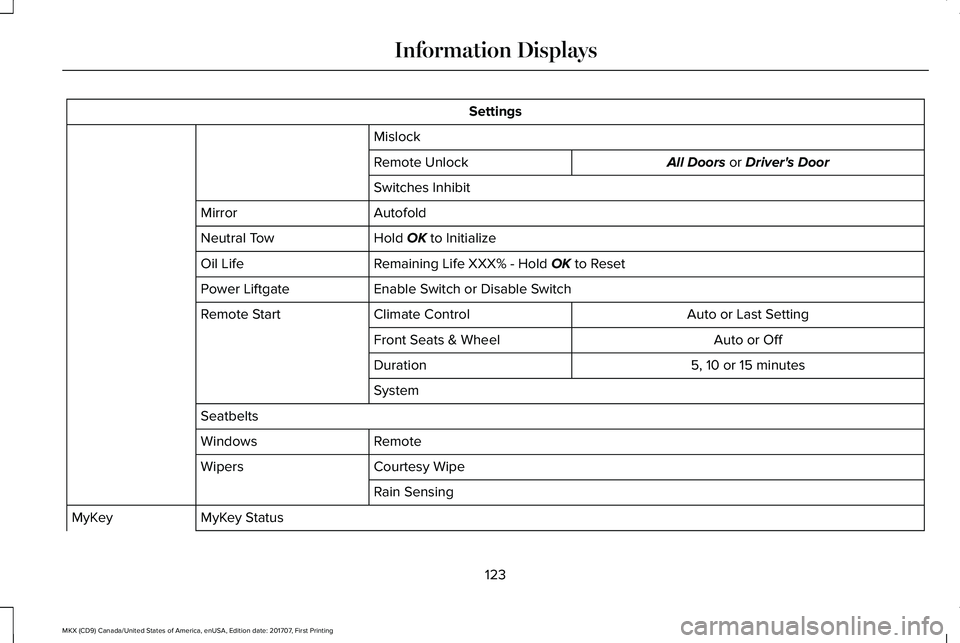
Settings
Mislock
All Doors or Driver's DoorRemote Unlock
Switches Inhibit
AutofoldMirror
Hold OK to InitializeNeutral Tow
Remaining Life XXX% - Hold OK to ResetOil Life
Enable Switch or Disable SwitchPower Liftgate
Auto or Last SettingClimate ControlRemote Start
Auto or OffFront Seats & Wheel
5, 10 or 15 minutesDuration
System
Seatbelts
RemoteWindows
Courtesy WipeWipers
Rain Sensing
MyKey StatusMyKey
123
MKX (CD9) Canada/United States of America, enUSA, Edition date: 201707, First Printing
Information Displays
Page 143 of 603
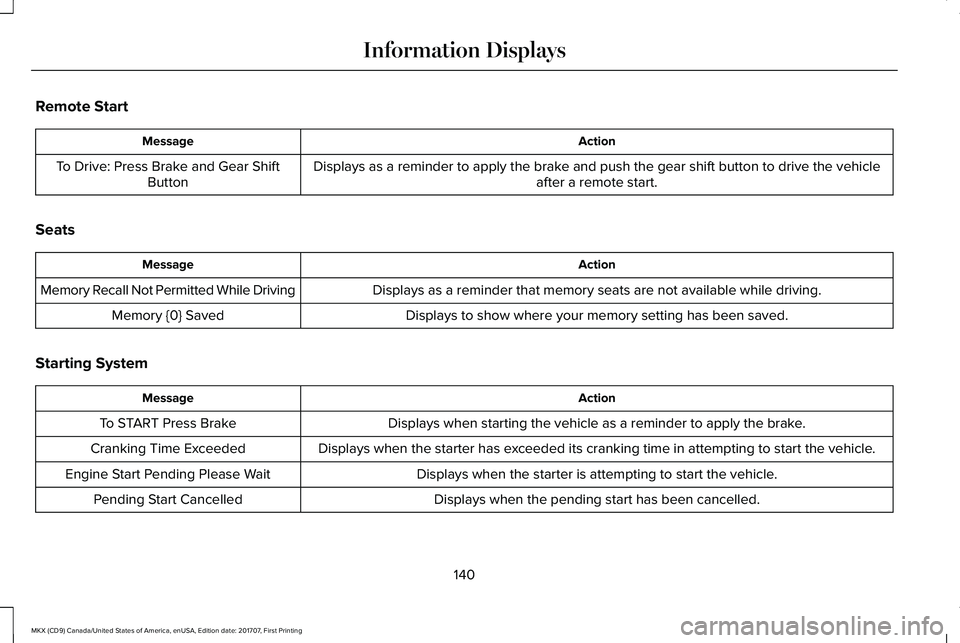
Remote Start
ActionMessage
Displays as a reminder to apply the brake and push the gear shift button to drive the vehicleafter a remote start.To Drive: Press Brake and Gear ShiftButton
Seats
ActionMessage
Displays as a reminder that memory seats are not available while driving.Memory Recall Not Permitted While Driving
Displays to show where your memory setting has been saved.Memory {0} Saved
Starting System
ActionMessage
Displays when starting the vehicle as a reminder to apply the brake.To START Press Brake
Displays when the starter has exceeded its cranking time in attempting to start the vehicle.Cranking Time Exceeded
Displays when the starter is attempting to start the vehicle.Engine Start Pending Please Wait
Displays when the pending start has been cancelled.Pending Start Cancelled
140
MKX (CD9) Canada/United States of America, enUSA, Edition date: 201707, First Printing
Information Displays
Page 149 of 603
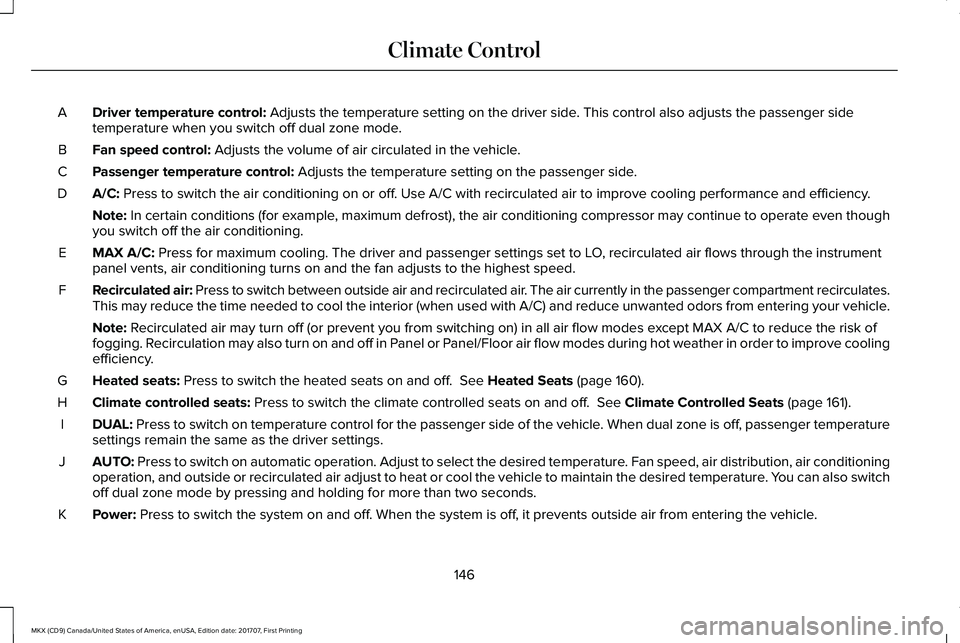
Driver temperature control: Adjusts the temperature setting on the driver side. This control also adjusts the passenger sidetemperature when you switch off dual zone mode.A
Fan speed control: Adjusts the volume of air circulated in the vehicle.B
Passenger temperature control: Adjusts the temperature setting on the passenger side.C
A/C: Press to switch the air conditioning on or off. Use A/C with recirculated air to improve cooling performance and efficiency.D
Note: In certain conditions (for example, maximum defrost), the air conditioning compressor may continue to operate even thoughyou switch off the air conditioning.
MAX A/C: Press for maximum cooling. The driver and passenger settings set to LO, recirculated air flows through the instrumentpanel vents, air conditioning turns on and the fan adjusts to the highest speed.E
Recirculated air: Press to switch between outside air and recirculated air. The air currently in the passenger compartment recirculates.This may reduce the time needed to cool the interior (when used with A/C) and reduce unwanted odors from entering your vehicle.F
Note: Recirculated air may turn off (or prevent you from switching on) in all air flow modes except MAX A/C to reduce the risk offogging. Recirculation may also turn on and off in Panel or Panel/Floor air flow modes during hot weather in order to improve coolingefficiency.
Heated seats: Press to switch the heated seats on and off. See Heated Seats (page 160).G
Climate controlled seats: Press to switch the climate controlled seats on and off. See Climate Controlled Seats (page 161).H
DUAL: Press to switch on temperature control for the passenger side of the vehicle. When dual zone is off, passenger temperaturesettings remain the same as the driver settings.I
AUTO: Press to switch on automatic operation. Adjust to select the desired temperature. Fan speed, air distribution, air conditioningoperation, and outside or recirculated air adjust to heat or cool the vehicle to maintain the desired temperature. You can also switchoff dual zone mode by pressing and holding for more than two seconds.
J
Power: Press to switch the system on and off. When the system is off, it prevents outside air from entering the vehicle.K
146
MKX (CD9) Canada/United States of America, enUSA, Edition date: 201707, First Printing
Climate Control
Page 150 of 603
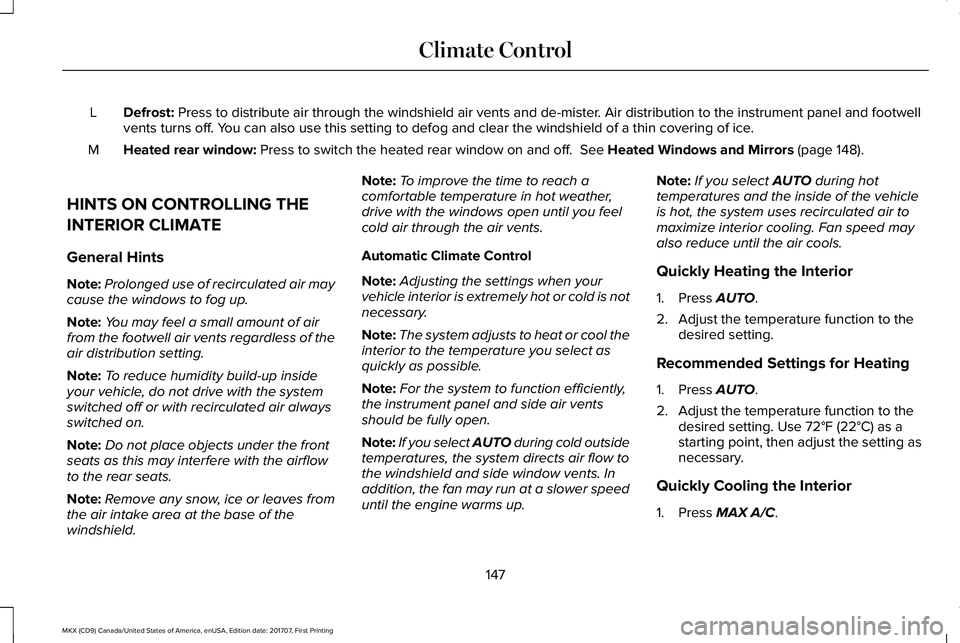
Defrost: Press to distribute air through the windshield air vents and de-mister. Air distribution to the instrument panel and footwellvents turns off. You can also use this setting to defog and clear the windshield of a thin covering of ice.L
Heated rear window: Press to switch the heated rear window on and off. See Heated Windows and Mirrors (page 148).M
HINTS ON CONTROLLING THE
INTERIOR CLIMATE
General Hints
Note:Prolonged use of recirculated air maycause the windows to fog up.
Note:You may feel a small amount of airfrom the footwell air vents regardless of theair distribution setting.
Note:To reduce humidity build-up insideyour vehicle, do not drive with the systemswitched off or with recirculated air alwaysswitched on.
Note:Do not place objects under the frontseats as this may interfere with the airflowto the rear seats.
Note:Remove any snow, ice or leaves fromthe air intake area at the base of thewindshield.
Note:To improve the time to reach acomfortable temperature in hot weather,drive with the windows open until you feelcold air through the air vents.
Automatic Climate Control
Note:Adjusting the settings when yourvehicle interior is extremely hot or cold is notnecessary.
Note:The system adjusts to heat or cool theinterior to the temperature you select asquickly as possible.
Note:For the system to function efficiently,the instrument panel and side air ventsshould be fully open.
Note:If you select AUTO during cold outsidetemperatures, the system directs air flow tothe windshield and side window vents. Inaddition, the fan may run at a slower speeduntil the engine warms up.
Note:If you select AUTO during hottemperatures and the inside of the vehicleis hot, the system uses recirculated air tomaximize interior cooling. Fan speed mayalso reduce until the air cools.
Quickly Heating the Interior
1. Press AUTO.
2. Adjust the temperature function to thedesired setting.
Recommended Settings for Heating
1. Press AUTO.
2. Adjust the temperature function to thedesired setting. Use 72°F (22°C) as astarting point, then adjust the setting asnecessary.
Quickly Cooling the Interior
1. Press MAX A/C.
147
MKX (CD9) Canada/United States of America, enUSA, Edition date: 201707, First Printing
Climate Control
Page 152 of 603
For additional cabin air filter information, orto replace the filter, see a qualifiedtechnician.
REMOTE START
The system adjusts the interior temperaturedepending on your chosen settings duringremote start.
You cannot adjust the climate control settingduring remote start operation. When youswitch the ignition on, the climate controlsystem returns to the previous settings. Youcan now make adjustments.
Some features may remain on if they turn onduring remote start:
•Driver heated seat.
•Driver ventilated seat.
•Heated steering wheel.
•Heated mirrors.
•Heated rear window.
•Windshield wiper de-icer.
Note:If the passenger heated or ventilatedseats are on when you switch the vehicleoff, they default to the driver setting whenyou switch the vehicle on.
You can adjust the default remote startsettings using the information displaycontrols. See Information Displays (page118).
Automatic Settings
In hot weather, the system sets to 72°F(22°C). The ventilated seats set to high (ifavailable, and if you select AUTO in theinformation display).
In moderate weather, the system heats orcools (based on pre-selected settings). Therear defroster, heated mirrors and heated orventilated seats do not turn on.
In cold weather, the system sets to 72°F(22°C). The heated seats and heated steeringwheel set to high (if available, and if youselect AUTO in the information display). Therear defroster and heated mirrors turn on.
149
MKX (CD9) Canada/United States of America, enUSA, Edition date: 201707, First Printing
Climate Control
Page 153 of 603
SITTING IN THE CORRECT
POSITION
WARNINGS
Sitting improperly, out of position orwith the seatback reclined too far cantake weight off the seat cushion and affectthe decision of the passenger sensingsystem, resulting in serious injury or deathin the event of a crash. Always sit uprightagainst your seat back, with your feet on thefloor.
Do not recline the seatback as this cancause the occupant to slide under thesafety belt, resulting in serious injury in theevent of a crash.
Do not place objects higher than theseatback to reduce the risk of seriousinjury in the event of a crash or during heavybraking.
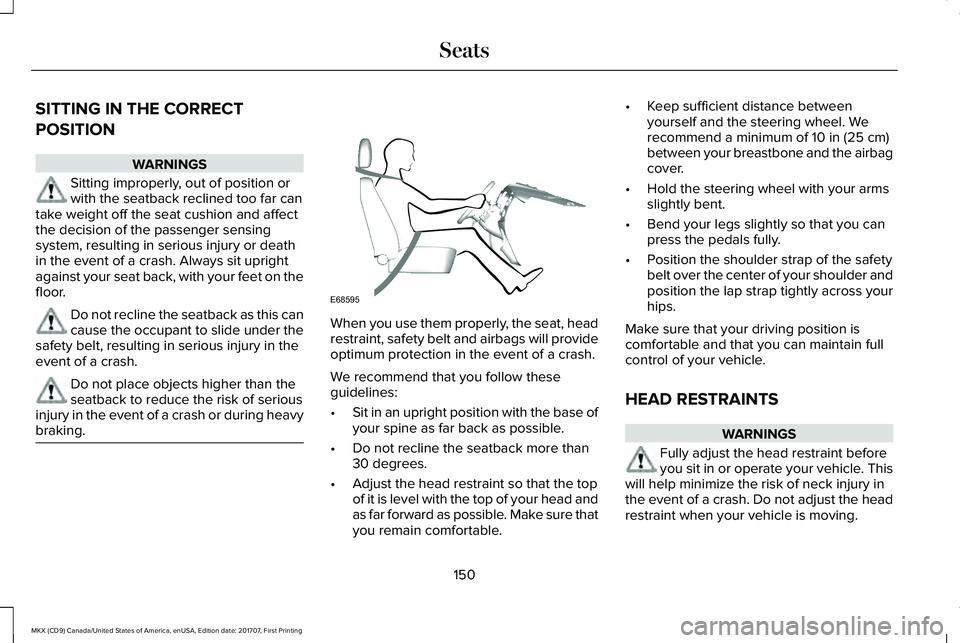
When you use them properly, the seat, headrestraint, safety belt and airbags will provideoptimum protection in the event of a crash.
We recommend that you follow theseguidelines:
•Sit in an upright position with the base ofyour spine as far back as possible.
•Do not recline the seatback more than30 degrees.
•Adjust the head restraint so that the topof it is level with the top of your head andas far forward as possible. Make sure thatyou remain comfortable.
•Keep sufficient distance betweenyourself and the steering wheel. Werecommend a minimum of 10 in (25 cm)between your breastbone and the airbagcover.
•Hold the steering wheel with your armsslightly bent.
•Bend your legs slightly so that you canpress the pedals fully.
•Position the shoulder strap of the safetybelt over the center of your shoulder andposition the lap strap tightly across yourhips.
Make sure that your driving position iscomfortable and that you can maintain fullcontrol of your vehicle.
HEAD RESTRAINTS
WARNINGS
Fully adjust the head restraint beforeyou sit in or operate your vehicle. Thiswill help minimize the risk of neck injury inthe event of a crash. Do not adjust the headrestraint when your vehicle is moving.
150
MKX (CD9) Canada/United States of America, enUSA, Edition date: 201707, First Printing
SeatsE68595
Page 154 of 603
WARNINGS
The head restraint is a safety device.Whenever possible it should beinstalled and properly adjusted when theseat is occupied. Failure to adjust the headrestraint properly could reduce itseffectiveness during certain impacts.
Note:Adjust the seat backrest to an uprightdriving position before adjusting the headrestraint. Adjust the head restraint so thatthe top of it is level with the top of your headand as far forward as possible. Make surethat you remain comfortable. If you areextremely tall, adjust the head restraint toits highest position.
Front Seat Manual Head Restraints (If
Equipped)
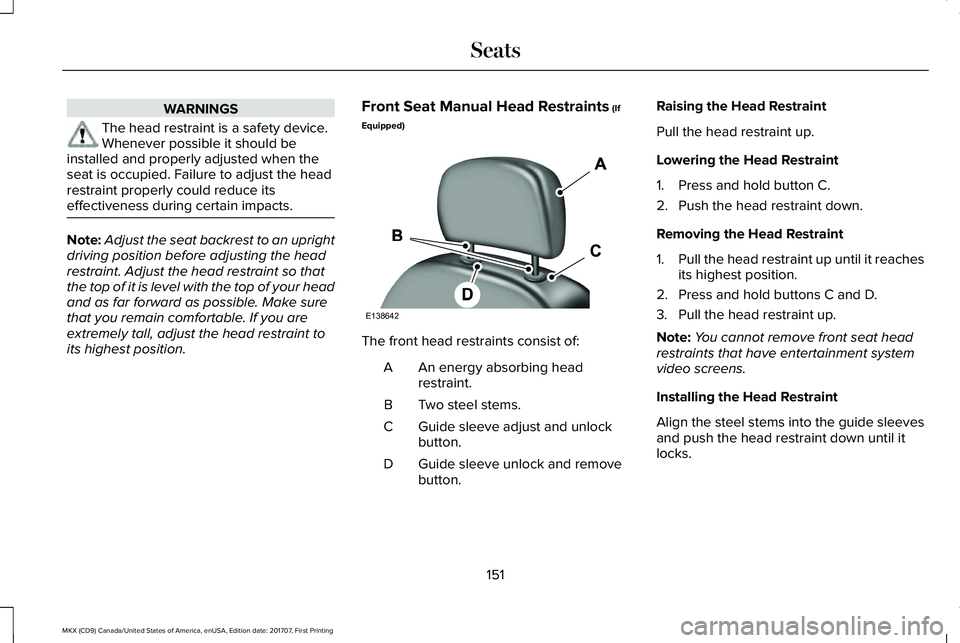
The front head restraints consist of:
An energy absorbing headrestraint.A
Two steel stems.B
Guide sleeve adjust and unlockbutton.C
Guide sleeve unlock and removebutton.D
Raising the Head Restraint
Pull the head restraint up.
Lowering the Head Restraint
1. Press and hold button C.
2. Push the head restraint down.
Removing the Head Restraint
1.Pull the head restraint up until it reachesits highest position.
2. Press and hold buttons C and D.
3. Pull the head restraint up.
Note:You cannot remove front seat headrestraints that have entertainment systemvideo screens.
Installing the Head Restraint
Align the steel stems into the guide sleevesand push the head restraint down until itlocks.
151
MKX (CD9) Canada/United States of America, enUSA, Edition date: 201707, First Printing
SeatsE138642
Page 155 of 603
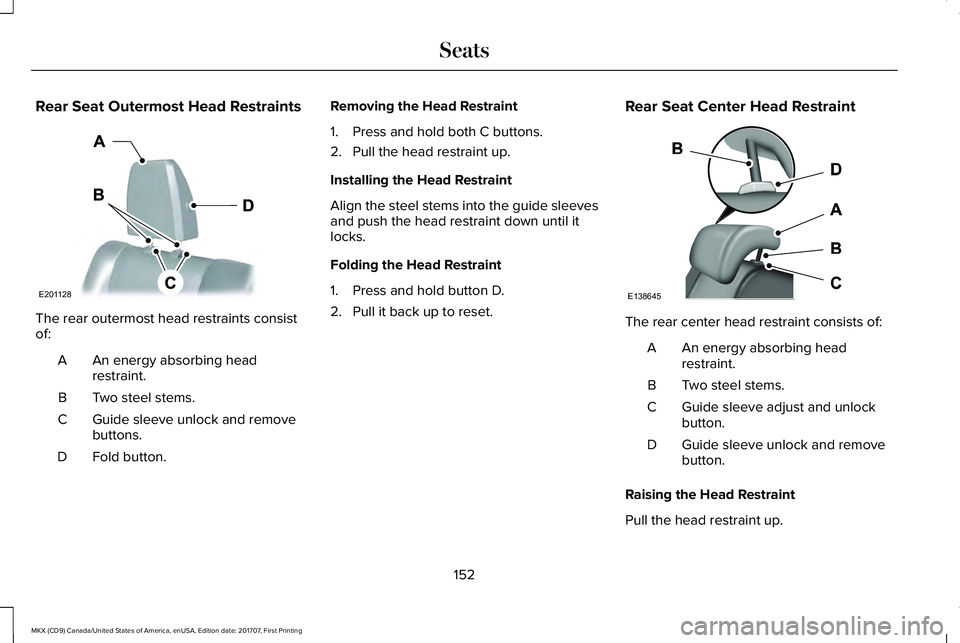
Rear Seat Outermost Head Restraints
The rear outermost head restraints consistof:
An energy absorbing headrestraint.A
Two steel stems.B
Guide sleeve unlock and removebuttons.C
Fold button.D
Removing the Head Restraint
1. Press and hold both C buttons.
2. Pull the head restraint up.
Installing the Head Restraint
Align the steel stems into the guide sleevesand push the head restraint down until itlocks.
Folding the Head Restraint
1. Press and hold button D.
2. Pull it back up to reset.
Rear Seat Center Head Restraint
The rear center head restraint consists of:
An energy absorbing headrestraint.A
Two steel stems.B
Guide sleeve adjust and unlockbutton.C
Guide sleeve unlock and removebutton.D
Raising the Head Restraint
Pull the head restraint up.
152
MKX (CD9) Canada/United States of America, enUSA, Edition date: 201707, First Printing
SeatsE201128 E138645
Page 156 of 603
Lowering the Head Restraint
1. Press and hold button C.
2. Push the head restraint down.
Removing the Head Restraint
1.Pull the head restraint up until it reachesits highest position.
2. Press and hold buttons C and D.
3. Pull the head restraint up.
Installing the Head Restraint
Align the steel stems into the guide sleevesand push the head restraint down until itlocks.
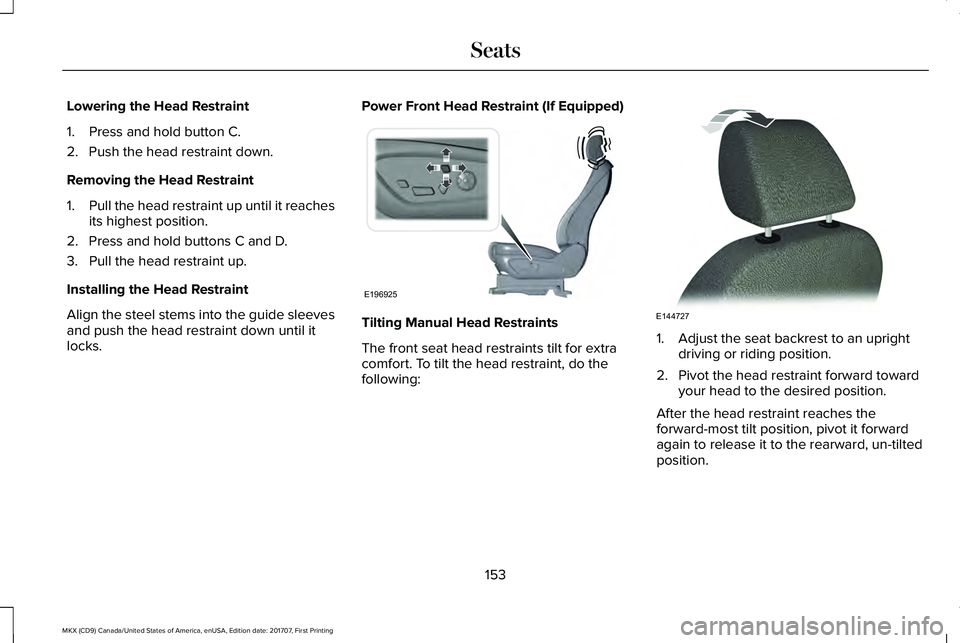
Power Front Head Restraint (If Equipped)
Tilting Manual Head Restraints
The front seat head restraints tilt for extracomfort. To tilt the head restraint, do thefollowing:
1. Adjust the seat backrest to an uprightdriving or riding position.
2. Pivot the head restraint forward towardyour head to the desired position.
After the head restraint reaches theforward-most tilt position, pivot it forwardagain to release it to the rearward, un-tiltedposition.
153
MKX (CD9) Canada/United States of America, enUSA, Edition date: 201707, First Printing
SeatsE196925 E144727