wheel LINCOLN MKX 2018 Owner's Manual
[x] Cancel search | Manufacturer: LINCOLN, Model Year: 2018, Model line: MKX, Model: LINCOLN MKX 2018Pages: 603, PDF Size: 4.94 MB
Page 138 of 603
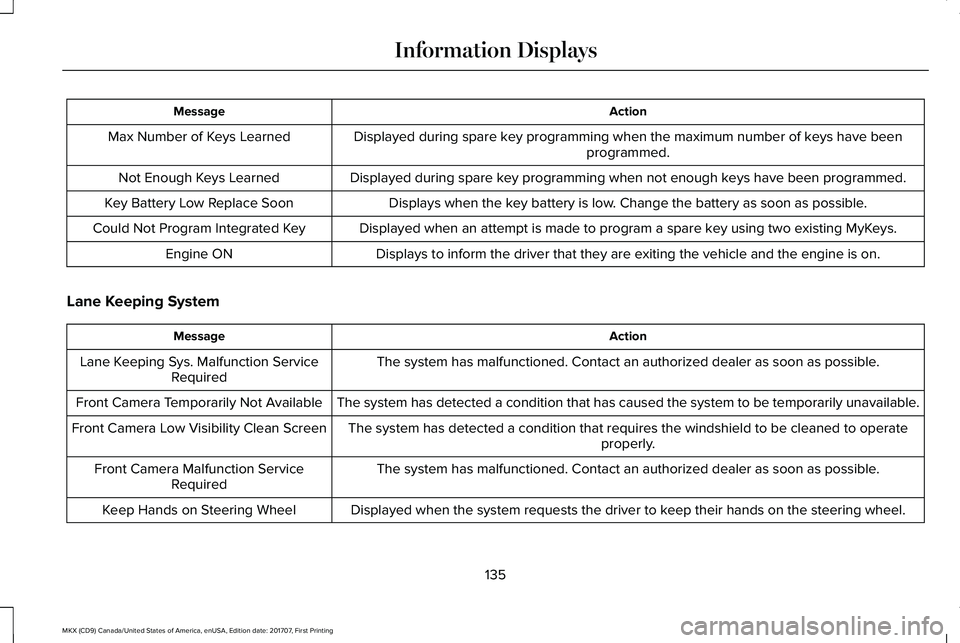
ActionMessage
Displayed during spare key programming when the maximum number of keys have beenprogrammed.Max Number of Keys Learned
Displayed during spare key programming when not enough keys have been programmed.Not Enough Keys Learned
Displays when the key battery is low. Change the battery as soon as possible.Key Battery Low Replace Soon
Displayed when an attempt is made to program a spare key using two existing MyKeys.Could Not Program Integrated Key
Displays to inform the driver that they are exiting the vehicle and the engine is on.Engine ON
Lane Keeping System
ActionMessage
The system has malfunctioned. Contact an authorized dealer as soon as possible.Lane Keeping Sys. Malfunction ServiceRequired
The system has detected a condition that has caused the system to be temporarily unavailable.Front Camera Temporarily Not Available
The system has detected a condition that requires the windshield to be cleaned to operateproperly.Front Camera Low Visibility Clean Screen
The system has malfunctioned. Contact an authorized dealer as soon as possible.Front Camera Malfunction ServiceRequired
Displayed when the system requests the driver to keep their hands on the steering wheel.Keep Hands on Steering Wheel
135
MKX (CD9) Canada/United States of America, enUSA, Edition date: 201707, First Printing
Information Displays
Page 147 of 603
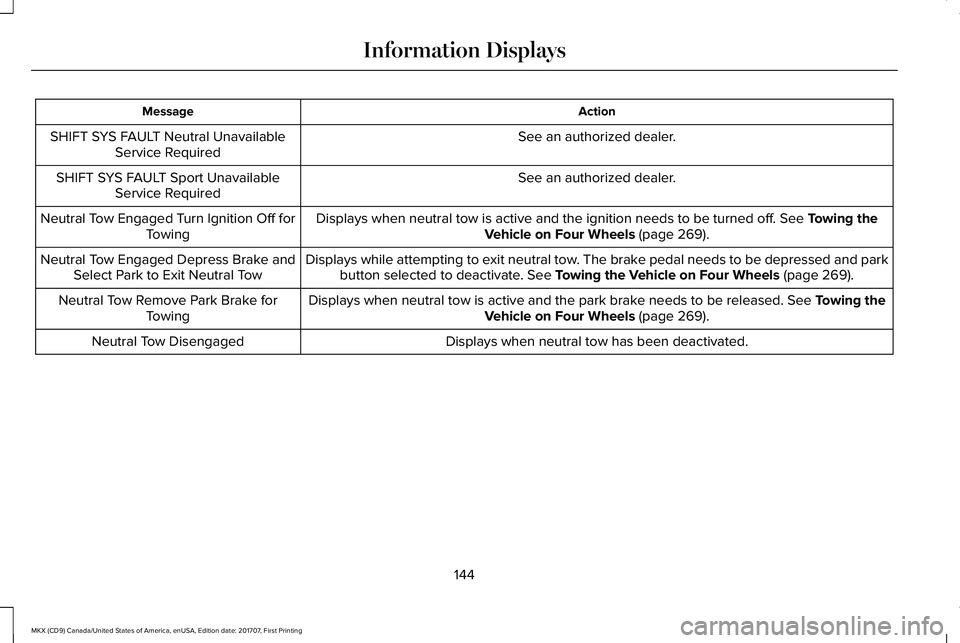
ActionMessage
See an authorized dealer.SHIFT SYS FAULT Neutral UnavailableService Required
See an authorized dealer.SHIFT SYS FAULT Sport UnavailableService Required
Displays when neutral tow is active and the ignition needs to be turned off. See Towing theVehicle on Four Wheels (page 269).Neutral Tow Engaged Turn Ignition Off forTowing
Displays while attempting to exit neutral tow. The brake pedal needs to be depressed and parkbutton selected to deactivate. See Towing the Vehicle on Four Wheels (page 269).Neutral Tow Engaged Depress Brake andSelect Park to Exit Neutral Tow
Displays when neutral tow is active and the park brake needs to be released. See Towing theVehicle on Four Wheels (page 269).Neutral Tow Remove Park Brake forTowing
Displays when neutral tow has been deactivated.Neutral Tow Disengaged
144
MKX (CD9) Canada/United States of America, enUSA, Edition date: 201707, First Printing
Information Displays
Page 152 of 603
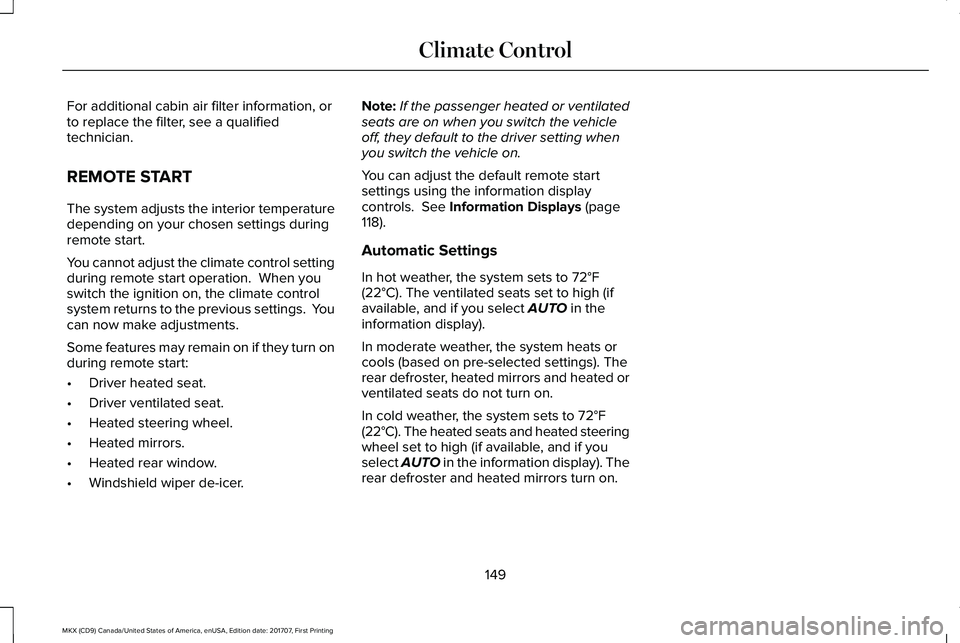
For additional cabin air filter information, orto replace the filter, see a qualifiedtechnician.
REMOTE START
The system adjusts the interior temperaturedepending on your chosen settings duringremote start.
You cannot adjust the climate control settingduring remote start operation. When youswitch the ignition on, the climate controlsystem returns to the previous settings. Youcan now make adjustments.
Some features may remain on if they turn onduring remote start:
•Driver heated seat.
•Driver ventilated seat.
•Heated steering wheel.
•Heated mirrors.
•Heated rear window.
•Windshield wiper de-icer.
Note:If the passenger heated or ventilatedseats are on when you switch the vehicleoff, they default to the driver setting whenyou switch the vehicle on.
You can adjust the default remote startsettings using the information displaycontrols. See Information Displays (page118).
Automatic Settings
In hot weather, the system sets to 72°F(22°C). The ventilated seats set to high (ifavailable, and if you select AUTO in theinformation display).
In moderate weather, the system heats orcools (based on pre-selected settings). Therear defroster, heated mirrors and heated orventilated seats do not turn on.
In cold weather, the system sets to 72°F(22°C). The heated seats and heated steeringwheel set to high (if available, and if youselect AUTO in the information display). Therear defroster and heated mirrors turn on.
149
MKX (CD9) Canada/United States of America, enUSA, Edition date: 201707, First Printing
Climate Control
Page 153 of 603
SITTING IN THE CORRECT
POSITION
WARNINGS
Sitting improperly, out of position orwith the seatback reclined too far cantake weight off the seat cushion and affectthe decision of the passenger sensingsystem, resulting in serious injury or deathin the event of a crash. Always sit uprightagainst your seat back, with your feet on thefloor.
Do not recline the seatback as this cancause the occupant to slide under thesafety belt, resulting in serious injury in theevent of a crash.
Do not place objects higher than theseatback to reduce the risk of seriousinjury in the event of a crash or during heavybraking.
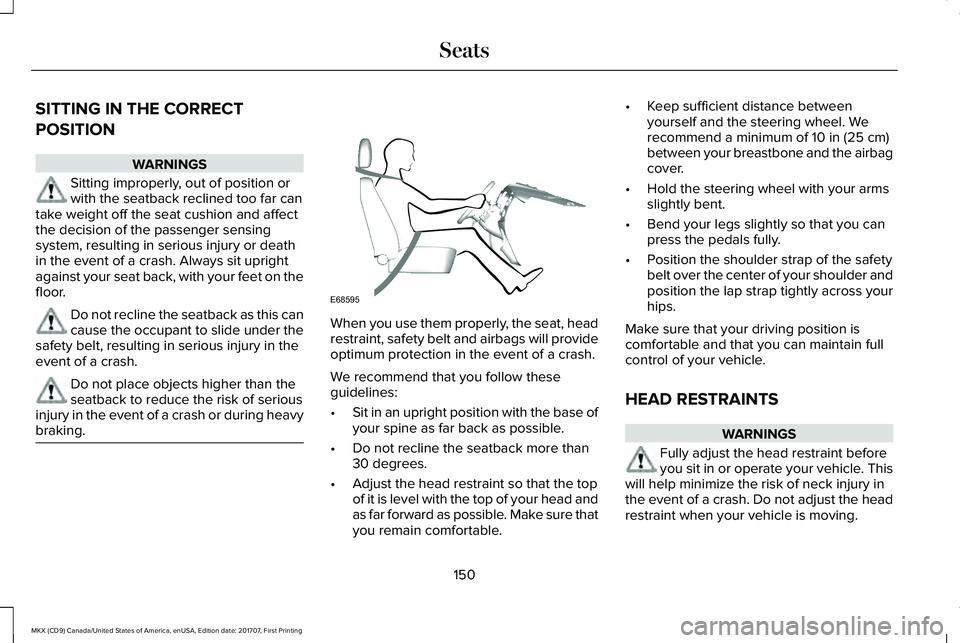
When you use them properly, the seat, headrestraint, safety belt and airbags will provideoptimum protection in the event of a crash.
We recommend that you follow theseguidelines:
•Sit in an upright position with the base ofyour spine as far back as possible.
•Do not recline the seatback more than30 degrees.
•Adjust the head restraint so that the topof it is level with the top of your head andas far forward as possible. Make sure thatyou remain comfortable.
•Keep sufficient distance betweenyourself and the steering wheel. Werecommend a minimum of 10 in (25 cm)between your breastbone and the airbagcover.
•Hold the steering wheel with your armsslightly bent.
•Bend your legs slightly so that you canpress the pedals fully.
•Position the shoulder strap of the safetybelt over the center of your shoulder andposition the lap strap tightly across yourhips.
Make sure that your driving position iscomfortable and that you can maintain fullcontrol of your vehicle.
HEAD RESTRAINTS
WARNINGS
Fully adjust the head restraint beforeyou sit in or operate your vehicle. Thiswill help minimize the risk of neck injury inthe event of a crash. Do not adjust the headrestraint when your vehicle is moving.
150
MKX (CD9) Canada/United States of America, enUSA, Edition date: 201707, First Printing
SeatsE68595
Page 181 of 603
Your vehicle is designed to operate onregular unleaded gasoline with a minimumpump (R+M)/2 octane rating of 87.
Some fuel stations, particularly those in highaltitude areas, offer fuels posted as regularunleaded gasoline with an octane ratingbelow 87. We do not recommend these fuels.
For best overall vehicle and engineperformance, premium fuel with an octanerating of 91 or higher is recommended. Theperformance gained by using premium fuelis most noticeable in hot weather as well asother conditions, for example when towinga trailer. See Towing (page 264).
Do not use any fuel other than thoserecommended because they could lead toengine damage that will not be covered bythe vehicle Warranty.
Note:Use of any fuel other than thoserecommended can impair the emissioncontrol system and cause a loss of vehicleperformance.
Do not use:
•Diesel fuel.
•Fuels containing kerosene or paraffin.
•Fuel containing more than 15% ethanolor E85 fuel.
•Fuels containing methanol.
•Fuels containing metallic-based additives,including manganese-based compounds.
•Fuels containing the octane boosteradditive, methylcyclopentadienylmanganese tricarbonyl (MMT).
•Leaded fuel (using leaded fuel isprohibited by law).
The use of fuels with metallic compoundssuch as methylcyclopentadienyl manganesetricarbonyl (commonly known as MMT), whichis a manganese-based fuel additive, willimpair engine performance and affect theemission control system.
Do not be concerned if the enginesometimes knocks lightly. However, if theengine knocks heavily while using fuel withthe recommended octane rating, contact anauthorized dealer to prevent any enginedamage.
FUEL FILLER FUNNEL LOCATION
The fuel filler funnel is in the spare wheelstorage tray.
RUNNING OUT OF FUEL
Running out of fuel can cause damage notcovered by the vehicle Warranty.
If your vehicle runs out of fuel:
•Add a minimum of 1.3 gal (5 L) of fuel torestart the engine.
•You may need to switch the ignition fromoff to on several times after refueling toallow the fuel system to pump the fuelfrom the tank to the engine. Whenrestarting, cranking time takes a fewseconds longer than normal.
Note:If your vehicle is on a steep slope,more fuel may be required.
178
MKX (CD9) Canada/United States of America, enUSA, Edition date: 201707, First Printing
Fuel and Refueling
Page 192 of 603
3. The gearshift button you select willilluminate and the selected gear willappear in the instrument cluster.
4. Release the brake pedal and yourtransmission will remain in the selectedgear.
Note:If you attempt to leave your vehiclewhile it is in gear, your vehicle willautomatically shift into park (P). Safety beltand door monitors determine your intent andmake the shift for you. During this time, amessage will appear in the informationdisplay screen prompting you to make theshift to park (P).
Note:To put your vehicle in gear with thedoor open, perform steps 1-4. See theAutomatic Return to Park section in thischapter for more information on this feature.
Park (P)
With the transmission in park (P), your vehiclelocks the transmission and prevents thewheels from turning. Always come to acomplete stop before putting your vehicleinto and out of park (P). An audible tonesounds once you select park (P).
When the ignition is turned off, the vehiclewill automatically shift into park (P). If theignition is turned off while the vehicle ismoving, it will first shift into neutral (N) untila slow enough speed is reached. The vehiclewill then shift into park (P) automatically.
Automatic Return to Park
Note:This feature will not operate when yourvehicle is in Stay in Neutral mode or neutraltow.
Your vehicle has a safety feature that willautomatically shift your vehicle into park (P)when any of the following conditions occur:
•You turn the ignition off
•You open the driver's door with yoursafety belt unlatched
•Your safety belt is unlatched while thedriver's door is open
If you turn the ignition off while your vehicleis moving, your vehicle will first shift intoneutral (N) until it slows down enough to shiftinto park (P) automatically.
Note:If you have waited an extended periodof time (2-15 minutes) before starting yourvehicle, unlatching your safety belt will causethis feature to activate, even with the driver'sdoor closed.
Note:This feature may not work properly ifthe door ajar switch is malfunctioning. If yourdoor ajar indicator does not illuminate whenyou open the driver’s door or the indicatorilluminates with the driver’s door closed, seeyour authorized dealer.
Reverse (R)
With the transmission in reverse (R), yourvehicle will move backward. Always cometo a complete stop before shifting into andout of reverse (R).
Neutral (N)
With the transmission in neutral (N), you canstart your vehicle and it is free to roll. Holdthe brake pedal down while in this position.
189
MKX (CD9) Canada/United States of America, enUSA, Edition date: 201707, First Printing
Transmission
Page 193 of 603
Stay in Neutral mode
Stay in Neutral mode allows your vehicle tostay in neutral (N) when you exit the vehicle.Your vehicle must be stationary to enter thismode.
To enter Stay in Neutral mode:
1. Press the neutral (N) button on theinstrument panel.
2. A message will appear in yourinformation display screen prompting youto press the neutral (N) button again toenter Stay in Neutral mode.
3. Press the neutral (N) button again toenter Stay in Neutral mode.
A message will appear in your informationdisplay screen when your vehicle hasentered Stay in Neutral mode.
Note:During this mode the N button willflash continuously and your instrumentcluster will display N as the selected gear.
Exiting Stay in Neutral mode
To disable Stay in Neutral mode selectanother gear. See the Putting the Vehiclein Gear for instructions on how to do this.
Entering a Carwash
Note:Always put your vehicle in Stay inNeutral mode when entering an automaticcar wash. Failure to do this could result invehicle damage not covered by warranty.
Drive (D)
The normal driving position for the best fueleconomy.
Sport (S)
Putting the vehicle in sport (S):
•Provides additional engine braking andextends lower gear operation to enhanceperformance for uphill climbs, hilly terrainor mountainous areas. This will increaseengine RPM during engine braking.
•Provides additional lower gear operationthrough the automatic transmission shiftstrategy.
•Provides gear selection more quickly andat higher engine speeds.
SelectShift Automatic™ Transmission
Your SelectShift Automatic transmissiongives you the ability to change gearsmanually.
Paddle Shifters
With your vehicle in drive (D), the paddleshifters provide temporary manual control.They allow you the ability to shift gearsquickly, without taking your hands off thesteering wheel.
You can achieve extensive manual controlby pressing the sport (S) button.
•Pull the right paddle (+) to upshift.
•Pull the left paddle (–) to downshift.
190
MKX (CD9) Canada/United States of America, enUSA, Edition date: 201707, First Printing
Transmission
Page 194 of 603
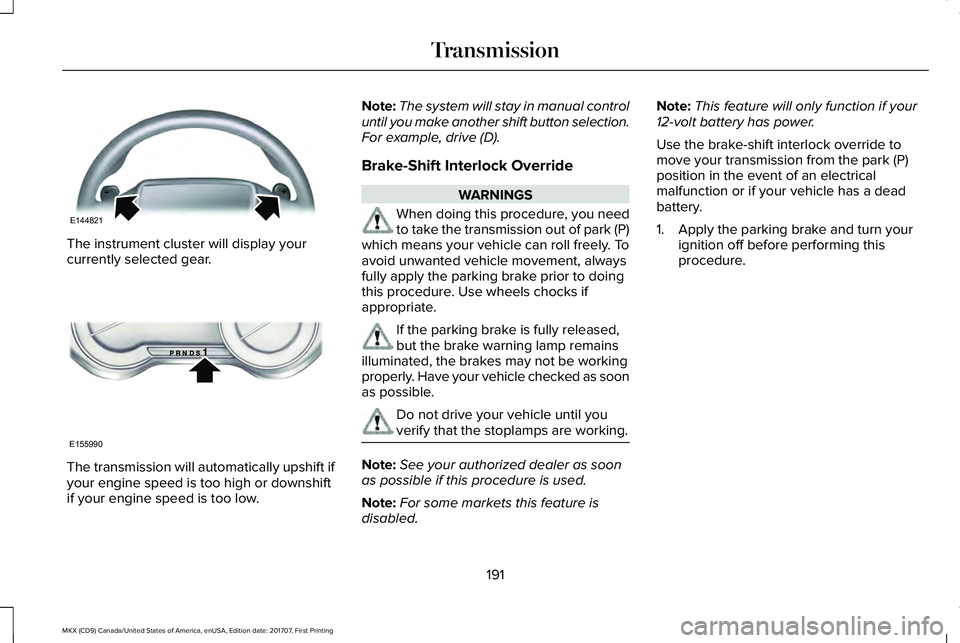
The instrument cluster will display yourcurrently selected gear.
The transmission will automatically upshift ifyour engine speed is too high or downshiftif your engine speed is too low.
Note:The system will stay in manual controluntil you make another shift button selection.For example, drive (D).
Brake-Shift Interlock Override
WARNINGS
When doing this procedure, you needto take the transmission out of park (P)which means your vehicle can roll freely. Toavoid unwanted vehicle movement, alwaysfully apply the parking brake prior to doingthis procedure. Use wheels chocks ifappropriate.
If the parking brake is fully released,but the brake warning lamp remainsilluminated, the brakes may not be workingproperly. Have your vehicle checked as soonas possible.
Do not drive your vehicle until youverify that the stoplamps are working.
Note:See your authorized dealer as soonas possible if this procedure is used.
Note:For some markets this feature isdisabled.
Note:This feature will only function if your12-volt battery has power.
Use the brake-shift interlock override tomove your transmission from the park (P)position in the event of an electricalmalfunction or if your vehicle has a deadbattery.
1. Apply the parking brake and turn yourignition off before performing thisprocedure.
191
MKX (CD9) Canada/United States of America, enUSA, Edition date: 201707, First Printing
TransmissionE144821 E155990
Page 196 of 603
USING ALL-WHEEL DRIVE
All-wheel drive uses all four wheels to powerthe vehicle. This increases traction, enablingyou to drive over terrain and road conditionsthat a conventional two-wheel drive vehiclecannot. The AWD system is active all the timeand requires no input from the operator.
Note:Your AWD vehicle is not intended foroff-road use. The AWD feature gives yourvehicle some limited off-road capabilities inwhich driving surfaces are relatively level,obstruction-free and otherwise similar tonormal on-road driving conditions. Operatingyour vehicle under other than thoseconditions could subject the vehicle toexcessive stress which might result indamage which is not covered under yourwarranty.
Note:A warning message will be displayedin the information display when an AWDsystem fault is present See InformationMessages (page 125). An AWD system faultwill cause the AWD system to default tofront-wheel drive only mode. When thiswarning message is displayed, have yourvehicle serviced at an authorized dealer
Note:A warning message will be displayedin the information display if the AWD systemhas overheated See Information Messages(page 125). This condition may occur if thevehicle was operated in extreme conditionswith excessive wheel slip, such as deepsand. To resume normal AWD function assoon as possible, stop the vehicle in a safelocation and stop the engine for at least 10minutes. After the engine has been restartedand the AWD system has adequately cooled,the warning message will turn off and normalAWD function will return.
Do not use a spare tire of a different sizeother than the tire provided. If the mini-sparetire is installed, the AWD system may disableautomatically and enter front-wheel driveonly mode to protect driveline components.This condition will be indicated by a warningin the information display See InformationMessages (page 125). If there is a warningmessage in the information display fromusing the spare tire, this indicator should turnoff after reinstalling the repaired or replacednormal road tire and cycling the ignition offand on. It is recommended to reinstall the
repaired or replaced road tire as soon aspossible. Major dissimilar tire sizes betweenthe front and rear axles could cause the AWDsystem to stop functioning and default tofront-wheel drive or damage the AWDsystem.
Driving In Special Conditions With All-Wheel Drive (AWD)
AWD vehicles are equipped for driving onsand, snow, mud and rough roads and haveoperating characteristics that are somewhatdifferent from conventional vehicles, both onand off the highway.
Under severe operating conditions, the A/Cmay cycle on and off to protect overheatingof the engine.
Basic operating principles in specialconditions
•Drive slower in strong crosswinds whichcan affect the normal steeringcharacteristics of your vehicle.
•Be extremely careful when driving onpavement made slippery by loose sand,water, gravel, snow or ice.
193
MKX (CD9) Canada/United States of America, enUSA, Edition date: 201707, First Printing
All-Wheel Drive (If Equipped)
Page 197 of 603
If Your Vehicle Goes Off the Edge of thePavement
•If your vehicle goes off the edge of thepavement, slow down, but avoid severebrake application, ease the vehicle backonto the pavement only after reducingyour speed. Do not turn the steeringwheel too sharply while returning to theroad surface.
•It may be safer to stay on the apron orshoulder of the road and slow downgradually before returning to thepavement. You may lose control if youdo not slow down or if you turn thesteering wheel too sharply or abruptly.
•It often may be less risky to strike smallobjects, such as highway reflectors, withminor damage to your vehicle rather thanattempt a sudden return to the pavementwhich could cause the vehicle to slidesideways out of control or rollover.Remember, your safety and the safety ofothers should be your primary concern.
If Your Vehicle Gets Stuck
WARNINGS
Always set the parking brake fully andmake sure the transmission is in P(Park). Turn the ignition to the lock positionor turn the vehicle off using the start/stopbutton and remove the key whenever youleave your vehicle.
If the parking brake is fully released,but the brake warning lamp remainsilluminated, the brakes may not be workingproperly. See your authorized dealer.
Do not spin the wheels at over 35 mph(56 km/h). The tires may fail and injurea passenger or bystander.
Note:Do not rock the vehicle if the engineis not at normal operating temperature ordamage to the transmission may occur.
Note:Do not rock the vehicle for more thana few minutes or damage to the transmissionand tires may occur or the engine mayoverheat.
If your vehicle gets stuck in mud or snow itmay be rocked out by shifting betweenforward and reverse gears, stoppingbetween shifts, in a steady pattern. Presslightly on the accelerator in each gear.
If your vehicle is equipped withAdvanceTrac® with Roll Stability Control™, itmay be beneficial to disengage theAdvanceTrac® with Roll Stability Control™system while attempting to rock the vehicle.
Emergency Maneuvers
•In an unavoidable emergency situationwhere a sudden sharp turn must bemade, remember to avoid "over-driving"your vehicle (i.e., turn the steering wheelonly as rapidly and as far as required toavoid the emergency). Excessive steeringwill result in less vehicle control, notmore. Additionally, smooth variations ofthe accelerator and/or brake pedalpressure should be utilized if changes invehicle speed are called for. Avoid abrupt
194
MKX (CD9) Canada/United States of America, enUSA, Edition date: 201707, First Printing
All-Wheel Drive (If Equipped)