audio LINCOLN MKX 2018 Service Manual
[x] Cancel search | Manufacturer: LINCOLN, Model Year: 2018, Model line: MKX, Model: LINCOLN MKX 2018Pages: 603, PDF Size: 4.94 MB
Page 503 of 603
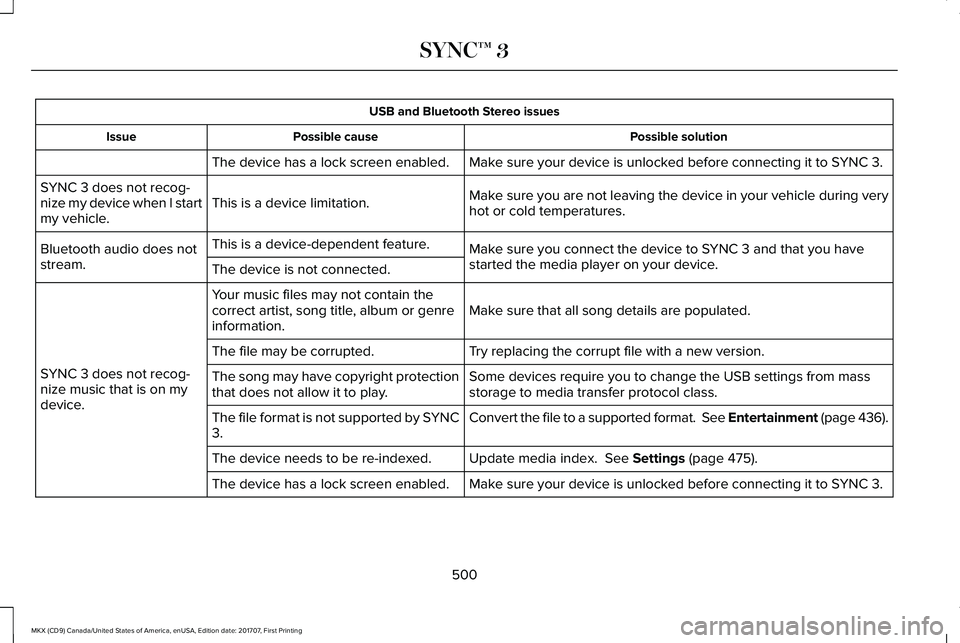
USB and Bluetooth Stereo issues
Possible solutionPossible causeIssue
Make sure your device is unlocked before connecting it to SYNC 3.The device has a lock screen enabled.
Make sure you are not leaving the device in your vehicle during veryhot or cold temperatures.This is a device limitation.SYNC 3 does not recog-nize my device when I startmy vehicle.
Make sure you connect the device to SYNC 3 and that you havestarted the media player on your device.
This is a device-dependent feature.Bluetooth audio does notstream.The device is not connected.
Make sure that all song details are populated.Your music files may not contain thecorrect artist, song title, album or genreinformation.
SYNC 3 does not recog-nize music that is on mydevice.
Try replacing the corrupt file with a new version.The file may be corrupted.
Some devices require you to change the USB settings from massstorage to media transfer protocol class.The song may have copyright protectionthat does not allow it to play.
Convert the file to a supported format. See Entertainment (page 436).The file format is not supported by SYNC3.
Update media index. See Settings (page 475).The device needs to be re-indexed.
Make sure your device is unlocked before connecting it to SYNC 3.The device has a lock screen enabled.
500
MKX (CD9) Canada/United States of America, enUSA, Edition date: 201707, First Printing
SYNC™ 3
Page 510 of 603
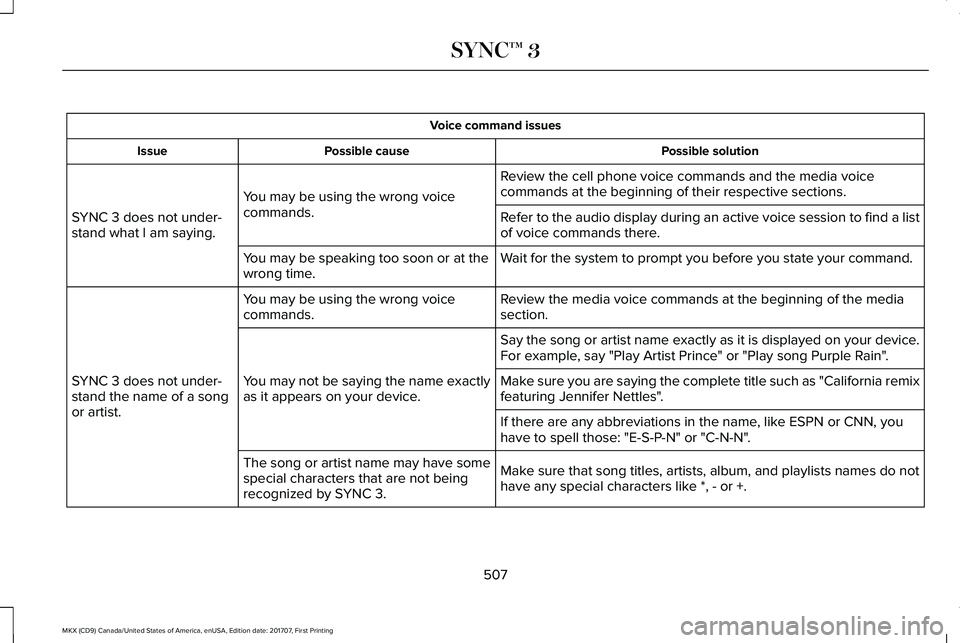
Voice command issues
Possible solutionPossible causeIssue
Review the cell phone voice commands and the media voicecommands at the beginning of their respective sections.You may be using the wrong voicecommands.SYNC 3 does not under-stand what I am saying.Refer to the audio display during an active voice session to find a listof voice commands there.
Wait for the system to prompt you before you state your command.You may be speaking too soon or at thewrong time.
Review the media voice commands at the beginning of the mediasection.You may be using the wrong voicecommands.
SYNC 3 does not under-stand the name of a songor artist.
Say the song or artist name exactly as it is displayed on your device.For example, say "Play Artist Prince" or "Play song Purple Rain".
You may not be saying the name exactlyas it appears on your device.Make sure you are saying the complete title such as "California remixfeaturing Jennifer Nettles".
If there are any abbreviations in the name, like ESPN or CNN, youhave to spell those: "E-S-P-N" or "C-N-N".
Make sure that song titles, artists, album, and playlists names do nothave any special characters like *, - or +.
The song or artist name may have somespecial characters that are not beingrecognized by SYNC 3.
507
MKX (CD9) Canada/United States of America, enUSA, Edition date: 201707, First Printing
SYNC™ 3
Page 513 of 603
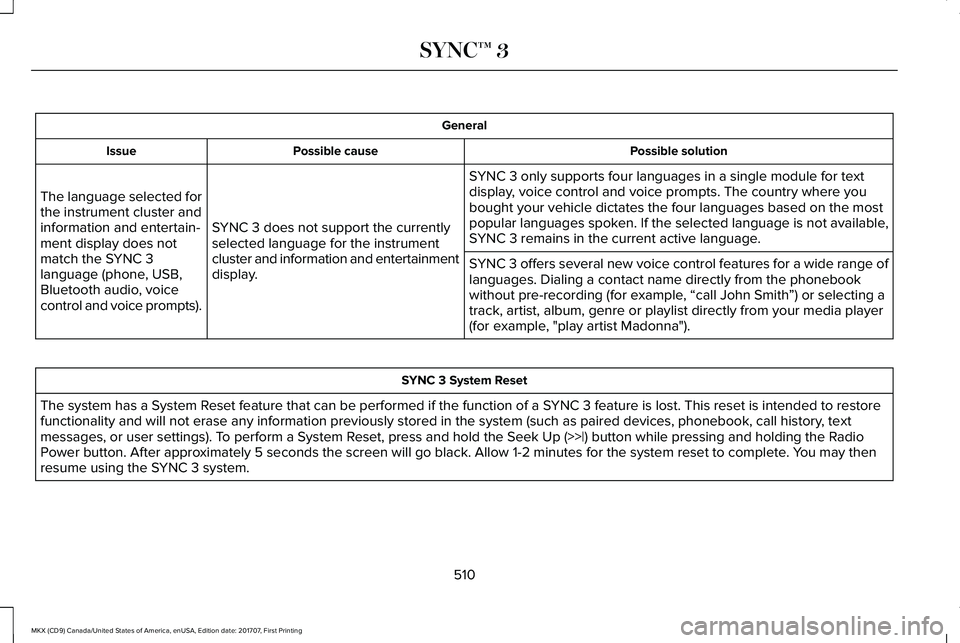
General
Possible solutionPossible causeIssue
SYNC 3 only supports four languages in a single module for textdisplay, voice control and voice prompts. The country where youbought your vehicle dictates the four languages based on the mostpopular languages spoken. If the selected language is not available,SYNC 3 remains in the current active language.SYNC 3 does not support the currentlyselected language for the instrumentcluster and information and entertainmentdisplay.
The language selected forthe instrument cluster andinformation and entertain-ment display does notmatch the SYNC 3language (phone, USB,Bluetooth audio, voicecontrol and voice prompts).
SYNC 3 offers several new voice control features for a wide range oflanguages. Dialing a contact name directly from the phonebookwithout pre-recording (for example, “call John Smith”) or selecting atrack, artist, album, genre or playlist directly from your media player(for example, "play artist Madonna").
SYNC 3 System Reset
The system has a System Reset feature that can be performed if the function of a SYNC 3 feature is lost. This reset is intended to restorefunctionality and will not erase any information previously stored in the system (such as paired devices, phonebook, call history, textmessages, or user settings). To perform a System Reset, press and hold the Seek Up (>>|) button while pressing and holding the RadioPower button. After approximately 5 seconds the screen will go black. Allow 1-2 minutes for the system reset to complete. You may thenresume using the SYNC 3 system.
510
MKX (CD9) Canada/United States of America, enUSA, Edition date: 201707, First Printing
SYNC™ 3
Page 560 of 603
•Links to Third Party Sites: TheSOFTWARE may provide you with theability to link to third party sites. The thirdparty sites are not under the control ofFORD MOTOR COMPANY, its affiliatesand/or its designated agent. NeitherFORD MOTOR COMPANY nor itsaffiliates nor its designated agent areresponsible for (I) the contents of anythird party sites, any links contained inthird party sites, or any changes orupdates to third party sites, or (ii)webcasting or any other form oftransmission received from any thirdparty sites. If the SOFTWARE provideslinks to third party sites, those links areprovided to you only as a convenience,and the inclusion of any link does notimply an endorsement of the third partysite by FORD MOTOR COMPANY, itsaffiliates and/or its designated agent.
•Obligation to Drive Responsibly: Yourecognize your obligation to driveresponsibly and keep attention on theroad. You will read and abide with theDEVICES operating instructionsparticularly as they pertain to safety andyou agree to assume any risk associated
with the use of the DEVICES.
UPGRADES AND RECOVERY MEDIA: If theSOFTWARE is provided by FORD MOTORCOMPANY separate from the DEVICES onmedia such as a ROM chip, CD ROM disk(s)or via web download or other means, and islabeled "For Upgrade Purposes Only" or "ForRecovery Purposes Only" you may install one(1) copy of such SOFTWARE onto theDEVICES as a replacement copy for theexisting SOFTWARE, and use it inaccordance with this EULA, including anyadditional EULA terms accompanying theupgrade SOFTWARE.
INTELLECTUAL PROPERTY RIGHTS: Alltitle and intellectual property rights in and tothe SOFTWARE (including but not limited toany images, photographs, animations, video,audio, music, text and "applets" incorporatedinto the SOFTWARE), the accompanyingprinted materials, and any copies of theSOFTWARE, are owned by FORD MOTORCOMPANY, or its affiliates or suppliers. TheSOFTWARE is licensed, not sold. You maynot copy the printed materials accompanyingthe SOFTWARE. All title and intellectualproperty rights in and to the content which
may be accessed through use of theSOFTWARE is the property of the respectivecontent owner and may be protected byapplicable copyright or other intellectualproperty laws and treaties. This EULA grantsyou no rights to use such content outside itsintended use. All rights not specificallygranted under this EULA are reserved byFORD MOTOR COMPANY, its affiliates, andthird party software and service providersand suppliers. Use of any on-line serviceswhich may be accessed through theSOFTWARE may be governed by therespective terms of use relating to suchservices. If this SOFTWARE containsdocumentation that is provided only inelectronic form, you may print one copy ofsuch electronic documentation.
557
MKX (CD9) Canada/United States of America, enUSA, Edition date: 201707, First Printing
Appendices
Page 568 of 603
(b) use your own personal judgment whiledriving. If you feel that a route suggested bythe TeleNav Software instructs you toperform an unsafe or illegal maneuver,places you in an unsafe situation, or directsyou into an area that you consider to beunsafe, do not follow such instructions;
(c) do not input destinations, or otherwisemanipulate the TeleNav Software, unlessyour vehicle is stationary and parked;
(d) do not use the TeleNav Software for anyillegal, unauthorized, unintended, unsafe,hazardous, or unlawful purposes, or in anymanner inconsistent with this Agreement;
(e) arrange all GPS and wireless devices andcables necessary for use of the TeleNavSoftware in a secure manner in your vehicleso that they will not interfere with yourdriving and will not prevent the operation ofany safety device (such as an airbag).
You agree to indemnify and hold TeleNavharmless against all claims resulting from anydangerous or otherwise inappropriate useof the TeleNav Software in any movingvehicle, including as a result of your failureto comply with the directions above.
2. Account Information
You agree: (a) when registering the TeleNavSoftware, to provide TeleNav with true,accurate, current, and complete informationabout yourself, and (b) to inform TeleNavpromptly of any changes to such information,and to keep it true, accurate, current andcomplete.
3. Software License
•Subject to your compliance with theterms of this Agreement, TeleNav herebygrants to you a personal, non-exclusive,non-transferable license (except asexpressly permitted below in connectionwith your permanent transfer of theTeleNav Software license), without theright to sublicense, to use the TeleNavSoftware (in object code form only) inorder to access and use the TeleNavSoftware. This license shall terminateupon any termination or expiration of thisAgreement. You agree that you will usethe TeleNav Software only for yourpersonal business or leisure purposes,and not to provide commercial navigationservices to other parties.
3.1 License Limitations
•(a) reverse engineer, decompile,disassemble, translate, modify, alter orotherwise change the TeleNav Softwareor any part thereof; (b) attempt to derivethe source code, audio library orstructure of the TeleNav Software withoutthe prior express written consent ofTeleNav; (c) remove from the TeleNavSoftware, or alter, any of TeleNav's or itssuppliers' trademarks, trade names,logos, patent or copyright notices, orother notices or markings; (d) distribute,sublicense or otherwise transfer theTeleNav Software to others, except aspart of your permanent transfer of theTeleNav Software; or (e) use the TeleNavSoftware in any manner that
I. infringes the intellectual property orproprietary rights, rights of publicity orprivacy or other rights of any party,
ii. violates any law, statute, ordinance orregulation, including but not limited to lawsand regulations related to spamming, privacy,consumer and child protection, obscenity ordefamation, or
565
MKX (CD9) Canada/United States of America, enUSA, Edition date: 201707, First Printing
Appendices
Page 592 of 603
3
360 Degree Camera...................................225Camera Views.....................................................226Front Camera.......................................................227Side Camera........................................................227
A
A/CSee: Climate Control..........................................145
About This Manual............................................7ABSSee: Brakes...........................................................199
ABS driving hintsSee: Hints on Driving With Anti-LockBrakes..............................................................200
Accessories....................................................512Exterior Style........................................................512Interior Style..........................................................512Lifestyle..................................................................512Peace of Mind......................................................512
AccessoriesSee: Replacement Parts Recommendation.....13
ACCSee: Using Adaptive Cruise Control.............230
Active Park Assist..........................................214Deactivating the Active Park AssistFeature.............................................................220Parallel Parking, Perpendicular Parking,Parallel Park Out Assist.................................214Troubleshooting the System............................221
Adaptive Headlamps...................................100Adjusting the Headlamps...........................327Vertical Aim Adjustment...................................327
Adjusting the Steering Wheel - VehiclesWith: Manual Adjustable SteeringColumn...........................................................90Adjusting the Steering Wheel - VehiclesWith: Power Adjustable SteeringColumn...........................................................89End of Travel Position..........................................89
AFSSee: Adaptive Headlamps................................100
Airbag Disposal...............................................57Air ConditioningSee: Climate Control..........................................145
Air FilterSee: Changing the Engine Air Filter..............332
AlarmSee: Anti-Theft Alarm...........................................88
All-Wheel Drive..............................................193Ambient Lighting...........................................103
Anti-Theft Alarm..............................................88Arming the Alarm..................................................88Disarming the Alarm............................................88
Appendices....................................................549Apps.................................................................472.................................................................................472SiriusXM Traffic and Travel Link......................474
At a Glance........................................................17Audible Warnings and Indicators...............117Headlamps On Warning Chime........................117Keyless Warning Alert.........................................117Parking Brake On Warning Chime...................117
Audio Control....................................................91Seek, Next or Previous.........................................91
Audio System.................................................401General Information............................................401
Audio Unit......................................................402Seek, Fast Forward and Reverse...................404Tune ......................................................................404Volume and Power.............................................404
Auto Hold.......................................................204Using Auto Hold.................................................205
Autolamps.........................................................97Windshield Wiper Activated Headlamps........98
Automatic Climate Control..........................145Automatic High Beam Control....................99Automatic High Beam Indicator......................100Switching the System On and Off..................100
589
MKX (CD9) Canada/United States of America, enUSA, Edition date: 201707, First Printing
Index
Page 602 of 603
Universal Garage Door Opener................163HomeLink Wireless Control System...............163
USB Port.........................................................404Using Adaptive Cruise Control.................230Automatic Cancellation.....................................233Blocked Sensor...................................................235Canceling the Set Speed.................................233Changing the Set Speed..................................233Detection Issues.................................................234Following a Vehicle.............................................231Hilly Condition Usage.......................................233Overriding the Set Speed................................232Resuming the Set Speed..................................233Setting the Adaptive Cruise Speed................231Setting the Gap Distance.................................232Switching Adaptive Cruise Control Off.........233Switching Adaptive Cruise Control On.........230Switching to Normal Cruise Control..............236System Not Available........................................235
Using All-Wheel Drive..................................193Driving In Special Conditions With All-WheelDrive (AWD)......................................................193
Using Cruise Control...................................229Switching Cruise Control Off...........................230Switching Cruise Control On...........................229
Using MyKey With Remote StartSystems..........................................................70Using Snow Chains......................................368
Using Stability Control................................209Using Summer Tires....................................367Using Traction Control................................206Switching the System Off.................................206System Indicator Lights and Messages.......206Using a Switch....................................................206Using the Information Display Controls.......206
Using Voice Recognition............................425Audio Voice Commands...................................427Climate Voice Commands................................428Mobile App Voice Commands........................433Navigation Voice Commands...........................431Phone Voice Commands..................................428SiriusXM Traffic and Travel Link VoiceCommands.......................................................433Voice Settings Commands...............................434
Utilizing the Mediation/Arbitration Program(Canada Only).............................................283
V
Vehicle Care..................................................333General Information...........................................333
Vehicle Certification Label.........................385Vehicle Identification Number..................385Vehicle Storage............................................340Battery....................................................................341Body.......................................................................340
Brakes.....................................................................341Cooling system....................................................341Engine.....................................................................341Fuel system...........................................................341General.................................................................340Miscellaneous.......................................................341Removing Vehicle From Storage.....................341Tires........................................................................341
VentilationSee: Climate Control..........................................145
VINSee: Vehicle Identification Number...............385
Voice Control....................................................91
W
Warning Lamps and Indicators...................113Adaptive Cruise Control Indicator....................113Adaptive Steering.................................................113Airbag Warning Lamp..........................................114Anti-Lock Brake System Warning Lamp.........114Auto Hold Active..................................................114Auto Hold Unavailable........................................114Automatic High Beam Control..........................114Battery.....................................................................114Blind Spot Information System Indicator........114Brake System Warning Lamp............................114Cruise Control Indicator......................................114
599
MKX (CD9) Canada/United States of America, enUSA, Edition date: 201707, First Printing
Index