phone LINCOLN MKX 2018 Workshop Manual
[x] Cancel search | Manufacturer: LINCOLN, Model Year: 2018, Model line: MKX, Model: LINCOLN MKX 2018Pages: 603, PDF Size: 4.94 MB
Page 487 of 603
The screen lists contacts in the phone book.Select the contact that you want to set asemergency contact. You can set EmergencyContact 2 by same process. You can set twoEmergency Contacts in total.
Note:After SYNC3 tries to place anemergency call, the Emergency Contactbutton displays on the touch screen. Youneed to press the button to call the contactthrough your Bluetooth phone.
Note:If the vehicle is equipped withnavigation, a map with your current streetinformation displays on the screen when 911Assist is in process.
Radio
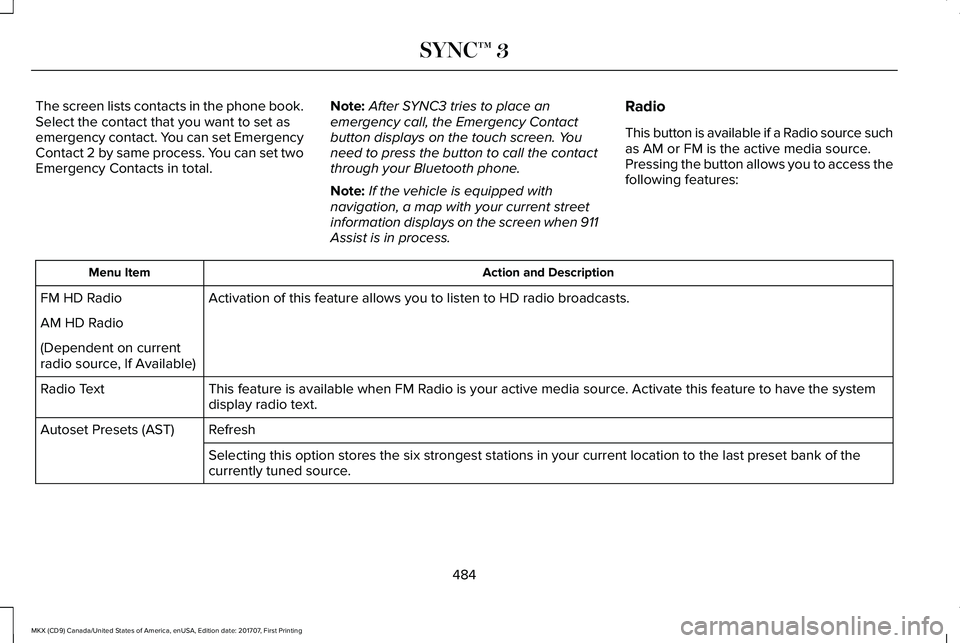
This button is available if a Radio source suchas AM or FM is the active media source.Pressing the button allows you to access thefollowing features:
Action and DescriptionMenu Item
Activation of this feature allows you to listen to HD radio broadcasts.FM HD Radio
AM HD Radio
(Dependent on currentradio source, If Available)
This feature is available when FM Radio is your active media source. Activate this feature to have the systemdisplay radio text.Radio Text
RefreshAutoset Presets (AST)
Selecting this option stores the six strongest stations in your current location to the last preset bank of thecurrently tuned source.
484
MKX (CD9) Canada/United States of America, enUSA, Edition date: 201707, First Printing
SYNC™ 3
Page 492 of 603
Action and DescriptionMenu Item
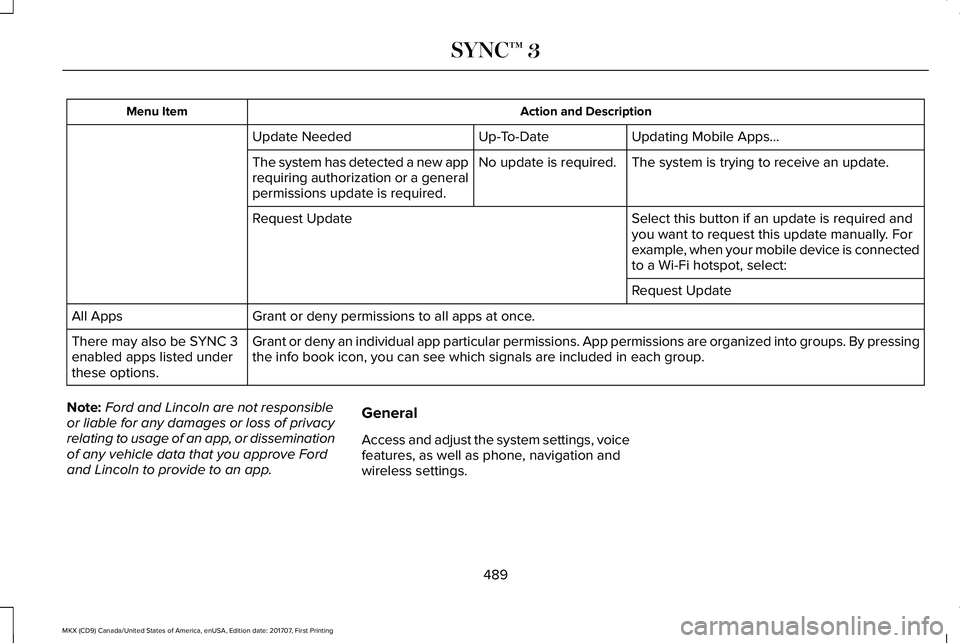
Updating Mobile Apps…Up-To-DateUpdate Needed
The system is trying to receive an update.No update is required.The system has detected a new apprequiring authorization or a generalpermissions update is required.
Select this button if an update is required andyou want to request this update manually. Forexample, when your mobile device is connectedto a Wi-Fi hotspot, select:
Request Update
Request Update
Grant or deny permissions to all apps at once.All Apps
Grant or deny an individual app particular permissions. App permissions are organized into groups. By pressingthe info book icon, you can see which signals are included in each group.There may also be SYNC 3enabled apps listed underthese options.
Note:Ford and Lincoln are not responsibleor liable for any damages or loss of privacyrelating to usage of an app, or disseminationof any vehicle data that you approve Fordand Lincoln to provide to an app.
General
Access and adjust the system settings, voicefeatures, as well as phone, navigation andwireless settings.
489
MKX (CD9) Canada/United States of America, enUSA, Edition date: 201707, First Printing
SYNC™ 3
Page 498 of 603
Menu Item
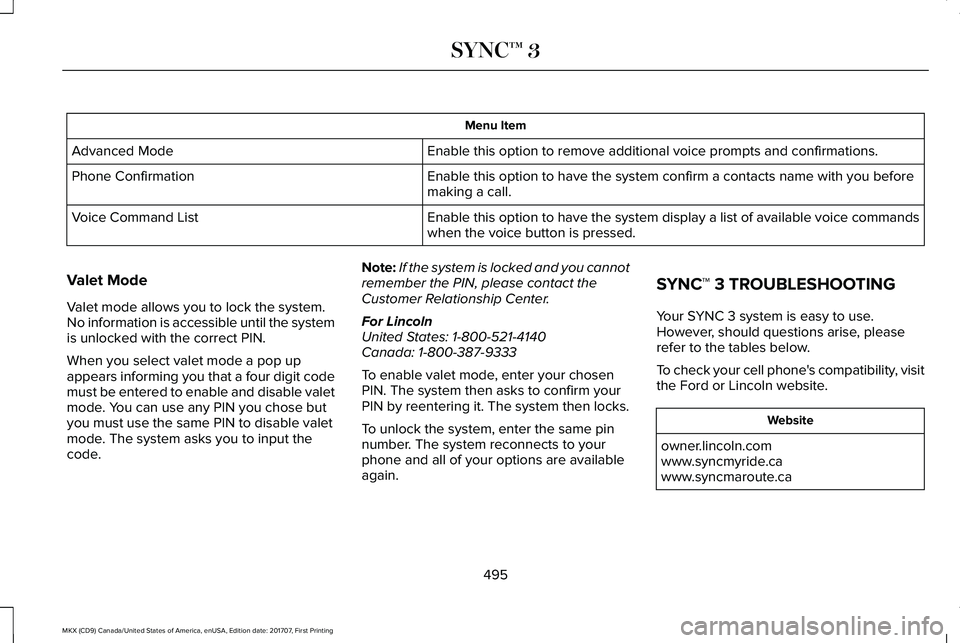
Enable this option to remove additional voice prompts and confirmations.Advanced Mode
Enable this option to have the system confirm a contacts name with you beforemaking a call.Phone Confirmation
Enable this option to have the system display a list of available voice commandswhen the voice button is pressed.Voice Command List
Valet Mode
Valet mode allows you to lock the system.No information is accessible until the systemis unlocked with the correct PIN.
When you select valet mode a pop upappears informing you that a four digit codemust be entered to enable and disable valetmode. You can use any PIN you chose butyou must use the same PIN to disable valetmode. The system asks you to input thecode.
Note:If the system is locked and you cannotremember the PIN, please contact theCustomer Relationship Center.
For LincolnUnited States: 1-800-521-4140Canada: 1-800-387-9333
To enable valet mode, enter your chosenPIN. The system then asks to confirm yourPIN by reentering it. The system then locks.
To unlock the system, enter the same pinnumber. The system reconnects to yourphone and all of your options are availableagain.
SYNC™ 3 TROUBLESHOOTING
Your SYNC 3 system is easy to use.However, should questions arise, pleaserefer to the tables below.
To check your cell phone's compatibility, visitthe Ford or Lincoln website.
Website
owner.lincoln.comwww.syncmyride.cawww.syncmaroute.ca
495
MKX (CD9) Canada/United States of America, enUSA, Edition date: 201707, First Printing
SYNC™ 3
Page 499 of 603
Cell phone issues
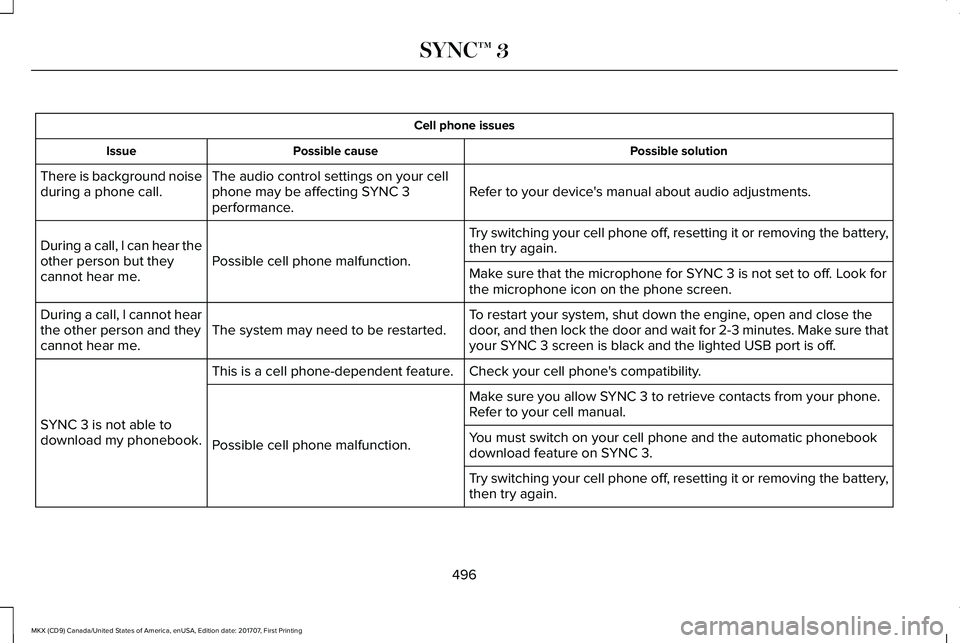
Possible solutionPossible causeIssue
Refer to your device's manual about audio adjustments.The audio control settings on your cellphone may be affecting SYNC 3performance.
There is background noiseduring a phone call.
Try switching your cell phone off, resetting it or removing the battery,then try again.Possible cell phone malfunction.During a call, I can hear theother person but theycannot hear me.Make sure that the microphone for SYNC 3 is not set to off. Look forthe microphone icon on the phone screen.
To restart your system, shut down the engine, open and close thedoor, and then lock the door and wait for 2-3 minutes. Make sure thatyour SYNC 3 screen is black and the lighted USB port is off.The system may need to be restarted.During a call, I cannot hearthe other person and theycannot hear me.
Check your cell phone's compatibility.This is a cell phone-dependent feature.
SYNC 3 is not able todownload my phonebook.
Make sure you allow SYNC 3 to retrieve contacts from your phone.Refer to your cell manual.
Possible cell phone malfunction.You must switch on your cell phone and the automatic phonebookdownload feature on SYNC 3.
Try switching your cell phone off, resetting it or removing the battery,then try again.
496
MKX (CD9) Canada/United States of America, enUSA, Edition date: 201707, First Printing
SYNC™ 3
Page 500 of 603
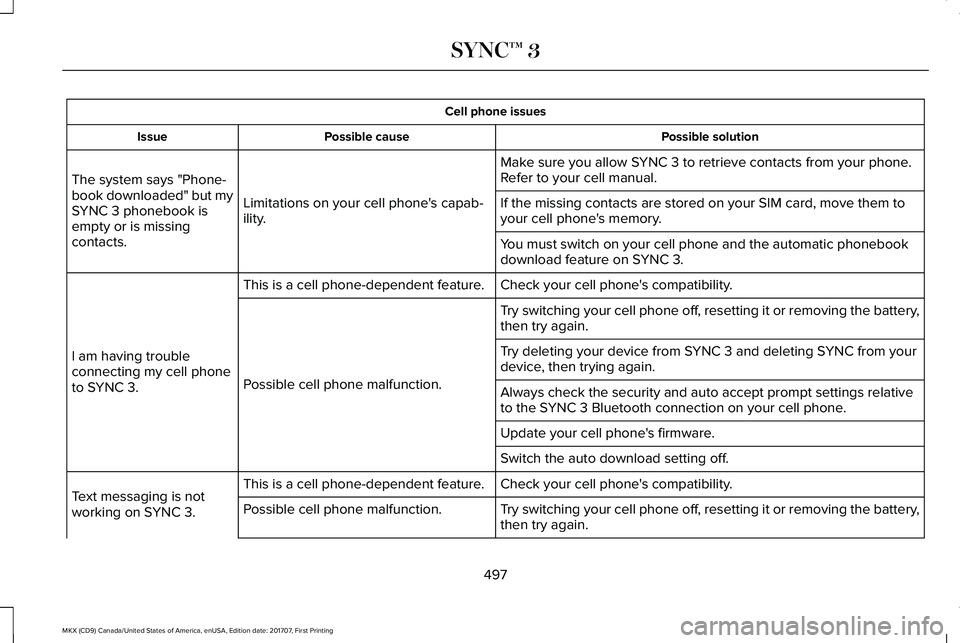
Cell phone issues
Possible solutionPossible causeIssue
Make sure you allow SYNC 3 to retrieve contacts from your phone.Refer to your cell manual.
Limitations on your cell phone's capab-ility.
The system says "Phone-book downloaded" but mySYNC 3 phonebook isempty or is missingcontacts.
If the missing contacts are stored on your SIM card, move them toyour cell phone's memory.
You must switch on your cell phone and the automatic phonebookdownload feature on SYNC 3.
Check your cell phone's compatibility.This is a cell phone-dependent feature.
I am having troubleconnecting my cell phoneto SYNC 3.
Try switching your cell phone off, resetting it or removing the battery,then try again.
Possible cell phone malfunction.
Try deleting your device from SYNC 3 and deleting SYNC from yourdevice, then trying again.
Always check the security and auto accept prompt settings relativeto the SYNC 3 Bluetooth connection on your cell phone.
Update your cell phone's firmware.
Switch the auto download setting off.
Check your cell phone's compatibility.This is a cell phone-dependent feature.Text messaging is notworking on SYNC 3.Try switching your cell phone off, resetting it or removing the battery,then try again.Possible cell phone malfunction.
497
MKX (CD9) Canada/United States of America, enUSA, Edition date: 201707, First Printing
SYNC™ 3
Page 501 of 603
Cell phone issues
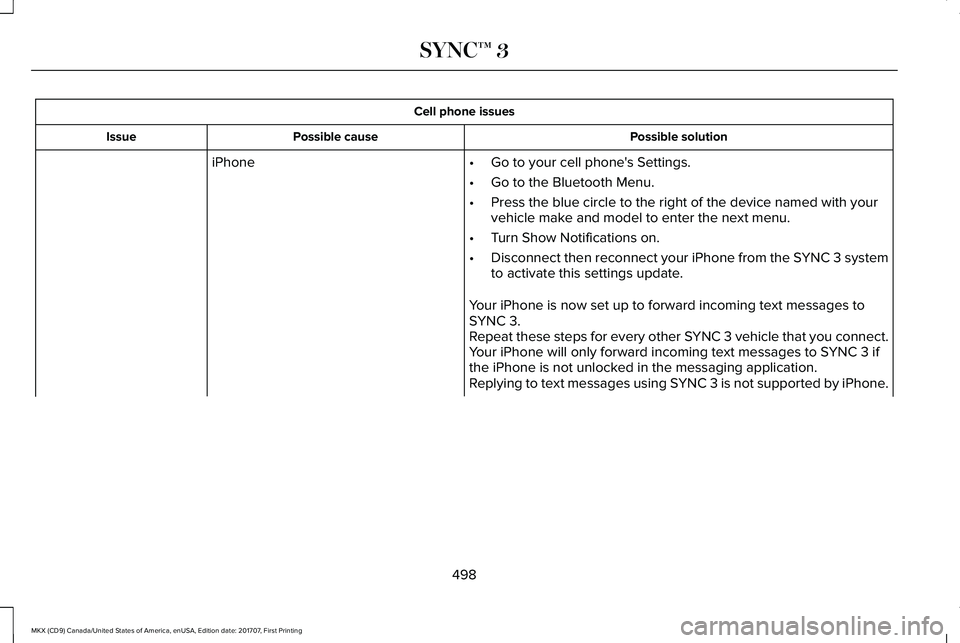
Possible solutionPossible causeIssue
iPhone•Go to your cell phone's Settings.
•Go to the Bluetooth Menu.
•Press the blue circle to the right of the device named with yourvehicle make and model to enter the next menu.
•Turn Show Notifications on.
•Disconnect then reconnect your iPhone from the SYNC 3 systemto activate this settings update.
Your iPhone is now set up to forward incoming text messages toSYNC 3.Repeat these steps for every other SYNC 3 vehicle that you connect.Your iPhone will only forward incoming text messages to SYNC 3 ifthe iPhone is not unlocked in the messaging application.Replying to text messages using SYNC 3 is not supported by iPhone.
498
MKX (CD9) Canada/United States of America, enUSA, Edition date: 201707, First Printing
SYNC™ 3
Page 502 of 603
Cell phone issues
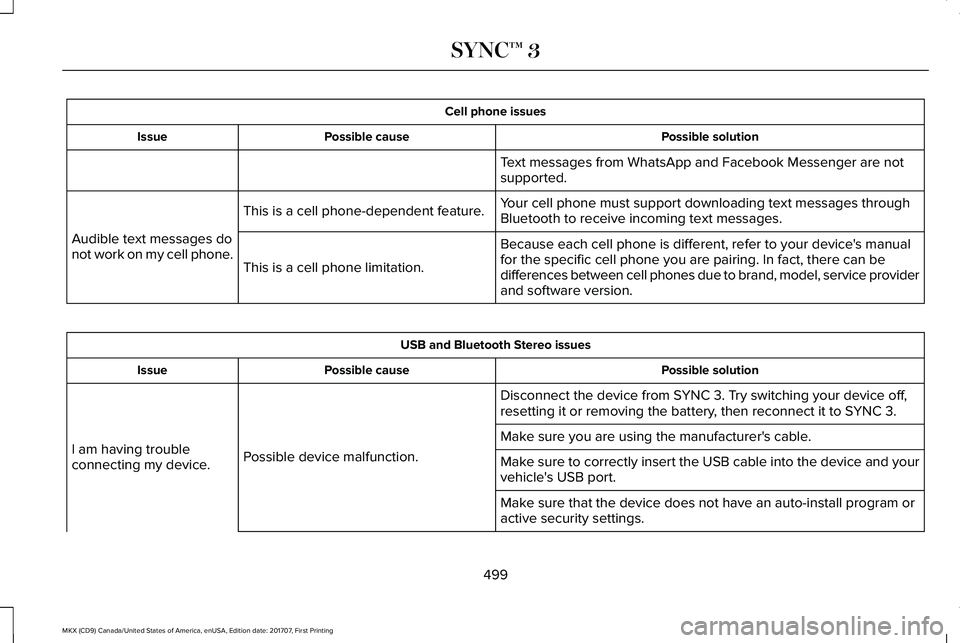
Possible solutionPossible causeIssue
Text messages from WhatsApp and Facebook Messenger are notsupported.
Your cell phone must support downloading text messages throughBluetooth to receive incoming text messages.This is a cell phone-dependent feature.
Audible text messages donot work on my cell phone.Because each cell phone is different, refer to your device's manualfor the specific cell phone you are pairing. In fact, there can bedifferences between cell phones due to brand, model, service providerand software version.
This is a cell phone limitation.
USB and Bluetooth Stereo issues
Possible solutionPossible causeIssue
Disconnect the device from SYNC 3. Try switching your device off,resetting it or removing the battery, then reconnect it to SYNC 3.
Possible device malfunction.I am having troubleconnecting my device.
Make sure you are using the manufacturer's cable.
Make sure to correctly insert the USB cable into the device and yourvehicle's USB port.
Make sure that the device does not have an auto-install program oractive security settings.
499
MKX (CD9) Canada/United States of America, enUSA, Edition date: 201707, First Printing
SYNC™ 3
Page 505 of 603
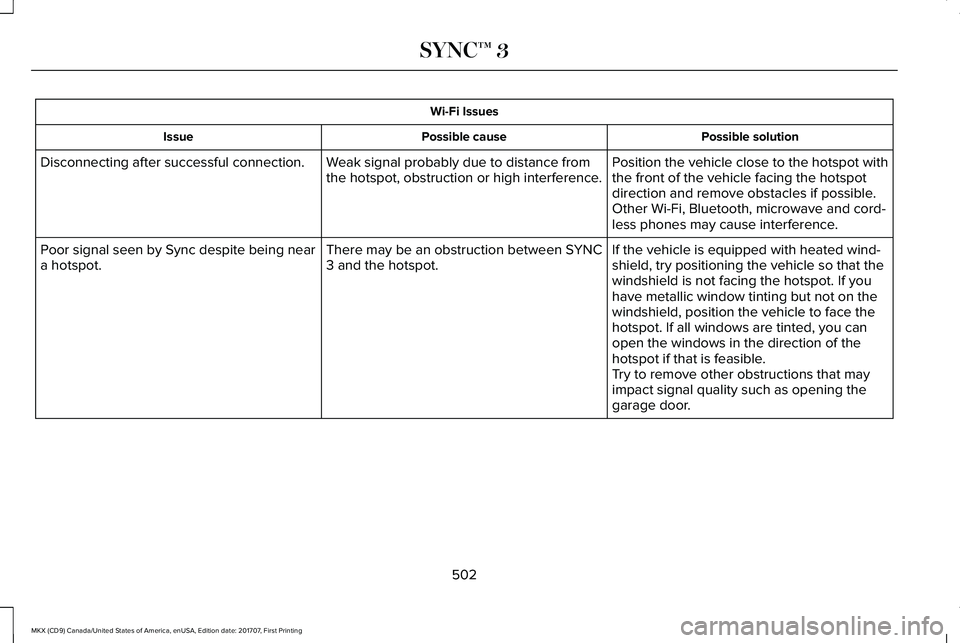
Wi-Fi Issues
Possible solutionPossible causeIssue
Position the vehicle close to the hotspot withthe front of the vehicle facing the hotspotdirection and remove obstacles if possible.Other Wi-Fi, Bluetooth, microwave and cord-less phones may cause interference.
Weak signal probably due to distance fromthe hotspot, obstruction or high interference.Disconnecting after successful connection.
If the vehicle is equipped with heated wind-shield, try positioning the vehicle so that thewindshield is not facing the hotspot. If youhave metallic window tinting but not on thewindshield, position the vehicle to face thehotspot. If all windows are tinted, you canopen the windows in the direction of thehotspot if that is feasible.
There may be an obstruction between SYNC3 and the hotspot.Poor signal seen by Sync despite being neara hotspot.
Try to remove other obstructions that mayimpact signal quality such as opening thegarage door.
502
MKX (CD9) Canada/United States of America, enUSA, Edition date: 201707, First Printing
SYNC™ 3
Page 507 of 603
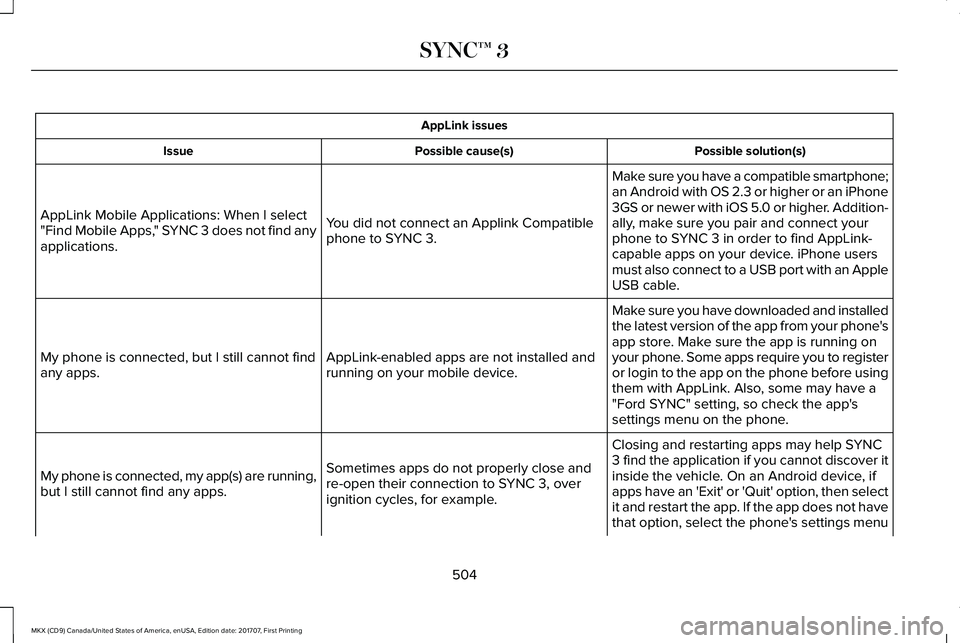
AppLink issues
Possible solution(s)Possible cause(s)Issue
Make sure you have a compatible smartphone;an Android with OS 2.3 or higher or an iPhone3GS or newer with iOS 5.0 or higher. Addition-ally, make sure you pair and connect yourphone to SYNC 3 in order to find AppLink-capable apps on your device. iPhone usersmust also connect to a USB port with an AppleUSB cable.
You did not connect an Applink Compatiblephone to SYNC 3.
AppLink Mobile Applications: When I select"Find Mobile Apps," SYNC 3 does not find anyapplications.
Make sure you have downloaded and installedthe latest version of the app from your phone'sapp store. Make sure the app is running onyour phone. Some apps require you to registeror login to the app on the phone before usingthem with AppLink. Also, some may have a"Ford SYNC" setting, so check the app'ssettings menu on the phone.
AppLink-enabled apps are not installed andrunning on your mobile device.My phone is connected, but I still cannot findany apps.
Closing and restarting apps may help SYNC3 find the application if you cannot discover itinside the vehicle. On an Android device, ifapps have an 'Exit' or 'Quit' option, then selectit and restart the app. If the app does not havethat option, select the phone's settings menu
Sometimes apps do not properly close andre-open their connection to SYNC 3, overignition cycles, for example.
My phone is connected, my app(s) are running,but I still cannot find any apps.
504
MKX (CD9) Canada/United States of America, enUSA, Edition date: 201707, First Printing
SYNC™ 3
Page 508 of 603
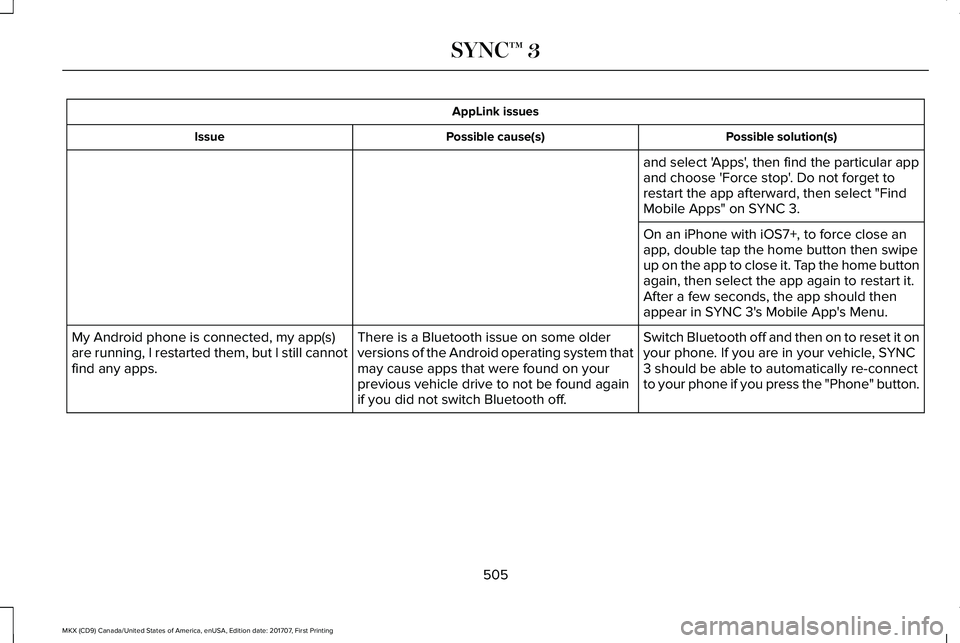
AppLink issues
Possible solution(s)Possible cause(s)Issue
and select 'Apps', then find the particular appand choose 'Force stop'. Do not forget torestart the app afterward, then select "FindMobile Apps" on SYNC 3.
On an iPhone with iOS7+, to force close anapp, double tap the home button then swipeup on the app to close it. Tap the home buttonagain, then select the app again to restart it.After a few seconds, the app should thenappear in SYNC 3's Mobile App's Menu.
Switch Bluetooth off and then on to reset it onyour phone. If you are in your vehicle, SYNC3 should be able to automatically re-connectto your phone if you press the "Phone" button.
There is a Bluetooth issue on some olderversions of the Android operating system thatmay cause apps that were found on yourprevious vehicle drive to not be found againif you did not switch Bluetooth off.
My Android phone is connected, my app(s)are running, I restarted them, but I still cannotfind any apps.
505
MKX (CD9) Canada/United States of America, enUSA, Edition date: 201707, First Printing
SYNC™ 3