warning LINCOLN MKX 2018 Repair Manual
[x] Cancel search | Manufacturer: LINCOLN, Model Year: 2018, Model line: MKX, Model: LINCOLN MKX 2018Pages: 603, PDF Size: 4.94 MB
Page 133 of 603
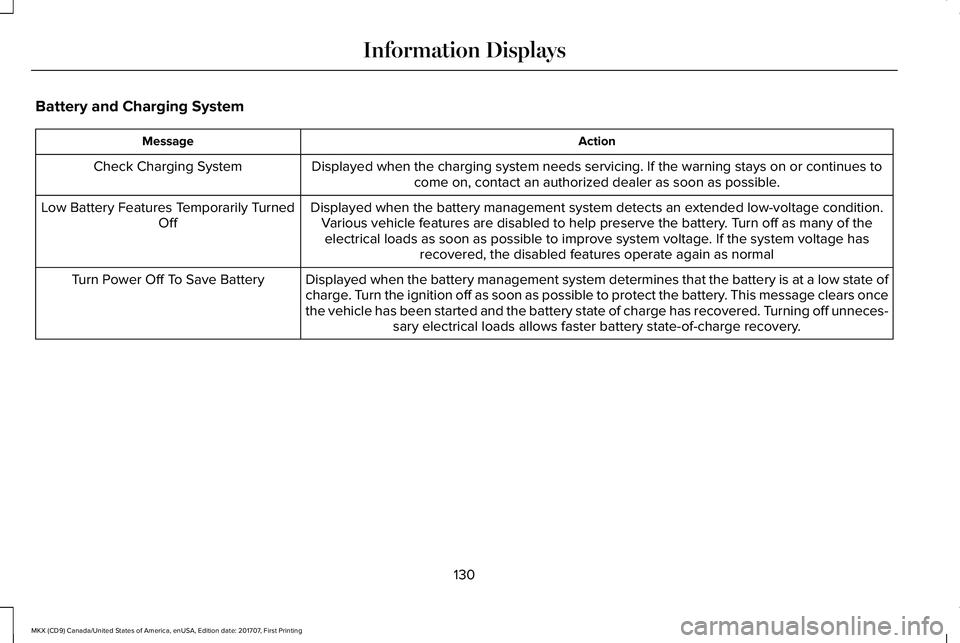
Battery and Charging System
ActionMessage
Displayed when the charging system needs servicing. If the warning stays on or continues tocome on, contact an authorized dealer as soon as possible.Check Charging System
Displayed when the battery management system detects an extended low-voltage condition.Various vehicle features are disabled to help preserve the battery. Turn off as many of theelectrical loads as soon as possible to improve system voltage. If the system voltage hasrecovered, the disabled features operate again as normal
Low Battery Features Temporarily TurnedOff
Displayed when the battery management system determines that the battery is at a low state ofcharge. Turn the ignition off as soon as possible to protect the battery. This message clears oncethe vehicle has been started and the battery state of charge has recovered. Turning off unneces-sary electrical loads allows faster battery state-of-charge recovery.
Turn Power Off To Save Battery
130
MKX (CD9) Canada/United States of America, enUSA, Edition date: 201707, First Printing
Information Displays
Page 135 of 603
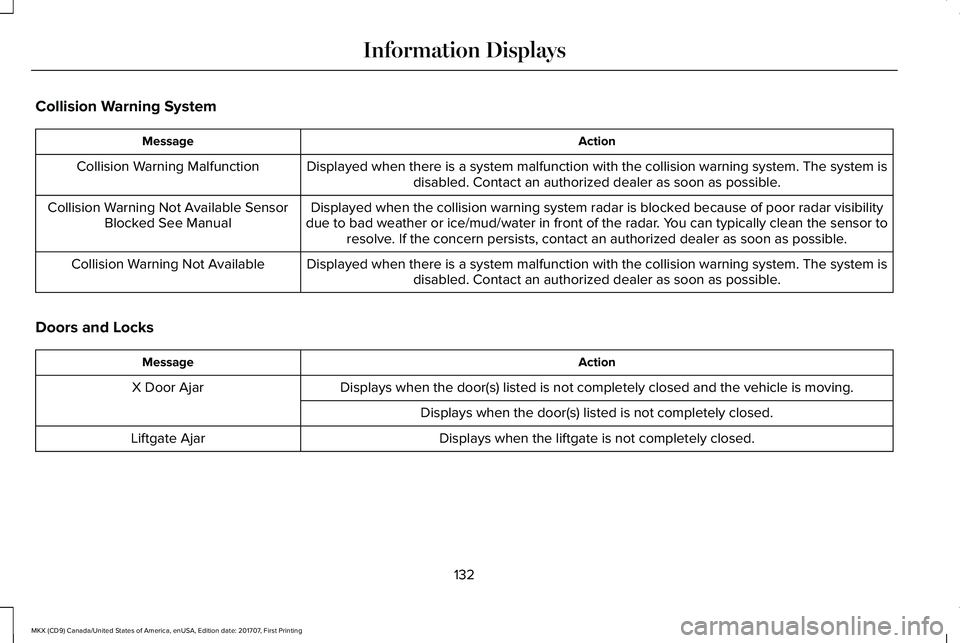
Collision Warning System
ActionMessage
Displayed when there is a system malfunction with the collision warning system. The system isdisabled. Contact an authorized dealer as soon as possible.Collision Warning Malfunction
Displayed when the collision warning system radar is blocked because of poor radar visibilitydue to bad weather or ice/mud/water in front of the radar. You can typically clean the sensor toresolve. If the concern persists, contact an authorized dealer as soon as possible.
Collision Warning Not Available SensorBlocked See Manual
Displayed when there is a system malfunction with the collision warning system. The system isdisabled. Contact an authorized dealer as soon as possible.Collision Warning Not Available
Doors and Locks
ActionMessage
Displays when the door(s) listed is not completely closed and the vehicle is moving.X Door Ajar
Displays when the door(s) listed is not completely closed.
Displays when the liftgate is not completely closed.Liftgate Ajar
132
MKX (CD9) Canada/United States of America, enUSA, Edition date: 201707, First Printing
Information Displays
Page 136 of 603
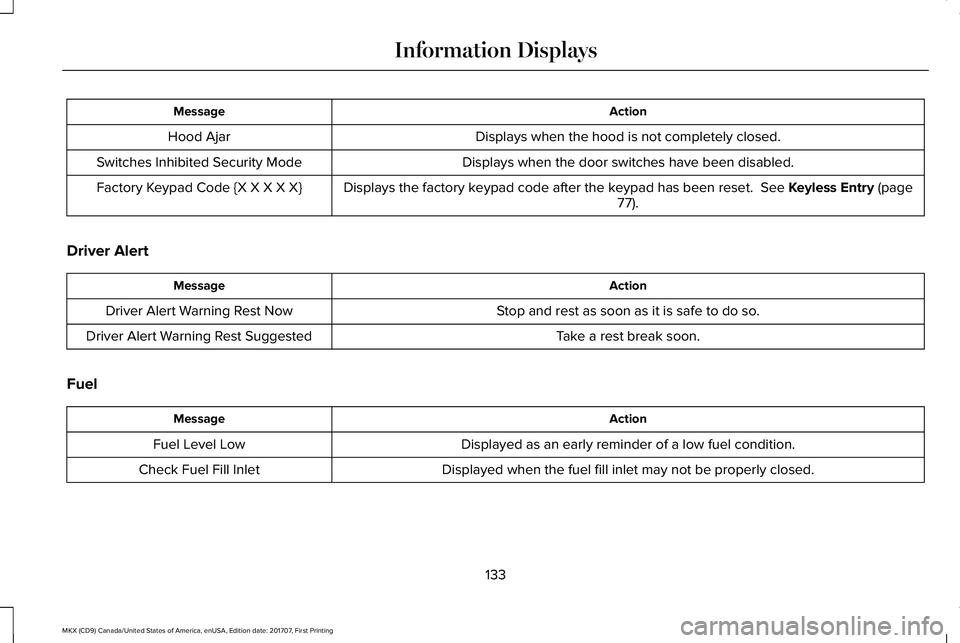
ActionMessage
Displays when the hood is not completely closed.Hood Ajar
Displays when the door switches have been disabled.Switches Inhibited Security Mode
Displays the factory keypad code after the keypad has been reset. See Keyless Entry (page77).Factory Keypad Code {X X X X X}
Driver Alert
ActionMessage
Stop and rest as soon as it is safe to do so.Driver Alert Warning Rest Now
Take a rest break soon.Driver Alert Warning Rest Suggested
Fuel
ActionMessage
Displayed as an early reminder of a low fuel condition.Fuel Level Low
Displayed when the fuel fill inlet may not be properly closed.Check Fuel Fill Inlet
133
MKX (CD9) Canada/United States of America, enUSA, Edition date: 201707, First Printing
Information Displays
Page 139 of 603
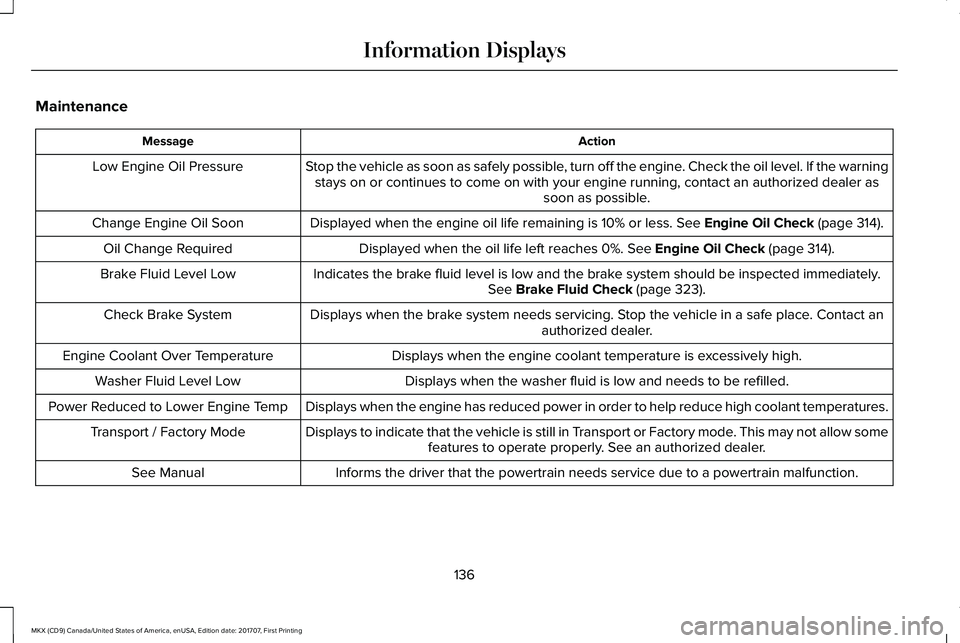
Maintenance
ActionMessage
Stop the vehicle as soon as safely possible, turn off the engine. Check the oil level. If the warningstays on or continues to come on with your engine running, contact an authorized dealer assoon as possible.
Low Engine Oil Pressure
Displayed when the engine oil life remaining is 10% or less. See Engine Oil Check (page 314).Change Engine Oil Soon
Displayed when the oil life left reaches 0%. See Engine Oil Check (page 314).Oil Change Required
Indicates the brake fluid level is low and the brake system should be inspected immediately.See Brake Fluid Check (page 323).Brake Fluid Level Low
Displays when the brake system needs servicing. Stop the vehicle in a safe place. Contact anauthorized dealer.Check Brake System
Displays when the engine coolant temperature is excessively high.Engine Coolant Over Temperature
Displays when the washer fluid is low and needs to be refilled.Washer Fluid Level Low
Displays when the engine has reduced power in order to help reduce high coolant temperatures.Power Reduced to Lower Engine Temp
Displays to indicate that the vehicle is still in Transport or Factory mode. This may not allow somefeatures to operate properly. See an authorized dealer.Transport / Factory Mode
Informs the driver that the powertrain needs service due to a powertrain malfunction.See Manual
136
MKX (CD9) Canada/United States of America, enUSA, Edition date: 201707, First Printing
Information Displays
Page 141 of 603
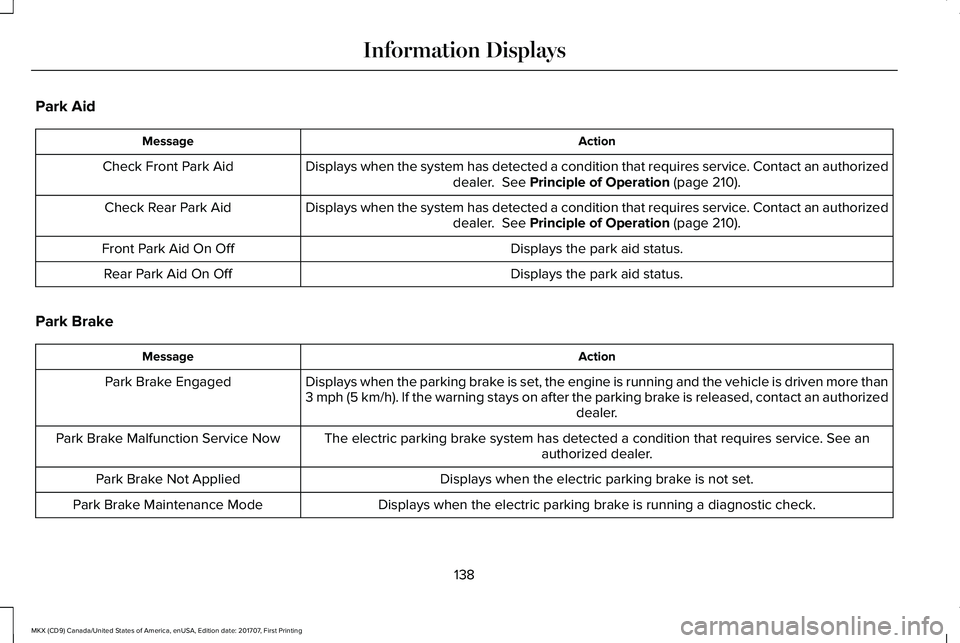
Park Aid
ActionMessage
Displays when the system has detected a condition that requires service. Contact an authorizeddealer. See Principle of Operation (page 210).Check Front Park Aid
Displays when the system has detected a condition that requires service. Contact an authorizeddealer. See Principle of Operation (page 210).Check Rear Park Aid
Displays the park aid status.Front Park Aid On Off
Displays the park aid status.Rear Park Aid On Off
Park Brake
ActionMessage
Displays when the parking brake is set, the engine is running and the vehicle is driven more than3 mph (5 km/h). If the warning stays on after the parking brake is released, contact an authorizeddealer.
Park Brake Engaged
The electric parking brake system has detected a condition that requires service. See anauthorized dealer.Park Brake Malfunction Service Now
Displays when the electric parking brake is not set.Park Brake Not Applied
Displays when the electric parking brake is running a diagnostic check.Park Brake Maintenance Mode
138
MKX (CD9) Canada/United States of America, enUSA, Edition date: 201707, First Printing
Information Displays
Page 144 of 603
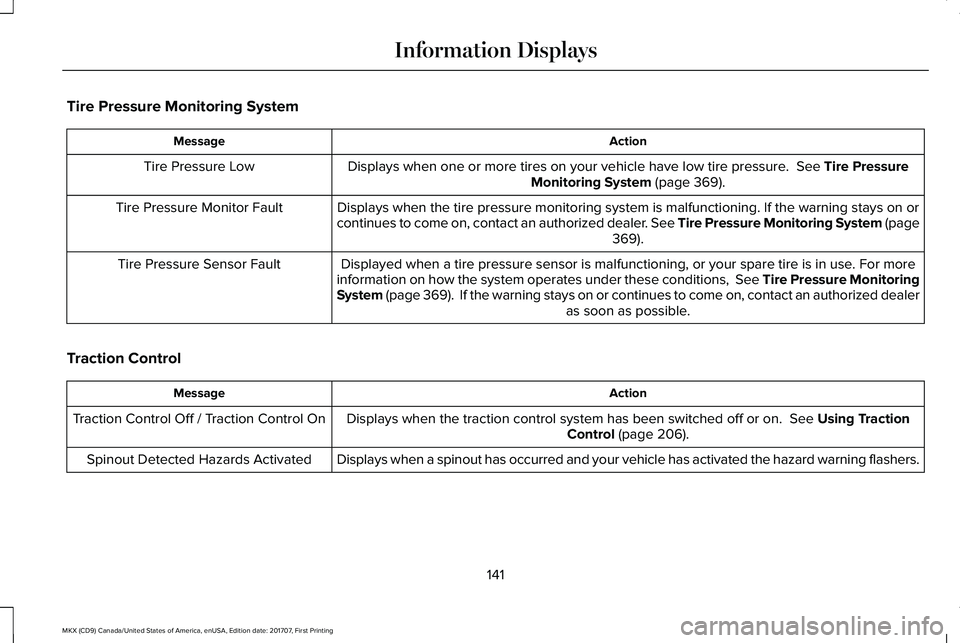
Tire Pressure Monitoring System
ActionMessage
Displays when one or more tires on your vehicle have low tire pressure. See Tire PressureMonitoring System (page 369).Tire Pressure Low
Displays when the tire pressure monitoring system is malfunctioning. If the warning stays on orcontinues to come on, contact an authorized dealer. See Tire Pressure Monitoring System (page369).
Tire Pressure Monitor Fault
Displayed when a tire pressure sensor is malfunctioning, or your spare tire is in use. For moreinformation on how the system operates under these conditions, See Tire Pressure MonitoringSystem (page 369). If the warning stays on or continues to come on, contact an authorized dealeras soon as possible.
Tire Pressure Sensor Fault
Traction Control
ActionMessage
Displays when the traction control system has been switched off or on. See Using TractionControl (page 206).Traction Control Off / Traction Control On
Displays when a spinout has occurred and your vehicle has activated the hazard warning flashers.Spinout Detected Hazards Activated
141
MKX (CD9) Canada/United States of America, enUSA, Edition date: 201707, First Printing
Information Displays
Page 153 of 603
SITTING IN THE CORRECT
POSITION
WARNINGS
Sitting improperly, out of position orwith the seatback reclined too far cantake weight off the seat cushion and affectthe decision of the passenger sensingsystem, resulting in serious injury or deathin the event of a crash. Always sit uprightagainst your seat back, with your feet on thefloor.
Do not recline the seatback as this cancause the occupant to slide under thesafety belt, resulting in serious injury in theevent of a crash.
Do not place objects higher than theseatback to reduce the risk of seriousinjury in the event of a crash or during heavybraking.
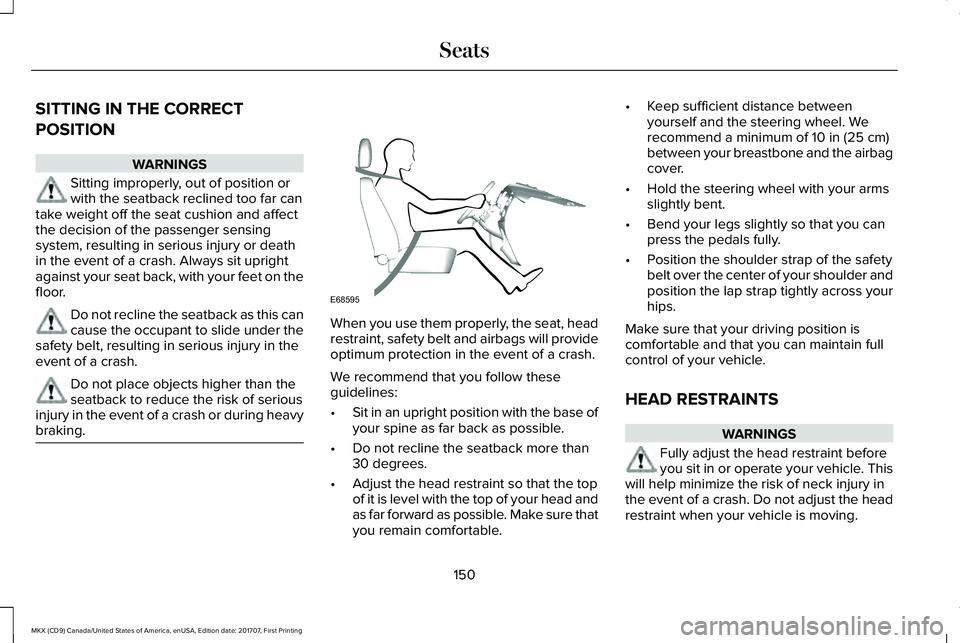
When you use them properly, the seat, headrestraint, safety belt and airbags will provideoptimum protection in the event of a crash.
We recommend that you follow theseguidelines:
•Sit in an upright position with the base ofyour spine as far back as possible.
•Do not recline the seatback more than30 degrees.
•Adjust the head restraint so that the topof it is level with the top of your head andas far forward as possible. Make sure thatyou remain comfortable.
•Keep sufficient distance betweenyourself and the steering wheel. Werecommend a minimum of 10 in (25 cm)between your breastbone and the airbagcover.
•Hold the steering wheel with your armsslightly bent.
•Bend your legs slightly so that you canpress the pedals fully.
•Position the shoulder strap of the safetybelt over the center of your shoulder andposition the lap strap tightly across yourhips.
Make sure that your driving position iscomfortable and that you can maintain fullcontrol of your vehicle.
HEAD RESTRAINTS
WARNINGS
Fully adjust the head restraint beforeyou sit in or operate your vehicle. Thiswill help minimize the risk of neck injury inthe event of a crash. Do not adjust the headrestraint when your vehicle is moving.
150
MKX (CD9) Canada/United States of America, enUSA, Edition date: 201707, First Printing
SeatsE68595
Page 154 of 603
WARNINGS
The head restraint is a safety device.Whenever possible it should beinstalled and properly adjusted when theseat is occupied. Failure to adjust the headrestraint properly could reduce itseffectiveness during certain impacts.
Note:Adjust the seat backrest to an uprightdriving position before adjusting the headrestraint. Adjust the head restraint so thatthe top of it is level with the top of your headand as far forward as possible. Make surethat you remain comfortable. If you areextremely tall, adjust the head restraint toits highest position.
Front Seat Manual Head Restraints (If
Equipped)
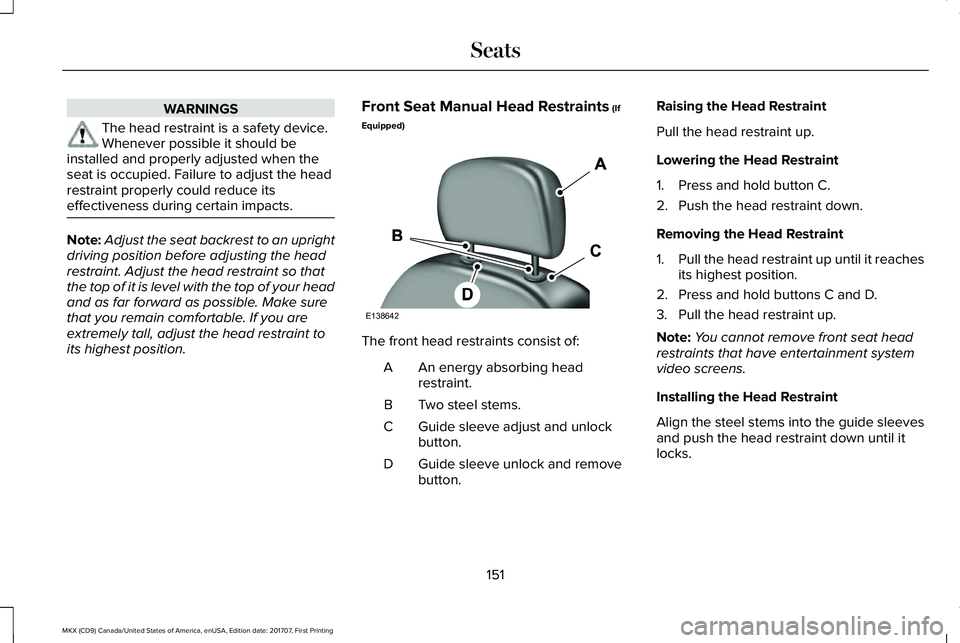
The front head restraints consist of:
An energy absorbing headrestraint.A
Two steel stems.B
Guide sleeve adjust and unlockbutton.C
Guide sleeve unlock and removebutton.D
Raising the Head Restraint
Pull the head restraint up.
Lowering the Head Restraint
1. Press and hold button C.
2. Push the head restraint down.
Removing the Head Restraint
1.Pull the head restraint up until it reachesits highest position.
2. Press and hold buttons C and D.
3. Pull the head restraint up.
Note:You cannot remove front seat headrestraints that have entertainment systemvideo screens.
Installing the Head Restraint
Align the steel stems into the guide sleevesand push the head restraint down until itlocks.
151
MKX (CD9) Canada/United States of America, enUSA, Edition date: 201707, First Printing
SeatsE138642
Page 157 of 603
POWER SEATS
WARNINGS
Do not adjust the driver seat or seat
WARNINGS
backrest when your vehicle is moving. Thismay result in sudden seat movement,causing the loss of control of your vehicle.
WARNINGS
Do not place cargo or any objectsbehind the seatback before returningit to the original position.
154
MKX (CD9) Canada/United States of America, enUSA, Edition date: 201707, First Printing
Seats
Page 160 of 603
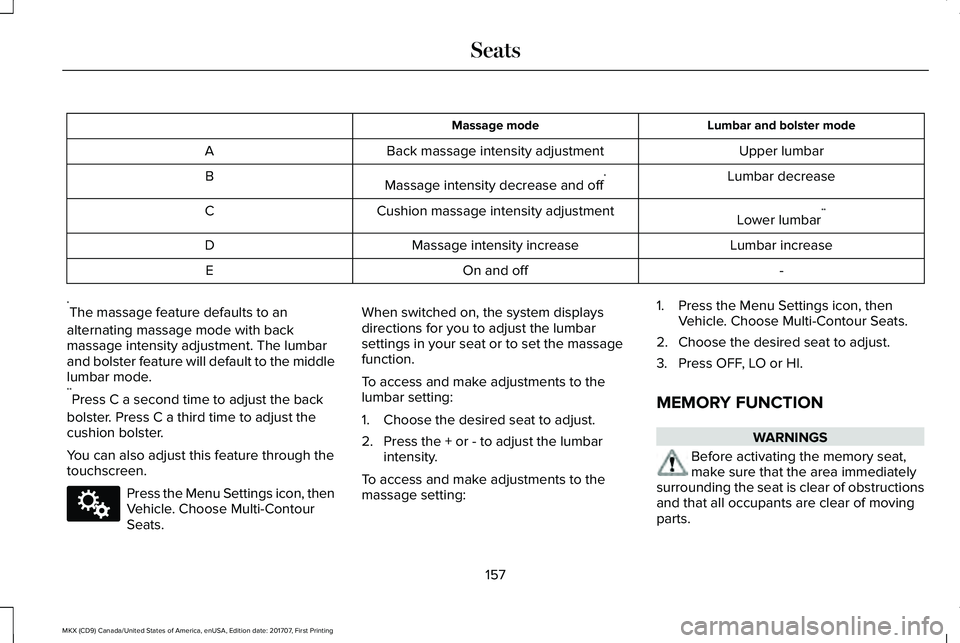
Lumbar and bolster modeMassage mode
Upper lumbarBack massage intensity adjustmentA
Lumbar decreaseMassage intensity decrease and off*B
Lower lumbar**Cushion massage intensity adjustmentC
Lumbar increaseMassage intensity increaseD
-On and offE
*The massage feature defaults to an
alternating massage mode with backmassage intensity adjustment. The lumbarand bolster feature will default to the middlelumbar mode.**Press C a second time to adjust the back
bolster. Press C a third time to adjust thecushion bolster.
You can also adjust this feature through thetouchscreen.
Press the Menu Settings icon, thenVehicle. Choose Multi-ContourSeats.
When switched on, the system displaysdirections for you to adjust the lumbarsettings in your seat or to set the massagefunction.
To access and make adjustments to thelumbar setting:
1. Choose the desired seat to adjust.
2. Press the + or - to adjust the lumbarintensity.
To access and make adjustments to themassage setting:
1. Press the Menu Settings icon, thenVehicle. Choose Multi-Contour Seats.
2. Choose the desired seat to adjust.
3. Press OFF, LO or HI.
MEMORY FUNCTION
WARNINGS
Before activating the memory seat,make sure that the area immediatelysurrounding the seat is clear of obstructionsand that all occupants are clear of movingparts.
157
MKX (CD9) Canada/United States of America, enUSA, Edition date: 201707, First Printing
SeatsE142607