audio LINCOLN MKX 2018 Owners Manual
[x] Cancel search | Manufacturer: LINCOLN, Model Year: 2018, Model line: MKX, Model: LINCOLN MKX 2018Pages: 603, PDF Size: 4.94 MB
Page 5 of 603
Liftgate
Manual Liftgate................................................80
Power Liftgate...................................................81
Security
Passive Anti-Theft System............................86
Anti-Theft Alarm..............................................88
Steering Wheel
Adjusting the Steering Wheel - VehiclesWith: Power Adjustable SteeringColumn..........................................................89
Adjusting the Steering Wheel - VehiclesWith: Manual Adjustable SteeringColumn..........................................................90
Audio Control....................................................91
Voice Control....................................................91
Cruise Control.................................................92
Information Display Control.........................92
Heated Steering Wheel................................92
Wipers and Washers
Windshield Wipers..........................................93
Autowipers.......................................................94
Windshield Washers......................................94
Rear Window Wiper and Washers..............95
Lighting
General Information.......................................96
Lighting Control..............................................96
Autolamps.........................................................97
Instrument Lighting Dimmer........................98
Headlamp Exit Delay.....................................98
Daytime Running Lamps...............................98
Automatic High Beam Control....................99
Adaptive Headlamps...................................100
Direction Indicators.......................................101
Welcome Lighting..........................................101
Interior Lamps................................................102
Ambient Lighting...........................................103
Windows and Mirrors
Power Windows.............................................104
Global Opening and Closing......................105
Exterior Mirrors..............................................105
Interior Mirror.................................................108
Sun Visors.......................................................109
Moonroof.........................................................109
Instrument Cluster
Gauges...............................................................111
Warning Lamps and Indicators...................113
Audible Warnings and Indicators...............117
Information Displays
General Information.......................................118
Information Messages.................................125
Climate Control
Automatic Climate Control..........................145
Hints on Controlling the InteriorClimate.........................................................147
Heated Windows and Mirrors....................148
Cabin Air Filter...............................................148
Remote Start...................................................149
Seats
Sitting in the Correct Position....................150
Head Restraints.............................................150
Power Seats....................................................154
2
MKX (CD9) Canada/United States of America, enUSA, Edition date: 201707, First Printing
Table of Contents
Page 8 of 603
Engine Coolant Check.................................316
Automatic Transmission Fluid Check - 2.7LEcoBoost™/3.7L..........................................321
Brake Fluid Check........................................323
Washer Fluid Check.....................................324
Fuel Filter........................................................324
Changing the 12V Battery..........................324
Checking the Wiper Blades.......................326
Changing the Wiper Blades......................326
Adjusting the Headlamps...........................327
Changing a Bulb...........................................328
Bulb Specification Chart.............................329
Changing the Engine Air Filter..................332
Vehicle Care
General Information.....................................333
Cleaning Products........................................333
Cleaning the Exterior...................................334
Waxing.............................................................335
Cleaning the Engine....................................335
Cleaning the Windows and WiperBlades.........................................................336
Cleaning the Interior....................................336
Cleaning the Instrument Panel andInstrument Cluster Lens.........................338
Cleaning Leather Seats..............................339
Repairing Minor Paint Damage.................339
Cleaning the Wheels...................................339
Vehicle Storage............................................340
Body Styling Kits...........................................342
Wheels and Tires
General Information.....................................343
Tire Sealant and Inflator Kit.......................345
Tire Care.........................................................352
Using Summer Tires....................................367
Using Snow Chains......................................368
Tire Pressure Monitoring System.............369
Changing a Road Wheel.............................373
Technical Specifications.............................379
Capacities and Specifications
Engine Specifications - 2.7LEcoBoost™...................................................381
Engine Specifications - 3.7L.......................382
Motorcraft Parts - 2.7L EcoBoost™............383
Motorcraft Parts - 3.7L.................................384
Vehicle Identification Number..................385
Vehicle Certification Label.........................385
Transmission Code Designation..............386
Capacities and Specifications - 2.7LEcoBoost™..................................................387
Capacities and Specifications - 3.7L........394
Audio System
General Information......................................401
Audio Unit......................................................402
USB Port.........................................................404
SYNC™ 3
General Information.....................................406
Home Screen................................................424
Using Voice Recognition............................425
Entertainment................................................436
Climate............................................................449
Phone..............................................................453
Navigation.......................................................461
Apps.................................................................472
Settings...........................................................475
5
MKX (CD9) Canada/United States of America, enUSA, Edition date: 201707, First Printing
Table of Contents
Page 21 of 603
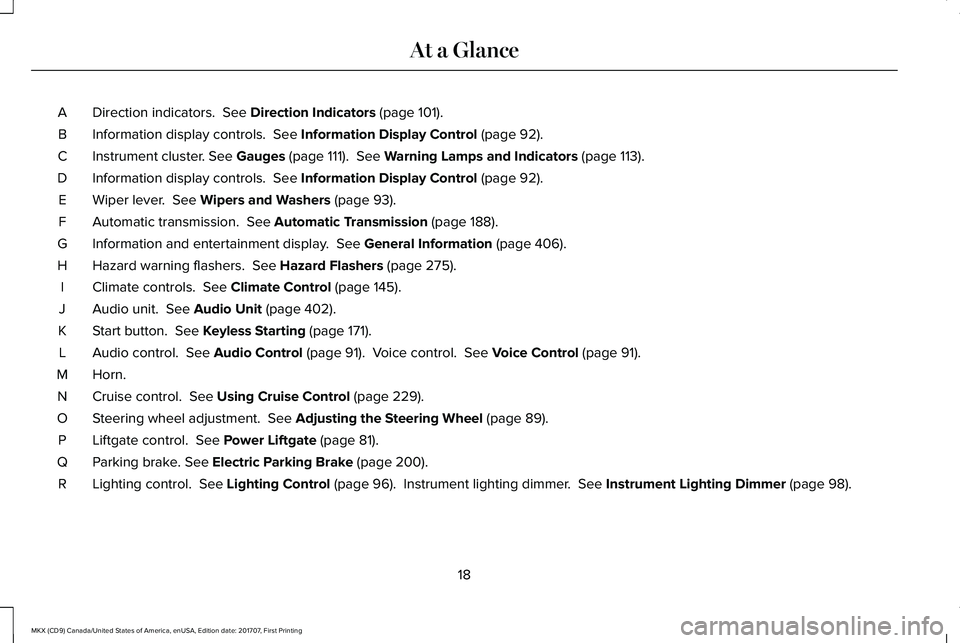
Direction indicators. See Direction Indicators (page 101).A
Information display controls. See Information Display Control (page 92).B
Instrument cluster. See Gauges (page 111). See Warning Lamps and Indicators (page 113).C
Information display controls. See Information Display Control (page 92).D
Wiper lever. See Wipers and Washers (page 93).E
Automatic transmission. See Automatic Transmission (page 188).F
Information and entertainment display. See General Information (page 406).G
Hazard warning flashers. See Hazard Flashers (page 275).H
Climate controls. See Climate Control (page 145).I
Audio unit. See Audio Unit (page 402).J
Start button. See Keyless Starting (page 171).K
Audio control. See Audio Control (page 91). Voice control. See Voice Control (page 91).L
Horn.M
Cruise control. See Using Cruise Control (page 229).N
Steering wheel adjustment. See Adjusting the Steering Wheel (page 89).O
Liftgate control. See Power Liftgate (page 81).P
Parking brake. See Electric Parking Brake (page 200).Q
Lighting control. See Lighting Control (page 96). Instrument lighting dimmer. See Instrument Lighting Dimmer (page 98).R
18
MKX (CD9) Canada/United States of America, enUSA, Edition date: 201707, First Printing
At a Glance
Page 68 of 603
PRINCIPLE OF OPERATION
MyKey allows you to program keys withrestricted driving modes to promote gooddriving habits. All but one of the keys can beactivated with these restricted modes.
Any keys that remain unprogrammed arereferred to as administrator keys or adminkeys. They can be used to:
•Create a MyKey.
•Program configurable MyKey settings.
•Clear all MyKey features.
When you have created a MyKey, you canaccess the following information by usingthe information display to determine:
•How many admin keys and MyKeys areprogrammed to your vehicle.
•The total distance your vehicle traveledwith a MyKey.
Note:Switch the vehicle on to use thesystem.
Note:All MyKeys are programmed to thesame settings. You cannot program themindividually.
Note:For vehicles equipped withpush-button start, when both a MyKey andan admin remote transmitter are present,the admin remote transmitter will berecognized by the vehicle while switchingthe vehicle on to start the vehicle.
Non-configurable Settings
The following settings cannot be changedby an admin key user:
•Safety belt reminder. You cannot disablethis feature. The audio system will mutewhen the driver and front seatpassengers’ safety belts are not fastened.
•Early low fuel or charge. The low-fuel orlow charge warning activates earlier,giving the MyKey user more time to refuelor recharge.
•Driver assist features, if equipped on yourvehicle, are forced on: parking aid, BlindSpot Information System (BLIS) with crosstraffic alert and forward collision warning.
•Satellite radio adult content restrictions,if equipped on your vehicle.
Configurable Settings
With an admin key, you can configure certainMyKey settings when you first create aMyKey and before you recycle the key orrestart the vehicle. You can also change thesettings afterward with an admin key.
•A vehicle speed limit can be set.Warnings will be shown in the displayfollowed by an audible tone when yourvehicle reaches the set speed. Youcannot override the set speed by fullydepressing the accelerator pedal or bysetting cruise control.
WARNING
Do not set MyKey maximum speed limitto a limit that will prevent the driverfrom maintaining a safe speed consideringposted speed limits and prevailing roadconditions. The driver is always responsibleto drive in accordance with local laws andprevailing conditions. Failure to do so couldresult in accident or injury.
65
MKX (CD9) Canada/United States of America, enUSA, Edition date: 201707, First Printing
MyKey™
Page 69 of 603
•Various vehicle speed minders can beset. Once you select a speed, it will beshown in the display, followed by anaudible tone when the preselectedvehicle speed is exceeded.
•Audio system maximum volume of 45%.A message will be shown in the displaywhen you attempt to exceed the limitedvolume. Also, the speed-sensitive orcompensated automatic volume controlwill be disabled.
•Always on setting. When this is selected,you will not be able to switch offAdvanceTrac™ or traction control, 911Assist or Emergency Assistance, or thedo not disturb feature (if your vehicle isequipped with these features).
CREATING A MYKEY
Use the information display to create aMyKey:
1. Insert the key you want to program intothe ignition. See Starting a GasolineEngine (page 172). If your vehicle isequipped with a push-button start, placethe remote control into the backupposition. See Passive Anti-Theft System(page 86).
2. Switch the ignition on.
3.Access the main menu on the informationdisplay controls. Use the arrow keys toget to the following menu selections:
Action and DescriptionMessage
Press the OK button or the right arrow key.Settings
Press the OK button or the right arrow key.MyKey
Press the OK button or the right arrow key.Create MyKey
When prompted, hold the OK button untilyou see a message informing you to labelthis key as a MyKey. The programmedrestrictions apply when you key off, openand close the driver door and restart yourvehicle with the programmed key ortransmitter.
MyKey is successfully created. Make sureyou label it so you can distinguish it from theadmin keys.
You can also program configurable settingsfor the key(s). See Programming/ChangingConfigurable Settings.
Programming/Changing ConfigurableSettings
Use the information display to access yourconfigurable MyKey settings.
1. Switch the ignition on using the key orthe transmitter you want to program.
66
MKX (CD9) Canada/United States of America, enUSA, Edition date: 201707, First Printing
MyKey™
Page 94 of 603
3. Lock the steering column.
AUDIO CONTROL
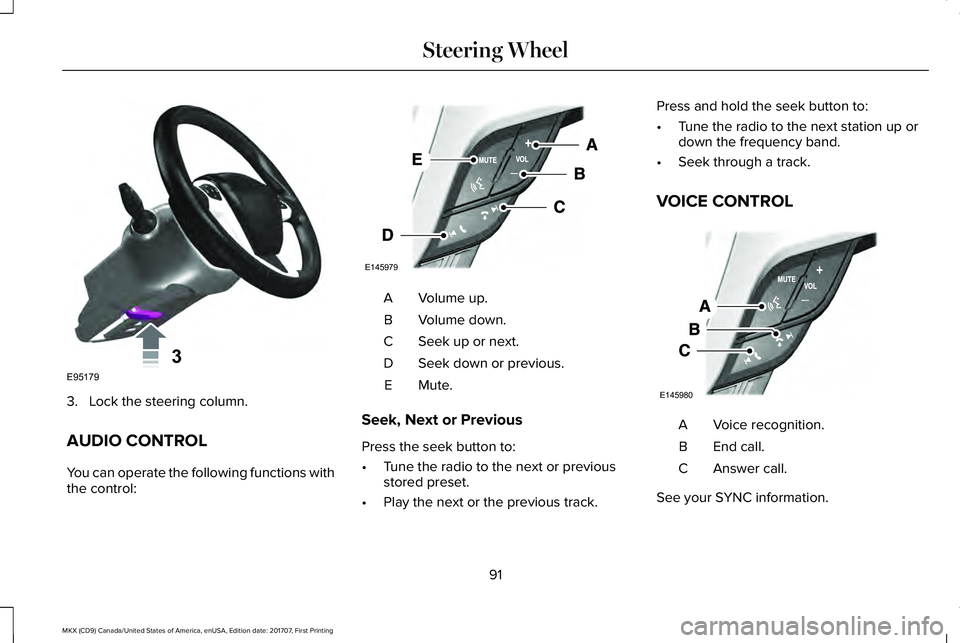
You can operate the following functions withthe control:
Volume up.A
Volume down.B
Seek up or next.C
Seek down or previous.D
Mute.E
Seek, Next or Previous
Press the seek button to:
•Tune the radio to the next or previousstored preset.
•Play the next or the previous track.
Press and hold the seek button to:
•Tune the radio to the next station up ordown the frequency band.
•Seek through a track.
VOICE CONTROL
Voice recognition.A
End call.B
Answer call.C
See your SYNC information.
91
MKX (CD9) Canada/United States of America, enUSA, Edition date: 201707, First Printing
Steering Wheel3E95179 E145979 E145980
Page 140 of 603
MyKey
ActionMessage
Displayed during key programming when MyKey cannot be programmed.MyKey not Created
Displays when MyKey is active.MyKey Active Drive Safely
Displays when starting the vehicle and MyKey is in use and the MyKey speed limit is on.Speed Limited to XX MPH/km/h
Displays when a MyKey is in use and the MyKey speed limit is on and the vehicle speed isapproaching 80 mph (130 km/h).Near Vehicle Top Speed
Displays when a MyKey is in use and the MyKey speed limit is reached.Vehicle at Top Speed of MyKey Setting
Displays when MyKey is active.Check Speed Drive Safely
Displays when a MyKey is in use and Belt-Minder is activated.Buckle Up to Unmute Audio
Displays when a MyKey is in use and AdvanceTrac is activated.AdvanceTrac On - MyKey Setting
Displays when a MyKey is in use and Traction control is activated.Traction Control On - MyKey Setting
Displays when a MyKey is in use and park aid is activated.MyKey Park Aid Cannot be Deactivated
Displayed when the lane keeping aid is on per MyKey settings.Lane Keeping Alert On MyKey Setting
137
MKX (CD9) Canada/United States of America, enUSA, Edition date: 201707, First Printing
Information Displays
Page 214 of 603
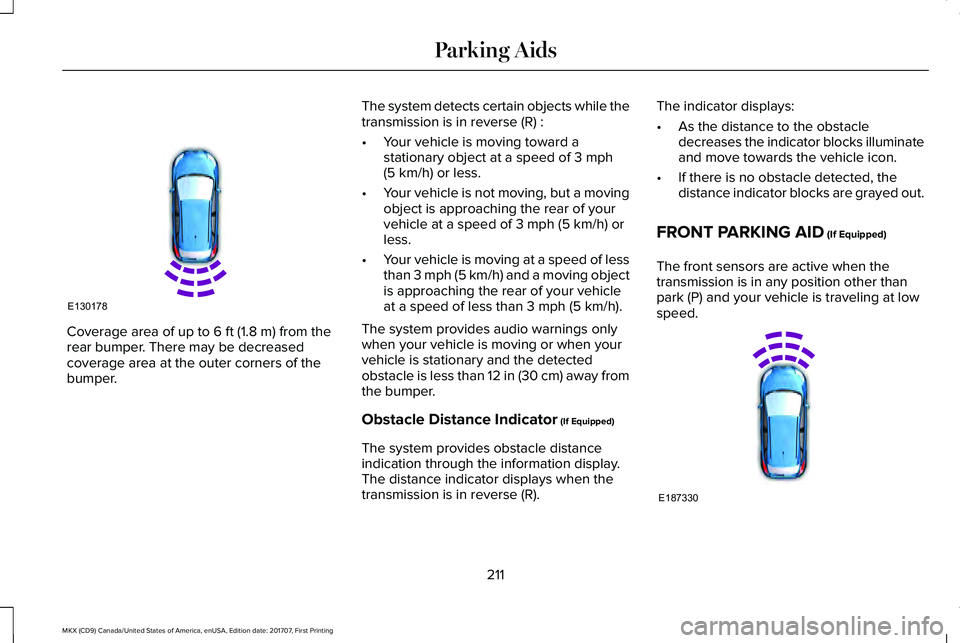
Coverage area of up to 6 ft (1.8 m) from therear bumper. There may be decreasedcoverage area at the outer corners of thebumper.
The system detects certain objects while thetransmission is in reverse (R) :
•Your vehicle is moving toward astationary object at a speed of 3 mph(5 km/h) or less.
•Your vehicle is not moving, but a movingobject is approaching the rear of yourvehicle at a speed of 3 mph (5 km/h) orless.
•Your vehicle is moving at a speed of lessthan 3 mph (5 km/h) and a moving objectis approaching the rear of your vehicleat a speed of less than 3 mph (5 km/h).
The system provides audio warnings onlywhen your vehicle is moving or when yourvehicle is stationary and the detectedobstacle is less than 12 in (30 cm) away fromthe bumper.
Obstacle Distance Indicator (If Equipped)
The system provides obstacle distanceindication through the information display.The distance indicator displays when thetransmission is in reverse (R).
The indicator displays:
•As the distance to the obstacledecreases the indicator blocks illuminateand move towards the vehicle icon.
•If there is no obstacle detected, thedistance indicator blocks are grayed out.
FRONT PARKING AID (If Equipped)
The front sensors are active when thetransmission is in any position other thanpark (P) and your vehicle is traveling at lowspeed.
211
MKX (CD9) Canada/United States of America, enUSA, Edition date: 201707, First Printing
Parking AidsE130178 E187330
Page 215 of 603
Coverage area of up to 28 in (70 cm) fromthe front bumper. The coverage areadecreases at the outer corners.
When your vehicle approaches an object, awarning tone sounds. When your vehiclemoves closer to an object, the warning tonerepeat rate increases. The warning tonesounds continuously when an object is 12 in(30 cm) or less from the front bumper.
You can switch the system off through theinformation display menu or from the pop-upmessage that appears once you shift thetransmission into reverse (R). See GeneralInformation (page 118). If your vehicle has aparking aid button, you can switch thesystem off by pressing the button.
Obstacle Distance Indicator (If Equipped)
The system provides obstacle distanceindication through the information display.
The indicator displays:
•As the distance to the obstacledecreases the indicator blocks illuminateand move towards the vehicle icon.
•If there is no obstacle detected, thedistance indicator blocks are grayed out.
If the transmission is in reverse (R), the frontsensing system provides audio warningswhen your vehicle is moving and thedetected obstacle is moving towards yourvehicle. Once the vehicle is stationary, theaudio warning will be stopped after 2seconds. Visual indication is always presentin reverse (R).
If the transmission is in drive (D) or any otherforward gear (for example, low (L), sport (S)or any forward gear in a manualtransmission), the front sensing systemprovides audio and visual warnings whenyour vehicle is moving below a speed of5 mph (8 km/h) and an obstacle is located
inside the detection area. Once the vehicleis stationary, the audio warning will bestopped after 2 seconds and the visualindication stops after 4 seconds. If theobstacles detected are within 12 in (30 cm),the visual indication remains on.
If the transmission is in neutral (N), thesystem provides visual indication only whenyour vehicle is moving at 5 mph (8 km/h) orbelow and an obstacle is located inside thedetection area. Once your vehicle isstationary, the visual indication will stop after4 seconds.
SIDE SENSING SYSTEM (If Equipped)
The side sensing system uses the front andrear side sensors to detect and mapobstacles within the vehicle's driving path,located near the sides of your vehicle. Theside sensors are active when thetransmission is in any position other thanpark (P).
212
MKX (CD9) Canada/United States of America, enUSA, Edition date: 201707, First Printing
Parking Aids
Page 328 of 603
Note:If your vehicle has a battery cover,after cleaning or replacing the battery, makesure you reinstall it.
Note:See an authorized dealer for batteryaccess, testing, or replacement.
To make sure the battery managementsystem works correctly, do not connect anelectrical device ground connection directlyto the battery negative post. This can causeinaccurate measurements of the batterycondition and potential incorrect systemoperation.
Note:If you add electrical accessories orcomponents to the vehicle, it may adverselyaffect battery performance and durability.This may also affect the performance ofother electrical systems in the vehicle.
If you see any corrosion on the battery orterminals, remove the cables from theterminals and clean with a wire brush. Youcan neutralize the acid with a solution ofbaking soda and water.
Because your vehicle’s engine iselectronically-controlled by a computer,some engine control settings are maintainedby power from the battery. Some enginecomputer settings, like the idle trim and fueltrim strategy, optimize the driveability andperformance of the engine. The clock andradio station presets are also maintained inmemory by power from the low-voltagebattery. These settings are erased when atechnician disconnects and connects thelow-voltage battery.
To restore the settings, do the following:
Note:Until you switch the ignition to the onposition, you will receive a message in yourinformation display stating that your vehicleis not in park.
1. Apply the parking brake.
2. Shift into park (P) or neutral (N).
3. Switch off all accessories.
4. Press the brake pedal and start yourvehicle.
5. Run the engine until it reaches normaloperating temperature. While the engineis warming up, complete the following:Reset the clock. See Audio Unit (page402). Reset the power windowsbounce-back feature. See PowerWindows (page 104). Reset the radiostation presets. See Audio Unit (page402).
6. Allow the engine to idle for at least oneminute.
7.Drive the vehicle at least 10 mi (16 km) tocompletely relearn the idle trim and fueltrim strategy.
Note:If you do not allow the engine torelearn the idle and fuel trim strategy, theidle quality of your vehicle may be adverselyaffected until the engine computereventually relearns the idle trim and fuel trimstrategy.
Note:Certain features may not operate ifthe battery monitor system is not reset witha scan tool following a jump start or batteryreplacement. Normal electrical accessoryoperation should resume after your vehicleis left undisturbed for 8 hours.
325
MKX (CD9) Canada/United States of America, enUSA, Edition date: 201707, First Printing
Maintenance