trunk LINCOLN MKZ 2010 User Guide
[x] Cancel search | Manufacturer: LINCOLN, Model Year: 2010, Model line: MKZ, Model: LINCOLN MKZ 2010Pages: 318, PDF Size: 2.22 MB
Page 101 of 318
the ignition is in the 1 (off) position and all vehicle doors are closed. You
must complete Steps 1–5 within 30 seconds or the procedure will have
to be repeated. If the procedure needs to be repeated, wait a minimum
of 30 seconds before beginning again.
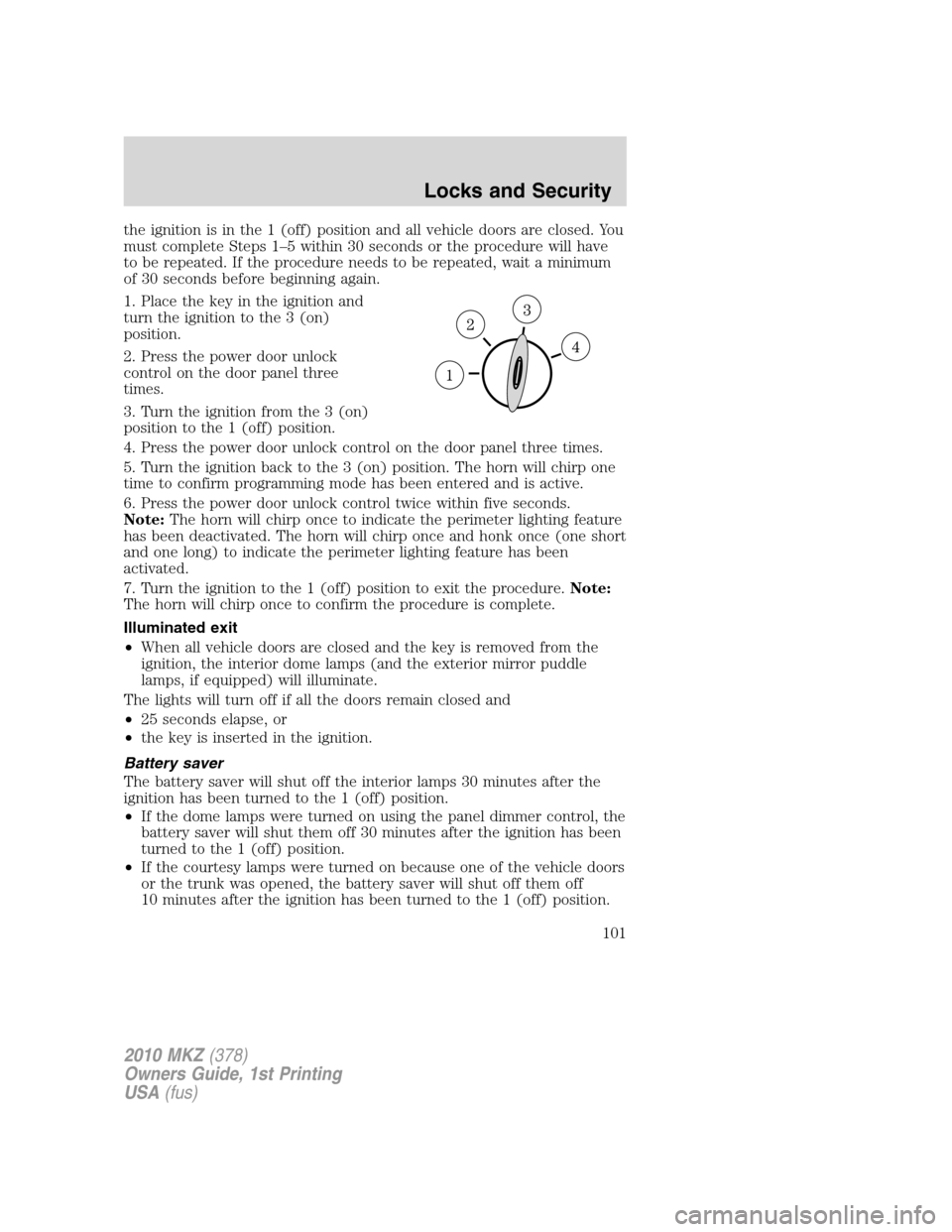
1. Place the key in the ignition and
turn the ignition to the 3 (on)
position.
2. Press the power door unlock
control on the door panel three
times.
3. Turn the ignition from the 3 (on)
position to the 1 (off) position.
4. Press the power door unlock control on the door panel three times.
5. Turn the ignition back to the 3 (on) position. The horn will chirp one
time to confirm programming mode has been entered and is active.
6. Press the power door unlock control twice within five seconds.
Note:The horn will chirp once to indicate the perimeter lighting feature
has been deactivated. The horn will chirp once and honk once (one short
and one long) to indicate the perimeter lighting feature has been
activated.
7. Turn the ignition to the 1 (off) position to exit the procedure.Note:
The horn will chirp once to confirm the procedure is complete.
Illuminated exit
•When all vehicle doors are closed and the key is removed from the
ignition, the interior dome lamps (and the exterior mirror puddle
lamps, if equipped) will illuminate.
The lights will turn off if all the doors remain closed and
•25 seconds elapse, or
•the key is inserted in the ignition.
Battery saver
The battery saver will shut off the interior lamps 30 minutes after the
ignition has been turned to the 1 (off) position.
•If the dome lamps were turned on using the panel dimmer control, the
battery saver will shut them off 30 minutes after the ignition has been
turned to the 1 (off) position.
•If the courtesy lamps were turned on because one of the vehicle doors
or the trunk was opened, the battery saver will shut off them off
10 minutes after the ignition has been turned to the 1 (off) position.
2010 MKZ(378)
Owners Guide, 1st Printing
USA(fus)
Locks and Security
101
Page 102 of 318
•The battery saver will shut off the headlamps 10 minutes after the
ignition has been turned to the 1 (off) position.
SECURICODE™ KEYLESS ENTRY SYSTEM
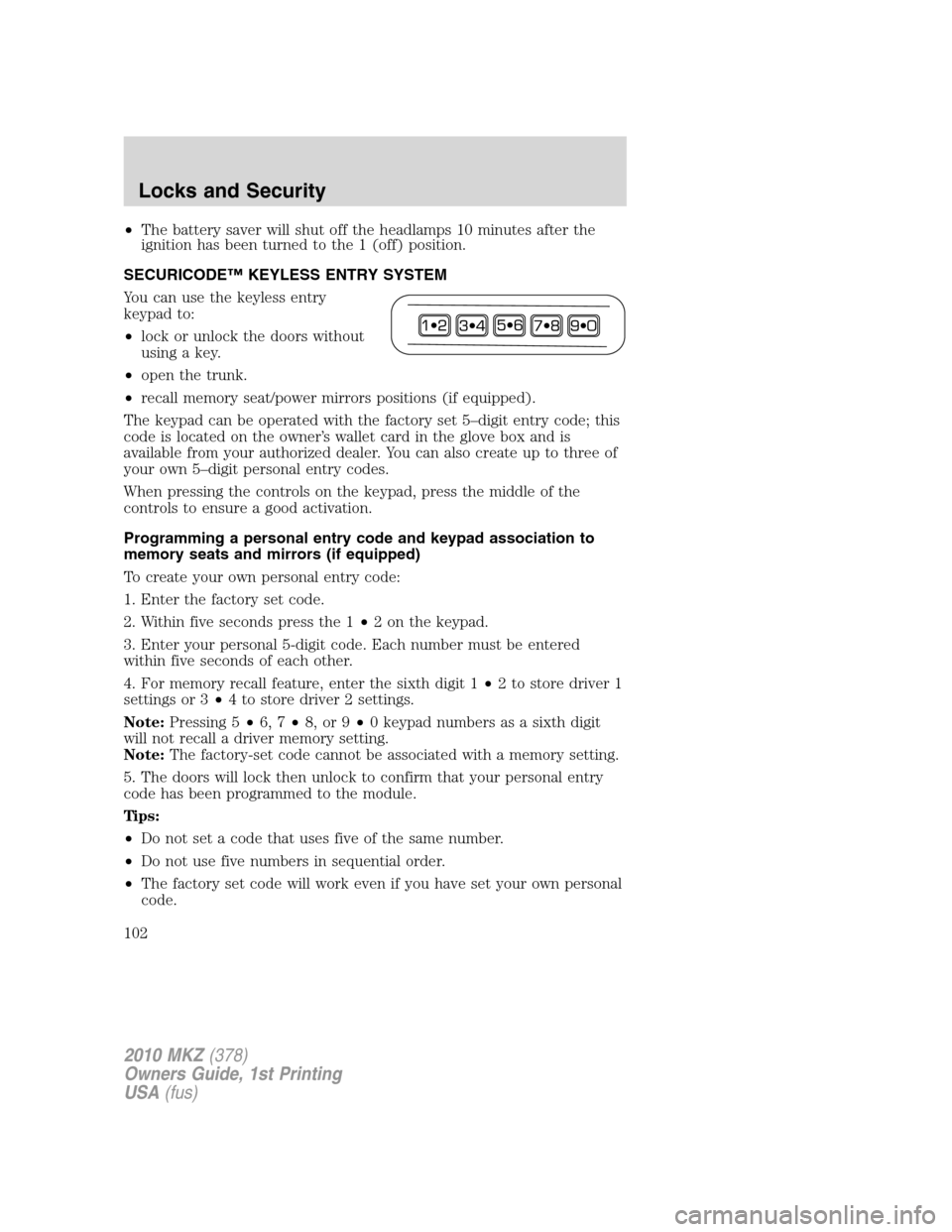
You can use the keyless entry
keypad to:
•lock or unlock the doors without
using a key.
•open the trunk.
•recall memory seat/power mirrors positions (if equipped).
The keypad can be operated with the factory set 5–digit entry code; this
code is located on the owner’s wallet card in the glove box and is
available from your authorized dealer. You can also create up to three of
your own 5–digit personal entry codes.
When pressing the controls on the keypad, press the middle of the
controls to ensure a good activation.
Programming a personal entry code and keypad association to
memory seats and mirrors (if equipped)
To create your own personal entry code:
1. Enter the factory set code.
2. Within five seconds press the 1•2 on the keypad.
3. Enter your personal 5-digit code. Each number must be entered
within five seconds of each other.
4. For memory recall feature, enter the sixth digit 1•2 to store driver 1
settings or 3•4 to store driver 2 settings.
Note:Pressing 5•6, 7•8, or 9•0 keypad numbers as a sixth digit
will not recall a driver memory setting.
Note:The factory-set code cannot be associated with a memory setting.
5. The doors will lock then unlock to confirm that your personal entry
code has been programmed to the module.
Tips:
•Do not set a code that uses five of the same number.
•Do not use five numbers in sequential order.
•The factory set code will work even if you have set your own personal
code.
2010 MKZ(378)
Owners Guide, 1st Printing
USA(fus)
Locks and Security
102
Page 103 of 318
Erasing personal code
1. Enter the factory set 5–digit code.
2. Within five seconds, press the 1•2 on the keypad and release.
3. Press and hold the 1•2 for two seconds. This must be done within
five seconds of completing Step 2.
All personal codes are now erased and only the factory set 5–digit code
will work.
Anti-scan feature
If the wrong code has been entered seven times (35 consecutive button
presses), the keypad will go into an anti-scan mode. This mode disables
the keypad for one minute and the keypad lamp will flash.
The anti-scan feature will turn off after:
•one minute of keypad inactivity.
•pressing the
control on the remote entry transmitter portion of
your Integrated Keyhead Transmitter.
•the ignition is turned on.
Unlocking and locking the doors using keyless entry
To unlock the driver’s door,enter the factory set 5-digit code or your
personal code. Each number must be pressed within five seconds of each
other. The interior lamps will illuminate.Note:If the two-stage unlocking
feature is disabled, all doors will unlock; for more information regarding
two-stage unlocking, refer to theUnlocking the doors/Two stage unlock
section earlier in this chapter.
To unlock all doors,enter the factory set code or your personal code,
then press the 3•4 control within five seconds.
To open the trunk,enter the factory set code or your personal code,
then press the 5•6 control within five seconds.
To lock all doors,press the 7•8 and the 9•0 at the same time (with
the driver’s door closed). Youdo notneed to enter the keypad code
first.
SECURILOCK™ PASSIVE ANTI-THEFT SYSTEM
SecuriLock™ passive anti-theft system is an engine immobilization
system. This system is designed to help prevent the engine from being
started unless acoded Integrated Keyhead Transmitter (IKT)
programmed to your vehicleis used. The use of the wrong type of
coded key may lead to a “no-start” condition.
2010 MKZ(378)
Owners Guide, 1st Printing
USA(fus)
Locks and Security
103
Page 107 of 318
If the key was not successfully programmed, it will not start your
vehicle’s engine and/or will not operate the remote entry features. The
theft indicator light may flash on and off. Wait 20 seconds and you may
repeat Steps 1 through 8. If failure repeats, bring your vehicle to your
authorized dealer to have the new key(s) programmed.
To program additional new unprogrammed key(s), wait 20 seconds and
then repeat this procedure from Step 1.
PERIMETER ALARM SYSTEM
The perimeter anti-theft system will help protect your vehicle from
unauthorized entry.
If there is any potential perimeter anti-theft problem with your vehicle,
ensureALL Integrated Keyhead Transmittersare brought to the
authorized dealer to aid in troubleshooting.
Arming the system
When armed, this system will respond if unauthorized entry is
attempted. When unauthorized entry occurs, the system will flash the
turn signal lamps and will sound the horn.
The system is ready to arm whenever the key is in the 1(off) position, or
is removed from the ignition. Either of the following actions will prearm
the alarm system:
•Press the
control on the remote entry transmitter portion of your
Integrated Keyhead Transmitter.
When you press the lock control twice within three seconds on the
remote entry transmitter portion of your IKT, the horn will chirp once
to let you know that all doors, the hood and the trunk are closed. If
any of these are not closed, the horn will chirp twice to warn you that
a door, the hood or the trunk is still open.
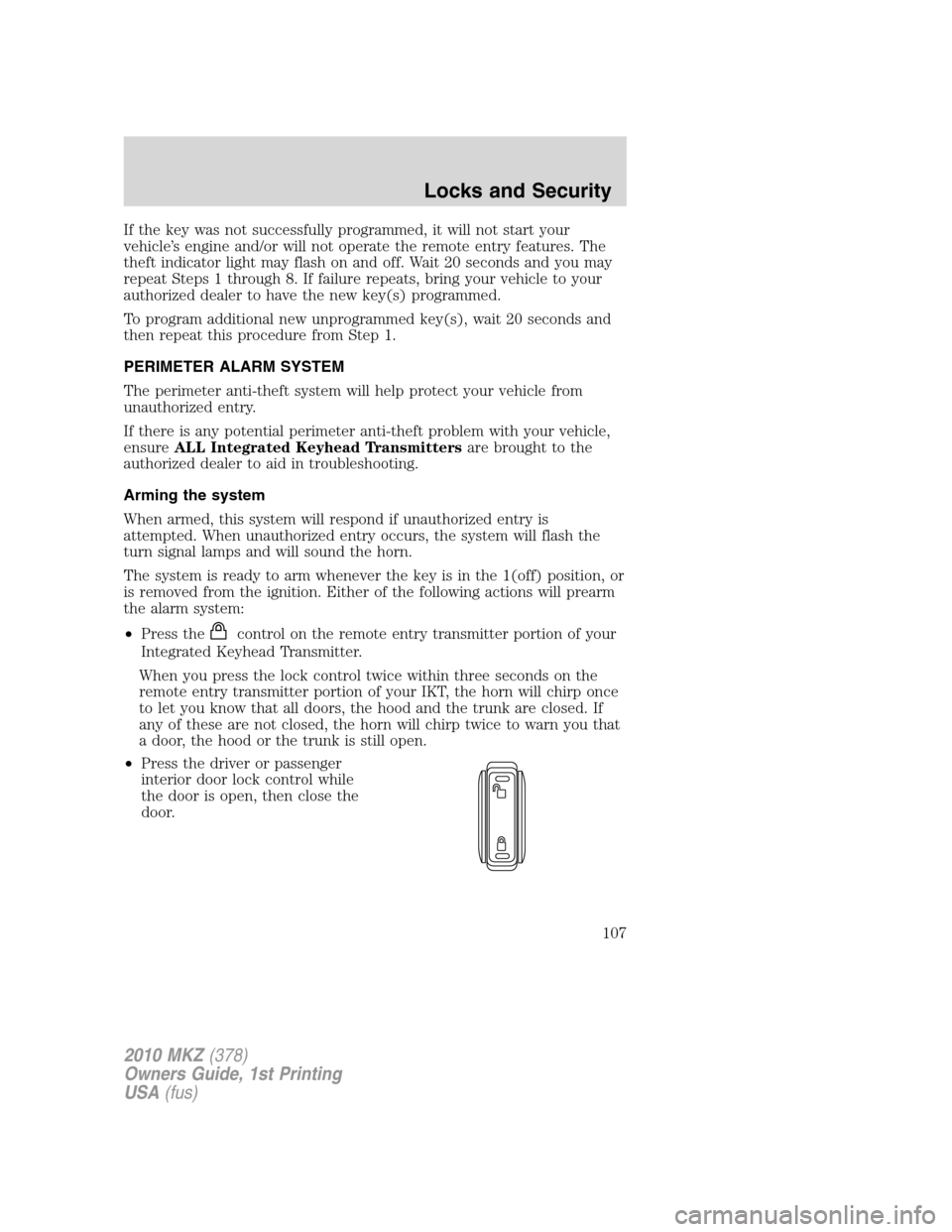
•Press the driver or passenger
interior door lock control while
the door is open, then close the
door.
2010 MKZ(378)
Owners Guide, 1st Printing
USA(fus)
Locks and Security
107
Page 108 of 318
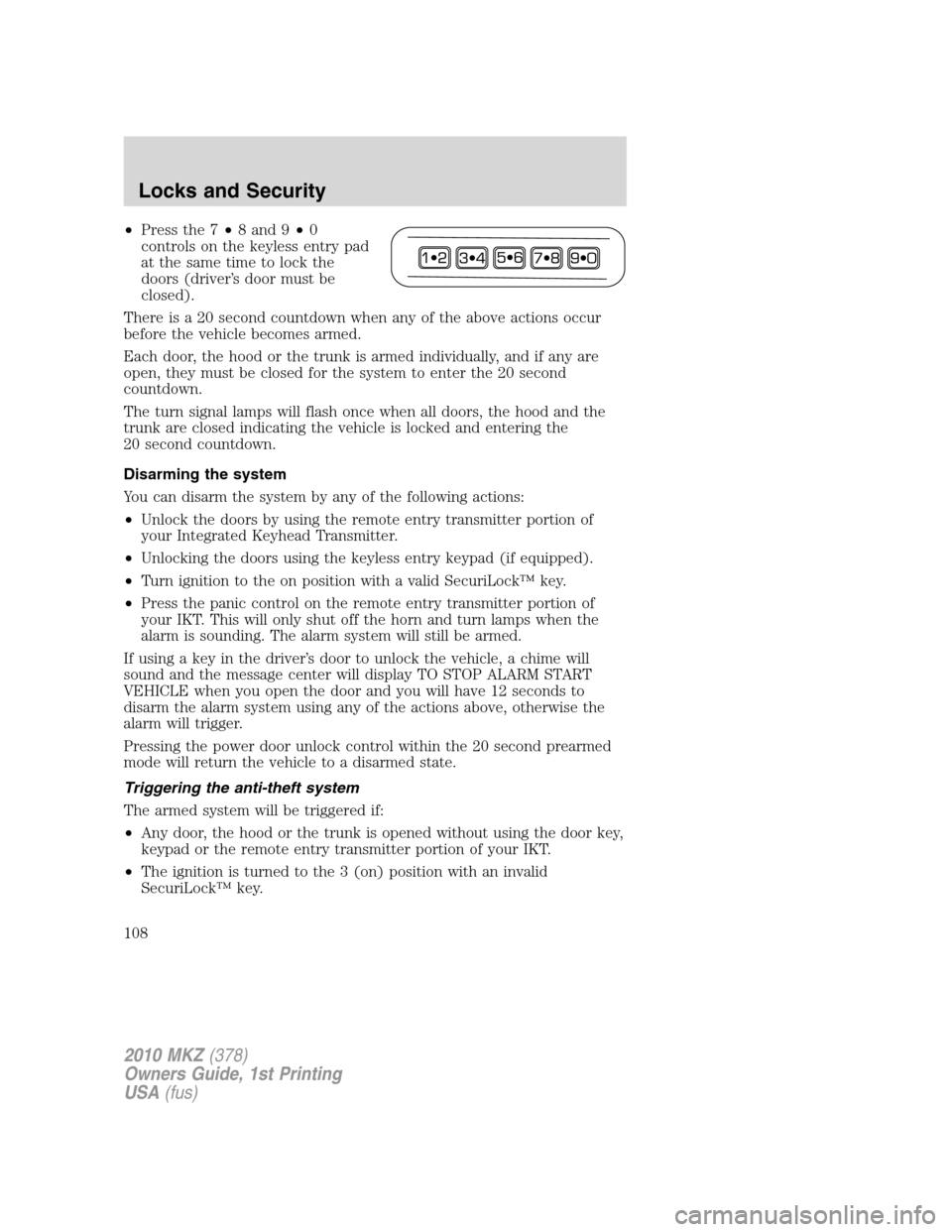
•Press the 7•8 and 9•0
controls on the keyless entry pad
at the same time to lock the
doors (driver’s door must be
closed).
There is a 20 second countdown when any of the above actions occur
before the vehicle becomes armed.
Each door, the hood or the trunk is armed individually, and if any are
open, they must be closed for the system to enter the 20 second
countdown.
The turn signal lamps will flash once when all doors, the hood and the
trunk are closed indicating the vehicle is locked and entering the
20 second countdown.
Disarming the system
You can disarm the system by any of the following actions:
•Unlock the doors by using the remote entry transmitter portion of
your Integrated Keyhead Transmitter.
•Unlocking the doors using the keyless entry keypad (if equipped).
•Turn ignition to the on position with a valid SecuriLock™ key.
•Press the panic control on the remote entry transmitter portion of
your IKT. This will only shut off the horn and turn lamps when the
alarm is sounding. The alarm system will still be armed.
If using a key in the driver’s door to unlock the vehicle, a chime will
sound and the message center will display TO STOP ALARM START
VEHICLE when you open the door and you will have 12 seconds to
disarm the alarm system using any of the actions above, otherwise the
alarm will trigger.
Pressing the power door unlock control within the 20 second prearmed
mode will return the vehicle to a disarmed state.
Triggering the anti-theft system
The armed system will be triggered if:
•Any door, the hood or the trunk is opened without using the door key,
keypad or the remote entry transmitter portion of your IKT.
•The ignition is turned to the 3 (on) position with an invalid
SecuriLock™ key.
2010 MKZ(378)
Owners Guide, 1st Printing
USA(fus)
Locks and Security
108
Page 120 of 318
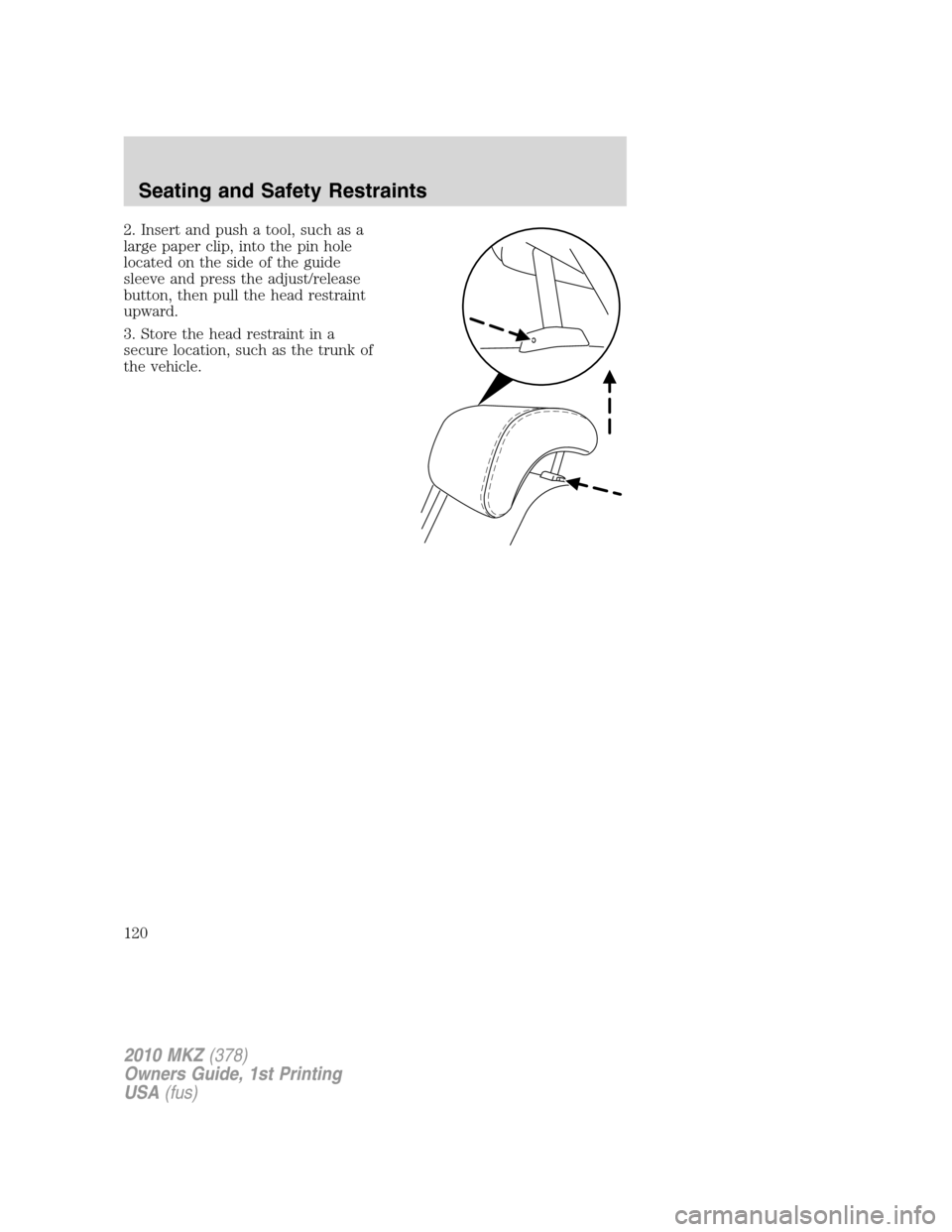
2. Insert and push a tool, such as a
large paper clip, into the pin hole
located on the side of the guide
sleeve and press the adjust/release
button, then pull the head restraint
upward.
3. Store the head restraint in a
secure location, such as the trunk of
the vehicle.
2010 MKZ(378)
Owners Guide, 1st Printing
USA(fus)
Seating and Safety Restraints
120
Page 122 of 318
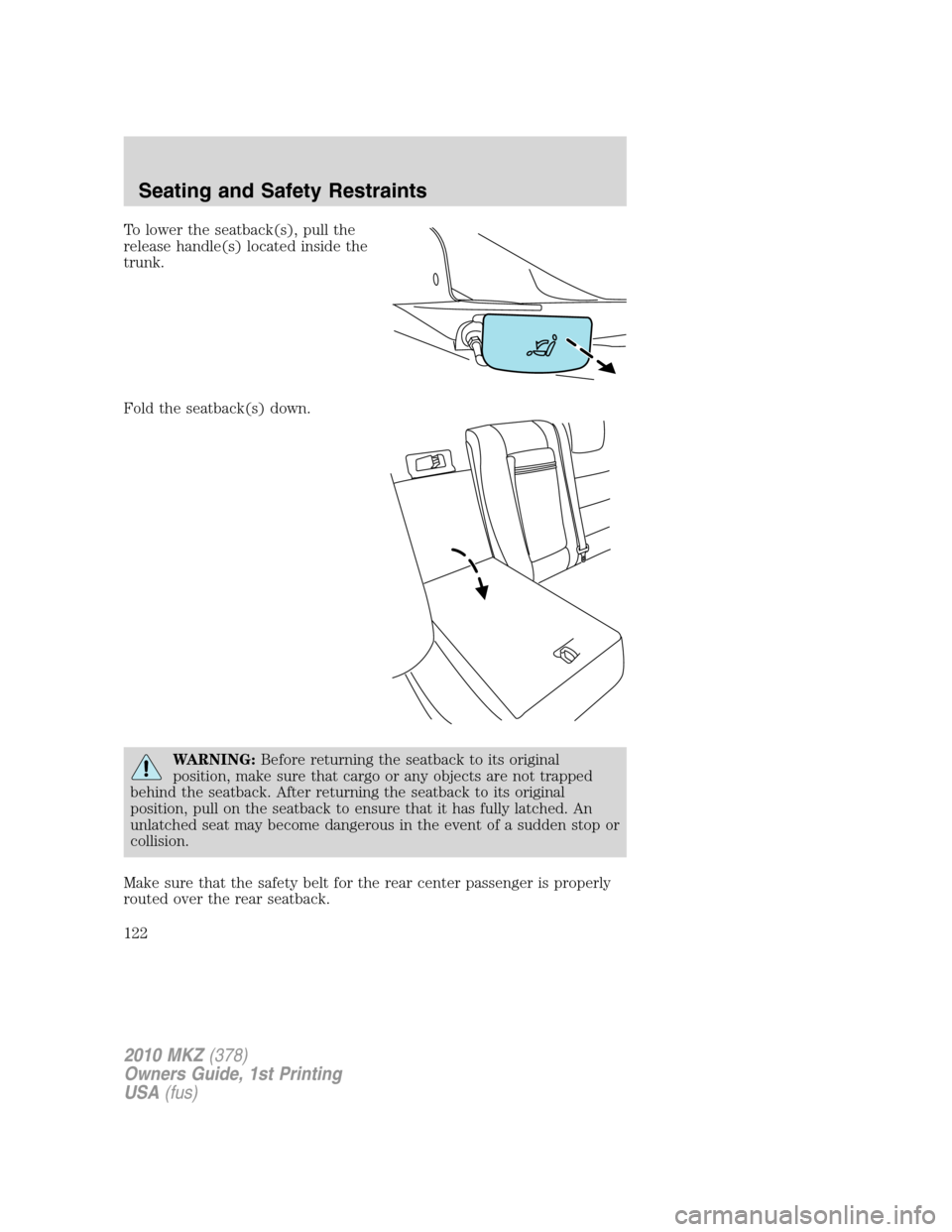
To lower the seatback(s), pull the
release handle(s) located inside the
trunk.
Fold the seatback(s) down.
WARNING:Before returning the seatback to its original
position, make sure that cargo or any objects are not trapped
behind the seatback. After returning the seatback to its original
position, pull on the seatback to ensure that it has fully latched. An
unlatched seat may become dangerous in the event of a sudden stop or
collision.
Make sure that the safety belt for the rear center passenger is properly
routed over the rear seatback.
2010 MKZ(378)
Owners Guide, 1st Printing
USA(fus)
Seating and Safety Restraints
122
Page 217 of 318
REARVIEW CAMERA SYSTEM (IF EQUIPPED)
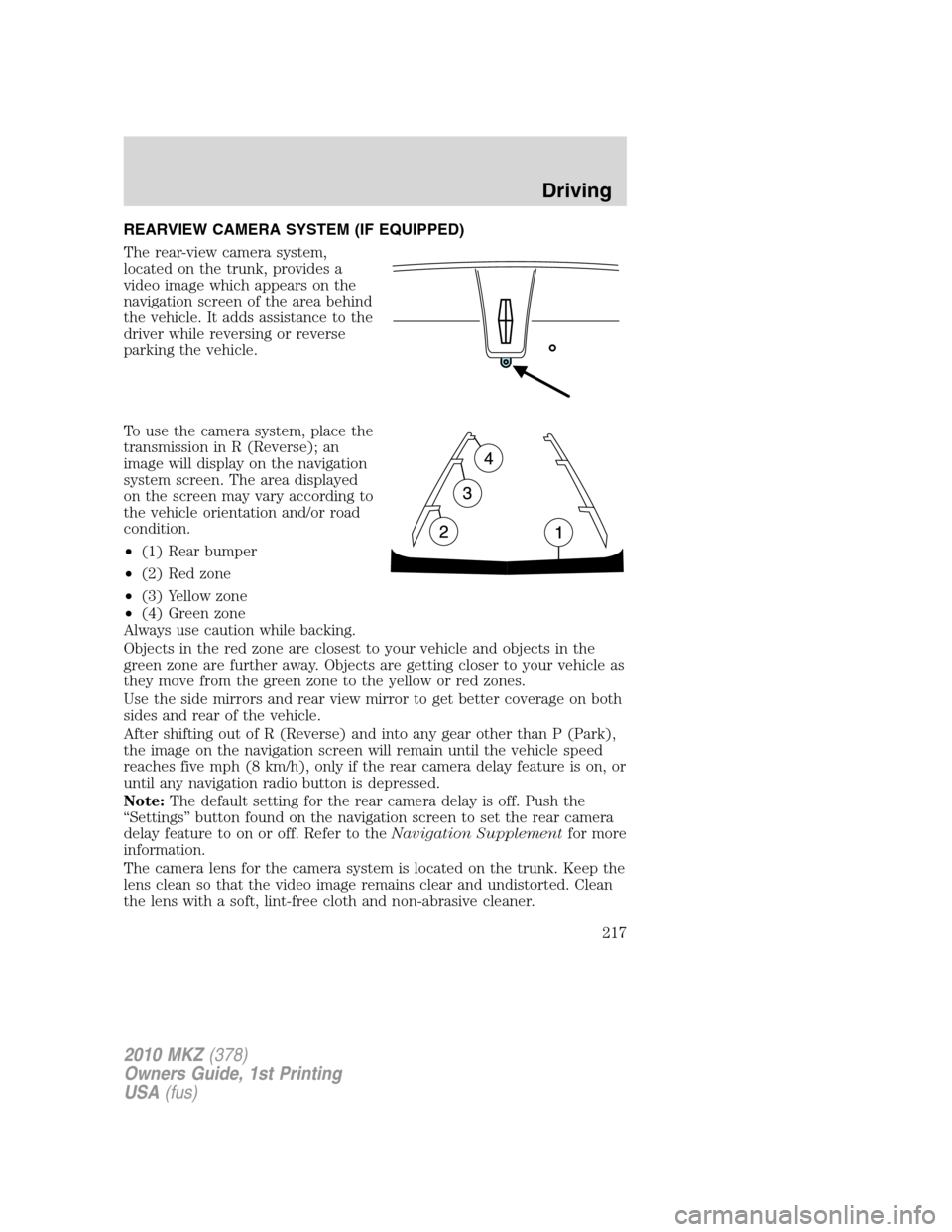
The rear-view camera system,
located on the trunk, provides a
video image which appears on the
navigation screen of the area behind
the vehicle. It adds assistance to the
driver while reversing or reverse
parking the vehicle.
To use the camera system, place the
transmission in R (Reverse); an
image will display on the navigation
system screen. The area displayed
on the screen may vary according to
the vehicle orientation and/or road
condition.
•(1) Rear bumper
•(2) Red zone
•(3) Yellow zone
•(4) Green zone
Always use caution while backing.
Objects in the red zone are closest to your vehicle and objects in the
green zone are further away. Objects are getting closer to your vehicle as
they move from the green zone to the yellow or red zones.
Use the side mirrors and rear view mirror to get better coverage on both
sides and rear of the vehicle.
After shifting out of R (Reverse) and into any gear other than P (Park),
the image on the navigation screen will remain until the vehicle speed
reaches five mph (8 km/h), only if the rear camera delay feature is on, or
until any navigation radio button is depressed.
Note:The default setting for the rear camera delay is off. Push the
“Settings” button found on the navigation screen to set the rear camera
delay feature to on or off. Refer to theNavigation Supplementfor more
information.
The camera lens for the camera system is located on the trunk. Keep the
lens clean so that the video image remains clear and undistorted. Clean
the lens with a soft, lint-free cloth and non-abrasive cleaner.
2010 MKZ(378)
Owners Guide, 1st Printing
USA(fus)
Driving
217
Page 218 of 318
Note:If the camera system image is not clear or seems distorted, it may
be covered with water droplets, snow, mud or any other substance. If
this occurs, clean the camera lens before using the camera system.
WARNING:The camera system is a reverse aid supplement
device that still requires the driver to use it in conjunction with
the rear view mirror and the side mirrors for maximum coverage.
WARNING:Objects that are close to either corner of the
bumper or under the bumper, might not be seen on the screen
due to the limited coverage of the camera system.
WARNING:Backup as slow as possible since higher speeds
might limit your reaction time to stop the vehicle.
WARNING:Do not use the camera system with the trunk open.
If the back end of the vehicle is hit or damaged, then check with your
authorized dealer to have your rear video system checked for proper
coverage and operation.
Night time and dark area use
At night time or in dark areas, the camera system relies on the reverse
lamp lighting to produce an image. Therefore it is necessary that both
reverse lamps are operating in order to get a clear image in the dark. If
either of the lamps are not operating, stop using the camera system, at
least in the dark, until the lamp(s) are replaced and functioning.
Servicing
•If the image comes on while the vehicle is not in R (Reverse), have
the system inspected by your authorized dealer.
•If the image is not clear, then check if there is anything covering the
lens such as dirt, mud, ice, snow, etc. If the image is still not clear
after cleaning, have your system inspected by your authorized dealer.
2010 MKZ(378)
Owners Guide, 1st Printing
USA(fus)
Driving
218
Page 237 of 318
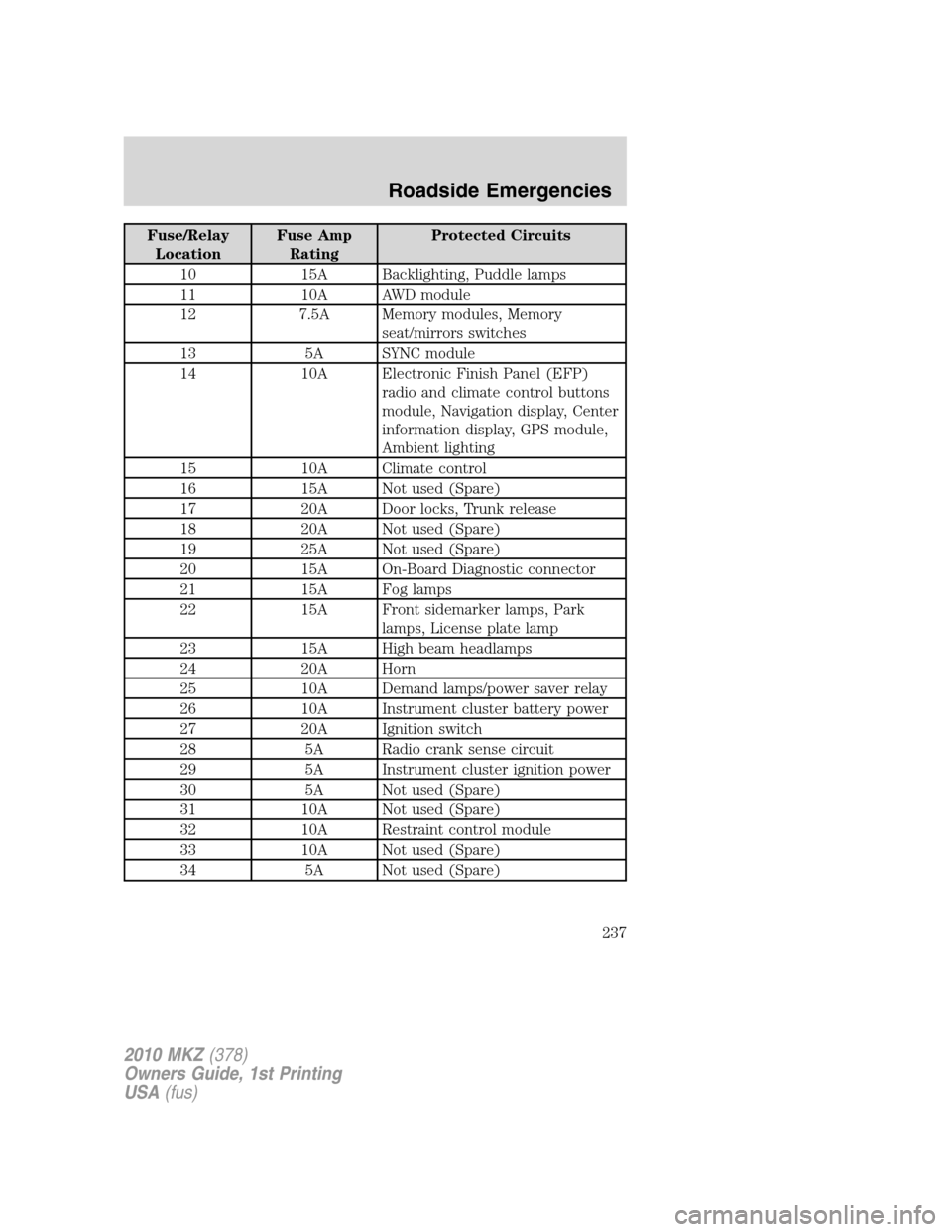
Fuse/Relay
LocationFuse Amp
RatingProtected Circuits
10 15A Backlighting, Puddle lamps
11 10A AWD module
12 7.5A Memory modules, Memory
seat/mirrors switches
13 5A SYNC module
14 10A Electronic Finish Panel (EFP)
radio and climate control buttons
module, Navigation display, Center
information display, GPS module,
Ambient lighting
15 10A Climate control
16 15A Not used (Spare)
17 20A Door locks, Trunk release
18 20A Not used (Spare)
19 25A Not used (Spare)
20 15A On-Board Diagnostic connector
21 15A Fog lamps
22 15A Front sidemarker lamps, Park
lamps, License plate lamp
23 15A High beam headlamps
24 20A Horn
25 10A Demand lamps/power saver relay
26 10A Instrument cluster battery power
27 20A Ignition switch
28 5A Radio crank sense circuit
29 5A Instrument cluster ignition power
30 5A Not used (Spare)
31 10A Not used (Spare)
32 10A Restraint control module
33 10A Not used (Spare)
34 5A Not used (Spare)
2010 MKZ(378)
Owners Guide, 1st Printing
USA(fus)
Roadside Emergencies
237