warning LINCOLN MKZ 2013 Owners Manual
[x] Cancel search | Manufacturer: LINCOLN, Model Year: 2013, Model line: MKZ, Model: LINCOLN MKZ 2013Pages: 474, PDF Size: 3.79 MB
Page 323 of 474
Have a flat serviced by an authorized
dealer in order to prevent damage to
the tire pressure monitoring system
sensors. See Tire Pressure
Monitoring System (page 298).
Replace the spare tire with a road tire
as soon as possible. During repairing
or replacing of the flat tire, have the
authorized dealer inspect the tire
pressure monitoring system sensor
for damage.
Dissimilar Spare Wheel and
Tire Assembly Information WARNING
Failure to follow these guidelines
could result in an increased risk
of loss of vehicle control, injury or
death. If you have a dissimilar spare wheel
and tire, then it is intended for
temporary use only. This means that
if you need to use it, you should
replace it as soon as possible with a
road wheel and tire assembly that is
the same size and type as the road
tires and wheels that were originally
provided by Ford. If the dissimilar
spare tire or wheel is damaged, it
should be replaced rather than
repaired.
A dissimilar spare wheel and tire
assembly is defined as a spare wheel
and tire assembly that is different in
brand, size or appearance from the
road tires and wheels and can be one
of three types: 1.
T-type mini-spare:
This spare tire
begins with the letter T for tire size
and may have Temporary Use Only
molded in the sidewall.
2. Full-size dissimilar spare with
label on wheel: This spare tire has a
label on the wheel that states: THIS
WHEEL AND TIRE ASSEMBLY FOR
TEMPORARY USE ONLY.
When driving with one of the
dissimilar spare tires listed above, do
not:
• Exceed 50 mph (80 km/h)
• Load the vehicle beyond maximum
vehicle load rating listed on the
Safety Compliance Label.
• Tow a trailer.
• Use snow chains on the end of the
vehicle with the dissimilar spare
tire.
• Use more than one dissimilar spare
tire at a time.
• Use commercial car washing
equipment.
• Try to repair the dissimilar spare
tire.
Use of one of the dissimilar spare tires
listed above at any one wheel location
can lead to impairment of the
following:
• Handling, stability and braking
performance.
• Comfort and noise.
• Ground clearance and parking at
curbs.
• Winter weather driving capability.
320
Wheels and Tires
Page 324 of 474
•
Wet weather driving capability.
• All-wheel driving capability (if
applicable).
3. Full-size dissimilar spare
without label on wheel
When driving with the full-size
dissimilar spare wheel and tire
assembly, do not:
• Exceed 70 mph (113 km/h).
• Use more than one dissimilar spare
wheel and tire assembly at a time.
• Use commercial car washing
equipment.
• Use snow chains on the end of the
vehicle with the dissimilar spare
wheel and tire assembly.
The usage of a full-size dissimilar
spare wheel and tire assembly can
lead to impairment of the following:
• Handling, stability and braking
performance.
• Comfort and noise.
• Ground clearance and parking at
curbs.
• Winter weather driving capability.
• Wet weather driving capability.
• All-wheel driving capability (if
applicable).
• Load leveling adjustment (if
applicable). When driving with the full-size
dissimilar spare wheel and tire
assembly additional caution should
be given to:
•
Towing a trailer.
• Driving vehicles equipped with a
camper body.
• Driving vehicles with a load on the
cargo rack.
Drive cautiously when using a full-size
dissimilar spare wheel and tire
assembly and seek service as soon as
possible.
Tire Change Procedure WARNINGS
When one of the front wheels is
off the ground, the transmission
alone will not prevent the vehicle from
moving or slipping off the jack, even if
the transmission selector lever is in
position P. To help prevent the vehicle from
moving when you change a tire,
be sure to place the transmission
selector lever in position
P, set the
parking brake and block (in both
directions) the wheel that is
diagonally opposite (other side and
end of the vehicle) to the tire being
changed. Never get underneath a vehicle
that is supported only by a jack.
If the vehicle slips off the jack, you or
someone else could be seriously
injured.
321
Wheels and Tires
Page 325 of 474
WARNINGS
Do not attempt to change a tire
on the side of the vehicle close
to moving traffic. Pull far enough off
the road to avoid the danger of being
hit when operating the jack or
changing the wheel. Always use the jack provided as
original equipment with your
vehicle. If using a jack other than the
one provided as original equipment
with your vehicle, make sure the jack
capacity is adequate for the vehicle
weight, including any vehicle cargo or
modifications. 1. Park on a level surface, set the
parking brake and activate the
hazard flashers.
2. Place the transmission selector lever in position P and turn the
engine off.
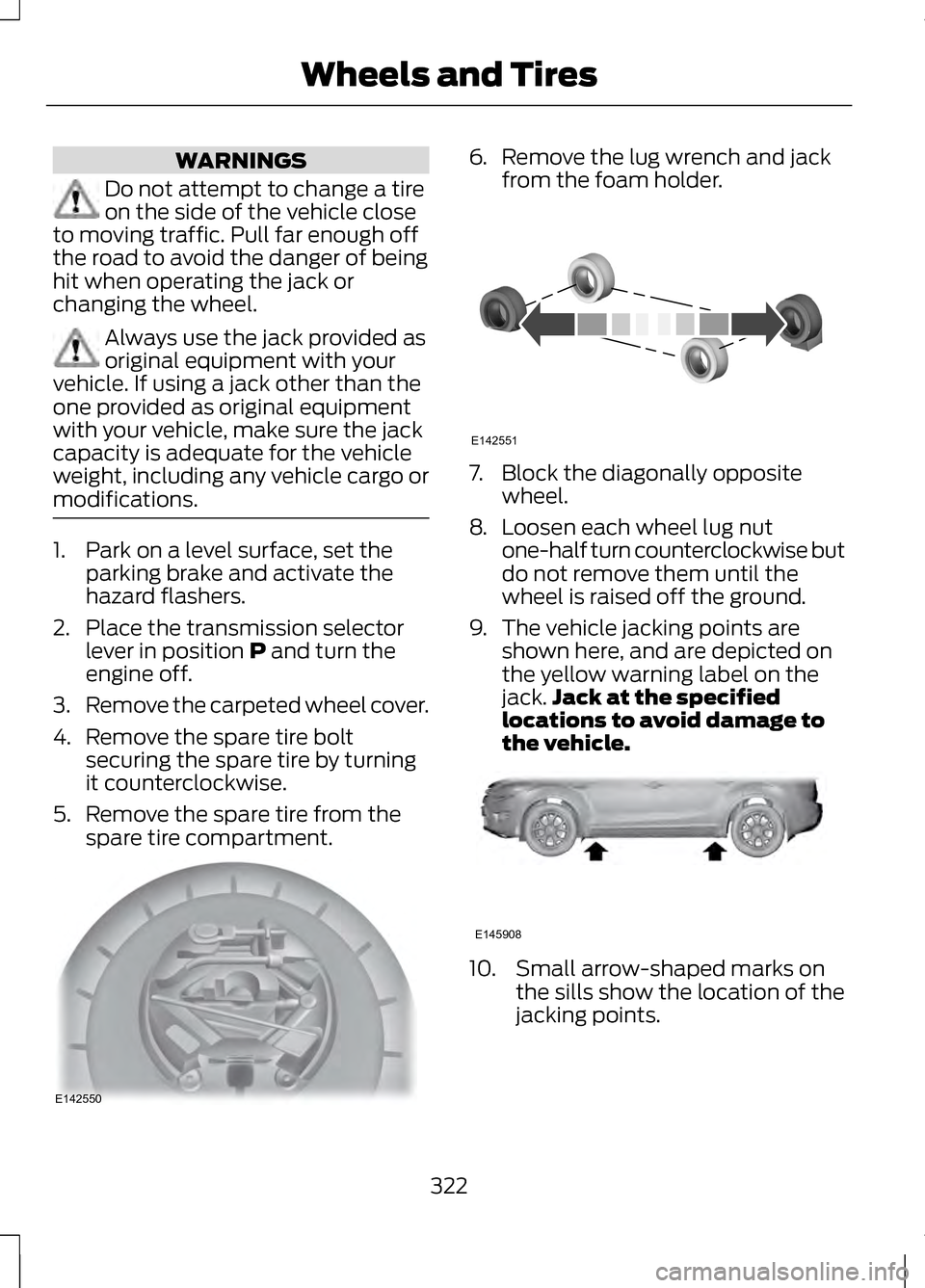
3. Remove the carpeted wheel cover.
4. Remove the spare tire bolt securing the spare tire by turning
it counterclockwise.
5. Remove the spare tire from the spare tire compartment. 6.
Remove the lug wrench and jack
from the foam holder. 7. Block the diagonally opposite
wheel.
8. Loosen each wheel lug nut
one-half turn counterclockwise but
do not remove them until the
wheel is raised off the ground.
9. The vehicle jacking points are shown here, and are depicted on
the yellow warning label on the
jack. Jack at the specified
locations to avoid damage to
the vehicle. 10. Small arrow-shaped marks on
the sills show the location of the
jacking points.
322
Wheels and TiresE142550 E142551 E145908
Page 327 of 474
TECHNICAL SPECIFICATIONS
Wheel Lug Nut Torque Specifications
WARNING
When a wheel is installed, always remove any corrosion, dirt or foreign
materials present on the mounting surfaces of the wheel or the surface
of the wheel hub, brake drum or brake disc that contacts the wheel. Make sure
that any fasteners that attach the rotor to the hub are secured so they do not
interfere with the mounting surfaces of the wheel. Installing wheels without
correct metal-to-metal contact at the wheel mounting surfaces can cause the
wheel nuts to loosen and the wheel to come off while the vehicle is in motion,
resulting in loss of control. Ib-ft (Nm)
*
Bolt size
100 (135)
M12 x 1.5
* Torque specifications are for nut and bolt threads free of dirt and rust. Use only
Ford recommended replacement fasteners.
Retighten the lug nuts to the specified torque within 100 miles (160 kilometers)
after any wheel disturbance (such as tire rotation, changing a flat tire, wheel
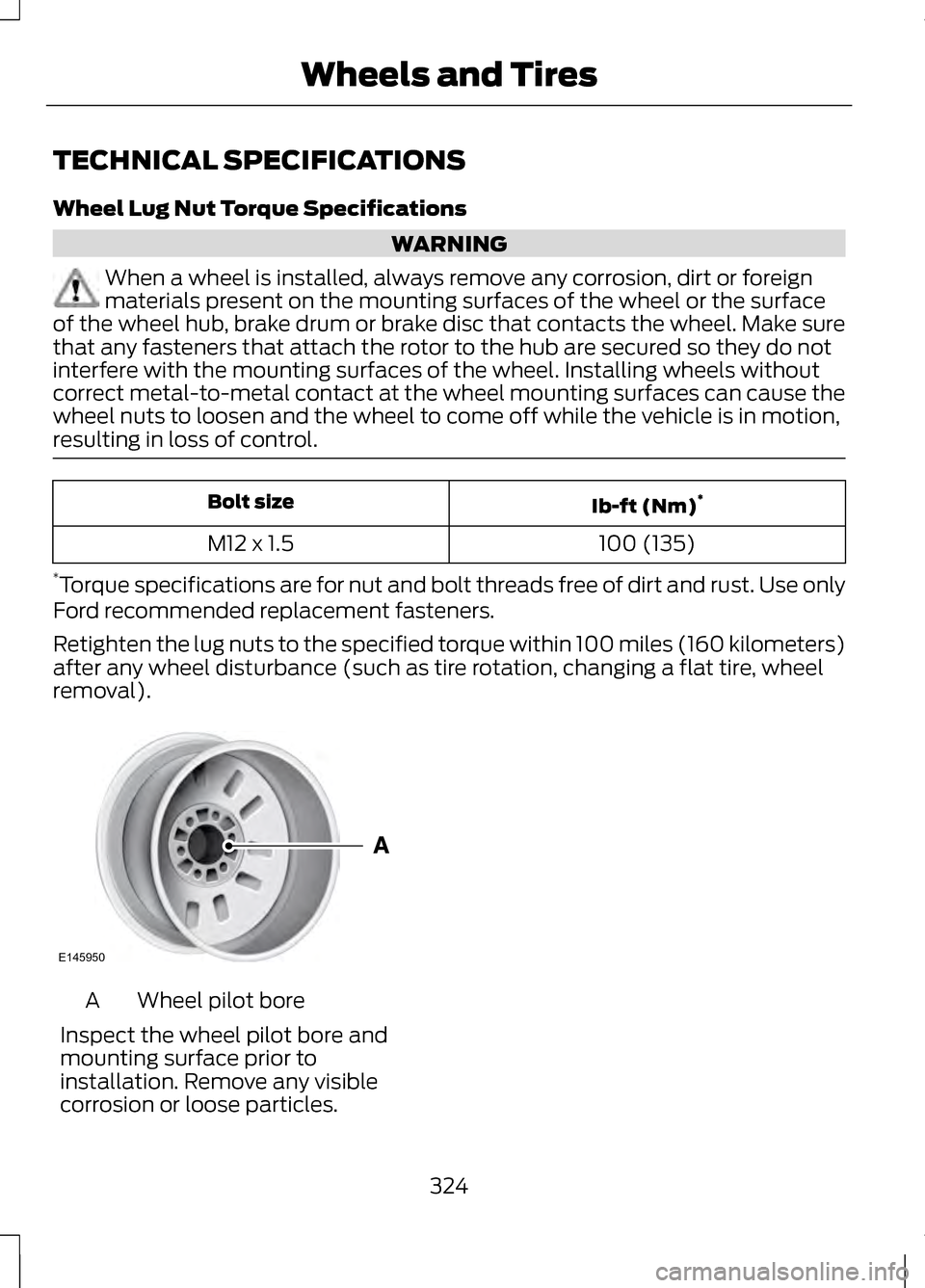
removal). Wheel pilot bore
A
Inspect the wheel pilot bore and
mounting surface prior to
installation. Remove any visible
corrosion or loose particles.
324
Wheels and TiresE145950
Page 340 of 474
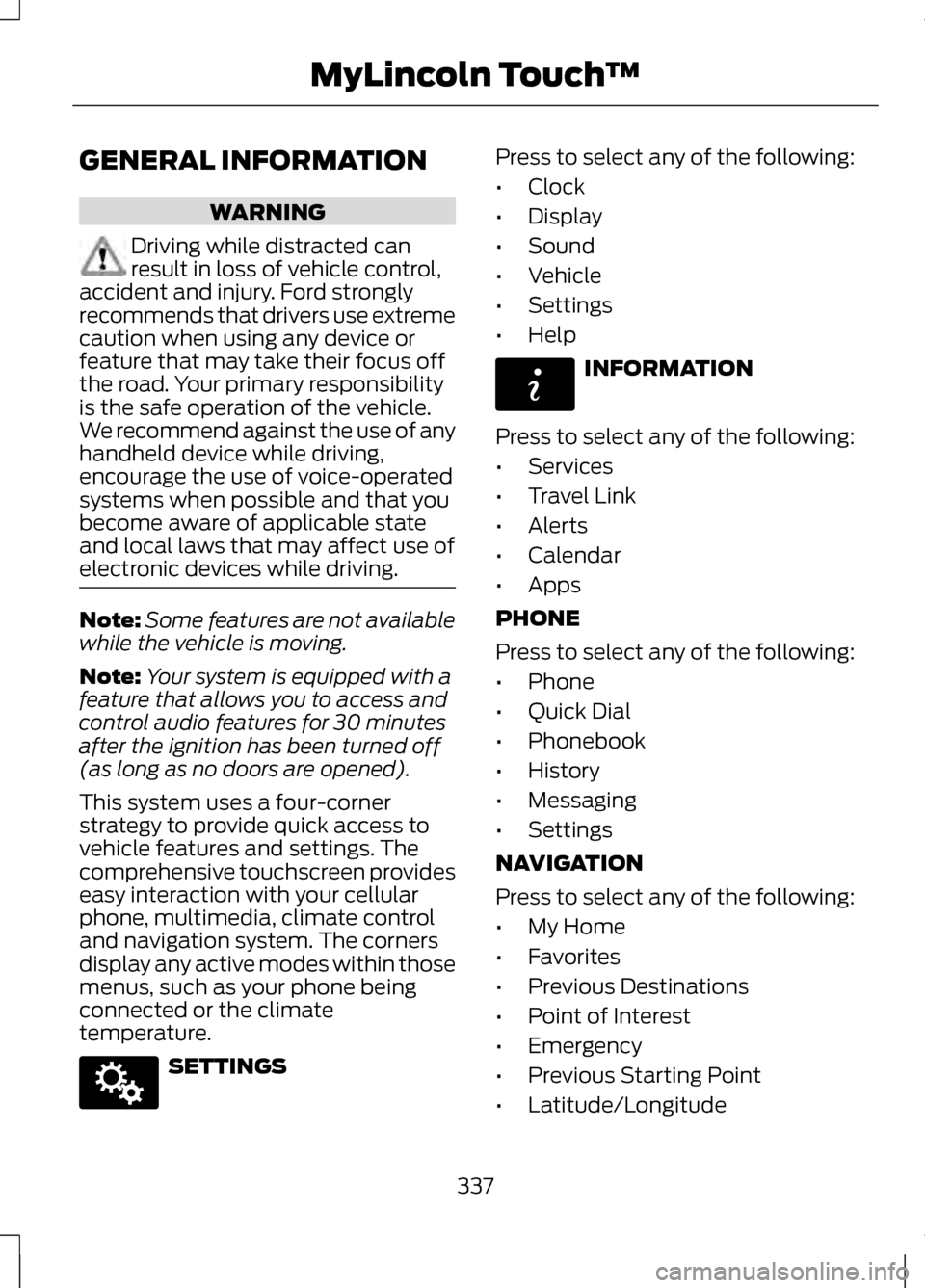
GENERAL INFORMATION
WARNING
Driving while distracted can
result in loss of vehicle control,
accident and injury. Ford strongly
recommends that drivers use extreme
caution when using any device or
feature that may take their focus off
the road. Your primary responsibility
is the safe operation of the vehicle.
We recommend against the use of any
handheld device while driving,
encourage the use of voice-operated
systems when possible and that you
become aware of applicable state
and local laws that may affect use of
electronic devices while driving. Note:
Some features are not available
while the vehicle is moving.
Note: Your system is equipped with a
feature that allows you to access and
control audio features for 30 minutes
after the ignition has been turned off
(as long as no doors are opened).
This system uses a four-corner
strategy to provide quick access to
vehicle features and settings. The
comprehensive touchscreen provides
easy interaction with your cellular
phone, multimedia, climate control
and navigation system. The corners
display any active modes within those
menus, such as your phone being
connected or the climate
temperature. SETTINGS Press to select any of the following:
•
Clock
• Display
• Sound
• Vehicle
• Settings
• Help INFORMATION
Press to select any of the following:
• Services
• Travel Link
• Alerts
• Calendar
• Apps
PHONE
Press to select any of the following:
• Phone
• Quick Dial
• Phonebook
• History
• Messaging
• Settings
NAVIGATION
Press to select any of the following:
• My Home
• Favorites
• Previous Destinations
• Point of Interest
• Emergency
• Previous Starting Point
• Latitude/Longitude
337
MyLincoln Touch
™E142607 E142608
Page 343 of 474
Safety Information
WARNING
Driving while distracted can
result in loss of vehicle control,
accident and injury. Ford strongly
recommends that drivers use extreme
caution when using any device or
feature that may take their focus off
the road. Your primary responsibility
is the safe operation of the vehicle.
We recommend against the use of any
handheld device while driving,
encourage the use of voice-operated
systems when possible and that you
become aware of applicable state
and local laws that may affect use of
electronic devices while driving. When using SYNC:
•
Do not operate playing devices if
the power cords or cables are
broken, split or damaged. Carefully
place cords and cables where they
cannot be stepped on or interfere
with the operation of pedals, seats,
compartments or safe driving
abilities.
• Do not leave playing devices in the
vehicle during extreme conditions
as it could cause them damage.
See your device's user guide for
further information. •
Do not attempt to service or repair
the system. See your authorized
dealer.
• For your safety, some SYNC
functions are speed-dependent
and cannot be performed when
the vehicle is traveling at speeds
greater than 3 mph (5 km/h).
Make sure that you review your
device's user guide before using it with
SYNC.
Speed-Restricted Features
Some features of this system may be
too difficult to use while the vehicle is
in motion so they are restricted from
being modified unless the vehicle is
not moving. Some examples of these
are listed below:
• Screens that are too crowded with
information, such as Point of
Interest (POI) reviews and ratings,
SIRIUS Travel Link sports scores,
movie times, ski conditions, etc.
• Any action that requires using a
keyboard, such as entering a
navigation destination or editing
information.
• All lists are limited so the user can
view fewer entries (e.g., phone
contacts, recent phone call
entries).
Listed below are more specific
features that can only be modified
while the vehicle is not moving:
340
MyLincoln Touch
™
Page 360 of 474
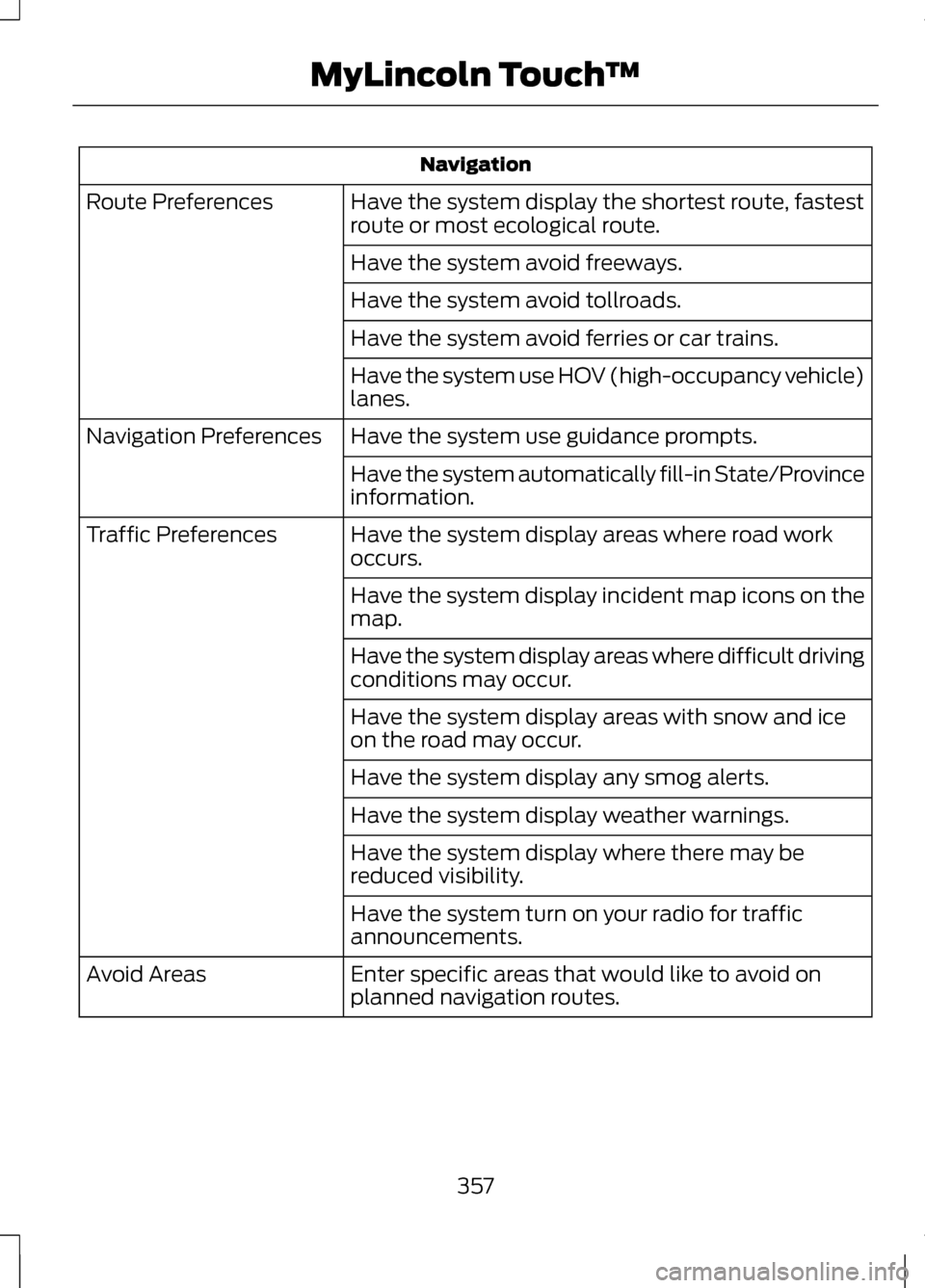
Navigation
Have the system display the shortest route, fastest
route or most ecological route.
Route Preferences
Have the system avoid freeways.
Have the system avoid tollroads.
Have the system avoid ferries or car trains.
Have the system use HOV (high-occupancy vehicle)
lanes.
Have the system use guidance prompts.
Navigation Preferences
Have the system automatically fill-in State/Province
information.
Have the system display areas where road work
occurs.
Traffic Preferences
Have the system display incident map icons on the
map.
Have the system display areas where difficult driving
conditions may occur.
Have the system display areas with snow and ice
on the road may occur.
Have the system display any smog alerts.
Have the system display weather warnings.
Have the system display where there may be
reduced visibility.
Have the system turn on your radio for traffic
announcements.
Enter specific areas that would like to avoid on
planned navigation routes.
Avoid Areas
357
MyLincoln Touch
™
Page 361 of 474
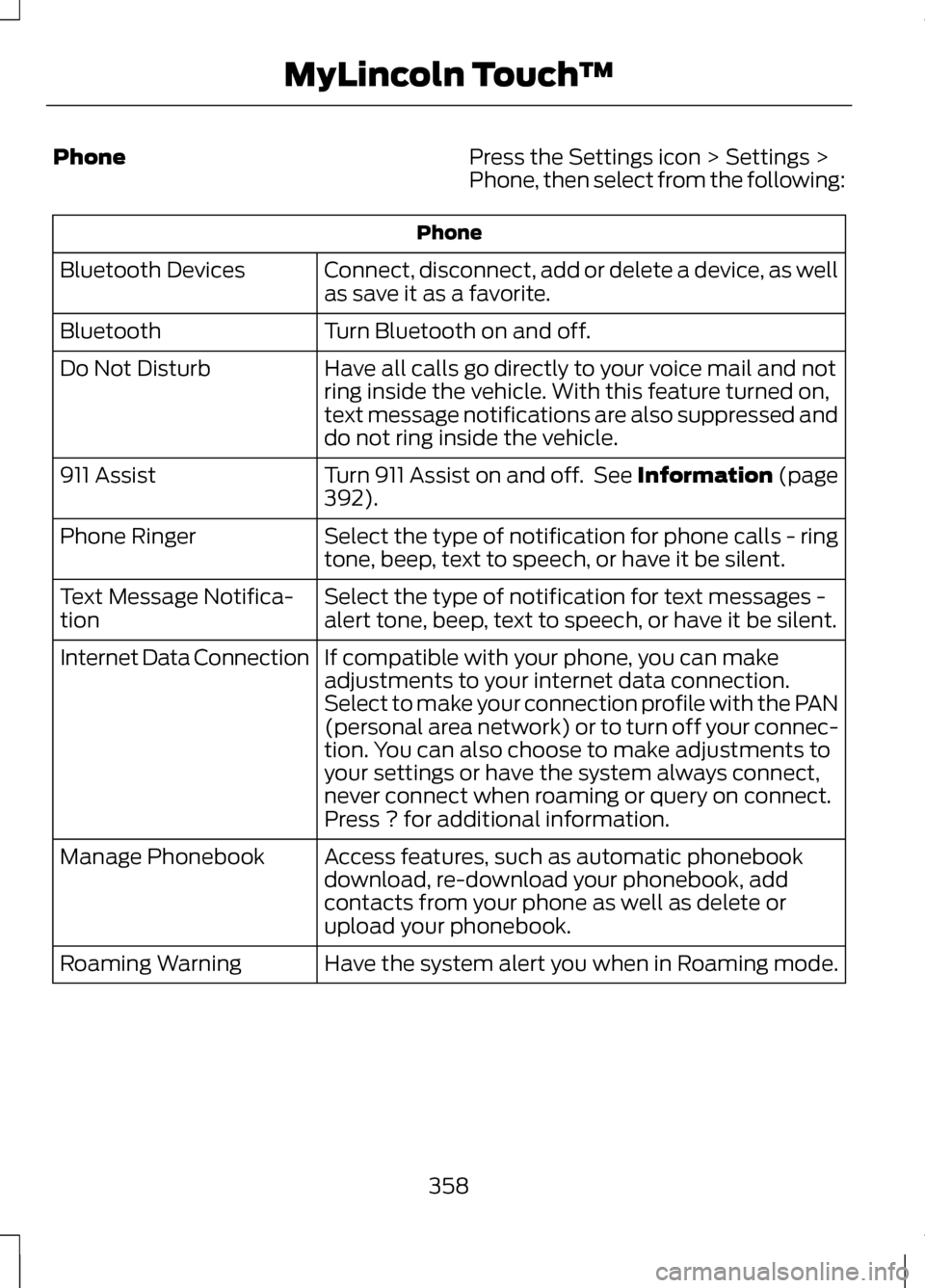
Phone
Press the Settings icon > Settings >
Phone, then select from the following:Phone
Connect, disconnect, add or delete a device, as well
as save it as a favorite.
Bluetooth Devices
Turn Bluetooth on and off.
Bluetooth
Have all calls go directly to your voice mail and not
ring inside the vehicle. With this feature turned on,
text message notifications are also suppressed and
do not ring inside the vehicle.
Do Not Disturb
Turn 911 Assist on and off. See Information (page
392).
911 Assist
Select the type of notification for phone calls - ring
tone, beep, text to speech, or have it be silent.
Phone Ringer
Select the type of notification for text messages -
alert tone, beep, text to speech, or have it be silent.
Text Message Notifica-
tion
If compatible with your phone, you can make
adjustments to your internet data connection.
Select to make your connection profile with the PAN
(personal area network) or to turn off your connec-
tion. You can also choose to make adjustments to
your settings or have the system always connect,
never connect when roaming or query on connect.
Press ? for additional information.
Internet Data Connection
Access features, such as automatic phonebook
download, re-download your phonebook, add
contacts from your phone as well as delete or
upload your phonebook.
Manage Phonebook
Have the system alert you when in Roaming mode.
Roaming Warning
358
MyLincoln Touch
™
Page 388 of 474
PHONE
Hands-free calling is one of the main
features of SYNC. Once your phone is
paired, you can access many options
using the touchscreen or voice
commands. While the system
supports a variety of features, many
are dependent on your cellular
phone's functionality.
At a minimum, most cellular phones
with Bluetooth wireless technology
support the following functions:
•
Answering an incoming call
• Ending a call
• Using privacy mode
• Dialing a number
• Redialing
• Call waiting notification
• Caller ID.
Other features such as text messaging
using Bluetooth and automatic
phonebook download are
phone-dependent features. To check
your phone's compatibility, see your
phone's user manual and visit
www.SYNCMyRide.com,
www.SYNCMyRide.ca or
www.syncmaroute.ca. Pairing Your Phone for the First
Time WARNING
Driving while distracted can
result in loss of vehicle control,
accident and injury. Ford strongly
recommends that drivers use extreme
caution when using any device that
may take their focus off the road. Your
primary responsibility is the safe
operation of the vehicle. We
recommend against the use of any
handheld device while driving,
encourage the use of voice-operated
systems when possible and that you
become aware of applicable state
and local laws that may affect use of
electronic devices while driving. The first thing you must do to use
SYNC's phone features is to pair your
Bluetooth-enabled cellular phone
with SYNC. This allows you to use
your phone in a hands-free manner.
Note:
Make sure the vehicle ignition
and radio are turned on and that the
transmission is in position P.
1. Touch Add Phone in the upper left
corner of the touchscreen.
2. Make sure that Bluetooth is set to On
and that your cellular phone is
in the proper mode. See your
phone's user guide if necessary.
385
MyLincoln Touch
™
Page 399 of 474
"SERVICES"
"Route summary" "Services"
"Update route" "Help"
SIRIUS Travel Link (If Equipped) WARNING
Driving while distracted can
result in loss of vehicle control,
accident and injury. Ford strongly
recommends that drivers use extreme
caution when using any device or
feature that may take their focus off
the road. Your primary responsibility
is the safe operation of the vehicle.
We recommend against the use of any
handheld device while driving,
encourage the use of voice-operated
systems when possible and that you
become aware of applicable state
and local laws that may affect use of
electronic devices while driving. Note:
In order to use SIRIUS Travel
Link, your vehicle must be equipped
with navigation and your navigation SD
card must be in the SD card slot. Note:
A paid subscription is required
to access and use these features. Go
to www.siriusxm.com/travellink for
more information.
Note: Visit www.siriusxm.com/traffic#
and click on Coverage map and details
for a complete listing of all traffic areas
covered by SIRIUS Travel Link.
Note: Neither SIRIUS nor Ford is
responsible for any errors or
inaccuracies in the SIRIUS Travel Link
services or its use in vehicles.
SIRIUS Travel Link (if activated) can
help you locate the best gas prices,
find movie listings, get current traffic
alerts, access the current weather
map, get accurate ski conditions and
scores to current sports games.
Press the Information button, select
Sirius Travel Link, then choose from
any of the following services: You Can
When You Select
Identify traffic incidents on your route, nearby your
vehicle's current location or near any of your favorite
places (if programmed).
Traffic On Route
Traffic Nearby
View fuel prices at stations close to your vehicle's
location or on an active navigation route.
Fuel Prices
396
MyLincoln Touch
™