airbag LINCOLN MKZ 2013 Owner's Manual
[x] Cancel search | Manufacturer: LINCOLN, Model Year: 2013, Model line: MKZ, Model: LINCOLN MKZ 2013Pages: 474, PDF Size: 3.79 MB
Page 52 of 474
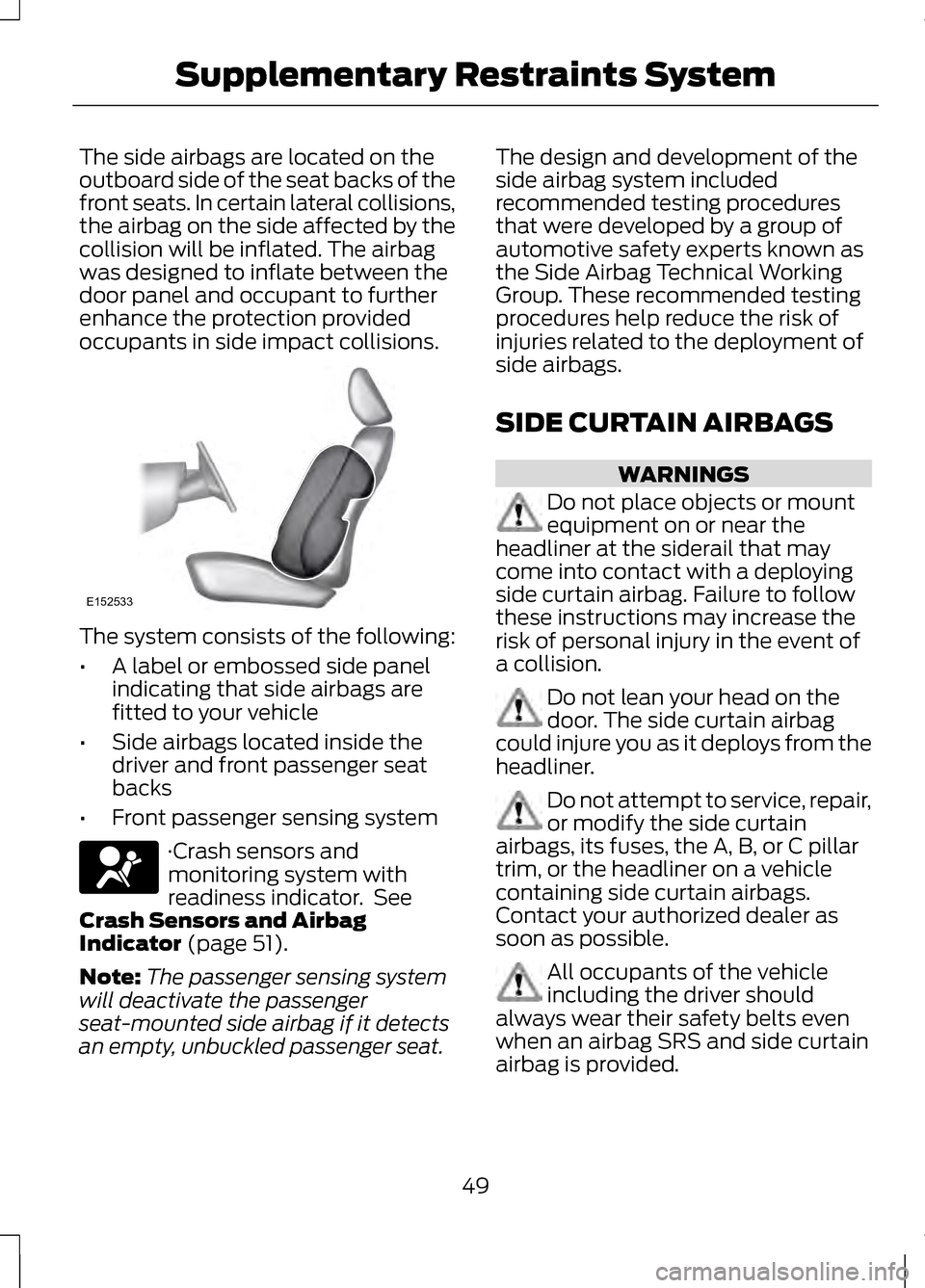
The side airbags are located on the
outboard side of the seat backs of the
front seats. In certain lateral collisions,
the airbag on the side affected by the
collision will be inflated. The airbag
was designed to inflate between the
door panel and occupant to further
enhance the protection provided
occupants in side impact collisions.
The system consists of the following:
•
A label or embossed side panel
indicating that side airbags are
fitted to your vehicle
• Side airbags located inside the
driver and front passenger seat
backs
• Front passenger sensing system ·Crash sensors and
monitoring system with
readiness indicator. See
Crash Sensors and Airbag
Indicator (page 51).
Note: The passenger sensing system
will deactivate the passenger
seat-mounted side airbag if it detects
an empty, unbuckled passenger seat. The design and development of the
side airbag system included
recommended testing procedures
that were developed by a group of
automotive safety experts known as
the Side Airbag Technical Working
Group. These recommended testing
procedures help reduce the risk of
injuries related to the deployment of
side airbags.
SIDE CURTAIN AIRBAGS
WARNINGS
Do not place objects or mount
equipment on or near the
headliner at the siderail that may
come into contact with a deploying
side curtain airbag. Failure to follow
these instructions may increase the
risk of personal injury in the event of
a collision. Do not lean your head on the
door. The side curtain airbag
could injure you as it deploys from the
headliner. Do not attempt to service, repair,
or modify the side curtain
airbags, its fuses, the A, B, or C pillar
trim, or the headliner on a vehicle
containing side curtain airbags.
Contact your authorized dealer as
soon as possible. All occupants of the vehicle
including the driver should
always wear their safety belts even
when an airbag SRS and side curtain
airbag is provided.
49
Supplementary Restraints SystemE152533
Page 53 of 474
WARNINGS
To reduce risk of injury, do not
obstruct or place objects in the
deployment path of the side curtain
airbag. If the side curtain airbags have
deployed, the side curtain
airbags will not function again. The
side curtain airbags (including the A,
B and C pillar trim and headliner)
must be inspected and serviced by an
authorized dealer. If the side curtain
airbag is not replaced, the unrepaired
area will increase the risk of injury in a
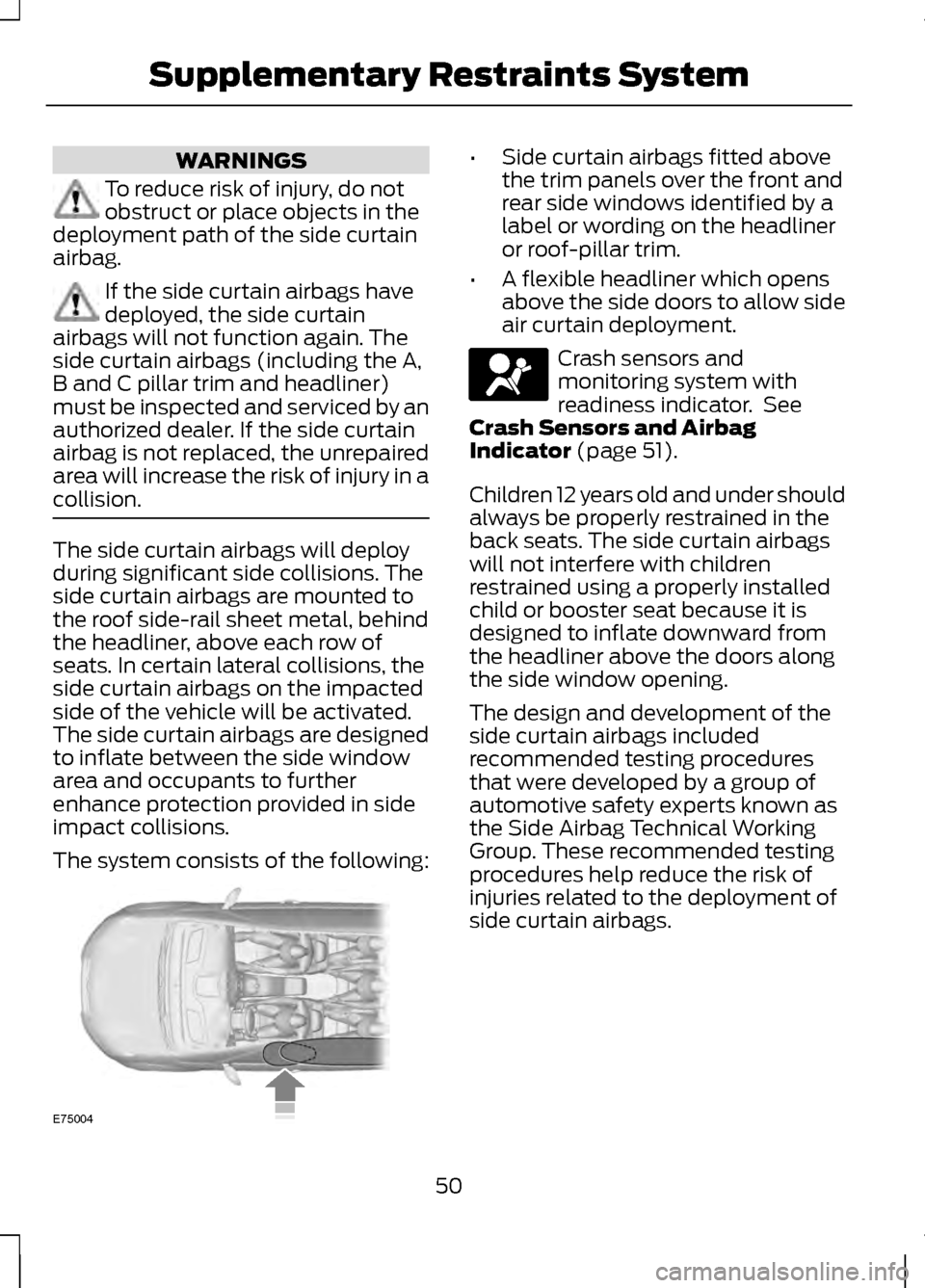
collision. The side curtain airbags will deploy
during significant side collisions. The
side curtain airbags are mounted to
the roof side-rail sheet metal, behind
the headliner, above each row of
seats. In certain lateral collisions, the
side curtain airbags on the impacted
side of the vehicle will be activated.
The side curtain airbags are designed
to inflate between the side window
area and occupants to further
enhance protection provided in side
impact collisions.
The system consists of the following: •
Side curtain airbags fitted above
the trim panels over the front and
rear side windows identified by a
label or wording on the headliner
or roof-pillar trim.
• A flexible headliner which opens
above the side doors to allow side
air curtain deployment. Crash sensors and
monitoring system with
readiness indicator. See
Crash Sensors and Airbag
Indicator (page 51).
Children 12 years old and under should
always be properly restrained in the
back seats. The side curtain airbags
will not interfere with children
restrained using a properly installed
child or booster seat because it is
designed to inflate downward from
the headliner above the doors along
the side window opening.
The design and development of the
side curtain airbags included
recommended testing procedures
that were developed by a group of
automotive safety experts known as
the Side Airbag Technical Working
Group. These recommended testing
procedures help reduce the risk of
injuries related to the deployment of
side curtain airbags.
50
Supplementary Restraints SystemE75004
Page 54 of 474
CRASH SENSORS AND
AIRBAG INDICATOR
WARNING
Modifying or adding equipment
to the front end of the vehicle
(including frame, bumper, front end
body structure and tow hooks) may
affect the performance of the airbag
system, increasing the risk of injury.
Do not modify the front end of the
vehicle. The vehicle has a collection of crash
and occupant sensors which provide
information to the Restraints Control
Module which deploys (activates) the
front safety belt pretensioners, driver
airbag, passenger airbag, knee
airbag(s), seat mounted side airbags,
and the side curtain airbags. Based on
the type of collision (frontal impact
or side impact), the restraints control
module will deploy the appropriate
safety devices.
The restraints control module also
monitors the readiness of the above
safety devices plus the crash and
occupant sensors. The readiness of
the safety system is indicated by a
warning indicator light in the
instrument cluster or by a backup tone
if the warning light is not working.
Routine maintenance of the airbag is
not required.
A difficulty with the system is
indicated by one or more of the
following: · The readiness light will not
illuminate immediately after
the ignition is turned on.
• The readiness light will either flash
or stay lit.
• A series of five beeps will be heard.
The tone pattern will repeat
periodically until the problem, the
light or both are repaired.
If any of these things happen, even
intermittently, have the supplemental
restraint system serviced at an
authorized dealer immediately. Unless
serviced, the system may not function
properly in the event of a collision.
The safety belt pretensioners and the
front airbag supplemental restraint
system are designed to activate when
the vehicle sustains longitudinal
deceleration sufficient to cause the
restraints control module to deploy a
safety device.
The fact that the safety belt
pretensioners or front airbags did not
activate for both front seat occupants
in a collision does not mean that
something is wrong with the system.
Rather, it means the restraints control
module determined the accident
conditions (crash severity, belt usage,
etc.) were not appropriate to activate
these safety devices.
51
Supplementary Restraints System
Page 55 of 474
•
Front airbags are designed to
activate only in frontal and
near-frontal collisions (not
rollovers, side impacts or rear
impacts) unless the collision
causes sufficient longitudinal
deceleration.
• The safety belt pretensioners are
designed to activate in frontal and
near-frontal collisions, and may
also activate when a side curtain
deploys.
• A knee airbag deploys from under
the instrument panel when the
front airbag activates in a collision.
• Side airbags and side curtain
airbags are designed to inflate in
side-impact collisions, not
rollovers, rear impacts, frontal or
near-frontal collisions, unless the
collision causes sufficient lateral
deceleration.
AIRBAG DISPOSAL
Contact your authorized dealer as
soon as possible. Airbags MUST BE
disposed of by qualified personnel.
52
Supplementary Restraints System
Page 100 of 474
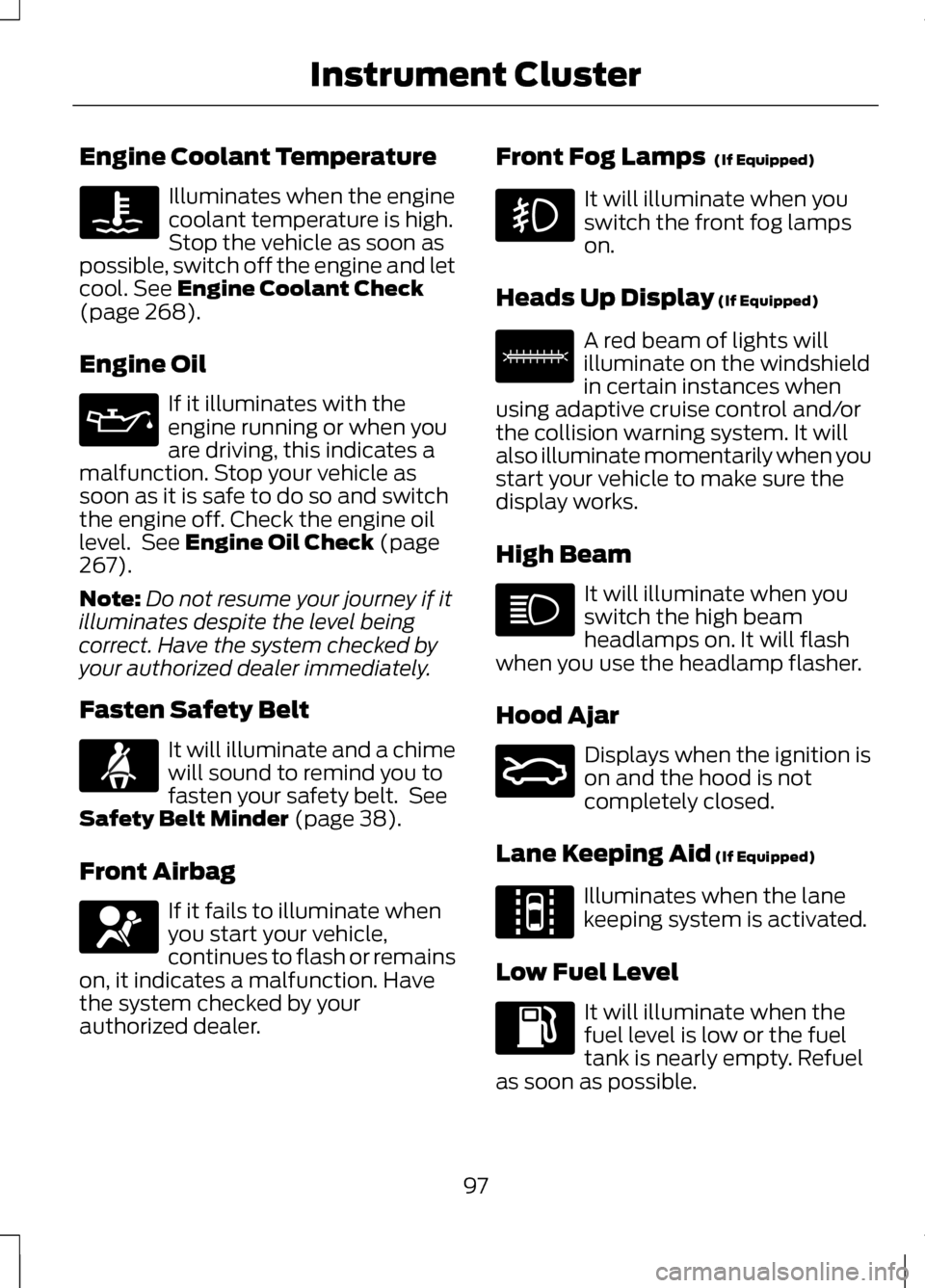
Engine Coolant Temperature
Illuminates when the engine
coolant temperature is high.
Stop the vehicle as soon as
possible, switch off the engine and let
cool. See Engine Coolant Check
(page 268).
Engine Oil If it illuminates with the
engine running or when you
are driving, this indicates a
malfunction. Stop your vehicle as
soon as it is safe to do so and switch
the engine off. Check the engine oil
level. See
Engine Oil Check (page
267).
Note: Do not resume your journey if it
illuminates despite the level being
correct. Have the system checked by
your authorized dealer immediately.
Fasten Safety Belt It will illuminate and a chime
will sound to remind you to
fasten your safety belt. See
Safety Belt Minder
(page 38).
Front Airbag If it fails to illuminate when
you start your vehicle,
continues to flash or remains
on, it indicates a malfunction. Have
the system checked by your
authorized dealer. Front Fog Lamps
(If Equipped) It will illuminate when you
switch the front fog lamps
on.
Heads Up Display
(If Equipped) A red beam of lights will
illuminate on the windshield
in certain instances when
using adaptive cruise control and/or
the collision warning system. It will
also illuminate momentarily when you
start your vehicle to make sure the
display works.
High Beam It will illuminate when you
switch the high beam
headlamps on. It will flash
when you use the headlamp flasher.
Hood Ajar Displays when the ignition is
on and the hood is not
completely closed.
Lane Keeping Aid
(If Equipped) Illuminates when the lane
keeping system is activated.
Low Fuel Level It will illuminate when the
fuel level is low or the fuel
tank is nearly empty. Refuel
as soon as possible.
97
Instrument Cluster E156133 E159324 E144813
Page 110 of 474
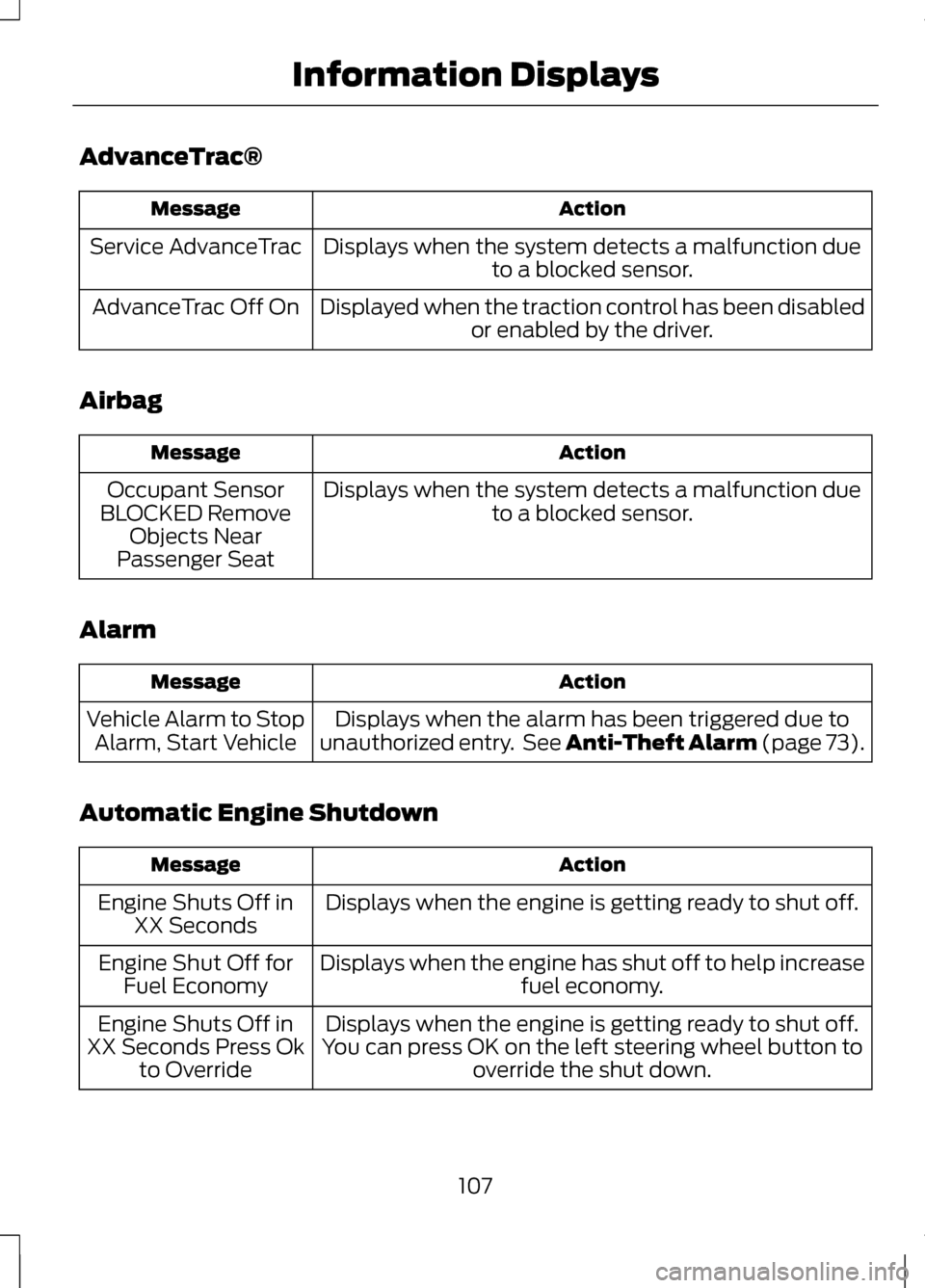
AdvanceTrac®
Action
Message
Displays when the system detects a malfunction dueto a blocked sensor.
Service AdvanceTrac
Displayed when the traction control has been disabledor enabled by the driver.
AdvanceTrac Off On
Airbag Action
Message
Displays when the system detects a malfunction dueto a blocked sensor.
Occupant Sensor
BLOCKED Remove Objects Near
Passenger Seat
Alarm Action
Message
Displays when the alarm has been triggered due to
unauthorized entry. See Anti-Theft Alarm (page 73).
Vehicle Alarm to Stop
Alarm, Start Vehicle
Automatic Engine Shutdown Action
Message
Displays when the engine is getting ready to shut off.
Engine Shuts Off in
XX Seconds
Displays when the engine has shut off to help increase fuel economy.
Engine Shut Off for
Fuel Economy
Displays when the engine is getting ready to shut off.
You can press OK on the left steering wheel button to override the shut down.
Engine Shuts Off in
XX Seconds Press Ok to Override
107
Information Displays
Page 264 of 474
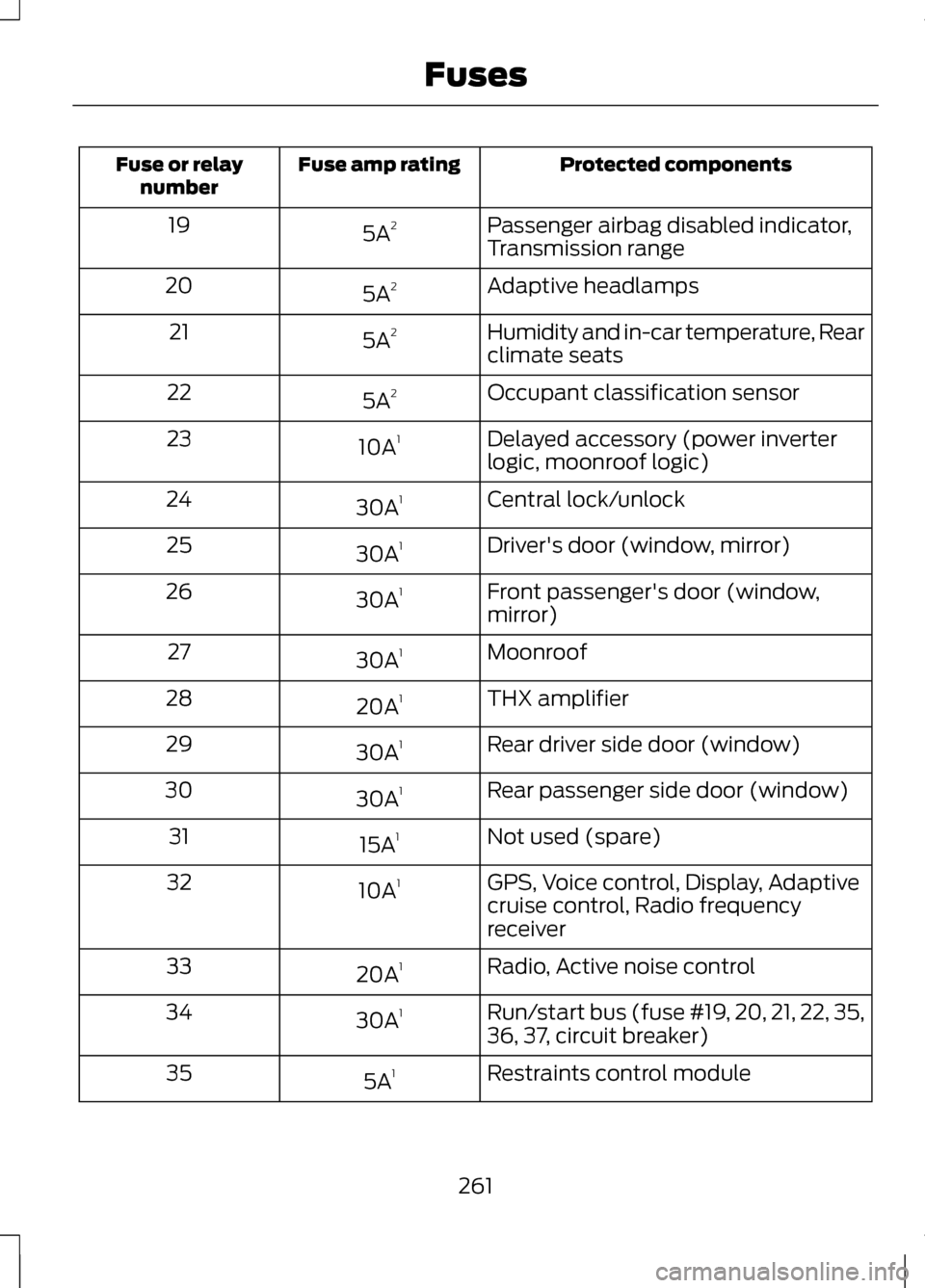
Protected components
Fuse amp rating
Fuse or relay
number
Passenger airbag disabled indicator,
Transmission range
5A
2
19
Adaptive headlamps
5A 2
20
Humidity and in-car temperature, Rear
climate seats
5A
2
21
Occupant classification sensor
5A 2
22
Delayed accessory (power inverter
logic, moonroof logic)
10A
1
23
Central lock/unlock
30A 1
24
Driver's door (window, mirror)
30A 1
25
Front passenger's door (window,
mirror)
30A
1
26
Moonroof
30A 1
27
THX amplifier
20A 1
28
Rear driver side door (window)
30A 1
29
Rear passenger side door (window)
30A 1
30
Not used (spare)
15A 1
31
GPS, Voice control, Display, Adaptive
cruise control, Radio frequency
receiver
10A
1
32
Radio, Active noise control
20A 1
33
Run/start bus (fuse #19, 20, 21, 22, 35,
36, 37, circuit breaker)
30A
1
34
Restraints control module
5A 1
35
261
Fuses
Page 290 of 474
If you cannot remove those streaks
after cleaning with the glass cleaner
or if the wipers chatter and move in a
jerky motion, clean the outer surface
of the windshield and the wiper
blades using a sponge or soft cloth
with a neutral detergent or
mild-abrasive cleaning solution. After
cleaning, rinse the windshield and
wiper blades with clean water. The
windshield is clean if beads do not
form when you rinse the windshield
with water.
Note:
Do not use sharp objects, such
as a razor blade, to clean the inside of
the rear window or to remove decals,
as it may cause damage to the rear
window defroster ’s heated grid lines.
CLEANING THE INTERIOR WARNINGS
Do not use cleaning solvents,
bleach or dye on the vehicle
’s
safety belts, as these actions may
weaken the belt webbing. On vehicles equipped with
seat-mounted airbags, do not
use chemical solvents or strong
detergents. Such products could
contaminate the side airbag system
and affect performance of the side
airbag in a collision. For fabric, carpets, cloth seats, safety
belts and seats equipped with side
airbags:
•
Remove dust and loose dirt with a
vacuum cleaner.
• Remove light stains and soil with
Motorcraft® Professional Strength
Carpet & Upholstery Cleaner.
• If grease or tar is present on the
material, spot-clean the area first
with Motorcraft® Spot and Stain
Remover. In Canada, use
Motorcraftt Multi-Purpose Cleaner.
• If a ring forms on the fabric after
spot cleaning, clean the entire area
immediately (but do not
oversaturate) or the ring will set.
• Do not use household cleaning
products or glass cleaners, which
can stain and discolor the fabric
and affect the flame retardant
abilities of the seat materials.
CLEANING THE
INSTRUMENT PANEL AND
INSTRUMENT CLUSTER
LENS WARNING
Do not use chemical solvents or
strong detergents when cleaning
the steering wheel or instrument panel
to avoid contamination of the airbag
system. 287
Vehicle Care
Page 403 of 474
WARNINGS
Do not wait for 911 Assist to
make an emergency call if you
can do it yourself. Dial emergency
services immediately to avoid delayed
response time which could increase
the risk of serious injury or death after
a crash. If you do not hear 911 Assist
within five seconds of the crash, the
system or phone may be damaged or
non-functional. Always place your phone in a
secure location in the vehicle so
it does not become a projectile or get
damaged in a collision. Failure to do
so may cause serious injury to
someone or damage the phone which
could prevent 911 Assist from working
properly. Note:
The SYNC 911 Assist feature
must be set on prior to the incident.
Note: Before setting this feature on,
ensure that you read the 911 Assist
privacy notice later in this section for
important information.
Note: If 911 Assist is turned on or off by
any user, that setting applies for all
paired phones. If 911 Assist is turned
off, either a voice message plays or a
display message/icon comes on (or
both) when the vehicle is started after
a previously paired phone connects.
Note: Every phone operates differently.
While SYNC 911 Assist works with most
cellular phones, some may have
trouble using this feature. If a crash deploys an airbag or
activates the fuel pump shut-off, your
SYNC-equipped vehicle may be able
to contact emergency services by
dialing 911 through a paired and
connected Bluetooth-enabled phone.
For more information about 911 Assist,
visit www.SYNCMyRide.com,
www.SYNCMyRide.ca or
www.syncmaroute.ca.
See Supplementary Restraints
System (page 42). Important
information regarding airbag
deployment is in this chapter.
See
Roadside Emergencies (page
238). Important information regarding
the fuel pump shut-off is in this
chapter.
Setting 911 Assist On
Press the Information button, Apps,
911 Assist, then On.
You can also access 911 Assist by:
• Pressing the Settings icon,
Settings, Phone, then 911 Assist
• Pressing the Settings icon, Help,
911 Assist
To make sure that 911 Assist works
properly:
• SYNC must be powered and
working properly at the time of the
incident and throughout feature
activation and use.
• The 911 Assist feature must be set
on prior to the incident.
• A Bluetooth-enabled and
compatible phone has to be paired
and connected to SYNC.
400
MyLincoln Touch
™
Page 404 of 474
•
A connected Bluetooth-enabled
phone must have the ability to
make and maintain an outgoing
call at the time of the incident.
• A connected Bluetooth-enabled
phone must have adequate
network coverage, battery power
and signal strength.
• The vehicle must have battery
power and be located in the U.S.,
Canada or in a territory in which 911
is the emergency number.
In the Event of a Crash
Not all crashes deploy an airbag or
activate the fuel pump shut-off
(which would activate 911 Assist);
however, if 911 Assist is triggered,
SYNC tries to contact emergency
services. If a connected phone is
damaged or loses connection to
SYNC, SYNC searches for, and tries
to connect to, any available previously
paired phone and tries to make the
call to 911.
Before making the call:
• SYNC provides a short window of
time (about 10 seconds) to cancel
the call. Failure to cancel the call
results in SYNC attempting to dial
911.
• SYNC says the following, or a
similar message: "SYNC will
attempt to call 911, to cancel the
call, press Cancel on your screen
or press and hold the phone button
on your steering wheel." If the call is not cancelled and a
successful call is made, a
pre-recorded message is played for
the 911 operator, then the occupant(s)
in the vehicle is able to talk with the
operator. Be prepared to provide your
name, phone number and location
immediately, because not all 911
systems are capable of receiving this
information electronically.
911 Assist May Not Work If
•
Your cellular phone or 911 Assist
hardware was damaged in a crash.
• The vehicle's battery or the SYNC
system has no power.
• The phone(s) paired and
connected to the system was
thrown from the vehicle.
911 Assist Privacy Notice
Once 911 Assist is set on, it may
disclose to emergency services that
the vehicle has been in a crash
involving the deployment of an airbag
or activation of the fuel pump
shut-off. Certain versions or updates
to 911 Assist may also be capable of
electronically or verbally disclosing to
911 operators the vehicle location or
other details about the vehicle or
crash to assist 911 operators to
provide the most appropriate
emergency services. If you do not
want to disclose this information, do
not turn the feature on.
401
MyLincoln Touch
™