steering wheel LINCOLN MKZ 2013 Owner's Guide
[x] Cancel search | Manufacturer: LINCOLN, Model Year: 2013, Model line: MKZ, Model: LINCOLN MKZ 2013Pages: 474, PDF Size: 3.79 MB
Page 210 of 474
System Limitations
WARNING
The collision warning system
’s
brake support can only help
reduce the speed at which a collision
occurs if the driver applies the
vehicle ’s brakes. The brake pedal
must be pressed just like any typical
braking situation. Due to the nature of radar technology,
there may be certain instances where
vehicles do not provide a collision
warning. These include:
•
Stationary vehicles or vehicles
moving below 6 mph (10 km/h).
• Pedestrians or objects in the
roadway.
• Oncoming vehicles in the same
lane.
• Severe weather conditions (see
blocked sensor section).
• Debris build-up on the grille near
the headlamps (see blocked
sensor section).
• Small distance to vehicle ahead.
• Steering wheel and pedal
movements are large (very active
driving style).
•
Certain conditions may reduce the
visibility of the warning lamp;
therefore, it is recommended to keep
the audible warning on. If the front end of the vehicle is hit or
damaged, the radar sensing zone may
be altered causing missed or false
collision warnings. See your
authorized dealer to have your
collision warning radar checked for
proper coverage and operation.
LINCOLN DRIVE CONTROL
The Lincoln driving experience is
delivered through a suite of
sophisticated electronic vehicle
systems that continuously monitor
both your inputs and the road
conditions to optimize ride comfort,
steering, handling, and powertrain
response and sound.
These systems include:
•
Continuously Controlled Damping
which dynamically adjusts the
shock absorbers in real time to
match the road surface and your
inputs.
• Electronically Power-Assisted
Steering which adjusts steering
effort and feel based on vehicle
speed and your inputs.
• Active Noise Control which utilizes
vehicle electronics to enhance the
acoustic experience.
• Electronic Stability Control and
Traction Control which maintain
vehicle control in adverse
conditions or high performance
driving.
• Electronic Throttle Control which
enhances the powertrain response
to your inputs.
207
Driving Aids
Page 211 of 474
These systems have a range of modes
which you can choose from in order
to customize your ideal driving
experience:
•
Comfort – Provides a more relaxed
driving experience. Steering effort
is decreased, suspension
movement is more fluid. Comfort
mode is ideal when enhanced
traveling comfort is desired.
• Normal – Delivers a balanced
combination of comfortable,
controlled ride and confident
handling and powerful yet quiet
powertrain sound. This mode
provides an engaging drive
experience and a direct connection
to the road without sacrificing any
of the composure demanded from
a luxury vehicle. Unwanted noises
from the powertrain are cancelled
while desired sounds are shaped
to deliver a smooth powerful note.
This setting is ideal for everyday
use and daily driving.
• Sport – Provides a sportier driving
experience. Suspension stiffens,
with an emphasis on handling and
control. The engine responds more
directly to your inputs and takes
on a more powerful tone. Sport
mode is intended to be used during
more spirited driving.
You can configure which of the
Adaptive Drive modes is active when
the vehicle is in D (Drive) or in S
(Sport). The configuration is retained
until modified from the main menu on
the information display. See General
Information (page 100). LANE KEEPING SYSTEM WARNING
The system is designed to aid the
driver. It is not intended to
replace the driver ’s attention and
judgment. The driver is still
responsible to drive with due care and
attention. Note:
The system needs to be
activated by the driver at each key
cycle.
Note: The system works above 40
mph (64 km/h).
Note: The system works as long as one
lane marking can be detected by the
camera.
Note: If the camera is blocked or if the
windshield is damaged, the system
may not function.
Note: When Aid mode is on and the
system detects no driver steering
activity for a short continuous period
of time, the system alerts the driver to
put their hands on the steering wheel.
The system may detect a light
grip/touch on the steering wheel as
hands off driving.
The system detects unintentional
drifting toward the outside of the lane
and alerts and/or aids the driver to
stay in the lane through the steering
system and instrument cluster display.
The system automatically detects and
tracks the road lane markings using a
camera that is mounted behind the
interior rear view mirror.
208
Driving Aids
Page 212 of 474
Switching the System On and
Off
Note:
The system defaults to off each
time the vehicle is started, unless a
MyKey® is detected. If a MyKey® is
detected, the system is defaulted to
on and the Alert mode is automatically
selected.
Note: If a MyKey® is detected,
pressing the button will not affect the
on/off status of the system. Only the
Mode, Sensitivity and Intensity settings
can be changed when a MyKey® is
present. To turn the system on, press
the button located on the left
steering wheel stalk. The
button must be pressed each time the
vehicle is started. The system can be
turned off by pressing the button
again.
System Settings
The system has three optional setting
menus available. To view or adjust
them, select Settings > Vehicle
Settings > Driver Assist > Lane
Keeping Sys in the left-hand
instrument cluster display using the
OK button on the steering wheel. The
last-known selection for each of these
settings is stored by the system. You
do not need to readjust your settings
each time you turn on the system.
Mode: This setting allows the driver
to select which of the system features
will be enabled and turned on when
the button is pressed. •
Alert only – Provides a steering
wheel vibration when an
unintended lane departure is
detected.
• Aid only – Provides a steering input
toward the lane center when an
unintended lane departure is
detected.
• Both Alert + Aid
Intensity:
This setting affects the
intensity of the steering wheel
vibration used for the alert and alert
+ aid modes. This setting does not
impact the aid mode.
• Low
• Medium
• High
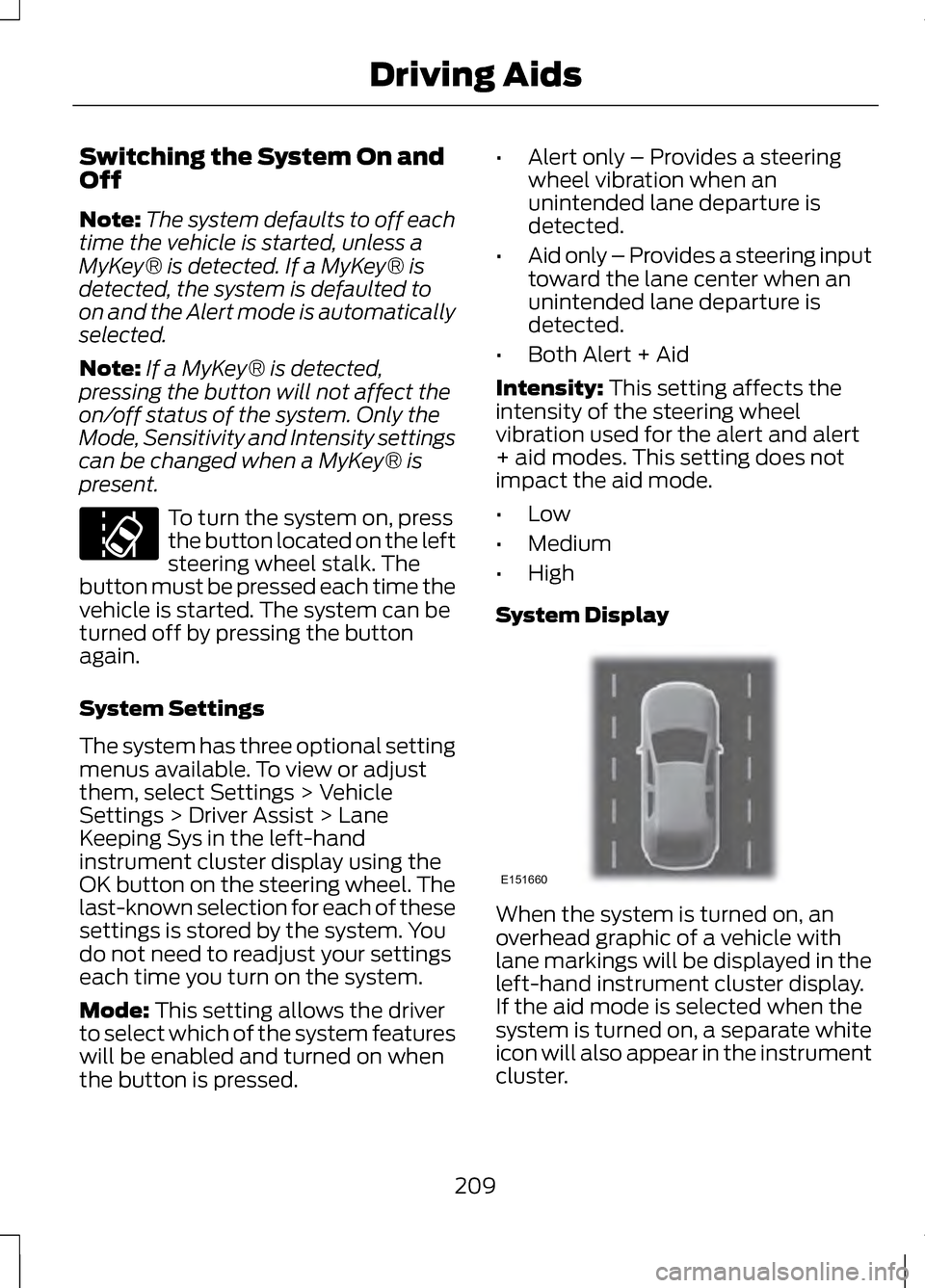
System Display When the system is turned on, an
overhead graphic of a vehicle with
lane markings will be displayed in the
left-hand instrument cluster display.
If the aid mode is selected when the
system is turned on, a separate white
icon will also appear in the instrument
cluster.
209
Driving Aids E151660
Page 234 of 474
•
Avoid parking on a grade.
• However, if you must park on a
grade:
•Turn the steering wheel to point
the vehicle tires away from
traffic flow.
• Set the vehicle parking brake.
• Place automatic transmission
in position P.
• Place wheel chocks in front and
back of the trailer wheels.
(Chocks not equipped with
vehicle.)
Launching or Retrieving a Boat
or Personal Watercraft (PWC)
Note: Disconnect the wiring to the
trailer
before backing the trailer into
the water.
Note: Reconnect the wiring to the
trailer after you remove the trailer from
the water.
When backing down a ramp during
boat launching or retrieval:
• Do not allow the static water level
to rise above the bottom edge of
the rear bumper.
• Do not allow waves to break higher
than 6 inches (15 centimeters)
above the bottom edge of the rear
bumper.
Exceeding these limits may allow
water to enter vehicle components:
• Causing internal damage to the
components.
• Affecting drivability, emissions, and
reliability. Any time the rear axle submerges in
water, replace the rear axle lubricant.
Water may contaminate the rear axle
lubricant, which is not a normal
maintenance inspection item unless
there is a possibility of a leak or other
axle repair is required.
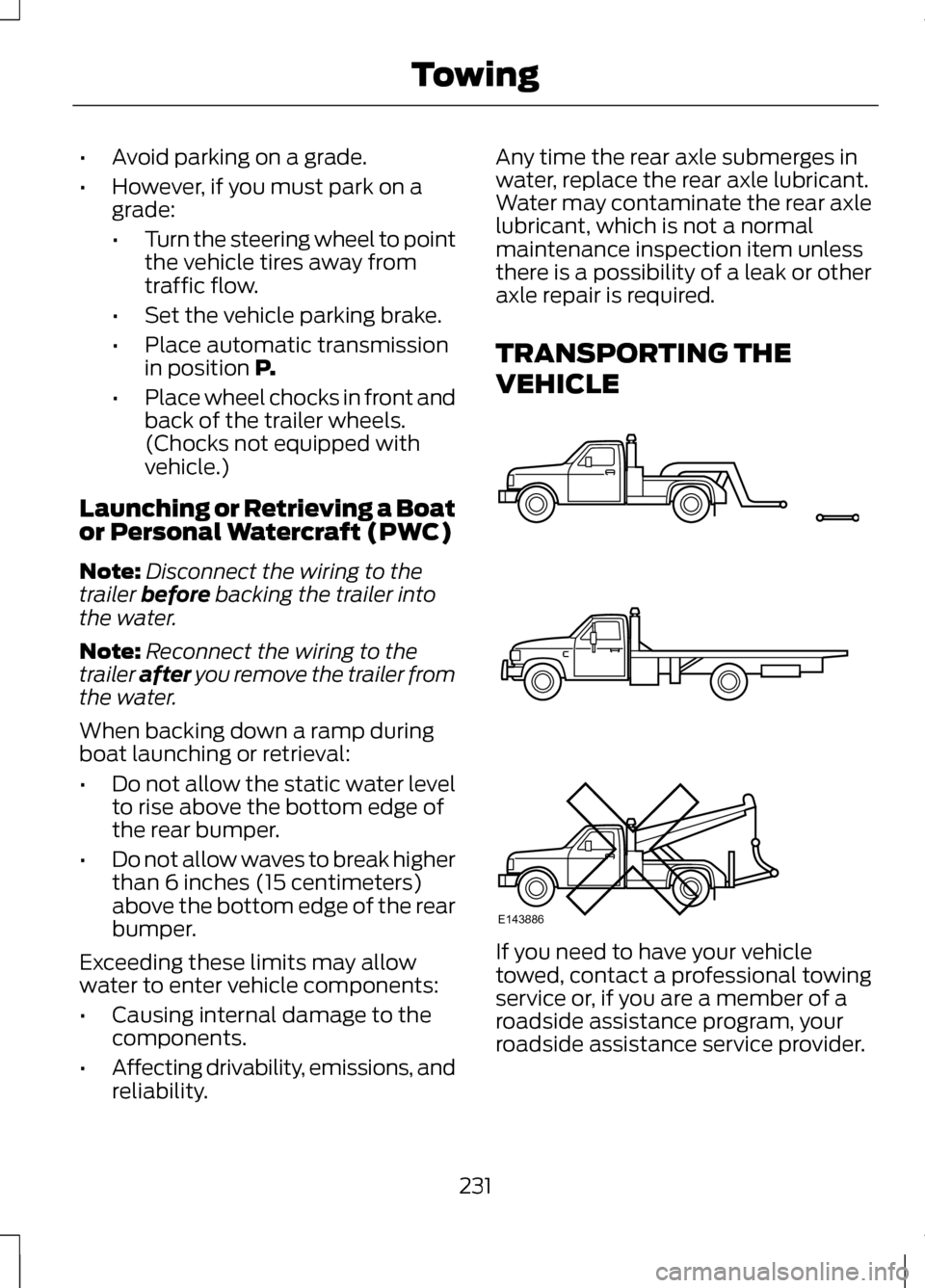
TRANSPORTING THE
VEHICLE
If you need to have your vehicle
towed, contact a professional towing
service or, if you are a member of a
roadside assistance program, your
roadside assistance service provider.
231
TowingE143886
Page 263 of 474
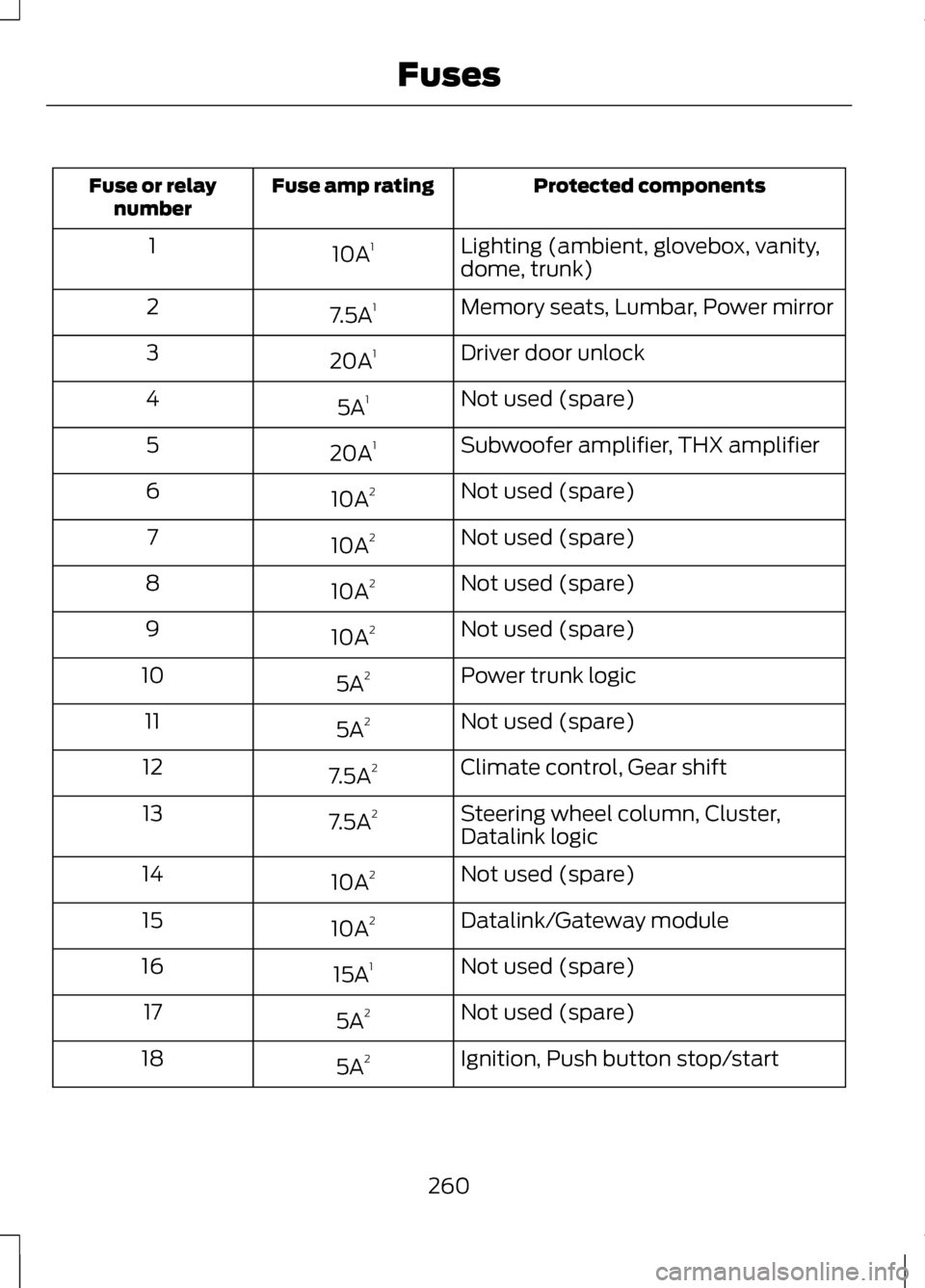
Protected components
Fuse amp rating
Fuse or relay
number
Lighting (ambient, glovebox, vanity,
dome, trunk)
10A
1
1
Memory seats, Lumbar, Power mirror
7.5A 1
2
Driver door unlock
20A 1
3
Not used (spare)
5A 1
4
Subwoofer amplifier, THX amplifier
20A 1
5
Not used (spare)
10A 2
6
Not used (spare)
10A 2
7
Not used (spare)
10A 2
8
Not used (spare)
10A 2
9
Power trunk logic
5A 2
10
Not used (spare)
5A 2
11
Climate control, Gear shift
7.5A 2
12
Steering wheel column, Cluster,
Datalink logic
7.5A
2
13
Not used (spare)
10A 2
14
Datalink/Gateway module
10A 2
15
Not used (spare)
15A 1
16
Not used (spare)
5A 2
17
Ignition, Push button stop/start
5A 2
18
260
Fuses
Page 265 of 474
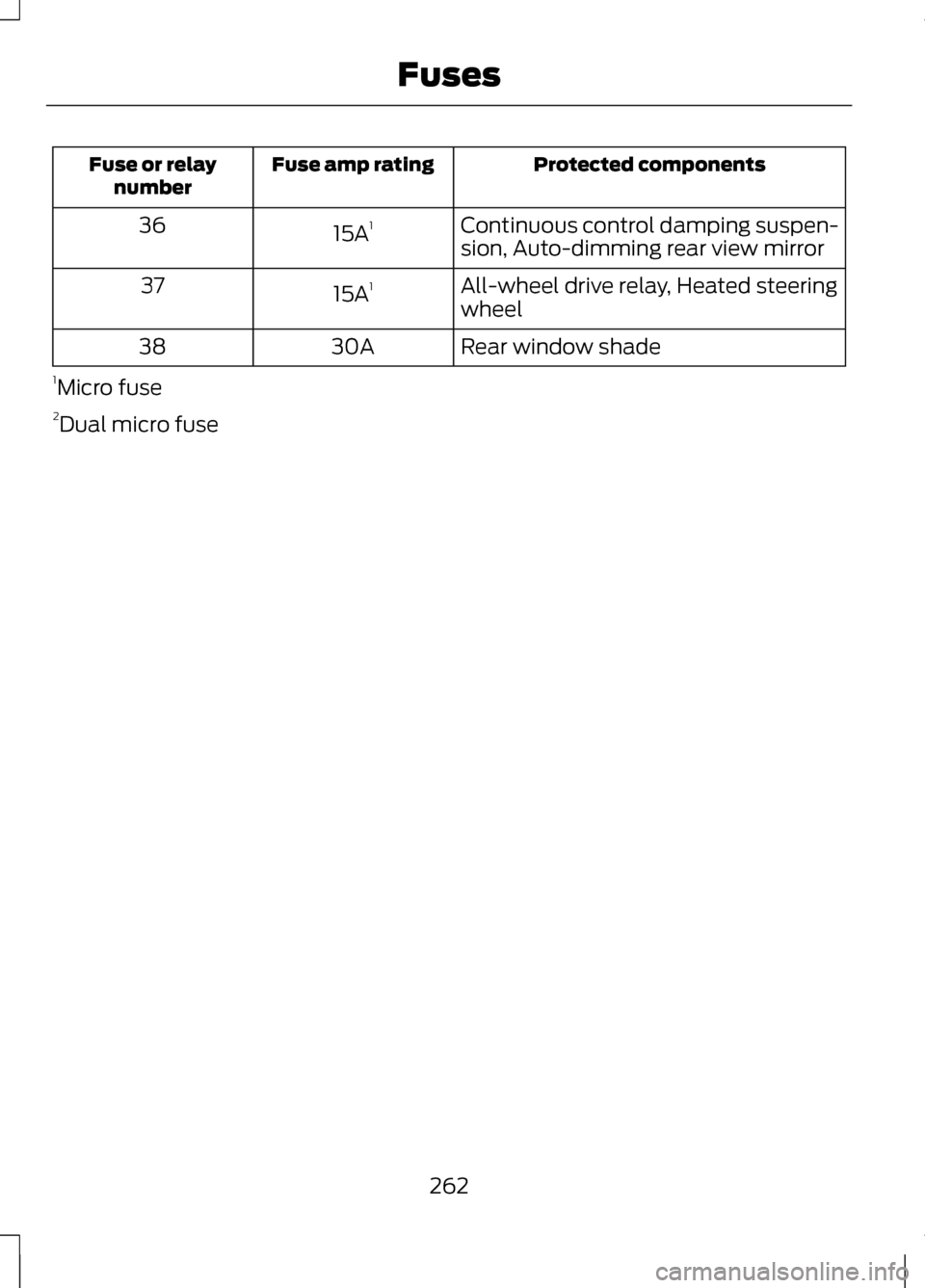
Protected components
Fuse amp rating
Fuse or relay
number
Continuous control damping suspen-
sion, Auto-dimming rear view mirror
15A
1
36
All-wheel drive relay, Heated steering
wheel
15A
1
37
Rear window shade
30A
38
1 Micro fuse
2 Dual micro fuse
262
Fuses
Page 290 of 474
If you cannot remove those streaks
after cleaning with the glass cleaner
or if the wipers chatter and move in a
jerky motion, clean the outer surface
of the windshield and the wiper
blades using a sponge or soft cloth
with a neutral detergent or
mild-abrasive cleaning solution. After
cleaning, rinse the windshield and
wiper blades with clean water. The
windshield is clean if beads do not
form when you rinse the windshield
with water.
Note:
Do not use sharp objects, such
as a razor blade, to clean the inside of
the rear window or to remove decals,
as it may cause damage to the rear
window defroster ’s heated grid lines.
CLEANING THE INTERIOR WARNINGS
Do not use cleaning solvents,
bleach or dye on the vehicle
’s
safety belts, as these actions may
weaken the belt webbing. On vehicles equipped with
seat-mounted airbags, do not
use chemical solvents or strong
detergents. Such products could
contaminate the side airbag system
and affect performance of the side
airbag in a collision. For fabric, carpets, cloth seats, safety
belts and seats equipped with side
airbags:
•
Remove dust and loose dirt with a
vacuum cleaner.
• Remove light stains and soil with
Motorcraft® Professional Strength
Carpet & Upholstery Cleaner.
• If grease or tar is present on the
material, spot-clean the area first
with Motorcraft® Spot and Stain
Remover. In Canada, use
Motorcraftt Multi-Purpose Cleaner.
• If a ring forms on the fabric after
spot cleaning, clean the entire area
immediately (but do not
oversaturate) or the ring will set.
• Do not use household cleaning
products or glass cleaners, which
can stain and discolor the fabric
and affect the flame retardant
abilities of the seat materials.
CLEANING THE
INSTRUMENT PANEL AND
INSTRUMENT CLUSTER
LENS WARNING
Do not use chemical solvents or
strong detergents when cleaning
the steering wheel or instrument panel
to avoid contamination of the airbag
system. 287
Vehicle Care
Page 296 of 474
General Information
WARNING
Failure to follow these guidelines
could result in an increased risk
of loss of vehicle control, injury or
death. Note:
Do not use the kit if a tire has
become severely damaged by driving
the vehicle with a tire that has
insufficient air pressure. Only punctured
areas located within the tire tread can
be sealed with the kit.
Do not attempt to repair punctures
larger than 1.4 inch (6.4 mm) or
damage to the tire's sidewall. The tire
may not completely seal.
Loss of air pressure may adversely
affect tire performance. For this
reason:
Note: Do not drive the vehicle above
50 mph (80 km/h).
Note: Do not drive further than 120
miles (200 km). Drive only to the
closest Ford Motor Company
authorized dealer or tire repair shop to
have your tire inspected.
• Drive carefully and avoid abrupt
steering maneuvers.
• Periodically monitor tire inflation
pressure in the affected tire; if the
tire is losing pressure, have the
vehicle towed.
• Read the information in the Tips
for Use of the Kit section to ensure
safe operation of the kit and your
vehicle. Tips for Use of the Kit
Read the following list of tips to
ensure safe operation of the kit:
•
Before operating the kit, make sure
your vehicle is safely off the road
and away from moving traffic. Turn
on the hazard lights.
• Always set the parking brake to
ensure the vehicle doesn't move
unexpectedly.
• Do not remove any foreign objects,
such as nails or screws, from the
tire.
• When using the kit, leave the
engine running (only if the vehicle
is outdoors or in a well-ventilated
area) so the compressor doesn't
drain the vehicle's battery.
• Do not allow the compressor to
operate continuously for more
than 15 minutes; this will help
prevent the compressor from
overheating.
• Never leave the kit unattended
when it is operating.
• Sealant compound contains latex.
Make sure that you use the
non-latex gloves provided to avoid
an allergic reaction.
• Keep the kit away from children.
• Only use the kit when the ambient
temperature is between -22°F
(–30°C) and 158°F (70°C).
293
Wheels and Tires
Page 319 of 474
WARNINGS
Use of any tire or wheel not
recommended by Ford can affect the
safety and performance of your
vehicle, which could result in an
increased risk of loss of vehicle
control, vehicle rollover, personal
injury and death. Additionally the use
of non-recommended tires and
wheels could cause steering,
suspension, axle, transfer case or
power transfer unit failure. If you have
questions regarding tire replacement,
contact your authorized dealer as
soon as possible. When mounting replacement
tires and wheels, you should not
exceed the maximum pressure
indicated on the sidewall of the tire to
set the beads without additional
precautions listed below. If the beads
do not seat at the maximum pressure
indicated, re-lubricate and try again
When inflating the tire for mounting
pressures up to 20 psi (1.38 bar)
greater than the maximum pressure
on the tire sidewall, the following
precautions must be taken to protect
the person mounting the tire:
1. Make sure that you have the correct
tire and wheel size.
2. Lubricate the tire bead and wheel
bead seat area again.
3. Stand at a minimum of 12 feet (3.66
meters) away from the wheel and tire
assembly.
4. Use both eye and ear protection. WARNINGS
For a mounting pressure more than
20 psi (1.38 bar) greater than the
maximum pressure, a Ford dealer or
other tire service professional should
do the mounting.
Always inflate steel carcass tires with
a remote air fill with the person
inflating standing at a minimum of 12
ft (3.66 m) away from the wheel and
tire assembly Important: Remember to replace the
wheel valve stems when the road tires
are replaced on your vehicle
It is recommended that the two front
tires or two rear tires generally be
replaced as a pair.
The tire pressure sensors mounted in
the wheels (originally installed on your
vehicle) are not designed to be used
in aftermarket wheels.
The use of wheels or tires not
recommended by Ford Motor
Company may affect the operation of
your tire pressure monitoring system.
If the TPMS indicator is flashing, your
TPMS is malfunctioning. Your
replacement tire might be
incompatible with your TPMS, or
some component of the TPMS may
be damaged.
316
Wheels and Tires
Page 322 of 474
USING SNOW CHAINS
Snow chains have not been approved
for use on your vehicle.
WARNINGS
If you choose to install snow tires
on your vehicle, they must be the
same size, construction, and load
range as the original tires listed on the
tire placard, and they must be
installed on all four wheels. Mixing
tires of different size or construction
on your vehicle can adversely affect
your vehicle's handling and braking,
and may lead to loss of vehicle
control. Do not use snow chains or cables
on this vehicle as they may cause
damage to your vehicle which may
lead to loss of vehicle control. The original equipment tires on your
vehicle may have an all-weather tread
design to provide traction, handling,
and braking performance in
year-round driving. You may install
snow tires for improved traction when
driving in areas with sustained periods
of snow or icy driving conditions. CHANGING A ROAD WHEEL WARNINGS
The use of tire sealants may
damage your tire pressure
monitoring system and should not be
used. However, if you must use a
sealant, the tire pressure monitoring
system sensor and valve stem on the
wheel must be replaced by an
authorized Ford dealer. See Tire Pressure Monitoring
System (page 298). for
important information. If the tire
pressure monitor sensor becomes
damaged, it will no longer function. Note:
The tire pressure monitoring
system indicator light will illuminate
when the spare tire is in use. To restore
the full function of the monitoring
system, all road wheels equipped with
tire pressure monitoring sensors must
be mounted on the vehicle.
If you get a flat tire while driving, do
not apply the brake heavily. Instead,
gradually decrease your speed. Hold
the steering wheel firmly and slowly
move to a safe place on the side of
the road.
319
Wheels and Tires