fuel LINCOLN MKZ 2013 Owners Manual
[x] Cancel search | Manufacturer: LINCOLN, Model Year: 2013, Model line: MKZ, Model: LINCOLN MKZ 2013Pages: 474, PDF Size: 3.79 MB
Page 6 of 474
Universal Garage Door
Opener
Universal Garage Door Opener......142
Auxiliary Power Points
Auxiliary Power Points.......................147
Storage Compartments
Center Console....................................149
Overhead Console..............................149
Starting and Stopping the Engine
General Information
..........................150
Keyless Starting...................................150
Starting a Gasoline Engine..............152
Engine Block Heater
...........................153
Fuel and Refueling
Safety Precautions
.............................155
Fuel Quality
...........................................156
Running Out of Fuel...........................156
Refueling................................................158
Fuel Consumption
..............................160
Emission Control System..................161
Transmission
Automatic Transmission
..................165
Hill Start Assist
.....................................170
All-Wheel Drive
Using All-Wheel Drive.........................171
Brakes
General Information............................177 Hints on Driving With Anti-Lock
Brakes..................................................178
Electric Parking Brake
........................178
Traction Control
Principle of Operation
........................181
Using Traction Control.......................181
Stability Control
Principle of Operation.......................182
Using Stability Control......................183
Parking Aids
Parking Aid
............................................184
Active Park Assist...............................186
Rear View Camera...............................191
Cruise Control
Principle of Operation.......................195
Using Cruise Control..........................195
Using Adaptive Cruise Control
.......196
Driving Aids
Driver Alert............................................203
Lane Keeping System......................208
Blind Spot Monitor..............................212
Steering...................................................217
Load Carrying
Load Limit..............................................219
Towing
Towing a Trailer
....................................227
Recommended Towing Weights...............................................227
3
Table of Contents
Page 7 of 474
Essential Towing Checks.................229
Transporting the Vehicle...................231
Towing the Vehicle on Four
Wheels................................................232
Driving Hints
Breaking-In............................................235
Economical Driving
............................235
Driving Through Water.....................236
Floor Mats.............................................236
Roadside Emergencies
Roadside Assistance
........................238
Hazard Warning Flashers................239
Fuel Cut-Off Switch..........................239
Jump-Starting the Vehicle.............240
Customer Assistance
Getting the Services You Need......243
In California (U.S. Only)...................244
The Better Business Bureau (BBB) Auto Line Program (U.S.
Only)...................................................245
Utilizing the Mediation/Arbitration Program (Canada Only)..............247
Getting Assistance Outside the U.S. and Canada
......................................247
Ordering Additional Owner's Literature...........................................248
Reporting Safety Defects (U.S. Only)...................................................249
Reporting Safety Defects (Canada Only)...................................................250
Fuses
Changing a Fuse
..................................251
Fuse Specification Chart
.................252 Maintenance
General Information
..........................263
Opening and Closing the Hood.....264
Under Hood Overview - 2.0L EcoBoost™......................................265
Under Hood Overview - 3.7L..........266
Engine Oil Dipstick - 2.0L EcoBoost™.......................................267
Engine Oil Dipstick - 3.7L.................267
Engine Oil Check - 2.0L EcoBoost™/3.7L
............................267
Engine Coolant Check - 2.0L EcoBoost™/3.7L............................268
Automatic Transmission Fluid Check...................................................272
Brake Fluid Check
...............................276
Power Steering Fluid Check............276
Fuel Filter...............................................276
Washer Fluid Check
............................277
Changing the 12V Battery.................277
Checking the Wiper Blades
............279
Changing the Wiper Blades............279
Changing the Engine Air Filter - 2.0L EcoBoost™/3.7L............................280
Adjusting the Headlamps
................281
Removing a Headlamp
....................282
Changing a Bulb
.................................282
Bulb Specification Chart.................283
Vehicle Care
General Information
..........................284
Cleaning Products.............................284
Cleaning the Exterior........................284
Repairing Minor Paint Damage......285
Waxing...................................................285
Cleaning the Engine
..........................286
4
Table of Contents
Page 11 of 474
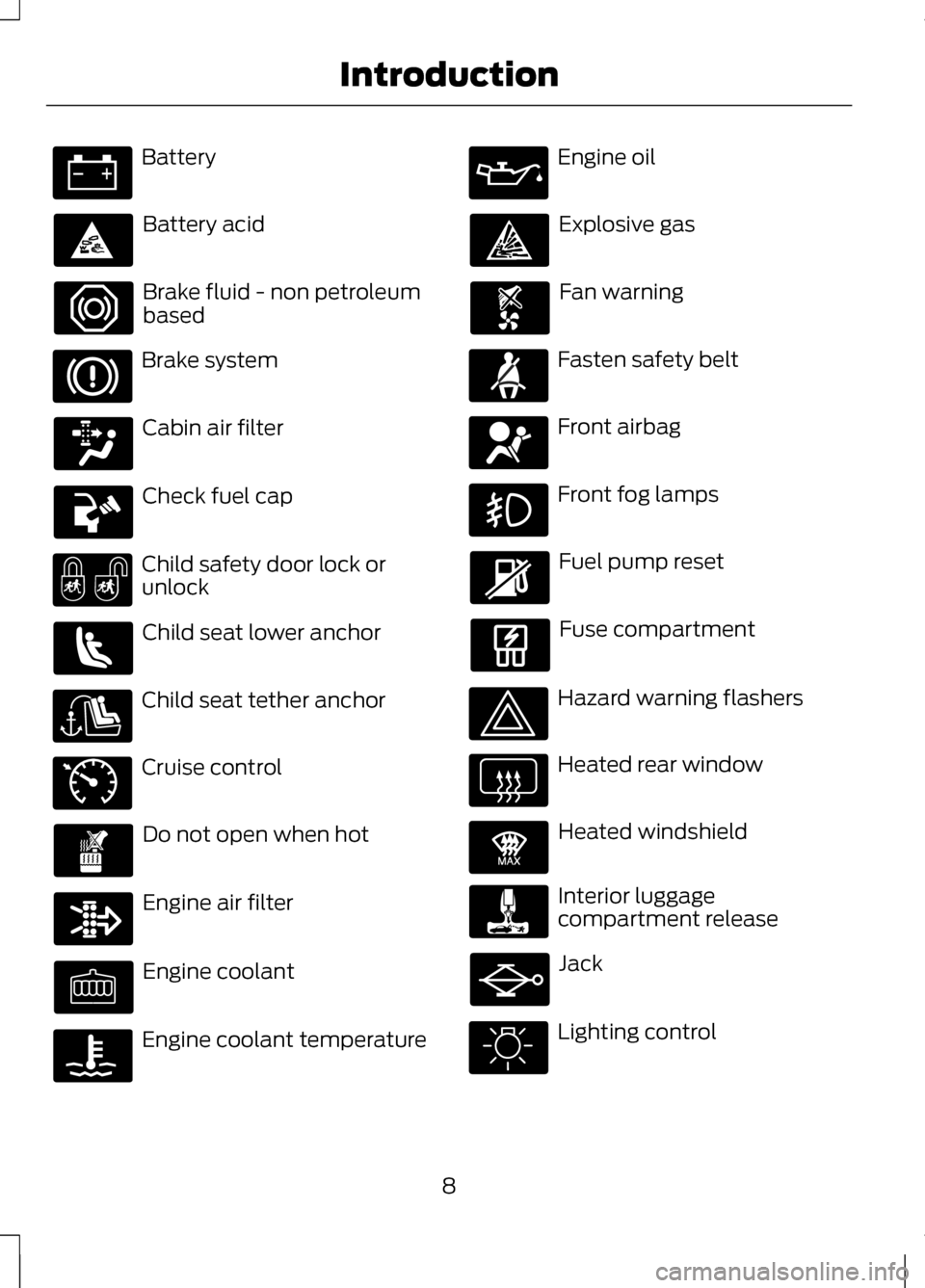
Battery
Battery acid
Brake fluid - non petroleum
based
Brake system
Cabin air filter
Check fuel cap
Child safety door lock or
unlock
Child seat lower anchor
Child seat tether anchor
Cruise control
Do not open when hot
Engine air filter
Engine coolant
Engine coolant temperature Engine oil
Explosive gas
Fan warning
Fasten safety belt
Front airbag
Front fog lamps
Fuel pump reset
Fuse compartment
Hazard warning flashers
Heated rear window
Heated windshield
Interior luggage
compartment release
Jack
Lighting control
8
Introduction E71340 E91392
Page 14 of 474
Note:
Including to the extent that
any law pertaining to Event Data
Recorders applies to SYNC or its
features, please note the following:
Once 911 Assist (if equipped) is
enabled (set ON), 911 Assist may,
through any paired and connected
cell phone, disclose to emergency
services that the vehicle has been in
a crash involving the deployment of
an airbag or, in certain vehicles, the
activation of the fuel pump shut-off.
Certain versions or updates to 911
Assist may also be capable of being
used to electronically or verbally
provide to 911 operators the vehicle
location (such as latitude and
longitude), and/or other details
about the vehicle or crash or
personal information about the
occupants to assist 911 operators to
provide the most appropriate
emergency services. If you do not
want to disclose this information, do
not activate the 911 Assist feature.
See MyLincoln Touch ™ (page 337).Additionally, when you connect to
Traffic, Directions and Information
(if equipped, U.S. only), the service
uses GPS technology and
advanced vehicle sensors to
collect the vehicle
’s current
location, travel direction, and
speed (“ vehicle travel
information ”), only to help provide
you with the directions, traffic
reports, or business searches that
you request. If you do not want
Ford or its vendors to receive this
information, do not activate the
service. Ford Motor Company and
the vendors it uses to provide you
with this information do not store
your vehicle travel information.
For more information, see Traffic,
Directions and Information, Terms
and Conditions. See
MyLincoln
Touch ™ (page 337).
CALIFORNIA PROPOSITION
65 WARNING
Some constituents of engine
exhaust, certain vehicle
components, certain fluids contained
in vehicles and certain products of
component wear contain or emit
chemicals known to the State of
California to cause cancer and birth
defects or other reproductive harm. 11
Introduction
Page 58 of 474
1.
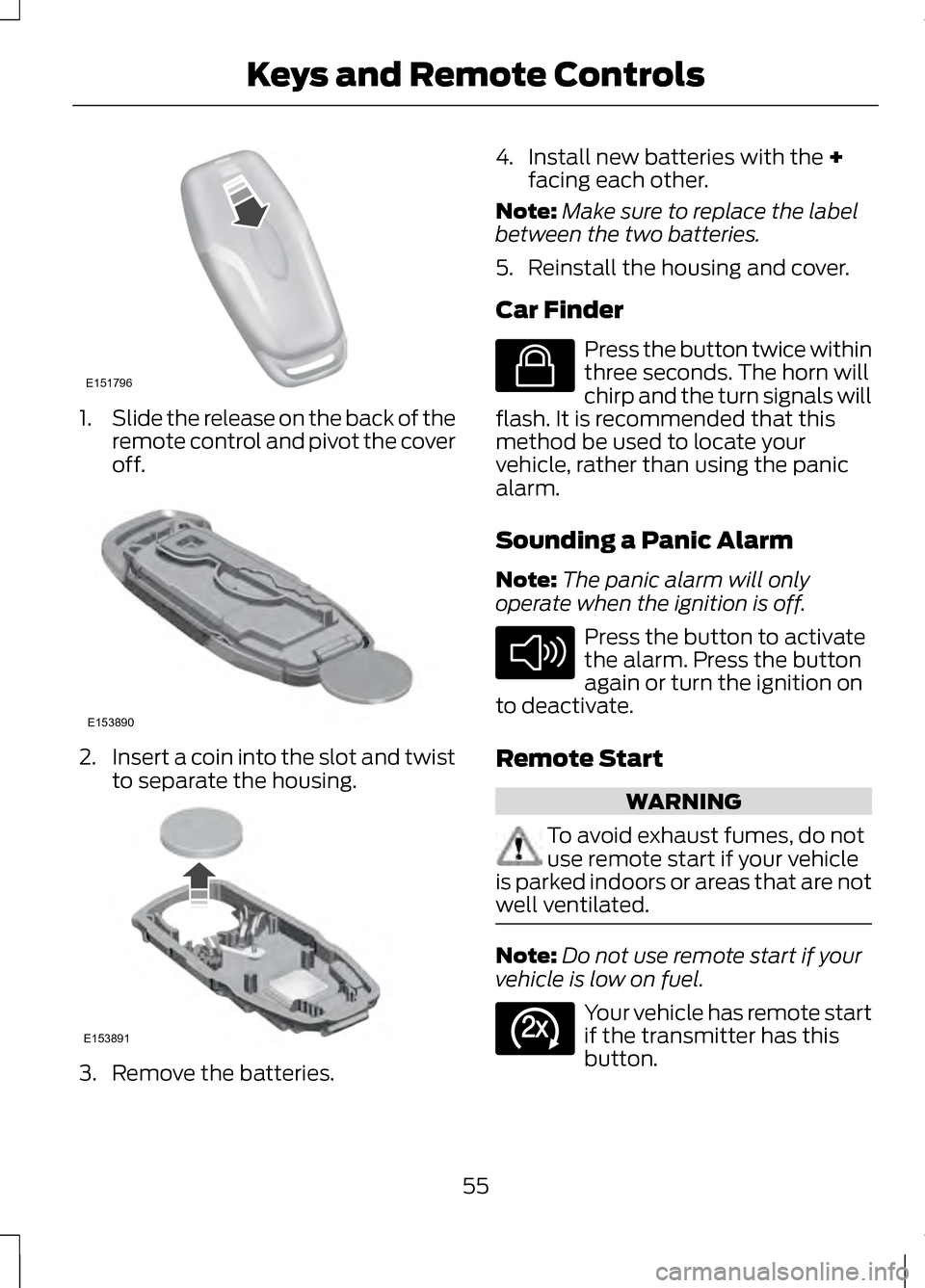
Slide the release on the back of the
remote control and pivot the cover
off. 2.
Insert a coin into the slot and twist
to separate the housing. 3. Remove the batteries. 4. Install new batteries with the +
facing each other.
Note: Make sure to replace the label
between the two batteries.
5. Reinstall the housing and cover.
Car Finder Press the button twice within
three seconds. The horn will
chirp and the turn signals will
flash. It is recommended that this
method be used to locate your
vehicle, rather than using the panic
alarm.
Sounding a Panic Alarm
Note: The panic alarm will only
operate when the ignition is off. Press the button to activate
the alarm. Press the button
again or turn the ignition on
to deactivate.
Remote Start WARNING
To avoid exhaust fumes, do not
use remote start if your vehicle
is parked indoors or areas that are not
well ventilated. Note:
Do not use remote start if your
vehicle is low on fuel. Your vehicle has remote start
if the transmitter has this
button.
55
Keys and Remote ControlsE151796 E153890 E153891 E138623 E138624 E138625
Page 61 of 474
PRINCIPLE OF OPERATION
MyKey allows you to program keys
with restricted driving modes to
promote good driving habits. All but
one of the keys programmed to the
vehicle can be activated with these
restricted modes. Any keys that have
not been programmed are referred to
as an "administrator key" or "admin
key" which can be used to:
•
create a restricted key
• program optional MyKey settings
• clear all MyKey features
altogether.
Once a key has been programmed you
can access the following information
using the information display control:
• How many admin keys and MyKeys
are programmed to the vehicle.
• The total distance the vehicle has
been driven with a MyKey.
For vehicles equipped with intelligent
access key (push button start), when
both a MyKey and an admin intelligent
access key (fob) are present, the
admin fob will be recognized by the
vehicle to start the engine. Standard Settings
These settings cannot be changed.
•
Belt-Minder®. This cannot be
disabled and the five-minute timer
does not expire. The audio system
is muted when MyKey
Belt-Minder® is activated.
• Early low fuel. Warnings are
displayed in the information
display control followed by an
audible tone when the fuel tank is
at one-eighth tank or less.
• Driver assist features, if equipped
on your vehicle, are forced on: Rear
parking aid, Blind spot information
system (BLIS®) with cross traffic
alert, Lane departure warning,
Forward collision warning system
and Satellite radio adult content
restriction.
Optional Settings
These settings can be configured right
after a MyKey is first created or
changed afterward with an admin key.
• Vehicle speed limit of 65, 70, 75
and 80 mph (105, 113, 121 and 130
km/h). Visual warnings are
displayed followed by an audible
tone when vehicle speed has
reached the selected top speed.
• Vehicle speed minder of 45, 55 or
65 mph (75, 90, or 105 km/h).
Visual warnings are displayed
followed by an audible tone when
the preselected vehicle speed is
exceeded.
58
MyKey®
Page 93 of 474
The image of the approaching vehicle
is small and near the inboard edge of
the main mirror when it is at a
distance. The image becomes larger
and begins to move outboard across
the main mirror as the vehicle
approaches (A). The image will
transition from the main mirror and
begin to appear in the blind spot
mirror as the vehicle approaches (B).
The vehicle will transition to your
peripheral field of view as it leaves the
blind spot mirror (C).
Blind Spot Monitor (If Equipped)
See
Blind Spot Monitor (page 212).
INTERIOR MIRROR WARNING
Do not adjust the mirror when
your vehicle is moving.
Note:
Do not clean the housing or
glass of any mirror with harsh
abrasives, fuel or other petroleum or
ammonia-based cleaning products.
You can adjust the interior mirror to
your preference. Some mirrors also
have a second pivot point. This lets
you move the mirror head up or down
and from side to side. Auto-Dimming Mirror
Note:
Do not block the sensors on the
front and back of the mirror. Mirror
performance may be affected. A rear
center passenger or raised rear center
head restraint may also block light
from reaching the sensor.
The mirror will dim automatically to
reduce glare when bright lights are
detected from behind your vehicle. It
will automatically return to normal
reflection when you select reverse
gear to make sure you have a clear
view when backing up.
SUN VISORS Rotate the sun visor toward the side
window and extend it rearward for
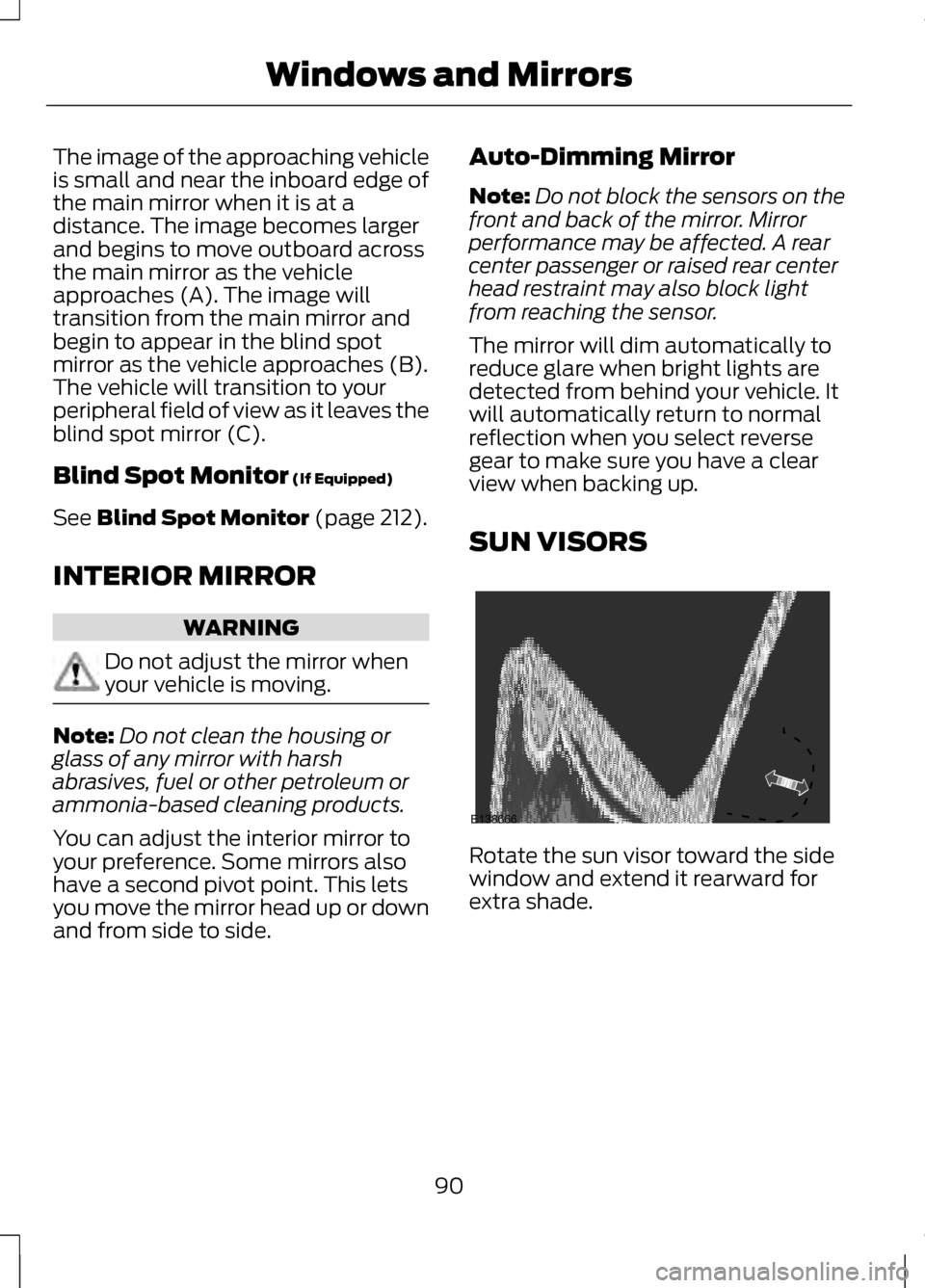
extra shade.
90
Windows and MirrorsE138666
Page 97 of 474
GAUGES
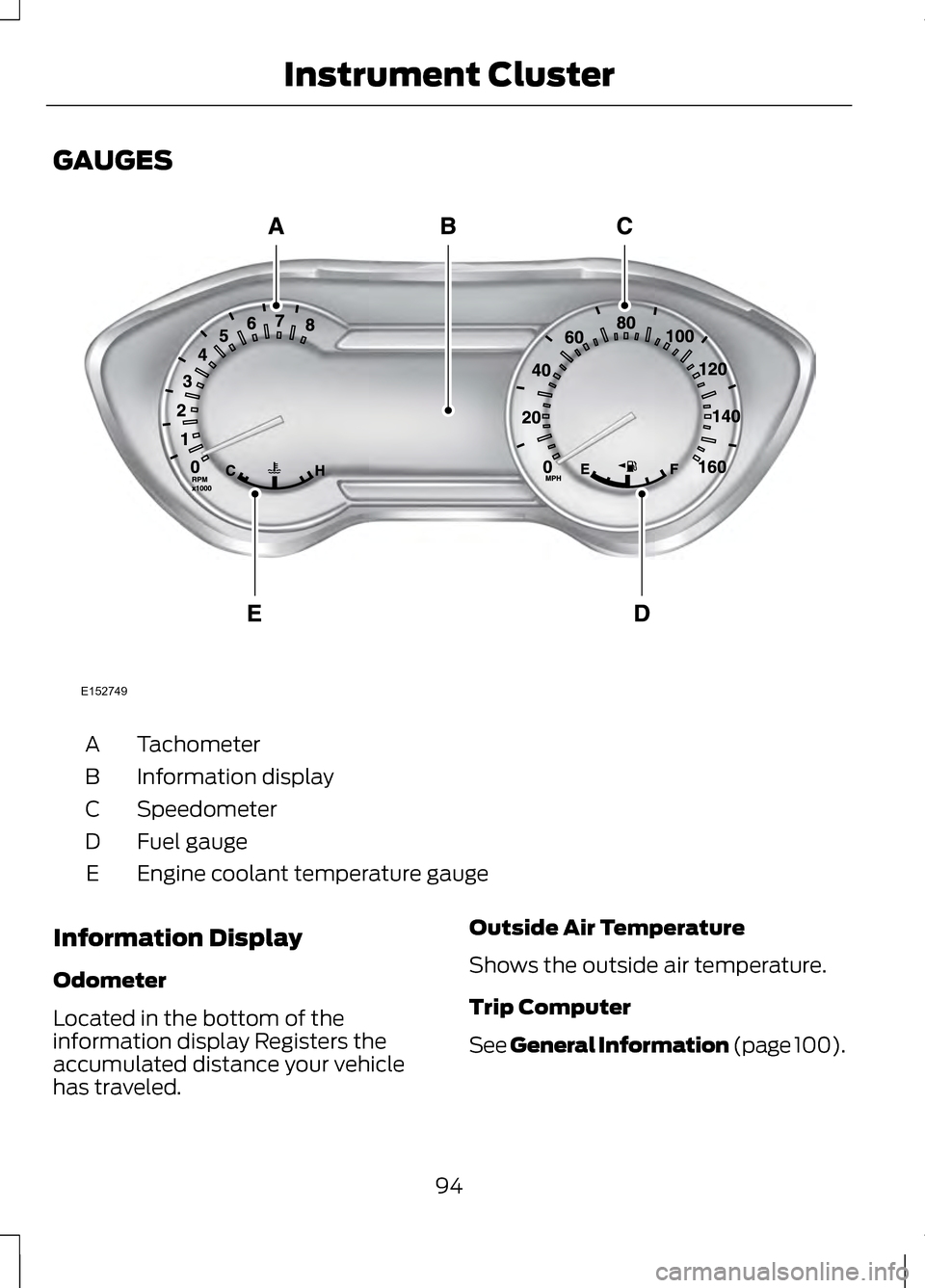
Tachometer
A
Information display
B
Speedometer
C
Fuel gauge
D
Engine coolant temperature gauge
E
Information Display
Odometer
Located in the bottom of the
information display Registers the
accumulated distance your vehicle
has traveled. Outside Air Temperature
Shows the outside air temperature.
Trip Computer
See General Information (page 100).
94
Instrument ClusterE152749
Page 98 of 474
Vehicle Settings and
Personalization
See General Information (page 100).
Fuel Gauge
Indicates approximately how much
fuel is left in the fuel tank (when the
ignition is on). The fuel gauge may
vary slightly when the vehicle is in
motion or on a grade. The fuel icon
and arrow indicates which side of the
vehicle the fuel filler door is located.
Engine Coolant Temperature
Gauge
Indicates engine coolant temperature.
At normal operating temperature, the
level indicator will be in the normal
range. If the engine coolant
temperature exceeds the normal
range, stop the vehicle as soon as
safely possible, switch off the engine
and let the engine cool.
WARNING
Never remove the coolant
reservoir cap while the engine is
running or hot. WARNING LAMPS AND
INDICATORS
The following warning lamps and
indicators will alert you to a vehicle
condition that may become serious.
Some lamps will illuminate when you
start your vehicle to make sure they
work. If any lamps remain on after
starting your vehicle, refer to the
respective system warning lamp for
further information.
Note:
Some warning indicators appear
in the information display and function
the same as a warning lamp but do not
display when you start your vehicle.
Adaptive Cruise Control (If
Equipped) The speed control system
indicator light changes color
to indicate what mode the
system is in:
See Using Adaptive
Cruise Control (page 196).
On (white light): Illuminates when the
adaptive cruise control system is
turned on. Turns off when the speed
control system is turned off.
Engaged (green light): Illuminates
when the adaptive cruise control
system is engaged. Turns off when
the speed control system is
disengaged.
95
Instrument ClusterE144524
Page 100 of 474
Engine Coolant Temperature
Illuminates when the engine
coolant temperature is high.
Stop the vehicle as soon as
possible, switch off the engine and let
cool. See Engine Coolant Check
(page 268).
Engine Oil If it illuminates with the
engine running or when you
are driving, this indicates a
malfunction. Stop your vehicle as
soon as it is safe to do so and switch
the engine off. Check the engine oil
level. See
Engine Oil Check (page
267).
Note: Do not resume your journey if it
illuminates despite the level being
correct. Have the system checked by
your authorized dealer immediately.
Fasten Safety Belt It will illuminate and a chime
will sound to remind you to
fasten your safety belt. See
Safety Belt Minder
(page 38).
Front Airbag If it fails to illuminate when
you start your vehicle,
continues to flash or remains
on, it indicates a malfunction. Have
the system checked by your
authorized dealer. Front Fog Lamps
(If Equipped) It will illuminate when you
switch the front fog lamps
on.
Heads Up Display
(If Equipped) A red beam of lights will
illuminate on the windshield
in certain instances when
using adaptive cruise control and/or
the collision warning system. It will
also illuminate momentarily when you
start your vehicle to make sure the
display works.
High Beam It will illuminate when you
switch the high beam
headlamps on. It will flash
when you use the headlamp flasher.
Hood Ajar Displays when the ignition is
on and the hood is not
completely closed.
Lane Keeping Aid
(If Equipped) Illuminates when the lane
keeping system is activated.
Low Fuel Level It will illuminate when the
fuel level is low or the fuel
tank is nearly empty. Refuel
as soon as possible.
97
Instrument Cluster E156133 E159324 E144813