brake LINCOLN MKZ 2014 User Guide
[x] Cancel search | Manufacturer: LINCOLN, Model Year: 2014, Model line: MKZ, Model: LINCOLN MKZ 2014Pages: 468, PDF Size: 4.49 MB
Page 116 of 468
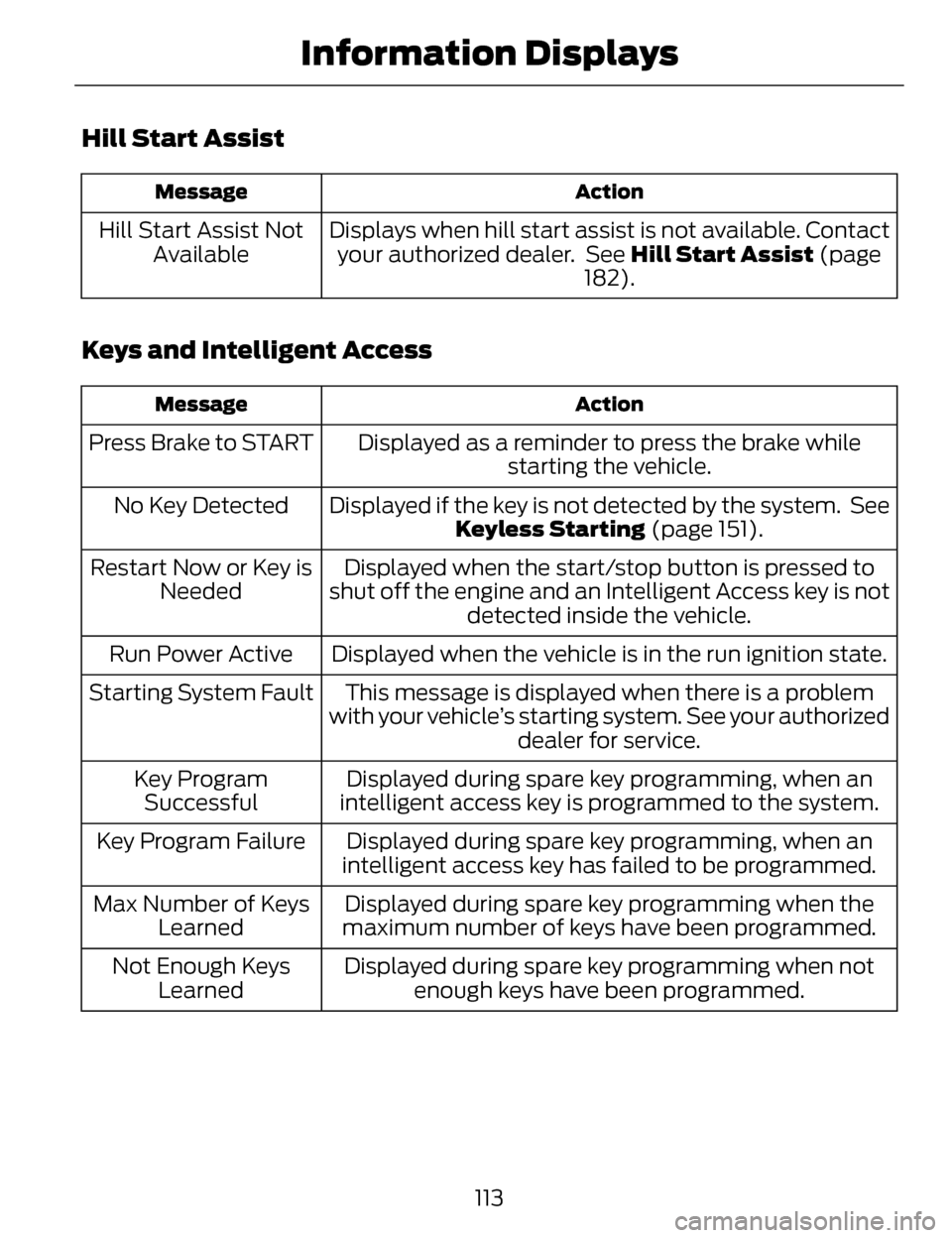
Hill Start Assist
Action
Message
Displays when hill start assist is not available. Contact
your authorized dealer. See Hill Start Assist (page
182).
Hill Start Assist Not
Available
Keys and Intelligent Access
Action
Message
Displayed as a reminder to press the brake while
starting the vehicle.
Press Brake to START
Displayed if the key is not detected by the system. SeeKeyless Starting (page 151).
No Key Detected
Displayed when the start/stop button is pressed to
shut off the engine and an Intelligent Access key is not detected inside the vehicle.
Restart Now or Key is
Needed
Displayed when the vehicle is in the run ignition state.
Run Power Active
This message is displayed when there is a problem
with your vehicle’s starting system. See your authorized dealer for service.
Starting System Fault
Displayed during spare key programming, when an
intelligent access key is programmed to the system.
Key Program
Successful
Displayed during spare key programming, when an
intelligent access key has failed to be programmed.
Key Program Failure
Displayed during spare key programming when the
maximum number of keys have been programmed.
Max Number of Keys
Learned
Displayed during spare key programming when notenough keys have been programmed.
Not Enough Keys
Learned
113
Information Displays
Page 118 of 468
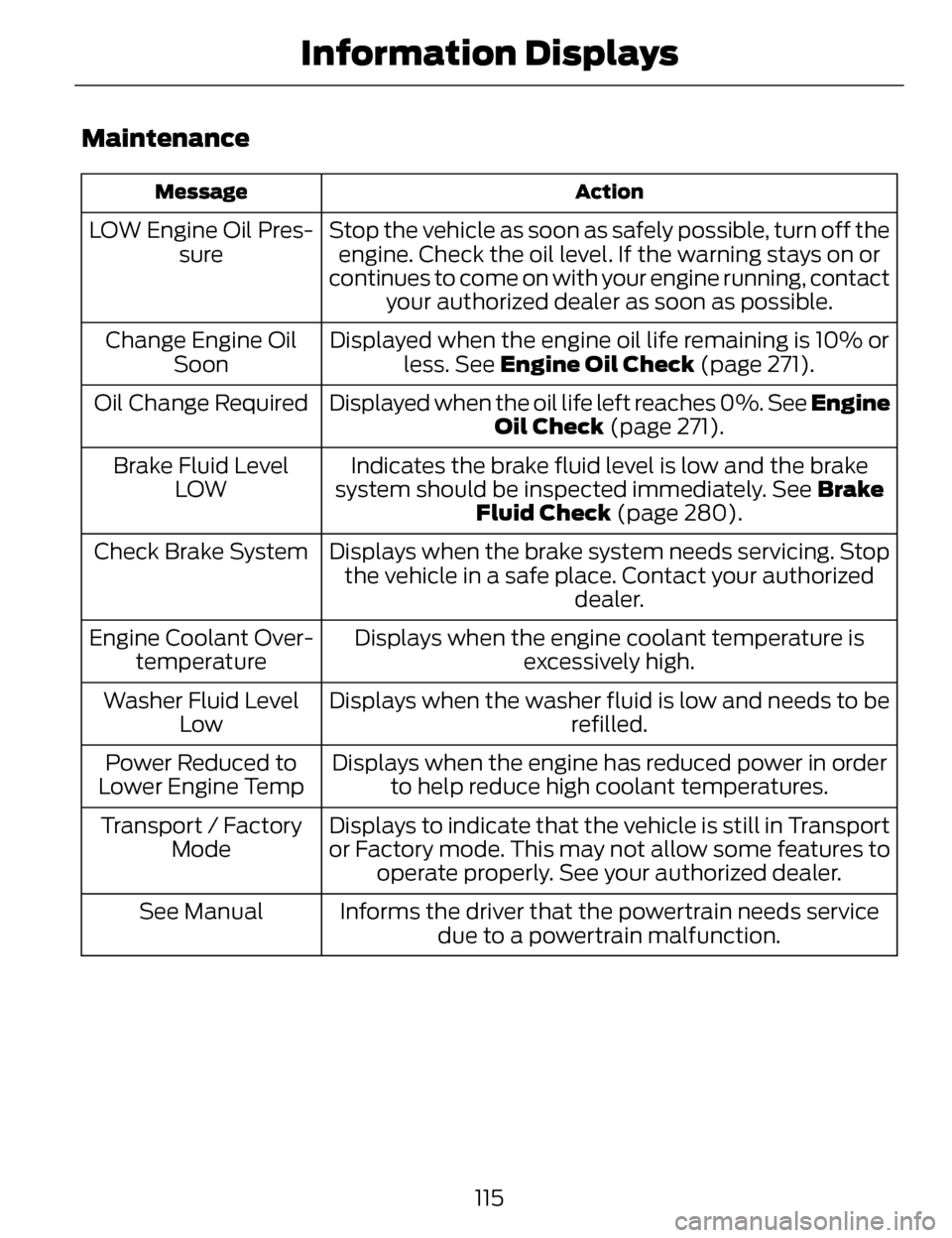
Maintenance
Action
Message
Stop the vehicle as soon as safely possible, turn off the
engine. Check the oil level. If the warning stays on or
continues to come on with your engine running, contact your authorized dealer as soon as possible.
LOW Engine Oil Pres-
sure
Displayed when the engine oil life remaining is 10% orless. See Engine Oil Check (page 271).
Change Engine Oil
Soon
Displayed when the oil life left reaches 0%. See Engine Oil Check (page 271).
Oil Change Required
Indicates the brake fluid level is low and the brake
system should be inspected immediately. See Brake
Fluid Check (page 280).
Brake Fluid Level
LOW
Displays when the brake system needs servicing. Stopthe vehicle in a safe place. Contact your authorized dealer.
Check Brake System
Displays when the engine coolant temperature isexcessively high.
Engine Coolant Over-
temperature
Displays when the washer fluid is low and needs to be refilled.
Washer Fluid Level
Low
Displays when the engine has reduced power in orderto help reduce high coolant temperatures.
Power Reduced to
Lower Engine Temp
Displays to indicate that the vehicle is still in Transport
or Factory mode. This may not allow some features tooperate properly. See your authorized dealer.
Transport / Factory
Mode
Informs the driver that the powertrain needs servicedue to a powertrain malfunction.
See Manual
115
Information Displays
Page 120 of 468
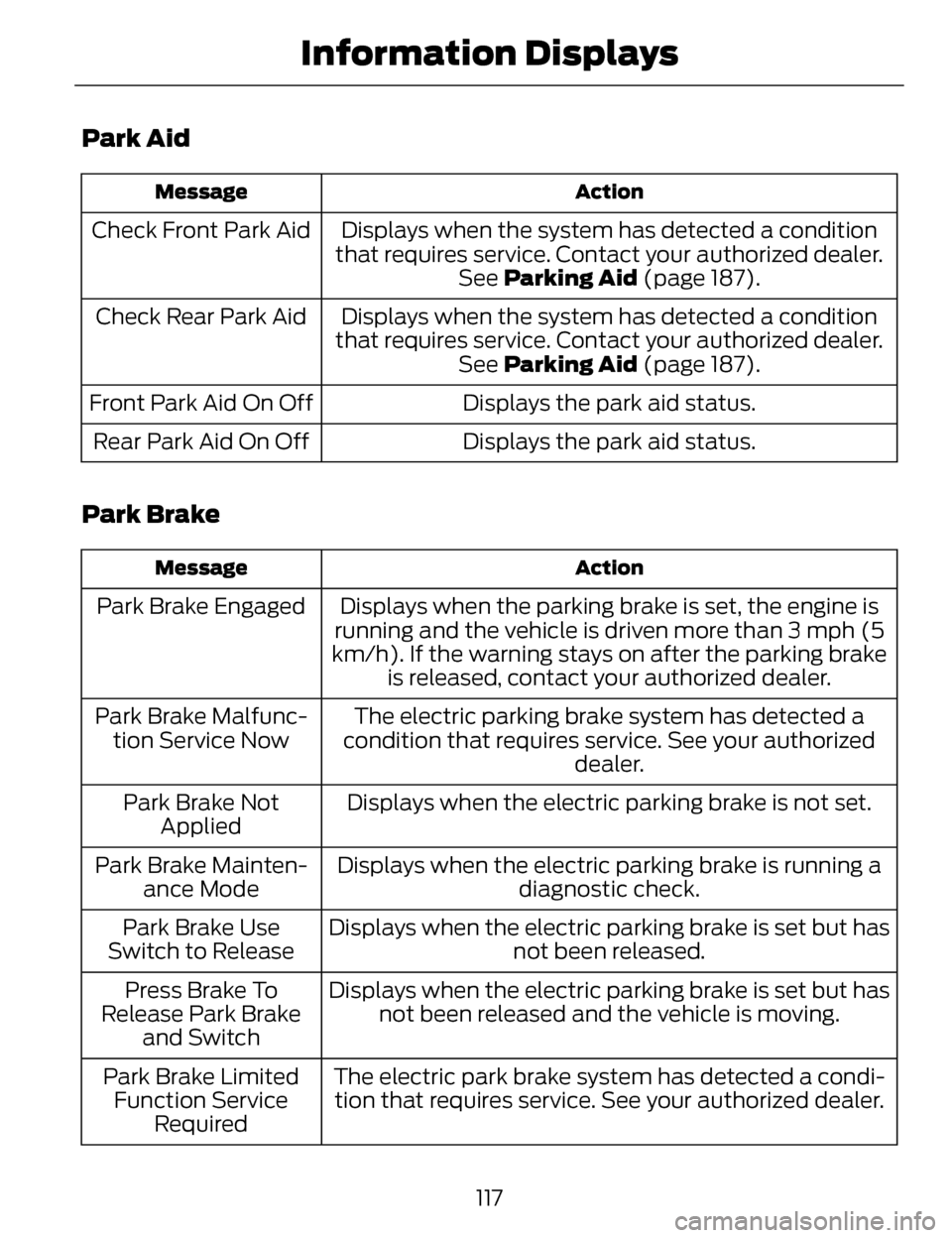
Park Aid
Action
Message
Displays when the system has detected a condition
that requires service. Contact your authorized dealer. See Parking Aid (page 187).
Check Front Park Aid
Displays when the system has detected a condition
that requires service. Contact your authorized dealer. See Parking Aid (page 187).
Check Rear Park Aid
Displays the park aid status.
Front Park Aid On Off
Displays the park aid status.
Rear Park Aid On Off
Park Brake
Action
Message
Displays when the parking brake is set, the engine is
running and the vehicle is driven more than 3 mph (5
km/h). If the warning stays on after the parking brake is released, contact your authorized dealer.
Park Brake Engaged
The electric parking brake system has detected a
condition that requires service. See your authorized dealer.
Park Brake Malfunc-
tion Service Now
Displays when the electric parking brake is not set.
Park Brake Not
Applied
Displays when the electric parking brake is running a diagnostic check.
Park Brake Mainten-
ance Mode
Displays when the electric parking brake is set but hasnot been released.
Park Brake Use
Switch to Release
Displays when the electric parking brake is set but hasnot been released and the vehicle is moving.
Press Brake To
Release Park Brake and Switch
The electric park brake system has detected a condi-tion that requires service. See your authorized dealer.
Park Brake Limited
Function Service Required
117
Information Displays
Page 121 of 468
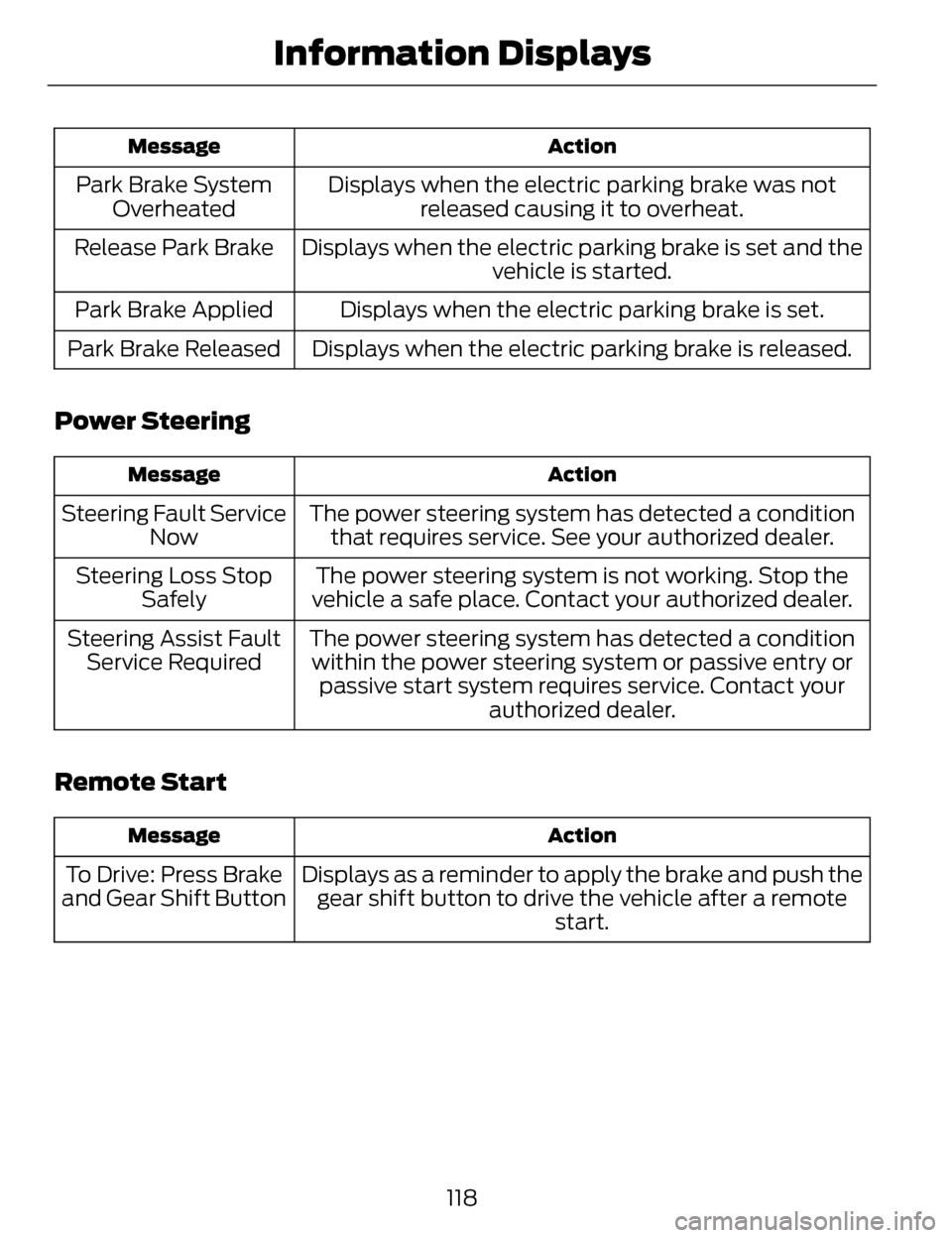
Action
Message
Displays when the electric parking brake was not
released causing it to overheat.
Park Brake System
Overheated
Displays when the electric parking brake is set and the vehicle is started.
Release Park Brake
Displays when the electric parking brake is set.
Park Brake Applied
Displays when the electric parking brake is released.
Park Brake Released
Power Steering
Action
Message
The power steering system has detected a condition
that requires service. See your authorized dealer.
Steering Fault Service
Now
The power steering system is not working. Stop the
vehicle a safe place. Contact your authorized dealer.
Steering Loss Stop
Safely
The power steering system has detected a conditionwithin the power steering system or passive entry or passive start system requires service. Contact your authorized dealer.
Steering Assist Fault
Service Required
Remote Start
Action
Message
Displays as a reminder to apply the brake and push the
gear shift button to drive the vehicle after a remote start.
To Drive: Press Brake
and Gear Shift Button
118
Information Displays
Page 122 of 468
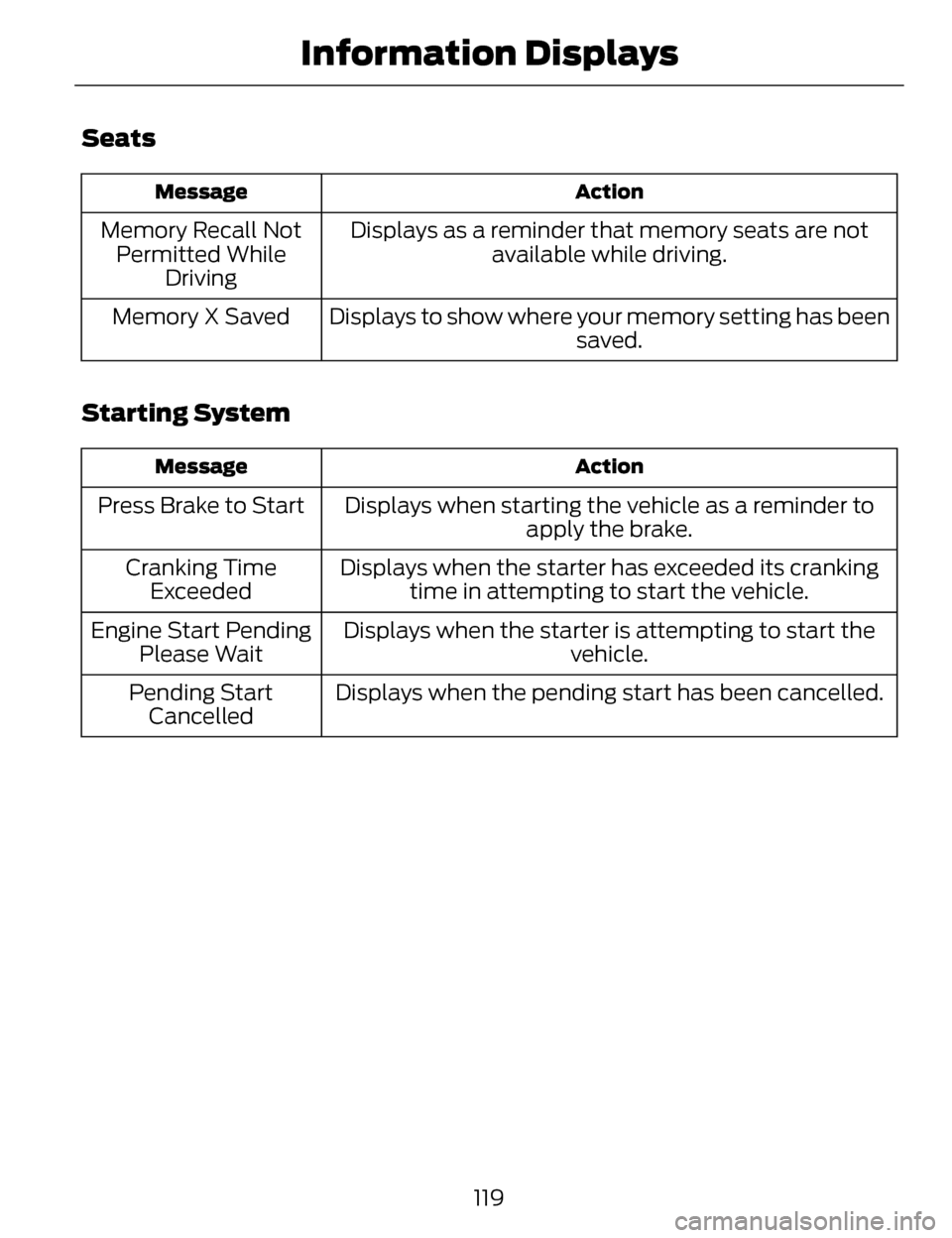
Seats
Action
Message
Displays as a reminder that memory seats are not
available while driving.
Memory Recall Not
Permitted While Driving
Displays to show where your memory setting has been saved.
Memory X Saved
Starting System
Action
Message
Displays when starting the vehicle as a reminder to
apply the brake.
Press Brake to Start
Displays when the starter has exceeded its crankingtime in attempting to start the vehicle.
Cranking Time
Exceeded
Displays when the starter is attempting to start the vehicle.
Engine Start Pending
Please Wait
Displays when the pending start has been cancelled.
Pending Start
Cancelled
119
Information Displays
Page 124 of 468
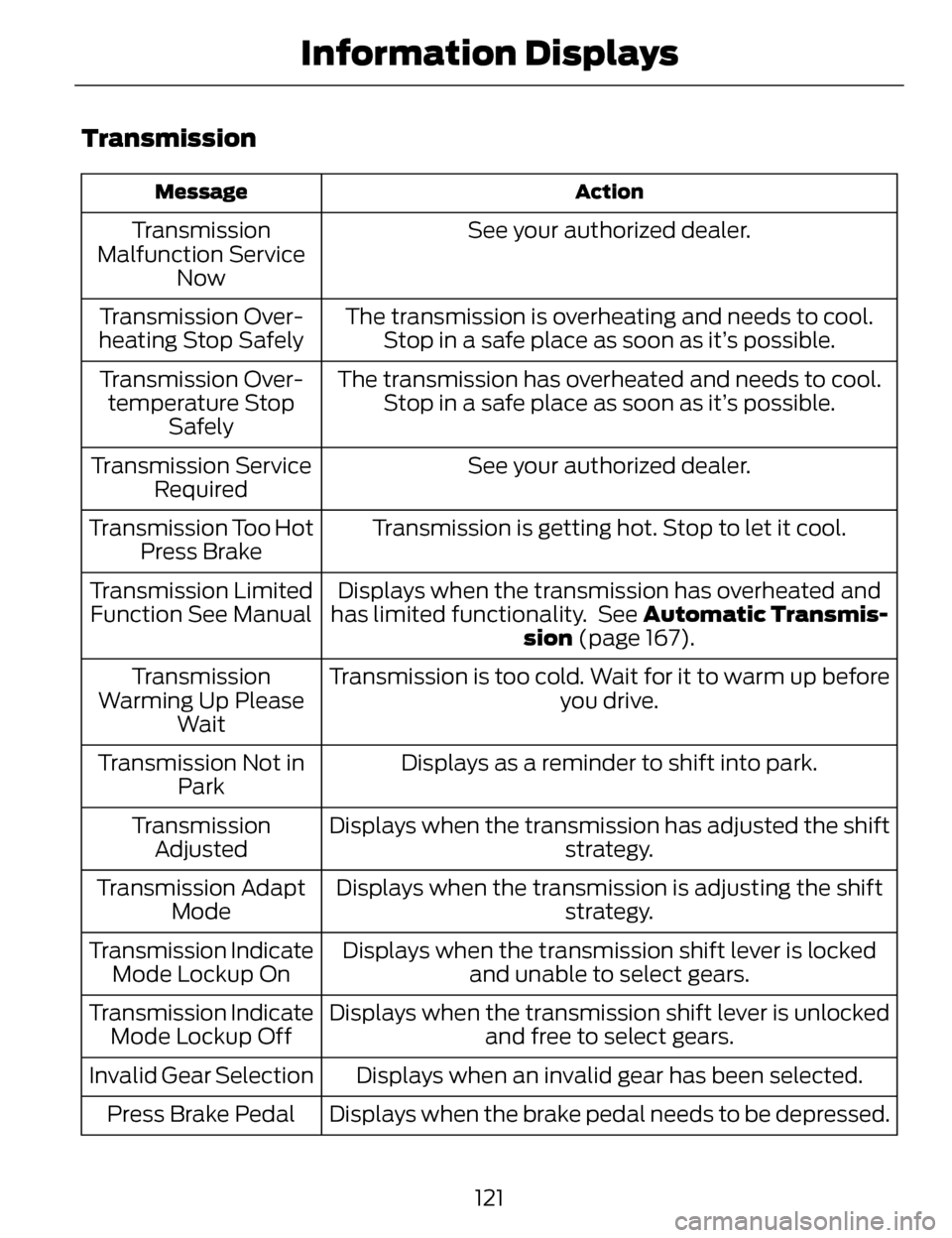
Transmission
Action
Message
See your authorized dealer.
Transmission
Malfunction Service Now
The transmission is overheating and needs to cool.Stop in a safe place as soon as it’s possible.
Transmission Over-
heating Stop Safely
The transmission has overheated and needs to cool.Stop in a safe place as soon as it’s possible.
Transmission Over-
temperature Stop Safely
See your authorized dealer.
Transmission Service
Required
Transmission is getting hot. Stop to let it cool.
Transmission Too Hot
Press Brake
Displays when the transmission has overheated and
has limited functionality. See Automatic Transmis- sion (page 167).
Transmission Limited
Function See Manual
Transmission is too cold. Wait for it to warm up beforeyou drive.
Transmission
Warming Up Please Wait
Displays as a reminder to shift into park.
Transmission Not in
Park
Displays when the transmission has adjusted the shift strategy.
Transmission
Adjusted
Displays when the transmission is adjusting the shift strategy.
Transmission Adapt
Mode
Displays when the transmission shift lever is lockedand unable to select gears.
Transmission Indicate
Mode Lockup On
Displays when the transmission shift lever is unlockedand free to select gears.
Transmission Indicate
Mode Lockup Off
Displays when an invalid gear has been selected.
Invalid Gear Selection
Displays when the brake pedal needs to be depressed.
Press Brake Pedal
121
Information Displays
Page 125 of 468
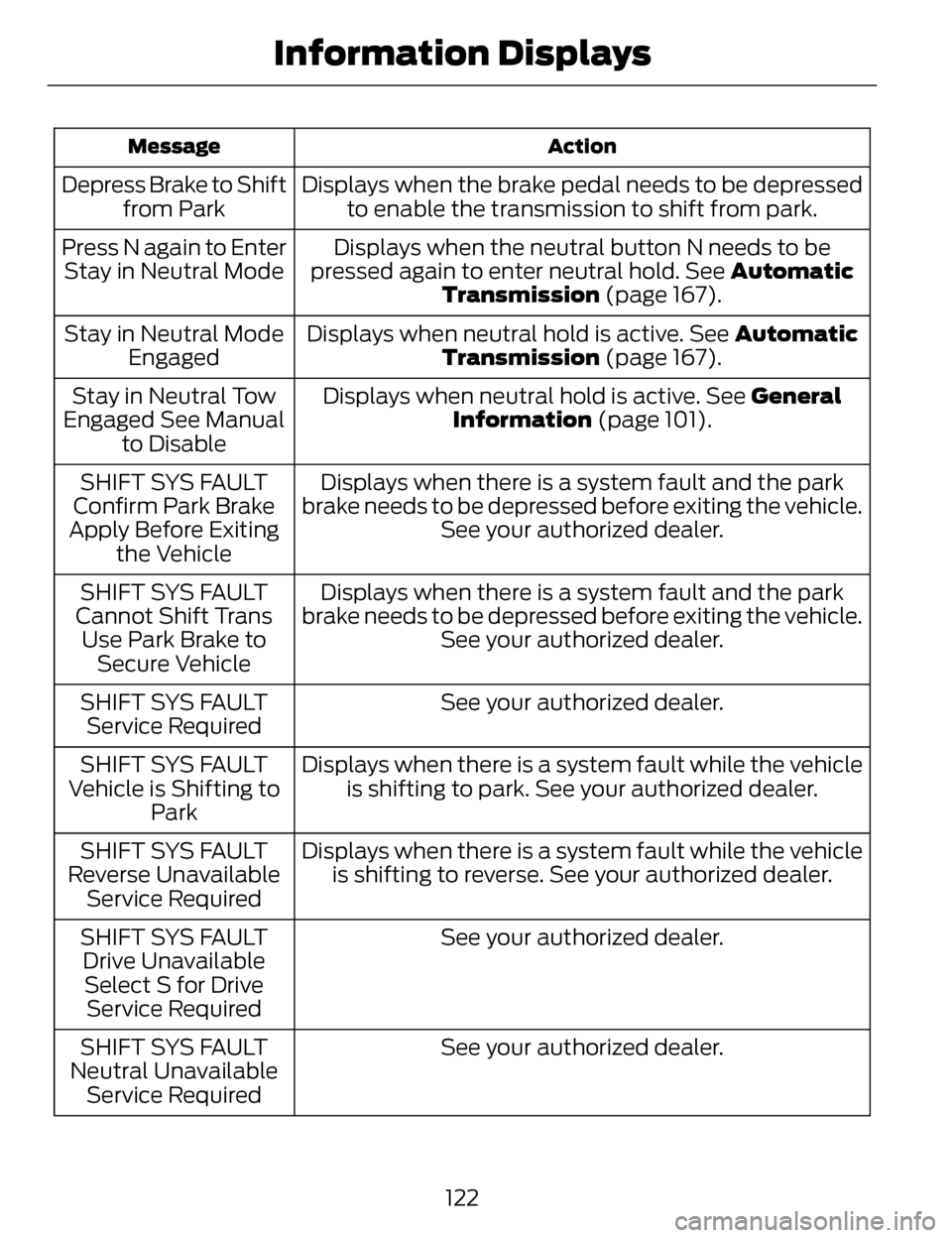
Action
Message
Displays when the brake pedal needs to be depressed
to enable the transmission to shift from park.
Depress Brake to Shift
from Park
Displays when the neutral button N needs to be
pressed again to enter neutral hold. See Automatic Transmission (page 167).
Press N again to Enter
Stay in Neutral Mode
Displays when neutral hold is active. See Automatic
Transmission (page 167).
Stay in Neutral Mode
Engaged
Displays when neutral hold is active. See General
Information (page 101).
Stay in Neutral Tow
Engaged See Manual to Disable
Displays when there is a system fault and the park
brake needs to be depressed before exiting the vehicle. See your authorized dealer.
SHIFT SYS FAULT
Confirm Park Brake
Apply Before Exiting the Vehicle
Displays when there is a system fault and the park
brake needs to be depressed before exiting the vehicle. See your authorized dealer.
SHIFT SYS FAULT
Cannot Shift Trans Use Park Brake to Secure Vehicle
See your authorized dealer.
SHIFT SYS FAULT
Service Required
Displays when there is a system fault while the vehicleis shifting to park. See your authorized dealer.
SHIFT SYS FAULT
Vehicle is Shifting to Park
Displays when there is a system fault while the vehicleis shifting to reverse. See your authorized dealer.
SHIFT SYS FAULT
Reverse Unavailable Service Required
See your authorized dealer.
SHIFT SYS FAULT
Drive UnavailableSelect S for Drive Service Required
See your authorized dealer.
SHIFT SYS FAULT
Neutral Unavailable Service Required
122
Information Displays
Page 126 of 468
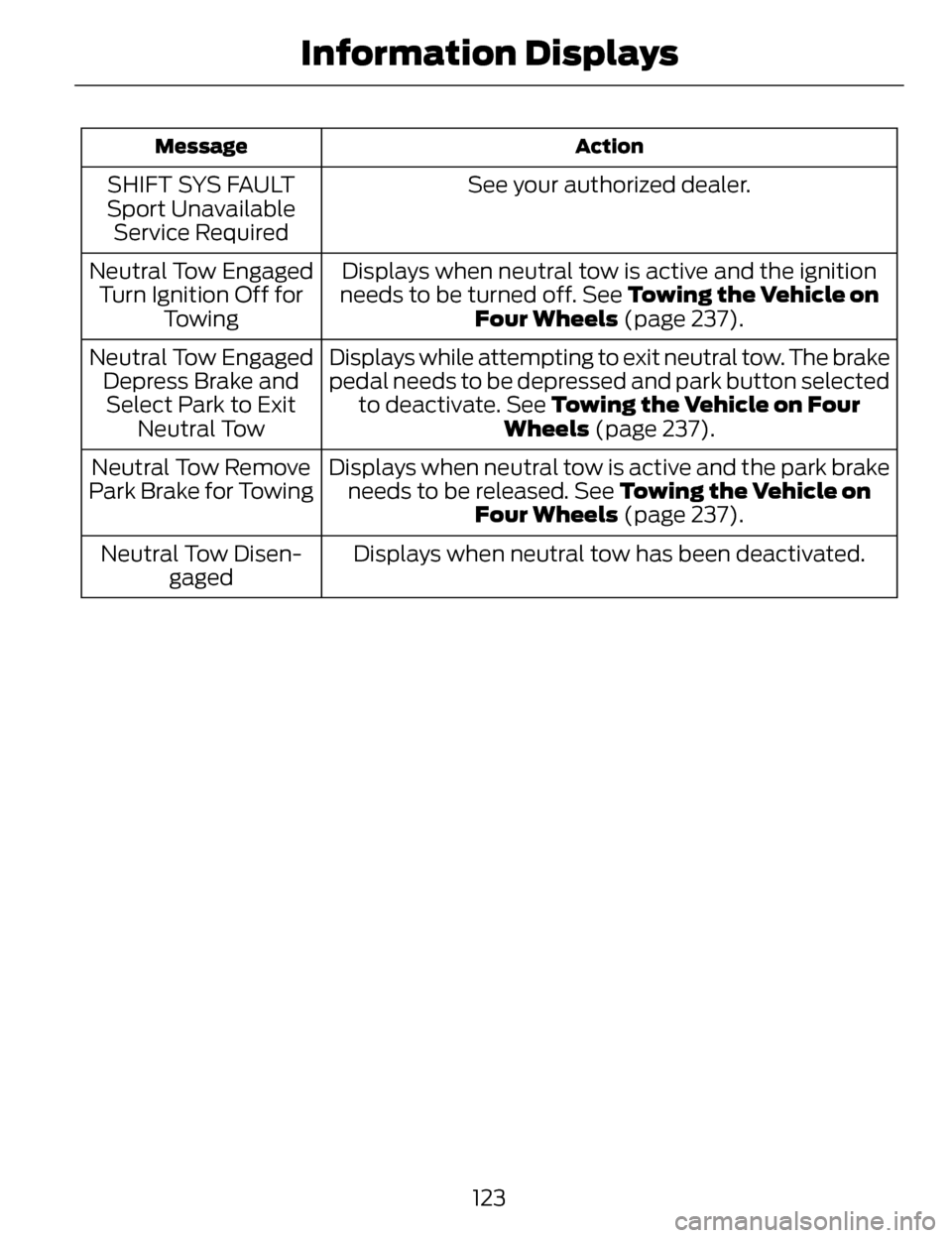
Action
Message
See your authorized dealer.
SHIFT SYS FAULT
Sport Unavailable Service Required
Displays when neutral tow is active and the ignition
needs to be turned off. See Towing the Vehicle on
Four Wheels (page 237).
Neutral Tow Engaged
Turn Ignition Off for Towing
Displays while attempting to exit neutral tow. The brake
pedal needs to be depressed and park button selectedto deactivate. See Towing the Vehicle on Four Wheels (page 237).
Neutral Tow Engaged
Depress Brake andSelect Park to Exit Neutral Tow
Displays when neutral tow is active and the park brakeneeds to be released. See Towing the Vehicle on Four Wheels (page 237).
Neutral Tow Remove
Park Brake for Towing
Displays when neutral tow has been deactivated.
Neutral Tow Disen-
gaged
123
Information Displays
Page 155 of 468
The keyless starting system has three
modes:
•Off: Turns the ignition off.
• Without applying the brake
pedal, press and release the
button once when the ignition
is in the on mode, or when the
engine is running but the
vehicle is not moving.
• On: All electrical circuits are
operational and the warning lamps
and indicators illuminate.
• Without applying the brake
pedal, press and release the
button once.
• Start: Starts the engine.
• Press the brake pedal, and then
press the button for any length
of time. An indicator light on the
button illuminates when then
ignition is on and when the
engine starts.
STARTING A GASOLINE
ENGINE
When you start the engine, the idle
speed increases, this helps to warm
up the engine. If the engine idle speed
does not slow down automatically,
have your vehicle checked by an
authorized dealer.
Before starting the engine, check the
following:
• Make sure all occupants havefastened their safety belts.
• Make sure the headlamps and electrical accessories are off. • Make sure the parking brake is on.
• Put the transmission in P.
Note:
Do not touch the accelerator
pedal.
1. Fully press the brake pedal.
2. Press the button.
The system does not function if:
• The key frequencies are jammed.
• The key battery has no charge.
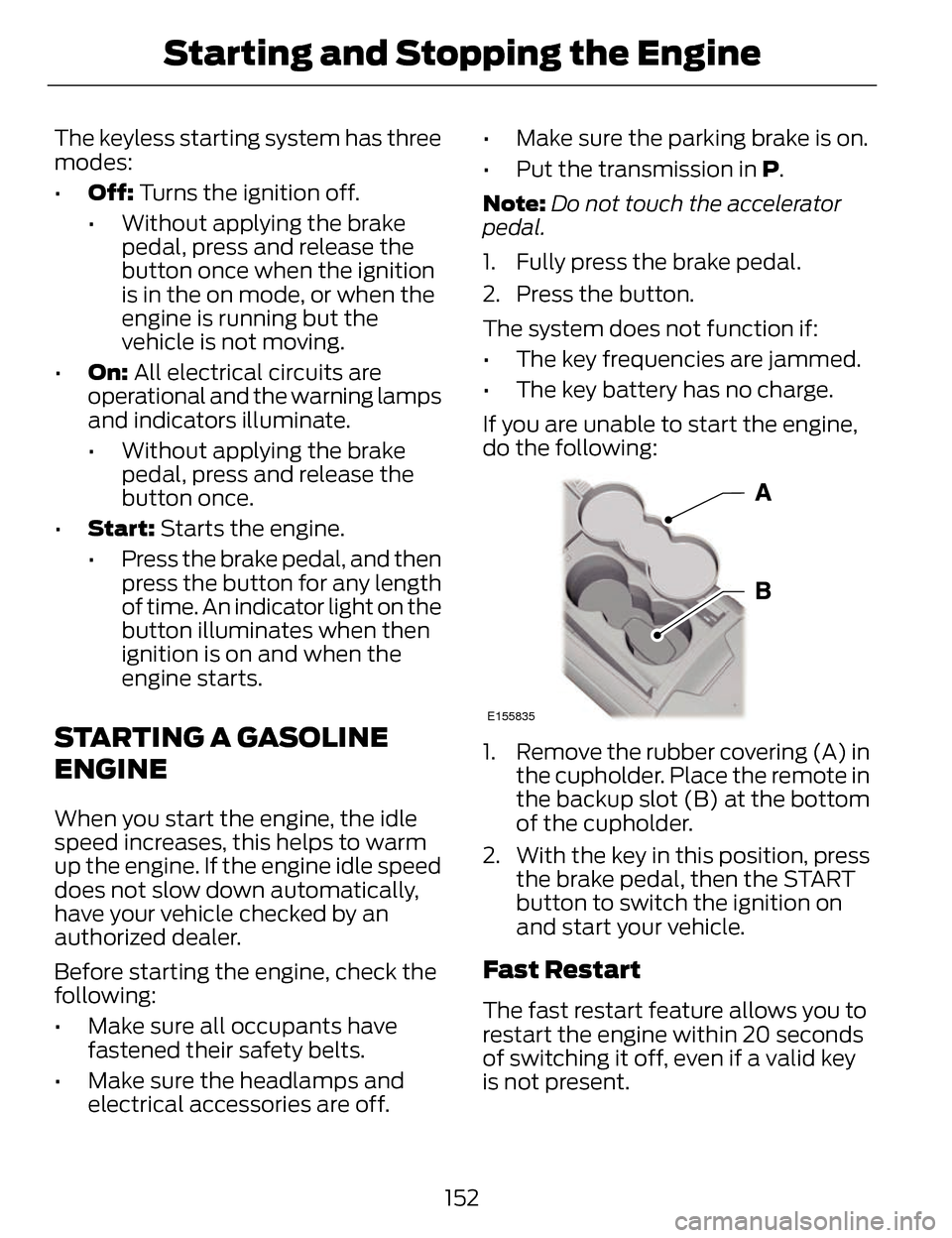
If you are unable to start the engine,
do the following:
E155835
1. Remove the rubber covering (A) in the cupholder. Place the remote in
the backup slot (B) at the bottom
of the cupholder.
2. With the key in this position, press the brake pedal, then the START
button to switch the ignition on
and start your vehicle.
Fast Restart
The fast restart feature allows you to
restart the engine within 20 seconds
of switching it off, even if a valid key
is not present.
152
Starting and Stopping the Engine
Page 156 of 468
Within 20 seconds of switching the
engine off, press the brake pedal and
press the button. After 20 seconds
have expired, you can no longer restart
the engine without the key present
inside your vehicle.
Once the engine has started, it
remains running until you press the
button, even if the system does not
detect a valid key. If you open and
close a door while the engine is
running, the system searches for a
valid key. You cannot restart the
engine if the system does not detect
a valid key within 20 seconds.
Failure to Start
If you cannot start the engine after
three attempts, wait 10 seconds and
follow this procedure:
1. Fully press the brake pedal.
2. Fully press the accelerator pedaland hold it there.
3. Start the engine. Note:
You can crank the engine for a
total of 60 seconds (without the
engine starting) before the starting
system temporarily disables. The 60
seconds does not have to be all at
once. For example, if you crank the
engine three times for 20 seconds each
time, without the engine starting, you
reached the 60-second time limit. A
message appears in the information
display alerting you that you exceeded
the cranking time. You cannot attempt
to start the engine for at least 15
minutes. After 15 minutes, you are
limited to a 15-second engine cranking
time. You need to wait 60 minutes
before you can crank the engine for 60
seconds again.Automatic Engine Shutdown
If your vehicle is equipped with a
keyless ignition, it has a feature that
automatically shuts down the engine
if it has been idling for an extended
period. The ignition also turns off in
order to save battery power. Before
the engine shuts down, a message
appears in the information display
showing a timer counting down from
30 seconds. If you do not intervene
within 30 seconds, the engine shuts
down. Another message appears in
the information display to inform you
that the engine has shut down in order
to save fuel. Start your vehicle as you
normally do.
153
Starting and Stopping the Engine