change time LINCOLN MKZ 2014 User Guide
[x] Cancel search | Manufacturer: LINCOLN, Model Year: 2014, Model line: MKZ, Model: LINCOLN MKZ 2014Pages: 468, PDF Size: 4.49 MB
Page 254 of 468
in the court action. Should you choose
to accept the BBB AUTO LINE
decision, Ford is then bound by the
decision, and must comply with the
decision within 30 days of receipt of
your acceptance letter.
BBB AUTO LINE Application: Using
the information provided below,
please call or write to request a
program application. You will be
asked for your name and address,
general information about your new
vehicle, information about your
warranty concerns, and any steps you
have already taken to try to resolve
them. A Customer Claim Form will be
mailed that will need to be
completed, signed and returned to the
BBB along with proof of ownership.
Upon receipt, the BBB will review the
claim for eligibility under the Program
Summary Guidelines.
You can get more information by
calling BBB AUTO LINE at
1-800-955-5100, or writing to:
BBB AUTO LINE
4200 Wilson Boulevard, Suite 800
Arlington, Virginia 22203-1833
BBB AUTO LINE applications can also
be requested by calling the Ford Motor
Company Customer Relationship
Center at 1-800-392-3673.
Note:Ford Motor Company reserves
the right to change eligibility
limitations, modify procedures, or to
discontinue this process at any time
without notice and without obligation.UTILIZING THE
MEDIATION/ARBITRATION
PROGRAM (CANADA ONLY)
For vehicles delivered to authorized
Canadian dealers. In those cases
where you continue to feel that the
efforts by Ford of Canada and the
authorized dealer to resolve a
factory-related vehicle service
concern have been unsatisfactory,
Ford of Canada participates in an
impartial third party
mediation/arbitration program
administered by the Canadian Motor
Vehicle Arbitration Plan (CAMVAP).
The CAMVAP program is a straight
forward and relatively speedy
alternative to resolve a disagreement
when all other efforts to produce a
settlement have failed. This procedure
is without cost to you and is designed
to eliminate the need for lengthy and
expensive legal proceedings.
In the CAMVAP program, impartial
third-party arbitrators conduct
hearings at mutually convenient times
and places in an informal
environment. These impartial
arbitrators review the positions of the
parties, make decisions and, when
appropriate, render awards to resolve
disputes. CAMVAP decisions are fast,
fair, and final as the arbitrator’s award
is binding on both you and Ford of
Canada.
251
Customer Assistance
Page 279 of 468
AUTOMATIC
TRANSMISSION FLUID
CHECK
6F35/HF35 transmission (If
Equipped)
Note: Transmission fluid should be
checked by an authorized dealer. If
required, fluid should be added by an
authorized dealer.
The automatic transmission does not
have a transmission fluid dipstick.
Refer to your scheduled maintenance
information for scheduled intervals
for fluid checks and changes. Your
transmission does not consume fluid.
However, the fluid level should be
checked if the transmission is not
working properly, (For example: if the
transmission slips or shifts slowly) or
if you notice some sign of fluid
leakage. See Scheduled
Maintenance (page 436).
Do not use supplemental transmission
fluid additives, treatments or cleaning
agents. The use of these materials
may affect transmission operation
and result in damage to internal
transmission components.
6F50/6F55 Transmission (If
Equipped)
WARNINGS
The dipstick cap and surrounding
components may be hot; gloves
are recommended.
WARNINGS
Use gloves when moving the air
filter assembly. Components will
be hot.
Note: Automatic transmission fluid
expands when warmed. To obtain an
accurate fluid check, drive the vehicle
until it is warmed up (approximately
20 miles [30 kilometers]). If your
vehicle has been operated for an
extended period at high speeds, in city
traffic during hot weather or pulling a
trailer, the vehicle should be turned off
until normal operating temperatures
are reached to allow the fluid to cool
before checking. Depending on vehicle
use, cooling times could take up to 30
minutes or longer.
Refer to your scheduled maintenance
information for scheduled intervals
for fluid checks and changes. Your
transmission does not consume fluid.
However, the fluid level should be
checked if the transmission is not
working properly. For example, if the
transmission slips or shifts slowly or
if you notice some sign of fluid
leakage.
1. Drive the vehicle 20 miles (30 kilometers) or until it reaches
normal operating temperature
2. Park the vehicle on a level surface and engage the parking brake.
276
Maintenance
Page 289 of 468
E150095
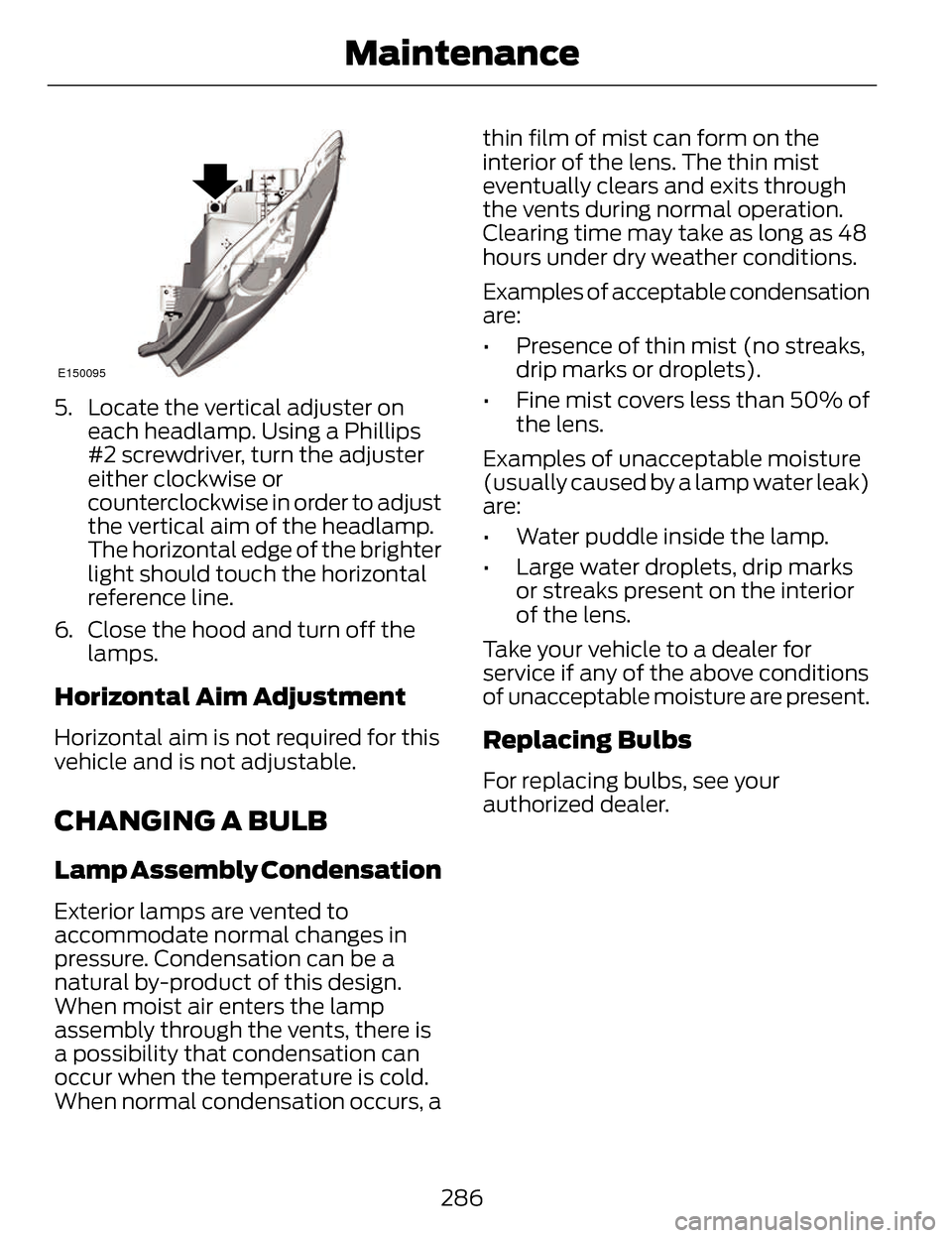
5. Locate the vertical adjuster oneach headlamp. Using a Phillips
#2 screwdriver, turn the adjuster
either clockwise or
counterclockwise in order to adjust
the vertical aim of the headlamp.
The horizontal edge of the brighter
light should touch the horizontal
reference line.
6. Close the hood and turn off the lamps.
Horizontal Aim Adjustment
Horizontal aim is not required for this
vehicle and is not adjustable.
CHANGING A BULB
Lamp Assembly Condensation
Exterior lamps are vented to
accommodate normal changes in
pressure. Condensation can be a
natural by-product of this design.
When moist air enters the lamp
assembly through the vents, there is
a possibility that condensation can
occur when the temperature is cold.
When normal condensation occurs, a thin film of mist can form on the
interior of the lens. The thin mist
eventually clears and exits through
the vents during normal operation.
Clearing time may take as long as 48
hours under dry weather conditions.
Examples of acceptable condensation
are:
• Presence of thin mist (no streaks,
drip marks or droplets).
• Fine mist covers less than 50% of the lens.
Examples of unacceptable moisture
(usually caused by a lamp water leak)
are:
• Water puddle inside the lamp.
• Large water droplets, drip marks or streaks present on the interior
of the lens.
Take your vehicle to a dealer for
service if any of the above conditions
of unacceptable moisture are present.
Replacing Bulbs
For replacing bulbs, see your
authorized dealer.
286
Maintenance
Page 297 of 468
VEHICLE STORAGE
If you plan on storing your vehicle for
an extended period of time (30 days
or more), read the following
maintenance recommendations to
make sure your vehicle stays in good
operating condition.
All motor vehicles and their
components were engineered and
tested for reliable, regular driving.
Long term storage under various
conditions may lead to component
degradation or failure unless specific
precautions are taken to preserve the
components.
General
• Store all vehicles in a dry,ventilated place.
• Protect from sunlight, if possible.
• If vehicles are stored outside, they require regular maintenance to
protect against rust and damage.
Body
• Wash your vehicle thoroughly toremove dirt, grease, oil, tar or mud
from exterior surfaces, rear-wheel
housing and underside of front
fenders.
• Periodically wash your vehicle stored in exposed locations.
• Touch-up exposed or primed metal to prevent rust. • Cover chrome and stainless steel
parts with a thick coat of auto wax
to prevent discoloration. Re-wax
as necessary when your vehicle is
washed.
• Lubricate all hood, door and trunk lid hinges, and latches with a light
grade oil.
• Cover interior trim to prevent fading.
• Keep all rubber parts free from oil and solvents.
Engine
• The engine oil and filter should bechanged prior to storage, as used
engine oil contain contaminates
that may cause engine damage.
• Start the engine every 15 days. Run at fast idle until it reaches normal
operating temperature
• With your foot on the brake, shift through all the gears while the
engine is running.
Fuel system
• Fill the fuel tank with high-qualityfuel until the first automatic
shutoff of the fuel pump nozzle.
294
Vehicle Care
Page 314 of 468
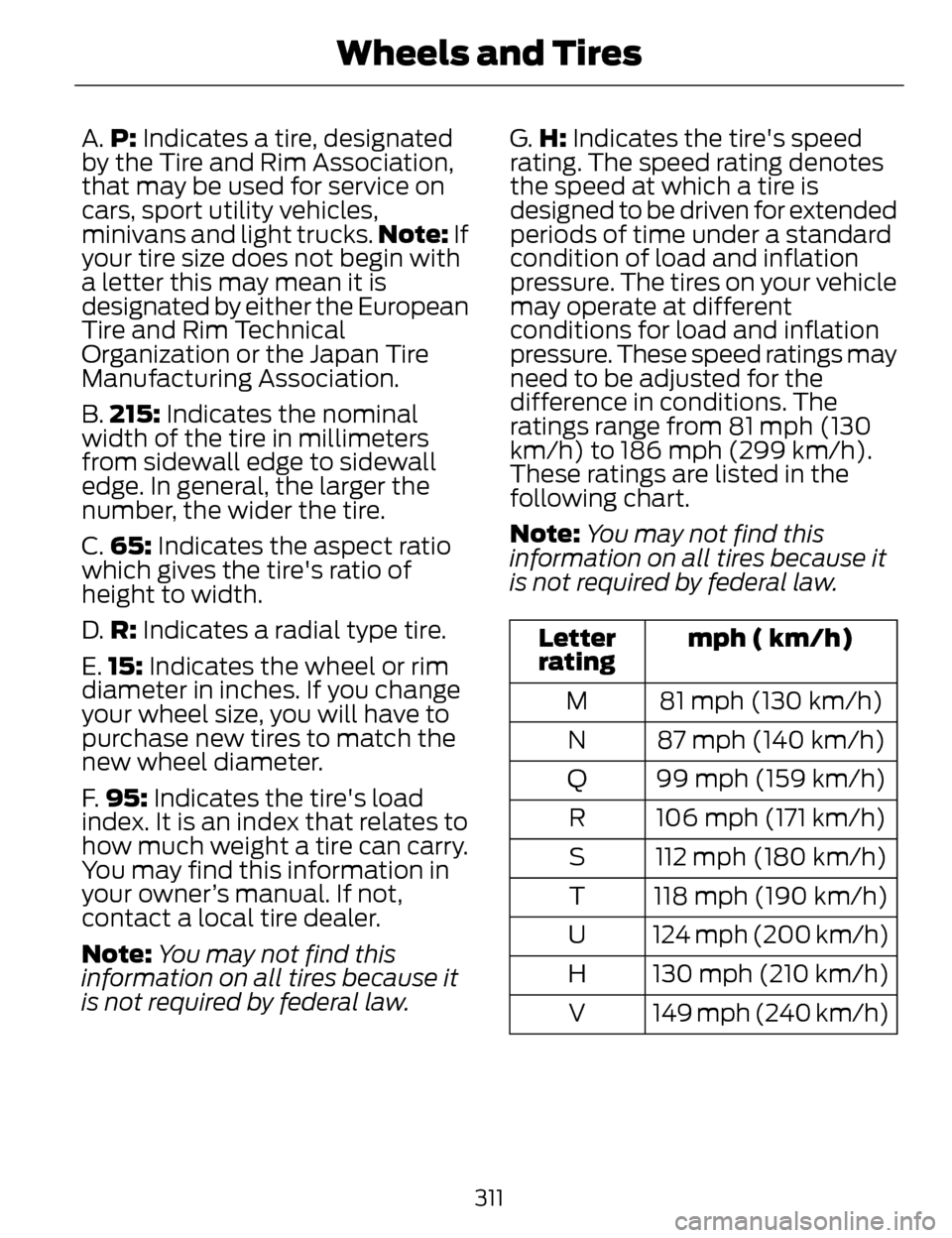
A.P: Indicates a tire, designated
by the Tire and Rim Association,
that may be used for service on
cars, sport utility vehicles,
minivans and light trucks. Note: If
your tire size does not begin with
a letter this may mean it is
designated by either the European
Tire and Rim Technical
Organization or the Japan Tire
Manufacturing Association.
B. 215: Indicates the nominal
width of the tire in millimeters
from sidewall edge to sidewall
edge. In general, the larger the
number, the wider the tire.
C. 65: Indicates the aspect ratio
which gives the tire's ratio of
height to width.
D. R: Indicates a radial type tire.
E. 15: Indicates the wheel or rim
diameter in inches. If you change
your wheel size, you will have to
purchase new tires to match the
new wheel diameter.
F. 95: Indicates the tire's load
index. It is an index that relates to
how much weight a tire can carry.
You may find this information in
your owner’s manual. If not,
contact a local tire dealer.
Note: You may not find this
information on all tires because it
is not required by federal law. G.
H: Indicates the tire's speed
rating. The speed rating denotes
the speed at which a tire is
designed to be driven for extended
periods of time under a standard
condition of load and inflation
pressure. The tires on your vehicle
may operate at different
conditions for load and inflation
pressure. These speed ratings may
need to be adjusted for the
difference in conditions. The
ratings range from 81 mph (130
km/h) to 186 mph (299 km/h).
These ratings are listed in the
following chart.
Note: You may not find this
information on all tires because it
is not required by federal law.
mph ( km/h)
Letter
rating
81 mph (130 km/h)
M
87 mph (140 km/h)
N
99 mph (159 km/h)
Q
106 mph (171 km/h)
R
112 mph (180 km/h)
S
118 mph (190 km/h)
T
124 mph (200 km/h)
U
130 mph (210 km/h)
H
149 mph (240 km/h)
V
311
Wheels and Tires
Page 344 of 468
Name (PLEASE PRINT)
APT.#
ADDRESS
ZIP
S TAT E
CITY
E-MAIL
SERVICE PLANS (CANADA
ONLY)
You can get more protection for your
vehicle by purchasing a Ford Extended
Service Plan. Ford Extended Service
Plan is the only service contract
backed by Ford Motor Company of
Canada, Limited. Depending on the
plan you purchase, Ford Extended
Service Plan provides benefits such
as:
• Rental reimbursement
• Coverage for cert ain maintenance
and wear items
• Protection against repair costs after your New Vehicle Limited
Warranty Coverage expires
• Roadside Assistance benefits
There are several Ford Extended
Service Plans available in various time,
distance and deductible
combinations. Each plan is tailored to
fit your own driving needs, including
reimbursement for towing and rental. When you purchase Ford Extended
Service Plan, you receive added
peace-of-mind protection throughout
Canada and the United States,
provided by a network of participating
authorized Ford Motor Company
dealers. The Lincoln Maintenance
Protection Plan is honored at
authorized Lincoln dealers.
Note:
Repairs performed outside of
Canada and the United States are not
eligible for Ford Extended Service Plan
coverage.
This information is subject to change.
For more information, visit your local
Ford of Canada dealer or www.ford.ca
to find the Ford Extended Service Plan
that is right for you.
341
Ford Extended Service Plan (ESP)
Page 348 of 468
• Eject: Eject a CD from theentertainment system.
• SOURCE: Touch the word
repeatedly to see all available
media modes. The screen does not
change, but you see the media
change in the lower left status bar.
• SOUND: Touch the word to
access the Sound menu where you
can adjust settings such as: Bass,
Treble, Midrange, Balance and
Fade, DSP (Digital Signal
Processing), THX Deep Note
Demo, Occupancy Mode and
Speed Compensated Volume.
(Your vehicle may not have all of
these sound options.)
• Hazard flasher: Switch the hazard flashers off and on.
Cleaning the Touchscreen
Display
Use a clean, soft cloth such as one
used for cleaning glasses. If dirt or
fingerprints are still visible, apply a
small amount of alcohol to the cloth.
Do not pour or spray alcohol onto the
display. Do not use detergent or any
type of solvent to clean the display.
Support
The SYNC support team is available
to help you with any questions you are
not able to answer on your own.
Monday-Saturday, 8:30am-9:00pm
EST.
Sunday, 10:30am-7:30pm EST.
In the United States, call:
1-800-392-3673. In Canada, call: 1-800-565-3673.
Times are subject to change due to
holidays.
Safety
Information
WARNING
Driving while distracted can
result in loss of vehicle control,
crash and injury. We strongly
recommend that you use extreme
caution when using any device that
may take your focus off the road. Your
primary responsibility is the safe
operation of your vehicle. We
recommend against the use of any
hand-held device while driving and
encourage the use of voice-operated
systems when possible. Make sure you
are aware of all applicable local laws
that may affect the use of electronic
devices while driving.
• Do not attempt to service or repair the system. See an authorized
dealer.
• Do not operate playing devices if the power cords or cables are
broken, split or damaged. Place
cords and cables out of the way,
so they do not interfere with the
operation of pedals, seats,
compartments or safe driving
abilities.
345
MyLincoln Touch™
Page 356 of 468
From this screen, you can also make
other adjustments such as 12-hour or
24-hour mode, activate GPS time
synchronization and have the system
automatically update new time zones.
You can also turn the outside air
temperature display off and on. It
appears at the top center of the
touchscreen, next to the time and
date.
The system automatically saves any
updates you make to the settings.
Display
You can adjust the touchscreen
display through the touchscreen or by
pressing the voice button on your
steering wheel controls and when
prompted, say, "Display settings".
E142607
Press the Settings icon >
Display, to access and make
adjustments using the
touchscreen.
• Brightness allows you to make
the screen display brighter or
dimmer.
• Auto DIM, when set to On, lets
you use the Auto Dim Manual
Offset feature.
• Mode allows you to set the screen
to a certain brightness or have the
system automatically change
based on the outside light level, or
turn the display off.
• If you select AUTO or NIGHT,
you have the options of turning
the display's Auto Dim feature
on or off and changing the Auto
Dim Manual Offset feature. •
Auto Dim Manual Offset allows
you to adjust screen dimming as
the outside lighting conditions
change from day to night.
• Edit Wallpaper
• You can have your touchscreen
display the default photo or
upload your own.
Uploading Photos for Your Home
Screen Wallpaper
Note: You cannot load photos directly
from your camera. You must access
the photos either from your USB mass
storage device or from an SD card.
Note: Photographs with extremely
large dimensions (such as 2048 x
1536) may not be compatible and
appear as a blank (black) image on the
display.
Your system allows you to upload and
view up to 32 photos.
E142607
To access, press the Settings
icon > Display > Edit
Wallpaper, and then follow
the system prompts to upload your
photographs.
Only the photograph(s), which meets
the following conditions, display:
• Compatible file formats are as follows: .jpg, .gif, .png, .bmp
• Each file must be 1.5 MB or less.
• Recommended dimensions: 800 x 384
353
MyLincoln Touch™
Page 374 of 468
HD Radio Technology manufactured
under license from iBiquity Digital
Corp. U.S. and foreign patents. HD
Radio and the HD and HD Radio logos
are proprietary trademarks of iBiquity
Digital Corp. Ford Motor Company and
iBiquity Digital Corp. are not
responsible for the content sent using
HD Radio technology. Content may
be changed, added or deleted at any
time at the station owner's discretion.
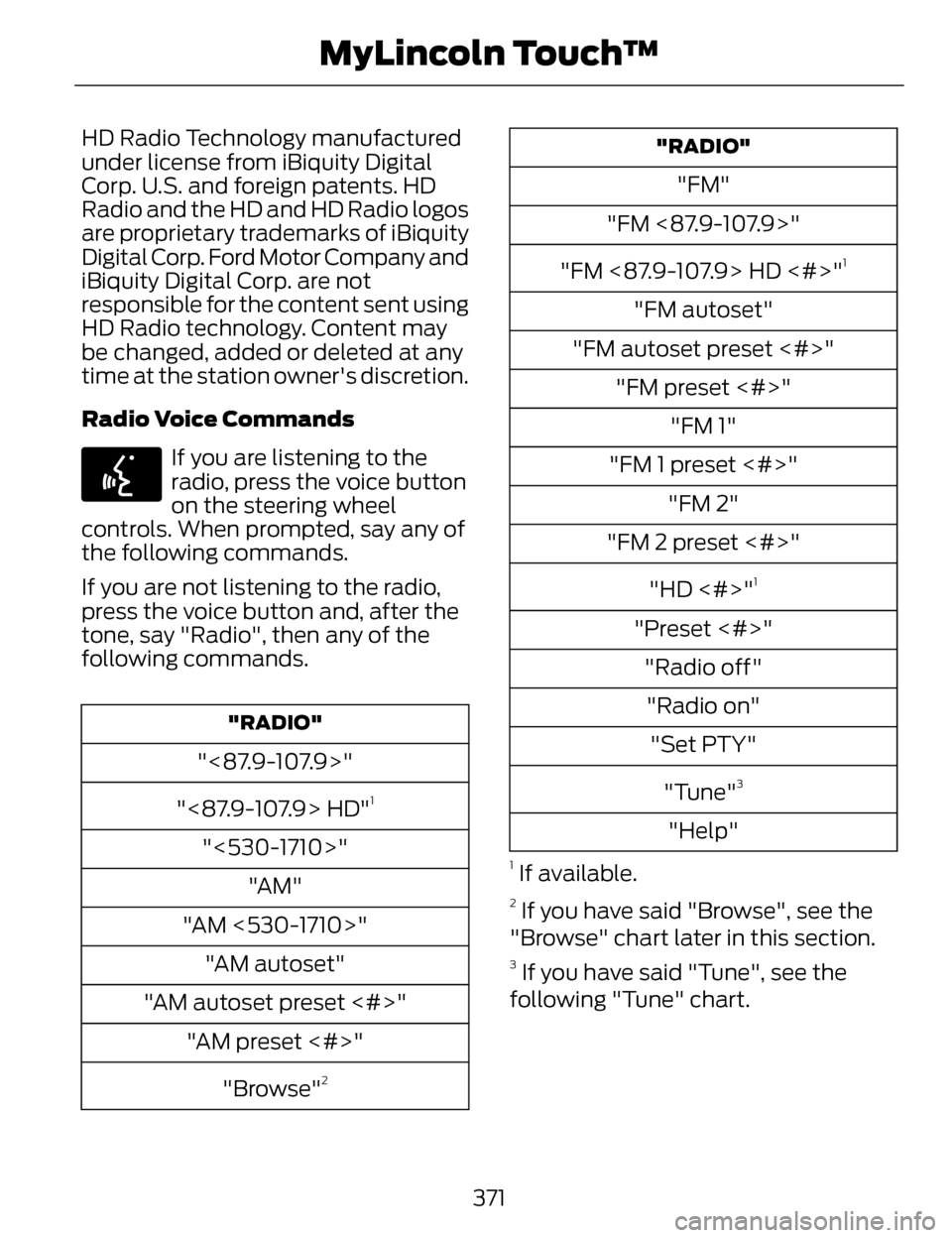
Radio Voice Commands
E142599
If you are listening to the
radio, press the voice button
on the steering wheel
controls. When prompted, say any of
the following commands.
If you are not listening to the radio,
press the voice button and, after the
tone, say "Radio", then any of the
following commands.
"RADIO"
"<87.9-107.9>"
"<87.9-107.9> HD"
1
"<530-1710>" "AM"
"AM <530-1710>" "AM autoset"
"AM autoset preset <#>" "AM preset <#>"
"Browse"
2
"RADIO"
"FM"
"FM <87.9-107.9>"
"FM <87.9-107.9> HD <#>"
1
"FM autoset"
"FM autoset preset <#>" "FM preset <#>" "FM 1"
"FM 1 preset <#>" "FM 2"
"FM 2 preset <#>"
"HD <#>"
1
"Preset <#>""Radio off""Radio on" "Set PTY"
"Tune"
3
"Help"
1 If available.
2 If you have said "Browse", see the
"Browse" chart later in this section.
3 If you have said "Tune", see the
following "Tune" chart.
371
MyLincoln Touch™
Page 377 of 468
Touch Lock if you do not want anyone
to listen to this channel.
Touch Title or Artist to see song and
artists on other stations.
Sirius Satellite Radio Information
Note: Sirius reserves the unrestricted
right to change, rearrange, add or
delete programming including
canceling, moving or adding particular
channels, and its prices, at any time,
with or without notice to you. Ford
Motor Company shall not be
responsible for any such programming
changes.
E142593
Sirius satellite radio is a
subscription-based satellite radio
service that broadcasts a variety of
music, sports, news, weather, traffic
and entertainment programming.
Your factory-installed Sirius satellite
radio system includes hardware and
a limited subscription term that begins
on the date of sale or lease of your
vehicle. See an authorized dealer for
availability. For more information on extended
subscription terms (a service fee is
required), the online media player and
a list of Sirius satellite radio channels,
and other features, please visit
www.siriusxm.com in the United
States, www.sirius.ca in Canada, or
call Sirius at 1-888-539-7474.
Note:
This receiver includes the eCos
real-time operating system. eCos is
published under the eCos License.
Satellite Radio Electronic Serial
Number (ESN)
You need your ESN to activate, modify
or track your satellite radio account.
The ESN is on the System Information
Screen (SR ESN:XXXXXXXXXXXX).
To access your ESN, touch the bottom
left corner of the touchscreen. Touch
SIRIUS > Options.
374
MyLincoln Touch™