child lock LINCOLN MKZ 2014 User Guide
[x] Cancel search | Manufacturer: LINCOLN, Model Year: 2014, Model line: MKZ, Model: LINCOLN MKZ 2014Pages: 468, PDF Size: 4.49 MB
Page 37 of 468
sharply, or the vehicle receives an
impact of approximately 5 mph (8
km/h) or more, the combination
safety belts will lock to help reduce
forward movement of the driver and
passengers.
In addition, the retractor is designed
to lock if the webbing is pulled out too
quickly. If this occurs, let the belt
retract slightly and pull webbing out
again in a slow and controlled
manner.
Automatic Locking Mode
In this mode, the shoulder belt is
automatically pre-locked. The belt
will still retract to remove any slack in
the shoulder belt. The automatic
locking mode is not available on the
driver safety belt.
When to Use the Automatic
Locking Mode
This mode should be used any time a
child safety seat, except a booster, is
installed in passenger front or rear
seating positions. Children 12 years old
and under should be properly
restrained in a rear seating position
whenever possible. See Child Safety
(page 15).
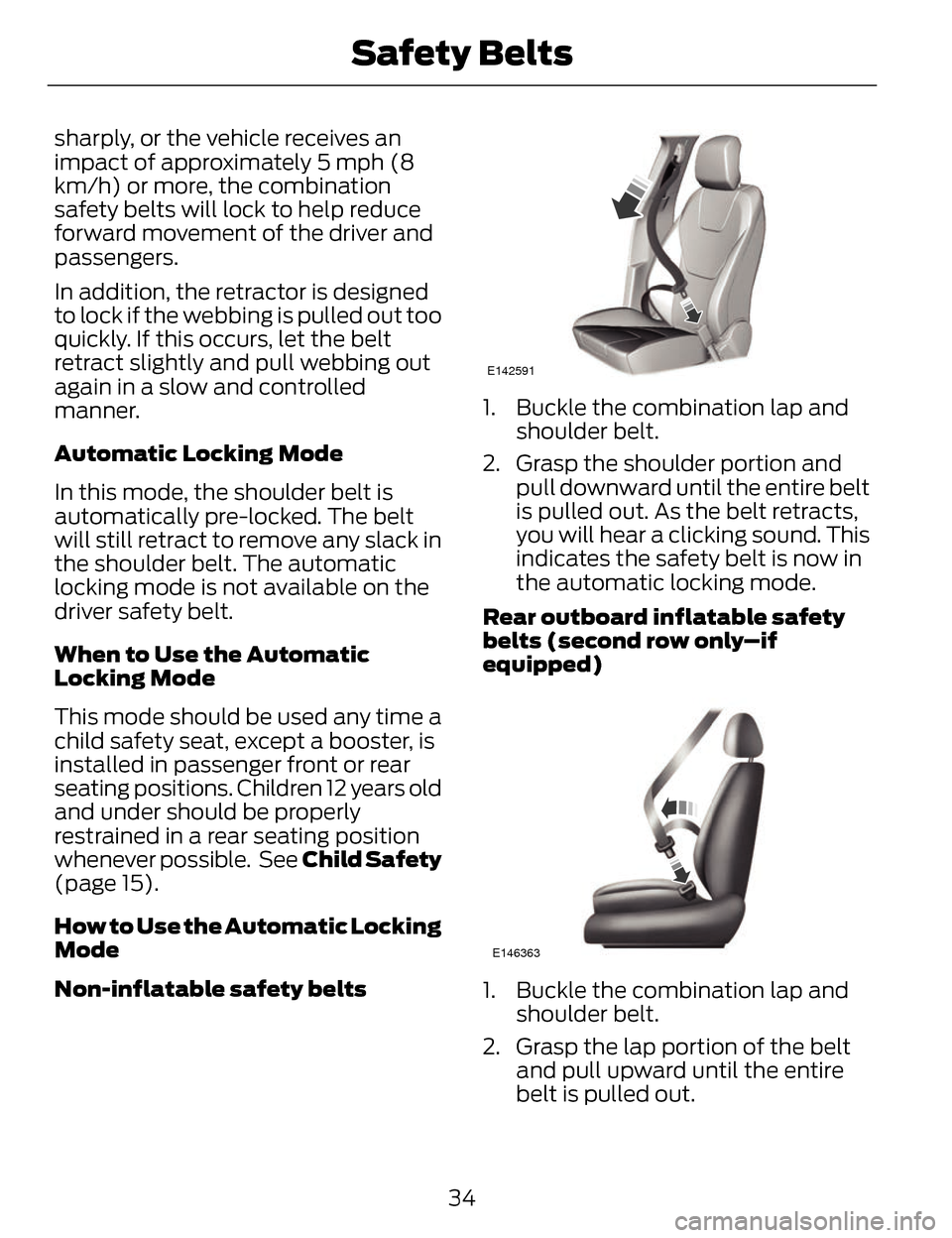
How to Use the Automatic Locking
Mode
Non-inflatable sa fety belts
E142591
1. Buckle the combination lap and
shoulder belt.
2. Grasp the shoulder portion and pull downward until the entire belt
is pulled out. As the belt retracts,
you will hear a clicking sound. This
indicates the safety belt is now in
the automatic locking mode.
Rear outboard inflatable safety
belts (second row only–if
equipped)
E146363
1. Buckle the combination lap and shoulder belt.
2. Grasp the lap portion of the belt and pull upward until the entire
belt is pulled out.
34
Safety Belts
Page 38 of 468
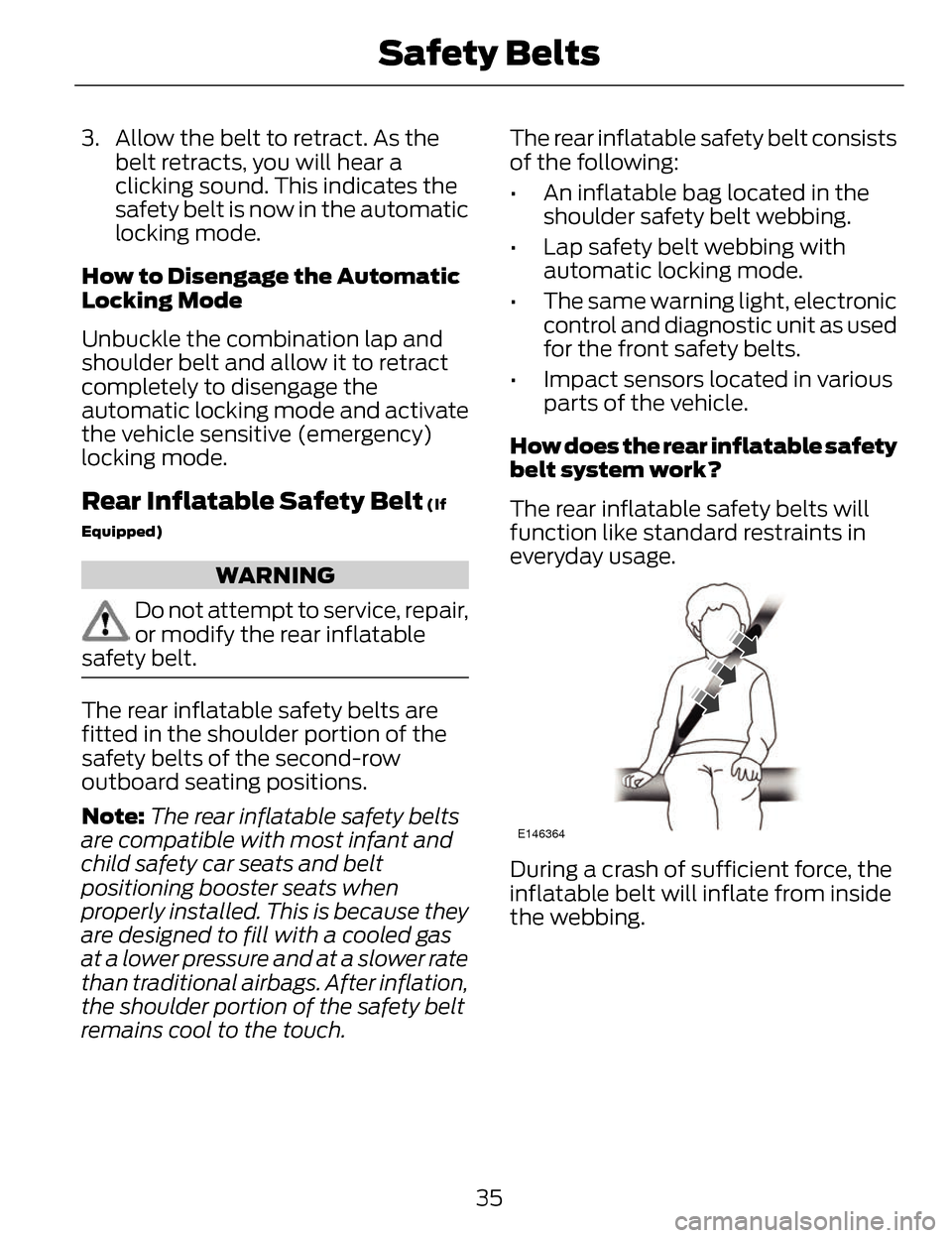
3. Allow the belt to retract. As thebelt retracts, you will hear a
clicking sound. This indicates the
safety belt is now in the automatic
locking mode.
How to Disengage the Automatic
Locking Mode
Unbuckle the combination lap and
shoulder belt and allow it to retract
completely to disengage the
automatic locking mode and activate
the vehicle sensitive (emergency)
locking mode.
Rear Inflatable Safety Belt (If
Equipped)
WARNING
Do not attempt to service, repair,
or modify the rear inflatable
safety belt.
The rear inflatable safety belts are
fitted in the shoulder portion of the
safety belts of the second-row
outboard seating positions.
Note: The rear inflatable safety belts
are compatible with most infant and
child safety car seats and belt
positioning booster seats when
properly installed. This is because they
are designed to fill with a cooled gas
at a lower pressure and at a slower rate
than traditional airbags. After inflation,
the shoulder portion of the safety belt
remains cool to the touch. The rear inflatable safety belt consists
of the following:
• An inflatable bag located in the
shoulder safety belt webbing.
• Lap safety belt webbing with automatic locking mode.
• The same warning light, electronic control and diagnostic unit as used
for the front safety belts.
• Impact sensors located in various parts of the vehicle.
How does the rear inflatable safety
belt system work?
The rear inflatable safety belts will
function like standard restraints in
everyday usage.
E146364
During a crash of sufficient force, the
inflatable belt will inflate from inside
the webbing.
35
Safety Belts
Page 69 of 468
Accessory Mode Battery Saver for
Intelligent Access Keys
If you leave your vehicle in the run
ignition state, it will shut off once it
detects a certain amount of battery
drain or after 45 minutes.
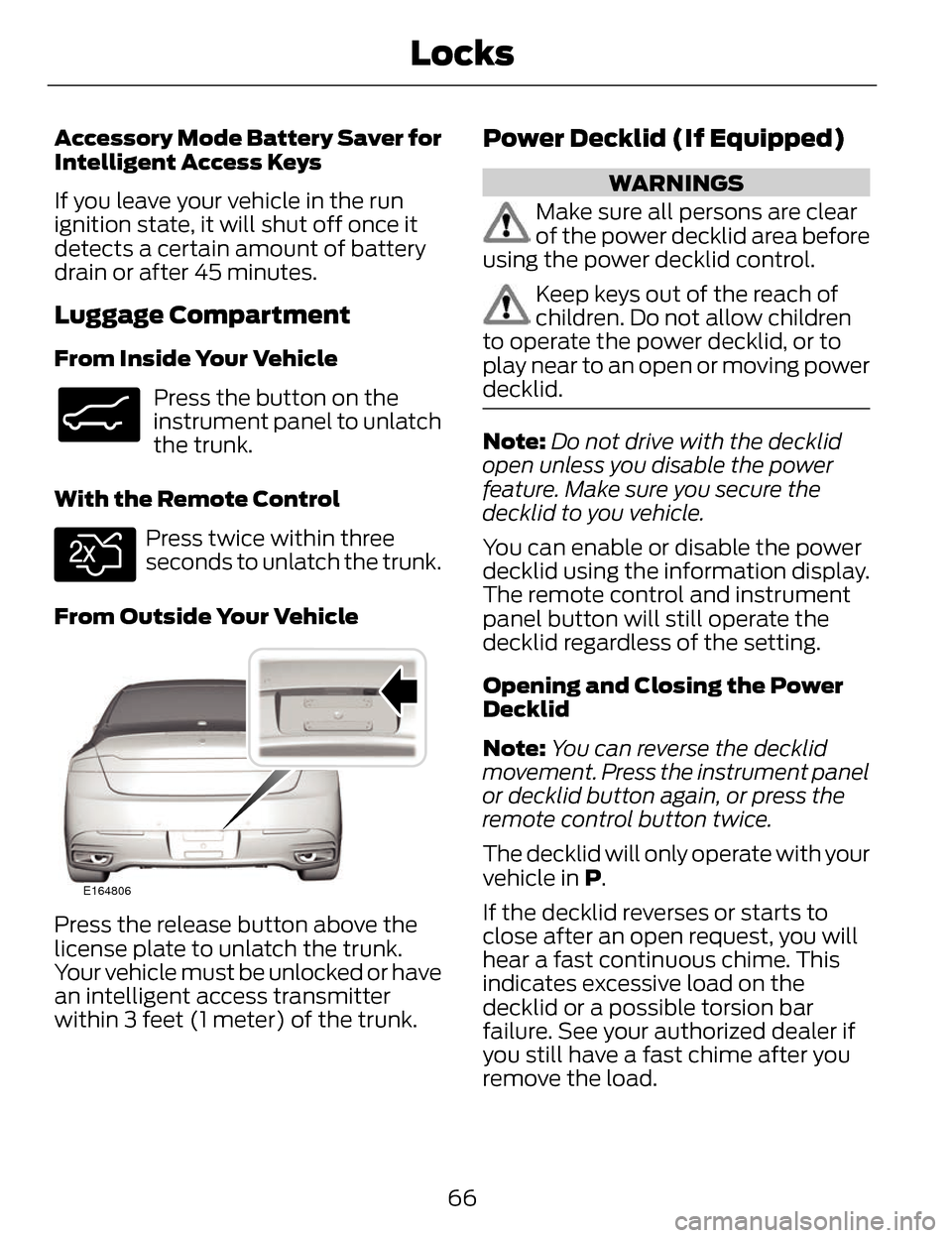
Luggage Compartment
From Inside Your Vehicle
E138633
Press the button on the
instrument panel to unlatch
the trunk.
With the Remote Control
E138630
Press twice within three
seconds to unlatch the trunk.
From Outside Your Vehicle
E164806
Press the release button above the
license plate to unlatch the trunk.
Your vehicle must be unlocked or have
an intelligent access transmitter
within 3 feet (1 meter) of the trunk.
Power Decklid (If Equipped)
WARNINGS
Make sure all persons are clear
of the power decklid area before
using the power decklid control.
Keep keys out of the reach of
children. Do not allow children
to operate the power decklid, or to
play near to an open or moving power
decklid.
Note: Do not drive with the decklid
open unless you disable the power
feature. Make sure you secure the
decklid to you vehicle.
You can enable or disable the power
decklid using the information display.
The remote control and instrument
panel button will still operate the
decklid regardless of the setting.
Opening and Closing the Power
Decklid
Note: You can reverse the decklid
movement. Press the instrument panel
or decklid button again, or press the
remote control button twice.
The decklid will only operate with your
vehicle in P.
If the decklid reverses or starts to
close after an open request, you will
hear a fast continuous chime. This
indicates excessive load on the
decklid or a possible torsion bar
failure. See your authorized dealer if
you still have a fast chime after you
remove the load.
66
Locks
Page 73 of 468
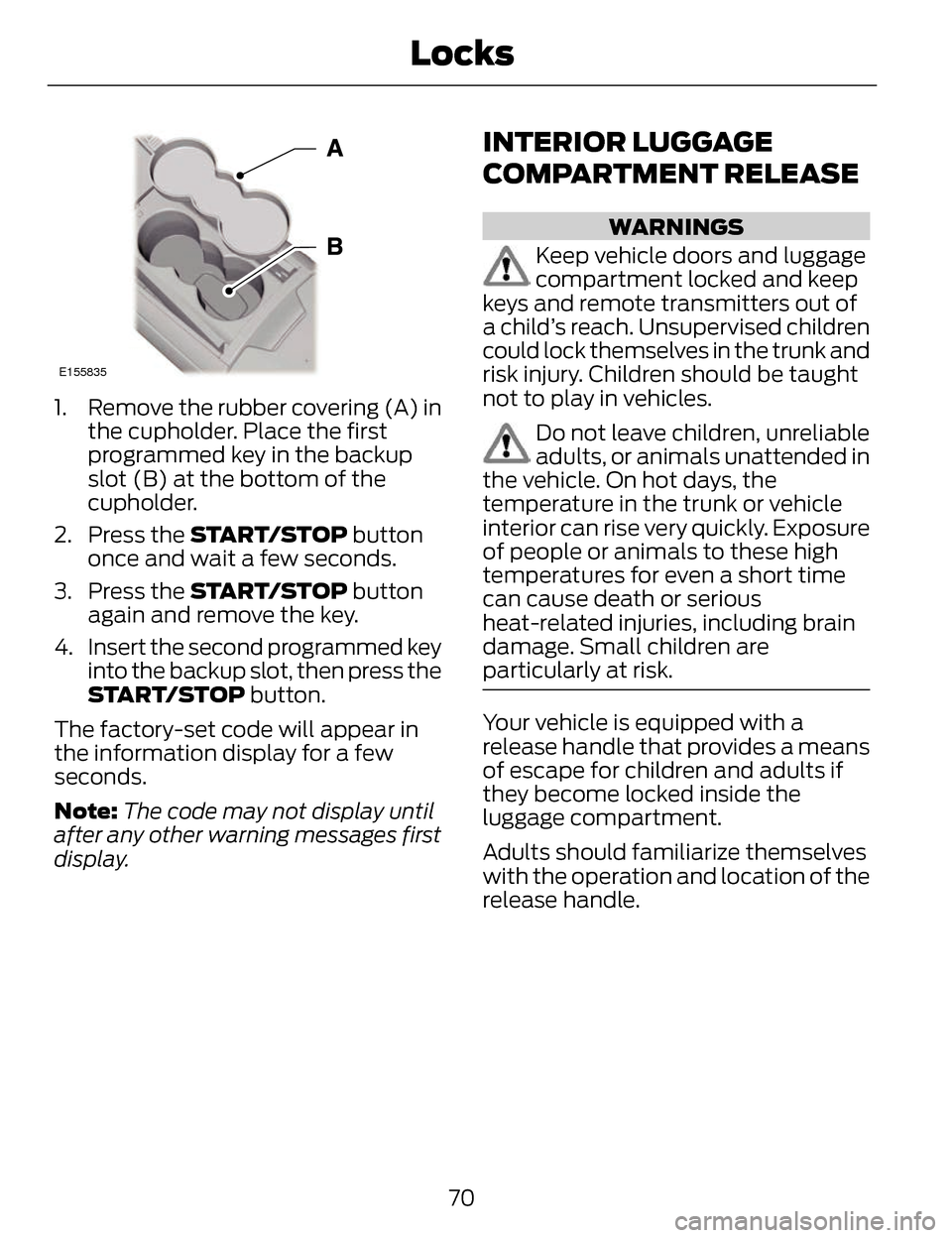
E155835
1. Remove the rubber covering (A) inthe cupholder. Place the first
programmed key in the backup
slot (B) at the bottom of the
cupholder.
2. Press the START/STOP button
once and wait a few seconds.
3. Press the START/STOP button
again and remove the key.
4. Insert the second programmed key into the backup slot, then press the
START/STOP button.
The factory-set code will appear in
the information display for a few
seconds.
Note: The code may not display until
after any other warning messages first
display.
INTERIOR LUGGAGE
COMPARTMENT RELEASE
WARNINGS
Keep vehicle doors and luggage
compartment locked and keep
keys and remote transmitters out of
a child’s reach. Unsupervised children
could lock themselves in the trunk and
risk injury. Children should be taught
not to play in vehicles.
Do not leave children, unreliable
adults, or animals unattended in
the vehicle. On hot days, the
temperature in the trunk or vehicle
interior can rise very quickly. Exposure
of people or animals to these high
temperatures for even a short time
can cause death or serious
heat-related injuries, including brain
damage. Small children are
particularly at risk.
Your vehicle is equipped with a
release handle that provides a means
of escape for children and adults if
they become locked inside the
luggage compartment.
Adults should familiarize themselves
with the operation and location of the
release handle.
70
Locks
Page 92 of 468
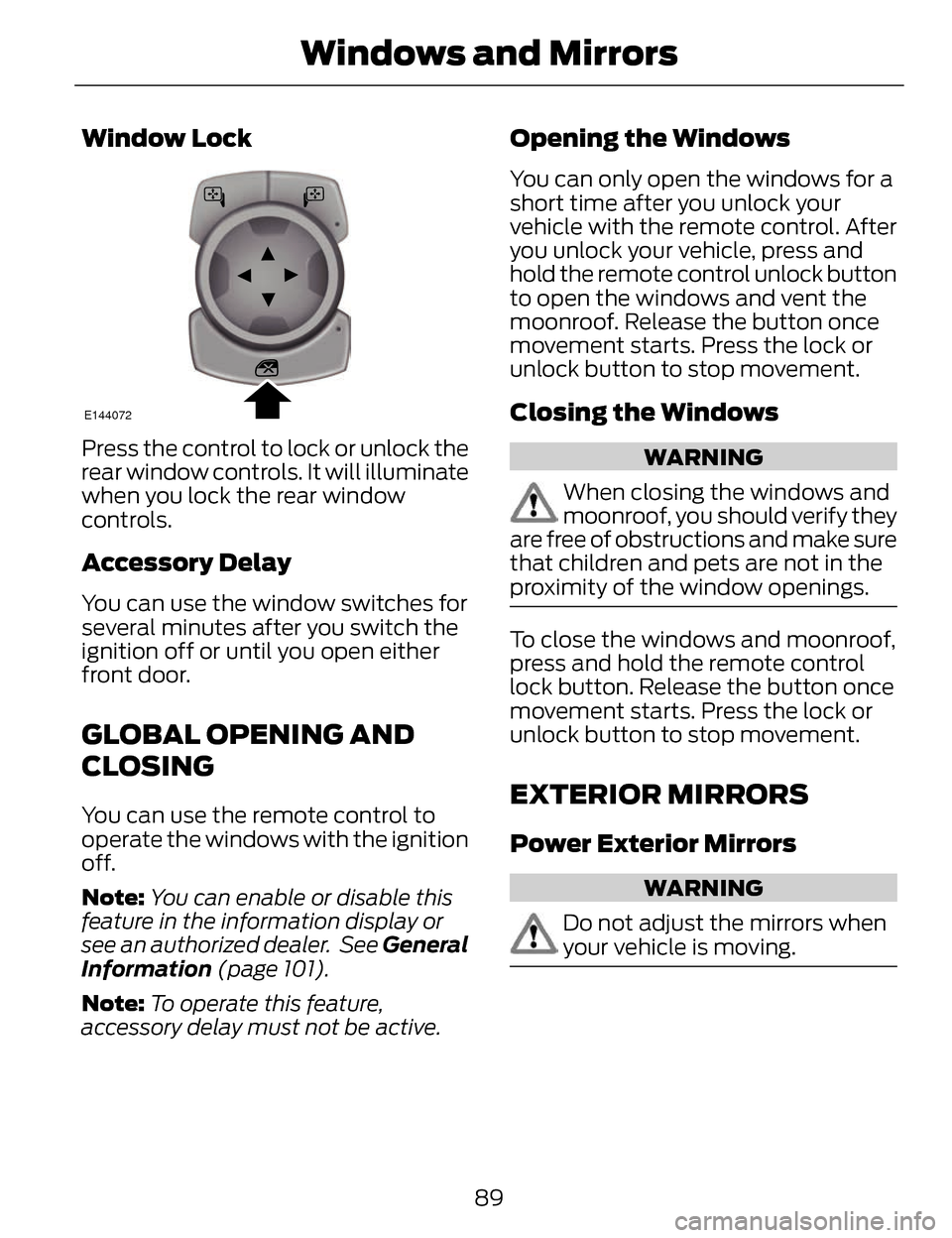
Window Lock
E144072
Press the control to lock or unlock the
rear window controls. It will illuminate
when you lock the rear window
controls.
Accessory Delay
You can use the window switches for
several minutes after you switch the
ignition off or until you open either
front door.
GLOBAL OPENING AND
CLOSING
You can use the remote control to
operate the windows with the ignition
off.
Note:You can enable or disable this
feature in the information display or
see an authorized dealer. See General
Information (page 101).
Note: To operate this feature,
accessory delay must not be active.
Opening the Windows
You can only open the windows for a
short time after you unlock your
vehicle with the remote control. After
you unlock your vehicle, press and
hold the remote control unlock button
to open the windows and vent the
moonroof. Release the button once
movement starts. Press the lock or
unlock button to stop movement.
Closing the Windows
WARNING
When closing the windows and
moonroof, you should verify they
are free of obstructions and make sure
that children and pets are not in the
proximity of the window openings.
To close the windows and moonroof,
press and hold the remote control
lock button. Release the button once
movement starts. Press the lock or
unlock button to stop movement.
EXTERIOR MIRRORS
Power Exterior Mirrors
WARNING
Do not adjust the mirrors when
your vehicle is moving.
89
Windows and Mirrors
Page 115 of 468
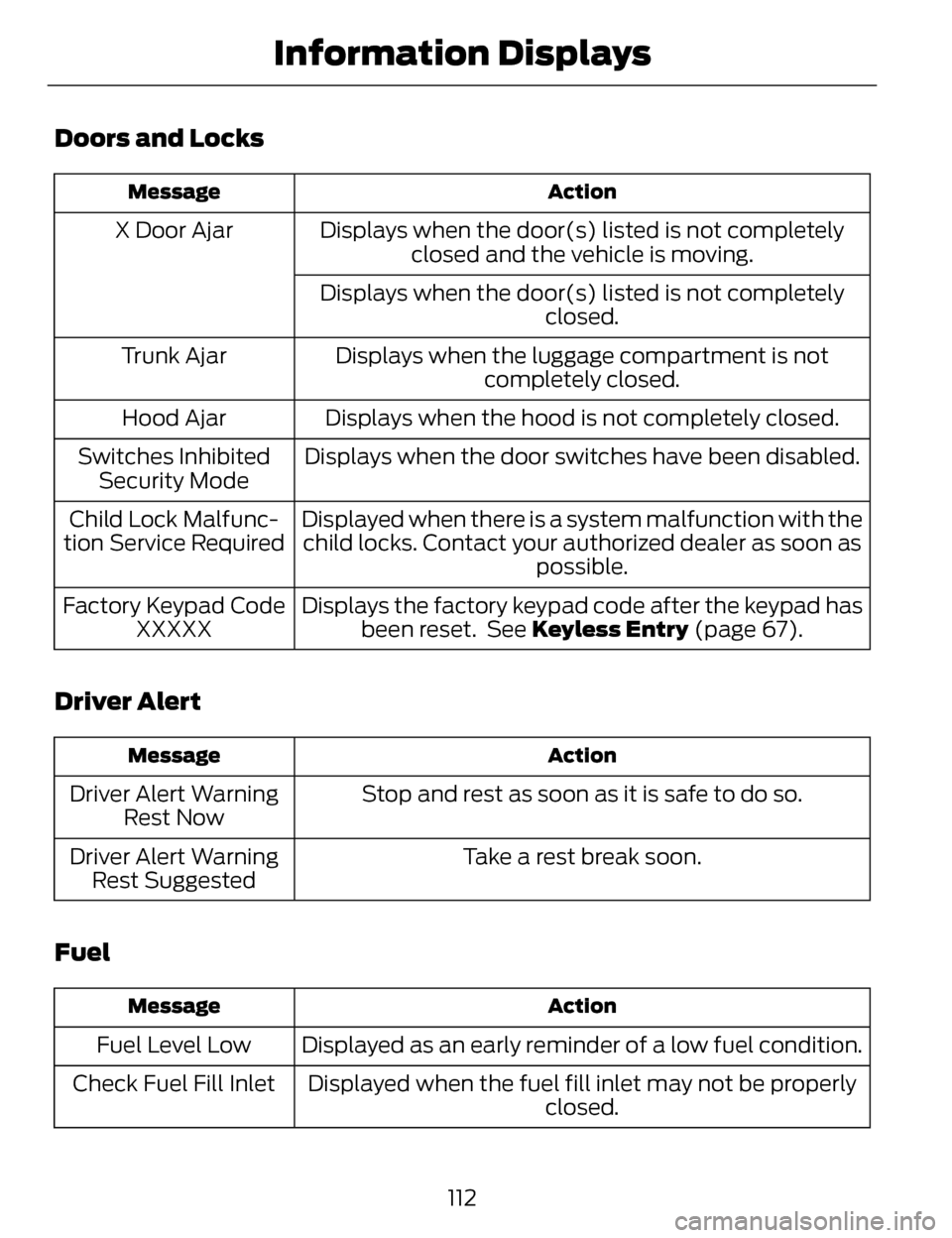
Doors and Locks
Action
Message
Displays when the door(s) listed is not completely
closed and the vehicle is moving.
X Door Ajar
Displays when the door(s) listed is not completely closed.
Displays when the luggage compartment is not completely closed.
Trunk Ajar
Displays when the hood is not completely closed.
Hood Ajar
Displays when the door switches have been disabled.
Switches Inhibited
Security Mode
Displayed when there is a system malfunction with thechild locks. Contact your authorized dealer as soon as possible.
Child Lock Malfunc-
tion Service Required
Displays the factory keypad code after the keypad hasbeen reset. See Keyless Entry (page 67).
Factory Keypad Code
XXXXX
Driver Alert
Action
Message
Stop and rest as soon as it is safe to do so.
Driver Alert Warning
Rest Now
Take a rest break soon.
Driver Alert Warning
Rest Suggested
Fuel
Action
Message
Displayed as an early reminder of a low fuel condition.
Fuel Level Low
Displayed when the fuel fill inlet may not be properly closed.
Check Fuel Fill Inlet
112
Information Displays
Page 457 of 468
AW DSee: All-Wheel Drive................................173
B
Blind Spot Monitor..............................213Blind Spot Information System(BLIS®) with Cross Traffic
Alert...........................................................213
Bonnet LockSee: Opening and Closing theHood........................................................268
Booster Seats..........................................18Types of Booster Seats.............................19
Brake Fluid Check..............................280
Brakes......................................................179
General Information................................179
Breaking-In...........................................240
Bulb Specification Chart..................287
C
Cabin Air Filter.......................................131
California Proposition 65.....................11
Capacities and Specifications......329
Technical Specifications.......................334
Car WashSee: Cleaning the Exterior....................288
Center Console....................................150
Changing a Bulb.................................286
Lamp Assembly Condensation.........286
Replacing Bulbs.......................................286
Changing a Fuse.................................255Fuses............................................................255
Changing a Road Wheel..................323Dissimilar Spare Wheel and TireAssembly Information.......................324
Stowing the flat tire.................................327
Tire Change Procedure..........................325
Changing the 12V Battery.................281 Changing the Engine Air Filter.......283
........................................................................\
284
2.0L EcoBoost Engine............................284
3.7L Engine.................................................284
Changing the Wiper Blades...........283
Checking MyKey System
Status.....................................................59
Checking the Wiper Blades............283
Child Restraint and Safety Belt Maintenance........................................39
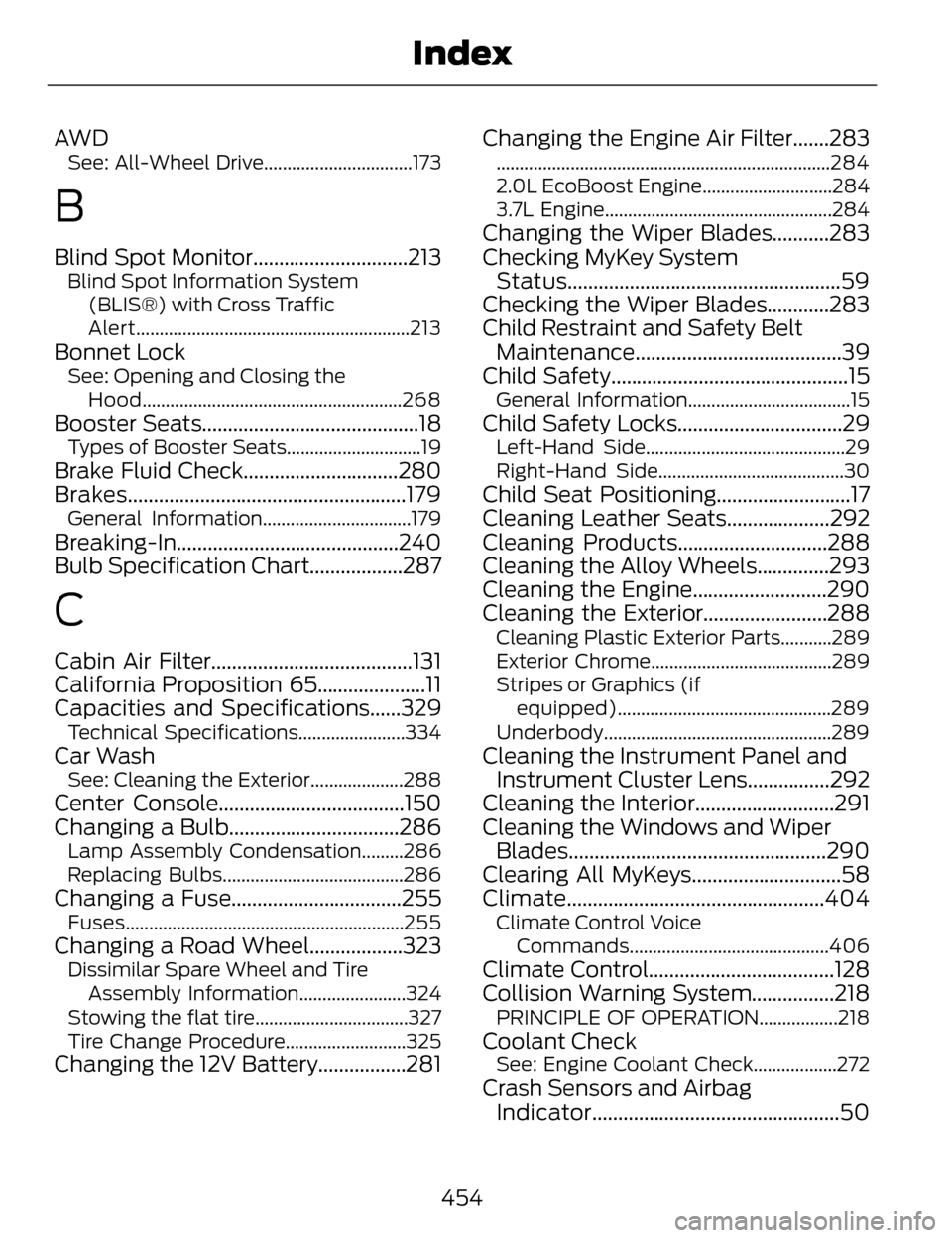
Child Safety..............................................15
General Information...................................15
Child Safety Locks................................29Left-Hand Side...........................................29
Right-Hand Side........................................30
Child Seat Positioning..........................17
Cleaning Leather Seats....................292
Cleaning Products.............................288
Cleaning the Alloy Wheels..............293
Cleaning the Engine..........................290
Cleaning the Exterior........................288
Cleaning Plastic Exterior Parts...........289
Exterior Chrome.......................................289
Stripes or Graphics (if
equipped)..............................................289
Underbody.................................................289
Cleaning the Instrument Panel and Instrument Cluster Lens................292
Cleaning the Interior...........................291
Cleaning the Windows and Wiper Blades..................................................290
Clearing All MyKeys.............................58
Climate..................................................404
Climate Control Voice
Commands...........................................406
Climate Control....................................128
Collision Warning System................218
PRINCIPLE OF OPERATION.................218
Coolant CheckSee: Engine Coolant Check..................272
Crash Sensors and AirbagIndicator................................................50
454
Index
Page 458 of 468
Creating a MyKey..................................58Programming/Changing ConfigurableSettings.....................................................58
Cruise Control.........................................77Principle of Operation............................198
Type 1...............................................................77
Type 2..............................................................77
Cruise controlSee: Using Cruise Control.....................198
Customer Assistance.......................248
D
Data Recording........................................9Event Data Recording................................10
Service Data Recording..............................9
Daytime Running Lamps...................83
Direction Indicators..............................85
Drive Control.........................................222
LINCOLN DRIVE CONTROL.................222
Driver Alert............................................207Using Driver Alert.....................................207
Driver and Passenger Airbags..........43Children and Airbags................................44
Proper Driver and Front PassengerSeating Adjustment..............................44
Driving Aids...........................................207
Driving Hints.........................................240
Driving Through Water.......................241
DRL
See: Daytime Running Lamps...............83
E
Economical Driving...........................240 Electric Parking Brake.......................180
Applying the electric parking
brake.........................................................180
Applying the electric parking brake when the vehicle is moving...............181
Battery With No Charge.........................182
Releasing the electric parking brake..........................................................181
Emission Control System................164On-Board Diagnostics (OBD-II).........165
Readiness for Inspection/Maintenance(I/M) Testing..........................................165
End User License Agreement.........418SYNC® End User License Agreement(EULA).....................................................418
Engine Block Heater...........................155Using the Engine Block Heater............156
Engine Coolant Check.......................272Adding Engine Coolant..........................272
Checking the Engine Coolant..............272
Recycled Engine Coolant......................274
Severe Climates........................................274
What You Should Know AboutFail-Safe Cooling.................................274
Engine ImmobilizerSee: Passive Anti-Theft System...........72
Engine Oil Check..................................271Adding Engine Oil......................................271
Engine Oil Dipstick - 2.0LEcoBoost™..........................................271
Engine Oil Dipstick - 3.7L...................271
Engine Specifications.......................329
Drivebelt Routing.....................................329
455
Index
Page 461 of 468
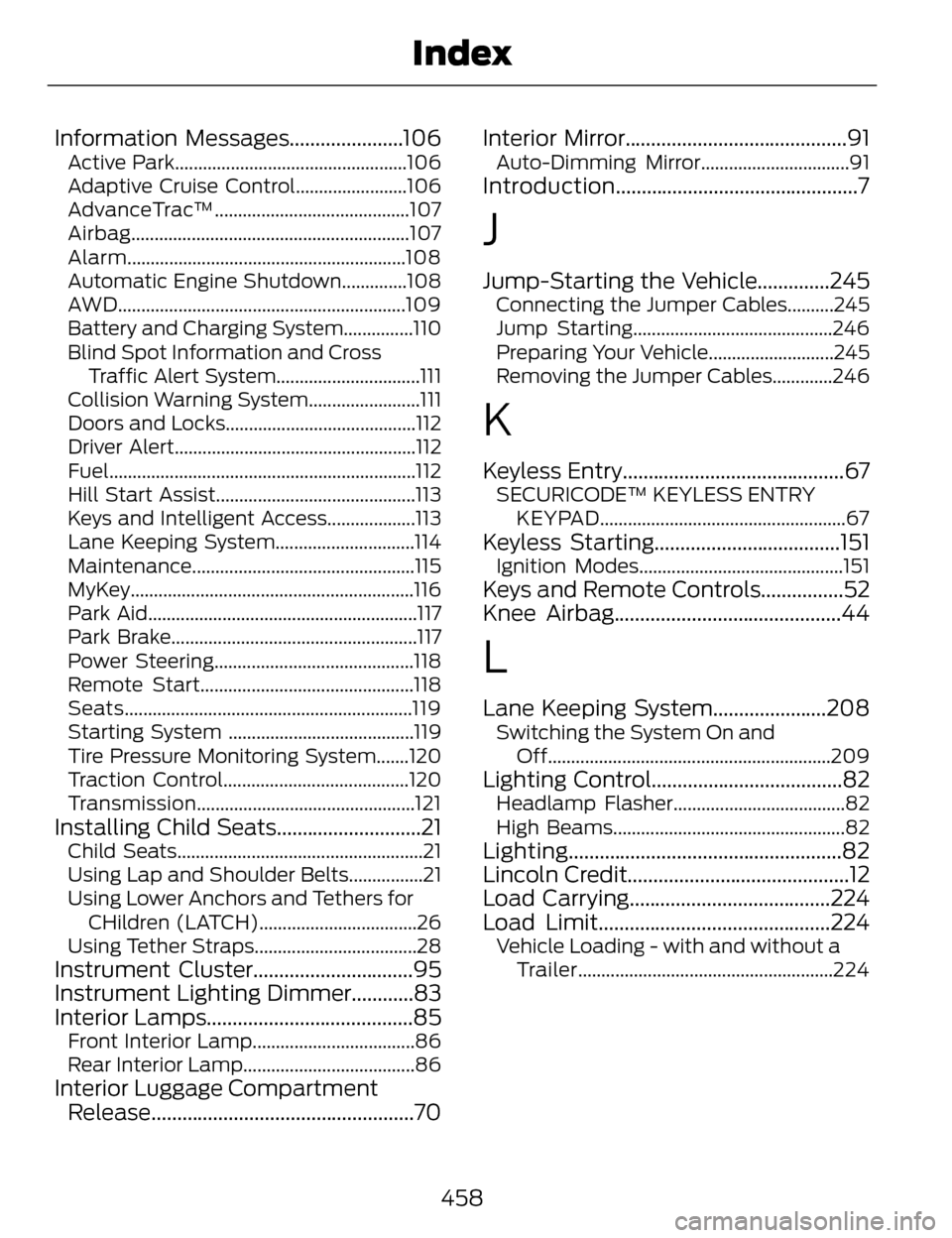
Information Messages......................106Active Park..................................................106
Adaptive Cruise Control........................106
AdvanceTrac™..........................................107
Airbag............................................................107
Alarm............................................................108
Automatic Engine Shutdown..............108
AWD..............................................................109
Battery and Charging System...............110
Blind Spot Information and CrossTraffic Alert System...............................111
Collision Warning System........................111
Doors and Locks.........................................112
Driver Alert....................................................112
Fuel..................................................................112
Hill Start Assist...........................................113
Keys and Intelligent Access...................113
Lane Keeping System..............................114
Maintenance................................................115
MyKey.............................................................116
Park Aid..........................................................117
Park Brake.....................................................117
Power Steering...........................................118
Remote Start..............................................118
Seats..............................................................119
Starting System ........................................119
Tire Pressure Monitoring System.......120
Traction Control........................................120
Transmission...............................................121
Installing Child Seats............................21Child Seats.....................................................21
Using Lap and Shoulder Belts................21
Using Lower Anchors and Tethers for CHildren (LATCH)..................................26
Using Tether Straps...................................28
Instrument Cluster...............................95
Instrument Lighting Dimmer............83
Interior Lamps........................................85
Front Interior Lamp...................................86
Rear Interior Lamp.....................................86
Interior Luggage Compartment Release...................................................70 Interior Mirror...........................................91
Auto-Dimming Mirror................................91
Introduction...............................................7
J
Jump-Starting the Vehicle..............245Connecting the Jumper Cables..........245
Jump Starting...........................................246
Preparing Your Vehicle...........................245
Removing the Jumper Cables.............246
K
Keyless Entry...........................................67SECURICODE™ KEYLESS ENTRY
KEYPAD.....................................................67
Keyless Starting....................................151Ignition Modes............................................151
Keys and Remote Controls................52
Knee Airbag............................................44
L
Lane Keeping System......................208Switching the System On andOff.............................................................209
Lighting Control.....................................82Headlamp Flasher.....................................82
High Beams..................................................82
Lighting.....................................................82
Lincoln Credit...........................................12
Load Carrying.......................................224
Load Limit.............................................224
Vehicle Loading - with and without aTrailer.......................................................224
458
Index