sd card LINCOLN MKZ 2014 User Guide
[x] Cancel search | Manufacturer: LINCOLN, Model Year: 2014, Model line: MKZ, Model: LINCOLN MKZ 2014Pages: 468, PDF Size: 4.49 MB
Page 356 of 468
From this screen, you can also make
other adjustments such as 12-hour or
24-hour mode, activate GPS time
synchronization and have the system
automatically update new time zones.
You can also turn the outside air
temperature display off and on. It
appears at the top center of the
touchscreen, next to the time and
date.
The system automatically saves any
updates you make to the settings.
Display
You can adjust the touchscreen
display through the touchscreen or by
pressing the voice button on your
steering wheel controls and when
prompted, say, "Display settings".
E142607
Press the Settings icon >
Display, to access and make
adjustments using the
touchscreen.
• Brightness allows you to make
the screen display brighter or
dimmer.
• Auto DIM, when set to On, lets
you use the Auto Dim Manual
Offset feature.
• Mode allows you to set the screen
to a certain brightness or have the
system automatically change
based on the outside light level, or
turn the display off.
• If you select AUTO or NIGHT,
you have the options of turning
the display's Auto Dim feature
on or off and changing the Auto
Dim Manual Offset feature. •
Auto Dim Manual Offset allows
you to adjust screen dimming as
the outside lighting conditions
change from day to night.
• Edit Wallpaper
• You can have your touchscreen
display the default photo or
upload your own.
Uploading Photos for Your Home
Screen Wallpaper
Note: You cannot load photos directly
from your camera. You must access
the photos either from your USB mass
storage device or from an SD card.
Note: Photographs with extremely
large dimensions (such as 2048 x
1536) may not be compatible and
appear as a blank (black) image on the
display.
Your system allows you to upload and
view up to 32 photos.
E142607
To access, press the Settings
icon > Display > Edit
Wallpaper, and then follow
the system prompts to upload your
photographs.
Only the photograph(s), which meets
the following conditions, display:
• Compatible file formats are as follows: .jpg, .gif, .png, .bmp
• Each file must be 1.5 MB or less.
• Recommended dimensions: 800 x 384
353
MyLincoln Touch™
Page 367 of 468
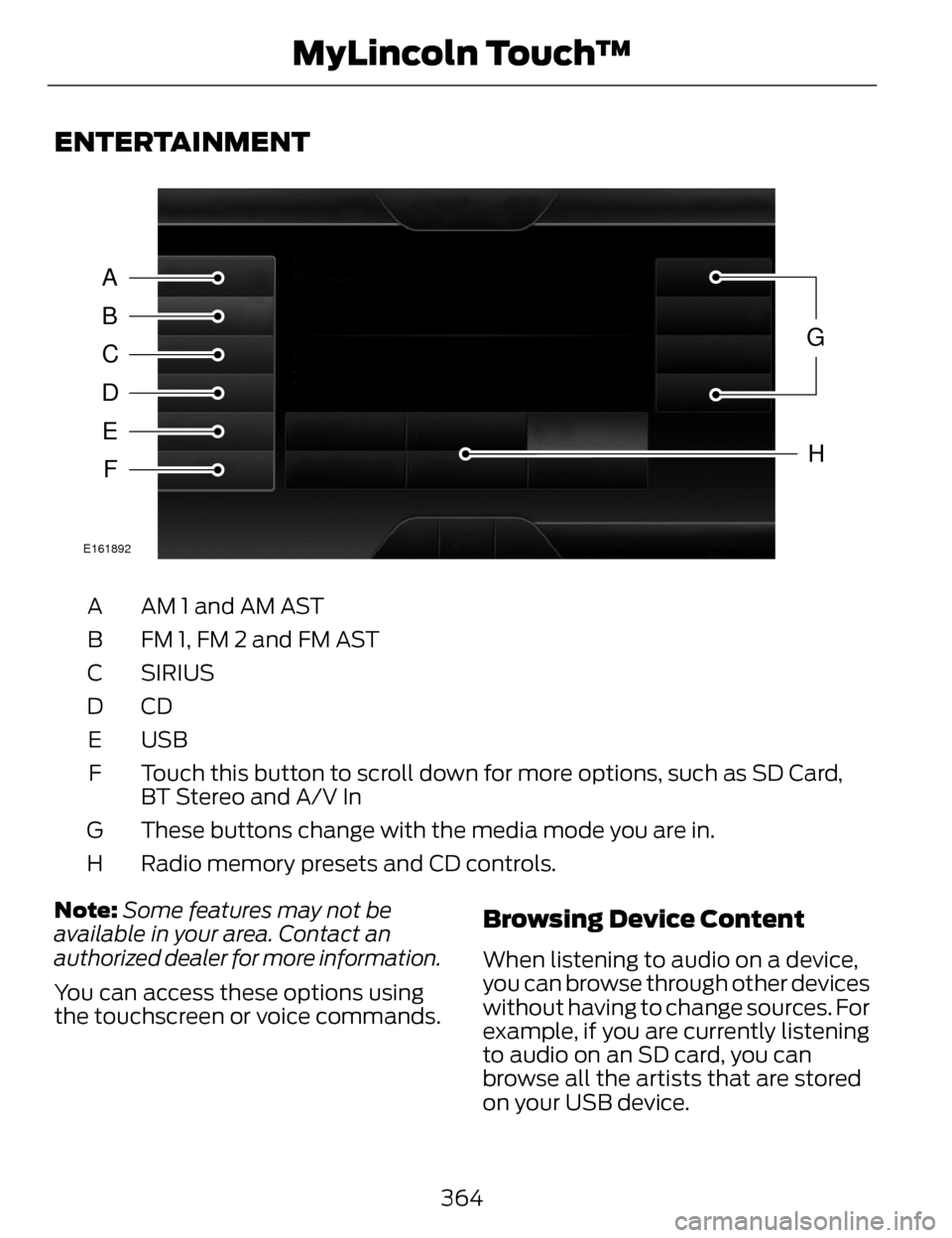
ENTERTAINMENT
A
B
C
D
E
F
G
H
E161892
AM 1 and AM AST
A
FM 1, FM 2 and FM AST
B
SIRIUS
C
CDD
USB
E
Touch this button to scroll down for more options, such as SD Card,
BT Stereo and A/V In
F
These buttons change with the media mode you are in.
G
Radio memory presets and CD controls.
H
Note: Some features may not be
available in your area. Contact an
authorized dealer for more information.
You can access these options using
the touchscreen or voice commands.
Browsing Device Content
When listening to audio on a device,
you can browse through other devices
without having to change sources. For
example, if you are currently listening
to audio on an SD card, you can
browse all the artists that are stored
on your USB device.
364
MyLincoln Touch™
Page 368 of 468
E142599
Press the voice icon on the
steering wheel. When
prompted, you can say:
"BROWSE" within devices
"Browse"*
"Browse
"Browse
"Browse SD card"
"Browse Sirius channel guide"
**
"Browse USB" "Help"
* If you only say, "Browse", you can
then say any commands in the
following chart.
**This command is only usable if you
have an active subscription to Sirius
satellite radio.
"BROWSE"
"
"
"SD card"**
"Sirius Channel Guide"*
"BROWSE"
"USB"**
"Help"
* This command is only usable if you
have an active subscription to Sirius
satellite radio.
** For more commands in SD card or
USB mode, see the "SD Card and USB
Port" section of this chapter.
Your voice system allows you to
change audio sources with a simple
voice command. For example, if you
are listening to music on a USB device,
then want to switch to a satellite radio
channel, simply press the voice button
on the steering wheel controls and say
the name of the Sirius station (such
as, "the Highway"). The following
voice commands are available at the
top level of the voice session no
matter which current audio source you
are listening to (such as a USB device
or Sirius satellite radio).
Note: This is only available when your
MyFord Touch system language is set
to North American English.
Sample commands
"<87.7-107.9>"
"<530-1710>"
"
*
"AM <530-1710>"
"FM <87.7-107.9>"
365
MyLincoln Touch™
Page 381 of 468
Options
Sound Settings
Touch this button to adjust settings
for:
•Bass
• Midrange
• Treble
• Balance and Fade
• THX Deep Note Demo
• DSP (Digital Signal processing)
• Occupancy Mode
• Speed Compensated Volume.
Note:Your vehicle may not have all
these sound settings.
Compression
Touch this button to turn the
compression feature off and on.
Browse
Touch this button to look through all
available CD tracks.
CD Voice Commands
E142599
If you are listening to a CD,
press the voice button on the
steering wheel controls.
When prompted, say any of the
following commands.
If you are not listening to a CD, press
the voice button and, after the tone,
say "CD", then any of the following
commands.
"CD"
"Pause"
"Play"
"Play next track"
"Play previous track" "Play track <1-512>" "Repeat"
"Repeat folder"
*
"Repeat off"
"Repeat track" "Shuffle"
"Shuffle CD"
*
"Shuffle folder"*
"Shuffle off" "Help"
*This applies to WMA or MP3 files
only.
SD Card Slot and USB Port
SD Card
Note: Your SD card slot is
spring-loaded. To remove the SD card,
press the card in and the system ejects
it. Do not attempt to pull the card to
remove it as this could cause damage.
Note: The navigation system also uses
this card slot. See Navigation (page
407).
378
MyLincoln Touch™
Page 382 of 468
E142619
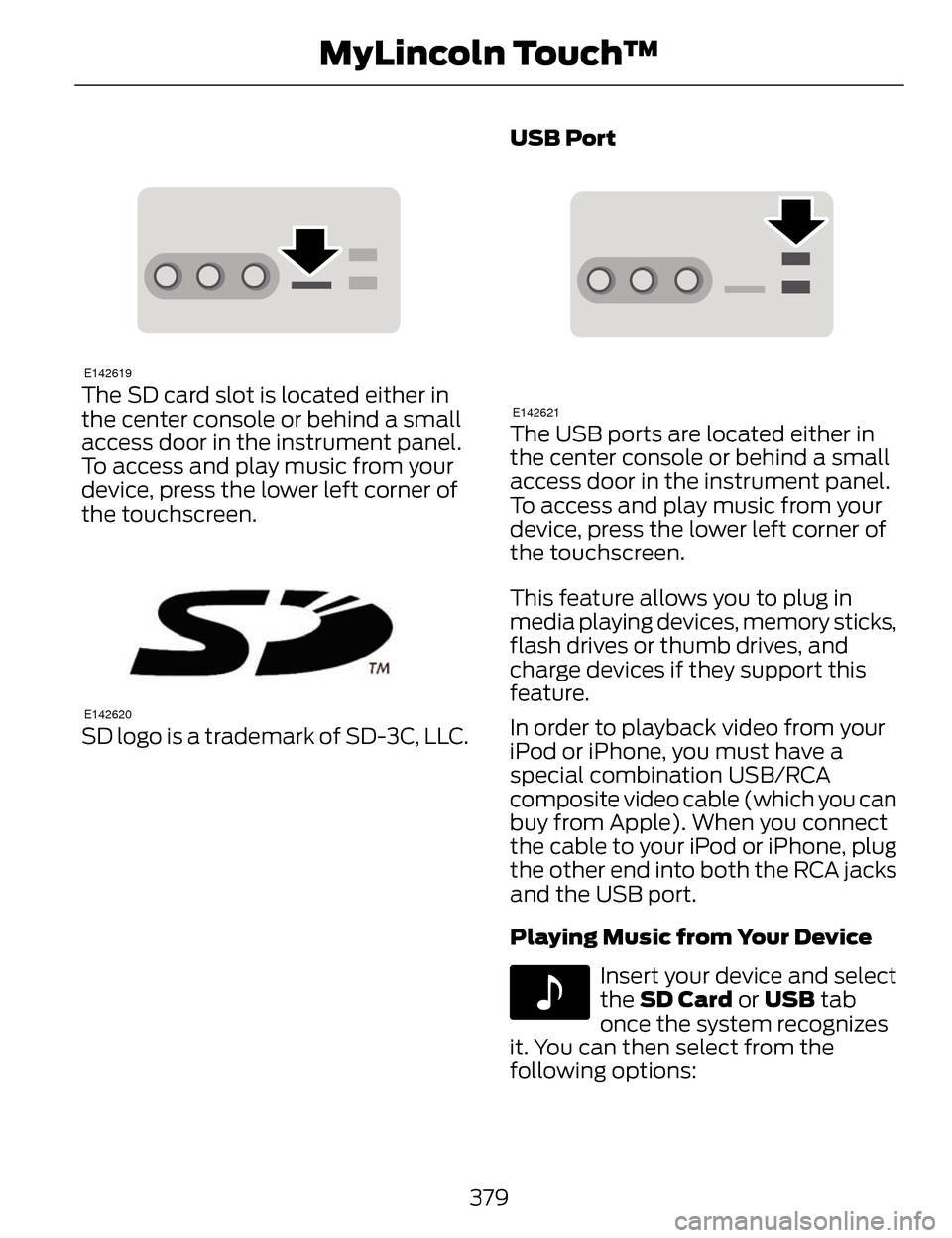
The SD card slot is located either in
the center console or behind a small
access door in the instrument panel.
To access and play music from your
device, press the lower left corner of
the touchscreen.
E142620
SD logo is a trademark of SD-3C, LLC.USB Port
E142621
The USB ports are located either in
the center console or behind a small
access door in the instrument panel.
To access and play music from your
device, press the lower left corner of
the touchscreen.
This feature allows you to plug in
media playing devices, memory sticks,
flash drives or thumb drives, and
charge devices if they support this
feature.
In order to playback video from your
iPod or iPhone, you must have a
special combination USB/RCA
composite video cable (which you can
buy from Apple). When you connect
the cable to your iPod or iPhone, plug
the other end into both the RCA jacks
and the USB port.
Playing Music from Your Device
E142611
Insert your device and select
the SD Card or USB
tab
once the system recognizes
it. You can then select from the
following options:
379
MyLincoln Touch™
Page 384 of 468
SD Card and USB Voice Commands
E142599
If you are listening to a USB
device or an SD card, press
the voice button on the
steering wheel controls. When
prompted, say any of the following
commands.
If you are not listening to a USB device
or an SD card, press the voice button
and, after the tone, say "USB" or "SD
card", then any of the following
commands.
"USB" or "SD CARD"
"Browse"*
"Next"
"Pause" "Play"
"Play album
"Play artist
"Play audiobook
"Play composer
"Play movie
**
"Play music video
"Play playlist
"USB" or "SD CARD"
"Play podcast
"Play podcast episode
"Play song
"Play TV show
**
"Play TV show episode
"Play video
"Play video podcast
"Play video podcast episode
"Play video playlist
"Previous"
"Repeat all"
"Repeat off"
"Repeat one" "Shuffle"
"Shuffle album" "Shuffle off"
381
MyLincoln Touch™
Page 385 of 468
"USB" or "SD CARD"
"What's this?""Help"
* If you have said you would like to
browse your USB or SD card, the
system prompts you to specify what
you would like to browse. When
prompted, see the following "Browse"
chart.
** These commands are only available
in USB mode and are
device-dependent.
"BROWSE"
"Album
"All albums""All artists"
"All audiobooks" "All authors"
"All composers" "All folders""All genres"
"All movies"
*
"All music videos"*
"All playlists"
"All podcasts" "All songs"
"All TV shows"
*
"BROWSE"
"All video playlists"*
"All video podcasts"*
"All videos"*
"Artist
"Audiobook
"Composer
"Playlist
"Podcast
"TV show
*
"Video
"Video playlist
"Video podcast
"Help"
* This command is only available in
USB mode and is device-dependent.
382
MyLincoln Touch™
Page 399 of 468
SYNC Services Voice Commands
E142599
When a route has been
downloaded (non-navigationsystems), press the voice button on
the steering wheel controls. When
prompted, say any of the following
commands:
"SERVICES"
"Cancel route"
"Navigation voice off" "Navigation voice on" "Next turn"
"Route status"
"Route summary" "Services"
"Update route" "Help"
Sirius T ravel Link (If Equipped)
WARNING
Driving while distracted can
result in loss of vehicle control,
crash and injury. We strongly
recommend that you use extreme
caution when using any device that
may take your focus off the road. Your
primary responsibility is the safe
operation of your vehicle. We
recommend against the use of any
handheld device while driving and
encourage the use of voice-operated
systems when possible. Make sure you
are aware of all applicable local laws
that may affect the use of electronic
devices while driving.
Note: In order to use Sirius Travel Link,
your vehicle must be equipped with
navigation and your navigation SD card
must be in the SD card slot.
Note: A paid subscription is required
to access and use these features. Go
to www.siriusxm.com/travellink for
more information.
Note: Visit www.siriusxm.com/traffic#
and click on Coverage map and details
for a complete listing of all traffic areas
covered by Sirius Travel Link.
Note: Neither Sirius nor Ford is
responsible for any errors or
inaccuracies in the Sirius Travel Link
services or its use in vehicles.
396
MyLincoln Touch™
Page 403 of 468
Alerts
E142608
If your vehicle is equipped
with Navigation, touch the i
(Information) button to
access these features. If your vehicle
is not equipped with Navigation, touch
the corner of the touchscreen with the
green tab.
Press Alerts, and then choose from
any of the following services:
• View the complete message
• Delete the message
• Delete All messages
This screen displays any system
messages (such as an SD card fault).
Note: The system alerts you to any
messages by turning the information
icon yellow. After you read or delete
the messages, the icon returns to white.
Calendar
E142608
If your vehicle is equipped
with Navigation, touch the i
(Information) button to
access these features. If your vehicle
is not equipped with Navigation, touch
the corner of the touchscreen with the
green tab.
Press Calendar. You can view the
current calendar by day, week or
month.
911 Assist (If Equipped)
WARNINGS
Unless the 911 Assist setting is
set on before a crash, the system
will not dial for help, which could
delay response time, potentially
increasing the risk of serious injury or
death after a crash.
Do not wait for 911 Assist to
make an emergency call if you
can do it yourself. Dial emergency
services immediately to avoid delayed
response time, which could increase
the risk of serious injury or death after
a crash. If you do not hear 911 Assist
within five seconds of the crash, the
system or phone may be damaged or
non-functional.
Always place your phone in a
secure location in your vehicle so
it does not become a projectile or
damaged in a crash. Failure to do so
may cause serious injury to someone
or damage the phone, which could
prevent 911 Assist from working
properly.
Note: The SYNC 911 Assist feature
must be set on prior to the incident.
Note: Before setting this feature on,
make sure that you read the 911 Assist
Privacy Notice later in this section for
important information.
400
MyLincoln Touch™
Page 406 of 468
Vehicle Health Report (If Equipped)
WARNING
Always follow scheduled
maintenance instructions,
regularly inspect your vehicle, and
seek repair for any damage or problem
you suspect. Vehicle Health Report
supplements, but cannot replace,
normal maintenance and vehicle
inspection. Vehicle Health Report only
monitors certain systems
electronically monitored by your
vehicle and will not monitor or report
the status of any other system, (such
as brake lining wear). Failure to
perform scheduled maintenance and
regularly inspect your vehicle may
result in vehicle damage and serious
injury.
Note: This feature is only available in
the United States.
Note: Your Vehicle Health Report
feature requires activation prior to use.
Visit www.SYNCMyRide.com to
register. There is no fee or subscription
associated with Vehicle Health Report,
but you must register to use this
feature.
Note: This feature may not function
properly if you have enabled caller ID
blocking on your cellular phone. Before
running a report, review the Vehicle
Health Report Privacy Notice.
Note: In order to allow a break-in
period for your vehicle, you may not be
able to create a Vehicle Health Report
until your vehicle odometer has
reached 200 miles. Note:
Cellular phone and SMS charges
may apply when making a report.
Register for Vehicle Health Report and
set your report preferences at
www.SYNCMyRide.com. After
registering, you can request a Vehicle
Health Report (inside your vehicle).
Return to your account at
www.SYNCMyRide.com to view your
report. You can also choose for SYNC
to remind you automatically to run
reports at specific mileage intervals.
Cellular phone airtime usage may
apply when reporting.
The system allows you to check your
vehicle’s overall health in the form of
a diagnostic report card. The Vehicle
Health Report contains valuable
information, such as:
• Vehicle diagnostic information
• Scheduled maintenance
• Open recalls and Field Service Actions
• Items noted during vehicle inspections by your authorized
dealer that still need servicing.
Making a Report
E142608
If you want to run a report by
using the touchscreen, touch
Apps > Vehicle Health
Report.
E142599
To run a report by voice
command, press the voice
button on the steering wheel
and, when prompted, say "Vehicle
health report".
403
MyLincoln Touch™