airbag LINCOLN MKZ 2014 Owner's Manual
[x] Cancel search | Manufacturer: LINCOLN, Model Year: 2014, Model line: MKZ, Model: LINCOLN MKZ 2014Pages: 468, PDF Size: 4.49 MB
Page 53 of 468
The design and development of the
side curtain airbags included
recommended testing procedures
that were developed by a group of
automotive safety experts known as
the Side Airbag Technical Working
Group. These recommended testing
procedures help reduce the risk of
injuries related to the deployment of
side curtain airbags.
CRASH SENSORS AND
AIRBAG INDICATOR
WARNING
Modifying or adding equipment
to the front end of the vehicle
(including frame, bumper, front end
body structure and tow hooks) may
affect the performance of the airbag
system, increasing the risk of injury.
Do not modify the front end of the
vehicle.
The vehicle has a collection of crash
and occupant sensors which provide
information to the restraints control
module which deploys (activates) the
front safety belt pretensioners, driver
airbag, passenger airbag, knee
airbag(s), seat mounted side airbags,
side curtain airbags and optional rear
inflatable safety belts. Based on the
type of crash (frontal impact or side
impact), the restraints control module
will deploy the appropriate safety
devices. The restraints control module also
monitors the readiness of the above
safety devices plus the crash and
occupant sensors. The readiness of
the safety system is indicated by a
warning indicator light in the
instrument cluster or by a backup tone
if the warning light is not working.
Routine maintenance of the airbag is
not required.
A difficulty with the system is
indicated by one or more of the
following:
The readiness light will not
illuminate immediately after
the ignition is turned on.
• The readiness light will either flash or stay lit.
• A series of five beeps will be heard. The tone pattern will repeat
periodically until the problem, the
light or both are repaired.
If any of these things happen, even
intermittently, have the supplemental
restraint system serviced at an
authorized dealer immediately. Unless
serviced, the system may not function
properly in the event of a crash.
The safety belt pretensioners and the
front airbag supplemental restraint
system are designed to activate when
the vehicle sustains frontal
deceleration sufficient to cause the
restraints control module to deploy a
safety device.
50
Supplementary Restraints System
Page 54 of 468

The fact that the safety belt
pretensioners or front airbags did not
activate for both front seat occupants
in a crash does not mean that
something is wrong with the system.
Rather, it means the restraints control
module determined the accident
conditions (crash severity, belt usage)
were not appropriate to activate these
safety devices.
• The design of the front airbags isto activate only in frontal and
near-frontal crashes (not rollovers,
side impacts or rear impacts)
unless the crash causes sufficient
frontal deceleration.
• The safety belt pretensioners and optional rear inflatable safety belts
are designed to activate in frontal,
near-frontal and side crashes.
• The knee airbag(s) may deploy based on crash severity and
occupant conditions.
• The design of the side airbags and side curtain airbags is to inflate in
certain side impact crashes. Side
airbags and side curtain airbags
may activate in other types of
crashes if the vehicle experiences
sufficient sideways motion or
deformation.
AIRBAG DISPOSAL
Contact your authorized dealer as
soon as possible. Airbags must be
disposed of by qualified personnel.
51
Supplementary Restraints System
Page 101 of 468
Engine Coolant Temperature
Illuminates when the engine
coolant temperature is high.
Stop the vehicle as soon as
possible, switch off the engine and let
cool. See Engine Coolant Check
(page 272).
Engine Oil
If it illuminates with the
engine running or when you
are driving, this indicates a
malfunction. Stop your vehicle as
soon as it is safe to do so and switch
the engine off. Check the engine oil
level. See Engine Oil Check (page
271).
Note: Do not resume your journey if it
illuminates despite the level being
correct. Have the system checked by
your authorized dealer immediately.
Fasten Safety Belt
It will illuminate and a chime
will sound to remind you to
fasten your safety belt. See
Safety Belt Minder (page 38).
Front Airbag
If it fails to illuminate when
you start your vehicle,
continues to flash or remains
on, it indicates a malfunction. Have
the system checked by your
authorized dealer.
Heads Up Display (If Equipped)
E156133
A red beam of lights will
illuminate on the windshield
in certain instances when
using adaptive cruise control and/or
the collision warning system. It will
also illuminate momentarily when you
start your vehicle to make sure the
display works.
High Beam
It will illuminate when you
switch the high beam
headlamps on. It will flash
when you use the headlamp flasher.
Hood Ajar
E159324
Displays when the ignition is
on and the hood is not
completely closed.
Low Fuel Level
It will illuminate when the
fuel level is low or the fuel
tank is nearly empty. Refuel
as soon as possible.
Low Tire Pressure Warning
It will illuminate when your
tire pressure is low. If the
lamp remains on with the
engine running or when driving, check
your tire pressure as soon as possible.
98
Instrument Cluster
Page 110 of 468
Action
Message
Displayed when the automatic braking has been
disabled.
Normal Cruise Active
Automatic Braking Turned Off
Displayed when a radar malfunction is preventing theACC from engaging.
Front Sensor Not
Aligned
Displayed when the adaptive cruise has reinstatedcontrols to the driver.
Adaptive Cruise -
Driver Resume Control
Displays when the vehicle speed is too slow to activate the adaptive cruise.
Adaptive Cruise
Speed Too Low to Activate
Displays when the adaptive cruise is automatically
adjusting the gap distance and the driver needs to shift the transmission into a lower gear.
Adaptive Cruise Shift
Down
AdvanceTrac™
Action
Message
Displays when the system detects a malfunction due
to a blocked sensor.
Service AdvanceTrac
Displayed when the traction control has been disabledor enabled by the driver.
AdvanceTrac Off On
Airbag
Action
Message
Displays when the system detects a malfunction due
to a blocked sensor.
Occupant Sensor
BLOCKED Remove Objects Near
Passenger Seat
107
Information Displays
Page 250 of 468
4
1
3
2
E142665
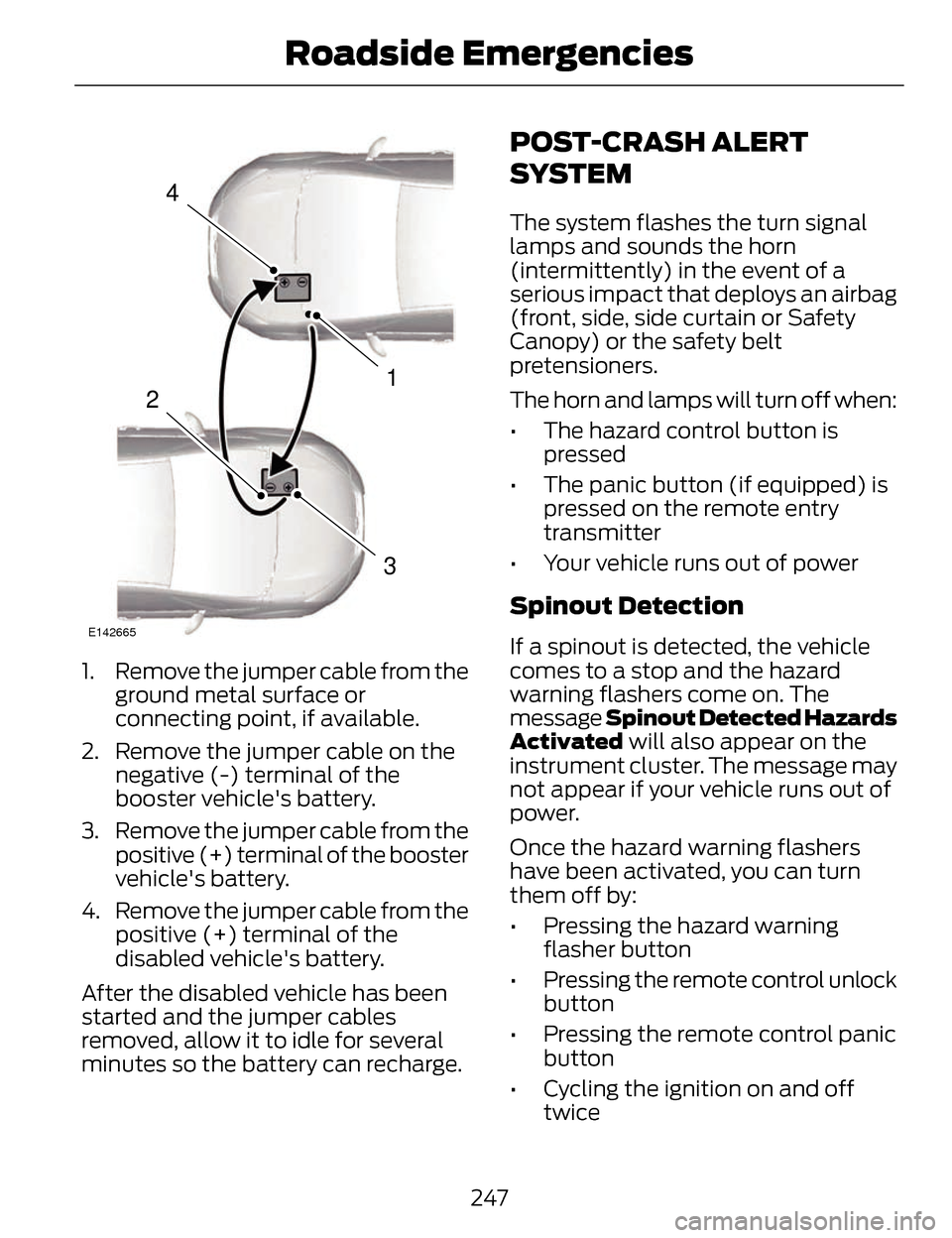
1. Remove the jumper cable from theground metal surface or
connecting point, if available.
2. Remove the jumper cable on the negative (-) terminal of the
booster vehicle's battery.
3. Remove the jumper cable from the positive (+) terminal of the booster
vehicle's battery.
4. Remove the jumper cable from the positive (+) terminal of the
disabled vehicle's battery.
After the disabled vehicle has been
started and the jumper cables
removed, allow it to idle for several
minutes so the battery can recharge.
POST-CRASH ALERT
SYSTEM
The system flashes the turn signal
lamps and sounds the horn
(intermittently) in the event of a
serious impact that deploys an airbag
(front, side, side curtain or Safety
Canopy) or the safety belt
pretensioners.
The horn and lamps will turn off when:
• The hazard control button is pressed
• The panic button (if equipped) is pressed on the remote entry
transmitter
• Your vehicle runs out of power
Spinout Detection
If a spinout is detected, the vehicle
comes to a stop and the hazard
warning flashers come on. The
message Spinout Detected Hazards
Activated will also appear on the
instrument cluster. The message may
not appear if your vehicle runs out of
power.
Once the hazard warning flashers
have been activated, you can turn
them off by:
• Pressing the hazard warning flasher button
• Pressing the remote control unlock button
• Pressing the remote control panic button
• Cycling the ignition on and off twice
247
Roadside Emergencies
Page 268 of 468
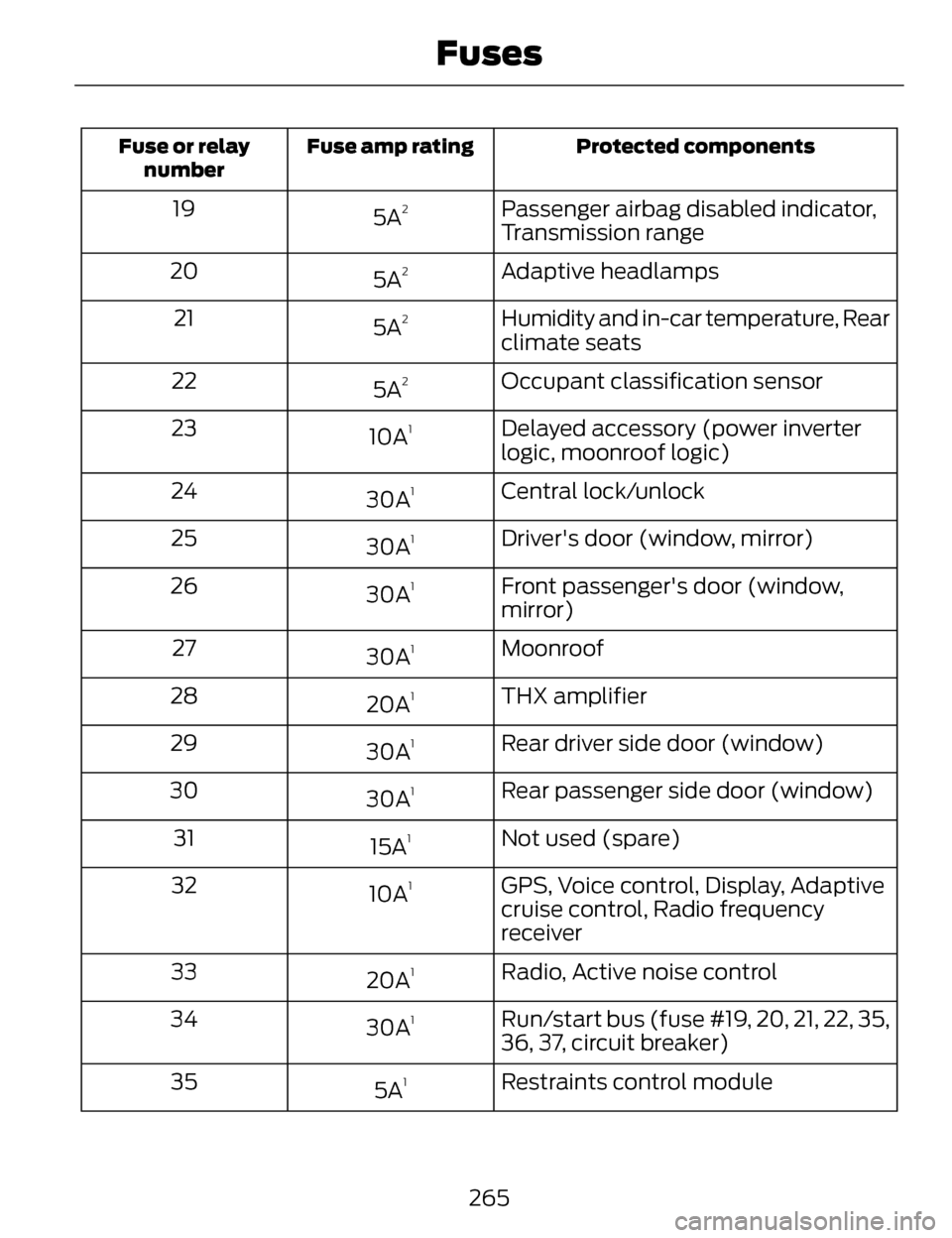
Protected components
Fuse amp rating
Fuse or relay
number
Passenger airbag disabled indicator,
Transmission range
5A219
Adaptive headlamps
5A
220
Humidity and in-car temperature, Rear
climate seats
5A
221
Occupant classification sensor
5A
222
Delayed accessory (power inverter
logic, moonroof logic)
10A
123
Central lock/unlock
30A
124
Driver's door (window, mirror)
30A
125
Front passenger's door (window,
mirror)
30A
126
Moonroof
30A
127
THX amplifier
20A
128
Rear driver side door (window)
30A
129
Rear passenger side door (window)
30A
130
Not used (spare)
15A
131
GPS, Voice control, Display, Adaptive
cruise control, Radio frequency
receiver
10A
132
Radio, Active noise control
20A
133
Run/start bus (fuse #19, 20, 21, 22, 35,
36, 37, circuit breaker)
30A
134
Restraints control module
5A
135
265
Fuses
Page 294 of 468
To clean these items, follow these
tips:
• You can clean the windows with anon-abrasive cleaner such as
Motorcraft Ultra-Clear Spray Glass
Cleaner.
• You can clean the wiper blades with isopropyl rubbing-alcohol or
Motorcraft Premium Windshield
Wash Concentrates in the U.S., or
Premium Quality Windshield
Washer Fluid in Canada. Be sure
to replace wiper blades when they
appear worn or do not function
properly.
• Do not use abrasives, as they may cause scratches.
• Do not use fuel, kerosene, or paint thinner to clean any parts.
If you cannot remove those streaks
after cleaning with the glass cleaner
or if the wipers chatter and move in a
jerky motion, clean the outer surface
of the windshield and the wiper
blades using a sponge or soft cloth
with a neutral detergent or
mild-abrasive cleaning solution. After
cleaning, rinse the windshield and
wiper blades with clean water. The
windshield is clean if beads do not
form when you rinse the windshield
with water.
Note: Do not use sharp objects, such
as a razorblade, to clean the inside of
the rear window or to remove decals,
as this may cause damage to the rear
window defroster’s heated grid lines.CLEANING THE INTERIOR
WARNINGS
Do not use cleaning solvents,
bleach or dye on the vehicle’s
safety belts, as these actions may
weaken the belt webbing.
On vehicles equipped with
seat-mounted airbags, do not
use chemical solvents or strong
detergents. Such products could
contaminate the side airbag system
and affect performance of the side
airbag in a collision.
For fabric, carpets, cloth seats, safety
belts and seats equipped with side
airbags:
• Remove dust and loose dirt with a vacuum cleaner.
• Remove light stains and soil with Motorcraft Professional Strength
Carpet & Upholstery Cleaner.
• If grease or tar is present on the material, spot-clean the area first
with Motorcraft Spot and Stain
Remover. In Canada, use
Motorcraft Multi-Purpose Cleaner.
• If a ring forms on the fabric after spot cleaning, clean the entire area
immediately (but do not
oversaturate) or the ring will set.
• Do not use household cleaning products or glass cleaners, which
can stain and discolor the fabric
and affect the flame retardant
abilities of the seat materials.
291
Vehicle Care
Page 295 of 468
CLEANING THE
INSTRUMENT PANEL AND
INSTRUMENT CLUSTER
LENS
WARNING
Do not use chemical solvents or
strong detergents when cleaning
the steering wheel or instrument panel
to avoid contamination of the airbag
system.
Clean the instrument panel and
cluster lens with a clean, damp, white
cotton cloth, then use a clean and dry
white cotton cloth to dry these areas.
• Avoid cleaners or polishes that increase the gloss of the upper
portion of the instrument panel.
The dull finish in this area helps
protect you from undesirable
windshield reflection.
• Be certain to wash or wipe your hands clean if you have been in
contact with certain products such
as insect repellent and suntan
lotion in order to avoid possible
damage to the interior painted
surfaces.
• Do not use household or glass cleaners as these may damage the
finish of the instrument panel,
interior trim and cluster lens.
• Do not allow air fresheners and hand sanitizers to spill onto interior
surfaces. If a spill occurs, wipe off
immediately. Damage may not be
covered by y our warranty. If a staining liquid like coffee or juice
has been spilled on the instrument
panel or on interior trim surfaces,
clean as follows:
1. Wipe up spilled liquid using a
clean, white, cotton cloth.
2. Wipe the surface with a damp, clean, white cotton cloth. For more
thorough cleaning, use a mild soap
and water solution. If the spot
cannot be completely cleaned by
this method, the area may be
cleaned using a commercially
available cleaning product
designed for automotive interiors.
3. If necessary, apply more soap and water solution or cleaning product
to a clean, white, cotton cloth and
press the cloth onto the soiled
area. Allow this to set at room
temperature for 30 minutes.
4. Remove the soaked cloth and if it is not soiled badly, use this cloth
to clean the area by using a
rubbing motion for 60 seconds.
5. Following this, wipe area dry with a clean, white, cotton cloth.
CLEANING LEATHER SEATS
(IF EQUIPPED)
For routine cleaning, wipe the surface
with a soft, damp cloth. For more
thorough cleaning, wipe the surface
with a mild soap and water solution.
Dry the area with a soft cloth. In
Canada, use Motorcraft® Vinyl
Cleaner.
292
Vehicle Care
Page 404 of 468
Note:If any user turns 911 Assist on or
off, that setting applies for all paired
phones. If 911 Assist is turned off, either
a voice message plays or a display
message (or icon) comes on (or both)
when your vehicle is started after a
previously paired phone connects.
Note: Every phone operates differently.
While SYNC 911 Assist works with most
cellular phones, some may have
trouble using this feature.
If a crash deploys an airbag (excludes
knee airbags and rear inflatable safety
belts [if equipped]) or activates the
fuel pump shut-off, your
SYNC-equipped vehicle may be able
to contact emergency services by
dialing 911 through a paired and
connected Bluetooth-enabled phone.
You can learn more about the 911
Assist feature, visit
www.SYNCMyRide.com,
www.SYNCMyRide.ca or
www.syncmaroute.ca.
See Supplementary Restraints
System (page 42). Important
information regarding airbag
deployment is in this chapter.
See Roadside Emergencies (page
243). Important information regarding
the fuel pump shut-off is in this
chapter. Setting 911 Assist On
E142608
If your vehicle is equipped
with Navigation, touch the i
(Information) button to
access these features. If your vehicle
is not equipped with Navigation, touch
the corner of the touchscreen with the
green tab.
Touch Apps > 911 Assist, then select
On.
E142607
You can also access 911
Assist by:
• Pressing the Settings icon > Settings > Phone > 911 Assist,
or
• Pressing the Settings icon > Help > 911 Assist.
To make sure that 911 Assist works
properly:
• SYNC must be powered and working properly at the time of the
incident and throughout feature
activation and use.
• The 911 Assist feature must be set on prior to the incident.
• You must pair and connect a Bluetooth-enabled and
compatible phone to SYNC.
• A connected Bluetooth-enabled phone must have the ability to
make and maintain an outgoing
call at the time of the incident.
401
MyLincoln Touch™
Page 405 of 468
• A connected Bluetooth-enabledphone must have adequate
network coverage, battery power
and signal strength.
• The vehicle must have battery power and be located in the United
States, Canada or in a territory in
which 911 is the emergency
number.
In the Event of a Crash
Not all crashes deploy an airbag or
activate the fuel pump shut-off
(which would trigger 911 Assist);
however, SYNC tries to contact
emergency services if 911 Assist
triggers. If a connected phone sustains
damage or loses connection to SYNC,
SYNC searches for, and tries to
connect to, any available previously
paired phone and tries to make the
call to 911.
Before making the call:
• SYNC provides a short window of time (about 10 seconds) to cancel
the call. If you fail to cancel the
call, SYNC attempts to dial 911.
• SYNC says the following, or a similar message: "SYNC will
attempt to call 911, to cancel the
call, press Cancel on your screen
or press and hold the phone button
on your steering wheel." If you do not cancel the call, and
SYNC makes a successful call, a
pre-recorded message plays for the
911 operator, and then the
occupant(s) in your vehicle is able to
talk with the operator. Be prepared to
provide your name, phone number
and location immediately, because
not all 911 systems are capable of
receiving this information
electronically.
911 Assist May Not Work If
• Your cellular phone or 911 Assist
hardware sustains damage in a
crash.
• The vehicle's battery or the SYNC system has no power.
• The phone(s) thrown from your vehicle are the ones paired and
connected to the system.
911 Assist Privacy Notice
When you turn on 911 Assist, it may
disclose to emergency services that
your vehicle has been in a crash
involving the deployment of an airbag
or activation of the fuel pump
shut-off. Certain versions or updates
to 911 Assist may also be capable of
electronically or verbally disclosing to
911 operators your vehicle location or
other details about your vehicle or
crash to assist 911 operators to
provide the most appropriate
emergency services. If you do not
want to disclose this information, do
not turn the feature on.
402
MyLincoln Touch™