change wheel LINCOLN MKZ 2014 Owner's Manual
[x] Cancel search | Manufacturer: LINCOLN, Model Year: 2014, Model line: MKZ, Model: LINCOLN MKZ 2014Pages: 468, PDF Size: 4.49 MB
Page 374 of 468
HD Radio Technology manufactured
under license from iBiquity Digital
Corp. U.S. and foreign patents. HD
Radio and the HD and HD Radio logos
are proprietary trademarks of iBiquity
Digital Corp. Ford Motor Company and
iBiquity Digital Corp. are not
responsible for the content sent using
HD Radio technology. Content may
be changed, added or deleted at any
time at the station owner's discretion.
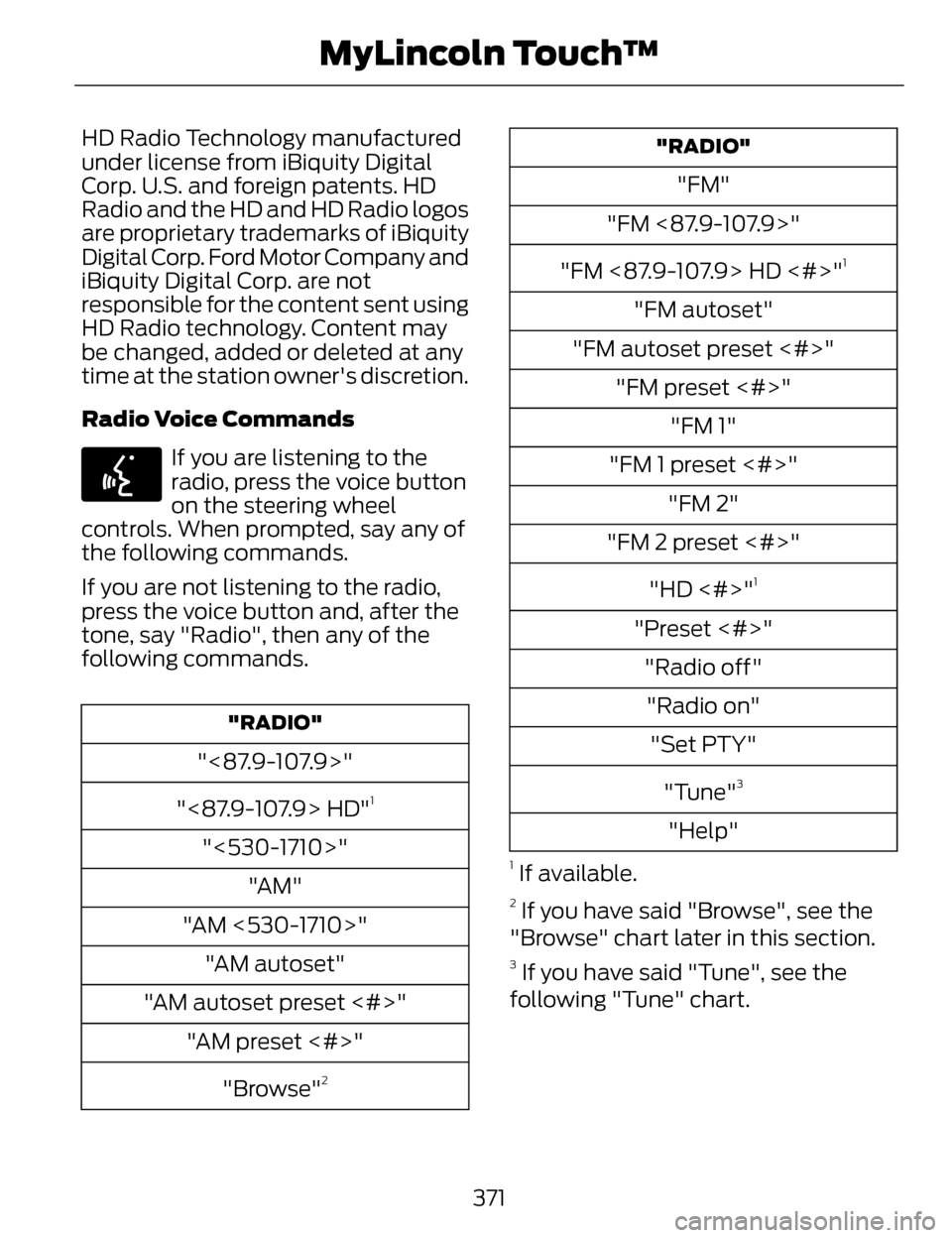
Radio Voice Commands
E142599
If you are listening to the
radio, press the voice button
on the steering wheel
controls. When prompted, say any of
the following commands.
If you are not listening to the radio,
press the voice button and, after the
tone, say "Radio", then any of the
following commands.
"RADIO"
"<87.9-107.9>"
"<87.9-107.9> HD"
1
"<530-1710>" "AM"
"AM <530-1710>" "AM autoset"
"AM autoset preset <#>" "AM preset <#>"
"Browse"
2
"RADIO"
"FM"
"FM <87.9-107.9>"
"FM <87.9-107.9> HD <#>"
1
"FM autoset"
"FM autoset preset <#>" "FM preset <#>" "FM 1"
"FM 1 preset <#>" "FM 2"
"FM 2 preset <#>"
"HD <#>"
1
"Preset <#>""Radio off""Radio on" "Set PTY"
"Tune"
3
"Help"
1 If available.
2 If you have said "Browse", see the
"Browse" chart later in this section.
3 If you have said "Tune", see the
following "Tune" chart.
371
MyLincoln Touch™
Page 427 of 468
Keep User's Guide in vehicle: When
kept in the vehicle, the User's Guide
will be a ready reference for you and
other users unfamiliar with the
Windows Automotive-based system.
Please make certain that before using
the system for the first time, all
persons have access to the User's
Guide and read its instructions and
safety information carefully.
WARNING
Operating certain parts of this
system while driving can distract
your attention away from the road,
and possibly cause an accident or
other serious consequences. Do not
change system settings or enter data
non-verbally (using your hands) while
driving. Stop the vehicle in a safe and
legal manner before attempting these
operations. This is important since
while setting up or changing some
functions you might be required to
distract your attention away from the
road and remove your hands from the
wheel.
General Operation
Voice Command Control: Functions
within the Windows
Automotive-based system may be
accomplished using only voice
commands. Using voice commands
while driving allows you to operate
the system without removing your
hands from the wheel. Prolonged Views of Screen: Do not
access any function requiring a
prolonged view of the screen while
you are driving. Pull over in a safe and
legal manner before attempting to
access a function of the system
requiring prolonged attention. Even
occasional short scans to the screen
may be hazardous if your attention
has been diverted away from your
driving task at a critical time.
Volume Setting: Do not raise the
volume excessively. Keep the volume
at a level where you can still hear
outside traffic and emergency signals
while driving. Driving while unable to
hear these sounds could cause an
accident.
Use of Speech Recognition
Functions: Speech recognition
software is inherently a statistical
process which is subject to errors. It is
your responsibility to monitor any
speech recognition functions included
in the system and address any errors.
Navigation Features: Any navigation
features included in the system are
intended to provide turn by turn
instructions to get you to a desired
destination. Please make certain all
persons using this system carefully
read and follow instructions and
safety information fully.
424
Appendices
Page 444 of 468
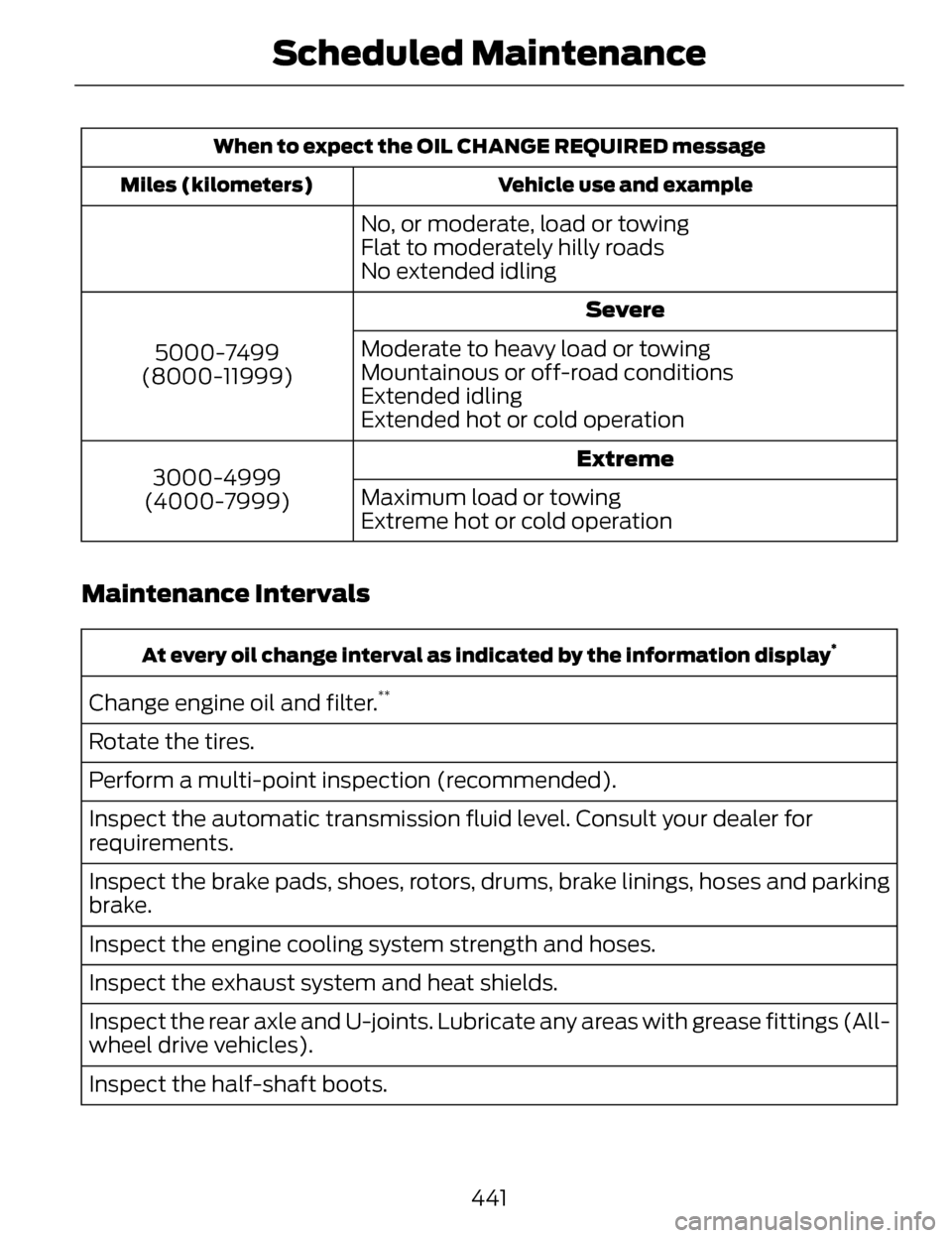
When to expect the OIL CHANGE REQUIRED messageVehicle use and example
Miles (kilometers)
No, or moderate, load or towing
Flat to moderately hilly roads
No extended idling
Severe
5000-7499
(8000-11999) Moderate to heavy load or towing
Mountainous or off-road conditions
Extended idling
Extended hot or cold operation
Extreme
3000-4999
(4000-7999) Maximum load or towing
Extreme hot or cold operation
Maintenance Intervals
At every oil change interval as indicated by the information display*
Change engine oil and filter.**
Rotate the tires.
Perform a multi-point inspection (recommended).
Inspect the automatic transmission fluid level. Consult your dealer for
requirements.
Inspect the brake pads, shoes, rotors, drums, brake linings, hoses and parking
brake.
Inspect the engine cooling system strength and hoses.
Inspect the exhaust system and heat shields.
Inspect the rear axle and U-joints. Lubricate any areas with grease fittings (All-
wheel drive vehicles).
Inspect the half-shaft boots.
441
Scheduled Maintenance
Page 445 of 468
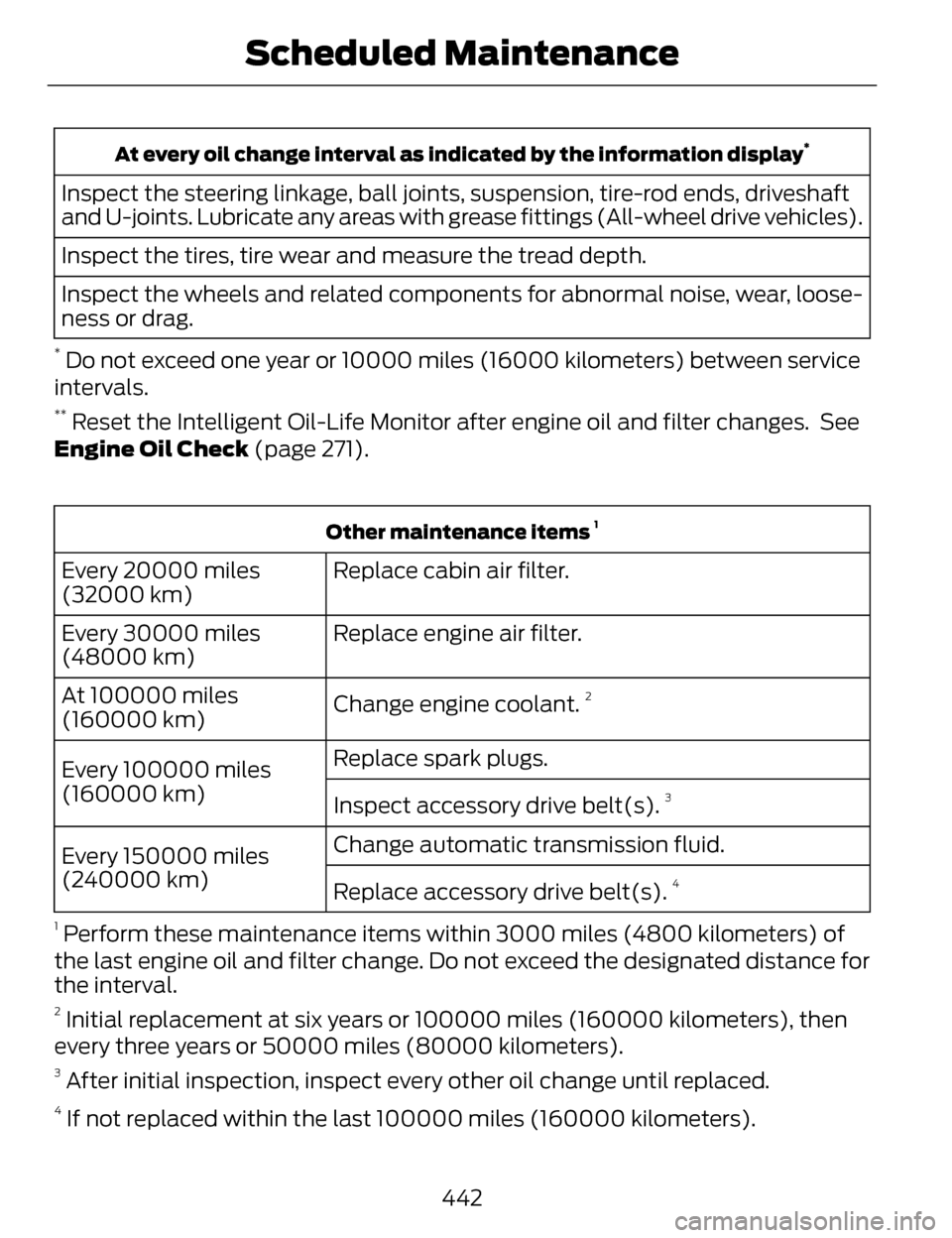
At every oil change interval as indicated by the information display*
Inspect the steering linkage, ball joints, suspension, tire-rod ends, driveshaft
and U-joints. Lubricate any areas with grease fittings (All-wheel drive vehicles).
Inspect the tires, tire wear and measure the tread depth.
Inspect the wheels and related components for abnormal noise, wear, loose-
ness or drag.
* Do not exceed one year or 10000 miles (16000 kilometers) between service
intervals.
** Reset the Intelligent Oil-Life Monitor after engine oil and filter changes. See
Engine Oil Check (page 271).
Other maintenance items 1
Replace cabin air filter.
Every 20000 miles
(32000 km)
Replace engine air filter.
Every 30000 miles
(48000 km)
Change engine coolant.
2At 100000 miles
(160000 km)Replace spark plugs.
Every 100000 miles
(160000 km) Inspect accessory drive belt(s).
3
Change automatic transmission fluid.
Every 150000 miles
(240000 km)
Replace accessory drive belt(s).
4
1
Perform these maintenance items within 3000 miles (4800 kilometers) of
the last engine oil and filter change. Do not exceed the designated distance for
the interval.
2 Initial replacement at six years or 100000 miles (160000 kilometers), then
every three years or 50000 miles (80000 kilometers).
3 After initial inspection, inspect every other oil change until replaced.
4 If not replaced within the last 100000 miles (160000 kilometers).
442
Scheduled Maintenance
Page 447 of 468
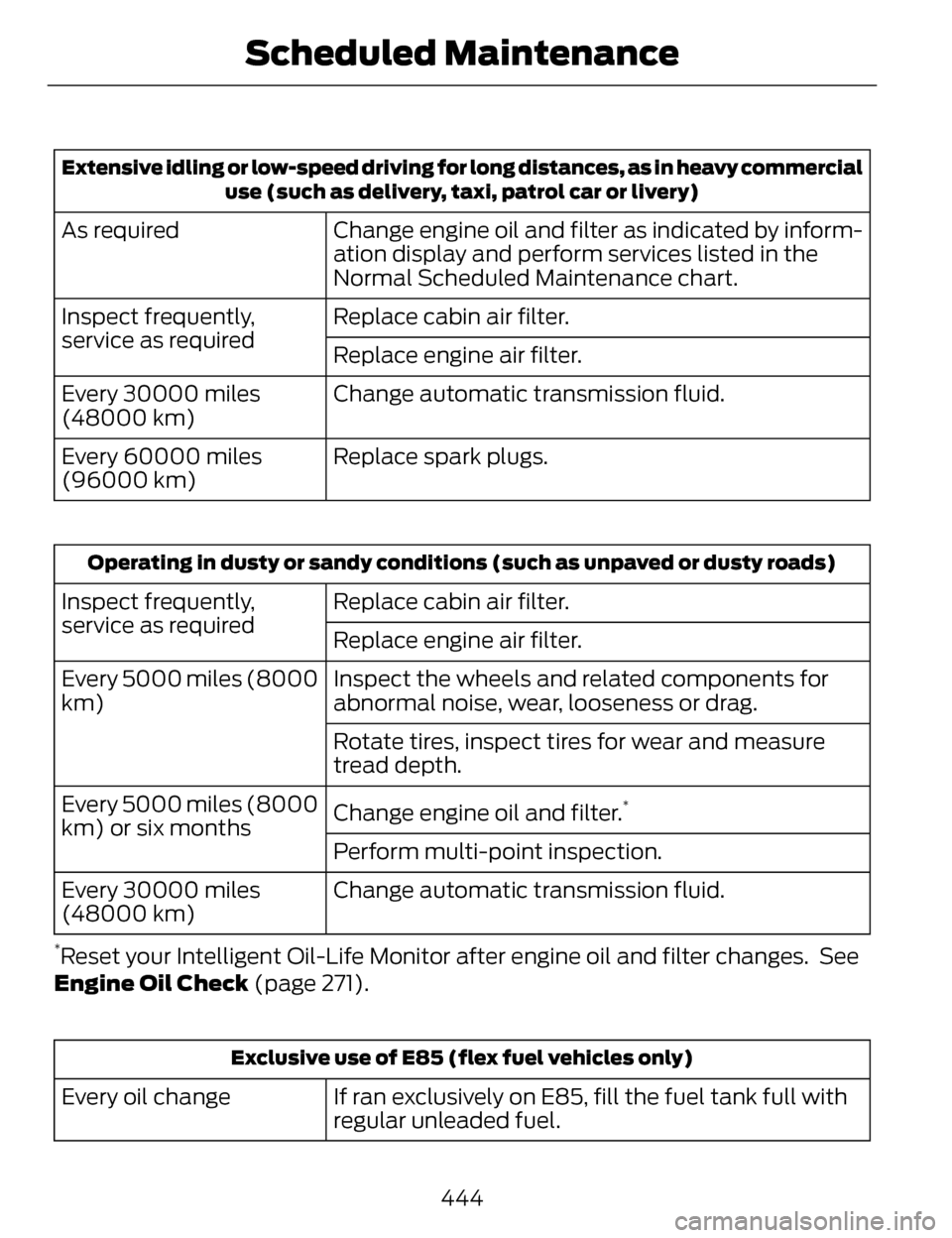
Extensive idling or low-speed driving for long distances, as in heavy commercialuse (such as delivery, taxi, patrol car or livery)
Change engine oil and filter as indicated by inform-
ation display and perform services listed in the
Normal Scheduled Maintenance chart.
As required
Replace cabin air filter.
Inspect frequently,
service as required
Replace engine air filter.
Change automatic transmission fluid.
Every 30000 miles
(48000 km)
Replace spark plugs.
Every 60000 miles
(96000 km)
Operating in dusty or sandy conditions (such as unpaved or dusty roads)
Replace cabin air filter.
Inspect frequently,
service as required
Replace engine air filter.
Inspect the wheels and related components for
abnormal noise, wear, looseness or drag.
Every 5000 miles (8000
km)
Rotate tires, inspect tires for wear and measure
tread depth.
Change engine oil and filter.
*Every 5000 miles (8000
km) or six monthsPerform multi-point inspection.
Change automatic transmission fluid.
Every 30000 miles
(48000 km)
*Reset your Intelligent Oil-Life Monitor after engine oil and filter changes. See
Engine Oil Check (page 271).
Exclusive use of E85 (flex fuel vehicles only)
If ran exclusively on E85, fill the fuel tank full with
regular unleaded fuel.
Every oil change
444
Scheduled Maintenance
Page 457 of 468
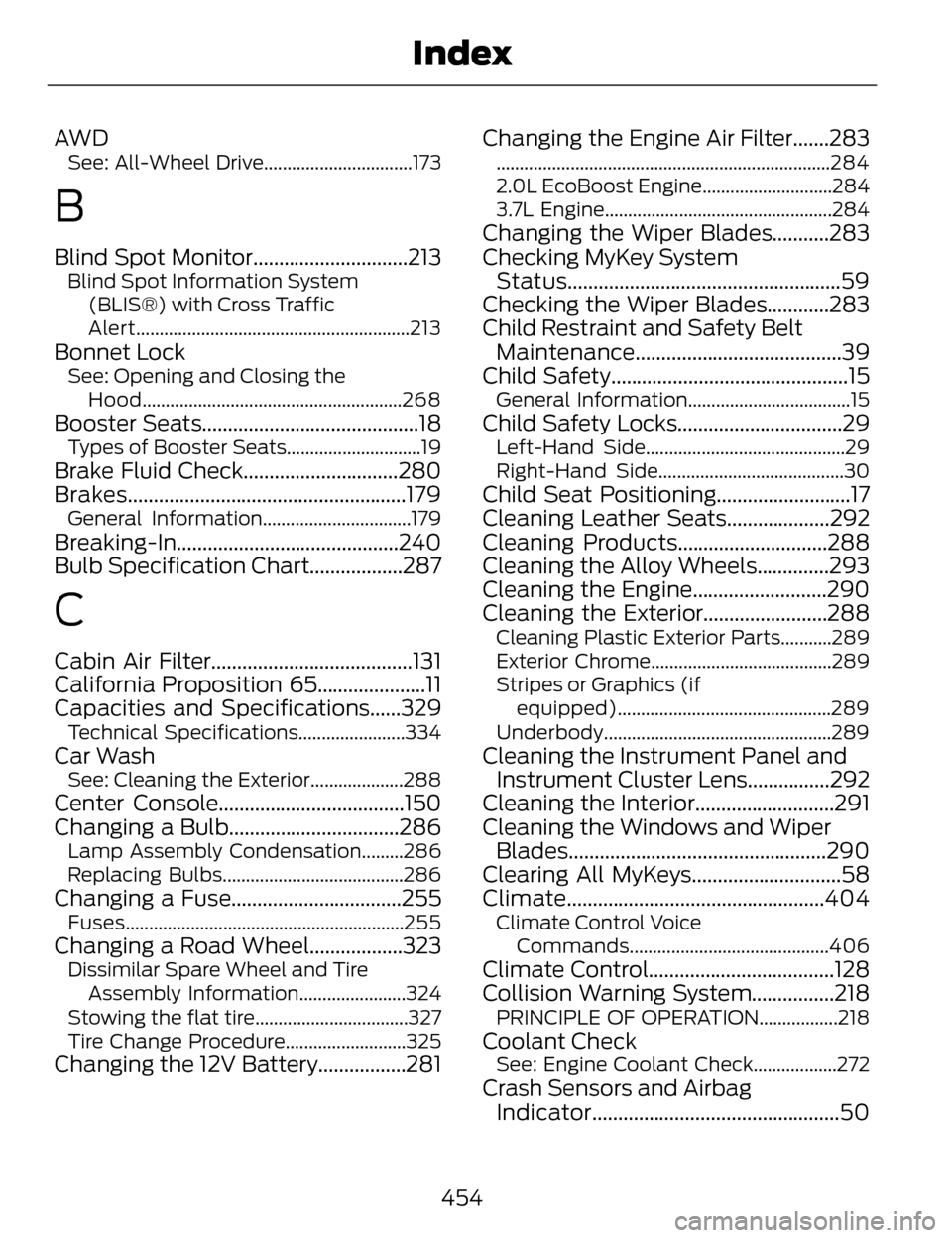
AW DSee: All-Wheel Drive................................173
B
Blind Spot Monitor..............................213Blind Spot Information System(BLIS®) with Cross Traffic
Alert...........................................................213
Bonnet LockSee: Opening and Closing theHood........................................................268
Booster Seats..........................................18Types of Booster Seats.............................19
Brake Fluid Check..............................280
Brakes......................................................179
General Information................................179
Breaking-In...........................................240
Bulb Specification Chart..................287
C
Cabin Air Filter.......................................131
California Proposition 65.....................11
Capacities and Specifications......329
Technical Specifications.......................334
Car WashSee: Cleaning the Exterior....................288
Center Console....................................150
Changing a Bulb.................................286
Lamp Assembly Condensation.........286
Replacing Bulbs.......................................286
Changing a Fuse.................................255Fuses............................................................255
Changing a Road Wheel..................323Dissimilar Spare Wheel and TireAssembly Information.......................324
Stowing the flat tire.................................327
Tire Change Procedure..........................325
Changing the 12V Battery.................281 Changing the Engine Air Filter.......283
........................................................................\
284
2.0L EcoBoost Engine............................284
3.7L Engine.................................................284
Changing the Wiper Blades...........283
Checking MyKey System
Status.....................................................59
Checking the Wiper Blades............283
Child Restraint and Safety Belt Maintenance........................................39
Child Safety..............................................15
General Information...................................15
Child Safety Locks................................29Left-Hand Side...........................................29
Right-Hand Side........................................30
Child Seat Positioning..........................17
Cleaning Leather Seats....................292
Cleaning Products.............................288
Cleaning the Alloy Wheels..............293
Cleaning the Engine..........................290
Cleaning the Exterior........................288
Cleaning Plastic Exterior Parts...........289
Exterior Chrome.......................................289
Stripes or Graphics (if
equipped)..............................................289
Underbody.................................................289
Cleaning the Instrument Panel and Instrument Cluster Lens................292
Cleaning the Interior...........................291
Cleaning the Windows and Wiper Blades..................................................290
Clearing All MyKeys.............................58
Climate..................................................404
Climate Control Voice
Commands...........................................406
Climate Control....................................128
Collision Warning System................218
PRINCIPLE OF OPERATION.................218
Coolant CheckSee: Engine Coolant Check..................272
Crash Sensors and AirbagIndicator................................................50
454
Index
Page 462 of 468
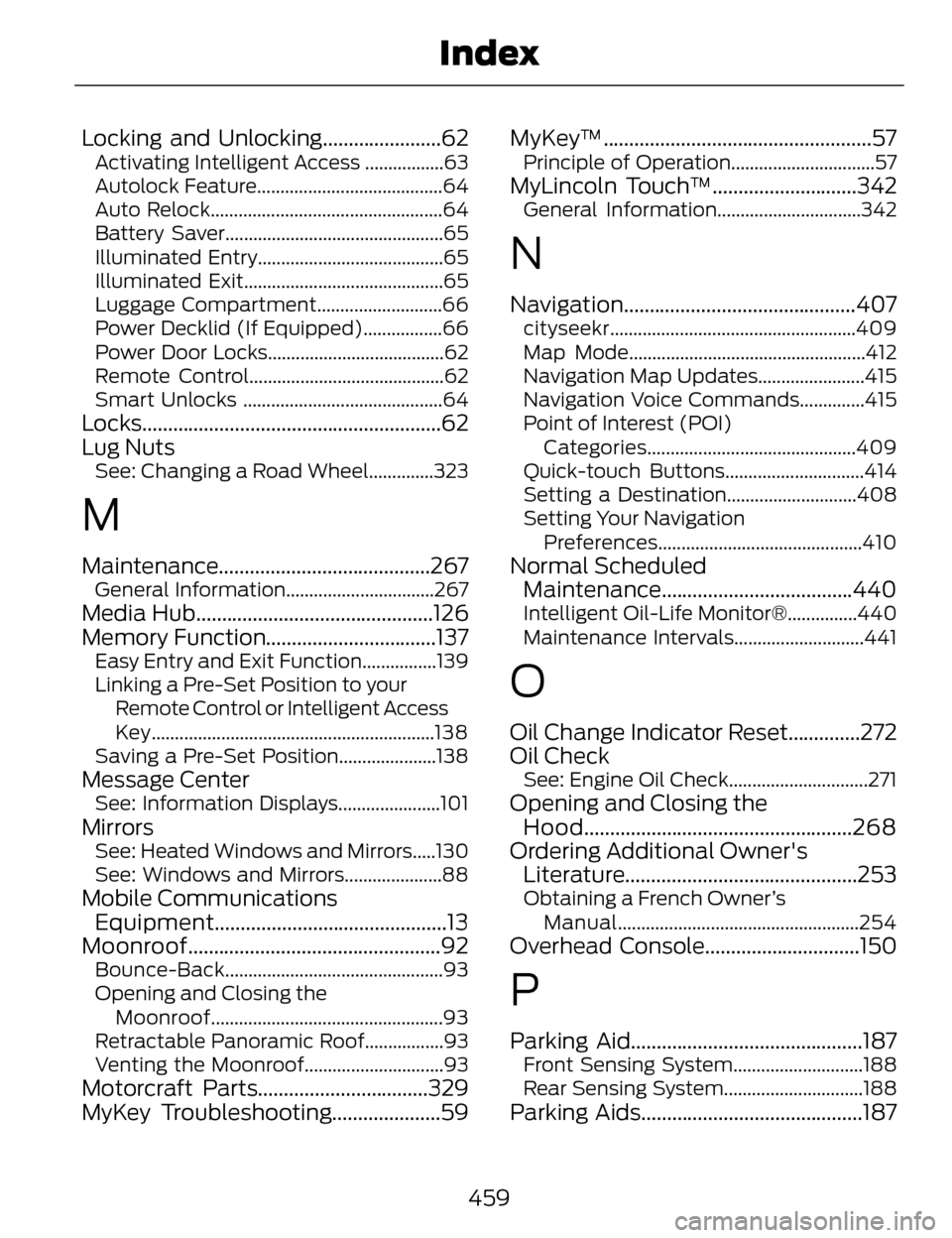
Locking and Unlocking.......................62Activating Intelligent Access .................63
Autolock Feature........................................64
Auto Relock..................................................64
Battery Saver...............................................65
Illuminated Entry........................................65
Illuminated Exit...........................................65
Luggage Compartment...........................66
Power Decklid (If Equipped).................66
Power Door Locks......................................62
Remote Control..........................................62
Smart Unlocks ...........................................64
Locks..........................................................62
Lug Nuts
See: Changing a Road Wheel..............323
M
Maintenance.........................................267General Information................................267
Media Hub..............................................126
Memory Function.................................137
Easy Entry and Exit Function................139
Linking a Pre-Set Position to yourRemote Control or Intelligent Access
Key.............................................................138
Saving a Pre-Set Position.....................138
Message CenterSee: Information Displays......................101
MirrorsSee: Heated Windows and Mirrors.....130
See: Windows and Mirrors.....................88
Mobile Communications Equipment.............................................13
Moonroof.................................................92
Bounce-Back...............................................93
Opening and Closing the
Moonroof..................................................93
Retractable Panoramic Roof.................93
Venting the Moonroof..............................93
Motorcraft Parts.................................329
MyKey Troubleshooting.....................59 MyKey™....................................................57
Principle of Operation...............................57
MyLincoln Touch™............................342General Information...............................342
N
Navigation.............................................407cityseekr.....................................................409
Map Mode...................................................412
Navigation Map Updates.......................415
Navigation Voice Commands..............415
Point of Interest (POI)
Categories.............................................409
Quick-touch Buttons..............................414
Setting a Destination............................408
Setting Your Navigation Preferences............................................410
Normal ScheduledMaintenance.....................................440
Intelligent Oil-Life Monitor®...............440
Maintenance Intervals............................441
O
Oil Change Indicator Reset..............272
Oil Check
See: Engine Oil Check..............................271
Opening and Closing theHood....................................................268
Ordering Additional Owner's Literatur e.............................................253
Obtaining a French Owner’s
Manual....................................................254
Overhead Console..............................150
P
Parking Aid.............................................187Front Sensing System............................188
Rear Sensing System..............................188
Parking Aids...........................................187
459
Index