park release LINCOLN MKZ 2014 Owners Manual
[x] Cancel search | Manufacturer: LINCOLN, Model Year: 2014, Model line: MKZ, Model: LINCOLN MKZ 2014Pages: 468, PDF Size: 4.49 MB
Page 12 of 468
E91392
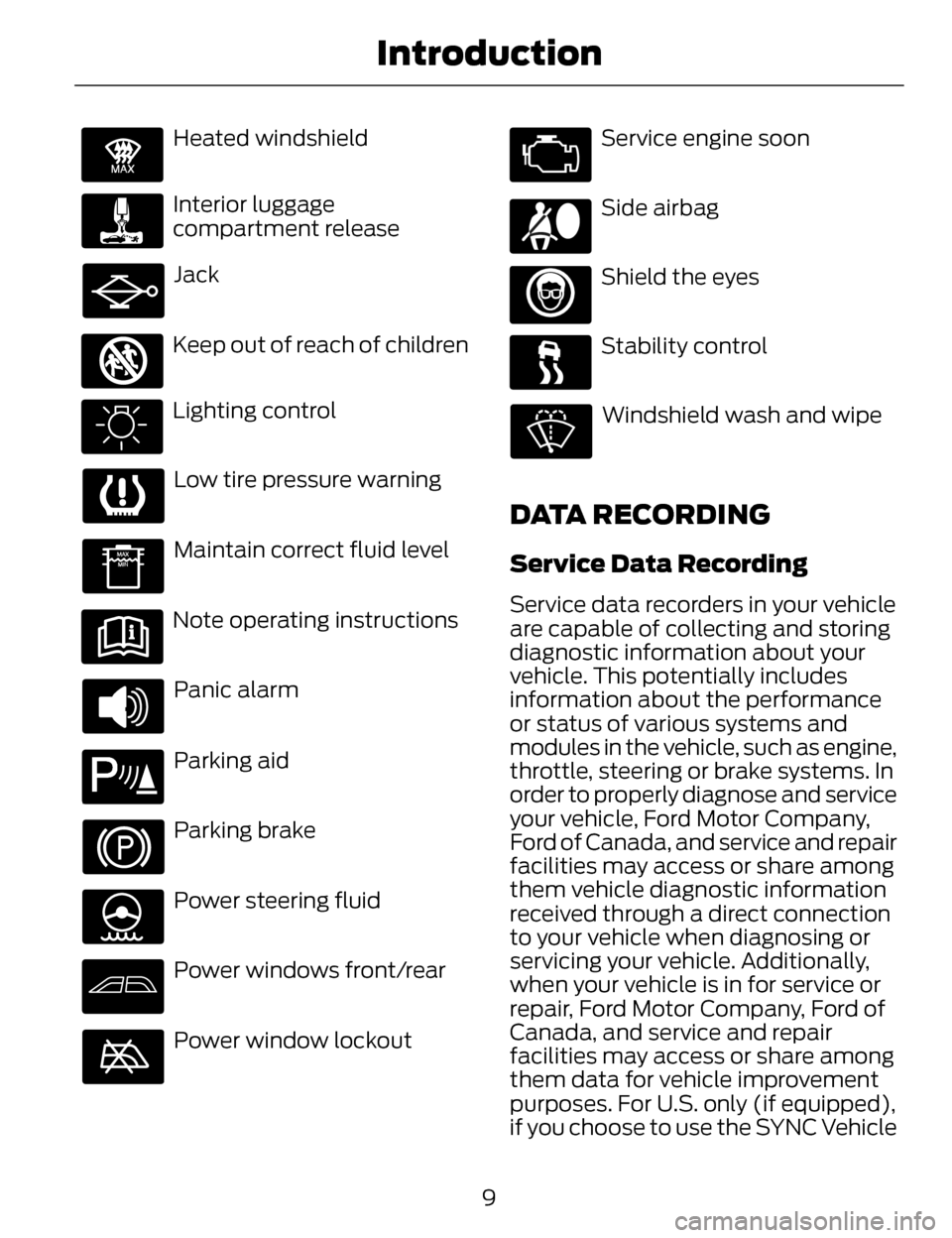
Heated windshield
Interior luggage
compartment release
Jack
E161353
Keep out of reach of children
Lighting control
Low tire pressure warning
Maintain correct fluid level
Note operating instructions
Panic alarm
E139213
Parking aid
Parking brake
Power steering fluid
Power windows front/rear
Power window lockout
Service engine soon
Side airbag
Shield the eyes
Stability control
Windshield wash and wipe
DATA RECORDING
Service Data Recording
Service data recorders in your vehicle
are capable of collecting and storing
diagnostic information about your
vehicle. This potentially includes
information about the performance
or status of various systems and
modules in the vehicle, such as engine,
throttle, steering or brake systems. In
order to properly diagnose and service
your vehicle, Ford Motor Company,
Ford of Canada, and service and repair
facilities may access or share among
them vehicle diagnostic information
received through a direct connection
to your vehicle when diagnosing or
servicing your vehicle. Additionally,
when your vehicle is in for service or
repair, Ford Motor Company, Ford of
Canada, and service and repair
facilities may access or share among
them data for vehicle improvement
purposes. For U.S. only (if equipped),
if you choose to use the SYNC Vehicle
9
Introduction
Page 57 of 468
E151796
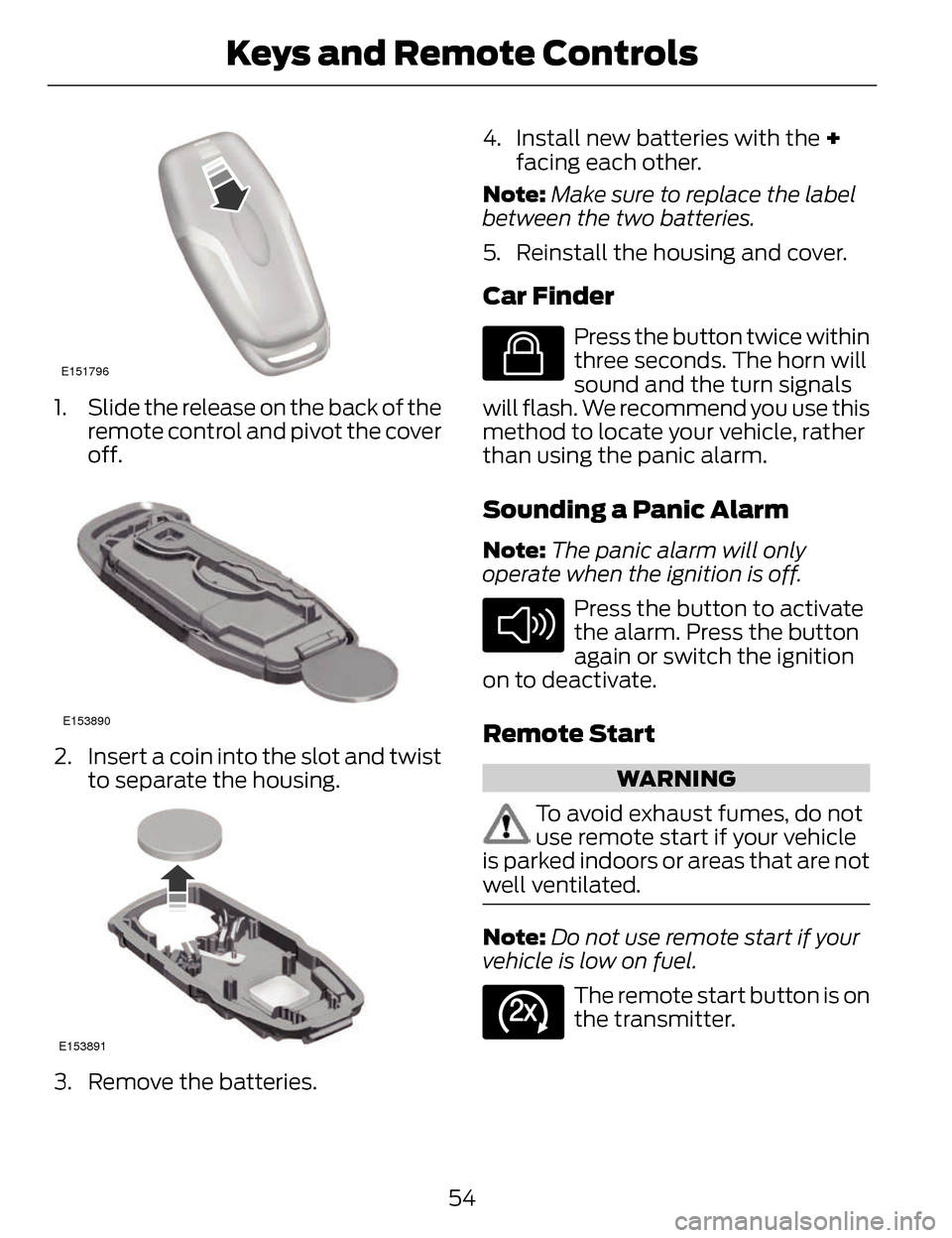
1. Slide the release on the back of theremote control and pivot the cover
off.
E153890
2. Insert a coin into the slot and twistto separate the housing.
E153891
3. Remove the batteries. 4. Install new batteries with the +
facing each other.
Note: Make sure to replace the label
between the two batteries.
5. Reinstall the housing and cover.
Car Finder
E138623
Press the button twice within
three seconds. The horn will
sound and the turn signals
will flash. We recommend you use this
method to locate your vehicle, rather
than using the panic alarm.
Sounding a Panic Alarm
Note: The panic alarm will only
operate when the ignition is off.
E138624
Press the button to activate
the alarm. Press the button
again or switch the ignition
on to deactivate.
Remote Start
WARNING
To avoid exhaust fumes, do not
use remote start if your vehicle
is parked indoors or areas that are not
well ventilated.
Note: Do not use remote start if your
vehicle is low on fuel.
E138625
The remote start button is on
the transmitter.
54
Keys and Remote Controls
Page 67 of 468
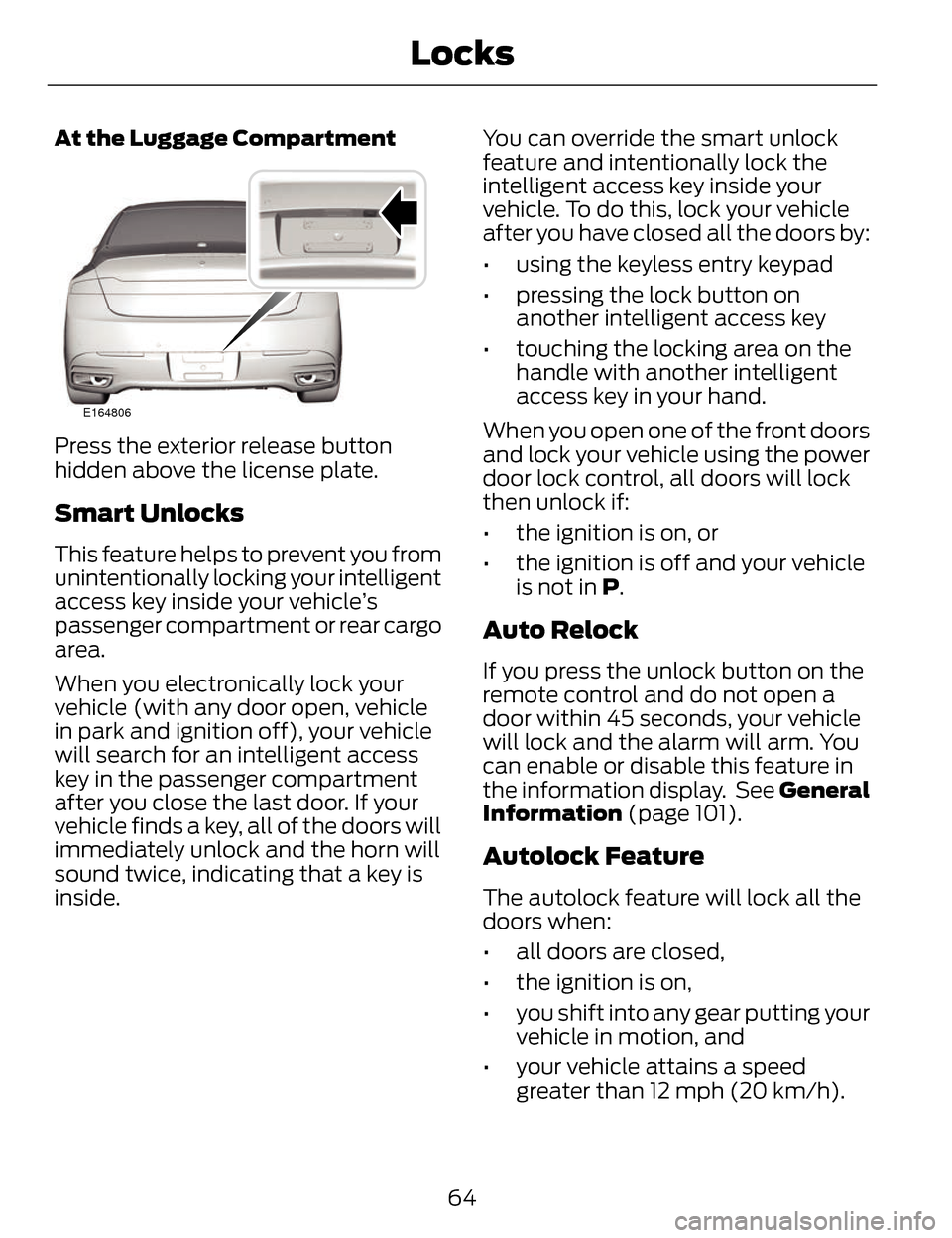
At the Luggage Compartment
E164806
Press the exterior release button
hidden above the license plate.
Smart Unlocks
This feature helps to prevent you from
unintentionally locking your intelligent
access key inside your vehicle’s
passenger compartment or rear cargo
area.
When you electronically lock your
vehicle (with any door open, vehicle
in park and ignition off), your vehicle
will search for an intelligent access
key in the passenger compartment
after you close the last door. If your
vehicle finds a key, all of the doors will
immediately unlock and the horn will
sound twice, indicating that a key is
inside.You can override the smart unlock
feature and intentionally lock the
intelligent access key inside your
vehicle. To do this, lock your vehicle
after you have closed all the doors by:
• using the keyless entry keypad
• pressing the lock button on
another intelligent access key
• touching the locking area on the handle with another intelligent
access key in your hand.
When you open one of the front doors
and lock your vehicle using the power
door lock control, all doors will lock
then unlock if:
• the ignition is on, or
• the ignition is off and your vehicle is not in P.
Auto Relock
If you press the unlock button on the
remote control and do not open a
door within 45 seconds, your vehicle
will lock and the alarm will arm. You
can enable or disable this feature in
the information display. See General
Information (page 101).
Autolock Feature
The autolock feature will lock all the
doors when:
• all doors are closed,
• the ignition is on,
• you shift into any gear putting your vehicle in motion, and
• your vehicle attains a speed greater than 12 mph (20 km/h).
64
Locks
Page 85 of 468
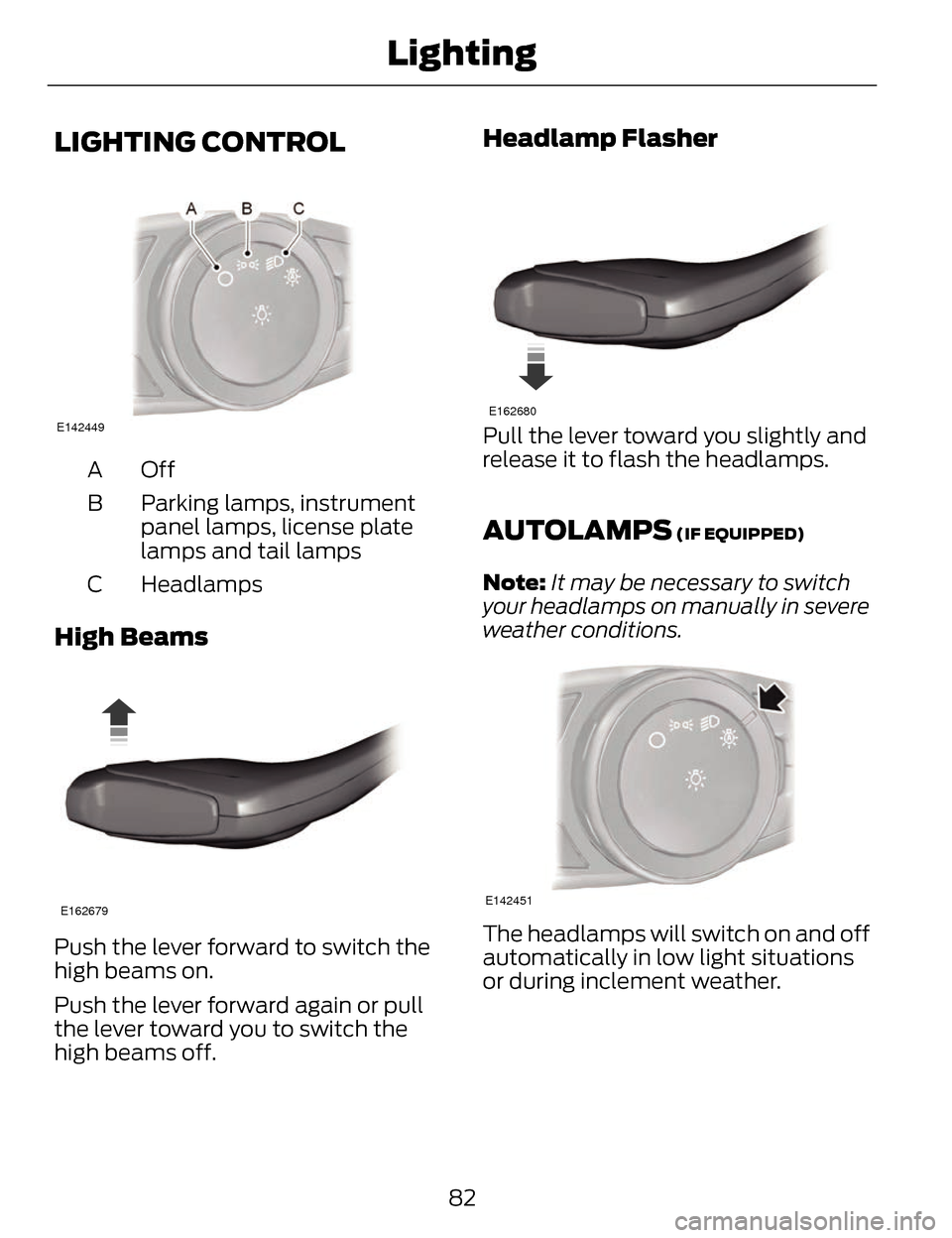
LIGHTING CONTROL
E142449
OffA
Parking lamps, instrument
panel lamps, license plate
lamps and tail lamps
B
Headlamps
C
High Beams
E162679
Push the lever forward to switch the
high beams on.
Push the lever forward again or pull
the lever toward you to switch the
high beams off.
Headlamp Flasher
E162680
Pull the lever toward you slightly and
release it to flash the headlamps.
AUTOLAMPS (IF EQUIPPED)
Note: It may be necessary to switch
your headlamps on manually in severe
weather conditions.
E142451
The headlamps will switch on and off
automatically in low light situations
or during inclement weather.
82
Lighting
Page 103 of 468
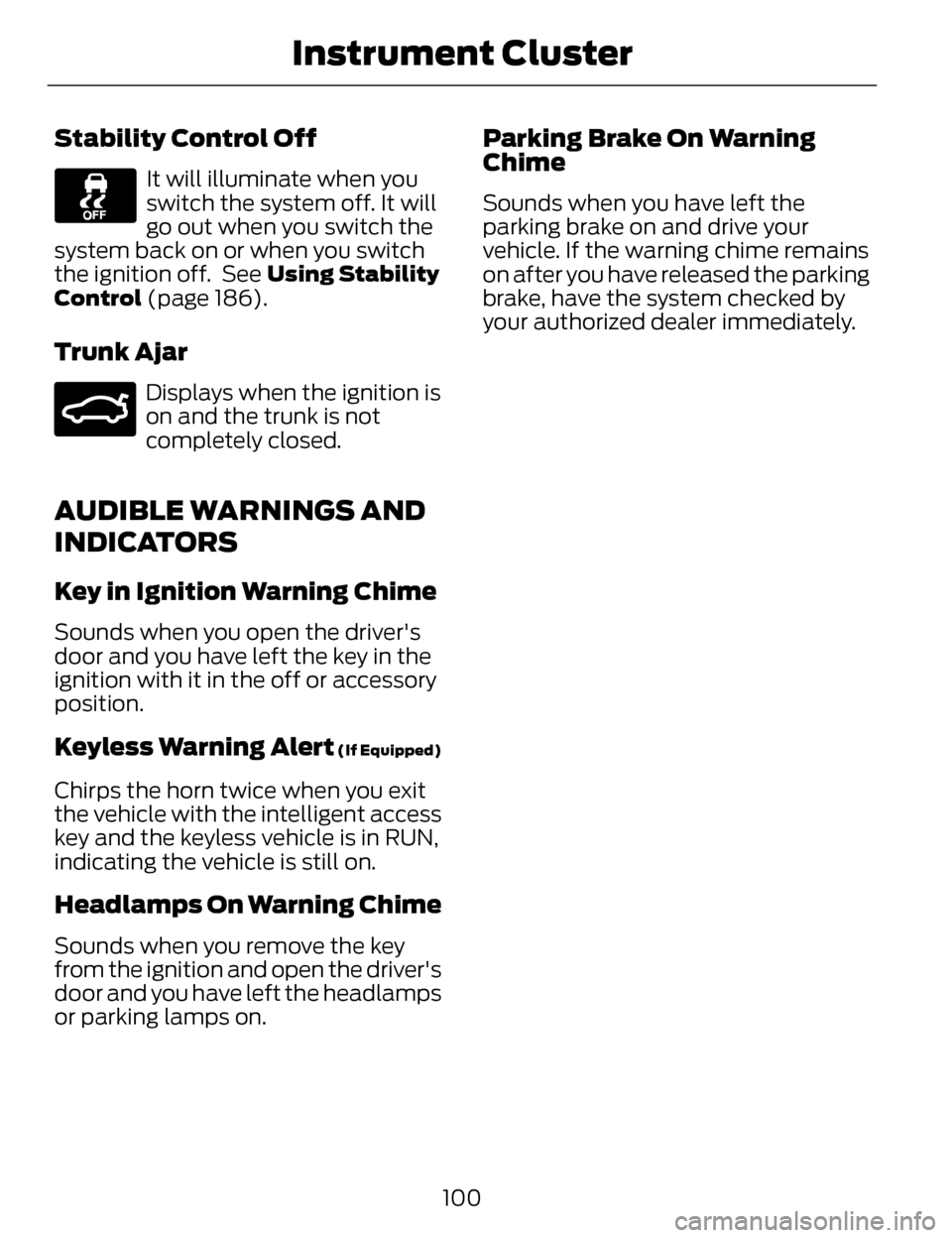
Stability Control Off
It will illuminate when you
switch the system off. It will
go out when you switch the
system back on or when you switch
the ignition off. See Using Stability
Control (page 186).
Trunk Ajar
E159323
Displays when the ignition is
on and the trunk is not
completely closed.
AUDIBLE WARNINGS AND
INDICATORS
Key in Ignition Warning Chime
Sounds when you open the driver's
door and you have left the key in the
ignition with it in the off or accessory
position.
Keyless Warning Alert (If Equipped)
Chirps the horn twice when you exit
the vehicle with the intelligent access
key and the keyless vehicle is in RUN,
indicating the vehicle is still on.
Headlamps On Warning Chime
Sounds when you remove the key
from the ignition and open the driver's
door and you have left the headlamps
or parking lamps on.
Parking Brake On Warning
Chime
Sounds when you have left the
parking brake on and drive your
vehicle. If the warning chime remains
on after you have released the parking
brake, have the system checked by
your authorized dealer immediately.
100
Instrument Cluster
Page 120 of 468
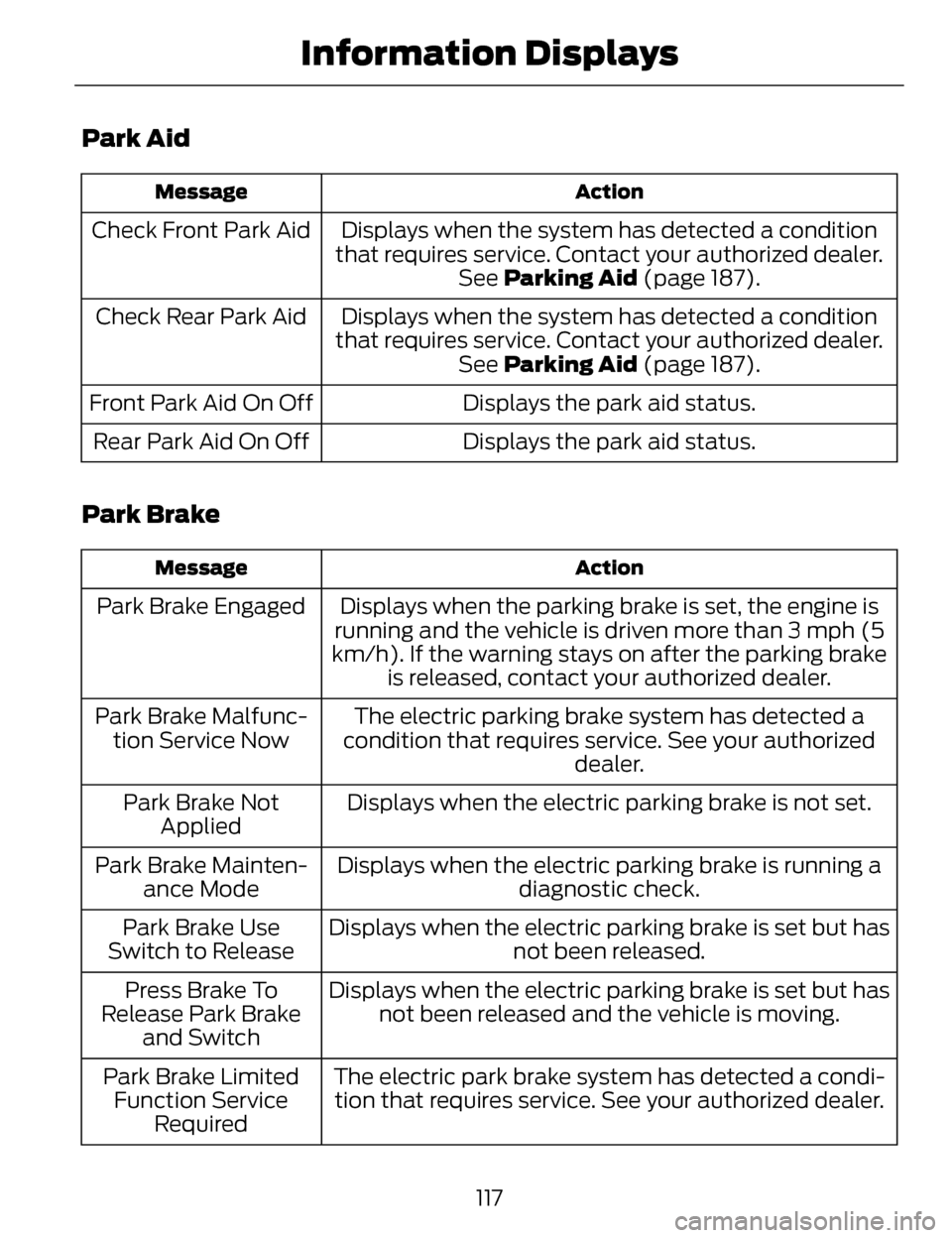
Park Aid
Action
Message
Displays when the system has detected a condition
that requires service. Contact your authorized dealer. See Parking Aid (page 187).
Check Front Park Aid
Displays when the system has detected a condition
that requires service. Contact your authorized dealer. See Parking Aid (page 187).
Check Rear Park Aid
Displays the park aid status.
Front Park Aid On Off
Displays the park aid status.
Rear Park Aid On Off
Park Brake
Action
Message
Displays when the parking brake is set, the engine is
running and the vehicle is driven more than 3 mph (5
km/h). If the warning stays on after the parking brake is released, contact your authorized dealer.
Park Brake Engaged
The electric parking brake system has detected a
condition that requires service. See your authorized dealer.
Park Brake Malfunc-
tion Service Now
Displays when the electric parking brake is not set.
Park Brake Not
Applied
Displays when the electric parking brake is running a diagnostic check.
Park Brake Mainten-
ance Mode
Displays when the electric parking brake is set but hasnot been released.
Park Brake Use
Switch to Release
Displays when the electric parking brake is set but hasnot been released and the vehicle is moving.
Press Brake To
Release Park Brake and Switch
The electric park brake system has detected a condi-tion that requires service. See your authorized dealer.
Park Brake Limited
Function Service Required
117
Information Displays
Page 121 of 468
Action
Message
Displays when the electric parking brake was not
released causing it to overheat.
Park Brake System
Overheated
Displays when the electric parking brake is set and the vehicle is started.
Release Park Brake
Displays when the electric parking brake is set.
Park Brake Applied
Displays when the electric parking brake is released.
Park Brake Released
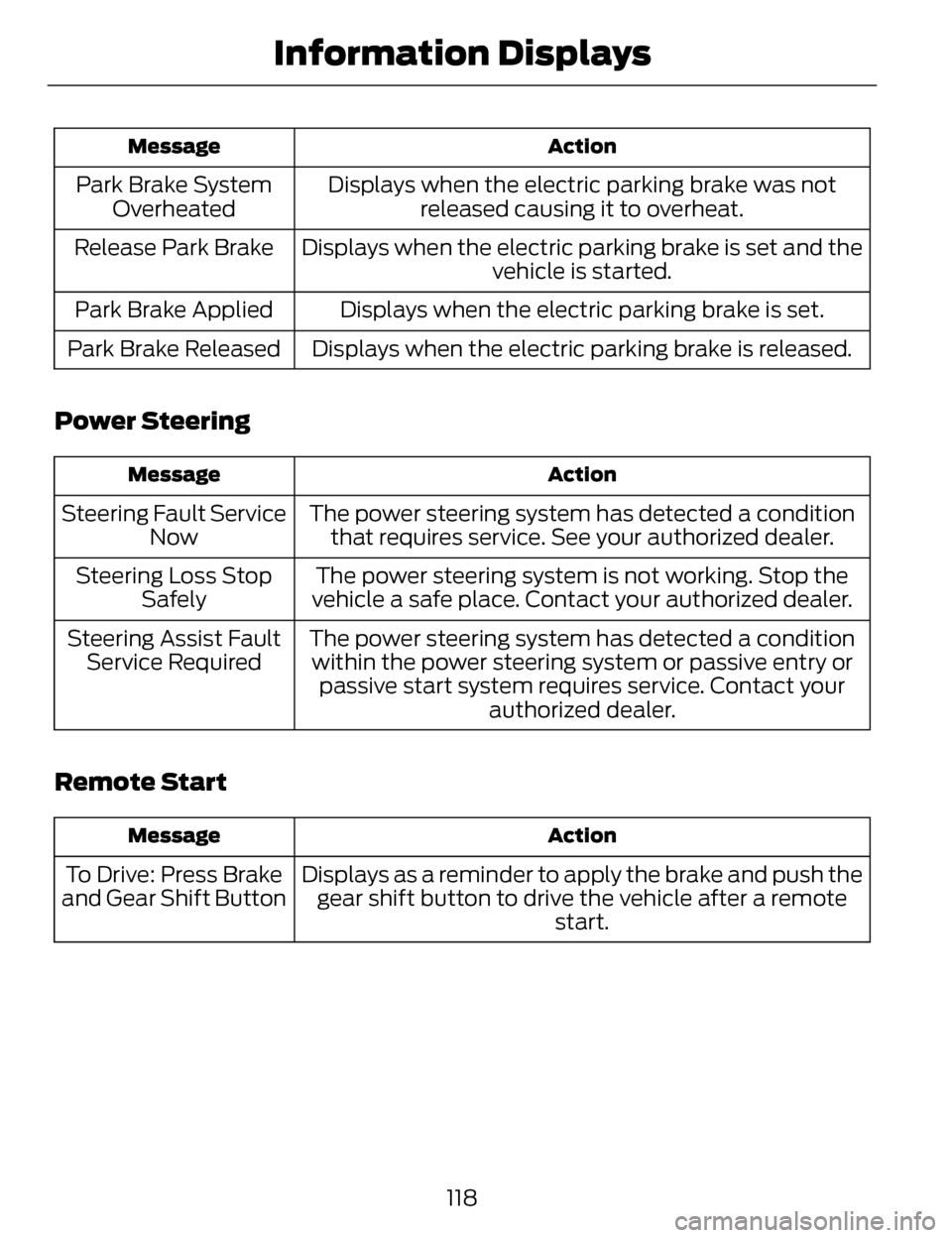
Power Steering
Action
Message
The power steering system has detected a condition
that requires service. See your authorized dealer.
Steering Fault Service
Now
The power steering system is not working. Stop the
vehicle a safe place. Contact your authorized dealer.
Steering Loss Stop
Safely
The power steering system has detected a conditionwithin the power steering system or passive entry or passive start system requires service. Contact your authorized dealer.
Steering Assist Fault
Service Required
Remote Start
Action
Message
Displays as a reminder to apply the brake and push the
gear shift button to drive the vehicle after a remote start.
To Drive: Press Brake
and Gear Shift Button
118
Information Displays
Page 126 of 468
Action
Message
See your authorized dealer.
SHIFT SYS FAULT
Sport Unavailable Service Required
Displays when neutral tow is active and the ignition
needs to be turned off. See Towing the Vehicle on
Four Wheels (page 237).
Neutral Tow Engaged
Turn Ignition Off for Towing
Displays while attempting to exit neutral tow. The brake
pedal needs to be depressed and park button selectedto deactivate. See Towing the Vehicle on Four Wheels (page 237).
Neutral Tow Engaged
Depress Brake andSelect Park to Exit Neutral Tow
Displays when neutral tow is active and the park brakeneeds to be released. See Towing the Vehicle on Four Wheels (page 237).
Neutral Tow Remove
Park Brake for Towing
Displays when neutral tow has been deactivated.
Neutral Tow Disen-
gaged
123
Information Displays
Page 147 of 468
E142658
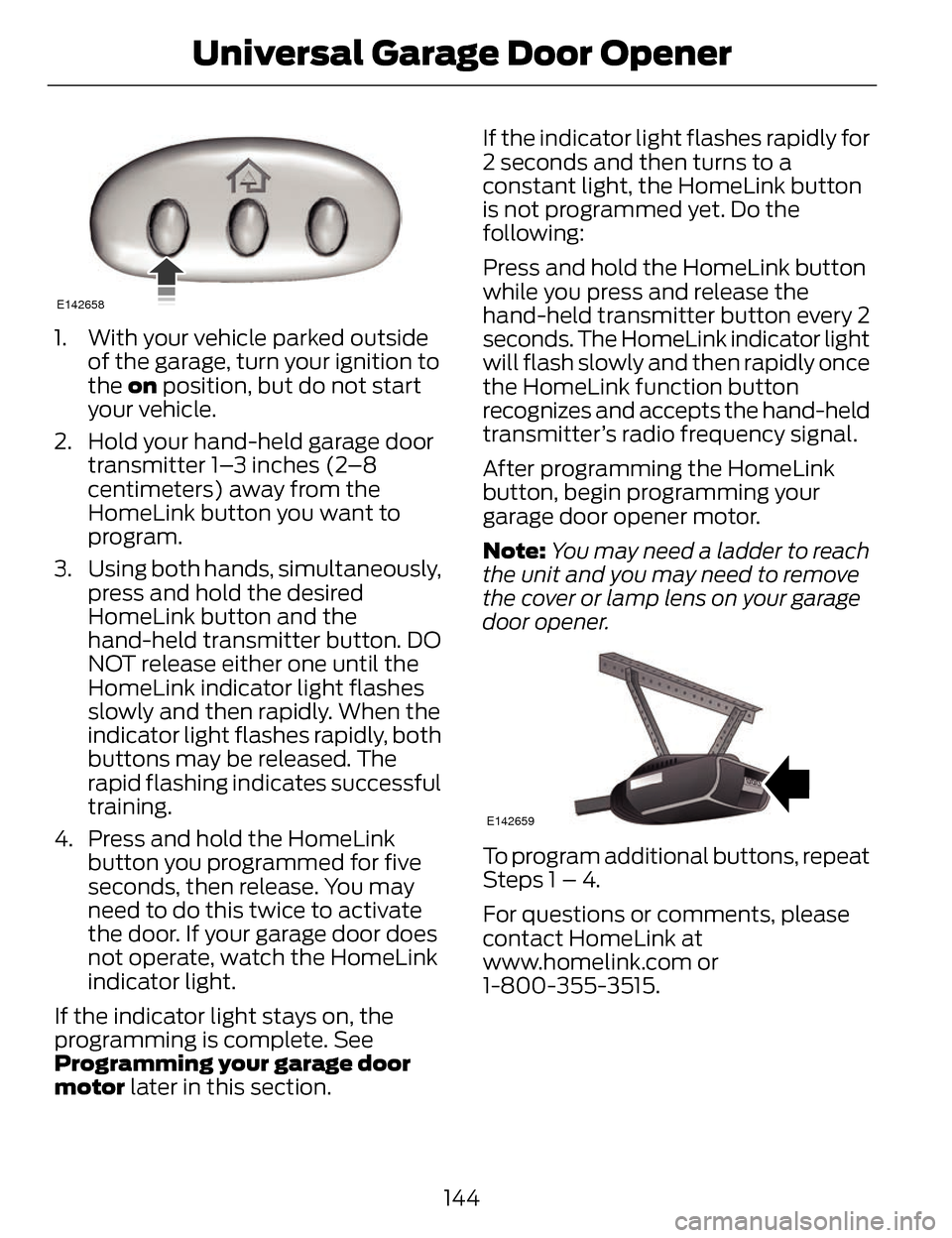
1. With your vehicle parked outsideof the garage, turn your ignition to
the on position, but do not start
your vehicle.
2. Hold your hand-held garage door transmitter 1–3 inches (2–8
centimeters) away from the
HomeLink button you want to
program.
3. Using both hands, simultaneously, press and hold the desired
HomeLink button and the
hand-held transmitter button. DO
NOT release either one until the
HomeLink indicator light flashes
slowly and then rapidly. When the
indicator light flashes rapidly, both
buttons may be released. The
rapid flashing indicates successful
training.
4. Press and hold the HomeLink button you programmed for five
seconds, then release. You may
need to do this twice to activate
the door. If your garage door does
not operate, watch the HomeLink
indicator light.
If the indicator light stays on, the
programming is complete. See
Programming your garage door
motor later in this section. If the indicator light flashes rapidly for
2 seconds and then turns to a
constant light, the HomeLink button
is not programmed yet. Do the
following:
Press and hold the HomeLink button
while you press and release the
hand-held transmitter button every 2
seconds. The HomeLink indicator light
will flash slowly and then rapidly once
the HomeLink function button
recognizes and accepts the hand-held
transmitter’s radio frequency signal.
After programming the HomeLink
button, begin programming your
garage door opener motor.
Note:
You may need a ladder to reach
the unit and you may need to remove
the cover or lamp lens on your garage
door opener.
E142659
To program additional buttons, repeat
Steps 1 – 4.
For questions or comments, please
contact HomeLink at
www.homelink.com or
1-800-355-3515.
144
Universal Garage Door Opener
Page 155 of 468
The keyless starting system has three
modes:
•Off: Turns the ignition off.
• Without applying the brake
pedal, press and release the
button once when the ignition
is in the on mode, or when the
engine is running but the
vehicle is not moving.
• On: All electrical circuits are
operational and the warning lamps
and indicators illuminate.
• Without applying the brake
pedal, press and release the
button once.
• Start: Starts the engine.
• Press the brake pedal, and then
press the button for any length
of time. An indicator light on the
button illuminates when then
ignition is on and when the
engine starts.
STARTING A GASOLINE
ENGINE
When you start the engine, the idle
speed increases, this helps to warm
up the engine. If the engine idle speed
does not slow down automatically,
have your vehicle checked by an
authorized dealer.
Before starting the engine, check the
following:
• Make sure all occupants havefastened their safety belts.
• Make sure the headlamps and electrical accessories are off. • Make sure the parking brake is on.
• Put the transmission in P.
Note:
Do not touch the accelerator
pedal.
1. Fully press the brake pedal.
2. Press the button.
The system does not function if:
• The key frequencies are jammed.
• The key battery has no charge.
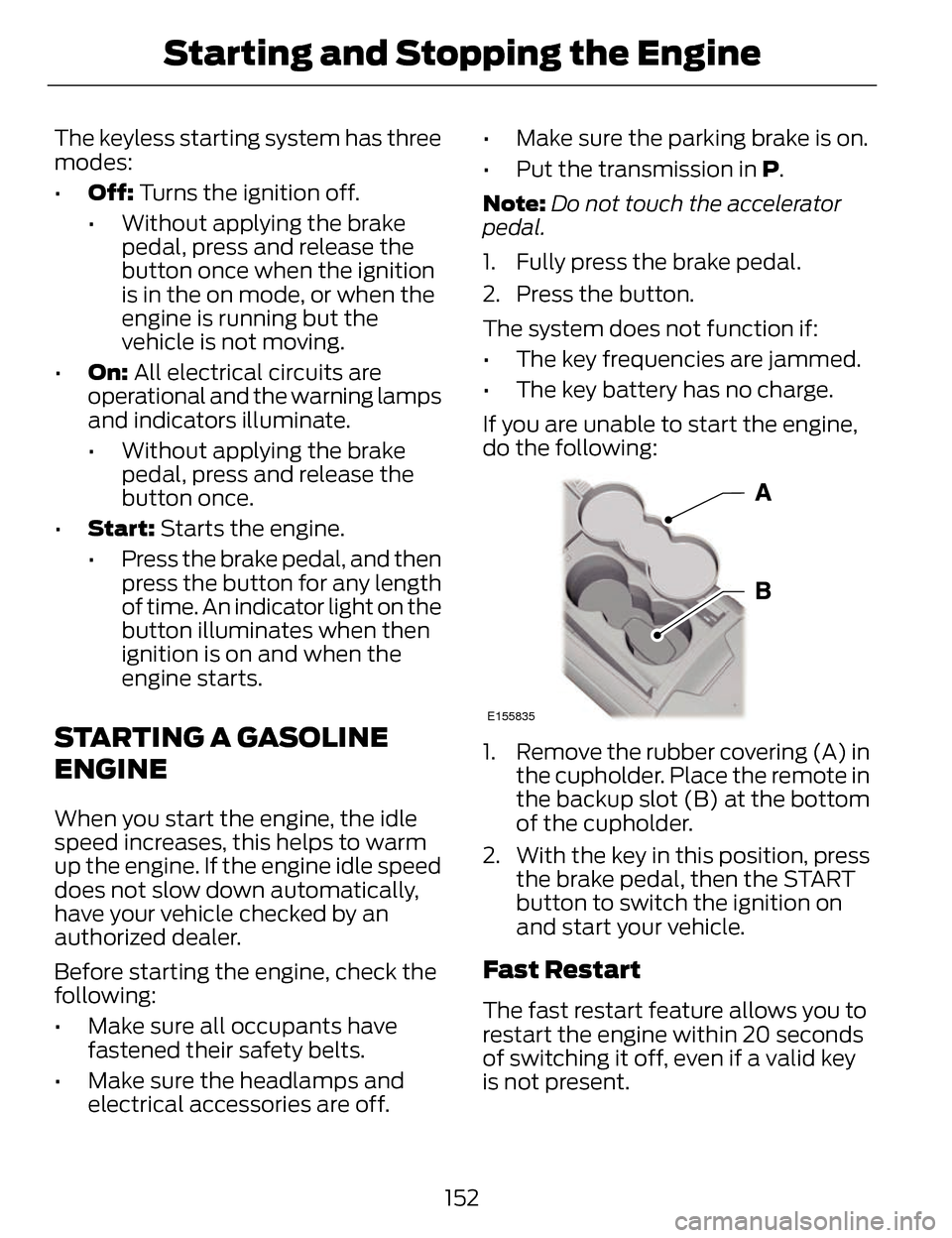
If you are unable to start the engine,
do the following:
E155835
1. Remove the rubber covering (A) in the cupholder. Place the remote in
the backup slot (B) at the bottom
of the cupholder.
2. With the key in this position, press the brake pedal, then the START
button to switch the ignition on
and start your vehicle.
Fast Restart
The fast restart feature allows you to
restart the engine within 20 seconds
of switching it off, even if a valid key
is not present.
152
Starting and Stopping the Engine