engine LINCOLN MKZ 2015 Owners Manual
[x] Cancel search | Manufacturer: LINCOLN, Model Year: 2015, Model line: MKZ, Model: LINCOLN MKZ 2015Pages: 516, PDF Size: 4.48 MB
Page 363 of 516
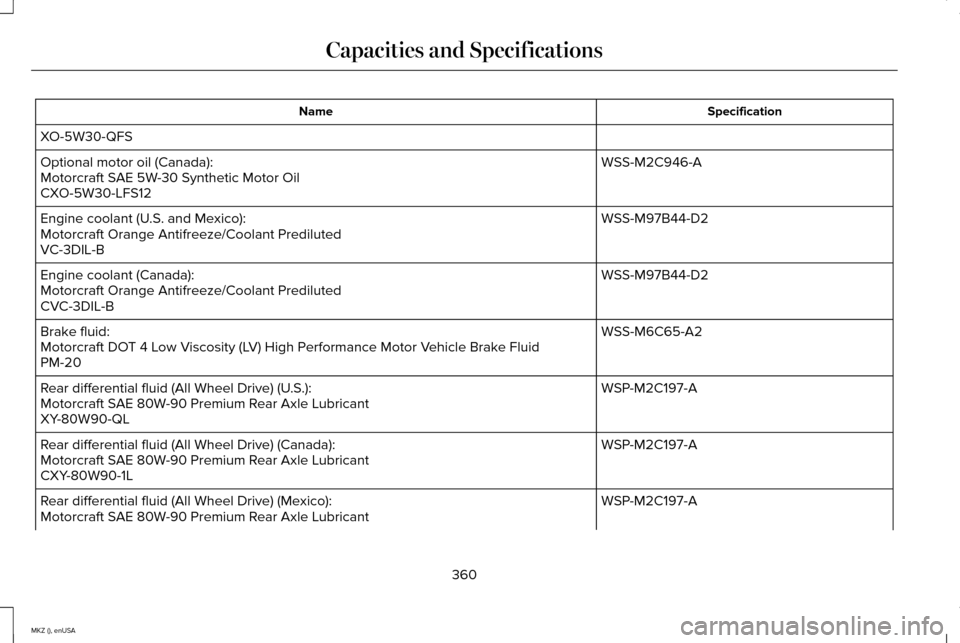
Specification
Name
XO-5W30-QFS WSS-M2C946-A
Optional motor oil (Canada):
Motorcraft SAE 5W-30 Synthetic Motor Oil
CXO-5W30-LFS12
WSS-M97B44-D2
Engine coolant (U.S. and Mexico):
Motorcraft Orange Antifreeze/Coolant Prediluted
VC-3DIL-B
WSS-M97B44-D2
Engine coolant (Canada):
Motorcraft Orange Antifreeze/Coolant Prediluted
CVC-3DIL-B
WSS-M6C65-A2
Brake fluid:
Motorcraft DOT 4 Low Viscosity (LV) High Performance Motor Vehicle Brake Fluid
PM-20
WSP-M2C197-A
Rear differential fluid (All Wheel Drive) (U.S.):
Motorcraft SAE 80W-90 Premium Rear Axle Lubricant
XY-80W90-QL
WSP-M2C197-A
Rear differential fluid (All Wheel Drive) (Canada):
Motorcraft SAE 80W-90 Premium Rear Axle Lubricant
CXY-80W90-1L
WSP-M2C197-A
Rear differential fluid (All Wheel Drive) (Mexico):
Motorcraft SAE 80W-90 Premium Rear Axle Lubricant
360
MKZ (), enUSA Capacities and Specifications
Page 366 of 516
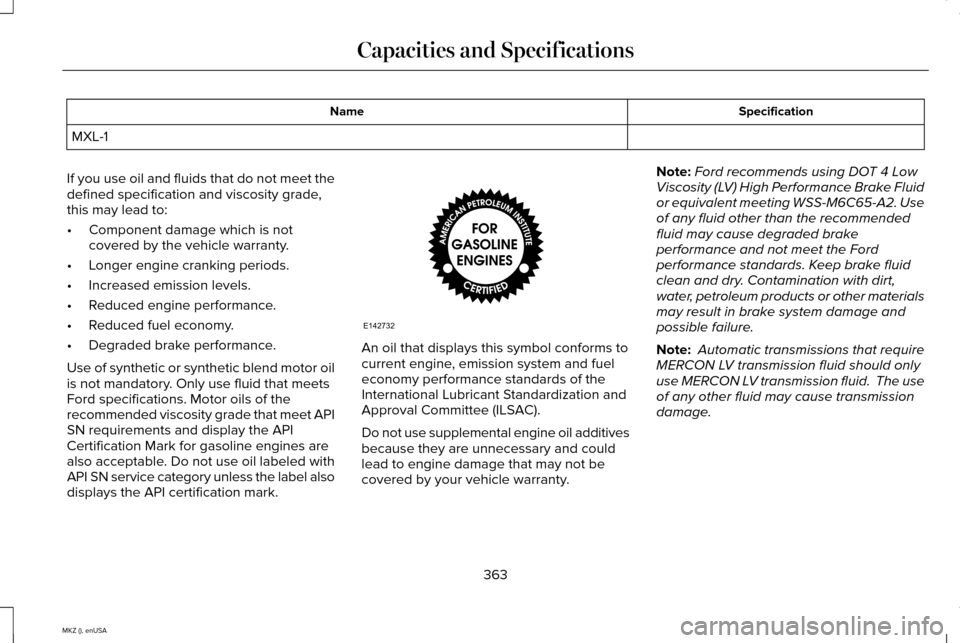
Specification
Name
MXL-1
If you use oil and fluids that do not meet the
defined specification and viscosity grade,
this may lead to:
• Component damage which is not
covered by the vehicle warranty.
• Longer engine cranking periods.
• Increased emission levels.
• Reduced engine performance.
• Reduced fuel economy.
• Degraded brake performance.
Use of synthetic or synthetic blend motor oil
is not mandatory. Only use fluid that meets
Ford specifications. Motor oils of the
recommended viscosity grade that meet API
SN requirements and display the API
Certification Mark for gasoline engines are
also acceptable. Do not use oil labeled with
API SN service category unless the label also
displays the API certification mark. An oil that displays this symbol conforms to
current engine, emission system and fuel
economy performance standards of the
International Lubricant Standardization and
Approval Committee (ILSAC).
Do not use supplemental engine oil additives
because they are unnecessary and could
lead to engine damage that may not be
covered by your vehicle warranty.Note:
Ford recommends using DOT 4 Low
Viscosity (LV) High Performance Brake Fluid
or equivalent meeting WSS-M6C65-A2. Use
of any fluid other than the recommended
fluid may cause degraded brake
performance and not meet the Ford
performance standards. Keep brake fluid
clean and dry. Contamination with dirt,
water, petroleum products or other materials
may result in brake system damage and
possible failure.
Note: Automatic transmissions that require
MERCON LV transmission fluid should only
use MERCON LV transmission fluid. The use
of any other fluid may cause transmission
damage.
363
MKZ (), enUSA Capacities and SpecificationsE142732
Page 367 of 516

CAPACITIES AND SPECIFICATIONS - 3.7L
Capacities
WARNING
The air conditioning refrigerant system contains refrigerant R-134a unde\
r high pressure. Opening the air conditioning refrigerant system
can cause personal injury. Have the air conditioning refrigerant system serviced only by qualifie\
d personnel.
Capacity
Item
6.0 qt (5.7 L)
Engine oil
9.7 qt (9.2 L)
Engine coolant
Between MIN/MAX on brake fluid reservoir
Brake fluid
2.4 pt (1.15L)
Rear differential fluid (All Wheel Drive)
18.0 fl oz (532 ml)
Power Transfer Unit fluid (All Wheel Drive) 1
11.6 qt (11 L)
Automatic transmission fluid 2
Fill as required
Windshield washer fluid
17.5 gal (66.2 L)
Fuel tank
364
MKZ (), enUSA Capacities and Specifications
Page 369 of 516
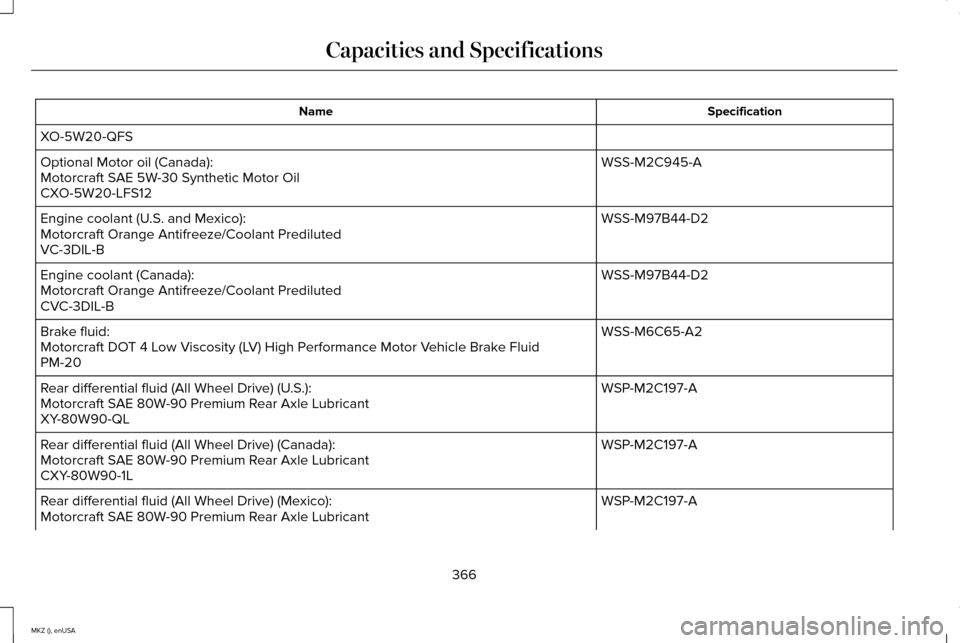
Specification
Name
XO-5W20-QFS WSS-M2C945-A
Optional Motor oil (Canada):
Motorcraft SAE 5W-30 Synthetic Motor Oil
CXO-5W20-LFS12
WSS-M97B44-D2
Engine coolant (U.S. and Mexico):
Motorcraft Orange Antifreeze/Coolant Prediluted
VC-3DIL-B
WSS-M97B44-D2
Engine coolant (Canada):
Motorcraft Orange Antifreeze/Coolant Prediluted
CVC-3DIL-B
WSS-M6C65-A2
Brake fluid:
Motorcraft DOT 4 Low Viscosity (LV) High Performance Motor Vehicle Brake Fluid
PM-20
WSP-M2C197-A
Rear differential fluid (All Wheel Drive) (U.S.):
Motorcraft SAE 80W-90 Premium Rear Axle Lubricant
XY-80W90-QL
WSP-M2C197-A
Rear differential fluid (All Wheel Drive) (Canada):
Motorcraft SAE 80W-90 Premium Rear Axle Lubricant
CXY-80W90-1L
WSP-M2C197-A
Rear differential fluid (All Wheel Drive) (Mexico):
Motorcraft SAE 80W-90 Premium Rear Axle Lubricant
366
MKZ (), enUSA Capacities and Specifications
Page 372 of 516
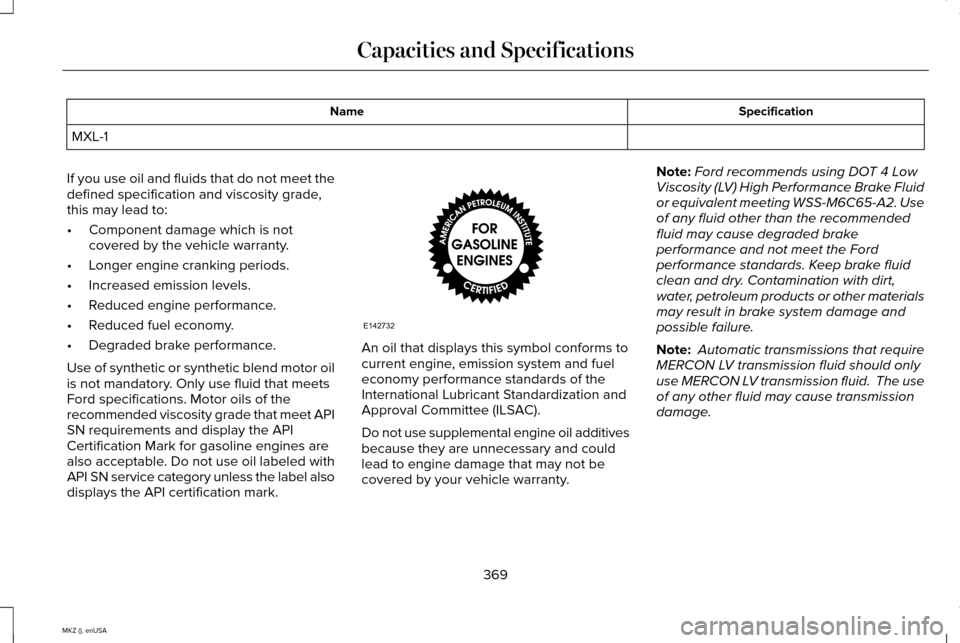
Specification
Name
MXL-1
If you use oil and fluids that do not meet the
defined specification and viscosity grade,
this may lead to:
• Component damage which is not
covered by the vehicle warranty.
• Longer engine cranking periods.
• Increased emission levels.
• Reduced engine performance.
• Reduced fuel economy.
• Degraded brake performance.
Use of synthetic or synthetic blend motor oil
is not mandatory. Only use fluid that meets
Ford specifications. Motor oils of the
recommended viscosity grade that meet API
SN requirements and display the API
Certification Mark for gasoline engines are
also acceptable. Do not use oil labeled with
API SN service category unless the label also
displays the API certification mark. An oil that displays this symbol conforms to
current engine, emission system and fuel
economy performance standards of the
International Lubricant Standardization and
Approval Committee (ILSAC).
Do not use supplemental engine oil additives
because they are unnecessary and could
lead to engine damage that may not be
covered by your vehicle warranty.Note:
Ford recommends using DOT 4 Low
Viscosity (LV) High Performance Brake Fluid
or equivalent meeting WSS-M6C65-A2. Use
of any fluid other than the recommended
fluid may cause degraded brake
performance and not meet the Ford
performance standards. Keep brake fluid
clean and dry. Contamination with dirt,
water, petroleum products or other materials
may result in brake system damage and
possible failure.
Note: Automatic transmissions that require
MERCON LV transmission fluid should only
use MERCON LV transmission fluid. The use
of any other fluid may cause transmission
damage.
369
MKZ (), enUSA Capacities and SpecificationsE142732
Page 420 of 516
Similar Music
This feature allows you to choose music
similar to what is currently playing.
More Info
Touch this button to see disc information
such as current track, artist name, album and
genre.
Options
Touch this button to view and adjust various
media settings.
Sound Settings allows you to adjust settings
for:
• Bass
• Midrange
• Treble
• Balance and Fade
• THX Deep Note Demo
• DSP (Digital Signal processing)
• Occupancy Mode
• Speed Compensated Volume. Note:
Your vehicle may not have all these
sound settings.
Media Player Settings
allows you to select
more settings, which is under Media Player.
See
Settings (page 387).
Device Information
displays software and
firmware information about the currently
connected media device.
Update Media Index
indexes your device
when you connect it for the first time and
each time the content changes (such as
adding or removing tracks) to make sure you
have the latest voice commands available
for all media on the device.
Browse
This feature allows you to view the contents
of the device. It also allows you to search by
categories, such as genre, artist or album.
If you want to view song information such as
Title, Artist, File, Folder, Album, and Genre,
touch the on-screen album art. You can also touch
What’
s Playing to hear
how the system pronounces the current band
and song. This can be helpful when using
voice commands to make sure the system
correctly plays your request.
Playing Video from Your Device
To access and play video from your device,
your vehicle's transmission must be in
position
P with the ignition in accessory
mode. See Starting and Stopping the
Engine (page 156).
SD Card and USB Voice Commands If you are listening to a USB device
or an SD card, press the voice
button on the steering wheel
controls. When prompted, say any of the
following commands.
If you are not listening to a USB device or an
SD card, press the voice button and, after
the tone, say "USB" or "SD card", then any
of the following commands.
417
MKZ (), enUSA MyLincoln Touch™E142599
Page 424 of 516
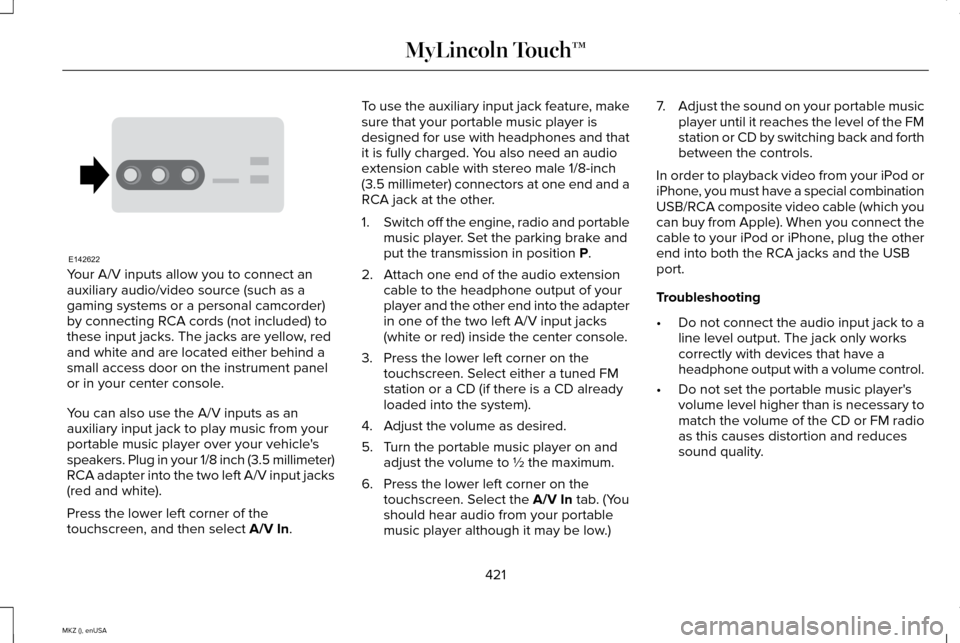
Your A/V inputs allow you to connect an
auxiliary audio/video source (such as a
gaming systems or a personal camcorder)
by connecting RCA cords (not included) to
these input jacks. The jacks are yellow, red
and white and are located either behind a
small access door on the instrument panel
or in your center console.
You can also use the A/V inputs as an
auxiliary input jack to play music from your
portable music player over your vehicle's
speakers. Plug in your 1/8 inch (3.5 millimeter)
RCA adapter into the two left A/V input jacks
(red and white).
Press the lower left corner of the
touchscreen, and then select A/V In. To use the auxiliary input jack feature, make
sure that your portable music player is
designed for use with headphones and that
it is fully charged. You also need an audio
extension cable with stereo male 1/8-inch
(3.5 millimeter) connectors at one end and a
RCA jack at the other.
1.
Switch off the engine, radio and portable
music player. Set the parking brake and
put the transmission in position
P.
2. Attach one end of the audio extension cable to the headphone output of your
player and the other end into the adapter
in one of the two left A/V input jacks
(white or red) inside the center console.
3. Press the lower left corner on the touchscreen. Select either a tuned FM
station or a CD (if there is a CD already
loaded into the system).
4. Adjust the volume as desired.
5. Turn the portable music player on and adjust the volume to ½ the maximum.
6. Press the lower left corner on the touchscreen. Select the
A/V In tab. (You
should hear audio from your portable
music player although it may be low.) 7.
Adjust the sound on your portable music
player until it reaches the level of the FM
station or CD by switching back and forth
between the controls.
In order to playback video from your iPod or
iPhone, you must have a special combination
USB/RCA composite video cable (which you
can buy from Apple). When you connect the
cable to your iPod or iPhone, plug the other
end into both the RCA jacks and the USB
port.
Troubleshooting
• Do not connect the audio input jack to a
line level output. The jack only works
correctly with devices that have a
headphone output with a volume control.
• Do not set the portable music player's
volume level higher than is necessary to
match the volume of the CD or FM radio
as this causes distortion and reduces
sound quality.
421
MKZ (), enUSA MyLincoln Touch™E142622
Page 458 of 516
For a complete listing of the accessories that
are available for your vehicle, please contact
an authorized dealer or visit our online store
at www.Accessories.Lincoln.com (United
States only).
Lincoln Custom Accessories are available
for your vehicle through an authorized
Lincoln dealer. Lincoln Motor Company will
repair or replace any properly authorized
dealer-installed Lincoln Genuine Accessory
found to be defective in factory-supplied
materials or workmanship during the
warranty period, as well as any component
damaged by the defective accessories.
Lincoln Motor Company will warrant your
Lincoln Genuine Accessory through the
warranty that provides the greatest benefit:
•
24 months, unlimited mileage.
• The remainder of your new vehicle
limited warranty.
Contact an authorized dealer for details and
a copy of the warranty. Exterior style
•
Side-window deflectors.
• Wheels.
• Bumper protectors.
Interior style
• All-weather floor mats.
• Rear seat entertainment*.
• Premium carpeted floor mats.
Lifestyle
• Ash cup (smoker's packages).
• Cargo area protector.
• Cargo net.
• Cargo organizer.
Peace of mind
• Car cover*.
• Wheel locks. *Lincoln Licensed Accessory. The accessory
manufacturer designs, develops and
therefore warrants Lincoln Licensed
Accessories, and does not design or test
these accessories to Lincoln Motor Company
engineering requirements. Contact an
authorized Lincoln dealer for the
manufacturer's limited warranty details and
request a copy of the Lincoln Licensed
Accessories product limited warranty from
the accessory manufacturer.
455
MKZ (), enUSA Accessories
Page 461 of 516
IF YOU DO NOT AGREE TO THIS END
USER LICENSE AGREEMENT ("EULA") DO
NOT USE THE DEVICE OR COPY THE
SOFTWARE. ANY USE OF THE SOFTWARE,
INCLUDING BUT NOT LIMITED TO USE ON
THE DEVICE, WILL CONSTITUTE YOUR
AGREEMENT TO THIS EULA (OR
RATIFICATION OF ANY PREVIOUS
CONSENT).
GRANT OF SOFTWARE LICENSE: This EULA
grants you the following license:
•
You may use the SOFTWARE as installed
on the DEVICE and as otherwise
interfacing with systems and/or services
provide by or through FORD MOTOR
COMPANY or its third party software and
service providers. Description of Other Rights and Limitations
•
Speech Recognition: If the SOFTWARE
includes speech recognition
component(s), you should understand
that speech recognition is an inherently
statistical process and that recognition
errors are inherent in the process.
Neither FORD MOTOR COMPANY nor
its suppliers shall be liable for any
damages arising out of errors in the
speech recognition process.
• Limitations on Reverse Engineering,
Decompilation and Disassembly:
You
may not reverse engineer, decompile, or
disassemble nor permit others to reverse
engineer, decompile or disassemble the
SOFTWARE, except and only to the
extent that such activity is expressly
permitted by applicable law
notwithstanding this limitation. •
Limitations on Distributing, Copying,
Modifying and Creating Derivative
Works:
You may not distribute, copy,
make modifications to or create
derivative works based on the
SOFTWARE, except and only to the
extent that such activity is expressly
permitted by applicable law
notwithstanding this limitation.
• Single EULA:
The end user
documentation for the DEVICE and
related systems and services may contain
multiple EULAs, such as multiple
translations and/or multiple media
versions (e.g., in the user documentation
and in the software). Even if you receive
multiple EULAs, you are licensed to use
only one (1) copy of the SOFTWARE.
• SOFTWARE Transfer:
You may
permanently transfer your rights under
this EULA only as part of a sale or transfer
of the DEVICE, provided you retain no
copies, you transfer all of the SOFTWARE
(including all component parts, the media
458
MKZ (), enUSA Appendices
Page 465 of 516
EXPORT RESTRICTIONS: You acknowledge
that the SOFTWARE is subject to U.S. and
European Union export jurisdiction. You
agree to comply with all applicable
international and national laws that apply to
the SOFTWARE, including the U.S. Export
Administration Regulations, as well as
end-user, end-use and destination
restrictions issued by U.S. and other
governments. For additional information, see
http://www.microsoft.com/exporting/.
TRADEMARKS: This EULA does not grant
you any rights in connection with any
trademarks or service marks of FORD
MOTOR COMPANY, MS, Microsoft
Corporation, third party software or service
providers, their affiliates or suppliers.
PRODUCT SUPPORT:
Product support for
the SOFTWARE is not provided by MS, its
parent corporation Microsoft Corporation, or
their affiliates or subsidiaries. For product
support, please refer to FORD MOTOR
COMPANY instructions provided in the documentation for the DEVICE. Should you
have any questions concerning this EULA,
or if you desire to contact FORD MOTOR
COMPANY for any other reason, please refer
to the address provided in the
documentation for the DEVICE.
No Liability for Certain Damages:
EXCEPT
AS PROHIBITED BY LAW, FORD MOTOR
COMPANY, ANY THIRD PARTY SOFTWARE
OR SERVICES SUPPLIERS, MS, MICROSOFT
CORPORATION AND THEIR AFFILIATES
SHALL HAVE NO LIABILITY FOR ANY
INDIRECT, SPECIAL, CONSEQUENTIAL OR
INCIDENTAL DAMAGES ARISING FROM OR
IN CONNECTION WITH THE USE OR
PERFORMANCE OF THE SOFTWARE. THIS
LIMITATION SHALL APPLY EVEN IF ANY
REMEDY FAILS OF ITS ESSENTIAL
PURPOSE. IN NO EVENT SHALL MS,
MICROSOFT CORPORATION AND/OR THEIR
AFFILIATES BE LIABLE FOR ANY AMOUNT
IN EXCESS OF U.S. TWO HUNDRED FIFTY
DOLLARS (U.S. $250.00).
• THERE ARE NO WARRANTIES OTHER
THAN THOSE THAT MAY EXPRESSLY
BE PROVIDED FOR YOUR NEW VEHICLE. Adobe
Contains Adobe® [Flash® Player] or [AIR®]
technology by Adobe Systems Incorporated.
This [Licensee Product] contains [Adobe®
Flash® Player] [Adobe® AIR®] software under
license from Adobe Systems Incorporated,
Copyright ©1995-2009 Adobe Macromedia
Software LLC. All rights reserved. Adobe,
Flash and AIR are trademarks of Adobe
Systems Incorporated.
End User Notice
Microsoft® Windows® Mobile for
Automotive Important Safety Information
This system Ford SYNC contains software
that is licensed to Manufacturer FORD
MOTOR COMPANY by an affiliate of
Microsoft Corporation pursuant to a license
agreement. Any removal, reproduction,
reverse engineering or other unauthorized
use of the software from this system in
violation of the license agreement is strictly
prohibited and may subject you to legal
action.
462
MKZ (), enUSA Appendices