radio LINCOLN MKZ 2015 User Guide
[x] Cancel search | Manufacturer: LINCOLN, Model Year: 2015, Model line: MKZ, Model: LINCOLN MKZ 2015Pages: 516, PDF Size: 4.48 MB
Page 197 of 516
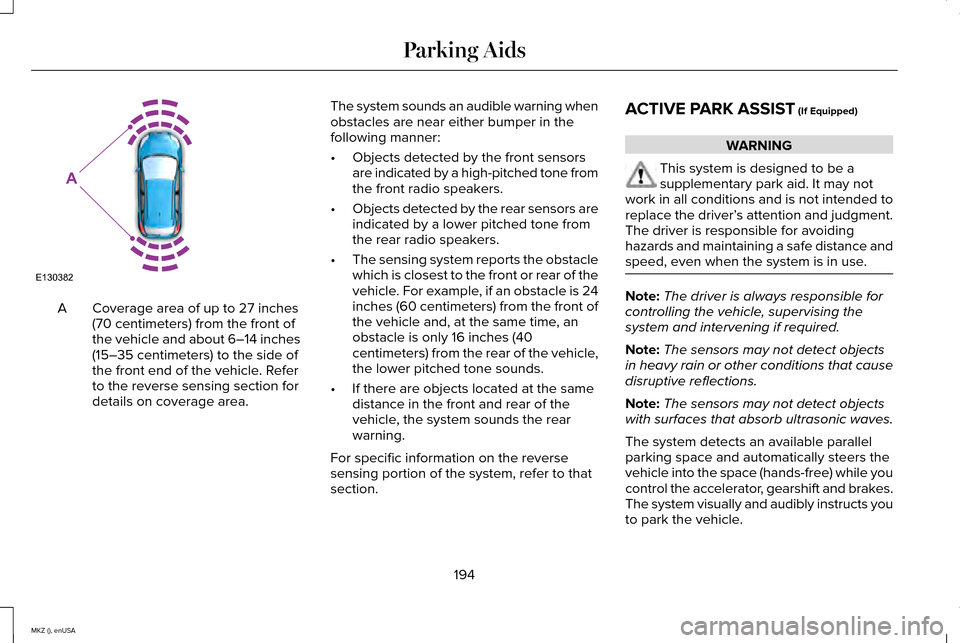
Coverage area of up to 27 inches
(70 centimeters) from the front of
the vehicle and about 6–14 inches
(15–35 centimeters) to the side of
the front end of the vehicle. Refer
to the reverse sensing section for
details on coverage area.
A The system sounds an audible warning when
obstacles are near either bumper in the
following manner:
•
Objects detected by the front sensors
are indicated by a high-pitched tone from
the front radio speakers.
• Objects detected by the rear sensors are
indicated by a lower pitched tone from
the rear radio speakers.
• The sensing system reports the obstacle
which is closest to the front or rear of the
vehicle. For example, if an obstacle is 24
inches (60 centimeters) from the front of
the vehicle and, at the same time, an
obstacle is only 16 inches (40
centimeters) from the rear of the vehicle,
the lower pitched tone sounds.
• If there are objects located at the same
distance in the front and rear of the
vehicle, the system sounds the rear
warning.
For specific information on the reverse
sensing portion of the system, refer to that
section. ACTIVE PARK ASSIST (If Equipped) WARNING
This system is designed to be a
supplementary park aid. It may not
work in all conditions and is not intended to
replace the driver’ s attention and judgment.
The driver is responsible for avoiding
hazards and maintaining a safe distance and
speed, even when the system is in use. Note:
The driver is always responsible for
controlling the vehicle, supervising the
system and intervening if required.
Note: The sensors may not detect objects
in heavy rain or other conditions that cause
disruptive reflections.
Note: The sensors may not detect objects
with surfaces that absorb ultrasonic waves.
The system detects an available parallel
parking space and automatically steers the
vehicle into the space (hands-free) while you
control the accelerator, gearshift and brakes.
The system visually and audibly instructs you
to park the vehicle.
194
MKZ (), enUSA Parking AidsE130382
A
Page 205 of 516
Note:
Manual zoom is only available when
the transmission is in reverse (R).
Note: Only the centerline shows when you
enable manual zoom.
This allows you to get a closer view of an
object behind your vehicle. The zoomed
image keeps the bumper in the image to
provide a reference. The zoom is only active
while the transmission is in reverse (R). When
you shift the transmission out of reverse (R),
the feature automatically turns off and you
must enable it to use it again.
Selectable settings for this feature are ON
and OFF.
Rear Camera Delay
When shifting the transmission out of reverse
(R) and into any gear other than park (P), the
camera image remains in the display until
your vehicle speed reaches 5 mph (8 km/h)
or until you select a radio button.
Selectable settings for this feature are ON
and OFF. The default setting for the rear
camera delay is OFF.
202
MKZ (), enUSA Parking Aids
Page 279 of 516
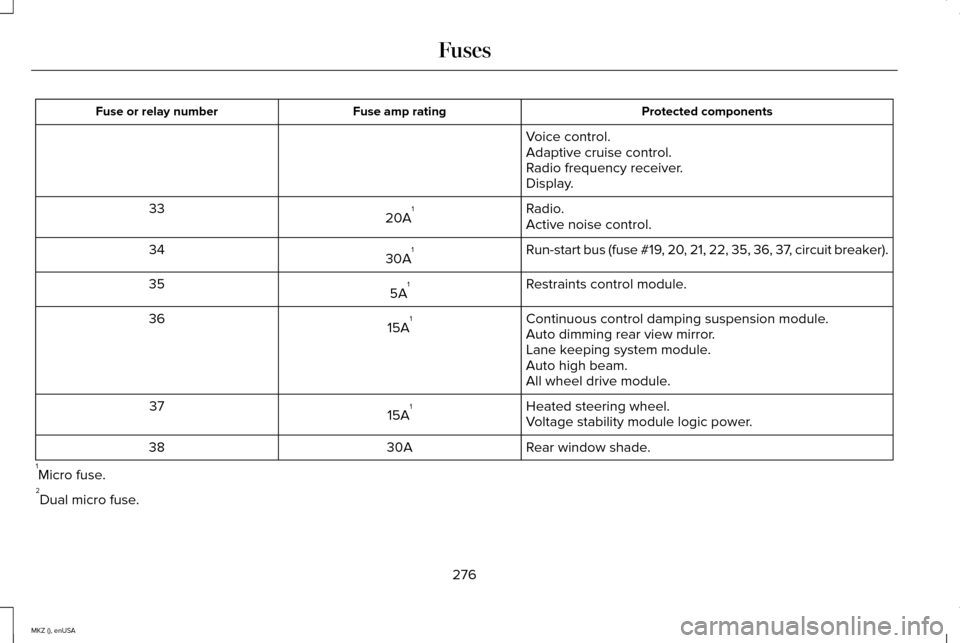
Protected components
Fuse amp rating
Fuse or relay number
Voice control.
Adaptive cruise control.
Radio frequency receiver.
Display.
Radio.
20A 1
33
Active noise control.
Run-start bus (fuse #19, 20, 21, 22, 35, 36, 37, circuit breaker).
30A 1
34
Restraints control module.
5A 1
35
Continuous control damping suspension module.
15A 1
36
Auto dimming rear view mirror.
Lane keeping system module.
Auto high beam.
All wheel drive module.
Heated steering wheel.
15A 1
37
Voltage stability module logic power.
Rear window shade.
30A
38
1 Micro fuse.
2 Dual micro fuse.
276
MKZ (), enUSA Fuses
Page 297 of 516
When a low voltage battery replacement is
necessary, see an authorized dealer to
replace the low voltage battery with a Ford
recommended replacement low voltage
battery that matches the electrical
requirements of the vehicle
To ensure proper operation of the battery
management system (BMS), do not allow a
technician to connect any electrical device
ground connection directly to the low voltage
battery negative post. A connection at the
low voltage battery negative post can cause
inaccurate measurements of the battery
condition and potential incorrect system
operation.
Note:
If a person adds electrical or electronic
accessories or components to the vehicle,
the accessories or components may
adversely affect the low voltage battery
performance and durability and may also
affect the performance of other electrical
systems in the vehicle.
For longer, trouble-free operation, keep the
top of the battery clean and dry. Also, make
certain the battery cables are always tightly
fastened to the battery terminals. If you see any corrosion on the battery or
terminals, remove the cables from the
terminals and clean with a wire brush. You
can neutralize the acid with a solution of
baking soda and water.
When a battery replacement is required, the
battery should only be replaced with a Ford
recommended replacement battery that
matches the electrical requirements of the
vehicle.
Because your vehicle
’s engine is
electronically-controlled by a computer,
some engine control settings are maintained
by power from the low voltage battery. Some
engine computer settings, like the idle trim
and fuel trim strategy, optimize the
driveability and performance of the engine.
Some other computer settings, like the clock
and radio station presets, are also maintained
in memory by power from the low voltage
battery. When a technician disconnects and
connects the low voltage battery, these
settings are erased. Note:
Until you switch the ignition to the on
position, you will receive a message in your
information display stating that your vehicle
is not in park.
Complete the following procedure in order
to restore the settings:
1. With the vehicle at a complete stop, set the parking brake.
2. Shift the transmission into P.
3. Turn off all accessories.
4. Step on the brake pedal and start the vehicle.
5. Run the engine until it reaches normal operating temperature. While the engine
is warming up, complete the following:
Reset the clock. See Audio System
(page 370). Reset the power windows
bounce-back feature. See Windows and
Mirrors (page 93). Reset the radio station
presets.
See Audio System (page 370).
6. Allow the engine to idle for at least one minute. If the engine turns off, step on
the accelerator to start the engine.
294
MKZ (), enUSA Maintenance
Page 315 of 516
Do not attempt to repair punctures larger
than 0.24 in (6 mm) or damage to the tire's
sidewall. The tire may not completely seal.
Loss of air pressure may adversely affect tire
performance. For this reason:
Note: Do not drive the vehicle above 50 mph
(80 km/h)
.
Note: Do not drive further than
120 mi
(200 km). Drive only to the closest authorized
Ford dealer or tire repair shop to have your
tire inspected.
• Drive carefully and avoid abrupt steering
maneuvers.
• Periodically monitor tire inflation pressure
in the affected tire. If the tire is losing
pressure, have the vehicle towed.
• Read the information in the Tips for Use
of the Kit section to make sure safe
operation of the kit and your vehicle.
Tips for Use of the Kit
To ensure safe operation of the kit: •
Read all instructions and cautions fully.
• Before operating the kit, make sure your
vehicle is safely off the road and away
from moving traffic. Turn on the hazard
lights.
• Always set the parking brake to ensure
the vehicle does not move unexpectedly.
• Do not remove any foreign objects, such
as nails or screws, from the tire.
• When using the kit, leave the engine
running (only if the vehicle is outdoors or
in a well-ventilated area) so the
compressor does not drain the vehicle
battery.
• Do not allow the compressor to operate
continuously for more than 15 minutes.
This will help prevent the compressor
from overheating.
• Never leave the kit unattended when it
is operating.
• Sealant compound contains latex. Make
sure that you use the non-latex gloves
provided to avoid an allergic reaction.
• Keep the kit away from children. •
Only use the kit when the ambient
temperature is between -22°F (-30°C) and
158°F (70°C)
.
• Only use the sealing compound before
the use by date. The use by date is on
the lower right hand corner of the label
located on the sealant canister (bottle).
Check the use by date regularly and
replace the canister after four years.
• Do not store the kit unsecured inside the
passenger compartment of the vehicle
as it may cause injury during a sudden
stop or crash. Always store the kit in its
original location.
• After sealant use, the tire pressure
monitoring system sensor and valve stem
on the wheel must be replaced by an
authorized Ford dealer.
• When inflating a tire or other objects, use
the black air hose only. Do not use the
transparent hose which is designed for
sealant application only.
• Operating the kit could cause an
electrical disturbance in radio, CD, and
DVD player operation.
312
MKZ (), enUSA Wheels and Tires
Page 322 of 516
•
Only use the sealing compound before
the use-by date. The use-by date is on a
label on the sealant canister and can be
seen through the rectangular viewing
window on the bottom of the compressor.
Check the use-by date regularly and
replace the canister after four years of
non-use.
• Do not store the kit unsecured inside the
passenger compartment of the vehicle
as it may cause injury during a sudden
stop or crash. Always store the kit in its
original location.
• After sealant use, the tire pressure
monitoring system sensor and valve stem
on the wheel must be replaced by an
authorized Ford dealer.
• Operating the kit could cause an
electrical disturbance in radio, CD, and
DVD player operation. * When inflation only is required for
a tire or other objects, the selector
must be in the Air position. What to do when a Tire Is Punctured
A tire puncture within the tire's tread area
can be repaired in two stages with the kit.
•
In the first stage, the tire will be reinflated
with a sealing compound and air. After
the tire has been inflated, you will need
to drive the vehicle a short distance
(about 4 miles [6 kilometers]) to distribute
the sealant in the tire.
• In the second stage, you will need to
check the tire pressure and adjust, if
necessary, to the vehicle's specified tire
inflation pressure.
First Stage: Reinflating the Tire with
Sealing Compound and Air WARNINGS
Do not stand directly over the kit while
inflating the tire. If you notice any
unusual bulges or deformations in the tire's
sidewall during inflation, stop and call
roadside assistance. If the tire does not inflate to the
recommended tire pressure within 15
minutes, stop and call roadside assistance. WARNINGS
Do not run the engine during kit
operation unless the vehicle is
outdoors or in a well-ventilated area. Preparation: Park the vehicle in a safe, level
and secure area, away from moving traffic.
Turn the hazard lights on. Apply the parking
brake and turn the engine off. Inspect the
flat tire for visible damage.
Sealant compound contains latex. Use
appropriate precautions to avoid any allergic
reactions.
Do not remove any foreign object that has
pierced the tire. If a puncture is located in
the tire sidewall, stop and call roadside
assistance.
1.
Remove the valve cap from the tire valve.
2. Unwrap the dual purpose hose (black tube) from the back of the compressor
housing.
3. Fasten the hose to the tire valve by turning the connector clockwise. Tighten
the connection securely.
319
MKZ (), enUSA Wheels and TiresE175978
Page 373 of 516
GENERAL INFORMATION
Radio Frequencies and Reception
Factors
AM and FM frequencies are established by
the Federal Communications Commission
(FCC) and the Canadian Radio and
Telecommunications Commission (CRTC).
Those frequencies are:
•
AM: 530, 540-1700, 1710 kHz
• FM: 87.9-107.7, 107.9 MHz Radio Reception Factors
The further you travel from an FM station, the weaker the signal and the weaker the reception.
Distance and Strength
Hills, mountains, tall buildings, bridges, tunnels, freeway overpasses, \
parking garages, dense tree foliage and
thunderstorms can interfere with the reception.
Terrain
When you pass a ground-based broadcast repeating tower, a stronger signal may overtake a weaker one and
result in the audio system muting.
Station overload
CD and CD Player Information
Note: CD units play commercially pressed
4.75-inch (12 centimeter) audio compact
discs only. Due to technical incompatibility,
certain recordable and re-recordable
compact discs may not function correctly
when used in Ford CD players. Note:
Do not insert CDs with homemade
paper (adhesive) labels into the CD player
as the label may peel and cause the CD to
become jammed. You should use a
permanent felt tip marker rather than
adhesive labels on your homemade CDs.
Ballpoint pens may damage CDs. Please
contact an authorized dealer for further
information. Note:
Do not use any irregularly shaped
discs or discs with a scratch protection film
attached.
Always handle discs by their edges only.
Clean the disc with an approved CD cleaner
only. Wipe it from the center of the disc
toward the edge. Do not clean in a circular
motion.
370
MKZ (), enUSA Audio System
Page 374 of 516
Do not expose discs to direct sunlight or heat
sources for extended periods.
MP3 and WMA Track and Folder
Structure
Audio systems capable of recognizing and
playing MP3 and WMA individual tracks and
folder structures work as follows:
•
There are two different modes for MP3
and WMA disc playback: MP3 and WMA
track mode (system default) and MP3 and
WMA folder mode.
• MP3 and WMA track mode ignores any
folder structure on the MP3 and WMA
disc. The player numbers each MP3 and
WMA track on the disc (noted by the MP3
or WMA file extension) from T001 to a
maximum of T255. The maximum number
of playable MP3 and WMA files may be
less depending on the structure of the
CD and exact model of radio present. •
MP3 and WMA folder mode represents
a folder structure consisting of one level
of folders. The CD player numbers all
MP3 and WMA tracks on the disc (noted
by the MP3 or WMA file extension) and
all folders containing MP3 and WMA files,
from F001 (folder) T001 (track) to F253
T255.
• Creating discs with only one level of
folders helps with navigation through the
disc files.
If you are burning your own MP3 and WMA
discs, it is important to understand how the
system reads the structures you create. While
various files may be present, (files with
extensions other than MP3 and WMA), only
files with the MP3 and WMA extension are
played; other files are ignored by the system.
This enables you to use the same MP3 and
WMA disc for a variety of tasks on your work
computer, home computer and your
in-vehicle system. In track mode, the system displays and plays
the structure as if it were only one level deep
(all MP3 and WMA files play, regardless of
being in a specific folder). In folder mode,
the system only plays the MP3 and WMA files
in the current folder.
AUDIO UNIT - VEHICLES WITH:
PREMIUM AM/FM/CD
WARNING
Driving while distracted can result in
loss of vehicle control, crash and injury.
We strongly recommend that you use
extreme caution when using any device that
may take your focus off the road. Your
primary responsibility is the safe operation
of your vehicle. We recommend against the
use of any hand-held device while driving
and encourage the use of voice-operated
systems when possible. Make sure you are
aware of all applicable local laws that may
affect the use of electronic devices while
driving. 371
MKZ (), enUSA Audio System
Page 375 of 516
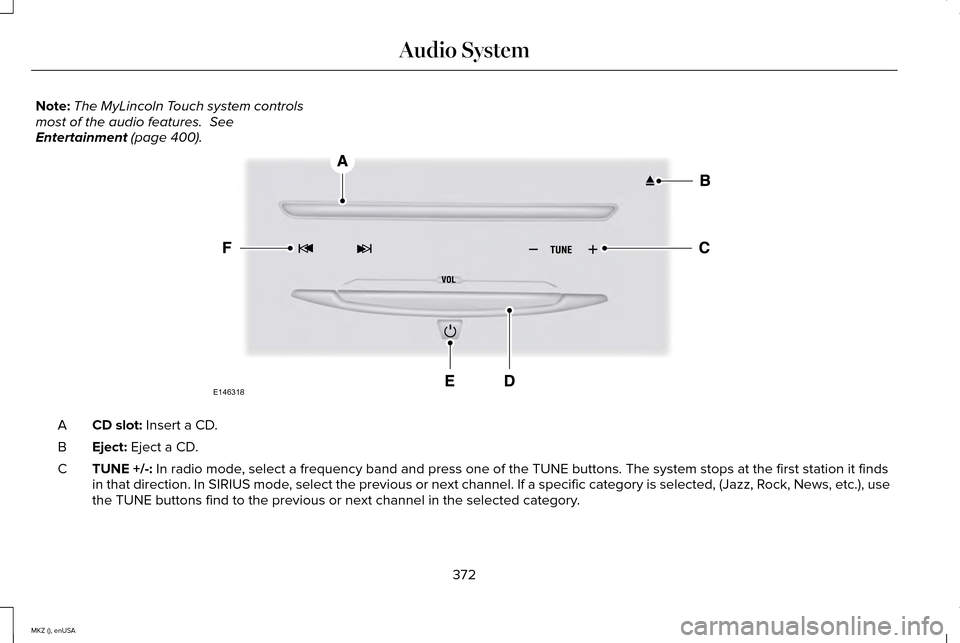
Note:
The MyLincoln Touch system controls
most of the audio features. See
Entertainment (page 400). CD slot:
Insert a CD.
A
Eject:
Eject a CD.
B
TUNE +/-:
In radio mode, select a frequency band and press one of the TUNE buttons. The system \
stops at the first station it finds
in that direction. In SIRIUS mode, select the previous or next channel. If a specific category is selecte\
d, (Jazz, Rock, News, etc.), use
the TUNE buttons find to the previous or next channel in the selected ca\
tegory.
C
372
MKZ (), enUSA Audio SystemE146318
Page 376 of 516

Volume:: Tap either side of the slider, or slide your finger across the control to increase or decrease the vo\
lume level on the system.
To slowly increase or decrease the volume level, press and hold either en\
d of the slider.
D
Power:
Switch the audio system on and off by pressing the button.
E
Seek/Fast Forward/Reverse:
Press to go to the previous or next track or available radio station. P\
ress and hold to either reverse
or fast forward through the current track or to quickly reverse or advan\
ce through the radio band in individual increments.
F
MEDIA HUB
The media hub is located in the center
console and has the following features: A/V inputs
A
SD card slot
B
USB ports
C
See
Entertainment (page 400).
373
MKZ (), enUSA Audio SystemC
BA
E142605