Seat LINCOLN MKZ 2015 Service Manual
[x] Cancel search | Manufacturer: LINCOLN, Model Year: 2015, Model line: MKZ, Model: LINCOLN MKZ 2015Pages: 516, PDF Size: 4.48 MB
Page 55 of 516
The fact that the safety belt pretensioners or
front airbags did not activate for both front
seat occupants in a crash does not mean
that something is wrong with the system.
Rather, it means the restraints control module
determined the accident conditions (crash
severity, belt usage) were not appropriate to
activate these safety devices.
•
The design of the front airbags is to
activate only in frontal and near-frontal
crashes (not rollovers, side impacts or
rear impacts) unless the crash causes
sufficient frontal deceleration.
• The safety belt pretensioners and
optional rear inflatable safety belts are
designed to activate in frontal,
near-frontal and side crashes.
• The knee airbag(s) may deploy based on
crash severity and occupant conditions.
• The design of the side airbags and side
curtain airbags is to inflate in certain side
impact crashes. Side airbags and side
curtain airbags may activate in other
types of crashes if the vehicle
experiences sufficient sideways motion
or deformation. AIRBAG DISPOSAL
Contact your authorized dealer as soon as
possible. Airbags must be disposed of by
qualified personnel.
52
MKZ (), enUSA Supplementary Restraints System
Page 61 of 516
Wait at least five seconds before remote
starting after a vehicle shutdown.
Turning the Vehicle Off After Remote
Starting
Press the button once. The parking
lamps will turn off.
You may have to be closer to the
vehicle than when starting due to ground
reflection and the added noise of the running
vehicle.
You can disable or enable the remote start
system through the information display. See
(page 107).
Memory Feature
You can recall the memory seat position,
mirror position, and steering column position
(if equipped) with your intelligent access
keyfob you link it to a pre-set position.
See
Memory Function (page 142). REPLACING A LOST KEY OR
REMOTE CONTROL
Replacement keys or remote controls can
be purchased from an authorized dealer.
Authorized dealers can program remote
controls for your vehicle.
See Passive
Anti-Theft System (page 75).
To re-program the passive anti-theft system
see an authorized dealer.
58
MKZ (), enUSA Keys and Remote ControlsE138625
Page 62 of 516
PRINCIPLE OF OPERATION
MyKey allows you to program keys with
restricted driving modes to promote good
driving habits. All but one of the keys
programmed to the vehicle can be activated
with these restricted modes.
Any keys that have not been programmed
are referred to as administrator keys or
admin keys. These can be used to:
•
create a MyKey
• program configurable MyKey settings
• clear all MyKey features.
When you have programmed a MyKey, you
can access the following information using
the information display:
• How many admin keys and MyKeys are
programmed to your vehicle.
• The total distance your vehicle has
traveled using a MyKey.
Note: All MyKeys are programmed to the
same settings. You cannot program them
individually. Note:
For vehicles with intelligent access
with push-button start, when both a MyKey
and an admin intelligent access key fob are
present, the admin fob will be recognized by
the vehicle while switching the ignition on to
start the vehicle.
Non-configurable Settings
The following settings cannot be changed
by an admin key user:
• Belt-Minder. You cannot disable this
feature. The audio system will mute when
the front seat occupants ’ safety belts are
not fastened.
• Early low fuel. The low-fuel warning
activates earlier, giving the MyKey user
more time to refuel.
• Driver assist features, if equipped on your
vehicle, are forced on: parking aid, blind
spot information system (BLIS) with cross
traffic alert, lane departure warning and
forward collision warning system. Configurable Settings
With an admin key, you can configure certain
MyKey settings when you first create a
MyKey and before you recycle the key or
restart the vehicle. You can also change the
settings afterward with an admin key.
•
A vehicle speed limit can be set.
Warnings will be shown in the display
followed by an audible tone when your
vehicle reaches the set speed. You
cannot override the set speed by fully
depressing the accelerator pedal or by
setting cruise control.
• Vehicle speed minders of 45, 55 or 65
mph (75, 90 or 105 km/h). Once you
select a speed, it will be shown in the
display, followed by an audible tone
when the preselected vehicle speed is
exceeded.
59
MKZ (), enUSA MyKey™
Page 74 of 516
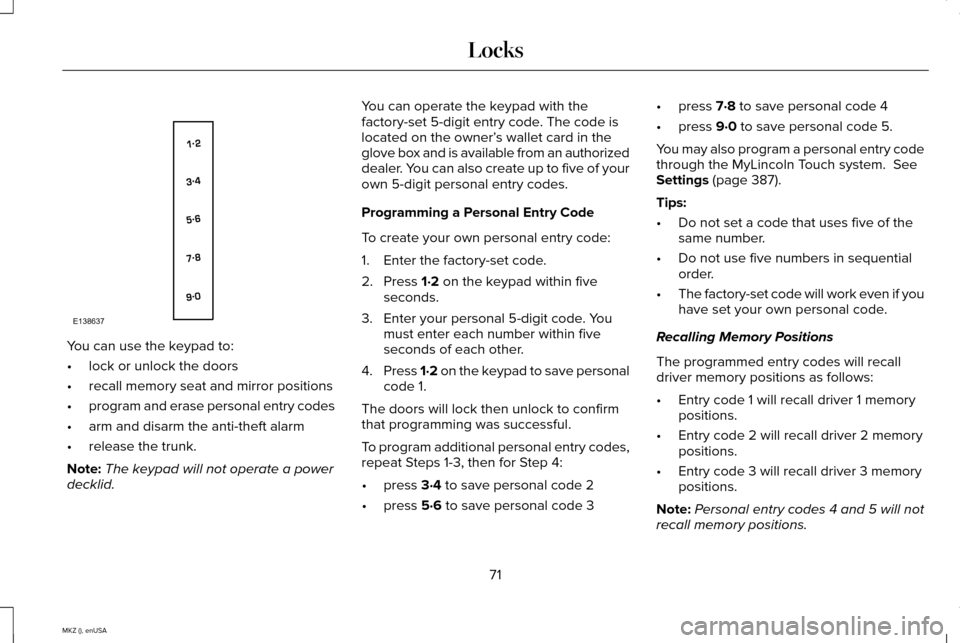
You can use the keypad to:
•
lock or unlock the doors
• recall memory seat and mirror positions
• program and erase personal entry codes
• arm and disarm the anti-theft alarm
• release the trunk.
Note: The keypad will not operate a power
decklid. You can operate the keypad with the
factory-set 5-digit entry code. The code is
located on the owner’
s wallet card in the
glove box and is available from an authorized
dealer. You can also create up to five of your
own 5-digit personal entry codes.
Programming a Personal Entry Code
To create your own personal entry code:
1. Enter the factory-set code.
2. Press 1·2 on the keypad within five
seconds.
3. Enter your personal 5-digit code. You must enter each number within five
seconds of each other.
4. Press 1·2 on the keypad to save personal
code 1.
The doors will lock then unlock to confirm
that programming was successful.
To program additional personal entry codes,
repeat Steps 1-3, then for Step 4:
• press
3·4 to save personal code 2
• press
5·6 to save personal code 3 •
press
7·8 to save personal code 4
• press
9·0 to save personal code 5.
You may also program a personal entry code
through the MyLincoln Touch system.
See
Settings (page 387).
Tips:
• Do not set a code that uses five of the
same number.
• Do not use five numbers in sequential
order.
• The factory-set code will work even if you
have set your own personal code.
Recalling Memory Positions
The programmed entry codes will recall
driver memory positions as follows:
• Entry code 1 will recall driver 1 memory
positions.
• Entry code 2 will recall driver 2 memory
positions.
• Entry code 3 will recall driver 3 memory
positions.
Note: Personal entry codes 4 and 5 will not
recall memory positions.
71
MKZ (), enUSA LocksE138637
Page 114 of 516
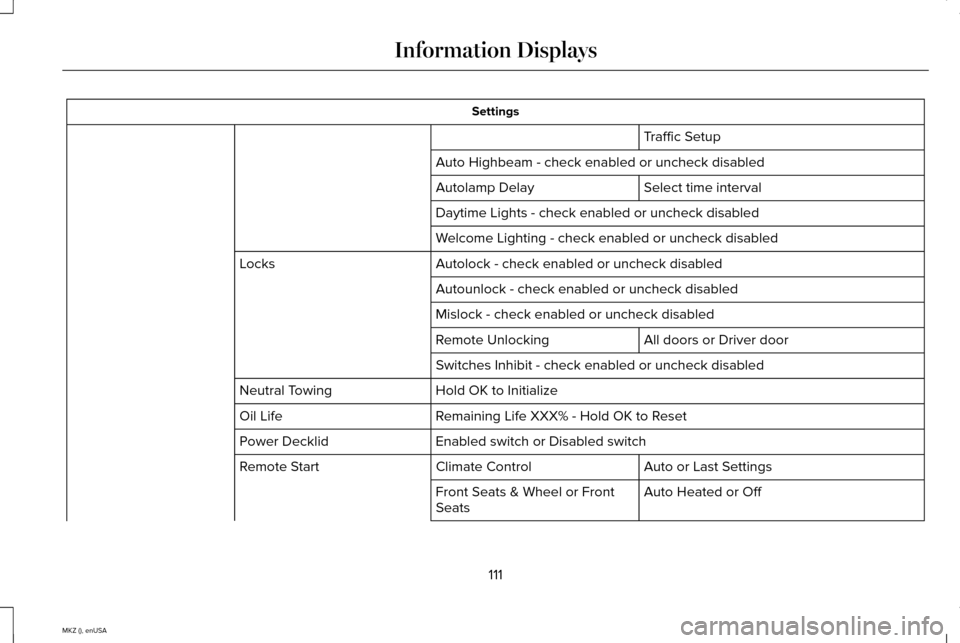
Settings
Traffic Setup
Auto Highbeam - check enabled or uncheck disabled Select time interval
Autolamp Delay
Daytime Lights - check enabled or uncheck disabled
Welcome Lighting - check enabled or uncheck disabled
Autolock - check enabled or uncheck disabled
Locks
Autounlock - check enabled or uncheck disabled
Mislock - check enabled or uncheck disabled All doors or Driver door
Remote Unlocking
Switches Inhibit - check enabled or uncheck disabled
Hold OK to Initialize
Neutral Towing
Remaining Life XXX% - Hold OK to Reset
Oil Life
Enabled switch or Disabled switch
Power Decklid
Auto or Last Settings
Climate Control
Remote Start
Auto Heated or Off
Front Seats & Wheel or Front
Seats
111
MKZ (), enUSA Information Displays
Page 118 of 516

AdvanceTrac
™ Action
Message
Displays when the system detects a malfunction due to a blocked sensor.
Service AdvanceTrac
Displayed when the traction control has been disabled or enabled by the \
driver.
AdvanceTrac Off On
Airbag Action
Message
Displays when the system detects a malfunction due to a blocked sensor.
Occupant Sensor BLOCKED Remove
Objects Near Passenger Seat
Alarm Action
Message
Displays when the alarm has been triggered due to unauthorized entry. See Anti-Theft Alarm
(page 76).
Vehicle Alarm to Stop Alarm, Start Vehicle
115
MKZ (), enUSA Information Displays
Page 130 of 516

Seats
Action
Message
Displays as a reminder that memory seats are not available while driving\
.
Memory Recall Not Permitted While Driving
Displays to show where your memory setting has been saved.
Memory X Saved
Starting System Action
Message
Displays when starting the vehicle as a reminder to apply the brake.
Press Brake to Start
Displays when the starter has exceeded its cranking time in attempting to start the vehicle.
Cranking Time Exceeded
Displays when the starter is attempting to start the vehicle.
Engine Start Pending Please Wait
Displays when the pending start has been cancelled.
Pending Start Cancelled
127
MKZ (), enUSA Information Displays
Page 137 of 516
HINTS ON CONTROLLING THE
INTERIOR CLIMATE
General Hints
Note:
Prolonged use of recirculated air may
cause the windows to fog up.
Note: You may feel a small amount of air
from the footwell air vents regardless of the
air distribution setting.
Note: To reduce humidity build-up inside
your vehicle, do not drive with the system
switched off or with recirculated air always
switched on.
Note: Do not place objects under the front
seats as this may interfere with the airflow
to the rear seats.
Note: Remove any snow, ice or leaves from
the air intake area at the base of the
windshield.
Note: To improve the time to reach comfort
in hot weather, drive with the windows
slightly open for 2-3 minutes after start-up
or until your vehicle airs out. Automatic Climate Control
Note:
Adjusting the settings when your
vehicle interior is extremely hot or cold is not
necessary. The system automatically adjusts
to heat or cool the cabin to your selected
temperature as quickly as possible. For the
system to function efficiently, the instrument
panel and side air vents should be fully
open.
Note: If you select AUTO during cold outside
temperatures, the system directs airflow to
the windshield and side window vents. In
addition, the fan may run at a slower speed
until the engine warms up.
Note: If you select AUTO during hot outside
temperatures, or when the inside of the
vehicle is hot, the system automatically uses
recirculated air to maximize interior cooling.
When the interior reaches the selected
temperature, the system automatically
switches to using outside air.
Heating the Interior Quickly
1. Press the
AUTO button. 2. Adjust the temperature control to the
desired setting.
Recommended Settings for Heating
1. Press the
AUTO button.
2. Adjust the temperature control to the desired setting. Use 72°F (22°C) as a
starting point, then adjust the setting as
necessary.
Cooling the Interior Quickly
Press the
MAX A/C button.
Recommended Settings for Cooling
1. Press the
AUTO button.
2. Adjust the temperature control to the desired setting. Use 72°F (22°C) as a
starting point, then adjust the setting as
necessary.
Side Window Defogging in Cold
Weather
1. Press the defrost button.
134
MKZ (), enUSA Climate Control
Page 139 of 516
REMOTE START
The remote start feature allows you to
pre-condition the interior of your vehicle. The
climate control system works to achieve
comfort according to your previous settings.
Note:
You cannot adjust the system during
remote start operation.
Turn the ignition on to return the system to
its previous settings. You can now make
adjustments normally, but you need to turn
certain vehicle-dependent features back on,
such as:
• Heated seats.
• Cooled seats.
• Heated steering wheel.
• Heated mirrors.
• Heated rear window.
You can adjust the default remote start
settings using the information display
controls. See Information Displays (page
107). Automatic Settings
In hot weather, the system is set to 72°F
(22°C). The cooled seats are set to high (if
available, and selected to AUTO in the
information display).
In moderate weather, the system either heats
or cools (based on previous settings). The
rear defroster, heated mirrors and heated
seats do not automatically switch on.
In cold weather, the system is set to 72°F
(22°C). The heated seats are set to high (if
available, and selected to AUTO in the
information display). The rear defroster and
heated mirrors automatically switch on.
136
MKZ (), enUSA Climate Control
Page 140 of 516
SITTING IN THE CORRECT
POSITION
WARNINGS
Sitting improperly, out of position or
with the seat back reclined too far can
take weight off the seat cushion and affect
the decision of the passenger sensing
system, resulting in serious injury or death
in the event of a crash. Always sit upright
against your seat back, with your feet on the
floor. Do not recline the seat back as this can
cause the occupant to slide under the
safety belt, resulting in serious injury in the
event of a crash. Do not place objects higher than the
seat back to reduce the risk of serious
injury in the event of a crash or during heavy
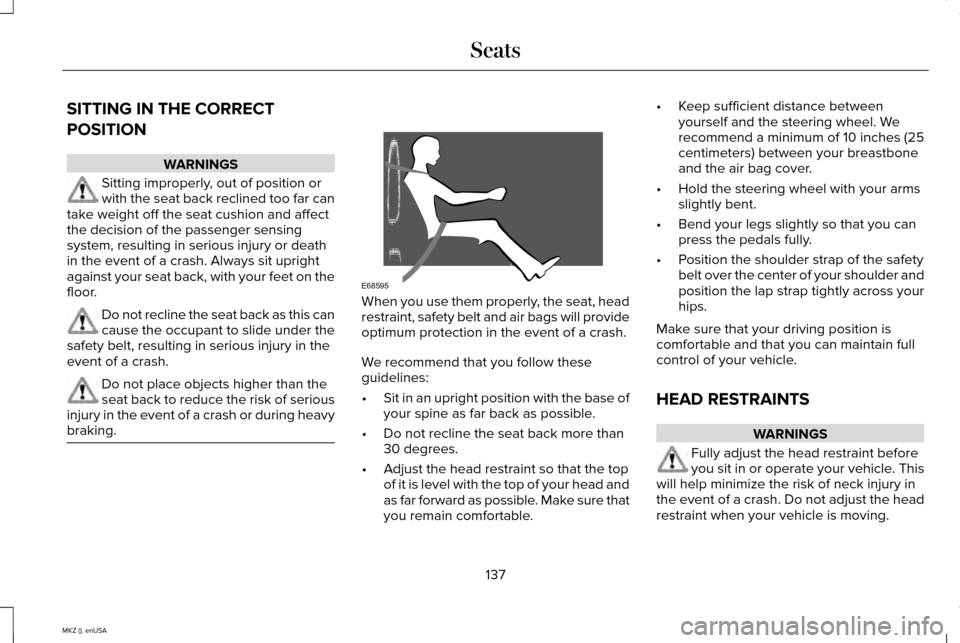
braking. When you use them properly, the seat, head
restraint, safety belt and air bags will provide
optimum protection in the event of a crash.
We recommend that you follow these
guidelines:
•
Sit in an upright position with the base of
your spine as far back as possible.
• Do not recline the seat back more than
30 degrees.
• Adjust the head restraint so that the top
of it is level with the top of your head and
as far forward as possible. Make sure that
you remain comfortable. •
Keep sufficient distance between
yourself and the steering wheel. We
recommend a minimum of 10 inches (25
centimeters) between your breastbone
and the air bag cover.
• Hold the steering wheel with your arms
slightly bent.
• Bend your legs slightly so that you can
press the pedals fully.
• Position the shoulder strap of the safety
belt over the center of your shoulder and
position the lap strap tightly across your
hips.
Make sure that your driving position is
comfortable and that you can maintain full
control of your vehicle.
HEAD RESTRAINTS WARNINGS
Fully adjust the head restraint before
you sit in or operate your vehicle. This
will help minimize the risk of neck injury in
the event of a crash. Do not adjust the head
restraint when your vehicle is moving.
137
MKZ (), enUSA SeatsE68595