steering LINCOLN MKZ 2015 Service Manual
[x] Cancel search | Manufacturer: LINCOLN, Model Year: 2015, Model line: MKZ, Model: LINCOLN MKZ 2015Pages: 516, PDF Size: 4.48 MB
Page 218 of 516
 when I can s\
ee the lane markings on the road?
Vehicle spe")
•
Using the turn signal indicator. •Evasive steering maneuver.
Troubleshooting Why is the feature not available (line markings are gray) when I can s\
ee the lane markings on the road?
Vehicle speed is outside the operational range of the feature
Sun is shining directly into the camera lens
Quick intentional lane change
Staying too close to the lane marking
Driving at high speeds in curves
Previous feature activation happened within the last one second
Ambiguous lane markings (mainly in construction zones)
Rapid transition from light to dark or vice versa
Sudden offset in lane markings
ABS or AdvanceTrac activation
Camera blockage due to dirt, grime, fog, frost or water on the windshield
Driving too close to the vehicle in front of you
Transitioning between no lane markings to lane markings or vice versa
Standing water on the road
215
MKZ (), enUSA Driving Aids
Page 225 of 516
There may be certain instances when either
the BLIS or cross traffic alert systems
illuminate the alert indicator with no vehicle
in the coverage zone; this is known as a false
alert. Some amount of false alerts are normal;
they are temporary and self-correct.
System Errors
If either system senses a problem with the
left or right sensor, the BLIS telltale will
illuminate and a message will appear in the
information display.
All other system faults will only be displayed
by a message in the information display.
Switching the Systems Off and On
One or both systems can be switched off
temporarily by using the information display
control. See (page 107). When the BLIS is
switched off, you will not receive alerts and
a telltale illuminates in the information
display. The yellow alert indicator in the
outside mirror will also flash twice. Note:
The CTA system always switches on
whenever the ignition is switched on.
However, the BLIS system will remember the
last selected on or off setting.
One or both systems cannot be switched off
when MyKey is used.
See General
Information (page 374).
One or both systems can also be switched
off permanently at your authorized dealer.
Once switched off, switching it back on must
also be done at your authorized dealer.
STEERING
Electric Power Steering WARNINGS
The electric power steering system has
diagnostic checks that continuously
monitor the system to ensure proper
operation. When a system error is detected
a steering message will appear in the
information display. WARNINGS
The electric power steering system has
diagnostic checks that continuously
monitor the system to ensure proper
operation of the electronic system. When an
electronic error is detected, a message will
be displayed in the information display. If this
happens, stop the vehicle in a safe place,
and turn off the engine. After at least 10
seconds, reset the system by restarting the
engine, and watch the information display
for a steering message. If a steering message
returns, or returns while driving, take the
vehicle to your dealer to have it checked. Obtain immediate service if a system
error is detected. You may not notice
any difference in the feel of your steering,
but a serious condition may exist. Failure to
do so may result in loss of steering control. Your vehicle has an electric power steering
system. There is no fluid reservoir to check
or fill.
222
MKZ (), enUSA Driving Aids
Page 226 of 516
If your vehicle loses electrical power while
you are driving (or if you switch the ignition
off ), you can steer your vehicle manually, but
it takes more effort. Extreme continuous
steering may increase the effort it takes for
you to steer. This occurs to prevent internal
overheating and permanent damage to your
steering system. If this should occur, you will
neither lose the ability to steer your vehicle
manually nor will it cause permanent
damage. Typical steering and driving
maneuvers allows the system to cool and
steering assist to return to normal.
Steering Tips
If the steering wanders or pulls, check for:
•
An improperly inflated tire.
• Uneven tire wear.
• Loose or worn suspension components.
• Loose or worn steering components.
• Improper vehicle alignment.
A high crown in the road or high crosswinds
may also make the steering seem to wander
or pull. Adaptive Learning
The electronic power steering system
adaptive learning helps correct road
irregularities and improves overall handling
and steering feel. It communicates with the
brake system to help operate advanced
stability control and accident avoidance
systems. Additionally, whenever the battery
is disconnected or a new battery installed,
you must drive your vehicle a short distance
before the system relearns the strategy and
reactivates all systems.
COLLISION WARNING SYSTEM
PRINCIPLE OF OPERATION (If Equipped)
WARNINGS
This system is designed to be a
supplementary driving aid. It is not
intended to replace the driver’ s attention,
and judgment, or the need to apply the
brakes. This system does NOT activate the
brakes automatically. Failure to press the
brake pedal to activate the brakes may result
in a collision. WARNINGS
The collision warning system with
brake support cannot help prevent all
collisions. Do not rely on this system to
replace driver judgment and the need to
maintain distance and speed. Note:
The system does not detect, warn or
respond to potential collisions with vehicles
to the rear or sides of the vehicle.
Note: The collision warning system is active
at speeds above approximately 5 mph (8
km/h). This system is designed to alert the driver of
certain collision risks. A radar detects if your
vehicle is rapidly approaching another
vehicle traveling in the same direction as
yours.
223
MKZ (), enUSA Driving AidsE156130
Page 228 of 516
Action
Cause
Clean the grille surface in front of the radar or remove the objectcausing the obstruction
The surface of the radar in the grille is dirty or obstructed in some
way
Wait a short time. It may take several minutes for the radar to detectthat it is no longer obstructed
The surface of the radar in the grille is clean but the message remains
in the display
The collision warning system is temporarily disabled. Collision warningshould automatically reactivate a short time after the weather condi- tions improve
Heavy rain, spray, snow, or fog is interfering with the radar signals
The collision warning system is temporarily disabled. Collision warningshould automatically reactivate a short time after the weather condi- tions improve
Swirling water, or snow or ice on the surface of the road may interfere
with the radar signals
System Limitations WARNING
The collision warning system
’s brake
support can only help reduce the
speed at which a collision occurs if the driver
applies the vehicle ’s brakes. The brake pedal
must be pressed just like any typical braking
situation. Due to the nature of radar technology, there
may be certain instances where vehicles do
not provide a collision warning. These
include:
•
Stationary vehicles or vehicles moving
below 6 mph (10 km/h).
• Pedestrians or objects in the roadway.
• Oncoming vehicles in the same lane.
• Severe weather conditions (see blocked
sensor section). •
Debris build-up on the grille near the
headlamps (see blocked sensor section).
• Small distance to vehicle ahead.
• Steering wheel and pedal movements
are large (very active driving style).
•
225
MKZ (), enUSA Driving Aids
Page 229 of 516
If the front end of the vehicle is hit or
damaged, the radar sensing zone may be
altered causing missed or false collision
warnings. See your authorized dealer to have
your collision warning radar checked for
proper coverage and operation.
DRIVE CONTROL
LINCOLN DRIVE CONTROL
Lincoln Drive Control delivers the Lincoln
driving experience through a suite of
sophisticated electronic vehicle systems.
These systems continuously monitor your
driving inputs and the road conditions to
optimize ride comfort, steering, handling,
powertrain response and sound. You can
preset your preferences for these systems
within the information display. Lincoln Drive
Control will respond to your preferences
based on what gear position you select. This
provides a single location to control multiple
systems performance settings.
Lincoln Drive Control consists of the
following systems:
•
Continuously controlled damping
dynamically adjusts the shock absorbers
stiffness in real time to match the road
surface and driver inputs. This system
continuously monitors your vehicle ’s
motion (roll, pitch, bounce), suspension
position, load, speed, road conditions,
and steering to adjust the suspension
damping for optimal vehicle control.
• Electronically power-assisted steering
adjusts steering effort and feel based on
your vehicle speed and your inputs.
• Active noise control utilizes your vehicle
electronics to enhance the acoustic
experience.
• Electronic stability control and traction
control maintain your vehicle control in
adverse conditions or high performance
driving.
• Electronic throttle control enhances the
powertrain response to your inputs.
Note: Active noise control is only available
with EcoBoost™ engines.
These systems have a range of modes which
you can choose from in order to customize
your ideal driving experience: •
Comfort – Provides a more relaxed
driving experience, maximizing comfort.
Your steering effort decreases and the
suspension movement is more fluid.
Comfort mode is ideal when you desire
enhanced traveling comfort.
• Normal – Delivers a balanced
combination of comfortable, controlled
ride and confident handling. This mode
provides an engaging drive experience
and a direct connection to the road
without sacrificing any of the composure
demanded from a luxury vehicle.
• Sport – Provides a sportier driving
experience. The suspension stiffens, with
an emphasis on handling and control.
The engine responds more directly to
your inputs and takes on a more powerful
tone. Sport mode is ideal for use during
more spirited driving.
Using Lincoln Drive Control
You can configure which of the Drive Control
modes are active when your vehicle is in
Drive (D) or in Sport (S). The configuration
remains active until modified from the main
menu on the information display.
226
MKZ (), enUSA Driving Aids
Page 243 of 516
Before Towing a Trailer
Practice turning, stopping and backing up to
get the feel of your vehicle-trailer
combination before starting on a trip. When
turning, make wider turns so the trailer
wheels clear curbs and other obstacles.
When Towing a Trailer
•
Do not drive faster than 70 mph (113
km/h) during the first 500 miles (800
kilometers).
• Do not make full-throttle starts.
• Check your hitch, electrical connections
and trailer wheel lug nuts thoroughly after
you have traveled 50 miles (80
kilometers).
• When stopped in congested or heavy
traffic during hot weather, place the
gearshift in position P to aid engine and
transmission cooling and to help A/C
performance.
• Turn off the speed control with heavy
loads or in hilly terrain. The speed control
may turn off automatically when you are
towing on long, steep grades. •
Shift to a lower gear when driving down
a long or steep hill. Do not apply the
brakes continuously, as they may
overheat and become less effective.
• If your transmission is equipped with a
Grade Assist or Tow/Haul feature, use
this feature when towing. This provides
engine braking and helps eliminate
excessive transmission shifting for
optimum fuel economy and transmission
cooling.
• Allow more distance for stopping with a
trailer attached. Anticipate stops and
brake gradually.
• Avoid parking on a grade. However, if
you must park on a grade:
1. Turn the steering wheel to point your vehicle tires away from traffic flow.
2. Set your vehicle parking brake.
3. Place the automatic transmission in position
P.
4. Place wheel chocks in front and back of the trailer wheels. (Chocks not included
with vehicle.) Launching or Retrieving a Boat or
Personal Watercraft (PWC)
Note:
Disconnect the wiring to the trailer
before
backing the trailer into the water.
Note: Reconnect the wiring to the trailer
after
removing the trailer from the water.
When backing down a ramp during boat
launching or retrieval:
• Do not allow the static water level to rise
above the bottom edge of the rear
bumper.
• Do not allow waves to break higher than
6 inches (15 centimeters) above the
bottom edge of the rear bumper.
Exceeding these limits may allow water to
enter vehicle components:
• Causing internal damage to the
components.
• Affecting driveability, emissions, and
reliability.
240
MKZ (), enUSA Towing
Page 248 of 516
Note:
Driving through standing water can
cause vehicle damage.
Note: Engine damage can occur if water
enters the air filter.
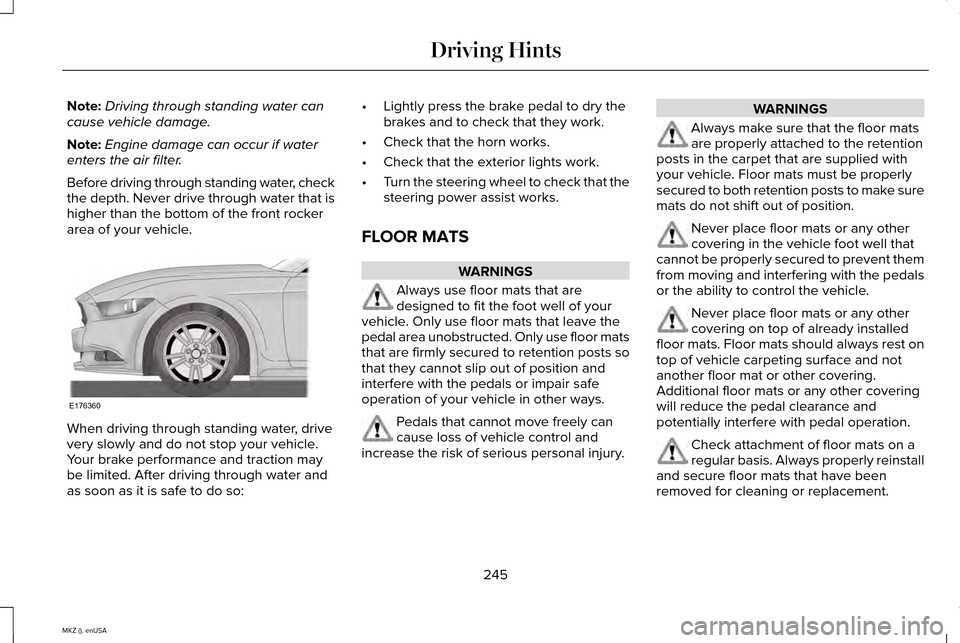
Before driving through standing water, check
the depth. Never drive through water that is
higher than the bottom of the front rocker
area of your vehicle. When driving through standing water, drive
very slowly and do not stop your vehicle.
Your brake performance and traction may
be limited. After driving through water and
as soon as it is safe to do so: •
Lightly press the brake pedal to dry the
brakes and to check that they work.
• Check that the horn works.
• Check that the exterior lights work.
• Turn the steering wheel to check that the
steering power assist works.
FLOOR MATS WARNINGS
Always use floor mats that are
designed to fit the foot well of your
vehicle. Only use floor mats that leave the
pedal area unobstructed. Only use floor mats
that are firmly secured to retention posts so
that they cannot slip out of position and
interfere with the pedals or impair safe
operation of your vehicle in other ways. Pedals that cannot move freely can
cause loss of vehicle control and
increase the risk of serious personal injury. WARNINGS
Always make sure that the floor mats
are properly attached to the retention
posts in the carpet that are supplied with
your vehicle. Floor mats must be properly
secured to both retention posts to make sure
mats do not shift out of position. Never place floor mats or any other
covering in the vehicle foot well that
cannot be properly secured to prevent them
from moving and interfering with the pedals
or the ability to control the vehicle. Never place floor mats or any other
covering on top of already installed
floor mats. Floor mats should always rest on
top of vehicle carpeting surface and not
another floor mat or other covering.
Additional floor mats or any other covering
will reduce the pedal clearance and
potentially interfere with pedal operation. Check attachment of floor mats on a
regular basis. Always properly reinstall
and secure floor mats that have been
removed for cleaning or replacement.
245
MKZ (), enUSA Driving HintsE176360
Page 266 of 516
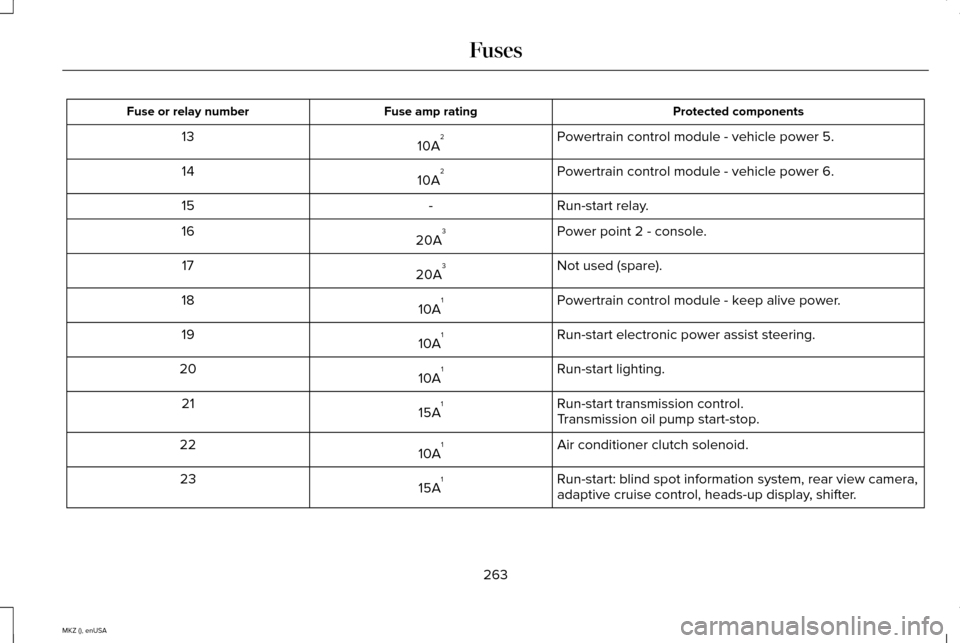
Protected components
Fuse amp rating
Fuse or relay number
Powertrain control module - vehicle power 5.
10A 2
13
Powertrain control module - vehicle power 6.
10A 2
14
Run-start relay.
-
15
Power point 2 - console.
20A 3
16
Not used (spare).
20A 3
17
Powertrain control module - keep alive power.
10A 1
18
Run-start electronic power assist steering.
10A 1
19
Run-start lighting.
10A 1
20
Run-start transmission control.
15A 1
21
Transmission oil pump start-stop.
Air conditioner clutch solenoid.
10A 1
22
Run-start: blind spot information system, rear view camera,
adaptive cruise control, heads-up display, shifter.
15A 1
23
263
MKZ (), enUSA Fuses
Page 274 of 516
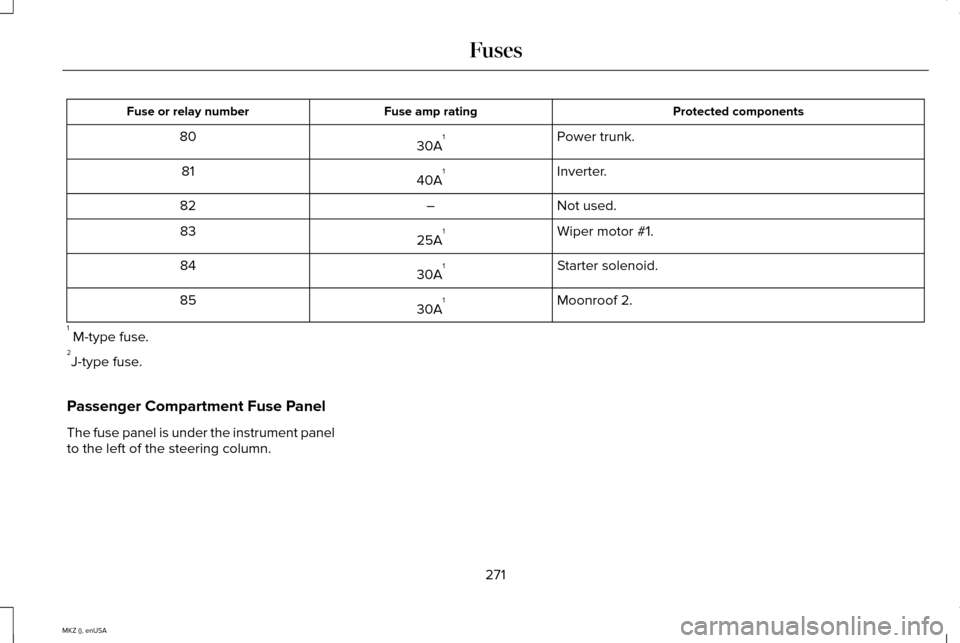
Protected components
Fuse amp rating
Fuse or relay number
Power trunk.
30A 1
80
Inverter.
40A 1
81
Not used.
–
82
Wiper motor #1.
25A 1
83
Starter solenoid.
30A 1
84
Moonroof 2.
30A 1
85
1 M-type fuse.
2 J-type fuse.
Passenger Compartment Fuse Panel
The fuse panel is under the instrument panel
to the left of the steering column.
271
MKZ (), enUSA Fuses
Page 277 of 516
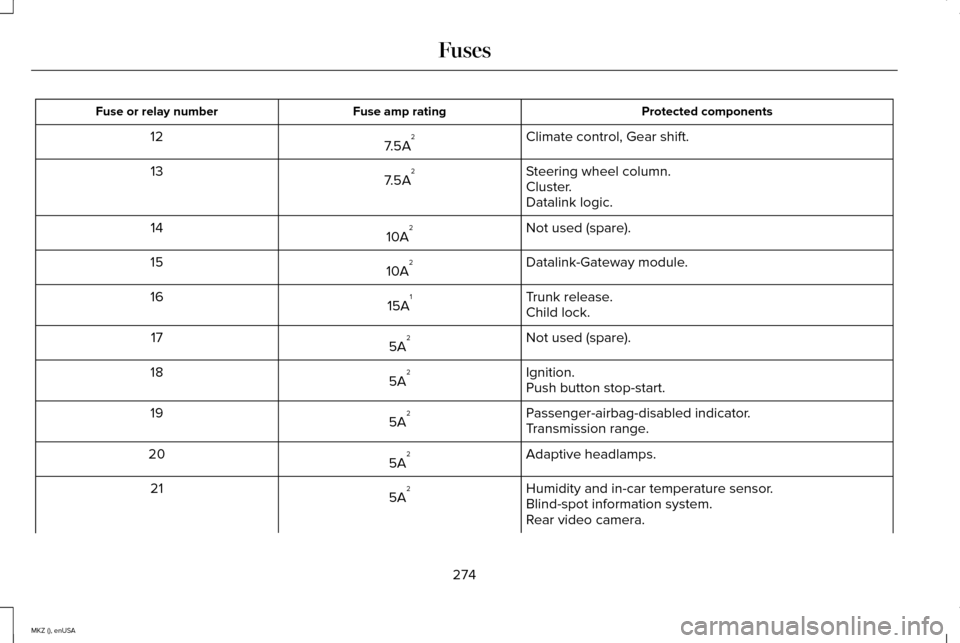
Protected components
Fuse amp rating
Fuse or relay number
Climate control, Gear shift.
7.5A 2
12
Steering wheel column.
7.5A 2
13
Cluster.
Datalink logic.
Not used (spare).
10A 2
14
Datalink-Gateway module.
10A 2
15
Trunk release.
15A 1
16
Child lock.
Not used (spare).
5A 2
17
Ignition.
5A 2
18
Push button stop-start.
Passenger-airbag-disabled indicator.
5A 2
19
Transmission range.
Adaptive headlamps.
5A 2
20
Humidity and in-car temperature sensor.
5A 2
21
Blind-spot information system.
Rear video camera.
274
MKZ (), enUSA Fuses