USB LINCOLN MKZ 2016 User Guide
[x] Cancel search | Manufacturer: LINCOLN, Model Year: 2016, Model line: MKZ, Model: LINCOLN MKZ 2016Pages: 544, PDF Size: 5.77 MB
Page 428 of 544

Voice command
PauseSay the name of what you would like to listen to such as a band, song, a\
lbum or playlist.
Play
*Play Artist ___
*Play Song ___
Similar Music
Help
* ___ is a dynamic listing, meaning that it could be the name of anything\
, such as a group, artist or song. For example you could say "Play
artist The Beatles" or "Play song Penny Lane".
Supported Media Players, Formats and
Metadata Information
SYNC is capable of hosting nearly any digital
media player, including iPod, Zune™, plays
from device players, and most USB drives.
Supported audio formats include MP3, WMA,
WAV and AAC. It is also able to organize your indexed media
from your playing device by metadata tags.
Metadata tags, which are descriptive
software identifiers embedded in the media
files, provide information about the file.
If your indexed media files contain no
information embedded in these metadata
tags, SYNC may classify the empty metadata
tags as unknown.
Bluetooth Audio
E142611
The system allows you to stream
audio over your vehicle's speakers
from your connected,
Bluetooth-enabled cell phone.
425
MyLincoln Touch™
Page 472 of 544
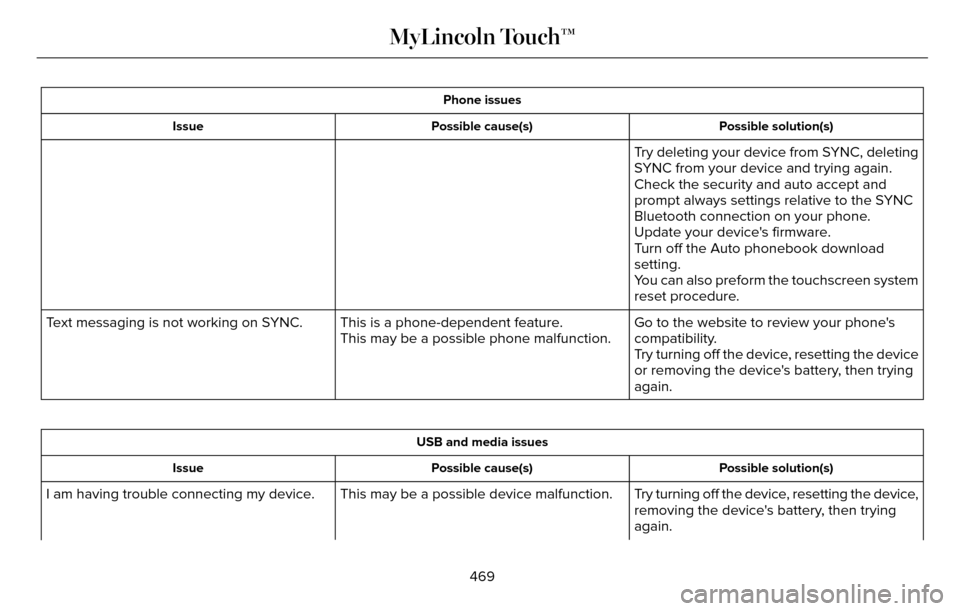
Phone issuesPossible solution(s)
Possible cause(s)
Issue
Try deleting your device from SYNC, deleting
SYNC from your device and trying again.
Check the security and auto accept and
prompt always settings relative to the SYNC
Bluetooth connection on your phone.
Update your device's firmware.
Turn off the Auto phonebook download
setting.
You can also preform the touchscreen system
reset procedure.
Go to the website to review your phone's
compatibility.
This is a phone-dependent feature.
This may be a possible phone malfunction.
Text messaging is not working on SYNC.
Try turning off the device, resetting the device
or removing the device's battery, then trying
again.
USB and media issuesPossible solution(s)
Possible cause(s)
Issue
Try turning off the device, resetting the device,
removing the device's battery, then trying
again.
This may be a possible device malfunction.
I am having trouble connecting my device.
469
MyLincoln Touch™
Page 473 of 544
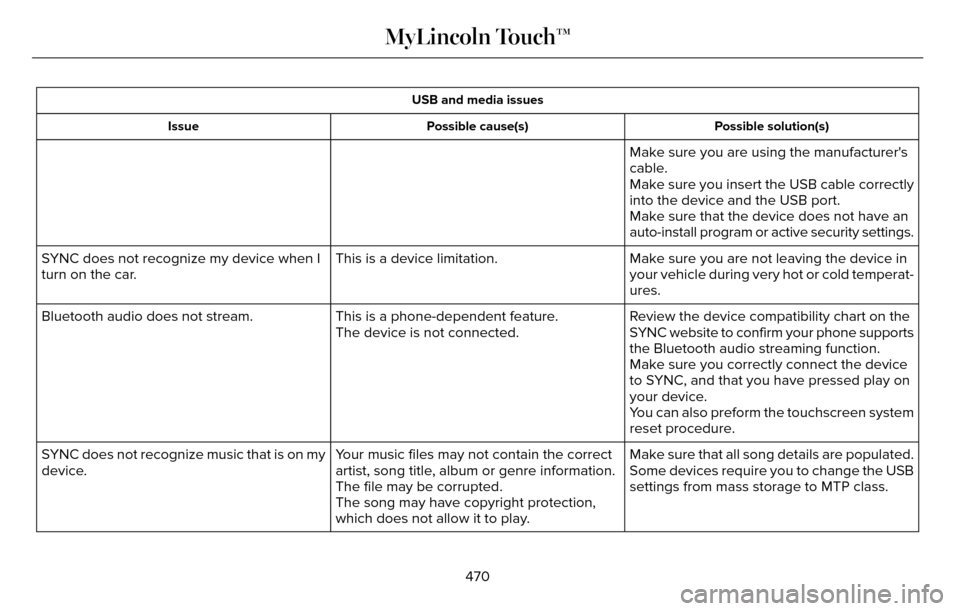
USB and media issuesPossible solution(s)
Possible cause(s)
Issue
Make sure you are using the manufacturer's
cable.
Make sure you insert the USB cable correctly
into the device and the USB port.
Make sure that the device does not have an
auto-install program or active security settings.
Make sure you are not leaving the device in
your vehicle during very hot or cold temperat-
ures.
This is a device limitation.
SYNC does not recognize my device when I
turn on the car.
Review the device compatibility chart on the
SYNC website to confirm your phone supports
the Bluetooth audio streaming function.
This is a phone-dependent feature.
The device is not connected.
Bluetooth audio does not stream.
Make sure you correctly connect the device
to SYNC, and that you have pressed play on
your device.
You can also preform the touchscreen system
reset procedure.
Make sure that all song details are populated.
Your music files may not contain the correct
artist, song title, album or genre information.
SYNC does not recognize music that is on my
device.
Some devices require you to change the USB
settings from mass storage to MTP class.
The file may be corrupted.
The song may have copyright protection,
which does not allow it to play.
470
MyLincoln Touch™
Page 536 of 544
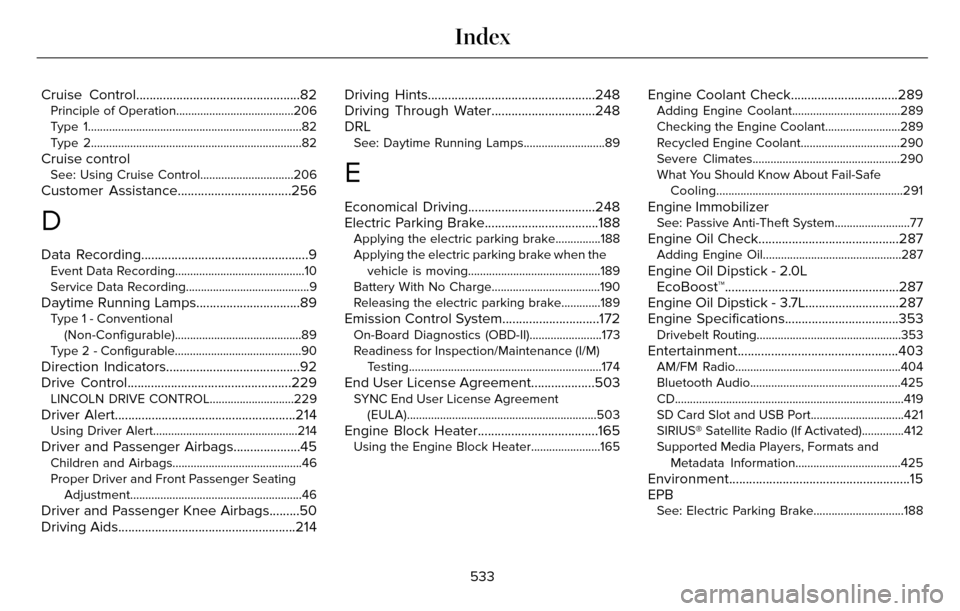
Cruise Control.................................................82Principle of Operation.......................................206
Type 1...................................................................\
....82
Type 2...................................................................\
...82
Cruise controlSee: Using Cruise Control...............................206
Customer Assistance..................................256
D
Data Recording..................................................9Event Data Recording...........................................10
Service Data Recording.........................................9
Daytime Running Lamps...............................89Type 1 - Conventional(Non-Configurable)..........................................89
Type 2 - Configurable..........................................90
Direction Indicators........................................92
Drive Control.................................................229
LINCOLN DRIVE CONTROL............................229
Driver Alert......................................................214Using Driver Alert................................................214
Driver and Passenger Airbags....................45Children and Airbags...........................................46
Proper Driver and Front Passenger Seating Adjustment.........................................................46
Driver and Passenger Knee Airbags.........50
Driving Aids.....................................................214 Driving Hints..................................................248
Driving Through Water...............................248
DRL
See: Daytime Running Lamps...........................89
E
Economical Driving......................................248
Electric Parking Brake..................................188
Applying the electric parking brake...............188
Applying the electric parking brake when the
vehicle is moving............................................189
Battery With No Charge....................................190
Releasing the electric parking brake.............189
Emission Control System.............................172On-Board Diagnostics (OBD-II)........................173
Readiness for Inspection/Maintenance (I/M) Testing................................................................174
End User License Agreement...................503SYNC End User License Agreement(EULA)...............................................................503
Engine Block Heater....................................165Using the Engine Block Heater.......................165
Engine Coolant Check................................289Adding Engine Coolant....................................289
Checking the Engine Coolant.........................289
Recycled Engine Coolant.................................290
Severe Climates.................................................290
What You Should Know About Fail-SafeCooling..............................................................291
Engine ImmobilizerSee: Passive Anti-Theft System.........................77
Engine Oil Check..........................................287Adding Engine Oil..............................................287
Engine Oil Dipstick - 2.0LEcoBoost™....................................................287
Engine Oil Dipstick - 3.7L............................287
Engine Specifications..................................353
Drivebelt Routing................................................353
Entertainment................................................403AM/FM Radio.......................................................404
Bluetooth Audio..................................................425
CD......................................................................\
......419
SD Card Slot and USB Port...............................421
SIRIUS® Satellite Radio (If Activated)..............412
Supported Media Players, Formats and
Metadata Information...................................425
Environment......................................................15
EPB
See: Electric Parking Brake..............................188
533
Index