Unlock door LINCOLN MKZ 2016 User Guide
[x] Cancel search | Manufacturer: LINCOLN, Model Year: 2016, Model line: MKZ, Model: LINCOLN MKZ 2016Pages: 544, PDF Size: 5.77 MB
Page 77 of 544
Note:Personal entry codes 4 and 5 will not
recall memory positions.
Erasing a Personal Code
1. Enter the factory-set 5-digit code.
2. Press and release 1·2 on the keypad within five seconds.
3. Press and hold 1·2 for two seconds. You must do this within five seconds of
completing Step 2.
All personal codes are now erased and only
the factory-set 5–digit code will work.
Anti-Scan Feature
The keypad will go into an anti-scan mode
if you enter the wrong code seven times (35
consecutive button presses). This mode
disables the keypad for one minute and the
keypad lamp will flash.
The anti-scan feature will turn off after:
• one minute of keypad inactivity
• pressing the unlock button on the remote control • switching the ignition on
• unlocking your vehicle using intelligent
access.
Unlocking and Locking the Doors
To Unlock the Driver Door
Enter the factory-set 5-digit code or your
personal code. You must press each number
within five seconds of each other. The
interior lamps will illuminate.
Note: All doors will unlock if you enable the
all-door unlocking mode. See Locking and
Unlocking (page 67).
To Unlock All Doors
Enter the factory-set code or your personal
code, then press 3·4 within five seconds.
To Lock All Doors
Press and hold 7·8 and 9·0 at the same time
(with the driver door closed). You do not
need to enter the keypad code first. To Release the Trunk
Enter the factory-set code or your personal
code, then press 5·6 within five seconds.
Displaying the Factory Set Code
Note:
You will need to have two
programmed intelligent access keys for this
procedure.
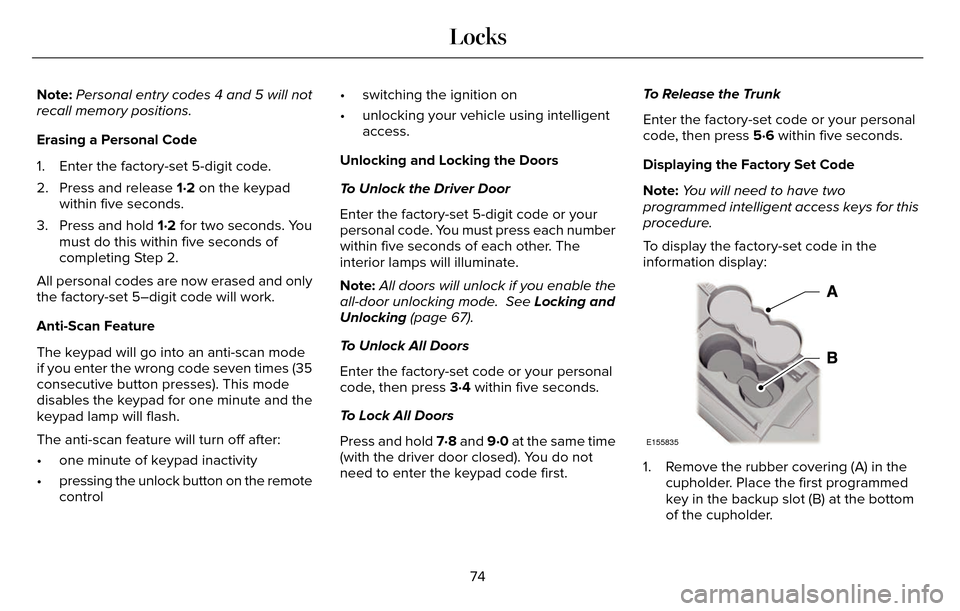
To display the factory-set code in the
information display:
E155835
1. Remove the rubber covering (A) in the cupholder. Place the first programmed
key in the backup slot (B) at the bottom
of the cupholder.
74
Locks
Page 82 of 544
Arming the Alarm
The alarm is ready to arm when there is not
a key in your vehicle. Electronically lock your
vehicle to arm the alarm.
Disarming the Alarm
Disarm the alarm by any of the following
actions:
• Unlock the doors or luggagecompartment with the remote control or
keyless entry keypad.
• Switch your vehicle on or start your vehicle.
• Use a key in the driver door to unlock your vehicle, then switch your vehicle on
within 12 seconds.
Note: Pressing the panic button on the
remote control will stop the horn and signal
indicators, but will not disarm the system.
79
Security
Page 99 of 544
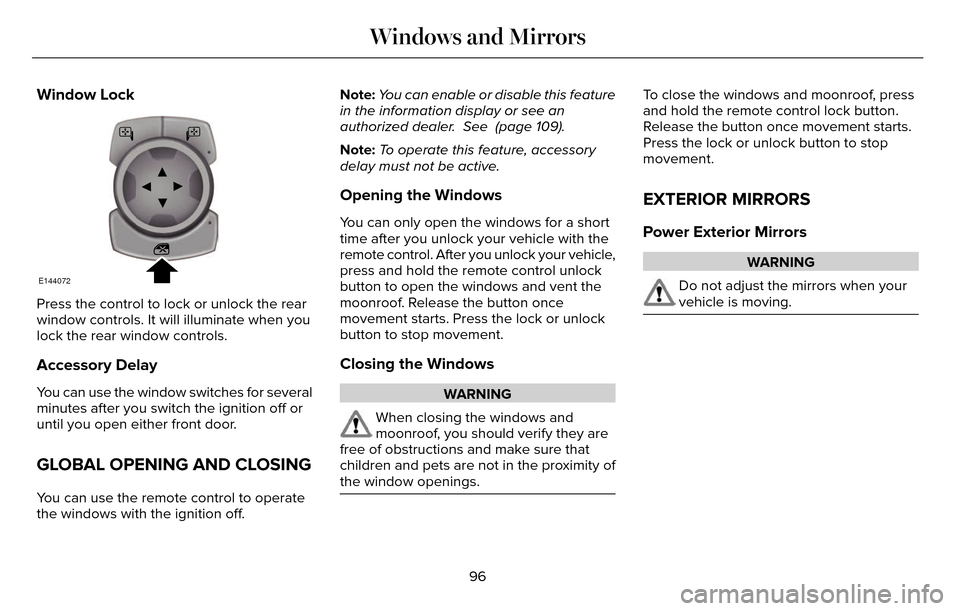
Window Lock
E144072
Press the control to lock or unlock the rear
window controls. It will illuminate when you
lock the rear window controls.
Accessory Delay
You can use the window switches for several
minutes after you switch the ignition off or
until you open either front door.
GLOBAL OPENING AND CLOSING
You can use the remote control to operate
the windows with the ignition off.Note:
You can enable or disable this feature
in the information display or see an
authorized dealer. See (page 109).
Note: To operate this feature, accessory
delay must not be active.
Opening the Windows
You can only open the windows for a short
time after you unlock your vehicle with the
remote control. After you unlock your vehicle,
press and hold the remote control unlock
button to open the windows and vent the
moonroof. Release the button once
movement starts. Press the lock or unlock
button to stop movement.
Closing the Windows
WARNING
When closing the windows and
moonroof, you should verify they are
free of obstructions and make sure that
children and pets are not in the proximity of
the window openings.
To close the windows and moonroof, press
and hold the remote control lock button.
Release the button once movement starts.
Press the lock or unlock button to stop
movement.
EXTERIOR MIRRORS
Power Exterior Mirrors
WARNING
Do not adjust the mirrors when your
vehicle is moving.
96
Windows and Mirrors
Page 116 of 544
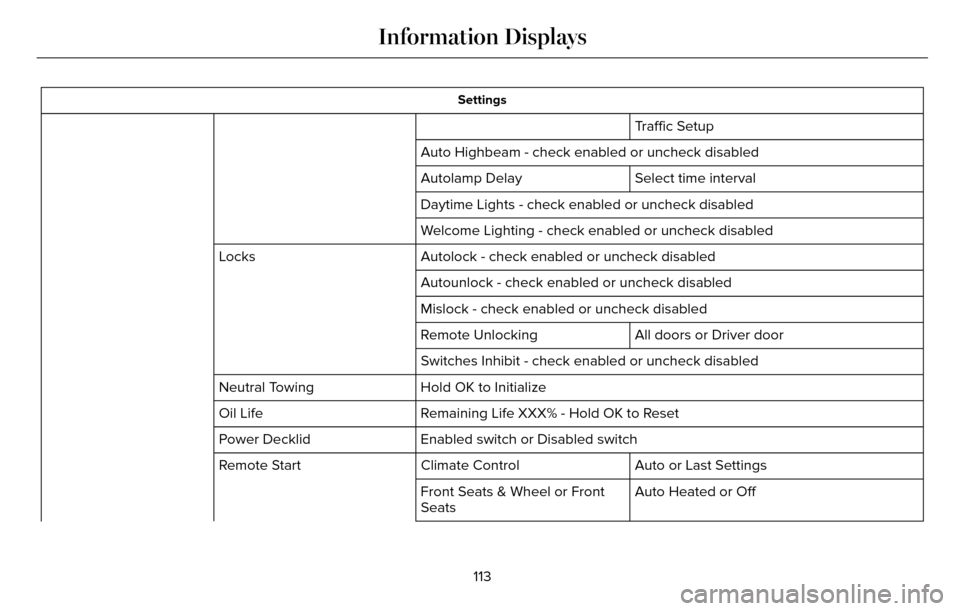
Settings
Traffic Setup
Auto Highbeam - check enabled or uncheck disabled Select time interval
Autolamp Delay
Daytime Lights - check enabled or uncheck disabled
Welcome Lighting - check enabled or uncheck disabled
Autolock - check enabled or uncheck disabled
Locks
Autounlock - check enabled or uncheck disabled
Mislock - check enabled or uncheck disabled
All doors or Driver door
Remote Unlocking
Switches Inhibit - check enabled or uncheck disabled
Hold OK to Initialize
Neutral Towing
Remaining Life XXX% - Hold OK to Reset
Oil Life
Enabled switch or Disabled switch
Power Decklid
Auto or Last Settings
Climate Control
Remote Start
Auto Heated or Off
Front Seats & Wheel or Front
Seats
113
Information Displays
Page 149 of 544
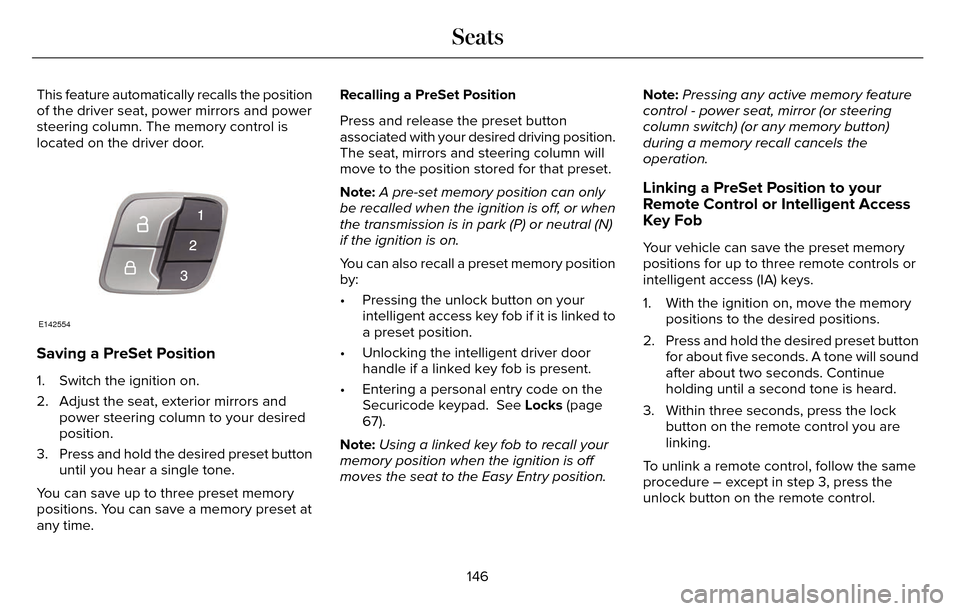
This feature automatically recalls the position
of the driver seat, power mirrors and power
steering column. The memory control is
located on the driver door.
E142554
Saving a PreSet Position
1. Switch the ignition on.
2. Adjust the seat, exterior mirrors andpower steering column to your desired
position.
3. Press and hold the desired preset button until you hear a single tone.
You can save up to three preset memory
positions. You can save a memory preset at
any time. Recalling a PreSet Position
Press and release the preset button
associated with your desired driving position.
The seat, mirrors and steering column will
move to the position stored for that preset.
Note:
A pre-set memory position can only
be recalled when the ignition is off, or when
the transmission is in park (P) or neutral (N)
if the ignition is on.
You can also recall a preset memory position
by:
• Pressing the unlock button on your intelligent access key fob if it is linked to
a preset position.
• Unlocking the intelligent driver door handle if a linked key fob is present.
• Entering a personal entry code on the Securicode keypad. See Locks (page
67).
Note: Using a linked key fob to recall your
memory position when the ignition is off
moves the seat to the Easy Entry position. Note:
Pressing any active memory feature
control - power seat, mirror (or steering
column switch) (or any memory button)
during a memory recall cancels the
operation.
Linking a PreSet Position to your
Remote Control or Intelligent Access
Key Fob
Your vehicle can save the preset memory
positions for up to three remote controls or
intelligent access (IA) keys.
1. With the ignition on, move the memory positions to the desired positions.
2. Press and hold the desired preset button for about five seconds. A tone will sound
after about two seconds. Continue
holding until a second tone is heard.
3. Within three seconds, press the lock button on the remote control you are
linking.
To unlink a remote control, follow the same
procedure – except in step 3, press the
unlock button on the remote control.
146
Seats
Page 279 of 544
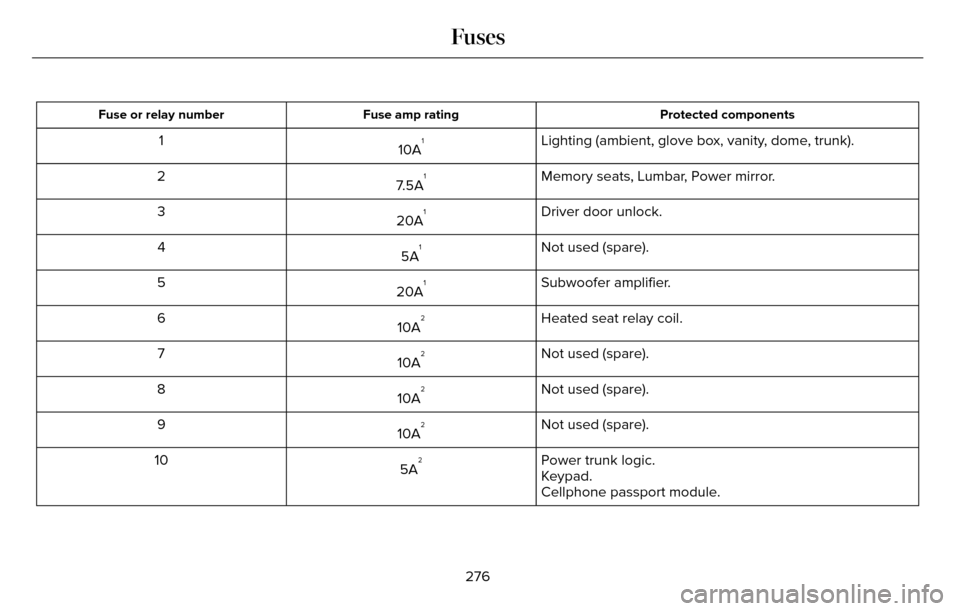
Protected components
Fuse amp rating
Fuse or relay number
Lighting (ambient, glove box, vanity, dome, trunk).
10A11
Memory seats, Lumbar, Power mirror.
7.5A
12
Driver door unlock.
20A
13
Not used (spare).
5A
14
Subwoofer amplifier.
20A
15
Heated seat relay coil.
10A
26
Not used (spare).
10A
27
Not used (spare).
10A
28
Not used (spare).
10A
29
Power trunk logic.
5A
210
Keypad.
Cellphone passport module.
276
Fuses
Page 281 of 544
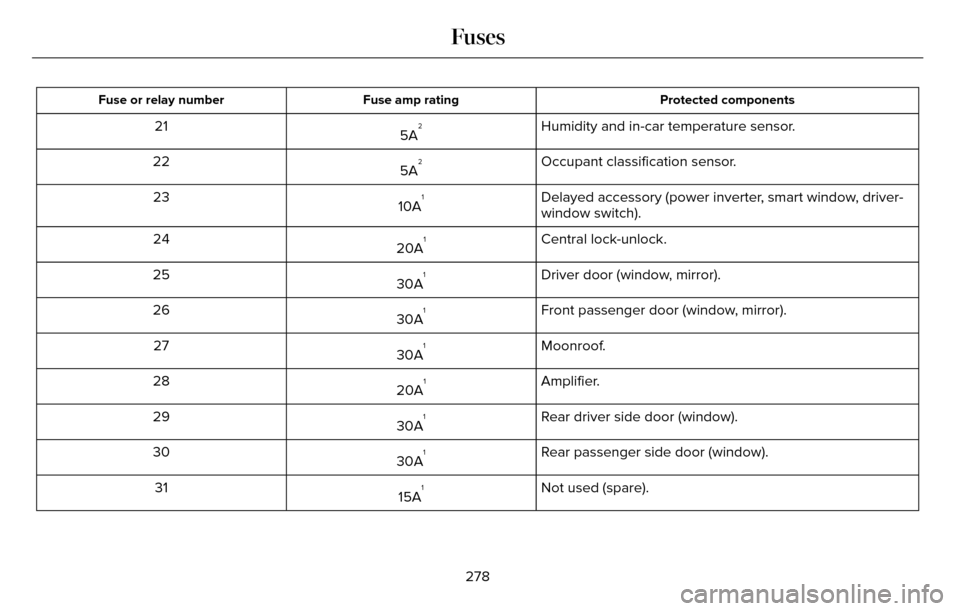
Protected components
Fuse amp rating
Fuse or relay number
Humidity and in-car temperature sensor.
5A221
Occupant classification sensor.
5A
222
Delayed accessory (power inverter, smart window, driver-
window switch).
10A
123
Central lock-unlock.
20A
124
Driver door (window, mirror).
30A
125
Front passenger door (window, mirror).
30A
126
Moonroof.
30A
127
Amplifier.
20A
128
Rear driver side door (window).
30A
129
Rear passenger side door (window).
30A
130
Not used (spare).
15A
131
278
Fuses
Page 540 of 544

Locking and Unlocking..................................67Activating Intelligent Access.............................68
Autolock ...............................................................\
..69
Auto Relock............................................................69
Battery Saver..........................................................7\
0
Illuminated Entry...................................................70
Illuminated Exit......................................................70\
Luggage Compartment.......................................70
Power Decklid.........................................................71
Power Door Locks................................................67
Remote Control.....................................................67
Smart Unlocks for Intelligent AccessKeys.....................................................................69
Locks..................................................................67
Lug Nuts
See: Changing a Road Wheel.........................346
M
Maintenance...................................................281General Information............................................281
Media Hub......................................................372
Memory Function..........................................145
Easy Entry and Exit Feature..............................147
Linking a PreSet Position to your RemoteControl or Intelligent Access Key Fob.......146
Saving a PreSet Position...................................146
Message CenterSee: Information Displays.................................109
MirrorsSee: Heated Windows and Mirrors.................138
See: Windows and Mirrors.................................95
Mobile Communications Equipment...........14
Moonroof.........................................................100
Bounce-Back.........................................................101
Opening and Closing the Moonroof..............100
Motorcraft Parts............................................354
MyKey Troubleshooting................................65
MyKey™..............................................................60
Principle of Operation.........................................60
MyLincoln Touch™.........................................373General Information...........................................373
MyLincoln Touch™ Troubleshooting.........467
N
Navigation ......................................................454cityseekr................................................................457
Destination Mode...............................................454
Map Mode............................................................462
Navigation Map Updates.................................466
Navigation Voice Commands.........................466
Point of Interest (POI) Categories..................456
Quick-touch Buttons..........................................465
Setting Your Navigation Preferences............458
Normal Scheduled Maintenance..............484Intelligent Oil-Life Monitor™..............................484
Maintenance Intervals.......................................486
O
Oil Change Indicator Reset.......................288
Oil Check
See: Engine Oil Check......................................287
Opening and Closing the Hood................281
Ordering Additional Owner's
Literature......................................................261
Obtaining a French Owner’s Manual.............261
Overhead Console.......................................160
P
Parking Aids....................................................196Principle of Operation........................................196
Passive Anti-Theft System............................77SecuriLock...............................................................77
PA T SSee: Passive Anti-Theft System.........................77
Perchlorate........................................................ 12
Personal Safety System™..............................43
How Does the Personal Safety System
Work?...................................................................43
537
Index
Page 541 of 544
Phone..............................................................426Making Calls........................................................429
Pairing Subsequent Cell Phones....................428
Pairing Your Cell Phone for the FirstTime...................................................................427
Phone Menu Options........................................430
Phone Settings....................................................434
Phone Voice Commands..................................435
Receiving Calls....................................................430
Text Messaging...................................................432
Post-Crash Alert System............................255Spinout Detection..............................................255
Power Door LocksSee: Locking and Unlocking..............................67
Power Seats....................................................142Multi-Contour Front Seats With Active Motion ........................................................................\
.....144
Power Lumbar......................................................144
Power Windows..............................................95Accessory Delay...................................................96
Bounce-Back..........................................................95
One-Touch Down..................................................95
One-Touch Up.......................................................95
Window Lock.........................................................96
Pre-Collision Assist......................................226Using the Pre-Collision Assist System..........227
Protecting the Environment..........................15
R
Rear Parking Aid............................................197
Rear Seat Armrest.........................................150
Armrest pass-through........................................150
Rear Seats.......................................................147
Rear View Camera.......................................202
Using the Rear View Camera System...........203
Rear View CameraSee: Rear View Camera...................................202
Recommended Towing Weights...............241
Refueling.........................................................169
Easy Fuel™ Capless Fuel System.....................170
Remote Control...............................................55Car Finder..............................................................\
.57
Intelligent Access Key.........................................55
Remote Start...........................................................57
Replacing the Battery..........................................56
Sounding a Panic Alarm......................................57
Remote Start...................................................138Automatic Settings..............................................139
Repairing Minor Paint Damage...................311
Replacement Parts Recommendation........12
Collision Repairs.....................................................13
Scheduled Maintenance and Mechanical Repairs.................................................................12
Warranty on Replacement Parts.........................13
Replacing a Lost Key or Remote Control............................................................59
Reporting Safety Defects (Canada Only)..............................................................262
Reporting Safety Defects (U.S. Only).......261
Roadside Assistance....................................251
Vehicles Sold In Canada: Getting Roadside
Assistance.......................................................252
Vehicles Sold In Canada: Using Roadside Assistance.......................................................252
Vehicles Sold In the United States: Getting Roadside Assistance......................................251
Vehicles Sold In the United States: Using Roadside Assistance......................................251
Roadside Emergencies................................251
Running-In
See: Breaking-In.................................................248
Running Out of Fuel.....................................168Refilling With a Portable Fuel Container.......168
S
Safety Belt Height Adjustment....................38
Safety Belt Minder..........................................39
Belt-Minder™...........................................................39
Safety Belts.......................................................33Principle of Operation..........................................33
538
Index