air condition LINCOLN MKZ 2016 User Guide
[x] Cancel search | Manufacturer: LINCOLN, Model Year: 2016, Model line: MKZ, Model: LINCOLN MKZ 2016Pages: 544, PDF Size: 5.77 MB
Page 139 of 544
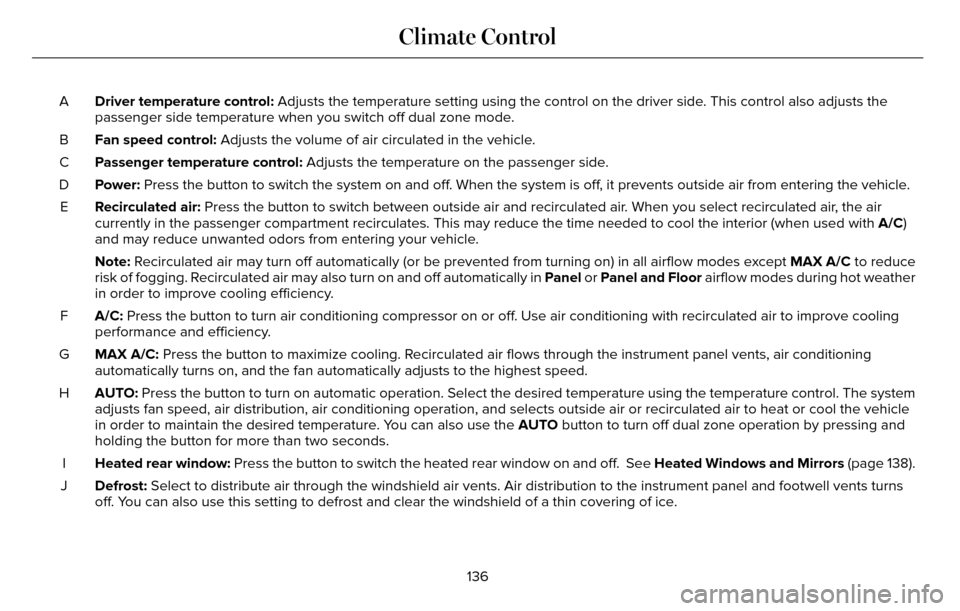
Driver temperature control: Adjusts the temperature setting using the control on the driver side. This control also adjusts the
passenger side temperature when you switch off dual zone mode.
A
Fan speed control: Adjusts the volume of air circulated in the vehicle.
B
Passenger temperature control: Adjusts the temperature on the passenger side.
C
Power: Press the button to switch the system on and off. When the system is off, it prevents outside air from entering the vehicle.
D
Recirculated air: Press the button to switch between outside air and recirculated air. When you select recirculated air, the air
currently in the passenger compartment recirculates. This may reduce the\
time needed to cool the interior (when used with A/C)
and may reduce unwanted odors from entering your vehicle.
E
Note: Recirculated air may turn off automatically (or be prevented from turnin\
g on) in all airflow modes except MAX A/C to reduce
risk of fogging. Recirculated air may also turn on and off automatically in Panel or Panel and Floor airflow modes during hot weather
in order to improve cooling efficiency.
A/C: Press the button to turn air conditioning compressor on or off. Use air conditioning with recirculated air to improve cooling
performance and efficiency.
F
MAX A/C: Press the button to maximize cooling. Recirculated air flows through the instrument panel vents, air conditioni\
ng
automatically turns on, and the fan automatically adjusts to the highest\
speed.
G
AUTO: Press the button to turn on automatic operation. Select the desired tem\
perature using the temperature control. The system
adjusts fan speed, air distribution, air conditioning operation, and sel\
ects outside air or recirculated air to heat or cool the vehicle
in order to maintain the desired temperature. You can also use the AUTO button to turn off dual zone operation by pressing and
holding the button for more than two seconds.
H
Heated rear window: Press the button to switch the heated rear window on and off. See Heated Windows and Mirrors (page 138).
I
Defrost: Select to distribute air through the windshield air vents. Air distribu\
tion to the instrument panel and footwell vents turns
off. You can also use this setting to defrost and clear the windshield of a th\
in covering of ice.
J
136
Climate Control
Page 141 of 544
2. Adjust the temperature control to thedesired setting. Use 72°F (22°C) as a
starting point, then adjust the setting as
necessary.
HEATED WINDOWS AND MIRRORS
Heated Rear Window
Note: Make sure the engine is running
before operating the heated windows.
E184884
Press the button to clear the
heated rear window of thin ice and
fog. The heated rear window will
automatically turn off after a short period of
time. Start the engine before you switch the
heated rear window on.
Note: Do not use razor blades or other sharp
objects to clean or remove decals from the
inside of the heated rear window. The
vehicle warranty does not cover damage
caused to the heated rear window grid lines.
Heated Exterior Mirror
When you switch the heated rear window
on, the heated exterior mirrors will
automatically turn on.
Note: Do not remove ice from the mirrors
with a scraper or adjust the mirror glass
when it is frozen in place.
Note: Do not clean the mirror housing or
glass with harsh abrasives, fuel or other
petroleum-based cleaning products.
CABIN AIR FILTER
Your vehicle is equipped with a cabin air
filter, which gives you and your passengers
the following benefits:
• It improves your driving comfort by reducing particle concentration.
• It improves the interior compartment cleanliness.
• It protects the climate control components from particle deposits.
You can locate the cabin air filter behind the
glove box. Note:
Make sure you have a cabin air filter
installed at all times. This prevents foreign
objects from entering the system. Running
the system without a filter in place could
result in degradation or damage to the
system.
Replace the filter at regular intervals. See
Scheduled Maintenance (page 480).
For additional cabin air filter information, or
to replace the filter, see an authorized dealer.
REMOTE START
The remote start feature allows you to
pre-condition the interior of your vehicle. The
climate control system works to achieve
comfort according to your previous settings.
Note: You cannot adjust the system during
remote start operation. You cannot switch
on the displays or indicators during remote
start.
138
Climate Control
Page 184 of 544
USING ALL-WHEEL DRIVE
All-wheel drive uses all four wheels to power
the vehicle. This increases traction, enabling
you to drive over terrain and road conditions
that a conventional two-wheel drive vehicle
cannot. The AWD system is active all the time
and requires no input from the operator.
Note:Your AWD vehicle is not for off-road
use. The AWD feature gives your vehicle
some limited off-road capabilities in which
driving surfaces are relatively level,
obstruction-free and otherwise similar to
normal on-road driving conditions. Operating
your vehicle under other than those
conditions could subject the vehicle to
excessive stress which might result in
damage not covered under your warranty.
Note: A warning message will display in the
information display when an AWD system
fault is present See Information Messages
(page 115). An AWD system fault will cause
the AWD system to default to front-wheel
drive only mode. When this warning
message displays, have your vehicle
serviced at an authorized dealer. Note:
A warning message will display in the
information display if the AWD system has
overheated. See Information Messages
(page 115). This condition may occur if the
vehicle operates in extreme conditions with
excessive wheel slip, such as deep sand. To
resume normal AWD function as soon as
possible, stop the vehicle in a safe location
and stop the engine for at least 10 minutes.
After the engine restarts and the AWD
system has adequately cooled, the warning
message will turn off and normal AWD
function will return.
Do not use a spare tire of a different size
other than the tire provided. If the mini-spare
tire is installed, the AWD system may disable
automatically and enter front-wheel drive
only mode to protect driveline components.
This condition will be indicated by a warning
in the information display. See Information
Messages (page 115). If there is a warning
message in the information display from
using the spare tire, this indicator should turn
off after reinstalling the repaired or replaced
normal road tire and cycling the ignition off
and on. It is recommended to reinstall the repaired or replaced road tire as soon as
possible. Major dissimilar tire sizes between
the front and rear axles could cause the AWD
system to stop functioning and default to
front-wheel drive or damage the AWD
system.
Driving In Special Conditions With All-
Wheel Drive (AWD)
AWD vehicles are equipped for driving on
sand, snow, mud and rough roads and have
operating characteristics that are somewhat
different from conventional vehicles, both on
and off the highway.
Under severe operating conditions, the A/C
may cycle on and off to protect overheating
of the engine.
Basic operating principles in special
conditions
• Drive slower in strong crosswinds which
can affect the normal steering
characteristics of your vehicle.
• Be extremely careful when driving on pavement made slippery by loose sand,
water, gravel, snow or ice.
181
All-Wheel Drive (If Equipped)
Page 201 of 544
If the transmission is in reverse (R), the front
sensing system provides audio warnings
when your vehicle is moving and the
detected obstacle is stationary or moving
towards your vehicle.
If the transmission is in drive (D) or any other
forward gear (for example, low (L), sport (S)
or any forward gear in a manual
transmission), the front sensing system
provides audio warnings when your vehicle
is moving below a speed of 7 mph (12 km/h)
and an obstacle is located inside the
detection area.
ACTIVE PARK ASSIST (If Equipped)
WARNING
Designed to be a supplementary park
aid, this system may not work in all
conditions. This system cannot replace the
driver’s attention and judgment. The driver
is responsible for avoiding hazards and
maintaining a safe distance and speed, even
when the system is in use.
Note: The driver is always responsible for
controlling the vehicle, supervising the
system and intervening if required.
The system detects an available parallel
parking space and automatically steers your
vehicle into the space (hands-free) while you
control the accelerator, gearshift and brakes.
The system visually and audibly instructs you
to park your vehicle.
The system may not function correctly if
something passes between the front bumper
and the parking space (a pedestrian or
cyclist) or if the edge of the neighboring
parked vehicle is high off the ground (for
example, a bus, tow truck or flatbed truck).
Note: The blindspot information system does
not detect traffic alongside or behind your
vehicle during a park assist maneuver.
Note: The sensors may not detect objects
in heavy rain or other conditions that cause
disruptive reflections.
Note: The sensors may not detect objects
with surfaces that absorb ultrasonic waves
or cause ultrasonic interference (motorcycle
exhaust, truck air brakes or horns). Do not use the system if:
• You have attached a foreign object (bike
rack or trailer) to the front or rear of your
vehicle or attached close to the sensors.
• You have attached an overhanging object (surfboard) to the roof.
• The front bumper or side sensors are damaged or obstructed by a foreign
object (front bumper cover).
• A mini-spare tire is in use.
Using Active Park Assist
E146186
Press the button located on the
center console near the gearshift
lever or the right side of the center
stack.
The touchscreen displays a message and a
corresponding graphic to indicate it is
searching for a parking space. Use the
direction indicator to indicate which side of
your vehicle you want the system to search.
Note: If the direction indicator is not on, the
system automatically searches on your
vehicle's passenger side.
198
Parking Aids (If Equipped)
Page 231 of 544
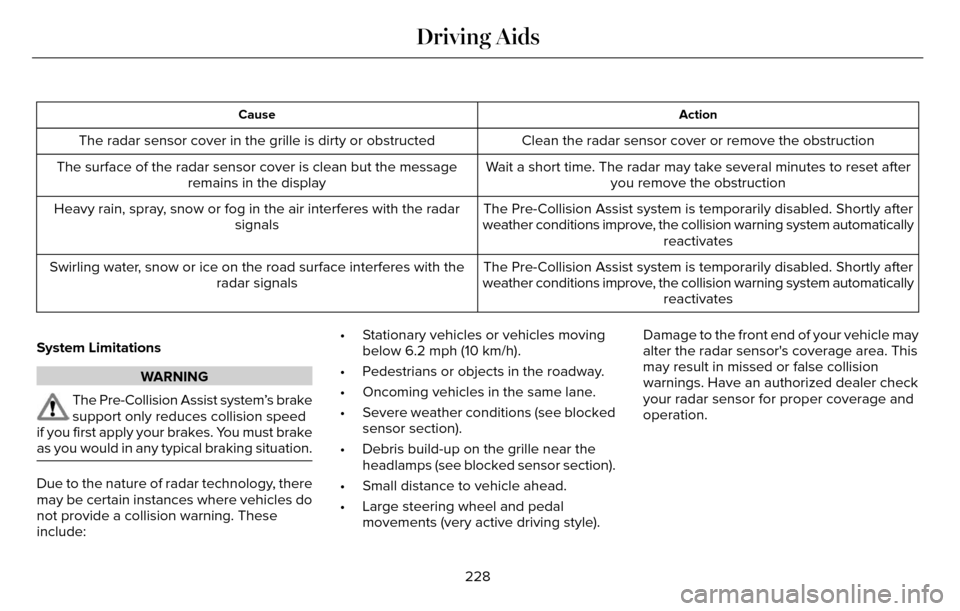
Action
Cause
Clean the radar sensor cover or remove the obstruction
The radar sensor cover in the grille is dirty or obstructed
Wait a short time. The radar may take several minutes to reset afteryou remove the obstruction
The surface of the radar sensor cover is clean but the message
remains in the display
The Pre-Collision Assist system is temporarily disabled. Shortly after
weather conditions improve, the collision warning system automatically reactivates
Heavy rain, spray, snow or fog in the air interferes with the radar
signals
The Pre-Collision Assist system is temporarily disabled. Shortly after
weather conditions improve, the collision warning system automatically reactivates
Swirling water, snow or ice on the road surface interferes with the
radar signals
System Limitations
WARNING
The Pre-Collision Assist system’s brake
support only reduces collision speed
if you first apply your brakes. You must brake
as you would in any typical braking situation.
Due to the nature of radar technology, there
may be certain instances where vehicles do
not provide a collision warning. These
include: • Stationary vehicles or vehicles moving
below 6.2 mph (10 km/h).
• Pedestrians or objects in the roadway.
• Oncoming vehicles in the same lane.
• Severe weather conditions (see blocked sensor section).
• Debris build-up on the grille near the headlamps (see blocked sensor section).
• Small distance to vehicle ahead.
• Large steering wheel and pedal movements (very active driving style). Damage to the front end of your vehicle may
alter the radar sensor's coverage area. This
may result in missed or false collision
warnings. Have an authorized dealer check
your radar sensor for proper coverage and
operation.
228
Driving Aids
Page 249 of 544
Front-wheel drive vehicles must have the
front wheels placed on a tow dolly when
towing your vehicle from the rear using
wheel lift equipment. This prevents damage
to the transmission.
Towing an all-wheel drive vehicle requires
that all wheels be off the ground, such as
using a wheel lift and dollies or flatbed
equipment. This prevents damage to the
transmission, all-wheel drive system and
vehicle.
TOWING THE VEHICLE ON FOUR
WHEELS
Emergency Towing
WARNING
If your vehicle has a steering wheel
lock make sure the ignition is in the
accessory or on position when being towed.
You can flat-tow (all wheels on the ground,
regardless of the powertrain/transmission
configuration) your disabled vehicle (without
access to wheel dollies, car-hauling trailer,
or flatbed transport vehicle) under the
following conditions:
• Your vehicle is facing forward so you tow it in a forward direction.
• You place the transmission in position N.
If you cannot place the transmission in
position N, you may need to override it.
See Transmission (page 175).
• Maximum speed is 35 mph (56 km/h).
• Maximum distance is 50 miles (80 kilometers).
Recreational Towing
Note: Put your climate control system in
recirculated air mode to prevent exhaust
fumes from entering the vehicle. See
Climate Control (page 135). Follow these guidelines if you have a need
for recreational (RV) towing. An example of
recreational towing would be towing your
vehicle behind a motorhome. These
guidelines are to make sure you do not
damage the transmission during towing.
Vehicles Equipped with a 2.0L Engine
Front-wheel drive (FWD) vehicles CANNOT
be flat-towed (all wheels on the ground) as
vehicle or transmission damage may occur.
You must place the front wheels on a
two-wheel tow dolly. If you are using a tow
dolly, follow the instructions specified by the
equipment provider.
All-wheel drive (AWD) vehicles
CANNOT be
flat-towed (all wheels on the ground), as
vehicle or transmission damage may occur.
It is recommended to tow your vehicle with
all four (4) wheels off the ground such as
when using a car-hauling trailer. Otherwise,
you cannot tow your vehicle.
246
Towing
Page 251 of 544
BREAKING-IN
You need to break in new tires for
approximately 300 miles (480 kilometers).
During this time, your vehicle may exhibit
some unusual driving characteristics.
Avoid driving too fast during the first 1000
miles (1600 kilometers). Vary your speed
frequently and change up through the gears
early. Do not labor the engine.
Do not tow during the first 1000 miles (1600
kilometers).
ECONOMICAL DRIVING
Fuel economy is affected by several things
such as how you drive, the conditions you
drive under and how you maintain your
vehicle.
There are some things to keep in mind that
may improve your fuel economy:
• Accelerate and slow down in a smooth,moderate fashion.
• Drive at steady speeds. • Anticipate stops; slowing down may
eliminate the need to stop.
• Combine errands and minimize stop-and-go driving.
• When running errands, go to thefurthest destination first and then
work your way back home.
• Close the windows for high-speed driving.
• Drive at reasonable speeds. (Traveling at 65 mph/105 kph uses about 15% less
fuel than traveling at 75 mph/121 kph).
• Keep the tires properly inflated and use only the recommended size.
• Use the recommended engine oil.
• Perform all regularly scheduled maintenance.
There are also some things you may want to
avoid doing because they reduce your fuel
economy:
• Avoid sudden or hard accelerations.
• Avoid revving the engine before turning off the car.
• Avoid long idle periods. • Do not warm up your vehicle on cold
mornings.
• Reduce the use of air conditioning and heat.
• Avoid using speed control in hilly terrain.
• Do not rest your foot on the brake pedal while driving.
• Avoid carrying unnecessary weight (approximately 1 mpg [0.4 kilometers/liter]
is lost for every 400 lbs [180 kilograms]
of weight carried).
• Avoid adding particular accessories to your vehicle (e.g. bug deflectors,
rollbars/light bars, running boards, ski
racks).
• Avoid driving with the wheels out of alignment.
DRIVING THROUGH WATER
WARNING
Do not drive through flowing or deep
water as you may lose control of your
vehicle.
248
Driving Hints
Page 261 of 544
2. Four or more repair attempts are madeon the same nonconformity (a defect or
condition that substantially impairs the
use, value or safety of the vehicle) OR
3. The vehicle is out of service for repair of nonconformities for a total of more than
30 calendar days (not necessarily all at
one time).
In the case of 1 or 2 above, the consumer
must also notify the manufacturer of the need
for the repair of the nonconformity at the
following address:
Ford Motor Company
16800 Executive Plaza Drive
Mail Drop 3NE-B
Dearborn, MI 48126
You are required to submit your warranty
dispute to BBB AUTO LINE before asserting
in court any rights or remedies conferred by
California Civil Code Section 1793.22(b). You
are also required to use BBB AUTO LINE
before exercising rights or seeking remedies
created by the Federal Magnuson-Moss Warranty Act, 15 U.S.C. sec. 2301 et seq. If
you choose to seek redress by pursuing
rights and remedies not created by California
Civil Code Section 1793.22(b) or the
Magnuson-Moss Warranty Act, resort to BBB
AUTO LINE is not required by those statutes.
THE BETTER BUSINESS BUREAU
(BBB) AUTO LINE PROGRAM (U.S.
ONLY)
Your satisfaction is important to Ford Motor
Company and to your dealer. If a warranty
concern has not been resolved using the
three-step procedure outlined earlier in this
chapter in the Getting the Services you need
section, you may be eligible to participate in
the BBB AUTO LINE program.
The BBB AUTO LINE program consists of
two parts – mediation and arbitration. During
mediation, a representative of the BBB will
contact both you and Ford Motor Company
to explore options for settlement of the claim.
If an agreement is not reached during
mediation or you do not want to participate
in mediation, and if your claim is eligible, youmay participate in the arbitration process. An
arbitration hearing will be scheduled so that
you can present your case in an informal
setting before an impartial person. The
arbitrator will consider the testimony
provided and make a decision after the
hearing.
Disputes submitted to the BBB AUTO LINE
program are usually decided within forty days
after you file your claim with the BBB. You
are not bound by the decision, and may
reject the decision and proceed to court
where all findings of the BBB Auto Line
dispute, and decision, are admissible in the
court action. Should you choose to accept
the BBB AUTO LINE decision, Ford is then
bound by the decision, and must comply with
the decision within 30 days of receipt of your
acceptance letter.
BBB AUTO LINE Application: Using the
information provided below, please call or
write to request a program application. You
will be asked for your name and address,
general information about your new vehicle,
information about your warranty concerns,
and any steps you have already taken to try
258
Customer Assistance
Page 269 of 544
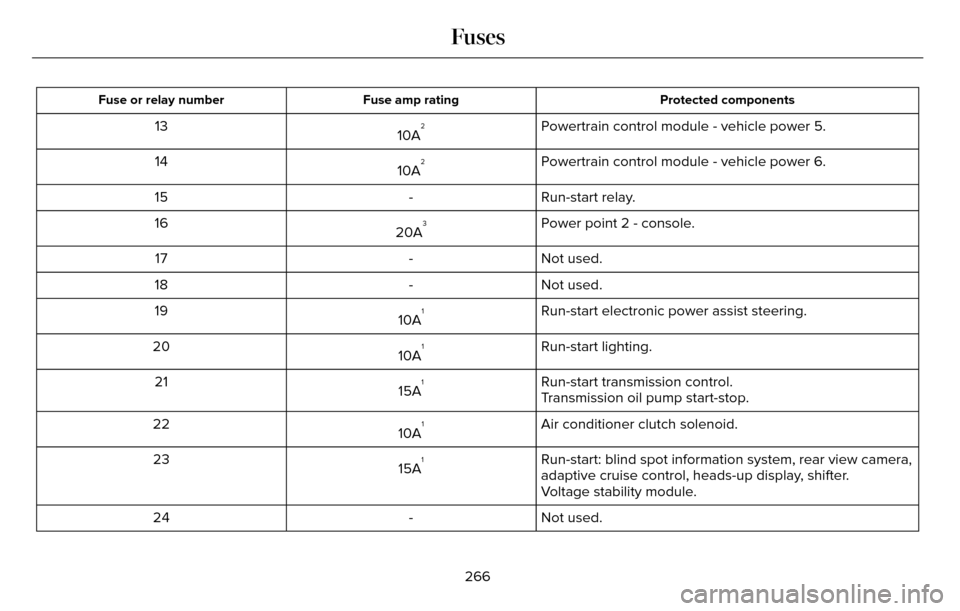
Protected components
Fuse amp rating
Fuse or relay number
Powertrain control module - vehicle power 5.
10A213
Powertrain control module - vehicle power 6.
10A
214
Run-start relay.
-
15
Power point 2 - console.
20A
316
Not used.
-
17
Not used.
-
18
Run-start electronic power assist steering.
10A
119
Run-start lighting.
10A
120
Run-start transmission control.
15A
121
Transmission oil pump start-stop.
Air conditioner clutch solenoid.
10A
122
Run-start: blind spot information system, rear view camera,
adaptive cruise control, heads-up display, shifter.
15A
123
Voltage stability module.
Not used.
-
24
266
Fuses
Page 270 of 544
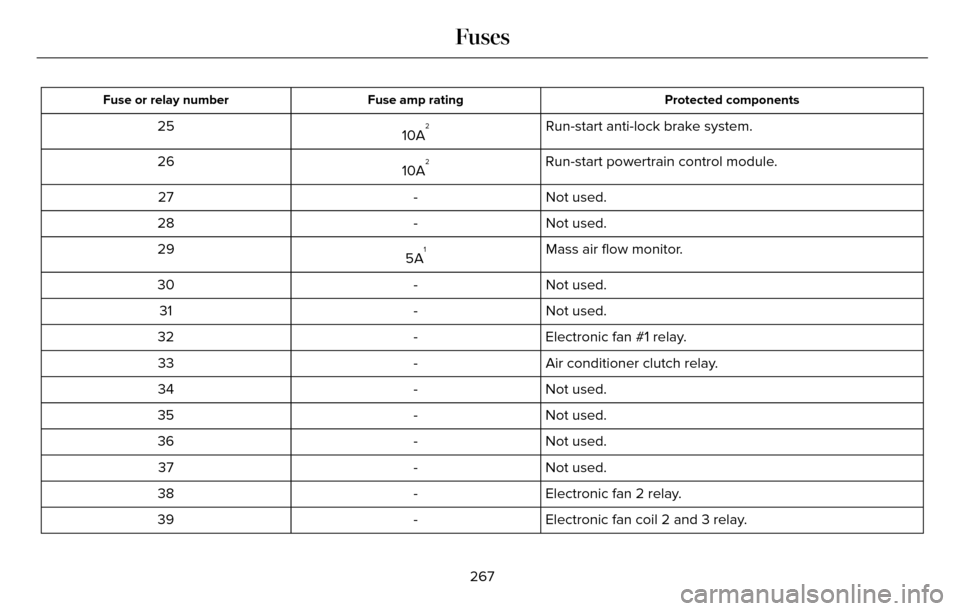
Protected components
Fuse amp rating
Fuse or relay number
Run-start anti-lock brake system.
10A225
Run-start powertrain control module.
10A
226
Not used.
-
27
Not used.
-
28
Mass air flow monitor.
5A
129
Not used.
-
30
Not used.
-
31
Electronic fan #1 relay.
-
32
Air conditioner clutch relay.
-
33
Not used.
-
34
Not used.
-
35
Not used.
-
36
Not used.
-
37
Electronic fan 2 relay.
-
38
Electronic fan coil 2 and 3 relay.
-
39
267
Fuses