camera LINCOLN MKZ 2016 User Guide
[x] Cancel search | Manufacturer: LINCOLN, Model Year: 2016, Model line: MKZ, Model: LINCOLN MKZ 2016Pages: 544, PDF Size: 5.77 MB
Page 220 of 544
E165517
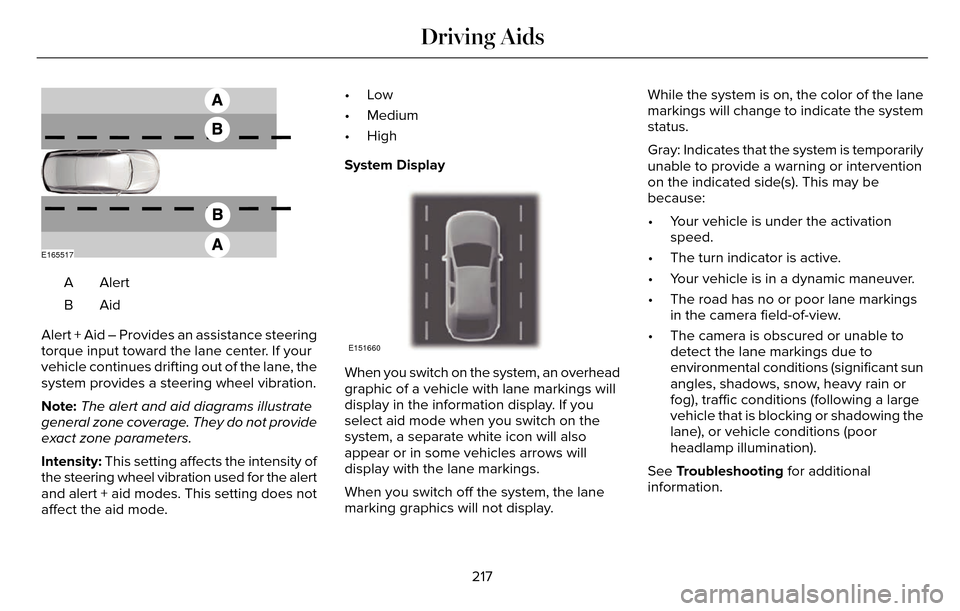
AlertA
AidB
Alert + Aid – Provides an assistance steering
torque input toward the lane center. If your
vehicle continues drifting out of the lane, the
system provides a steering wheel vibration.
Note: The alert and aid diagrams illustrate
general zone coverage. They do not provide
exact zone parameters.
Intensity: This setting affects the intensity of
the steering wheel vibration used for the alert
and alert + aid modes. This setting does not
affect the aid mode. •Low
• Medium
• High
System Display
E151660
When you switch on the system, an overhead
graphic of a vehicle with lane markings will
display in the information display. If you
select aid mode when you switch on the
system, a separate white icon will also
appear or in some vehicles arrows will
display with the lane markings.
When you switch off the system, the lane
marking graphics will not display.
While the system is on, the color of the lane
markings will change to indicate the system
status.
Gray: Indicates that the system is temporarily
unable to provide a warning or intervention
on the indicated side(s). This may be
because:
• Your vehicle is under the activation
speed.
• The turn indicator is active.
• Your vehicle is in a dynamic maneuver.
• The road has no or poor lane markings in the camera field-of-view.
• The camera is obscured or unable to detect the lane markings due to
environmental conditions (significant sun
angles, shadows, snow, heavy rain or
fog), traffic conditions (following a large
vehicle that is blocking or shadowing the
lane), or vehicle conditions (poor
headlamp illumination).
See Troubleshooting for additional
information.
217
Driving Aids
Page 221 of 544
Green: Indicates that the system is available
or ready to provide a warning or intervention,
on the indicated side(s).
Yellow: Indicates that the system is providing
or has just provided a lane keeping aid
intervention.Red: Indicates that the system is providing
or has just provided a lane keeping alert
warning.
The system can be temporarily suppressed
at any time by the following:
• Quick braking.
• Fast acceleration.
• Using the turn signal indicator.
• Evasive steering maneuver.
Troubleshooting
Why is the feature not available (line markings are gray) when I can s\
ee the lane markings on the road?
Vehicle speed is outside the operational range of the feature
Sun is shining directly into the camera lens
Quick intentional lane change
Staying too close to the lane marking
Driving at high speeds in curves
The last Alert warning or Aid intervention occurred a short time ago
Ambiguous lane markings (mainly in construction zones)
Rapid transition from light to dark or vice versa
Sudden offset in lane markings
ABS or AdvanceTrac activation
218
Driving Aids
Page 222 of 544
 when I can s\
ee the lane markings on the road?
Camera blockage due to dirt, grime, fog, frost or water on the windshield
Driving too close to")
Why is the feature not available (line markings are gray) when I can s\
ee the lane markings on the road?
Camera blockage due to dirt, grime, fog, frost or water on the windshield
Driving too close to the vehicle in front of you
Transitioning between no lane markings to lane markings or vice versa
Standing water on the road
Faint lane markings (partial yellow lane markings on concrete roads)
Lane width too narrow or too wide
Camera not calibrated after a windshield replacement
Driving on tight roads or on uneven roads
Why does the vehicle not come back toward the middle of the lane, as exp\
ected, in the Aid or Aid + Alert mode?
High cross winds
Large road crown
Rough roads, grooves, shoulder drop-offs
Heavy uneven loading of the vehicle or improper tire inflation pressure
If the tires have been exchanged (including snow tires), or the suspension has been modified219
Driving Aids
Page 269 of 544
Protected components
Fuse amp rating
Fuse or relay number
Powertrain control module - vehicle power 5.
10A213
Powertrain control module - vehicle power 6.
10A
214
Run-start relay.
-
15
Power point 2 - console.
20A
316
Not used.
-
17
Not used.
-
18
Run-start electronic power assist steering.
10A
119
Run-start lighting.
10A
120
Run-start transmission control.
15A
121
Transmission oil pump start-stop.
Air conditioner clutch solenoid.
10A
122
Run-start: blind spot information system, rear view camera,
adaptive cruise control, heads-up display, shifter.
15A
123
Voltage stability module.
Not used.
-
24
266
Fuses
Page 383 of 544

Speed-restricted Features
Enabling Valet Mode
System Functionality
Editing settings while the rear view camera or active park assist are ac\
tive
Editing wireless settings
Wi-Fi and Wireless
Editing the list of wireless networks
Adding or editing wallpaper
Photos and Graphics
Composing text messages
Text Messages
Viewing received text messages
Editing preset text messages
Using the keyboard to enter a destination
Navigation
Demo navigation route
Adding or editing Address Book or Avoid Area entries
380
MyLincoln Touch™
Page 390 of 544
To make adjustments using the voice
button, press the button and when
prompted, say:
Voice command
Display SettingsUploading Photos for Your Home Screen
Wallpaper
Note:
You cannot load photos directly from
your camera. You must access the photos
either from your USB mass storage device
or from an SD card. Note:
Photographs with extremely large
dimensions (such as 2048 x 1536) may not
be compatible and appear as a blank (black)
image on the display.
The system allows you to upload and view
up to 32 photos.
E142607
To access, press:
To upload your photos, select:
Action and Description
Menu Item
Press the settings icon.
Settings
Display
Follow the system prompts to upload your photographs.
Edit Wallpaper
Only the photograph(s), which meets the
following conditions display:
• Compatible file formats are as follows: JPG, GIF, PNG, BMP.
• Each file must be 1.5 MB or less.
• Recommended dimensions: 800 x 384.
Sound
E142607
387
MyLincoln Touch™
Page 391 of 544

To make adjustments using the
touchscreen, select:
Menu Item
Settings
Sound
Then select from the following:
Bass
Midrange
Treble
Set Balance and Fade
Occupancy Mode
Menu Item
Speed Compensated Volume
DSP
Note: Your vehicle may not have all of these
sound settings.
Vehicle
E142607
To make adjustments using the
touchscreen, select:
Menu Item
Settings
Vehicle
Then select from the following:
Menu Item
Ambient Lighting
Vehicle Health Report
Camera Settings
Enable Valet Mode
Ambient Lighting
When you switch this feature on, ambient
lighting illuminates the dashboard, footwells,
doors, cupholders, and console with a choice
of colors.
388
MyLincoln Touch™
Page 393 of 544
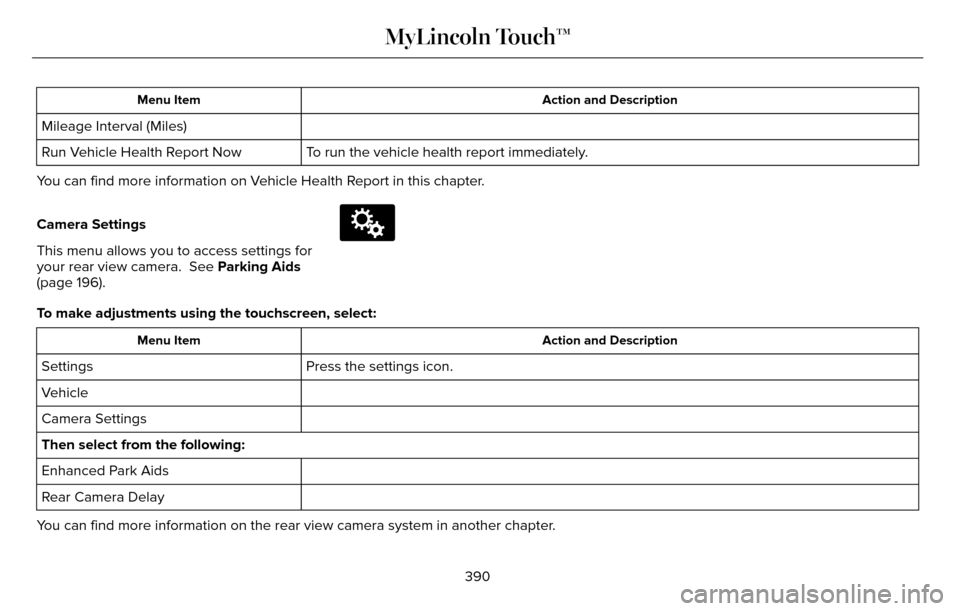
Action and Description
Menu Item
Mileage Interval (Miles)
To run the vehicle health report immediately.
Run Vehicle Health Report Now
You can find more information on Vehicle Health Report in this chapter.
Camera Settings
This menu allows you to access settings for
your rear view camera. See Parking Aids
(page 196).
E142607
To make adjustments using the touchscreen, select:
Action and Description
Menu Item
Press the settings icon.
Settings
Vehicle
Camera Settings
Then select from the following:
Enhanced Park Aids
Rear Camera Delay
You can find more information on the rear view camera system in another c\
hapter.
390
MyLincoln Touch™
Page 541 of 544
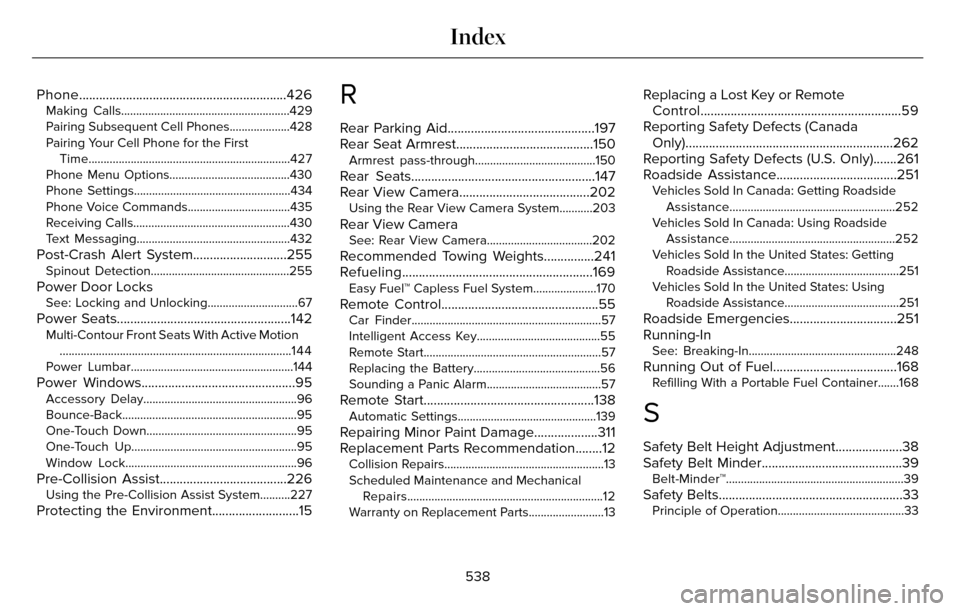
Phone..............................................................426Making Calls........................................................429
Pairing Subsequent Cell Phones....................428
Pairing Your Cell Phone for the FirstTime...................................................................427
Phone Menu Options........................................430
Phone Settings....................................................434
Phone Voice Commands..................................435
Receiving Calls....................................................430
Text Messaging...................................................432
Post-Crash Alert System............................255Spinout Detection..............................................255
Power Door LocksSee: Locking and Unlocking..............................67
Power Seats....................................................142Multi-Contour Front Seats With Active Motion ........................................................................\
.....144
Power Lumbar......................................................144
Power Windows..............................................95Accessory Delay...................................................96
Bounce-Back..........................................................95
One-Touch Down..................................................95
One-Touch Up.......................................................95
Window Lock.........................................................96
Pre-Collision Assist......................................226Using the Pre-Collision Assist System..........227
Protecting the Environment..........................15
R
Rear Parking Aid............................................197
Rear Seat Armrest.........................................150
Armrest pass-through........................................150
Rear Seats.......................................................147
Rear View Camera.......................................202
Using the Rear View Camera System...........203
Rear View CameraSee: Rear View Camera...................................202
Recommended Towing Weights...............241
Refueling.........................................................169
Easy Fuel™ Capless Fuel System.....................170
Remote Control...............................................55Car Finder..............................................................\
.57
Intelligent Access Key.........................................55
Remote Start...........................................................57
Replacing the Battery..........................................56
Sounding a Panic Alarm......................................57
Remote Start...................................................138Automatic Settings..............................................139
Repairing Minor Paint Damage...................311
Replacement Parts Recommendation........12
Collision Repairs.....................................................13
Scheduled Maintenance and Mechanical Repairs.................................................................12
Warranty on Replacement Parts.........................13
Replacing a Lost Key or Remote Control............................................................59
Reporting Safety Defects (Canada Only)..............................................................262
Reporting Safety Defects (U.S. Only).......261
Roadside Assistance....................................251
Vehicles Sold In Canada: Getting Roadside
Assistance.......................................................252
Vehicles Sold In Canada: Using Roadside Assistance.......................................................252
Vehicles Sold In the United States: Getting Roadside Assistance......................................251
Vehicles Sold In the United States: Using Roadside Assistance......................................251
Roadside Emergencies................................251
Running-In
See: Breaking-In.................................................248
Running Out of Fuel.....................................168Refilling With a Portable Fuel Container.......168
S
Safety Belt Height Adjustment....................38
Safety Belt Minder..........................................39
Belt-Minder™...........................................................39
Safety Belts.......................................................33Principle of Operation..........................................33
538
Index