intelligent access LINCOLN MKZ 2016 User Guide
[x] Cancel search | Manufacturer: LINCOLN, Model Year: 2016, Model line: MKZ, Model: LINCOLN MKZ 2016Pages: 544, PDF Size: 5.77 MB
Page 75 of 544
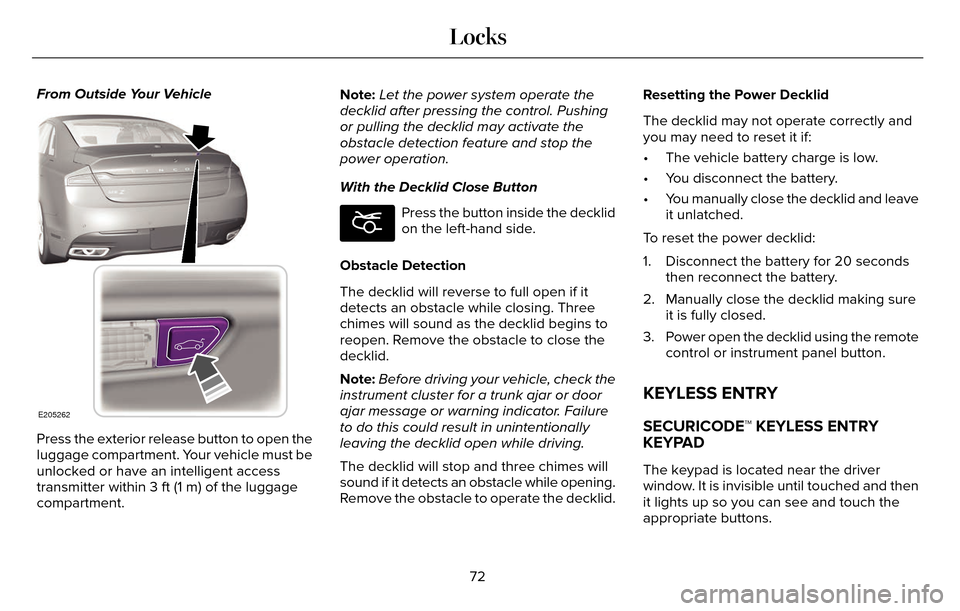
From Outside Your Vehicle
E205262
Press the exterior release button to open the
luggage compartment. Your vehicle must be
unlocked or have an intelligent access
transmitter within 3 ft (1 m) of the luggage
compartment.Note:
Let the power system operate the
decklid after pressing the control. Pushing
or pulling the decklid may activate the
obstacle detection feature and stop the
power operation.
With the Decklid Close Button
E194407
Press the button inside the decklid
on the left-hand side.
Obstacle Detection
The decklid will reverse to full open if it
detects an obstacle while closing. Three
chimes will sound as the decklid begins to
reopen. Remove the obstacle to close the
decklid.
Note: Before driving your vehicle, check the
instrument cluster for a trunk ajar or door
ajar message or warning indicator. Failure
to do this could result in unintentionally
leaving the decklid open while driving.
The decklid will stop and three chimes will
sound if it detects an obstacle while opening.
Remove the obstacle to operate the decklid. Resetting the Power Decklid
The decklid may not operate correctly and
you may need to reset it if:
• The vehicle battery charge is low.
• You disconnect the battery.
• You manually close the decklid and leave
it unlatched.
To reset the power decklid:
1. Disconnect the battery for 20 seconds then reconnect the battery.
2. Manually close the decklid making sure it is fully closed.
3. Power open the decklid using the remote control or instrument panel button.
KEYLESS ENTRY
SECURICODE™ KEYLESS ENTRY
KEYPAD
The keypad is located near the driver
window. It is invisible until touched and then
it lights up so you can see and touch the
appropriate buttons.
72
Locks
Page 77 of 544
Note:Personal entry codes 4 and 5 will not
recall memory positions.
Erasing a Personal Code
1. Enter the factory-set 5-digit code.
2. Press and release 1·2 on the keypad within five seconds.
3. Press and hold 1·2 for two seconds. You must do this within five seconds of
completing Step 2.
All personal codes are now erased and only
the factory-set 5–digit code will work.
Anti-Scan Feature
The keypad will go into an anti-scan mode
if you enter the wrong code seven times (35
consecutive button presses). This mode
disables the keypad for one minute and the
keypad lamp will flash.
The anti-scan feature will turn off after:
• one minute of keypad inactivity
• pressing the unlock button on the remote control • switching the ignition on
• unlocking your vehicle using intelligent
access.
Unlocking and Locking the Doors
To Unlock the Driver Door
Enter the factory-set 5-digit code or your
personal code. You must press each number
within five seconds of each other. The
interior lamps will illuminate.
Note: All doors will unlock if you enable the
all-door unlocking mode. See Locking and
Unlocking (page 67).
To Unlock All Doors
Enter the factory-set code or your personal
code, then press 3·4 within five seconds.
To Lock All Doors
Press and hold 7·8 and 9·0 at the same time
(with the driver door closed). You do not
need to enter the keypad code first. To Release the Trunk
Enter the factory-set code or your personal
code, then press 5·6 within five seconds.
Displaying the Factory Set Code
Note:
You will need to have two
programmed intelligent access keys for this
procedure.
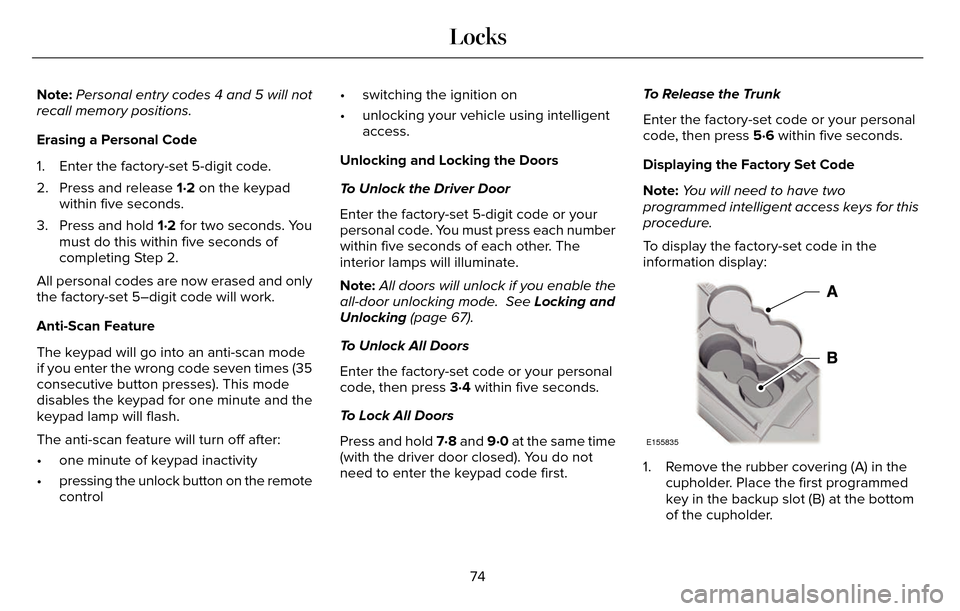
To display the factory-set code in the
information display:
E155835
1. Remove the rubber covering (A) in the cupholder. Place the first programmed
key in the backup slot (B) at the bottom
of the cupholder.
74
Locks
Page 80 of 544
PASSIVE ANTI-THEFT SYSTEM
Note:The system is not compatible with
non-Ford aftermarket remote start systems.
Use of these systems may result in vehicle
starting problems and a loss of security
protection.
Note: Metallic objects, electronic devices or
a second coded key on the same key chain
may cause vehicle starting problems if they
are too close to the key when starting your
vehicle. Prevent these objects from touching
the coded key while starting your vehicle.
Switch the ignition off, move all objects on
the key chain away from the coded key and
restart your vehicle if a problem occurs.
Note: Do not leave a duplicate coded key
in your vehicle. Always take your keys and
lock all doors when leaving your vehicle.
SecuriLock
The system helps prevent your vehicle from
starting unless you use a coded key
programmed to your vehicle. Using the
wrong key may prevent your vehicle from
starting. A message may appear in the
information display.
If you are unable to start your vehicle with a
correctly coded key, it is not operating
properly. A message may appear in the
information display.
Automatic Arming
Your vehicle arms immediately after
switching the ignition off.
Automatic Disarming
Switching the ignition on with a coded key
disarms your vehicle.
Replacement Keys
Note: Your vehicle comes equipped with two
intelligent access keys. The intelligent access key functions as a
programmed key that operates the driver
door lock and activates the intelligent access
with push button start system, as well as a
remote control.
If your programmed transmitters are lost or
stolen and you do not have an extra coded
key, have your vehicle towed to an
authorized dealer. You need to erase the
key codes from your vehicle and program
new coded keys.
Store an extra programmed key away from
your vehicle in a safe place to help prevent
any inconveniences. See your authorized
dealer to purchase additional spare or
replacement keys.
Programming a Spare Intelligent Access
Key
Note:
You can program a maximum of four
intelligent access keys to your vehicle.
77
Security
Page 81 of 544
You must have two previously programmed
intelligent access keys inside your vehicle
and the new unprogrammed intelligent
access keys readily accessible. See an
authorized dealer to have the spare key
programmed if two previously programmed
keys are not available.
Make sure that your vehicle is off before
beginning this procedure. Make sure that
you close all the doors before beginning and
that they remain closed throughout the
procedure. Perform all steps within 30
seconds of starting the sequence. Stop and
wait for at least one minute before starting
again if you perform any steps out of
sequence.
Read and understand the entire procedure
before you begin.
E155835
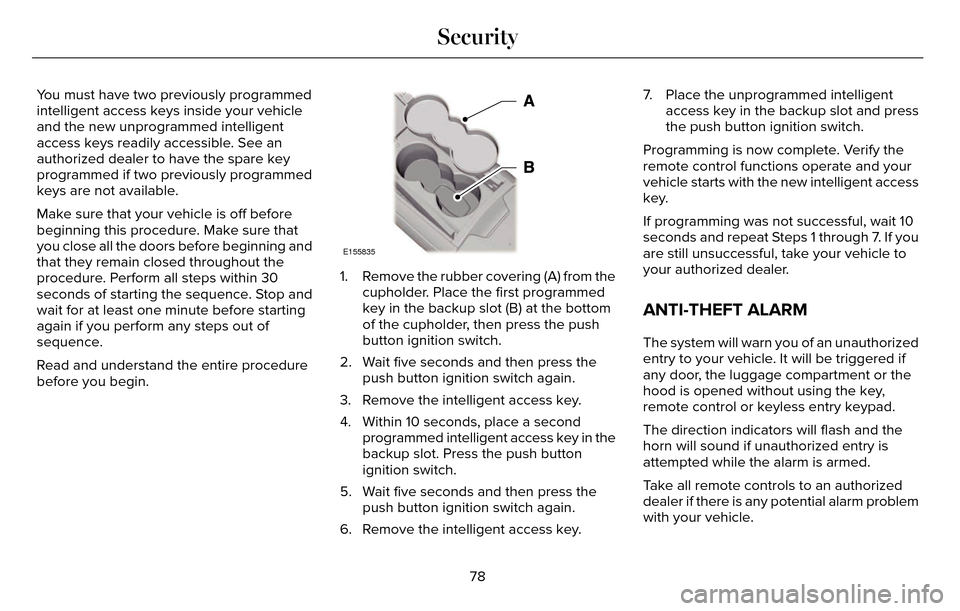
1. Remove the rubber covering (A) from thecupholder. Place the first programmed
key in the backup slot (B) at the bottom
of the cupholder, then press the push
button ignition switch.
2. Wait five seconds and then press the push button ignition switch again.
3. Remove the intelligent access key.
4. Within 10 seconds, place a second programmed intelligent access key in the
backup slot. Press the push button
ignition switch.
5. Wait five seconds and then press the push button ignition switch again.
6. Remove the intelligent access key. 7. Place the unprogrammed intelligent
access key in the backup slot and press
the push button ignition switch.
Programming is now complete. Verify the
remote control functions operate and your
vehicle starts with the new intelligent access
key.
If programming was not successful, wait 10
seconds and repeat Steps 1 through 7. If you
are still unsuccessful, take your vehicle to
your authorized dealer.
ANTI-THEFT ALARM
The system will warn you of an unauthorized
entry to your vehicle. It will be triggered if
any door, the luggage compartment or the
hood is opened without using the key,
remote control or keyless entry keypad.
The direction indicators will flash and the
horn will sound if unauthorized entry is
attempted while the alarm is armed.
Take all remote controls to an authorized
dealer if there is any potential alarm problem
with your vehicle.
78
Security
Page 111 of 544
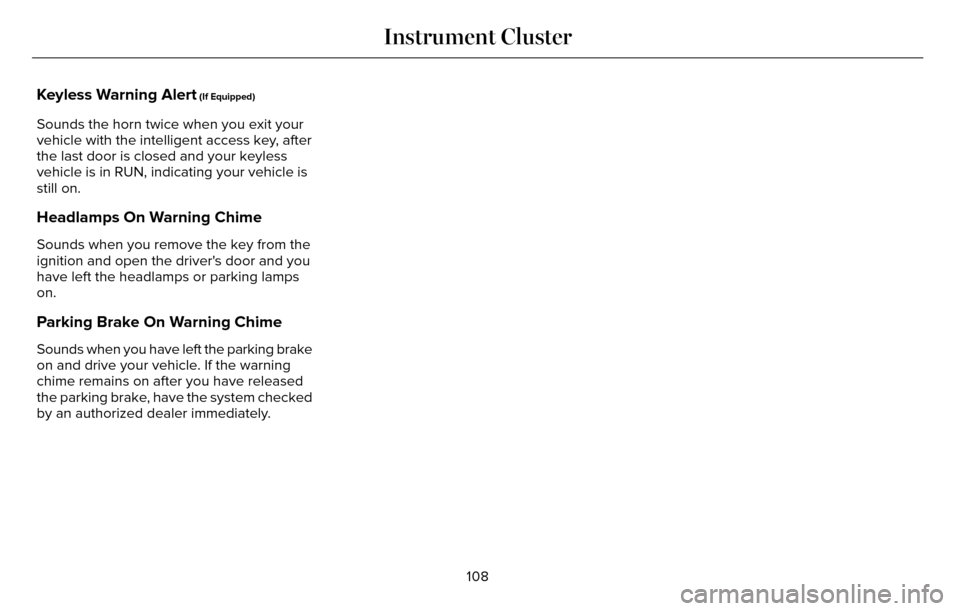
Keyless Warning Alert (If Equipped)
Sounds the horn twice when you exit your
vehicle with the intelligent access key, after
the last door is closed and your keyless
vehicle is in RUN, indicating your vehicle is
still on.
Headlamps On Warning Chime
Sounds when you remove the key from the
ignition and open the driver's door and you
have left the headlamps or parking lamps
on.
Parking Brake On Warning Chime
Sounds when you have left the parking brake
on and drive your vehicle. If the warning
chime remains on after you have released
the parking brake, have the system checked
by an authorized dealer immediately.108
Instrument Cluster
Page 126 of 544
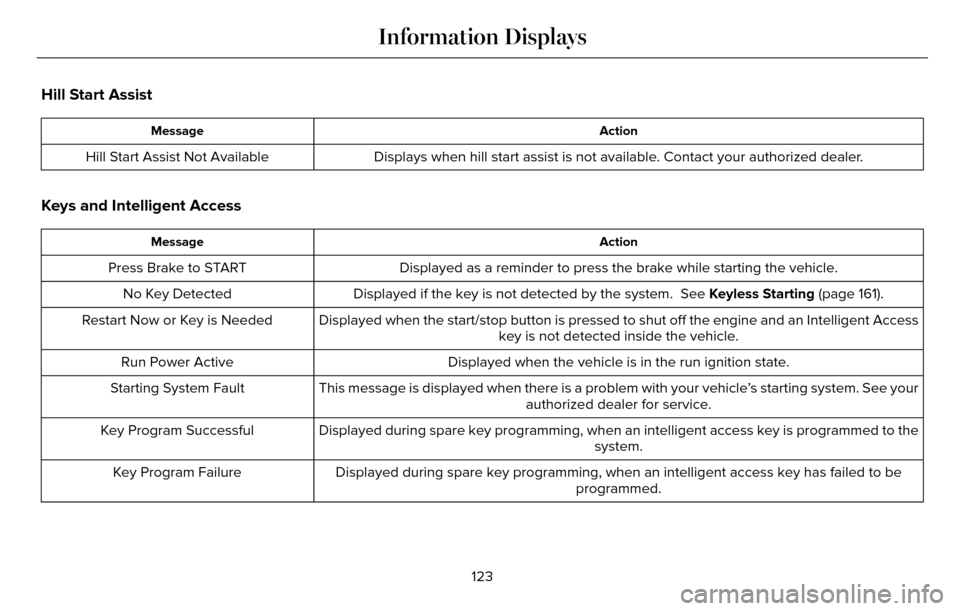
Hill Start Assist
Action
Message
Displays when hill start assist is not available. Contact your authorized dealer.
Hill Start Assist Not Available
Keys and Intelligent Access
Action
Message
Displayed as a reminder to press the brake while starting the vehicle.
Press Brake to START
Displayed if the key is not detected by the system. See Keyless Starting (page 161).
No Key Detected
Displayed when the start/stop button is pressed to shut off the engine a\
nd an Intelligent Accesskey is not detected inside the vehicle.
Restart Now or Key is Needed
Displayed when the vehicle is in the run ignition state.
Run Power Active
This message is displayed when there is a problem with your vehicle’s starting system. See your authorized dealer for service.
Starting System Fault
Displayed during spare key programming, when an intelligent access key i\
s programmed to the system.
Key Program Successful
Displayed during spare key programming, when an intelligent access key h\
as failed to be programmed.
Key Program Failure
123
Information Displays
Page 149 of 544
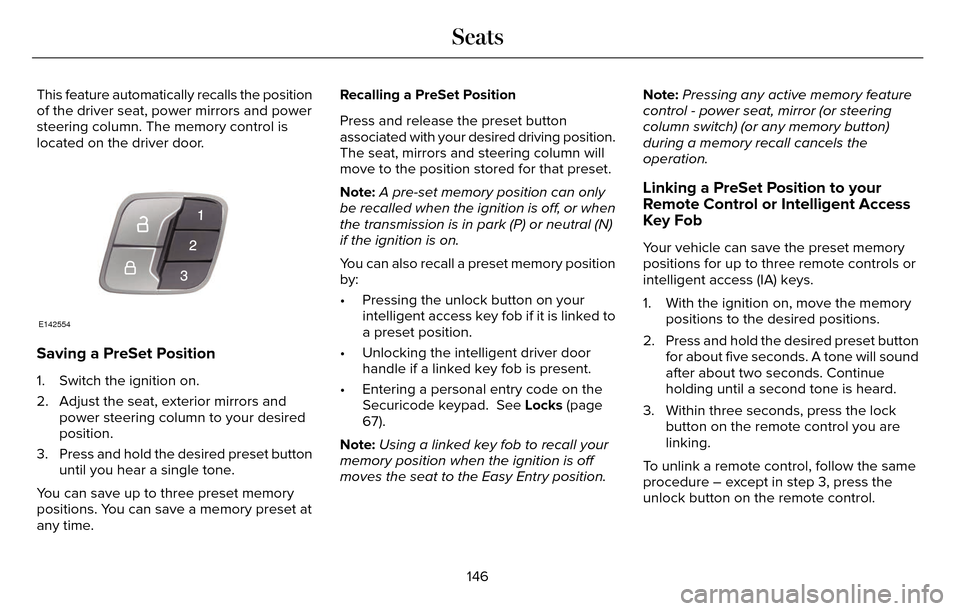
This feature automatically recalls the position
of the driver seat, power mirrors and power
steering column. The memory control is
located on the driver door.
E142554
Saving a PreSet Position
1. Switch the ignition on.
2. Adjust the seat, exterior mirrors andpower steering column to your desired
position.
3. Press and hold the desired preset button until you hear a single tone.
You can save up to three preset memory
positions. You can save a memory preset at
any time. Recalling a PreSet Position
Press and release the preset button
associated with your desired driving position.
The seat, mirrors and steering column will
move to the position stored for that preset.
Note:
A pre-set memory position can only
be recalled when the ignition is off, or when
the transmission is in park (P) or neutral (N)
if the ignition is on.
You can also recall a preset memory position
by:
• Pressing the unlock button on your intelligent access key fob if it is linked to
a preset position.
• Unlocking the intelligent driver door handle if a linked key fob is present.
• Entering a personal entry code on the Securicode keypad. See Locks (page
67).
Note: Using a linked key fob to recall your
memory position when the ignition is off
moves the seat to the Easy Entry position. Note:
Pressing any active memory feature
control - power seat, mirror (or steering
column switch) (or any memory button)
during a memory recall cancels the
operation.
Linking a PreSet Position to your
Remote Control or Intelligent Access
Key Fob
Your vehicle can save the preset memory
positions for up to three remote controls or
intelligent access (IA) keys.
1. With the ignition on, move the memory positions to the desired positions.
2. Press and hold the desired preset button for about five seconds. A tone will sound
after about two seconds. Continue
holding until a second tone is heard.
3. Within three seconds, press the lock button on the remote control you are
linking.
To unlink a remote control, follow the same
procedure – except in step 3, press the
unlock button on the remote control.
146
Seats
Page 537 of 544
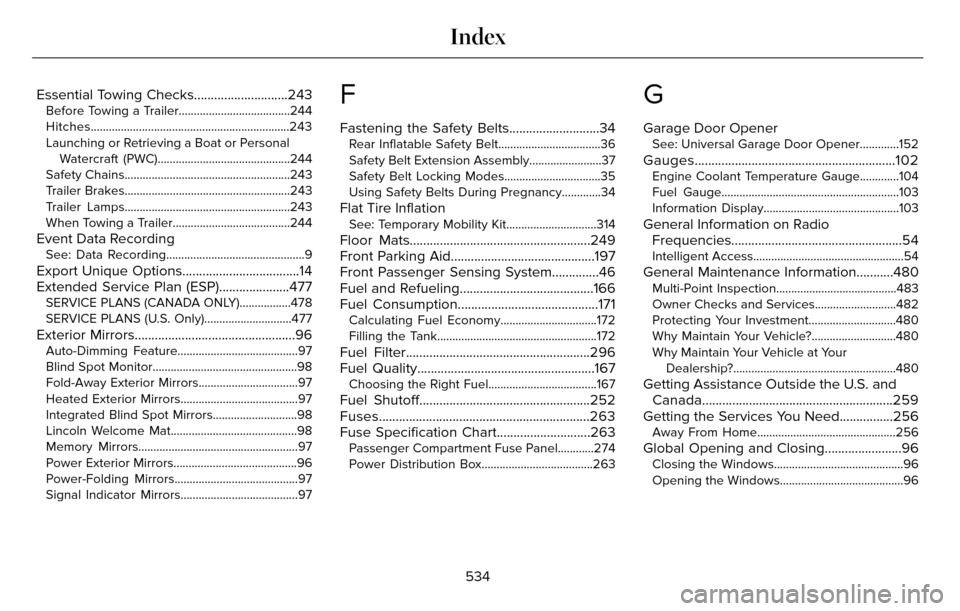
Essential Towing Checks............................243Before Towing a Trailer.....................................244
Hitches..................................................................243
Launching or Retrieving a Boat or PersonalWatercraft (PWC)............................................244
Safety Chains.......................................................243
Trailer Brakes.......................................................243
Trailer Lamps.......................................................243
When Towing a Trailer.......................................244
Event Data RecordingSee: Data Recording..............................................9
Export Unique Options...................................14
Extended Service Plan (ESP).....................477
SERVICE PLANS (CANADA ONLY).................478
SERVICE PLANS (U.S. Only).............................477
Exterior Mirrors................................................96Auto-Dimming Feature........................................97
Blind Spot Monitor................................................98
Fold-Away Exterior Mirrors.................................97
Heated Exterior Mirrors.......................................97
Integrated Blind Spot Mirrors............................98
Lincoln Welcome Mat..........................................98
Memory Mirrors.....................................................97
Power Exterior Mirrors.........................................96
Power-Folding Mirrors.........................................97
Signal Indicator Mirrors.......................................97
F
Fastening the Safety Belts...........................34Rear Inflatable Safety Belt..................................36
Safety Belt Extension Assembly........................37
Safety Belt Locking Modes................................35
Using Safety Belts During Pregnancy.............34
Flat Tire InflationSee: Temporary Mobility Kit..............................314
Floor Mats......................................................249
Front Parking Aid...........................................197
Front Passenger Sensing System..............46
Fuel and Refueling........................................166
Fuel Consumption..........................................171
Calculating Fuel Economy................................172
Filling the Tank.....................................................172
Fuel Filter.......................................................296
Fuel Quality.....................................................167
Choosing the Right Fuel....................................167
Fuel Shutoff...................................................252
Fuses...............................................................263
Fuse Specification Chart............................263
Passenger Compartment Fuse Panel............274
Power Distribution Box.....................................263
G
Garage Door OpenerSee: Universal Garage Door Opener.............152
Gauges............................................................102Engine Coolant Temperature Gauge.............104
Fuel Gauge...........................................................103\
Information Display.............................................103
General Information on Radio Frequencies...................................................54
Intelligent Access..................................................54
General Maintenance Information...........480Multi-Point Inspection........................................483
Owner Checks and Services...........................482
Protecting Your Investment.............................480
Why Maintain Your Vehicle?............................480
Why Maintain Your Vehicle at Your
Dealership?......................................................480
Getting Assistance Outside the U.S. andCanada.........................................................259
Getting the Services You Need................256
Away From Home..............................................256
Global Opening and Closing.......................96Closing the Windows...........................................96
Opening the Windows.........................................96
534
Index
Page 539 of 544
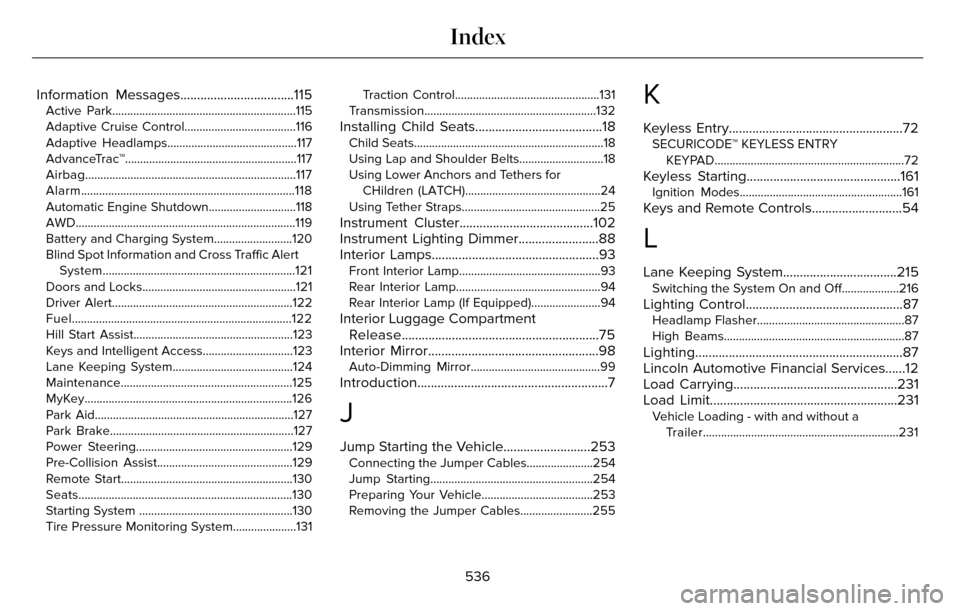
Information Messages..................................115Active Park.............................................................115
Adaptive Cruise Control.....................................116
Adaptive Headlamps...........................................117
AdvanceTrac™.........................................................117
Airbag......................................................................117
Alarm.......................................................................1\
18
Automatic Engine Shutdown.............................118
AWD........................................................................\
.119
Battery and Charging System..........................120
Blind Spot Information and Cross Traffic AlertSystem................................................................121
Doors and Locks...................................................121
Driver Alert............................................................\
122
Fuel........................................................................\
.122
Hill Start Assist.....................................................123
Keys and Intelligent Access..............................123
Lane Keeping System........................................124
Maintenance.........................................................125
MyKey.....................................................................126
Park Aid.................................................................\
.127
Park Brake.............................................................12\
7
Power Steering....................................................129
Pre-Collision Assist.............................................129
Remote Start.........................................................130
Seats.......................................................................1\
30
Starting System ...................................................130
Tire Pressure Monitoring System.....................131 Traction Control................................................131
Transmission.........................................................132
Installing Child Seats......................................18Child Seats.............................................................\
..18
Using Lap and Shoulder Belts............................18
Using Lower Anchors and Tethers for CHildren (LATCH).............................................24
Using Tether Straps..............................................25
Instrument Cluster........................................102
Instrument Lighting Dimmer........................88
Interior Lamps..................................................93
Front Interior Lamp...............................................93
Rear Interior Lamp................................................94
Rear Interior Lamp (If Equipped).......................94
Interior Luggage Compartment Release...........................................................75
Interior Mirror...................................................98
Auto-Dimming Mirror...........................................99
Introduction.........................................................7
J
Jump Starting the Vehicle..........................253Connecting the Jumper Cables......................254
Jump Starting......................................................254
Preparing Your Vehicle.....................................253
Removing the Jumper Cables........................255
K
Keyless Entry....................................................72SECURICODE™ KEYLESS ENTRY
KEYPAD...............................................................72
Keyless Starting..............................................161Ignition Modes......................................................161
Keys and Remote Controls...........................54
L
Lane Keeping System..................................215Switching the System On and Off...................216
Lighting Control...............................................87Headlamp Flasher.................................................87
High Beams............................................................87\
Lighting..............................................................87
Lincoln Automotive Financial Services......12
Load Carrying.................................................231
Load Limit........................................................231
Vehicle Loading - with and without aTrailer.................................................................231
536
Index
Page 540 of 544

Locking and Unlocking..................................67Activating Intelligent Access.............................68
Autolock ...............................................................\
..69
Auto Relock............................................................69
Battery Saver..........................................................7\
0
Illuminated Entry...................................................70
Illuminated Exit......................................................70\
Luggage Compartment.......................................70
Power Decklid.........................................................71
Power Door Locks................................................67
Remote Control.....................................................67
Smart Unlocks for Intelligent AccessKeys.....................................................................69
Locks..................................................................67
Lug Nuts
See: Changing a Road Wheel.........................346
M
Maintenance...................................................281General Information............................................281
Media Hub......................................................372
Memory Function..........................................145
Easy Entry and Exit Feature..............................147
Linking a PreSet Position to your RemoteControl or Intelligent Access Key Fob.......146
Saving a PreSet Position...................................146
Message CenterSee: Information Displays.................................109
MirrorsSee: Heated Windows and Mirrors.................138
See: Windows and Mirrors.................................95
Mobile Communications Equipment...........14
Moonroof.........................................................100
Bounce-Back.........................................................101
Opening and Closing the Moonroof..............100
Motorcraft Parts............................................354
MyKey Troubleshooting................................65
MyKey™..............................................................60
Principle of Operation.........................................60
MyLincoln Touch™.........................................373General Information...........................................373
MyLincoln Touch™ Troubleshooting.........467
N
Navigation ......................................................454cityseekr................................................................457
Destination Mode...............................................454
Map Mode............................................................462
Navigation Map Updates.................................466
Navigation Voice Commands.........................466
Point of Interest (POI) Categories..................456
Quick-touch Buttons..........................................465
Setting Your Navigation Preferences............458
Normal Scheduled Maintenance..............484Intelligent Oil-Life Monitor™..............................484
Maintenance Intervals.......................................486
O
Oil Change Indicator Reset.......................288
Oil Check
See: Engine Oil Check......................................287
Opening and Closing the Hood................281
Ordering Additional Owner's
Literature......................................................261
Obtaining a French Owner’s Manual.............261
Overhead Console.......................................160
P
Parking Aids....................................................196Principle of Operation........................................196
Passive Anti-Theft System............................77SecuriLock...............................................................77
PA T SSee: Passive Anti-Theft System.........................77
Perchlorate........................................................ 12
Personal Safety System™..............................43
How Does the Personal Safety System
Work?...................................................................43
537
Index