key program LINCOLN MKZ 2016 User Guide
[x] Cancel search | Manufacturer: LINCOLN, Model Year: 2016, Model line: MKZ, Model: LINCOLN MKZ 2016Pages: 544, PDF Size: 5.77 MB
Page 80 of 544
PASSIVE ANTI-THEFT SYSTEM
Note:The system is not compatible with
non-Ford aftermarket remote start systems.
Use of these systems may result in vehicle
starting problems and a loss of security
protection.
Note: Metallic objects, electronic devices or
a second coded key on the same key chain
may cause vehicle starting problems if they
are too close to the key when starting your
vehicle. Prevent these objects from touching
the coded key while starting your vehicle.
Switch the ignition off, move all objects on
the key chain away from the coded key and
restart your vehicle if a problem occurs.
Note: Do not leave a duplicate coded key
in your vehicle. Always take your keys and
lock all doors when leaving your vehicle.
SecuriLock
The system helps prevent your vehicle from
starting unless you use a coded key
programmed to your vehicle. Using the
wrong key may prevent your vehicle from
starting. A message may appear in the
information display.
If you are unable to start your vehicle with a
correctly coded key, it is not operating
properly. A message may appear in the
information display.
Automatic Arming
Your vehicle arms immediately after
switching the ignition off.
Automatic Disarming
Switching the ignition on with a coded key
disarms your vehicle.
Replacement Keys
Note: Your vehicle comes equipped with two
intelligent access keys. The intelligent access key functions as a
programmed key that operates the driver
door lock and activates the intelligent access
with push button start system, as well as a
remote control.
If your programmed transmitters are lost or
stolen and you do not have an extra coded
key, have your vehicle towed to an
authorized dealer. You need to erase the
key codes from your vehicle and program
new coded keys.
Store an extra programmed key away from
your vehicle in a safe place to help prevent
any inconveniences. See your authorized
dealer to purchase additional spare or
replacement keys.
Programming a Spare Intelligent Access
Key
Note:
You can program a maximum of four
intelligent access keys to your vehicle.
77
Security
Page 81 of 544
You must have two previously programmed
intelligent access keys inside your vehicle
and the new unprogrammed intelligent
access keys readily accessible. See an
authorized dealer to have the spare key
programmed if two previously programmed
keys are not available.
Make sure that your vehicle is off before
beginning this procedure. Make sure that
you close all the doors before beginning and
that they remain closed throughout the
procedure. Perform all steps within 30
seconds of starting the sequence. Stop and
wait for at least one minute before starting
again if you perform any steps out of
sequence.
Read and understand the entire procedure
before you begin.
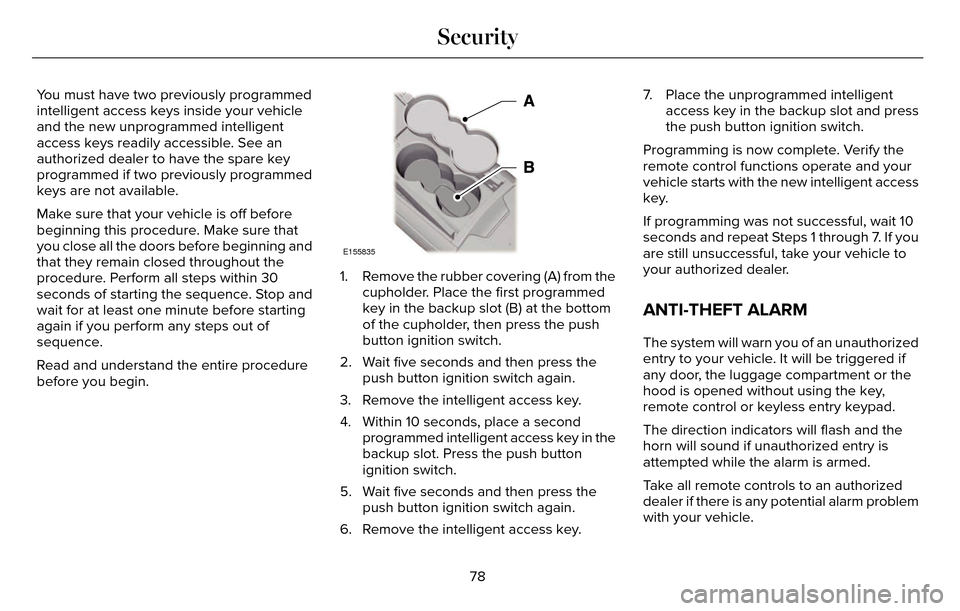
E155835
1. Remove the rubber covering (A) from thecupholder. Place the first programmed
key in the backup slot (B) at the bottom
of the cupholder, then press the push
button ignition switch.
2. Wait five seconds and then press the push button ignition switch again.
3. Remove the intelligent access key.
4. Within 10 seconds, place a second programmed intelligent access key in the
backup slot. Press the push button
ignition switch.
5. Wait five seconds and then press the push button ignition switch again.
6. Remove the intelligent access key. 7. Place the unprogrammed intelligent
access key in the backup slot and press
the push button ignition switch.
Programming is now complete. Verify the
remote control functions operate and your
vehicle starts with the new intelligent access
key.
If programming was not successful, wait 10
seconds and repeat Steps 1 through 7. If you
are still unsuccessful, take your vehicle to
your authorized dealer.
ANTI-THEFT ALARM
The system will warn you of an unauthorized
entry to your vehicle. It will be triggered if
any door, the luggage compartment or the
hood is opened without using the key,
remote control or keyless entry keypad.
The direction indicators will flash and the
horn will sound if unauthorized entry is
attempted while the alarm is armed.
Take all remote controls to an authorized
dealer if there is any potential alarm problem
with your vehicle.
78
Security
Page 126 of 544
Hill Start Assist
Action
Message
Displays when hill start assist is not available. Contact your authorized dealer.
Hill Start Assist Not Available
Keys and Intelligent Access
Action
Message
Displayed as a reminder to press the brake while starting the vehicle.
Press Brake to START
Displayed if the key is not detected by the system. See Keyless Starting (page 161).
No Key Detected
Displayed when the start/stop button is pressed to shut off the engine a\
nd an Intelligent Accesskey is not detected inside the vehicle.
Restart Now or Key is Needed
Displayed when the vehicle is in the run ignition state.
Run Power Active
This message is displayed when there is a problem with your vehicle’s starting system. See your authorized dealer for service.
Starting System Fault
Displayed during spare key programming, when an intelligent access key i\
s programmed to the system.
Key Program Successful
Displayed during spare key programming, when an intelligent access key h\
as failed to be programmed.
Key Program Failure
123
Information Displays
Page 127 of 544

Action
Message
Displayed during spare key programming when the maximum number of keys h\
ave been
programmed.
Max Number of Keys Learned
Displayed during spare key programming when not enough keys have been pr\
ogrammed.
Not Enough Keys Learned
Displays when the key battery is low. Change the battery as soon as possible.
Key Battery Low Replace Soon
Displayed when an attempt is made to program a spare key using two exist\
ing MyKeys.
Could Not Program Integrated Key
Displays to inform the driver that they are exiting the vehicle and the \
engine is on.
Engine On
Lane Keeping System
Action
Message
The system has malfunctioned. Contact your authorized dealer as soon as \
possible.
Lane Keeping Sys. Malfunction Service
Required
The system has detected a condition that has caused the system to be tem\
porarily unavailable.
Front Camera Temporarily Not Available
The system has detected a condition that requires the windshield to be c\
leaned to operateproperly.
Front Camera Low Visibility Clean Screen
The system has malfunctioned. Contact your authorized dealer as soon as \
possible.
Front Camera Malfunction Service
Required
Displayed when the system requests the driver to keep their hands on the\
steering wheel.
Keep Hands on Steering Wheel
124
Information Displays
Page 129 of 544
MyKey
Action
Message
Displayed during key programming when MyKey cannot be programmed.
MyKey Not Created
Displays when MyKey is active.
MyKey Active Drive Safely
Displays when starting the vehicle and MyKey is in use and the MyKey speed limit is on.
Speed Limited to XX MPH/km/h
Displays when a MyKey is in use and the MyKey speed limit is on and the vehicle speed isapproaching 80 mph (130 km/h).
Near Vehicle Top Speed
Displays when a MyKey is in use and the MyKey speed limit is reached.
Vehicle at Top Speed of MyKey Setting
Displays when MyKey is active.
Check Speed Drive Safely
Displays when a MyKey is in use and Belt-Minder is activated.
Buckle Up to Unmute Audio
Displays when a MyKey is in use and AdvanceTrac is activated.
AdvanceTrac On - MyKey Setting
Displays when a MyKey is in use and Traction control is activated.
Traction Control On - MyKey Setting
Displays when a MyKey is in use and park aid is activated.
MyKey Park Aid Cannot be Deactivated
Displayed when the lane keeping aid is on per MyKey settings.
Lane Keeping Alert On MyKey Setting
126
Information Displays
Page 177 of 544
You can correct these temporary
malfunctions by filling the fuel tank with good
quality fuel, properly closing the fuel fill inlet
or letting the electrical system dry out. After
three driving cycles without these or any
other temporary malfunctions present, the
service engine soon indicator should stay off
the next time you start the engine. A driving
cycle consists of a cold engine startup
followed by mixed city/highway driving. No
additional vehicle service is required.
If the service engine soon indicator remains
on, have your vehicle serviced at the first
available opportunity. Although some
malfunctions detected by the OBD-II may not
have symptoms that are apparent, continued
driving with the service engine soon indicator
on can result in increased emissions, lower
fuel economy, reduced engine and
transmission smoothness, and lead to more
costly repairs.Readiness for Inspection/Maintenance
(I/M) Testing
Some state/provincial and local governments
may have Inspection/Maintenance (I/M)
programs to inspect the emission control
equipment on your vehicle. Failure to pass
this inspection could prevent you from
getting a vehicle registration.
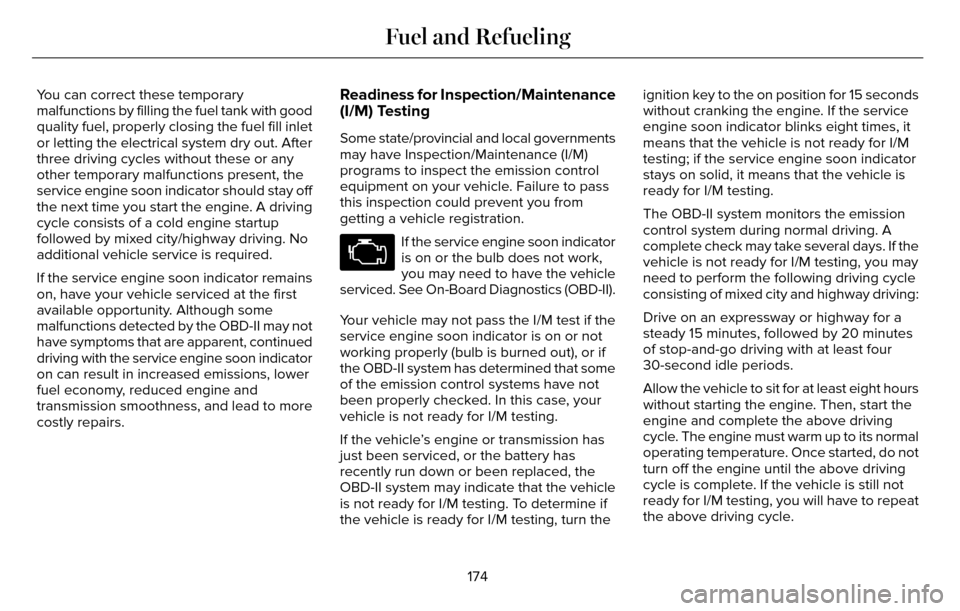
If the service engine soon indicator
is on or the bulb does not work,
you may need to have the vehicle
serviced. See On-Board Diagnostics (OBD-II).
Your vehicle may not pass the I/M test if the
service engine soon indicator is on or not
working properly (bulb is burned out), or if
the OBD-II system has determined that some
of the emission control systems have not
been properly checked. In this case, your
vehicle is not ready for I/M testing.
If the vehicle’s engine or transmission has
just been serviced, or the battery has
recently run down or been replaced, the
OBD-II system may indicate that the vehicle
is not ready for I/M testing. To determine if
the vehicle is ready for I/M testing, turn the ignition key to the on position for 15 seconds
without cranking the engine. If the service
engine soon indicator blinks eight times, it
means that the vehicle is not ready for I/M
testing; if the service engine soon indicator
stays on solid, it means that the vehicle is
ready for I/M testing.
The OBD-II system monitors the emission
control system during normal driving. A
complete check may take several days. If the
vehicle is not ready for I/M testing, you may
need to perform the following driving cycle
consisting of mixed city and highway driving:
Drive on an expressway or highway for a
steady 15 minutes, followed by 20 minutes
of stop-and-go driving with at least four
30-second idle periods.
Allow the vehicle to sit for at least eight hours
without starting the engine. Then, start the
engine and complete the above driving
cycle. The engine must warm up to its normal
operating temperature. Once started, do not
turn off the engine until the above driving
cycle is complete. If the vehicle is still not
ready for I/M testing, you will have to repeat
the above driving cycle.
174
Fuel and Refueling
Page 254 of 544
ROADSIDE ASSISTANCE
Vehicles Sold In the United States:
Getting Roadside Assistance
If you ever need help on the road, the Lincoln
Motor Company is there for you with
nationwide, 24-hours-a-day,
seven-days-a-week assistance.
The service is available:
• Throughout the life of the vehicle fororiginal owners.
• For six years or 70,000 mi (112,654.08 km) (whichever comes first)
within the extended powertrain warranty
coverage period for subsequent owners.
• For the coverage period listed on the Roadside Assistance Card included in
your Owner's Manual portfolio.
This complimentary Roadside Assistance
program is separate from the New Vehicle
Limited Warranty, and includes:
• A flat tire change with a good spare (except vehicles supplied with a tire
inflation kit).
• Battery jump start. • Lock-out assistance (key replacement
cost is the client's responsibility).
• Fuel delivery — independent service contractors, if not prohibited by state,
local or municipal law shall deliver up to
2.0 gal (7.5 L) of gasoline or 5.0 gal
(18.9 L) of diesel fuel to a disabled
vehicle. Roadside Assistance limits fuel
delivery service to two no-charge
occurrences within a 12-month period.
• Winch out — available within 100 ft (30.48 m) of a paved or county
maintained road, no recoveries.
• Towing — independent service contractors, if not prohibited by state,
local or municipal law shall tow Lincoln
eligible vehicles to the client's selling or
preferred dealer within 100 mi (161 km) of
the disablement location or to the nearest
Lincoln dealer. If a client requests a tow
to a selling or preferred dealer that is
more than 100 mi (161 km) from the
disablement location, the client shall be
responsible for any mileage costs in
excess of 100 mi (161 km). Roadside Assistance includes up to $200
coverage for a towed trailer if the disabled
eligible vehicle requires service at the
nearest authorized dealer. If the towing
vehicle is operational but the trailer is not,
then the trailer does not qualify for any
roadside services.
Vehicles Sold In the United States:
Using Roadside Assistance
United States Lincoln vehicle clients who
require Roadside Assistance, call
1-800-521-4140.
If you need to arrange roadside assistance
for yourself, Ford Motor Company will
reimburse a reasonable amount for towing
to the nearest Lincoln dealership within
100 mi (161 km). To obtain reimbursement
information, United States Lincoln vehicle
clients, call 1-800-521-4140. Ford Motor
Company will ask you to submit your original
receipts.
251
Roadside Emergencies
Page 535 of 544
B
Blind Spot Information System.................220Blind Spot Information System (BLIS®) withCross Traffic Alert..........................................220
Bonnet LockSee: Opening and Closing the Hood.............281
Booster Seats...................................................27Types of Booster Seats.......................................27
Brake Fluid Check.......................................296
Brakes...............................................................187\
General Information............................................187
Breaking-In.....................................................248
Bulb Specification Chart..............................301
C
Cabin Air Filter...............................................138
California Proposition 65................................11
Capacities and Specifications - 2.0LEcoBoost™....................................................357
Specifications......................................................358
Capacities and Specifications - 3.7L........363Specifications......................................................364
Capacities and Specifications...................353
Car Wash
See: Cleaning the Exterior...............................305
Center Console.............................................160 Changing a Bulb............................................301
Lamp Assembly Condensation........................301
Replacing Bulbs...................................................301
Changing a Fuse..........................................280Fuses.....................................................................280
Changing a Road Wheel.............................346Dissimilar Spare Wheel and Tire Assembly
Information.......................................................347
Stowing the flat tire............................................350
Tire Change Procedure....................................348
Changing the 12V Battery..........................297
Changing the Engine Air Filter.................303
2.0L EcoBoost Engine.......................................303
3.7L Engine...........................................................303
Changing the Wiper Blades......................299
Checking MyKey System Status.................64
Checking the Wiper Blades.......................299
Child Restraint and Safety Belt Maintenance...................................................41
Child Safety.......................................................16
General Information..............................................16
Child Safety Locks...........................................31Left-Hand Side.......................................................32
Right-Hand Side....................................................32
Child Seat Positioning...................................29
Cigar Lighter...................................................158
Cleaning Leather Seats................................311
Cleaning Products.......................................305 Cleaning the Alloy Wheels...........................311
Cleaning the Engine....................................307
Cleaning the Exterior..................................305
Exterior Chrome Parts.......................................306
Exterior Plastic Parts..........................................306
Stripes or Graphics............................................306
Underbody...........................................................306
Cleaning the Instrument Panel and
Instrument Cluster Lens............................310
Cleaning the Interior....................................308
Cleaning Black Label Interior (If
Equipped).........................................................308
Cleaning the Windows and WiperBlades...........................................................307
Clearing All MyKeys.......................................62
Climate............................................................450
Climate Control Voice Commands................453
Climate Control..............................................135
Climate Controlled Seats............................149
Cooled Seats........................................................150
Coolant CheckSee: Engine Coolant Check............................289
Crash Sensors and Airbag Indicator..........52
Creating a MyKey............................................61
Programming/Changing Configurable
Settings................................................................61
532
Index
Page 543 of 544
Tire Pressure Monitoring System.............342Changing Tires With a Tire PressureMonitoring System.........................................343
Understanding Your Tire Pressure Monitoring System .............................................................344
Tire Repair KitSee: Temporary Mobility Kit..............................314
TiresSee: Wheels and Tires.......................................314
Towing a Trailer.............................................240Load Placement..................................................240
Towing the Vehicle on Four Wheels.......246Emergency Towing............................................246
Recreational Towing..........................................246
Towing.............................................................240
Traction Control.............................................192
Principle of Operation........................................192
Transmission Code Designation..............356
Transmission...................................................175
Transmission
See: Transmission................................................175
Transporting the Vehicle............................245
Type Approvals.............................................528
RF Certification Logos for Tire PressureMonitoring Sensor(s).....................................528
U
Under Hood Overview - 2.0LEcoBoost™....................................................283
Under Hood Overview - 3.7L....................285
Universal Garage Door Opener................152
HomeLink Wireless Control System...............152
Using Adaptive Cruise Control.................207Blocked Sensor...................................................212
Changing the Set Speed...................................210
Detection Issues...................................................211
Disengaging the System...................................210
Following a Vehicle...........................................208
Hilly Condition Usage........................................210
Low Speed Automatic Cancellation...............210
Overriding the System.......................................210
Resuming the Set Speed..................................210
Setting a Speed..................................................208
Setting the Gap Distance.................................209
Switching the System Off...................................211
Switching the System On.................................207
Switching to Normal Cruise Control...............213
System Not Available.........................................212
Using All-Wheel Drive...................................181Driving In Special Conditions With All-Wheel
Drive (AWD).......................................................181
Using Cruise Control...................................206Switching Cruise Control Off...........................207
Switching Cruise Control On...........................206
Using MyKey With Remote StartSystems..........................................................65
Using Snow Chains......................................342
Using Stability Control.................................195
AdvanceTrac® ......................................................195
Using Summer Tires.....................................341
Using Traction Control.................................192
Switching the System Off Using a
Switch................................................................192
Switching the System Off Using the Information Display Controls.......................192
System Indicator Lights and Messages.........192
Utilizing the Mediation/Arbitration Program (Canada Only).............................................259
V
Vehicle Care..................................................305General Information...........................................305
Vehicle Certification Label.........................355
Vehicle Identification Number..................355
540
Index