phone LINCOLN MKZ 2016 User Guide
[x] Cancel search | Manufacturer: LINCOLN, Model Year: 2016, Model line: MKZ, Model: LINCOLN MKZ 2016Pages: 544, PDF Size: 5.77 MB
Page 265 of 544
To contact NHTSA, you may call the
Vehicle Safety Hotline toll-free at
1-888-327-4236 (TTY: 1-800-424-9153);
go to http://www.safercar.gov; or write
to:
Administrator1200 New Jersey Avenue, Southeast
Washington, D.C. 20590
You can also obtain other information
about motor vehicle safety from
http://www.safercar.gov.REPORTING SAFETY DEFECTS
(CANADA ONLY)
If you believe that your vehicle has a
defect which could cause a crash or
could cause injury or death, you should
immediately inform Transport Canada.
Transport Canada Contact Information
http://www.tc.gc.ca/eng/roadsafety/menu.htm
Website
1–800–333–0510
Phone
262
Customer Assistance
Page 279 of 544
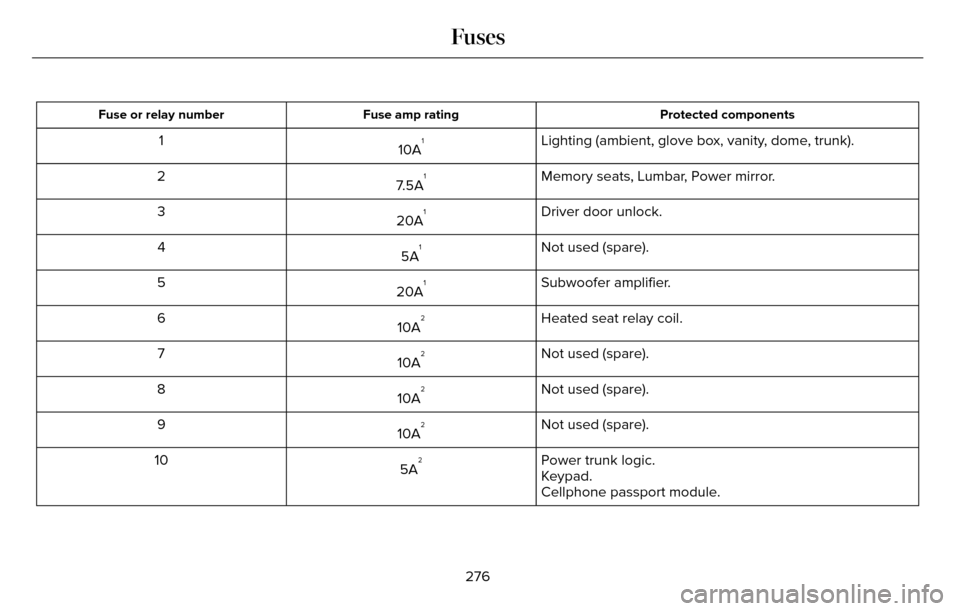
Protected components
Fuse amp rating
Fuse or relay number
Lighting (ambient, glove box, vanity, dome, trunk).
10A11
Memory seats, Lumbar, Power mirror.
7.5A
12
Driver door unlock.
20A
13
Not used (spare).
5A
14
Subwoofer amplifier.
20A
15
Heated seat relay coil.
10A
26
Not used (spare).
10A
27
Not used (spare).
10A
28
Not used (spare).
10A
29
Power trunk logic.
5A
210
Keypad.
Cellphone passport module.
276
Fuses
Page 377 of 544
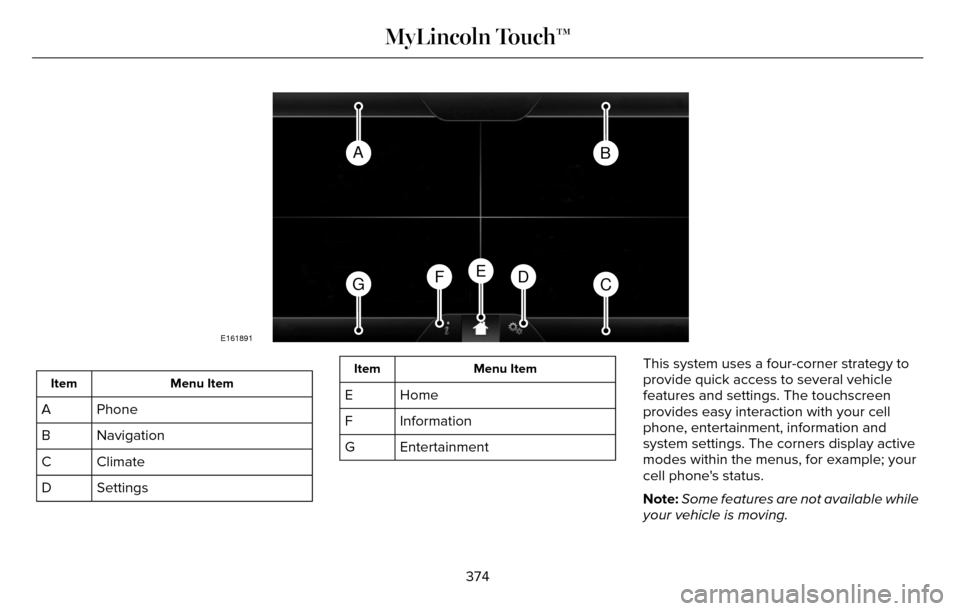
AB
GCDFE
E161891
Menu Item
Item
Phone
A
Navigation
B
Climate
C
Settings
D
Menu Item
Item
Home
E
Information
F
Entertainment
G This system uses a four-corner strategy to
provide quick access to several vehicle
features and settings. The touchscreen
provides easy interaction with your cell
phone, entertainment, information and
system settings. The corners display active
modes within the menus, for example; your
cell phone's status.
Note:
Some features are not available while
your vehicle is moving.
374
MyLincoln Touch™
Page 378 of 544
Note:You can access the entertainment
features for 30 minutes after you switch the
ignition off, and no doors are opened.
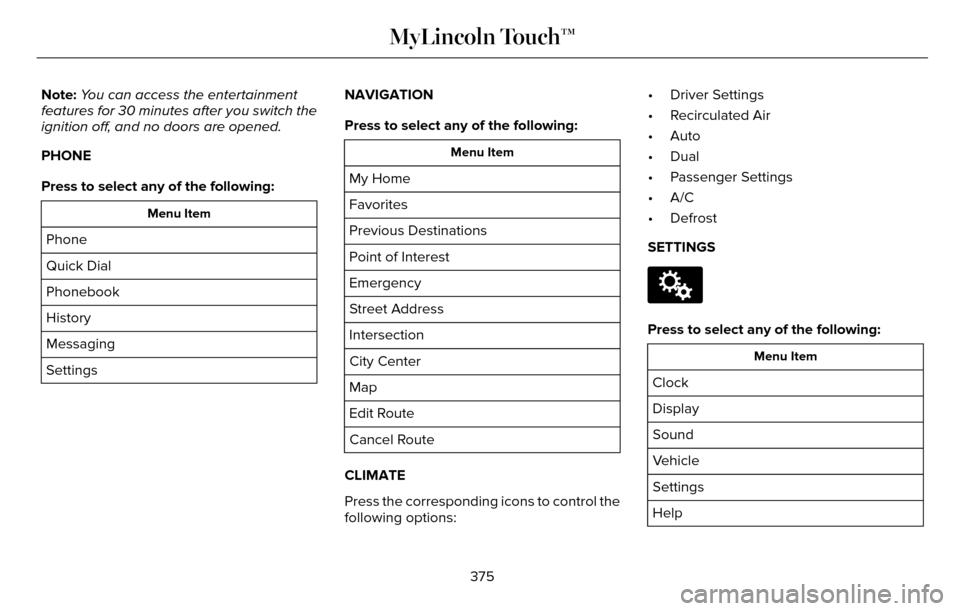
PHONE
Press to select any of the following:
Menu Item
Phone
Quick Dial
Phonebook
History
Messaging
Settings NAVIGATION
Press to select any of the following:
Menu Item
My Home
Favorites
Previous Destinations
Point of Interest
Emergency
Street Address
Intersection
City Center
Map
Edit Route
Cancel Route
CLIMATE
Press the corresponding icons to control the
following options: • Driver Settings
• Recirculated Air
• Auto
• Dual
• Passenger Settings
• A/C
• Defrost
SETTINGS
E142607
Press to select any of the following:
Menu Item
Clock
Display
Sound
Vehicle
Settings
Help
375
MyLincoln Touch™
Page 381 of 544
Using the Steering Wheel Controls
Depending on your vehicle, it may also have the following controls:
Action and Description
Control
Adjust the volume of playing media.
VOL
Press to start a voice session. Press again to interrupt a voice prompt \
and begin speaking. Press
and hold to end an active voice session.
Voice
Use as you normally would in media and phone modes.
Seek and Call Accept
Use as you normally would in media and phone modes.
Seek and Call Reject
Using the Touchscreen
• Make sure your hands are clean and dry.
• Press firmly on the center of a control
graphic or menu item.
• Keep metal objects or other conductive material away from the surface of the
touchscreen.
Cleaning the Touchscreen Display
Use a dry, clean, soft cloth. If dirt or
fingerprints are still visible, apply a small
amount of alcohol to the cloth. Do not pour
or spray alcohol onto the display. Do not use
detergent or any type of solvent to clean the
display.
Support
The SYNC support team is available:
• Monday-Saturday, 8:30am-8:00pm EST.
• United States: 1-800-521-4140
• Canada: 1-800-387-9333
Note: Times are subject to change due to
holidays.
378
MyLincoln Touch™
Page 382 of 544
Safety Information
WARNING
Driving while distracted can result in
loss of vehicle control, crash and injury.
We strongly recommend that you use
extreme caution when using any device that
may take your focus off the road. Your
primary responsibility is the safe operation
of your vehicle. We recommend against the
use of any hand-held device while driving
and encourage the use of voice-operated
systems when possible. Make sure you are
aware of all applicable local laws that may
affect the use of electronic devices while
driving.
• Do not attempt to service or repair the system. Have your vehicle checked by
an authorized dealer.
• Do not operate media devices if the power cables are broken or damaged.
• Make sure the power cables do not interfere with the safe operation of your
vehicle's controls or affect your safe
driving abilities.
• Some SYNC functions are speed-dependent. Their use is limited to
when your vehicle is traveling at speeds
below 3 mph (5 km/h).
Make sure that you review your device's
manual before using it with SYNC.Speed-restricted Features
Some features of this system are restricted
from use unless your vehicle is stationary.
• Screens crowded with information, for example:
• Point of Interest reviews and ratings
• SIRIUS Travel Link sports scores
• Movie times
• Ski conditions.
• Any action that requires keyboard use, for example: entering a navigation
destination or editing information.
• All lists are limited, for example: phone contacts.
See the following chart for more specific
examples.
Speed-restricted Features
Pairing a cell phone
Cell phone
Adding or editing phonebook contacts
Phone contacts and recent phone call entries
379
MyLincoln Touch™
Page 384 of 544
Privacy Information
When you connect a cell phone to SYNC,
the system creates a profile within your
vehicle that links to that cell phone. This
profile helps in offering you more cellular
features and operating more efficiently.
Among other things, this profile may contain
data about your cell phone book, text
messages (read and unread), and call history,
including history of calls when your cell
phone was not connected to the system. In
addition, if you connect a media device, the
system creates and retains an index of
supported media content. The system also
records a short development log of
approximately 10 minutes of all recent system
activity. The log profile and other system data
may be used to improve the system and help
diagnose any problems that may occur.
The cellular profile, media device index, and
development log remain in your vehicle
unless you delete them, and are generally
accessible only in your vehicle when your
cell phone or media player is connected. If
you no longer plan to use the system or your
vehicle, we recommend you carry out a
Master Reset to erase all stored information.System data cannot be accessed without
special equipment and access to your
vehicle's SYNC module. Ford Motor
Company and Ford of Canada do not access
the system data for any purpose other than
as described without consent, a court order,
or where required by law enforcement, other
government authorities, or other third parties
acting with lawful authority. Other parties
may seek to access the information
independently of Ford Motor Company and
Ford of Canada. For further privacy
information, see the sections on 911 Assist®,
Vehicle Health Report, and Traffic, Directions
and Information.
Using Voice Commands
This system helps you control many features
using voice commands. This allows you to
keep your hands on the wheel and focus on
what is in front of you. The system provides
feedback through audible tones, prompts,
questions and spoken confirmations
depending on the situation and the chosen
level of interaction (voice settings).
The system also asks short questions
(confirmation prompts) when it is not sure of
your request or when there are multiple
possible responses to your request.
When using voice commands, words and
icons may appear in the lower left status bar
indicating the status of the voice command
session (such as Listening, Success, Failed,
Paused or Try Again).
How to Use Voice Commands
E142599
The following are some of the
voice commands that you can say
at any time during a voice
command session.
381
MyLincoln Touch™
Page 385 of 544
Press the voice button and when prompted
say:
Voice command
Main Menu
What Can I Say
Previous Page
Go Back
Help
Helpful Hints
• Make sure the interior of your vehicle is as quiet as possible. Wind noise from
open windows and road vibrations may
prevent the system from correctly
recognizing spoken voice commands.
• After pressing the voice command icon, wait until after the tone sounds and a
message appears before saying a voice
command. Any voice command spoken
prior to this does not register with the
system. • Speak naturally, without long pauses
between words.
• At any time, you can interrupt the system while it is speaking by pressing the voice
command icon.
Accessing a List of Available Voice
Commands
To access a list of available voice commands
you can do either of the following.
Using the touchscreen, press:
Menu Item
Settings
Help
Voice Command List Using the steering wheel control, press the
voice button and when prompted say one
of the following:
Voice Commands
List of Commands
Radio List of Commands
Phone List of Commands
Voice Instructions List of Commands
Voice Command Settings
These allow you to customize the level of
system interaction, help and feedback. The
system defaults to standard interaction that
uses candidate lists and confirmation
prompts as these provide the highest level
of guidance and feedback.
382
MyLincoln Touch™
Page 386 of 544
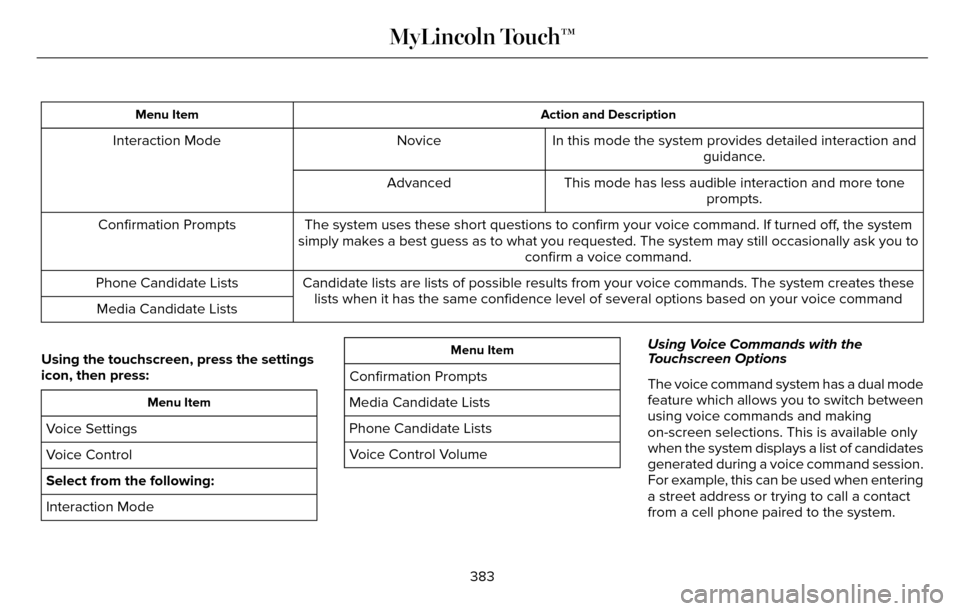
Action and Description
Menu Item
In this mode the system provides detailed interaction and
guidance.
Novice
Interaction Mode
This mode has less audible interaction and more toneprompts.
Advanced
The system uses these short questions to confirm your voice command. If \
turned off, the system
simply makes a best guess as to what you requested. The system may still\
occasionally ask you to confirm a voice command.
Confirmation Prompts
Candidate lists are lists of possible results from your voice commands. \
The system creates theselists when it has the same confidence level of several options based on \
your voice command
Phone Candidate Lists
Media Candidate Lists
Using the touchscreen, press the settings
icon, then press:
Menu Item
Voice Settings
Voice Control
Select from the following:
Interaction Mode
Menu Item
Confirmation Prompts
Media Candidate Lists
Phone Candidate Lists
Voice Control Volume Using Voice Commands with the
Touchscreen Options
The voice command system has a dual mode
feature which allows you to switch between
using voice commands and making
on-screen selections. This is available only
when the system displays a list of candidates
generated during a voice command session.
For example, this can be used when entering
a street address or trying to call a contact
from a cell phone paired to the system.
383
MyLincoln Touch™
Page 394 of 544
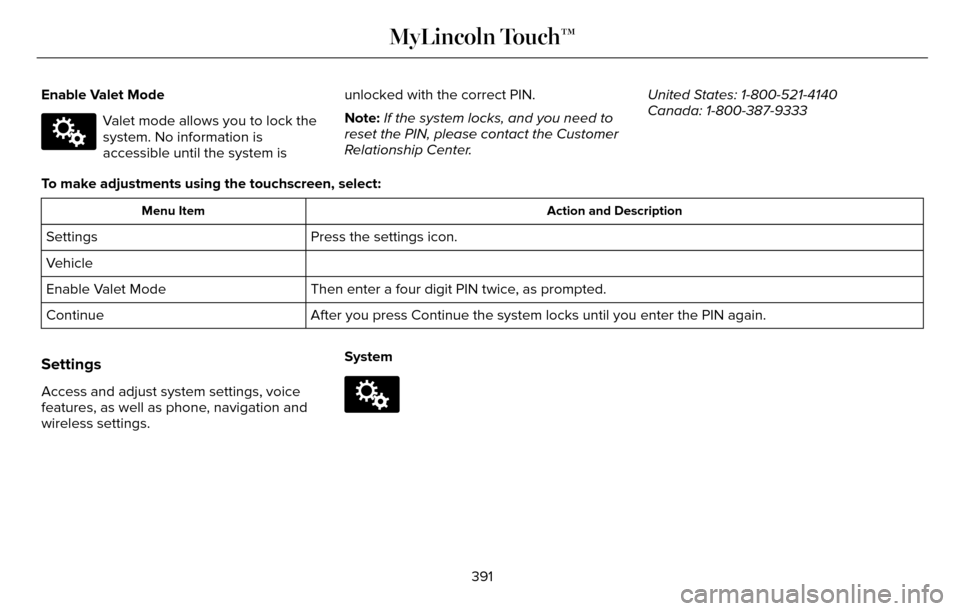
Enable Valet Mode
E142607
Valet mode allows you to lock the
system. No information is
accessible until the system isunlocked with the correct PIN.
Note:
If the system locks, and you need to
reset the PIN, please contact the Customer
Relationship Center. United States: 1-800-521-4140
Canada: 1-800-387-9333
To make adjustments using the touchscreen, select:
Action and Description
Menu Item
Press the settings icon.
Settings
Vehicle
Then enter a four digit PIN twice, as prompted.
Enable Valet Mode
After you press Continue the system locks until you enter the PIN again.\
Continue
Settings
Access and adjust system settings, voice
features, as well as phone, navigation and
wireless settings. SystemE142607
391
MyLincoln Touch™