remote control LINCOLN MKZ 2016 Owner's Guide
[x] Cancel search | Manufacturer: LINCOLN, Model Year: 2016, Model line: MKZ, Model: LINCOLN MKZ 2016Pages: 544, PDF Size: 5.77 MB
Page 258 of 544
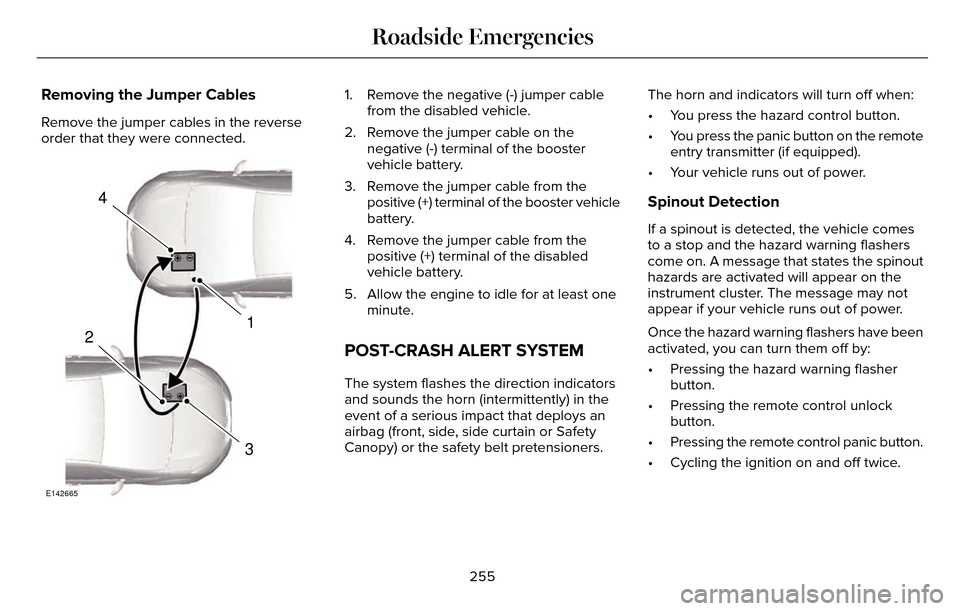
Removing the Jumper Cables
Remove the jumper cables in the reverse
order that they were connected.
4
1
3
2
E142665
1. Remove the negative (-) jumper cablefrom the disabled vehicle.
2. Remove the jumper cable on the negative (-) terminal of the booster
vehicle battery.
3. Remove the jumper cable from the positive (+) terminal of the booster vehicle
battery.
4. Remove the jumper cable from the positive (+) terminal of the disabled
vehicle battery.
5. Allow the engine to idle for at least one minute.
POST-CRASH ALERT SYSTEM
The system flashes the direction indicators
and sounds the horn (intermittently) in the
event of a serious impact that deploys an
airbag (front, side, side curtain or Safety
Canopy) or the safety belt pretensioners. The horn and indicators will turn off when:
• You press the hazard control button.
• You press the panic button on the remote
entry transmitter (if equipped).
• Your vehicle runs out of power.
Spinout Detection
If a spinout is detected, the vehicle comes
to a stop and the hazard warning flashers
come on. A message that states the spinout
hazards are activated will appear on the
instrument cluster. The message may not
appear if your vehicle runs out of power.
Once the hazard warning flashers have been
activated, you can turn them off by:
• Pressing the hazard warning flasher button.
• Pressing the remote control unlock button.
• Pressing the remote control panic button.
• Cycling the ignition on and off twice.
255
Roadside Emergencies
Page 539 of 544
Information Messages..................................115Active Park.............................................................115
Adaptive Cruise Control.....................................116
Adaptive Headlamps...........................................117
AdvanceTrac™.........................................................117
Airbag......................................................................117
Alarm.......................................................................1\
18
Automatic Engine Shutdown.............................118
AWD........................................................................\
.119
Battery and Charging System..........................120
Blind Spot Information and Cross Traffic AlertSystem................................................................121
Doors and Locks...................................................121
Driver Alert............................................................\
122
Fuel........................................................................\
.122
Hill Start Assist.....................................................123
Keys and Intelligent Access..............................123
Lane Keeping System........................................124
Maintenance.........................................................125
MyKey.....................................................................126
Park Aid.................................................................\
.127
Park Brake.............................................................12\
7
Power Steering....................................................129
Pre-Collision Assist.............................................129
Remote Start.........................................................130
Seats.......................................................................1\
30
Starting System ...................................................130
Tire Pressure Monitoring System.....................131 Traction Control................................................131
Transmission.........................................................132
Installing Child Seats......................................18Child Seats.............................................................\
..18
Using Lap and Shoulder Belts............................18
Using Lower Anchors and Tethers for CHildren (LATCH).............................................24
Using Tether Straps..............................................25
Instrument Cluster........................................102
Instrument Lighting Dimmer........................88
Interior Lamps..................................................93
Front Interior Lamp...............................................93
Rear Interior Lamp................................................94
Rear Interior Lamp (If Equipped).......................94
Interior Luggage Compartment Release...........................................................75
Interior Mirror...................................................98
Auto-Dimming Mirror...........................................99
Introduction.........................................................7
J
Jump Starting the Vehicle..........................253Connecting the Jumper Cables......................254
Jump Starting......................................................254
Preparing Your Vehicle.....................................253
Removing the Jumper Cables........................255
K
Keyless Entry....................................................72SECURICODE™ KEYLESS ENTRY
KEYPAD...............................................................72
Keyless Starting..............................................161Ignition Modes......................................................161
Keys and Remote Controls...........................54
L
Lane Keeping System..................................215Switching the System On and Off...................216
Lighting Control...............................................87Headlamp Flasher.................................................87
High Beams............................................................87\
Lighting..............................................................87
Lincoln Automotive Financial Services......12
Load Carrying.................................................231
Load Limit........................................................231
Vehicle Loading - with and without aTrailer.................................................................231
536
Index
Page 540 of 544

Locking and Unlocking..................................67Activating Intelligent Access.............................68
Autolock ...............................................................\
..69
Auto Relock............................................................69
Battery Saver..........................................................7\
0
Illuminated Entry...................................................70
Illuminated Exit......................................................70\
Luggage Compartment.......................................70
Power Decklid.........................................................71
Power Door Locks................................................67
Remote Control.....................................................67
Smart Unlocks for Intelligent AccessKeys.....................................................................69
Locks..................................................................67
Lug Nuts
See: Changing a Road Wheel.........................346
M
Maintenance...................................................281General Information............................................281
Media Hub......................................................372
Memory Function..........................................145
Easy Entry and Exit Feature..............................147
Linking a PreSet Position to your RemoteControl or Intelligent Access Key Fob.......146
Saving a PreSet Position...................................146
Message CenterSee: Information Displays.................................109
MirrorsSee: Heated Windows and Mirrors.................138
See: Windows and Mirrors.................................95
Mobile Communications Equipment...........14
Moonroof.........................................................100
Bounce-Back.........................................................101
Opening and Closing the Moonroof..............100
Motorcraft Parts............................................354
MyKey Troubleshooting................................65
MyKey™..............................................................60
Principle of Operation.........................................60
MyLincoln Touch™.........................................373General Information...........................................373
MyLincoln Touch™ Troubleshooting.........467
N
Navigation ......................................................454cityseekr................................................................457
Destination Mode...............................................454
Map Mode............................................................462
Navigation Map Updates.................................466
Navigation Voice Commands.........................466
Point of Interest (POI) Categories..................456
Quick-touch Buttons..........................................465
Setting Your Navigation Preferences............458
Normal Scheduled Maintenance..............484Intelligent Oil-Life Monitor™..............................484
Maintenance Intervals.......................................486
O
Oil Change Indicator Reset.......................288
Oil Check
See: Engine Oil Check......................................287
Opening and Closing the Hood................281
Ordering Additional Owner's
Literature......................................................261
Obtaining a French Owner’s Manual.............261
Overhead Console.......................................160
P
Parking Aids....................................................196Principle of Operation........................................196
Passive Anti-Theft System............................77SecuriLock...............................................................77
PA T SSee: Passive Anti-Theft System.........................77
Perchlorate........................................................ 12
Personal Safety System™..............................43
How Does the Personal Safety System
Work?...................................................................43
537
Index
Page 541 of 544
Phone..............................................................426Making Calls........................................................429
Pairing Subsequent Cell Phones....................428
Pairing Your Cell Phone for the FirstTime...................................................................427
Phone Menu Options........................................430
Phone Settings....................................................434
Phone Voice Commands..................................435
Receiving Calls....................................................430
Text Messaging...................................................432
Post-Crash Alert System............................255Spinout Detection..............................................255
Power Door LocksSee: Locking and Unlocking..............................67
Power Seats....................................................142Multi-Contour Front Seats With Active Motion ........................................................................\
.....144
Power Lumbar......................................................144
Power Windows..............................................95Accessory Delay...................................................96
Bounce-Back..........................................................95
One-Touch Down..................................................95
One-Touch Up.......................................................95
Window Lock.........................................................96
Pre-Collision Assist......................................226Using the Pre-Collision Assist System..........227
Protecting the Environment..........................15
R
Rear Parking Aid............................................197
Rear Seat Armrest.........................................150
Armrest pass-through........................................150
Rear Seats.......................................................147
Rear View Camera.......................................202
Using the Rear View Camera System...........203
Rear View CameraSee: Rear View Camera...................................202
Recommended Towing Weights...............241
Refueling.........................................................169
Easy Fuel™ Capless Fuel System.....................170
Remote Control...............................................55Car Finder..............................................................\
.57
Intelligent Access Key.........................................55
Remote Start...........................................................57
Replacing the Battery..........................................56
Sounding a Panic Alarm......................................57
Remote Start...................................................138Automatic Settings..............................................139
Repairing Minor Paint Damage...................311
Replacement Parts Recommendation........12
Collision Repairs.....................................................13
Scheduled Maintenance and Mechanical Repairs.................................................................12
Warranty on Replacement Parts.........................13
Replacing a Lost Key or Remote Control............................................................59
Reporting Safety Defects (Canada Only)..............................................................262
Reporting Safety Defects (U.S. Only).......261
Roadside Assistance....................................251
Vehicles Sold In Canada: Getting Roadside
Assistance.......................................................252
Vehicles Sold In Canada: Using Roadside Assistance.......................................................252
Vehicles Sold In the United States: Getting Roadside Assistance......................................251
Vehicles Sold In the United States: Using Roadside Assistance......................................251
Roadside Emergencies................................251
Running-In
See: Breaking-In.................................................248
Running Out of Fuel.....................................168Refilling With a Portable Fuel Container.......168
S
Safety Belt Height Adjustment....................38
Safety Belt Minder..........................................39
Belt-Minder™...........................................................39
Safety Belts.......................................................33Principle of Operation..........................................33
538
Index
Page 543 of 544
Tire Pressure Monitoring System.............342Changing Tires With a Tire PressureMonitoring System.........................................343
Understanding Your Tire Pressure Monitoring System .............................................................344
Tire Repair KitSee: Temporary Mobility Kit..............................314
TiresSee: Wheels and Tires.......................................314
Towing a Trailer.............................................240Load Placement..................................................240
Towing the Vehicle on Four Wheels.......246Emergency Towing............................................246
Recreational Towing..........................................246
Towing.............................................................240
Traction Control.............................................192
Principle of Operation........................................192
Transmission Code Designation..............356
Transmission...................................................175
Transmission
See: Transmission................................................175
Transporting the Vehicle............................245
Type Approvals.............................................528
RF Certification Logos for Tire PressureMonitoring Sensor(s).....................................528
U
Under Hood Overview - 2.0LEcoBoost™....................................................283
Under Hood Overview - 3.7L....................285
Universal Garage Door Opener................152
HomeLink Wireless Control System...............152
Using Adaptive Cruise Control.................207Blocked Sensor...................................................212
Changing the Set Speed...................................210
Detection Issues...................................................211
Disengaging the System...................................210
Following a Vehicle...........................................208
Hilly Condition Usage........................................210
Low Speed Automatic Cancellation...............210
Overriding the System.......................................210
Resuming the Set Speed..................................210
Setting a Speed..................................................208
Setting the Gap Distance.................................209
Switching the System Off...................................211
Switching the System On.................................207
Switching to Normal Cruise Control...............213
System Not Available.........................................212
Using All-Wheel Drive...................................181Driving In Special Conditions With All-Wheel
Drive (AWD).......................................................181
Using Cruise Control...................................206Switching Cruise Control Off...........................207
Switching Cruise Control On...........................206
Using MyKey With Remote StartSystems..........................................................65
Using Snow Chains......................................342
Using Stability Control.................................195
AdvanceTrac® ......................................................195
Using Summer Tires.....................................341
Using Traction Control.................................192
Switching the System Off Using a
Switch................................................................192
Switching the System Off Using the Information Display Controls.......................192
System Indicator Lights and Messages.........192
Utilizing the Mediation/Arbitration Program (Canada Only).............................................259
V
Vehicle Care..................................................305General Information...........................................305
Vehicle Certification Label.........................355
Vehicle Identification Number..................355
540
Index