sport mode LINCOLN MKZ 2016 Owners Manual
[x] Cancel search | Manufacturer: LINCOLN, Model Year: 2016, Model line: MKZ, Model: LINCOLN MKZ 2016Pages: 544, PDF Size: 5.77 MB
Page 114 of 544
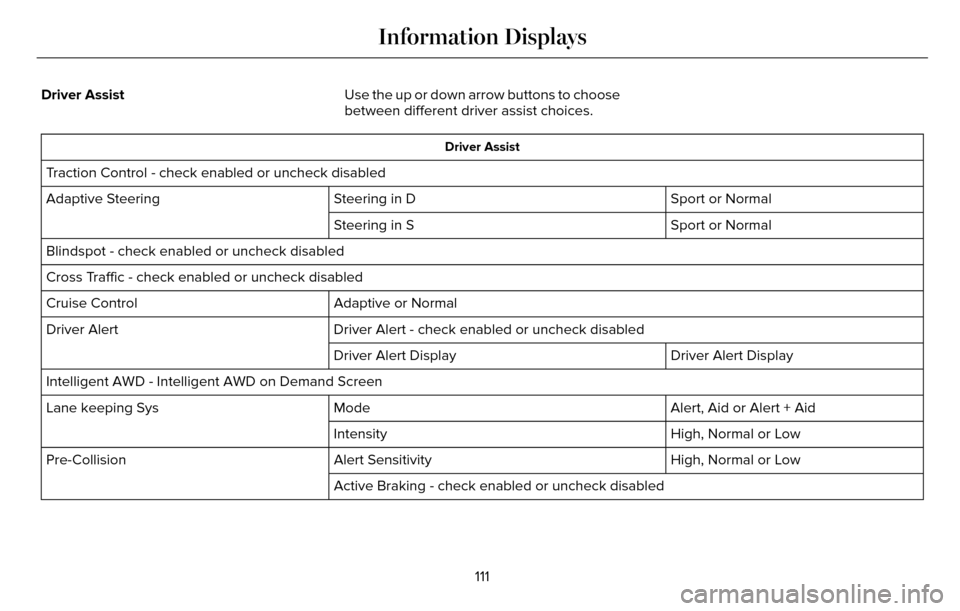
Driver AssistUse the up or down arrow buttons to choose
between different driver assist choices.
Driver Assist
Traction Control - check enabled or uncheck disabled
Sport or Normal
Steering in D
Adaptive Steering
Sport or Normal
Steering in S
Blindspot - check enabled or uncheck disabled
Cross Traffic - check enabled or uncheck disabled Adaptive or Normal
Cruise Control
Driver Alert - check enabled or uncheck disabled
Driver Alert
Driver Alert Display
Driver Alert Display
Intelligent AWD - Intelligent AWD on Demand Screen Alert, Aid or Alert + Aid
Mode
Lane keeping Sys
High, Normal or Low
Intensity
High, Normal or Low
Alert Sensitivity
Pre-Collision
Active Braking - check enabled or uncheck disabled
111
Information Displays
Page 128 of 544
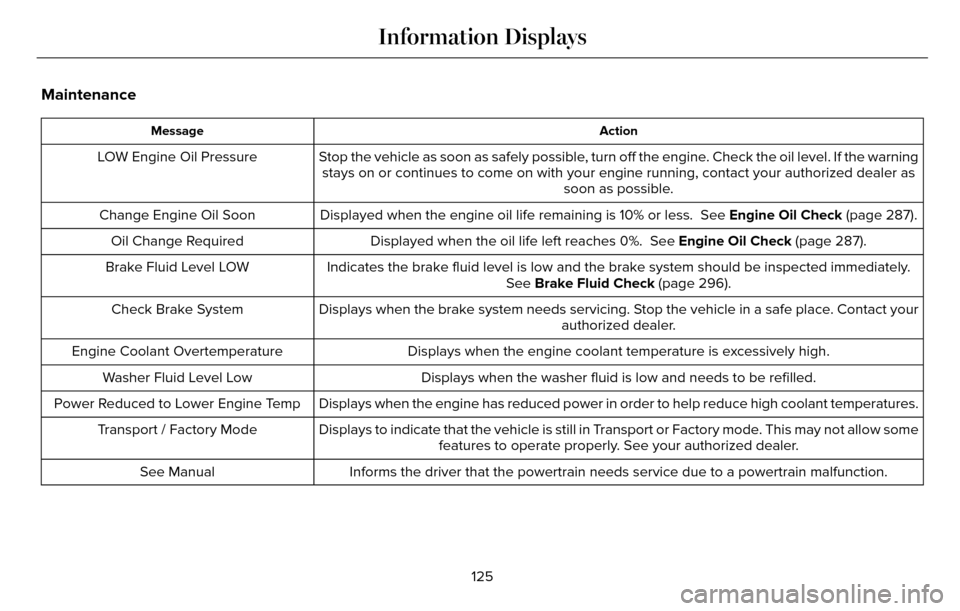
Maintenance
Action
Message
Stop the vehicle as soon as safely possible, turn off the engine. Check the oil level. If the warning
stays on or continues to come on with your engine running, contact your \
authorized dealer as soon as possible.
LOW Engine Oil Pressure
Displayed when the engine oil life remaining is 10% or less. See Engine Oil Check (page 287).
Change Engine Oil Soon
Displayed when the oil life left reaches 0%. See Engine Oil Check (page 287).
Oil Change Required
Indicates the brake fluid level is low and the brake system should be in\
spected immediately.See Brake Fluid Check (page 296).
Brake Fluid Level LOW
Displays when the brake system needs servicing. Stop the vehicle in a safe place. Contact your authorized dealer.
Check Brake System
Displays when the engine coolant temperature is excessively high.
Engine Coolant Overtemperature
Displays when the washer fluid is low and needs to be refilled.
Washer Fluid Level Low
Displays when the engine has reduced power in order to help reduce high \
coolant temperatures.
Power Reduced to Lower Engine Temp
Displays to indicate that the vehicle is still in Transport or Factory mode. This may not allow somefeatures to operate properly. See your authorized dealer.
Transport / Factory Mode
Informs the driver that the powertrain needs service due to a powertrain\
malfunction.
See Manual
125
Information Displays
Page 180 of 544
A message will appear in your information
display screen when your vehicle has
entered Stay in Neutral mode.
Note:During this mode the neutral (N) button
will flash continuously and your instrument
cluster will display N as the selected gear.
Exiting Stay in Neutral mode
To disable Stay in Neutral mode select
another gear. See the Putting the Vehicle
in Gear for instructions on how to do this.
Entering a Carwash
Note: Always put your vehicle in Stay in
Neutral mode when entering an automatic
car wash. Failure to do this could result in
vehicle damage not covered by warranty.
Drive (D)
The normal driving position for the best fuel
economy. Sport (S)
Putting the vehicle in sport (S):
• Provides additional engine braking and
extends lower gear operation to enhance
performance for uphill climbs, hilly terrain
or mountainous areas. This will increase
engine RPM during engine braking
• Provides additional lower gear operation through the automatic transmission shift
strategy
• Provides gear selection more quickly and at higher engine speeds
SelectShift Automatic™ Transmission
Your SelectShift Automatic transmission
gives you the ability to change gears
manually.
Paddle Shifters With your vehicle in drive (D), the paddle
shifters provide temporary manual control.
They allow you the ability to shift gears
quickly, without taking your hands off the
steering wheel.
You can achieve extensive manual control
by pressing the sport (S) button.
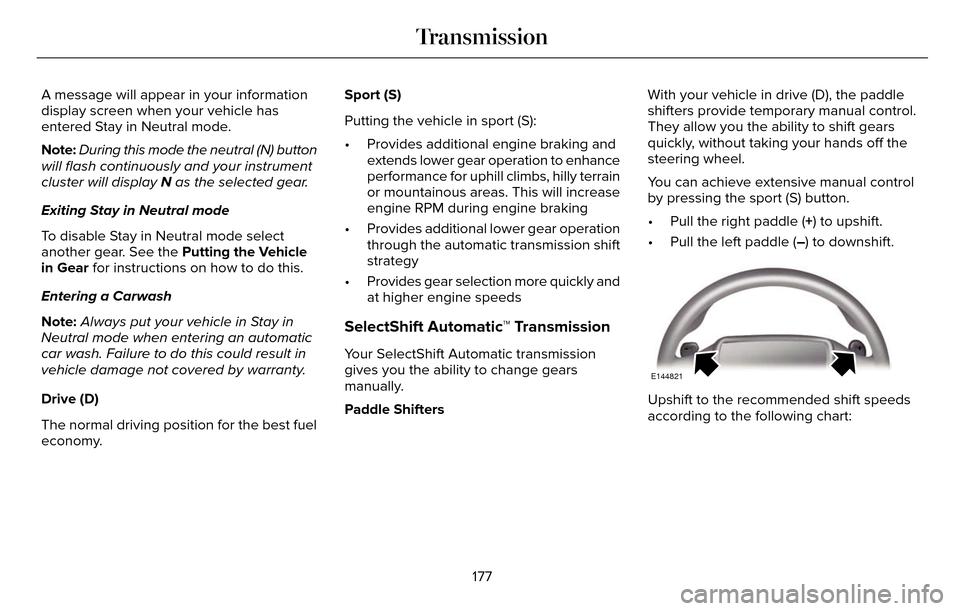
• Pull the right paddle (+) to upshift.
• Pull the left paddle (–) to downshift.
E144821
Upshift to the recommended shift speeds
according to the following chart:
177
Transmission
Page 232 of 544
DRIVE CONTROL
LINCOLN DRIVE CONTROL
Lincoln Drive Control delivers the Lincoln
driving experience through a suite of
sophisticated electronic vehicle systems.
These systems continuously monitor your
driving inputs and the road conditions to
optimize ride comfort, steering, handling,
powertrain response and sound. You can
preset your preferences for these systems
within the information display. Lincoln Drive
Control will respond to your preferences
based on what gear position you select. This
provides a single location to control multiple
systems performance settings.Lincoln Drive Control consists of the
following systems:
• Continuously controlled damping
dynamically adjusts the shock absorbers
stiffness in real time to match the road
surface and driver inputs. This system
continuously monitors your vehicle’s
motion (roll, pitch, bounce), suspension
position, load, speed, road conditions,
and steering to adjust the suspension
damping for optimal vehicle control.
• Electronically power-assisted steering adjusts steering effort and feel based on
your vehicle speed and your inputs.
• Active noise control utilizes your vehicle electronics to enhance the acoustic
experience.
• Electronic stability control and traction control maintain your vehicle control in
adverse conditions or high performance
driving.
• Electronic throttle control enhances the powertrain response to your inputs. Using Lincoln Drive Control
You can configure which of the Drive Control
modes are active when your vehicle is in
drive (D) or in Sport (S). The configuration
remains active until modified from the main
menu on the information display.
229
Driving Aids
Page 233 of 544
These systems have a range of modes which
you can choose from in order to customize
your ideal driving experience:
• Comfort – Provides a more relaxeddriving experience, maximizing comfort.
Your steering effort decreases and the
suspension movement is more fluid.
Comfort mode is ideal when you desire
enhanced traveling comfort.
• Normal – Delivers a balanced combination of comfortable, controlled
ride and confident handling. This mode
provides an engaging drive experience
and a direct connection to the road
without sacrificing any of the composure
demanded from a luxury vehicle.
• Sport – Provides a sportier driving experience. The suspension stiffens, with
an emphasis on handling and control.
The engine responds more directly to
your inputs and takes on a more powerful
tone. Sport mode is ideal for use during
more spirited driving. You can change your vehicle’s Drive
Control settings from the main menu on
the information display:
Settings
Drive Control
Vehicle
Note: Not all settings may be available.
Note: Lincoln Drive Control has diagnostic
checks that continuously monitor the system
to ensure proper operation. Certain types of
system errors will gray out the mode
selections within the information display,
preventing you from changing states when
the gear position is changed. Other types of
errors will produce a temporary message
that states Drive Control Malfunction. If either
condition persists for multiple key cycles,
have your vehicle checked by an authorized
dealer.
230
Driving Aids
Page 249 of 544
Front-wheel drive vehicles must have the
front wheels placed on a tow dolly when
towing your vehicle from the rear using
wheel lift equipment. This prevents damage
to the transmission.
Towing an all-wheel drive vehicle requires
that all wheels be off the ground, such as
using a wheel lift and dollies or flatbed
equipment. This prevents damage to the
transmission, all-wheel drive system and
vehicle.
TOWING THE VEHICLE ON FOUR
WHEELS
Emergency Towing
WARNING
If your vehicle has a steering wheel
lock make sure the ignition is in the
accessory or on position when being towed.
You can flat-tow (all wheels on the ground,
regardless of the powertrain/transmission
configuration) your disabled vehicle (without
access to wheel dollies, car-hauling trailer,
or flatbed transport vehicle) under the
following conditions:
• Your vehicle is facing forward so you tow it in a forward direction.
• You place the transmission in position N.
If you cannot place the transmission in
position N, you may need to override it.
See Transmission (page 175).
• Maximum speed is 35 mph (56 km/h).
• Maximum distance is 50 miles (80 kilometers).
Recreational Towing
Note: Put your climate control system in
recirculated air mode to prevent exhaust
fumes from entering the vehicle. See
Climate Control (page 135). Follow these guidelines if you have a need
for recreational (RV) towing. An example of
recreational towing would be towing your
vehicle behind a motorhome. These
guidelines are to make sure you do not
damage the transmission during towing.
Vehicles Equipped with a 2.0L Engine
Front-wheel drive (FWD) vehicles CANNOT
be flat-towed (all wheels on the ground) as
vehicle or transmission damage may occur.
You must place the front wheels on a
two-wheel tow dolly. If you are using a tow
dolly, follow the instructions specified by the
equipment provider.
All-wheel drive (AWD) vehicles
CANNOT be
flat-towed (all wheels on the ground), as
vehicle or transmission damage may occur.
It is recommended to tow your vehicle with
all four (4) wheels off the ground such as
when using a car-hauling trailer. Otherwise,
you cannot tow your vehicle.
246
Towing
Page 250 of 544
Vehicles Equipped with a 3.7L Engine
You can tow your vehicle with all four wheels
on the ground using the Neutral Tow feature,
or with all four wheels off the ground using
a vehicle transport trailer. If you are using a
vehicle transport trailer, follow the instruction
specified by the equipment provider.
If you tow your vehicle with all four wheels
on the ground:
• Tow only in the forward direction.
• Release the parking brake.
Neutral Tow
Enter Neutral Tow mode by doing the
following:
1. Put the ignition in accessory mode bypressing the engine START button
without pressing the brake pedal.
2. Select the neutral tow option under the vehicle settings menu in the information
display. See (page 109).
3. Press and hold the OK button to start the neutral tow process. 4. Press the brake pedal and select N on
the push-button transmission.
5. Turn the ignition off by pressing the engine START button without pressing
the brake pedal.
If the process completes successfully:
• the N on the push-button transmission blinks slowly
• A confirmation message appears in the information display.
Note: If the parking brake is applied, a
message appears in the information display.
Note: Do not exceed 65 mph (105 km/h).
Note: Start the engine and allow it to run for
five minutes at the beginning of each day
and every six hours (or fewer). Shut the
engine off and verify that a message
appears indicating neutral tow has been
engaged, before continuing to tow.
Exit Neutral Tow mode, make sure the
ignition is on (engine can be on or off ), press
the brake pedal and select P on the
push-button transmission. If the process is completed successfully, a
message appears indicating that neutral tow
has disengaged in both the instrument
cluster and push-button transmission display
P.
247
Towing
Page 255 of 544
Vehicles Sold In Canada: Getting
Roadside Assistance
Canadian clients who require roadside
assistance, call 1-800-387-9333.
Sykes Assistance Services Corporation
administers the Roadside Assistance
program. You must receive covered services
in Canada or the continental United States.
Coverage extends to vehicles that use public,
non-seasonal, annually traveled roadways.
Roadside Assistance coverage does not
extend to vehicles involved in cross-country
driving, logging, autocross and any other
form of off-road use. Well maintained roads
and surfaces help ensure safe travel for the
Supplier, and allow their representatives to
perform service as per the standard
operating procedures.
In Remote Locations
If our supplier cannot take your vehicle by
road to the nearest authorized dealership,
transportation by rail or water may be
necessary. The program covers a tow to the
dock or rail terminal and also to the
dealership at the end of the trip.For rail or water transportation, however,
contact your authorized dealer to confirm if
you are eligible for additional coverage
before you authorize or pay for the service.
Call the Lincoln Roadside Assistance at
1-800-387-9333 for additional information.
Vehicles Sold In Canada: Using
Roadside Assistance
Canadian Roadside coverage and benefits
may differ from the United States coverage.
Please refer to your warranty information or
visit our website at www.lincolncanada.com
for information on Canadian services and
benefits.
Canadian clients who need to obtain
roadside information, call 1-800-387-9333 or
visit our website at www.lincolncanada.com.
HAZARD WARNING FLASHERS
Note:
If used when the vehicle is not running,
the battery will lose charge. There may be
insufficient power to restart your vehicle.
The hazard warning button is
located on the instrument panel.
Use it when your vehicle is
creating a safety hazard for other motorists.
• Press the button to turn on the hazard warning function, and the front and rear
direction indicators will flash.
• Press the button again to turn them off.
FUEL SHUTOFF
WARNING
Failure to inspect and, if necessary,
repair fuel leaks after a collision may
increase the risk of fire and serious injury.
Ford Motor Company recommends that the
fuel system be inspected by an authorized
dealer after any collision.
In the event of a moderate to severe
collision, this vehicle includes a fuel pump
shutoff feature that stops the flow of fuel to
the engine. Not every impact will cause a
shutoff.
252
Roadside Emergencies
Page 416 of 544

To turn the feature on press the lower left corner of the touchscreen, an\
d then select:
Action and Description
Menu Item
SIRIUS
You can then select any of the following:
Save a channel by pressing and holding one of the memory preset areas. T\
here is a brief mute while the
radio saves the channel. Sound returns when finished.
Presets
Save the current song, artist, or team as a favorite.
Alerts
If you are listening to music, you can save the song or artist, so the s\
ystem can alert you when they are
playing on a satellite radio channel. If you are listening to a sporting\
event, you can save your favorite
teams so the system can alert you when they are playing on a satellite r\
adio channel. You can also edit
alerts or turn alerts on or off.
When an alert appears on the screen, you can choose to tune to the chann\
el, cancel the alert or turn off
alerts.
Replay audio on the current channel. You can replay approximately 45 minutes of audio as long as you
have remained tuned to the current station. Changing stations erases the\
previous audio.
Replay
While in replay mode:
Press and release the seek buttons to hear the previous or next song.
Press and hold the seek buttons to reverse or fast forward in the curren\
t track.
Press play or pause to play or pause the audio.
Press the button again to return to live audio.
413
MyLincoln Touch™