lock LINCOLN MKZ 2016 Service Manual
[x] Cancel search | Manufacturer: LINCOLN, Model Year: 2016, Model line: MKZ, Model: LINCOLN MKZ 2016Pages: 544, PDF Size: 5.77 MB
Page 116 of 544
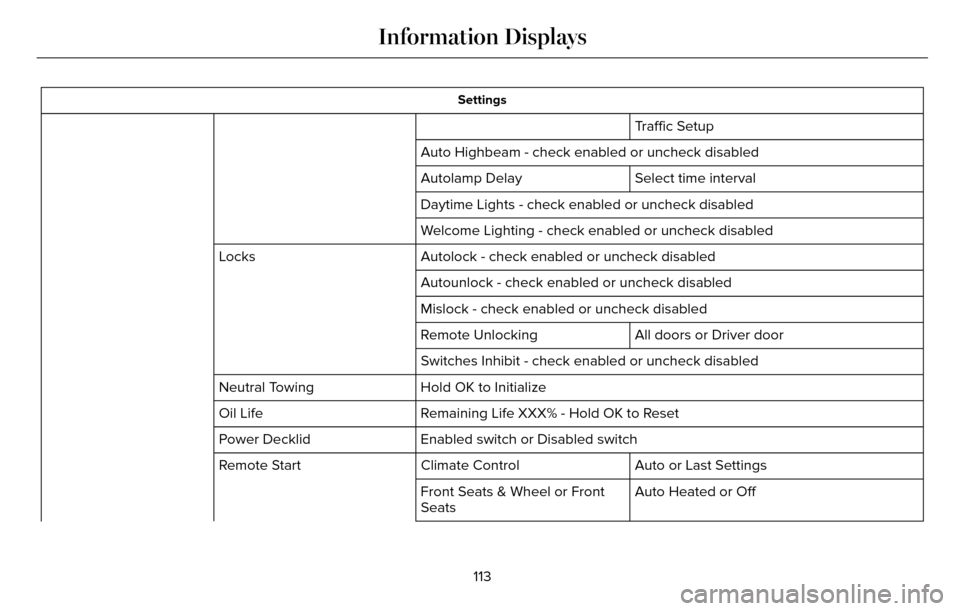
Settings
Traffic Setup
Auto Highbeam - check enabled or uncheck disabled Select time interval
Autolamp Delay
Daytime Lights - check enabled or uncheck disabled
Welcome Lighting - check enabled or uncheck disabled
Autolock - check enabled or uncheck disabled
Locks
Autounlock - check enabled or uncheck disabled
Mislock - check enabled or uncheck disabled
All doors or Driver door
Remote Unlocking
Switches Inhibit - check enabled or uncheck disabled
Hold OK to Initialize
Neutral Towing
Remaining Life XXX% - Hold OK to Reset
Oil Life
Enabled switch or Disabled switch
Power Decklid
Auto or Last Settings
Climate Control
Remote Start
Auto Heated or Off
Front Seats & Wheel or Front
Seats
113
Information Displays
Page 119 of 544
.
Adaptive Cruise Malfunction
Displayed w")
Adaptive Cruise Control
Action
Message
Displayed when a radar malfunction is preventing the ACC from engaging. \
See Using Adaptive
Cruise Control (page 207).
Adaptive Cruise Malfunction
Displayed when conditions exist such that the adaptive cruise cannot fun\
ction properly. SeeUsing Adaptive Cruise Control (page 207).
Adaptive Cruise Not Available
Displayed when the radar is blocked because of poor radar visibility due\
to bad weather or ice/
mud/water in front of radar. Driver can typically clean the sensor to resolve. See Using Adaptive
Cruise Control (page 207).
Adaptive Cruise Not Available Sensor
Blocked See Manual
Displayed when the automatic braking has been disabled.
Normal Cruise Active Automatic Braking
Turned Off
Displayed when a radar malfunction is preventing the ACC from engaging.
Front Sensor Not Aligned
Displayed when the adaptive cruise has reinstated controls to the driver\
.
Adaptive Cruise - Driver Resume Control
Displays when the vehicle speed is too slow to activate the adaptive cru\
ise.
Adaptive Cruise Speed Too Low to
Activate
Displays when the adaptive cruise is automatically adjusting the gap dis\
tance and the driverneeds to shift the transmission into a lower gear.
Adaptive Cruise Shift Down
116
Information Displays
Page 120 of 544

Adaptive Headlamps
Action
Message
Displays when a fault with the system has occurred. Contact an authorize\
d dealer as soon as
possible.
Check Headlamp System See Manual
AdvanceTrac™
Action
Message
Displays when the system detects a malfunction due to a blocked sensor.
Service AdvanceTrac
Displayed when the traction control has been disabled or enabled by the \
driver.
AdvanceTrac Off On
Airbag
Action
Message
Displays when the system detects a malfunction due to a blocked sensor.
Occupant Sensor BLOCKED Remove
Objects Near Passenger Seat
117
Information Displays
Page 124 of 544

Blind Spot Information and Cross Traffic Alert System
Action
Message
Displayed when a fault with the system has occurred. Contact your author\
ized dealer as soon
as possible.
Blindspot System Fault
Displayed when the system sensors are blocked. Contact your authorized d\
ealer as soon aspossible. See Blind Spot Information System (page 220).
Blindspot Not Available Sensor Blocked
See Manual
Displayed when the system detects a vehicle. See Blind Spot Information System (page 220).
Cross Traffic Vehicle Coming From X
Displayed when the blind spot information system and cross traffic alert\
system sensors areblocked. See Blind Spot Information System (page 220).
Cross Traffic Not Available Sensor Blocked
See Manual
Displays when a fault with the system has occurred. Contact your authori\
zed dealer as soon as possible.
Cross Traffic System Fault
Doors and Locks
Action
Message
Displays when the door(s) listed is not completely closed and the vehi\
cle is moving.
X Door Ajar
Displays when the door(s) listed is not completely closed.
Displays when the luggage compartment is not completely closed.
Trunk Ajar
Displays when the hood is not completely closed.
Hood Ajar
121
Information Displays
Page 125 of 544

Action
Message
Displays when the door switches have been disabled.
Switches Inhibited Security Mode
Displayed when there is a system malfunction with the child locks. Conta\
ct your authorized dealeras soon as possible.
Child Lock Malfunction Service Required
Displays the factory keypad code after the keypad has been reset. See Keyless Entry (page 72).
Factory Keypad Code XXXXX
Driver Alert
Action
Message
Stop and rest as soon as it is safe to do so.
Driver Alert Warning Rest Now
Take a rest break soon.
Driver Alert Warning Rest Suggested
Fuel
Action
Message
Displayed as an early reminder of a low fuel condition.
Fuel Level Low
Displayed when the fuel fill inlet may not be properly closed.
Check Fuel Fill Inlet
122
Information Displays
Page 132 of 544

Power Steering
Action
Message
The power steering system has detected a condition that requires service\
. See your authorized
dealer.
Steering Fault Service Now
The power steering system is not working. Stop the vehicle a safe place. Contact your authorized dealer.
Steering Loss Stop Safely
The power steering system has detected a condition within the power stee\
ring system or passiveentry or passive start system requires service. Contact your authorized dealer.
Steering Assist Fault Service Required
Pre-Collision Assist
Action
Message
Displayed when there is a system malfunction with the collision warning \
system. The system will
be disabled. Contact an authorized dealer as soon as possible.
Pre-Collision Assist Malfunction
Displayed when the collision warning system radar is blocked because of \
poor radar visibility
due to bad weather, ice, mud or water in front of the radar. Driver can typically clean the sensor to resolve. Contact an authorized dealer as soon as possible.
Pre-Collision Assist Not Available Sensor
Blocked See Manual
Displayed when there is a system malfunction with the collision warning \
system. The system willbe disabled. Contact an authorized dealer as soon as possible.
Pre-Collision Assist Not Available
129
Information Displays
Page 135 of 544
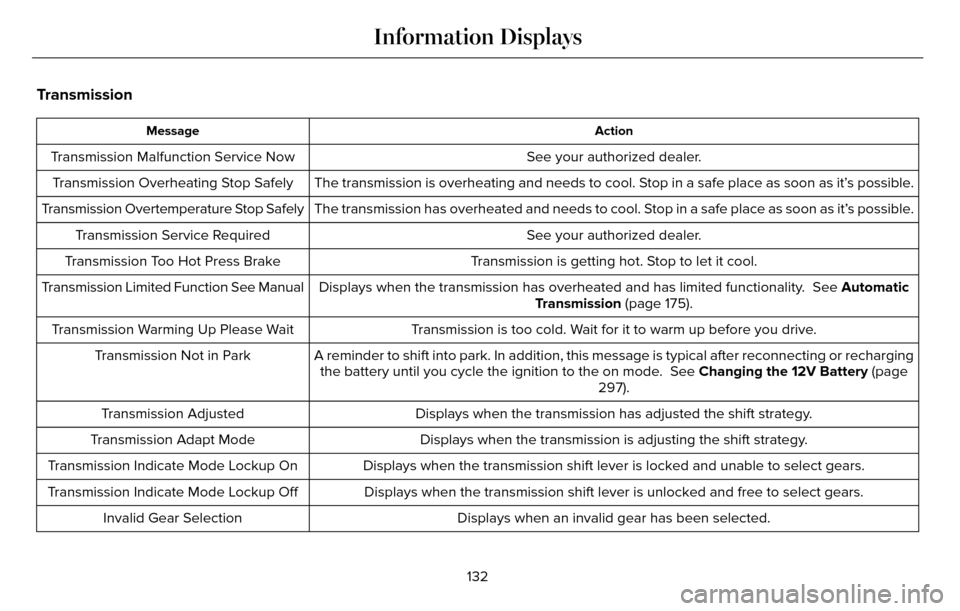
Transmission
Action
Message
See your authorized dealer.
Transmission Malfunction Service Now
The transmission is overheating and needs to cool. Stop in a safe place as soon as it’s possible.
Transmission Overheating Stop Safely
The transmission has overheated and needs to cool. Stop in a safe place as soon as it’s possible.
Transmission Overtemperature Stop Safely
See your authorized dealer.
Transmission Service Required
Transmission is getting hot. Stop to let it cool.
Transmission Too Hot Press Brake
Displays when the transmission has overheated and has limited functional\
ity. See Automatic
Transmission (page 175).
Transmission Limited Function See Manual
Transmission is too cold. Wait for it to warm up before you drive.
Transmission Warming Up Please Wait
A reminder to shift into park. In addition, this message is typical afte\
r reconnecting or rechargingthe battery until you cycle the ignition to the on mode. See Changing the 12V Battery (page
297).
Transmission Not in Park
Displays when the transmission has adjusted the shift strategy.
Transmission Adjusted
Displays when the transmission is adjusting the shift strategy.
Transmission Adapt Mode
Displays when the transmission shift lever is locked and unable to selec\
t gears.
Transmission Indicate Mode Lockup On
Displays when the transmission shift lever is unlocked and free to selec\
t gears.
Transmission Indicate Mode Lockup Off
Displays when an invalid gear has been selected.
Invalid Gear Selection
132
Information Displays
Page 144 of 544
WARNINGS
The adjustable head restraint is a
safety device. Whenever possible, it
should be installed and properly adjusted
when the seat is occupied. Failure to adjust
the head restraint properly could reduce its
effectiveness during certain impacts.
Install the head restraint properly to
help minimize the risk of neck injury in
the event of a crash.
Note: Adjust the seatback to an upright
driving position before adjusting the head
restraint. Adjust the head restraint so that
the top of it is level with the top of your head
and as far forward as possible. Make sure
that you remain comfortable. If you are
extremely tall, adjust the head restraint to
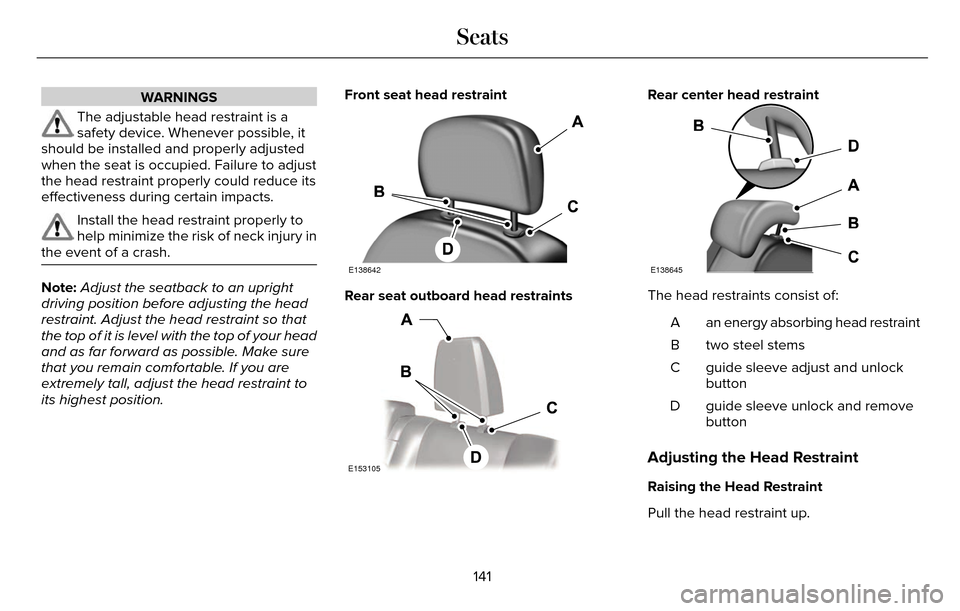
its highest position. Front seat head restraint
E138642
Rear seat outboard head restraints
E153105
Rear center head restraint
E138645
The head restraints consist of:
an energy absorbing head restraint
A
two steel stems
B
guide sleeve adjust and unlock
button
C
guide sleeve unlock and remove
button
D
Adjusting the Head Restraint
Raising the Head Restraint
Pull the head restraint up.
141
Seats
Page 145 of 544
Lowering the Head Restraint
1. Press and hold button C.
2. Push the head restraint down.
Removing the Head Restraint
1. Pull the head restraint up until it reachesits highest position.
2. Press and hold buttons C and D.
3. Pull the head restraint up.
Installing the Head Restraint
Align the steel stems into the guide sleeves
and push the head restraint down until it
locks.Tilting Head Restraints
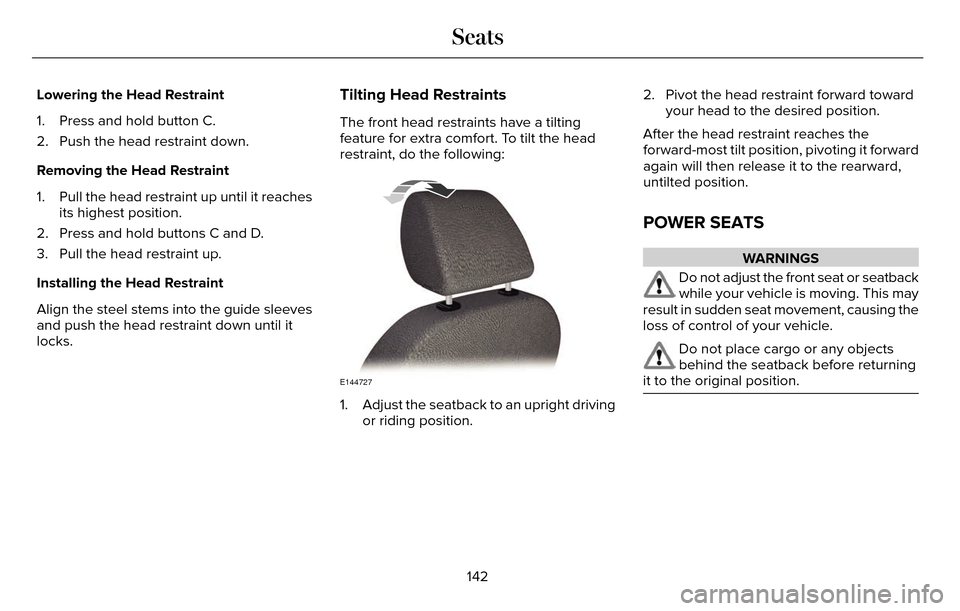
The front head restraints have a tilting
feature for extra comfort. To tilt the head
restraint, do the following:
E144727
1. Adjust the seatback to an upright driving or riding position. 2. Pivot the head restraint forward toward
your head to the desired position.
After the head restraint reaches the
forward-most tilt position, pivoting it forward
again will then release it to the rearward,
untilted position.
POWER SEATS
WARNINGS
Do not adjust the front seat or seatback
while your vehicle is moving. This may
result in sudden seat movement, causing the
loss of control of your vehicle.
Do not place cargo or any objects
behind the seatback before returning
it to the original position.
142
Seats
Page 149 of 544
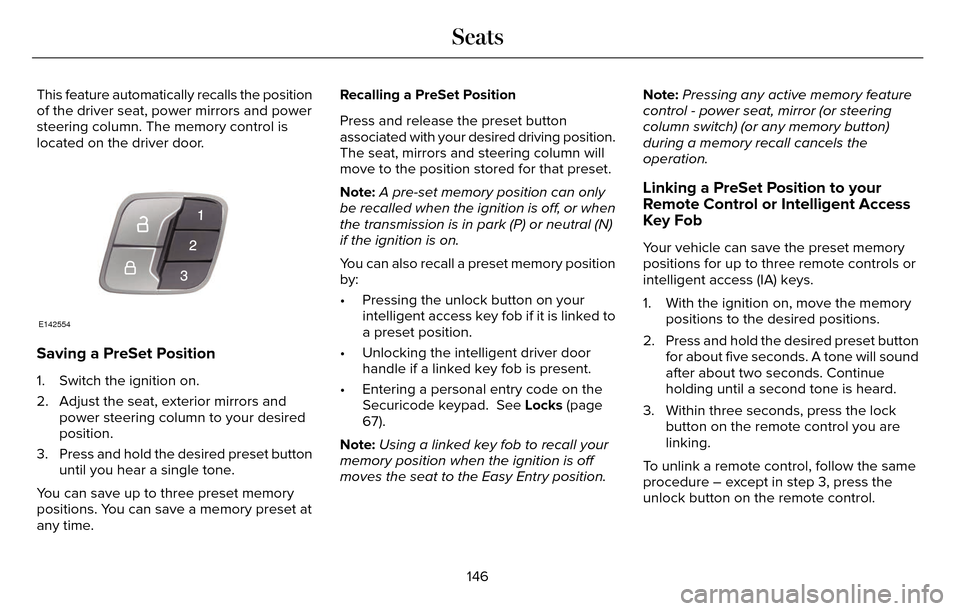
This feature automatically recalls the position
of the driver seat, power mirrors and power
steering column. The memory control is
located on the driver door.
E142554
Saving a PreSet Position
1. Switch the ignition on.
2. Adjust the seat, exterior mirrors andpower steering column to your desired
position.
3. Press and hold the desired preset button until you hear a single tone.
You can save up to three preset memory
positions. You can save a memory preset at
any time. Recalling a PreSet Position
Press and release the preset button
associated with your desired driving position.
The seat, mirrors and steering column will
move to the position stored for that preset.
Note:
A pre-set memory position can only
be recalled when the ignition is off, or when
the transmission is in park (P) or neutral (N)
if the ignition is on.
You can also recall a preset memory position
by:
• Pressing the unlock button on your intelligent access key fob if it is linked to
a preset position.
• Unlocking the intelligent driver door handle if a linked key fob is present.
• Entering a personal entry code on the Securicode keypad. See Locks (page
67).
Note: Using a linked key fob to recall your
memory position when the ignition is off
moves the seat to the Easy Entry position. Note:
Pressing any active memory feature
control - power seat, mirror (or steering
column switch) (or any memory button)
during a memory recall cancels the
operation.
Linking a PreSet Position to your
Remote Control or Intelligent Access
Key Fob
Your vehicle can save the preset memory
positions for up to three remote controls or
intelligent access (IA) keys.
1. With the ignition on, move the memory positions to the desired positions.
2. Press and hold the desired preset button for about five seconds. A tone will sound
after about two seconds. Continue
holding until a second tone is heard.
3. Within three seconds, press the lock button on the remote control you are
linking.
To unlink a remote control, follow the same
procedure – except in step 3, press the
unlock button on the remote control.
146
Seats