lock LINCOLN MKZ 2016 Repair Manual
[x] Cancel search | Manufacturer: LINCOLN, Model Year: 2016, Model line: MKZ, Model: LINCOLN MKZ 2016Pages: 544, PDF Size: 5.77 MB
Page 191 of 544
The anti-lock braking system will not
eliminate the risks when:
• You drive too closely to the vehicle infront of you.
• Your vehicle is hydroplaning.
• You take corners too fast.
• The road surface is poor.
ELECTRIC PARKING BRAKE
The electric parking brake replaces the
conventional handbrake. The operating
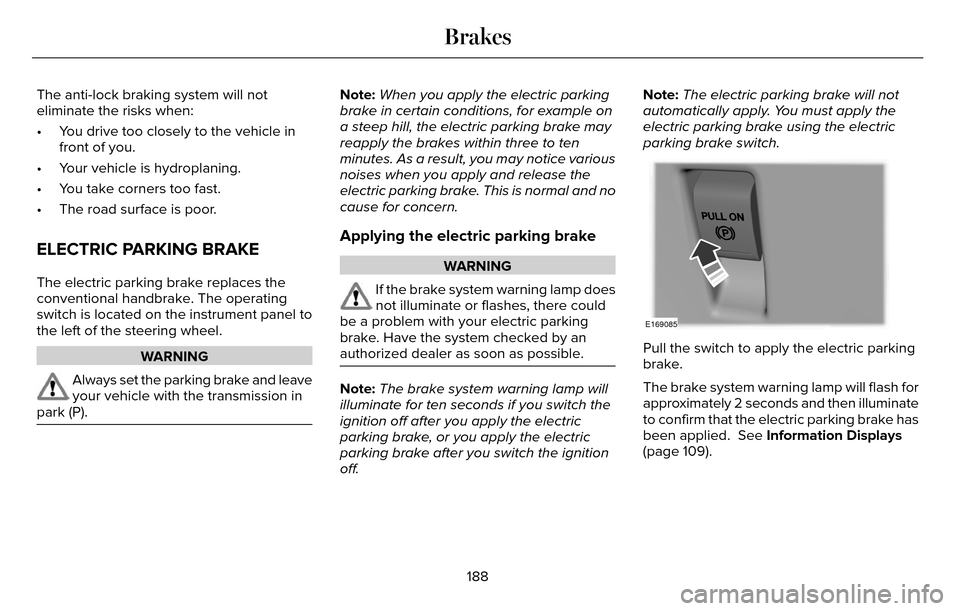
switch is located on the instrument panel to
the left of the steering wheel.
WARNING
Always set the parking brake and leave
your vehicle with the transmission in
park (P).
Note: When you apply the electric parking
brake in certain conditions, for example on
a steep hill, the electric parking brake may
reapply the brakes within three to ten
minutes. As a result, you may notice various
noises when you apply and release the
electric parking brake. This is normal and no
cause for concern.
Applying the electric parking brake
WARNING
If the brake system warning lamp does
not illuminate or flashes, there could
be a problem with your electric parking
brake. Have the system checked by an
authorized dealer as soon as possible.
Note: The brake system warning lamp will
illuminate for ten seconds if you switch the
ignition off after you apply the electric
parking brake, or you apply the electric
parking brake after you switch the ignition
off. Note:
The electric parking brake will not
automatically apply. You must apply the
electric parking brake using the electric
parking brake switch.
E169085
Pull the switch to apply the electric parking
brake.
The brake system warning lamp will flash for
approximately 2 seconds and then illuminate
to confirm that the electric parking brake has
been applied. See Information Displays
(page 109).
188
Brakes
Page 192 of 544
Applying the electric parking brake
when the vehicle is moving
WARNINGS
Applying the electric parking brake
while moving will result in use of the
anti-lock braking system. Do not use the
electric parking brake system when the
vehicle is moving unless the normal brake
system is unable to stop the vehicle.
With the exception of emergency
conditions (for example, the brake
pedal does not work or is blocked), do not
apply the electric parking brake while the
vehicle is moving. On bends, or poor road
surfaces or weather conditions, emergency
braking can cause the vehicle to skid out of
control or off the road.
The brake system warning lamp will
flash during an electric parking brake
apply. If the brake system warning lamp
continues to flash there could be a problem
with your electric parking brake. Have the
system checked by an authorized dealer as
soon as possible.
If you apply the electric parking brake when
your vehicle is moving, the brake system
warning lamp will illuminate and a warning
tone will sound. See Information Displays
(page 109).
If your vehicle speed is above 4 mph
(6 km/h), the braking force is applied as long
as the switch is applied. Release or press the
switch, or press the accelerator pedal to stop
the braking force.
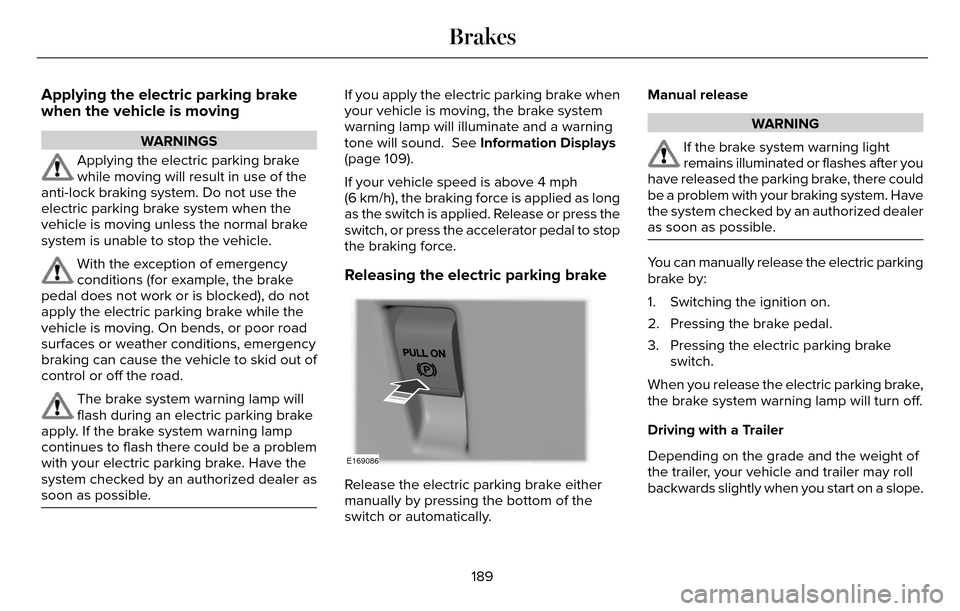
Releasing the electric parking brake
E169086
Release the electric parking brake either
manually by pressing the bottom of the
switch or automatically. Manual release
WARNING
If the brake system warning light
remains illuminated or flashes after you
have released the parking brake, there could
be a problem with your braking system. Have
the system checked by an authorized dealer
as soon as possible.
You can manually release the electric parking
brake by:
1. Switching the ignition on.
2. Pressing the brake pedal.
3. Pressing the electric parking brake switch.
When you release the electric parking brake,
the brake system warning lamp will turn off.
Driving with a Trailer
Depending on the grade and the weight of
the trailer, your vehicle and trailer may roll
backwards slightly when you start on a slope.
189
Brakes
Page 199 of 544
PRINCIPLE OF OPERATION
WARNINGS
To help avoid personal injury, please
read and understand the limitations of
the system as contained in this section.
Sensing is only an aid for some (generally
large and fixed) objects when moving on a
flat surface at parking speeds. Certain
objects with surfaces that absorb ultrasonic
waves, surrounding vehicle's parking aid
systems, traffic control systems, fluorescent
lamps, inclement weather, air brakes, and
external motors and fans may also affect the
function of the sensing system; this may
include reduced performance or a false
activation.
To help avoid personal injury, always
use caution when in reverse (R) and
when using the sensing system.
WARNINGS
This system is not designed to prevent
contact with small or moving objects.
The system is designed to provide a warning
to assist the driver in detecting large
stationary objects to avoid damaging your
vehicle. The system may not detect smaller
objects, particularly those close to the
ground.
Certain add-on devices such as large
trailer hitches, bike or surfboard racks
and any device that may block the normal
detection zone of the system, may create
false beeps.
Note: Keep the sensors, located on the
bumper or fascia, free from snow, ice and
large accumulations of dirt. If the sensors
are covered, the system’s accuracy can be
affected. Do not clean the sensors with sharp
objects.
Note: If your vehicle sustains damage to the
bumper or fascia, leaving it misaligned or
bent, the sensing zone may be altered
causing inaccurate measurement of
obstacles or false alarms. Note:
The sensing system cannot be turned
off when a MyKey is present. See Principle
of Operation (page 60).
Note: If you attach certain add-on devices
such as a trailer or bike rack, the rear
sensing system may detect that add-on
device and therefore provide warnings. It is
suggested that you disable the rear sensing
system when you attach an add-on device
to your vehicle to prevent these warnings.
The sensing system warns the driver of
obstacles within a certain range of your
vehicle. The system turns on automatically
whenever you switch the ignition on.
The system can be switched off through the
information display menu or from the pop-up
message that appears once you shift the
transmission into reverse (R). See General
Information (page 109).
Note: On vehicles with front parking aid you
can use the parking aid switch to switch the
system off.
If a fault is present in the system, a warning
message appears in the information display.
See Information Messages (page 115).
196
Parking Aids (If Equipped)
Page 203 of 544
E130108
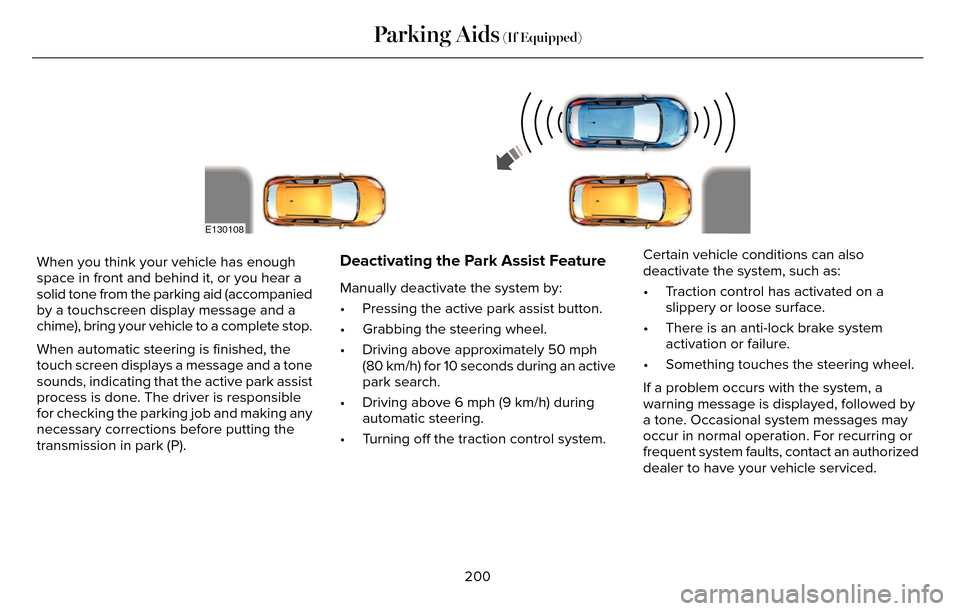
When you think your vehicle has enough
space in front and behind it, or you hear a
solid tone from the parking aid (accompanied
by a touchscreen display message and a
chime), bring your vehicle to a complete stop.
When automatic steering is finished, the
touch screen displays a message and a tone
sounds, indicating that the active park assist
process is done. The driver is responsible
for checking the parking job and making any
necessary corrections before putting the
transmission in park (P).Deactivating the Park Assist Feature
Manually deactivate the system by:
• Pressing the active park assist button.
• Grabbing the steering wheel.
• Driving above approximately 50 mph(80 km/h) for 10 seconds during an active
park search.
• Driving above 6 mph (9 km/h) during automatic steering.
• Turning off the traction control system. Certain vehicle conditions can also
deactivate the system, such as:
• Traction control has activated on a
slippery or loose surface.
• There is an anti-lock brake system activation or failure.
• Something touches the steering wheel.
If a problem occurs with the system, a
warning message is displayed, followed by
a tone. Occasional system messages may
occur in normal operation. For recurring or
frequent system faults, contact an authorized
dealer to have your vehicle serviced.
200
Parking Aids (If Equipped)
Page 215 of 544
System Not Available
Conditions that can cause the system to
deactivate or prevent the system from
activating when requested include:
• A blocked sensor.
• High brake temperature.
• A failure in the system or a relatedsystem.
Blocked Sensor
WARNINGS
Do not use the system when towing a
trailer with brake controls. Aftermarket
trailer brakes do not function properly when
you switch the system on because the
brakes are electronically controlled. Failing
to do so may result in loss of vehicle control,
which could result in serious injury. The
system does operate with non-electronic
trailer brake controllers, such as over-run or
surge brakes.
Do not use tire sizes other than those
recommended because this can affect
the normal operation of the system. Failing
to do so may result in a loss of vehicle
control, which could result in serious injury.
E145632
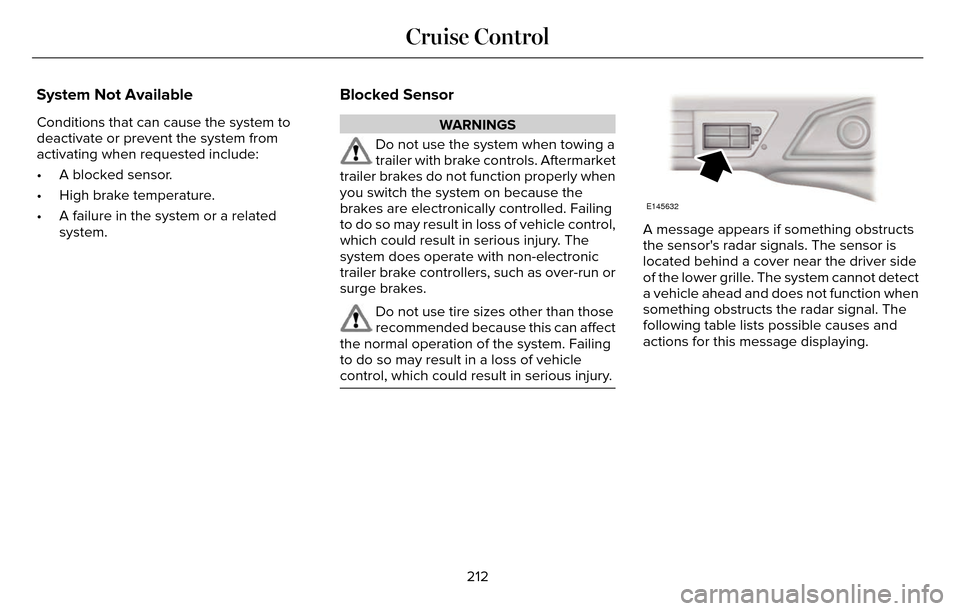
A message appears if something obstructs
the sensor's radar signals. The sensor is
located behind a cover near the driver side
of the lower grille. The system cannot detect
a vehicle ahead and does not function when
something obstructs the radar signal. The
following table lists possible causes and
actions for this message displaying.
212
Cruise Control
Page 216 of 544
Action
Cause
Clean the grille surface in front of the radar or remove the object
causing the obstruction.
The surface of the radar in the grille is dirty or obstructed in some
way.
Wait a short time. It may take several minutes for the radar to detect
that it is free from obstruction.
The surface of the radar in the grille is clean but the message remains
in the display.
Do not use the system in these conditions because it may not detect
any vehicles ahead.
Heavy rain or snow is interfering with the radar signals.
Do not use the system in these conditions because it may not detect
any vehicles ahead.
Swirling water, or snow or ice on the surface of the road may interfere
with the radar signals.
Wait a short time or switch to normal cruise control.
You are in a desert or remote area with no other vehicles and no
roadside objects.
Due to the nature of radar technology, it is
possible to get a blockage warning with no
actual block. This happens, for example,
when driving in sparse rural or desert
environments. A false blocked condition
either self clears or clears after a you restart
your vehicle.
Switching to Normal Cruise Control
WARNING
Normal cruise control does not brake
for slower vehicles. Always be aware
of which mode you have selected and apply
the brakes when necessary.
You can manually change from adaptive
cruise control to normal cruise control
through the information display.
E71340
The cruise control indicator light
replaces the adaptive cruise
control indicator light if you select
normal cruise control. The gap setting does
not display, the system does not
automatically respond to lead vehicles and
automatic braking does not activate.
213
Cruise Control
Page 217 of 544
DRIVER ALERT (If Equipped)
WARNING
The driver alert system is designed to
aid you. It is not intended to replace
your attention and judgment. You are still
responsible to drive with due care and
attention.
Note: The system will store the on or off
setting in the information display menu
through ignition cycles.
Note: If enabled in the menu, the system will
be active at speeds above 40 mph (64 km/h).
When below the activation speed, the
information display will inform you that the
system is unavailable.
Note: The system works as long as one lane
marking can be detected by the camera.
Note: If the camera is blocked or if the
windshield is damaged, the system may not
function.
Note: The system may not be available in
poor weather or other low visibility
conditions. The system automatically monitors your
driving behavior using various inputs
including the front camera sensor.
If the system detects that your driving
alertness is reduced below a certain
threshold, the system will alert you using a
chime and a message in the information
display.Using Driver Alert
Switching the system on and off
You may switch the system on or off through
the information display by selecting Settings
then Driver Assist then Driver Alert in the
menu. When activated, the system will
monitor your alertness level based upon your
driving behavior in relation to the lane
markings, and other factors.
System Warnings
Note:
The system will not issue warnings
below approximately 40 mph (64 km/h). The warning system is in two stages. At first
the system issues a temporary warning that
you need to take a rest. This message will
only appear for a short time. If the system
detects further reduction in driving alertness,
another warning may be issued which will
remain in the information display for a longer
time. Press OK on the steering wheel control
to clear the warning
System Display
When active the system will run automatically
in the background and only issue a warning
if required. You can view the status at any
time using the information display. See
(page 109).
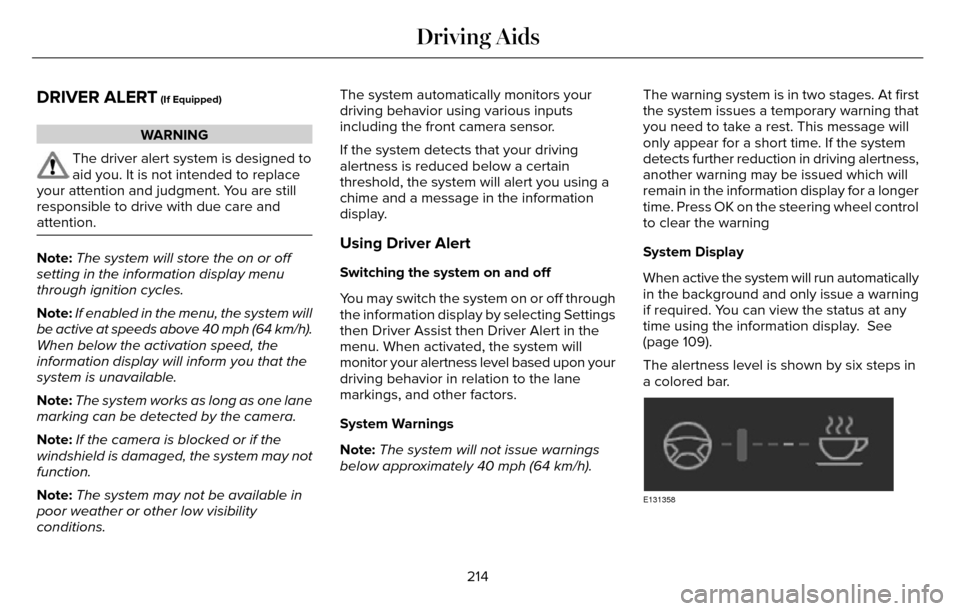
The alertness level is shown by six steps in
a colored bar.
E131358
214
Driving Aids
Page 218 of 544
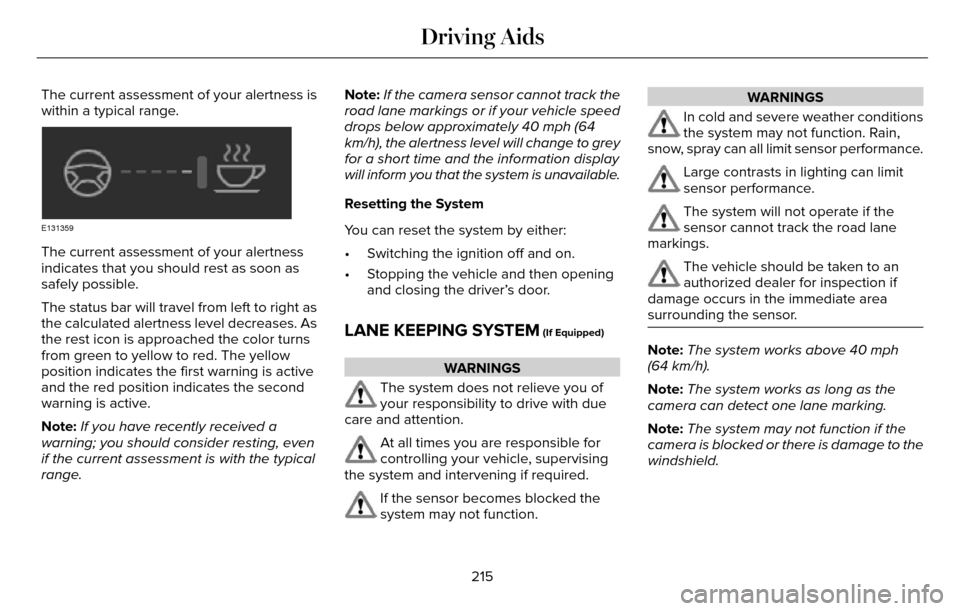
The current assessment of your alertness is
within a typical range.
E131359
The current assessment of your alertness
indicates that you should rest as soon as
safely possible.
The status bar will travel from left to right as
the calculated alertness level decreases. As
the rest icon is approached the color turns
from green to yellow to red. The yellow
position indicates the first warning is active
and the red position indicates the second
warning is active.
Note:If you have recently received a
warning; you should consider resting, even
if the current assessment is with the typical
range. Note:
If the camera sensor cannot track the
road lane markings or if your vehicle speed
drops below approximately 40 mph (64
km/h), the alertness level will change to grey
for a short time and the information display
will inform you that the system is unavailable.
Resetting the System
You can reset the system by either:
• Switching the ignition off and on.
• Stopping the vehicle and then opening and closing the driver’s door.
LANE KEEPING SYSTEM (If Equipped)
WARNINGS
The system does not relieve you of
your responsibility to drive with due
care and attention.
At all times you are responsible for
controlling your vehicle, supervising
the system and intervening if required.
If the sensor becomes blocked the
system may not function.
WARNINGS
In cold and severe weather conditions
the system may not function. Rain,
snow, spray can all limit sensor performance.
Large contrasts in lighting can limit
sensor performance.
The system will not operate if the
sensor cannot track the road lane
markings.
The vehicle should be taken to an
authorized dealer for inspection if
damage occurs in the immediate area
surrounding the sensor.
Note: The system works above 40 mph
(64 km/h).
Note: The system works as long as the
camera can detect one lane marking.
Note: The system may not function if the
camera is blocked or there is damage to the
windshield.
215
Driving Aids
Page 220 of 544
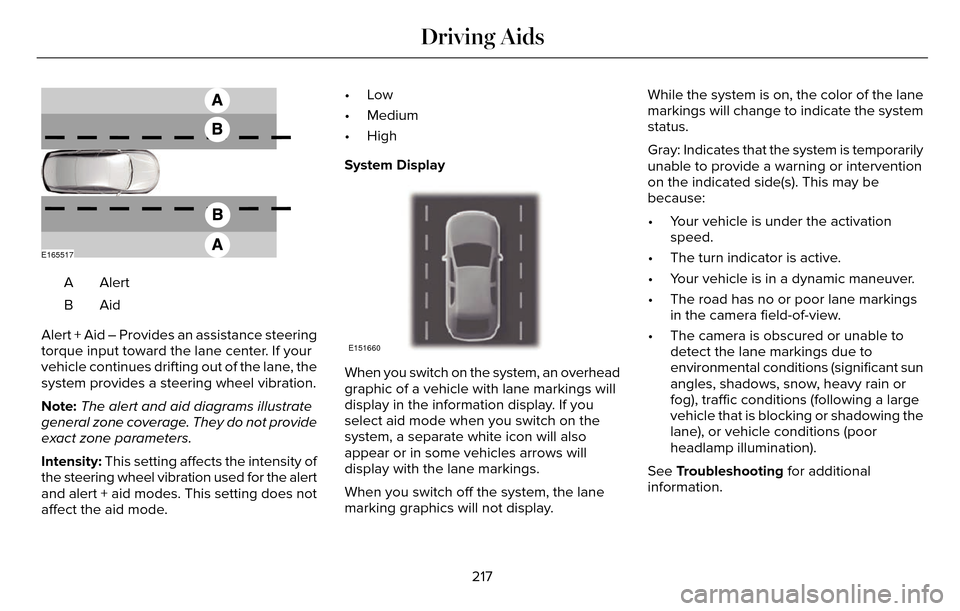
E165517
AlertA
AidB
Alert + Aid – Provides an assistance steering
torque input toward the lane center. If your
vehicle continues drifting out of the lane, the
system provides a steering wheel vibration.
Note: The alert and aid diagrams illustrate
general zone coverage. They do not provide
exact zone parameters.
Intensity: This setting affects the intensity of
the steering wheel vibration used for the alert
and alert + aid modes. This setting does not
affect the aid mode. •Low
• Medium
• High
System Display
E151660
When you switch on the system, an overhead
graphic of a vehicle with lane markings will
display in the information display. If you
select aid mode when you switch on the
system, a separate white icon will also
appear or in some vehicles arrows will
display with the lane markings.
When you switch off the system, the lane
marking graphics will not display.
While the system is on, the color of the lane
markings will change to indicate the system
status.
Gray: Indicates that the system is temporarily
unable to provide a warning or intervention
on the indicated side(s). This may be
because:
• Your vehicle is under the activation
speed.
• The turn indicator is active.
• Your vehicle is in a dynamic maneuver.
• The road has no or poor lane markings in the camera field-of-view.
• The camera is obscured or unable to detect the lane markings due to
environmental conditions (significant sun
angles, shadows, snow, heavy rain or
fog), traffic conditions (following a large
vehicle that is blocking or shadowing the
lane), or vehicle conditions (poor
headlamp illumination).
See Troubleshooting for additional
information.
217
Driving Aids
Page 222 of 544
 when I can s\
ee the lane markings on the road?
Camera blockage due to dirt, grime, fog, frost or water on the windshield
Driving too close to")
Why is the feature not available (line markings are gray) when I can s\
ee the lane markings on the road?
Camera blockage due to dirt, grime, fog, frost or water on the windshield
Driving too close to the vehicle in front of you
Transitioning between no lane markings to lane markings or vice versa
Standing water on the road
Faint lane markings (partial yellow lane markings on concrete roads)
Lane width too narrow or too wide
Camera not calibrated after a windshield replacement
Driving on tight roads or on uneven roads
Why does the vehicle not come back toward the middle of the lane, as exp\
ected, in the Aid or Aid + Alert mode?
High cross winds
Large road crown
Rough roads, grooves, shoulder drop-offs
Heavy uneven loading of the vehicle or improper tire inflation pressure
If the tires have been exchanged (including snow tires), or the suspension has been modified219
Driving Aids