steering LINCOLN MKZ 2016 Service Manual
[x] Cancel search | Manufacturer: LINCOLN, Model Year: 2016, Model line: MKZ, Model: LINCOLN MKZ 2016Pages: 544, PDF Size: 5.77 MB
Page 231 of 544
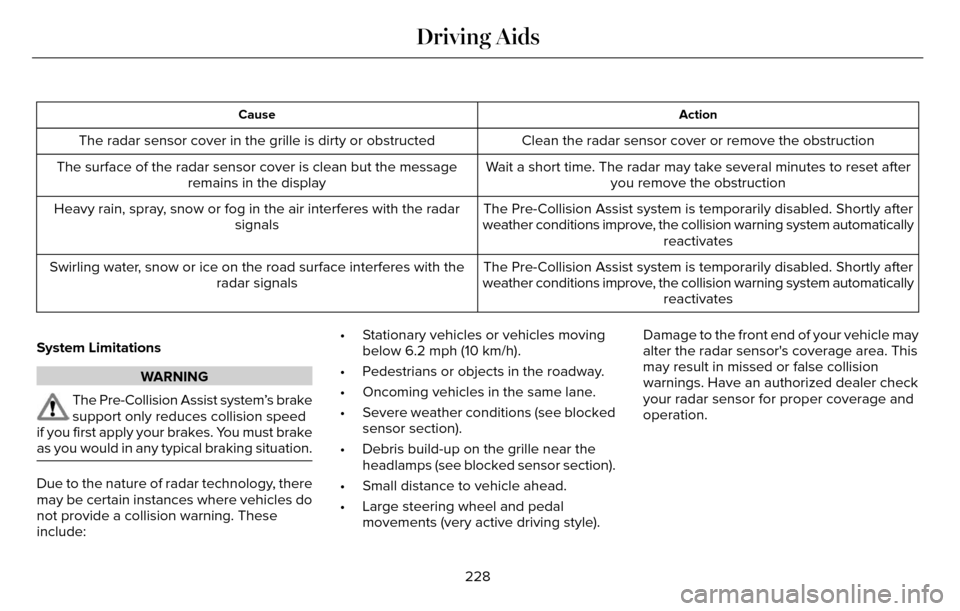
Action
Cause
Clean the radar sensor cover or remove the obstruction
The radar sensor cover in the grille is dirty or obstructed
Wait a short time. The radar may take several minutes to reset afteryou remove the obstruction
The surface of the radar sensor cover is clean but the message
remains in the display
The Pre-Collision Assist system is temporarily disabled. Shortly after
weather conditions improve, the collision warning system automatically reactivates
Heavy rain, spray, snow or fog in the air interferes with the radar
signals
The Pre-Collision Assist system is temporarily disabled. Shortly after
weather conditions improve, the collision warning system automatically reactivates
Swirling water, snow or ice on the road surface interferes with the
radar signals
System Limitations
WARNING
The Pre-Collision Assist system’s brake
support only reduces collision speed
if you first apply your brakes. You must brake
as you would in any typical braking situation.
Due to the nature of radar technology, there
may be certain instances where vehicles do
not provide a collision warning. These
include: • Stationary vehicles or vehicles moving
below 6.2 mph (10 km/h).
• Pedestrians or objects in the roadway.
• Oncoming vehicles in the same lane.
• Severe weather conditions (see blocked sensor section).
• Debris build-up on the grille near the headlamps (see blocked sensor section).
• Small distance to vehicle ahead.
• Large steering wheel and pedal movements (very active driving style). Damage to the front end of your vehicle may
alter the radar sensor's coverage area. This
may result in missed or false collision
warnings. Have an authorized dealer check
your radar sensor for proper coverage and
operation.
228
Driving Aids
Page 232 of 544
DRIVE CONTROL
LINCOLN DRIVE CONTROL
Lincoln Drive Control delivers the Lincoln
driving experience through a suite of
sophisticated electronic vehicle systems.
These systems continuously monitor your
driving inputs and the road conditions to
optimize ride comfort, steering, handling,
powertrain response and sound. You can
preset your preferences for these systems
within the information display. Lincoln Drive
Control will respond to your preferences
based on what gear position you select. This
provides a single location to control multiple
systems performance settings.Lincoln Drive Control consists of the
following systems:
• Continuously controlled damping
dynamically adjusts the shock absorbers
stiffness in real time to match the road
surface and driver inputs. This system
continuously monitors your vehicle’s
motion (roll, pitch, bounce), suspension
position, load, speed, road conditions,
and steering to adjust the suspension
damping for optimal vehicle control.
• Electronically power-assisted steering adjusts steering effort and feel based on
your vehicle speed and your inputs.
• Active noise control utilizes your vehicle electronics to enhance the acoustic
experience.
• Electronic stability control and traction control maintain your vehicle control in
adverse conditions or high performance
driving.
• Electronic throttle control enhances the powertrain response to your inputs. Using Lincoln Drive Control
You can configure which of the Drive Control
modes are active when your vehicle is in
drive (D) or in Sport (S). The configuration
remains active until modified from the main
menu on the information display.
229
Driving Aids
Page 233 of 544
These systems have a range of modes which
you can choose from in order to customize
your ideal driving experience:
• Comfort – Provides a more relaxeddriving experience, maximizing comfort.
Your steering effort decreases and the
suspension movement is more fluid.
Comfort mode is ideal when you desire
enhanced traveling comfort.
• Normal – Delivers a balanced combination of comfortable, controlled
ride and confident handling. This mode
provides an engaging drive experience
and a direct connection to the road
without sacrificing any of the composure
demanded from a luxury vehicle.
• Sport – Provides a sportier driving experience. The suspension stiffens, with
an emphasis on handling and control.
The engine responds more directly to
your inputs and takes on a more powerful
tone. Sport mode is ideal for use during
more spirited driving. You can change your vehicle’s Drive
Control settings from the main menu on
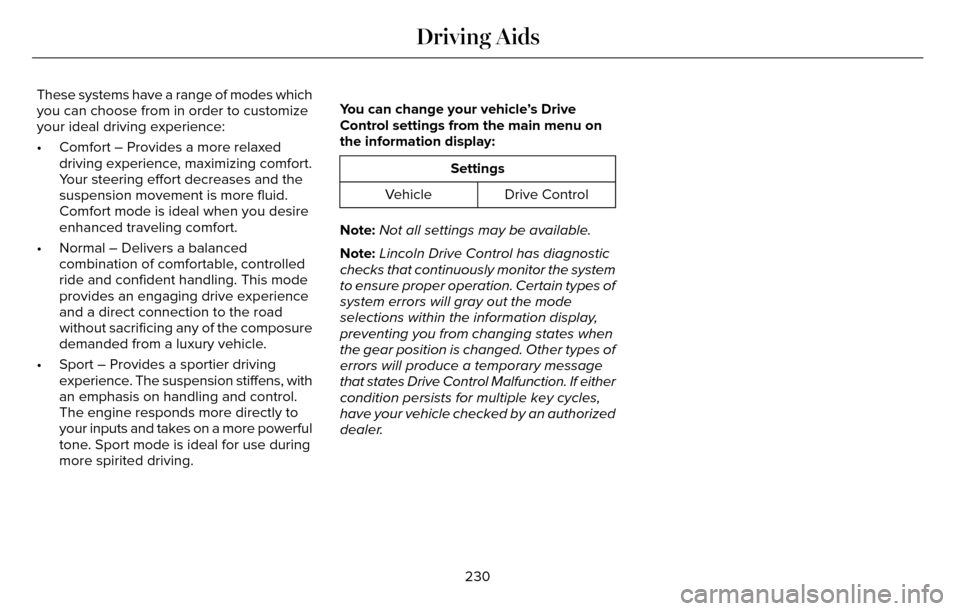
the information display:
Settings
Drive Control
Vehicle
Note: Not all settings may be available.
Note: Lincoln Drive Control has diagnostic
checks that continuously monitor the system
to ensure proper operation. Certain types of
system errors will gray out the mode
selections within the information display,
preventing you from changing states when
the gear position is changed. Other types of
errors will produce a temporary message
that states Drive Control Malfunction. If either
condition persists for multiple key cycles,
have your vehicle checked by an authorized
dealer.
230
Driving Aids
Page 247 of 544
Before Towing a Trailer
Practice turning, stopping and backing up to
get the feel of your vehicle-trailer
combination before starting on a trip. When
turning, make wider turns so the trailer
wheels clear curbs and other obstacles.
When Towing a Trailer
• Do not drive faster than 70 mph (113km/h) during the first 500 miles (800
kilometers).
• Do not make full-throttle starts.
• Check your hitch, electrical connections and trailer wheel lug nuts thoroughly after
you have traveled 50 miles (80
kilometers).
• When stopped in congested or heavy traffic during hot weather, place the
gearshift in position P to aid engine and
transmission cooling and to help A/C
performance.
• Turn off the speed control with heavy loads or in hilly terrain. The speed control
may turn off automatically when you are
towing on long, steep grades. • Shift to a lower gear when driving down
a long or steep hill. Do not apply the
brakes continuously, as they may
overheat and become less effective.
• If your transmission is equipped with a Grade Assist or Tow/Haul feature, use
this feature when towing. This provides
engine braking and helps eliminate
excessive transmission shifting for
optimum fuel economy and transmission
cooling.
• Allow more distance for stopping with a trailer attached. Anticipate stops and
brake gradually.
• Avoid parking on a grade. However, if you must park on a grade:
1. Turn the steering wheel to point your vehicle tires away from traffic flow.
2. Set your vehicle parking brake.
3. Place the automatic transmission in position P.
4. Place wheel chocks in front and back of the trailer wheels. (Chocks not included
with vehicle.)
Launching or Retrieving a Boat or
Personal Watercraft (PWC)
Note: Disconnect the wiring to the trailer
before backing the trailer into the water.
Note: Reconnect the wiring to the trailer
after removing the trailer from the water.
When backing down a ramp during boat
launching or retrieval:
• Do not allow the static water level to rise above the bottom edge of the rear
bumper.
• Do not allow waves to break higher than 6 inches (15 centimeters) above the
bottom edge of the rear bumper.
Exceeding these limits may allow water to
enter vehicle components:
• Causing internal damage to the components.
• Affecting driveability, emissions, and reliability.
244
Towing
Page 249 of 544
Front-wheel drive vehicles must have the
front wheels placed on a tow dolly when
towing your vehicle from the rear using
wheel lift equipment. This prevents damage
to the transmission.
Towing an all-wheel drive vehicle requires
that all wheels be off the ground, such as
using a wheel lift and dollies or flatbed
equipment. This prevents damage to the
transmission, all-wheel drive system and
vehicle.
TOWING THE VEHICLE ON FOUR
WHEELS
Emergency Towing
WARNING
If your vehicle has a steering wheel
lock make sure the ignition is in the
accessory or on position when being towed.
You can flat-tow (all wheels on the ground,
regardless of the powertrain/transmission
configuration) your disabled vehicle (without
access to wheel dollies, car-hauling trailer,
or flatbed transport vehicle) under the
following conditions:
• Your vehicle is facing forward so you tow it in a forward direction.
• You place the transmission in position N.
If you cannot place the transmission in
position N, you may need to override it.
See Transmission (page 175).
• Maximum speed is 35 mph (56 km/h).
• Maximum distance is 50 miles (80 kilometers).
Recreational Towing
Note: Put your climate control system in
recirculated air mode to prevent exhaust
fumes from entering the vehicle. See
Climate Control (page 135). Follow these guidelines if you have a need
for recreational (RV) towing. An example of
recreational towing would be towing your
vehicle behind a motorhome. These
guidelines are to make sure you do not
damage the transmission during towing.
Vehicles Equipped with a 2.0L Engine
Front-wheel drive (FWD) vehicles CANNOT
be flat-towed (all wheels on the ground) as
vehicle or transmission damage may occur.
You must place the front wheels on a
two-wheel tow dolly. If you are using a tow
dolly, follow the instructions specified by the
equipment provider.
All-wheel drive (AWD) vehicles
CANNOT be
flat-towed (all wheels on the ground), as
vehicle or transmission damage may occur.
It is recommended to tow your vehicle with
all four (4) wheels off the ground such as
when using a car-hauling trailer. Otherwise,
you cannot tow your vehicle.
246
Towing
Page 252 of 544
Note:Driving through standing water can
cause vehicle damage.
Note: Engine damage can occur if water
enters the air filter.
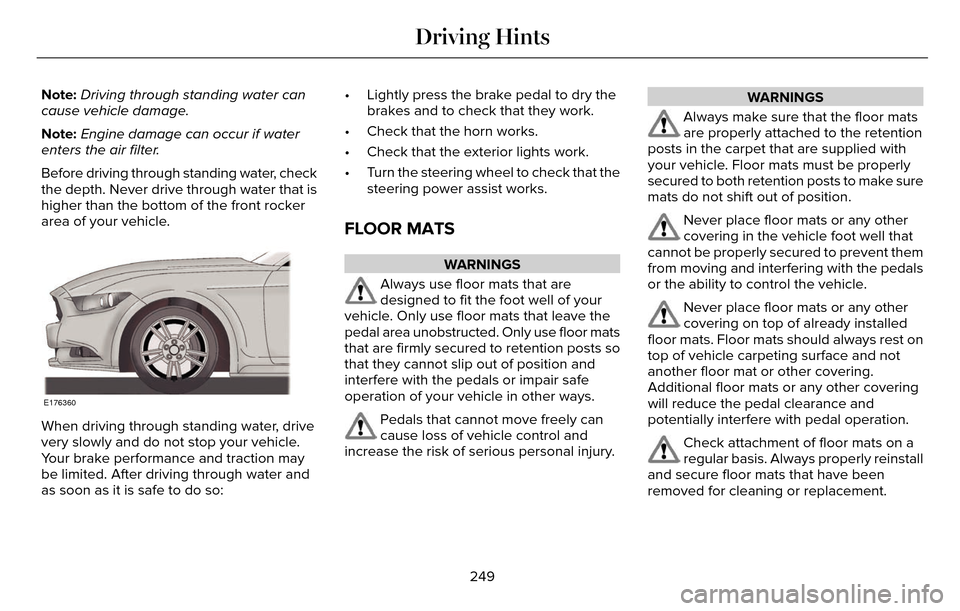
Before driving through standing water, check
the depth. Never drive through water that is
higher than the bottom of the front rocker
area of your vehicle.
E176360
When driving through standing water, drive
very slowly and do not stop your vehicle.
Your brake performance and traction may
be limited. After driving through water and
as soon as it is safe to do so: • Lightly press the brake pedal to dry the
brakes and to check that they work.
• Check that the horn works.
• Check that the exterior lights work.
• Turn the steering wheel to check that the steering power assist works.
FLOOR MATS
WARNINGS
Always use floor mats that are
designed to fit the foot well of your
vehicle. Only use floor mats that leave the
pedal area unobstructed. Only use floor mats
that are firmly secured to retention posts so
that they cannot slip out of position and
interfere with the pedals or impair safe
operation of your vehicle in other ways.
Pedals that cannot move freely can
cause loss of vehicle control and
increase the risk of serious personal injury.
WARNINGS
Always make sure that the floor mats
are properly attached to the retention
posts in the carpet that are supplied with
your vehicle. Floor mats must be properly
secured to both retention posts to make sure
mats do not shift out of position.
Never place floor mats or any other
covering in the vehicle foot well that
cannot be properly secured to prevent them
from moving and interfering with the pedals
or the ability to control the vehicle.
Never place floor mats or any other
covering on top of already installed
floor mats. Floor mats should always rest on
top of vehicle carpeting surface and not
another floor mat or other covering.
Additional floor mats or any other covering
will reduce the pedal clearance and
potentially interfere with pedal operation.
Check attachment of floor mats on a
regular basis. Always properly reinstall
and secure floor mats that have been
removed for cleaning or replacement.
249
Driving Hints
Page 269 of 544
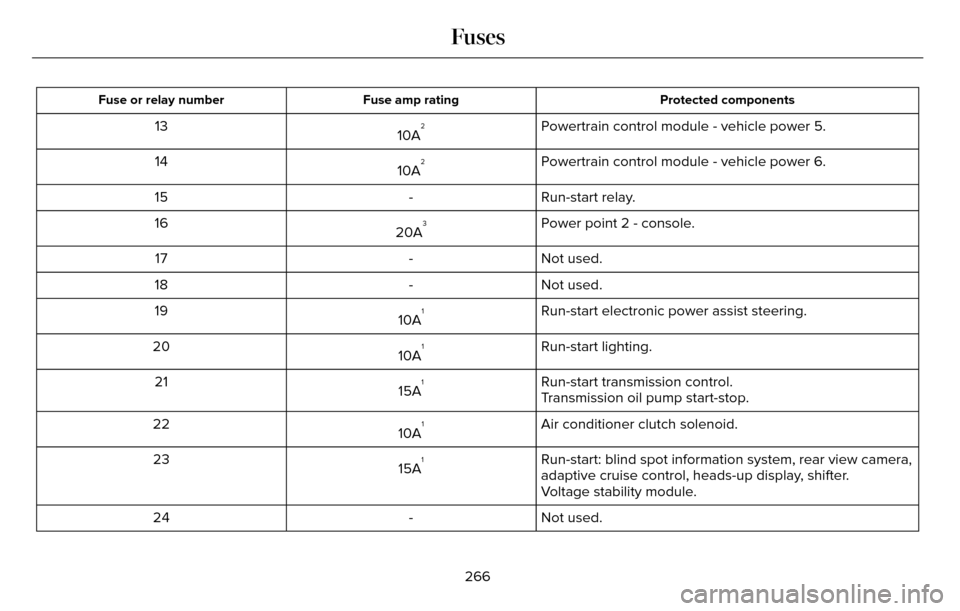
Protected components
Fuse amp rating
Fuse or relay number
Powertrain control module - vehicle power 5.
10A213
Powertrain control module - vehicle power 6.
10A
214
Run-start relay.
-
15
Power point 2 - console.
20A
316
Not used.
-
17
Not used.
-
18
Run-start electronic power assist steering.
10A
119
Run-start lighting.
10A
120
Run-start transmission control.
15A
121
Transmission oil pump start-stop.
Air conditioner clutch solenoid.
10A
122
Run-start: blind spot information system, rear view camera,
adaptive cruise control, heads-up display, shifter.
15A
123
Voltage stability module.
Not used.
-
24
266
Fuses
Page 277 of 544
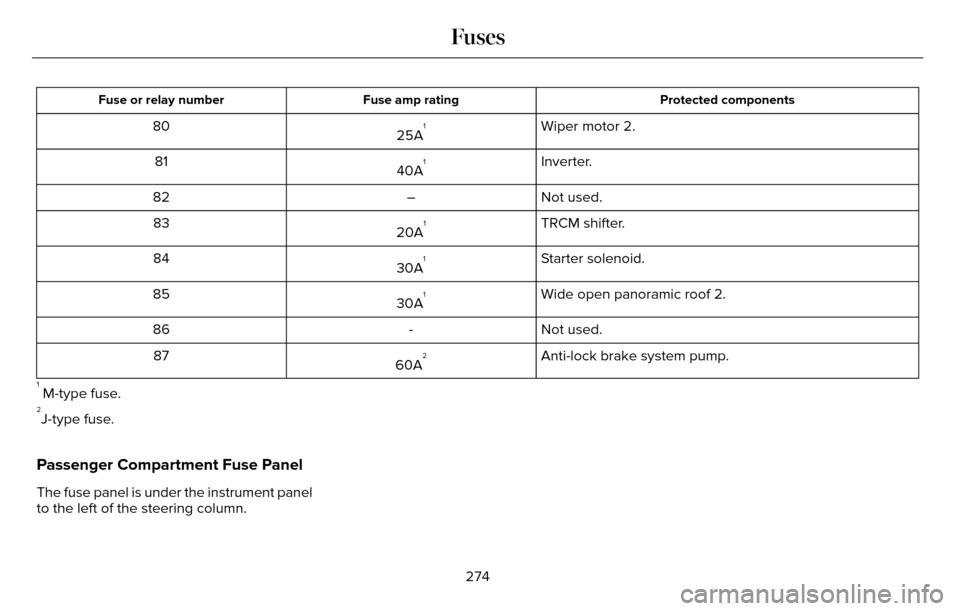
Protected components
Fuse amp rating
Fuse or relay number
Wiper motor 2.
25A180
Inverter.
40A
181
Not used.
–
82
TRCM shifter.
20A
183
Starter solenoid.
30A
184
Wide open panoramic roof 2.
30A
185
Not used.
-
86
Anti-lock brake system pump.
60A
287
1 M-type fuse.2J-type fuse.
Passenger Compartment Fuse Panel
The fuse panel is under the instrument panel
to the left of the steering column.
274
Fuses
Page 280 of 544
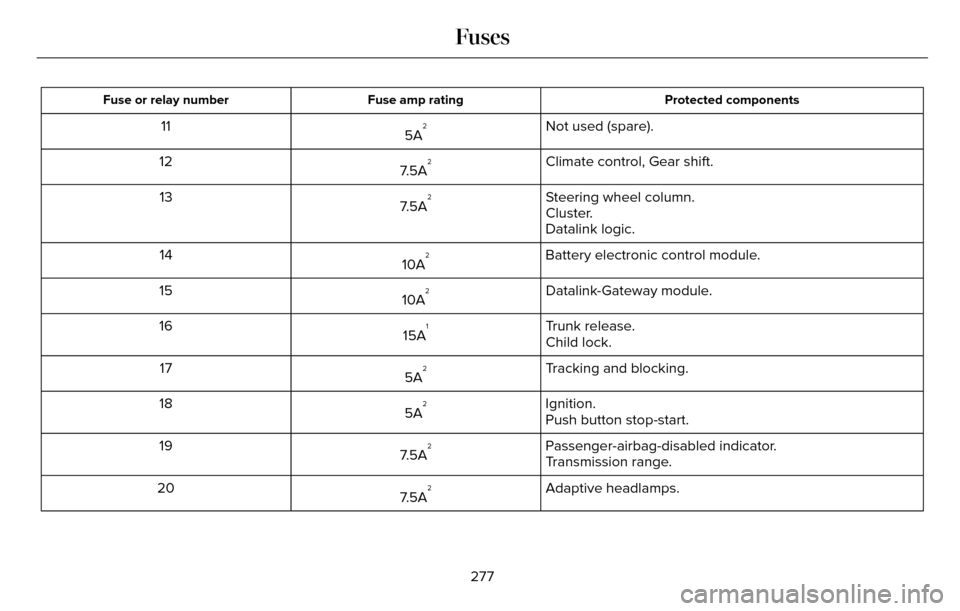
Protected components
Fuse amp rating
Fuse or relay number
Not used (spare).
5A211
Climate control, Gear shift.
7.5A
212
Steering wheel column.
7.5A
213
Cluster.
Datalink logic.
Battery electronic control module.
10A
214
Datalink-Gateway module.
10A
215
Trunk release.
15A
116
Child lock.
Tracking and blocking.
5A
217
Ignition.
5A
218
Push button stop-start.
Passenger-airbag-disabled indicator.
7.5A
219
Transmission range.
Adaptive headlamps.
7.5A
220
277
Fuses
Page 282 of 544
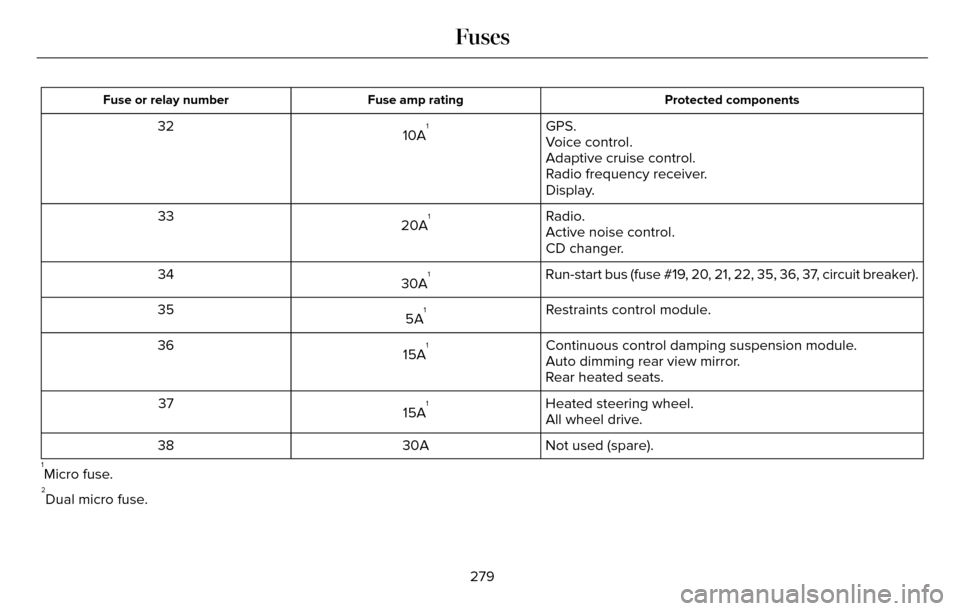
Protected components
Fuse amp rating
Fuse or relay number
GPS.
10A132
Voice control.
Adaptive cruise control.
Radio frequency receiver.
Display.
Radio.
20A
133
Active noise control.
CD changer.
Run-start bus (fuse #19, 20, 21, 22, 35, 36, 37, circuit breaker).
30A
134
Restraints control module.
5A
135
Continuous control damping suspension module.
15A
136
Auto dimming rear view mirror.
Rear heated seats.
Heated steering wheel.
15A
137
All wheel drive.
Not used (spare).
30A
38
1Micro fuse.2Dual micro fuse.
279
Fuses