door LINCOLN MKZ 2016 Manual Online
[x] Cancel search | Manufacturer: LINCOLN, Model Year: 2016, Model line: MKZ, Model: LINCOLN MKZ 2016Pages: 544, PDF Size: 5.77 MB
Page 344 of 544
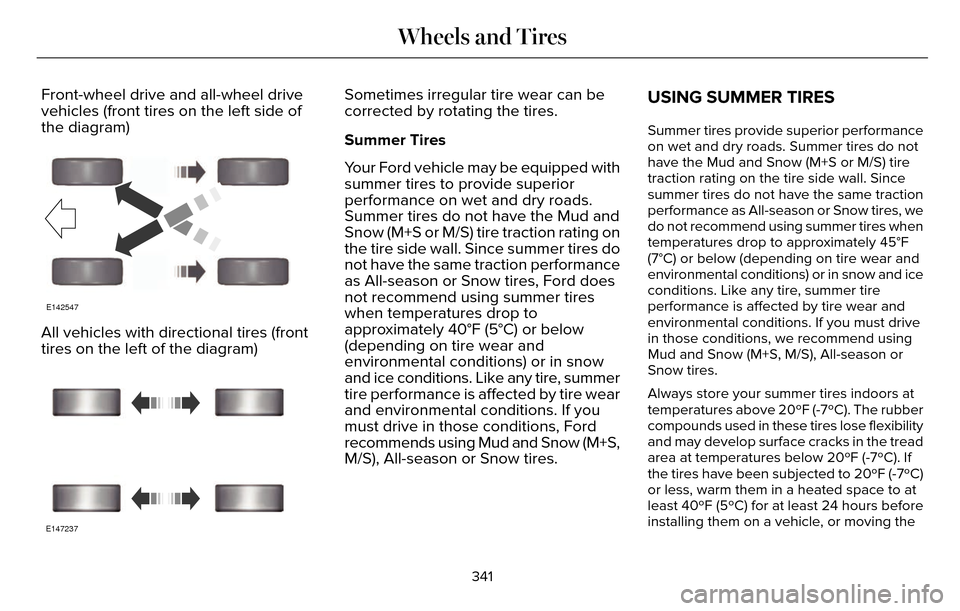
Front-wheel drive and all-wheel drive
vehicles (front tires on the left side of
the diagram)
E142547
All vehicles with directional tires (front
tires on the left of the diagram)
E147237
Sometimes irregular tire wear can be
corrected by rotating the tires.
Summer Tires
Your Ford vehicle may be equipped with
summer tires to provide superior
performance on wet and dry roads.
Summer tires do not have the Mud and
Snow (M+S or M/S) tire traction rating on
the tire side wall. Since summer tires do
not have the same traction performance
as All-season or Snow tires, Ford does
not recommend using summer tires
when temperatures drop to
approximately 40°F (5°C) or below
(depending on tire wear and
environmental conditions) or in snow
and ice conditions. Like any tire, summer
tire performance is affected by tire wear
and environmental conditions. If you
must drive in those conditions, Ford
recommends using Mud and Snow (M+S,
M/S), All-season or Snow tires.USING SUMMER TIRES
Summer tires provide superior performance
on wet and dry roads. Summer tires do not
have the Mud and Snow (M+S or M/S) tire
traction rating on the tire side wall. Since
summer tires do not have the same traction
performance as All-season or Snow tires, we
do not recommend using summer tires when
temperatures drop to approximately 45°F
(7°C) or below (depending on tire wear and
environmental conditions) or in snow and ice
conditions. Like any tire, summer tire
performance is affected by tire wear and
environmental conditions. If you must drive
in those conditions, we recommend using
Mud and Snow (M+S, M/S), All-season or
Snow tires.
Always store your summer tires indoors at
temperatures above 20ºF (-7ºC). The rubber
compounds used in these tires lose flexibility
and may develop surface cracks in the tread
area at temperatures below 20ºF (-7ºC). If
the tires have been subjected to 20ºF (-7ºC)
or less, warm them in a heated space to at
least 40ºF (5ºC) for at least 24 hours before
installing them on a vehicle, or moving the
341
Wheels and Tires
Page 348 of 544
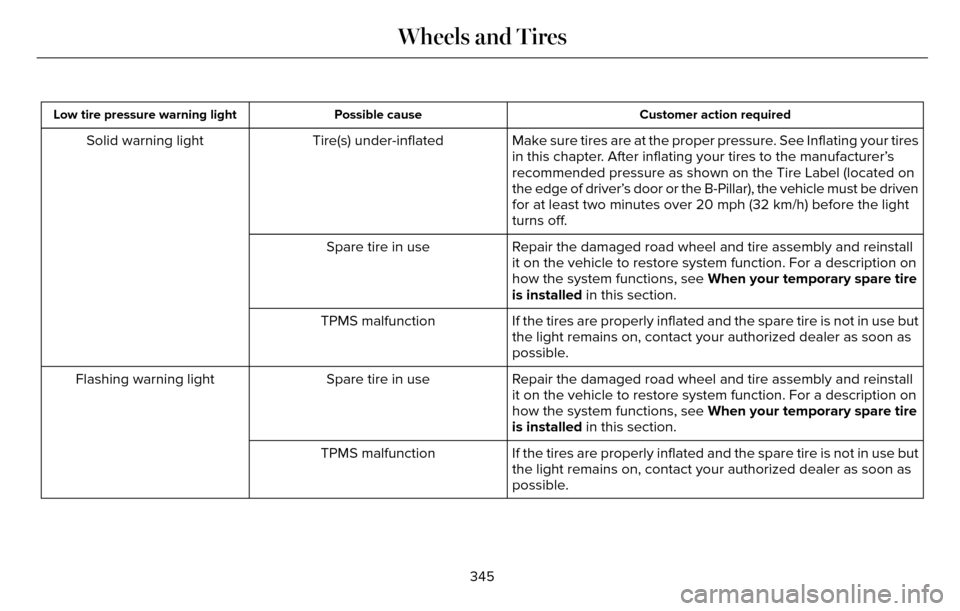
Customer action required
Possible cause
Low tire pressure warning light
Make sure tires are at the proper pressure. See Inflating your tires
in this chapter. After inflating your tires to the manufacturer’s
recommended pressure as shown on the Tire Label (located on
the edge of driver’s door or the B-Pillar), the vehicle must be driven
for at least two minutes over 20 mph (32 km/h) before the light
turns off.
Tire(s) under-inflated
Solid warning light
Repair the damaged road wheel and tire assembly and reinstall
it on the vehicle to restore system function. For a description on
how the system functions, see When your temporary spare tire
is installed in this section.
Spare tire in use
If the tires are properly inflated and the spare tire is not in use but
the light remains on, contact your authorized dealer as soon as
possible.
TPMS malfunction
Repair the damaged road wheel and tire assembly and reinstall
it on the vehicle to restore system function. For a description on
how the system functions, see When your temporary spare tire
is installed in this section.
Spare tire in use
Flashing warning light
If the tires are properly inflated and the spare tire is not in use but
the light remains on, contact your authorized dealer as soon as
possible.
TPMS malfunction
345
Wheels and Tires
Page 358 of 544
VEHICLE IDENTIFICATION
NUMBER
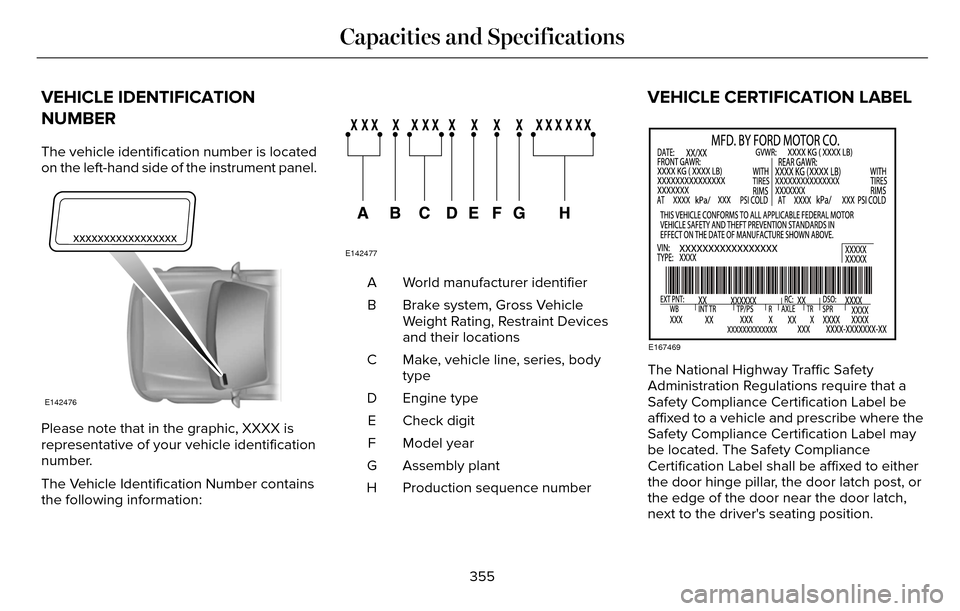
The vehicle identification number is located
on the left-hand side of the instrument panel.
E142476
Please note that in the graphic, XXXX is
representative of your vehicle identification
number.
The Vehicle Identification Number contains
the following information:
E142477
World manufacturer identifier
A
Brake system, Gross Vehicle
Weight Rating, Restraint Devices
and their locations
B
Make, vehicle line, series, body
type
C
Engine type
D
Check digit
E
Model year
F
Assembly plant
G
Production sequence number
H
VEHICLE CERTIFICATION LABEL
E167469
The National Highway Traffic Safety
Administration Regulations require that a
Safety Compliance Certification Label be
affixed to a vehicle and prescribe where the
Safety Compliance Certification Label may
be located. The Safety Compliance
Certification Label shall be affixed to either
the door hinge pillar, the door latch post, or
the edge of the door near the door latch,
next to the driver's seating position.
355
Capacities and Specifications
Page 378 of 544
Note:You can access the entertainment
features for 30 minutes after you switch the
ignition off, and no doors are opened.
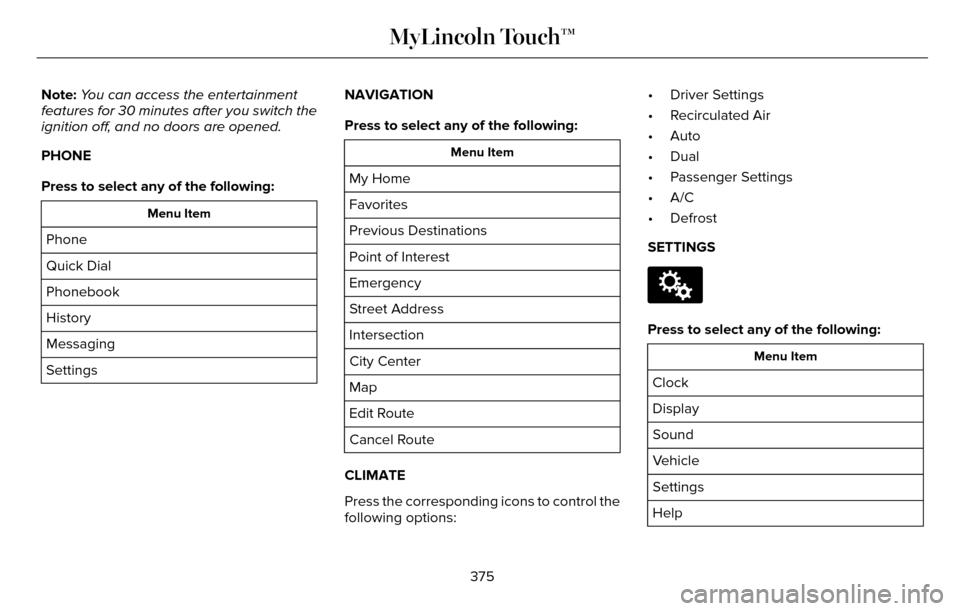
PHONE
Press to select any of the following:
Menu Item
Phone
Quick Dial
Phonebook
History
Messaging
Settings NAVIGATION
Press to select any of the following:
Menu Item
My Home
Favorites
Previous Destinations
Point of Interest
Emergency
Street Address
Intersection
City Center
Map
Edit Route
Cancel Route
CLIMATE
Press the corresponding icons to control the
following options: • Driver Settings
• Recirculated Air
• Auto
• Dual
• Passenger Settings
• A/C
• Defrost
SETTINGS
E142607
Press to select any of the following:
Menu Item
Clock
Display
Sound
Vehicle
Settings
Help
375
MyLincoln Touch™
Page 391 of 544

To make adjustments using the
touchscreen, select:
Menu Item
Settings
Sound
Then select from the following:
Bass
Midrange
Treble
Set Balance and Fade
Occupancy Mode
Menu Item
Speed Compensated Volume
DSP
Note: Your vehicle may not have all of these
sound settings.
Vehicle
E142607
To make adjustments using the
touchscreen, select:
Menu Item
Settings
Vehicle
Then select from the following:
Menu Item
Ambient Lighting
Vehicle Health Report
Camera Settings
Enable Valet Mode
Ambient Lighting
When you switch this feature on, ambient
lighting illuminates the dashboard, footwells,
doors, cupholders, and console with a choice
of colors.
388
MyLincoln Touch™
Page 424 of 544
If you are not listening to a CD, press the
voice button and, after the tone, say:
Voice command
CD Player
When listening to a CD you can say many
commands. Following are a few examples
of what you can say.
Voice command
Play
Pause
Next Track
Previous Track
Help
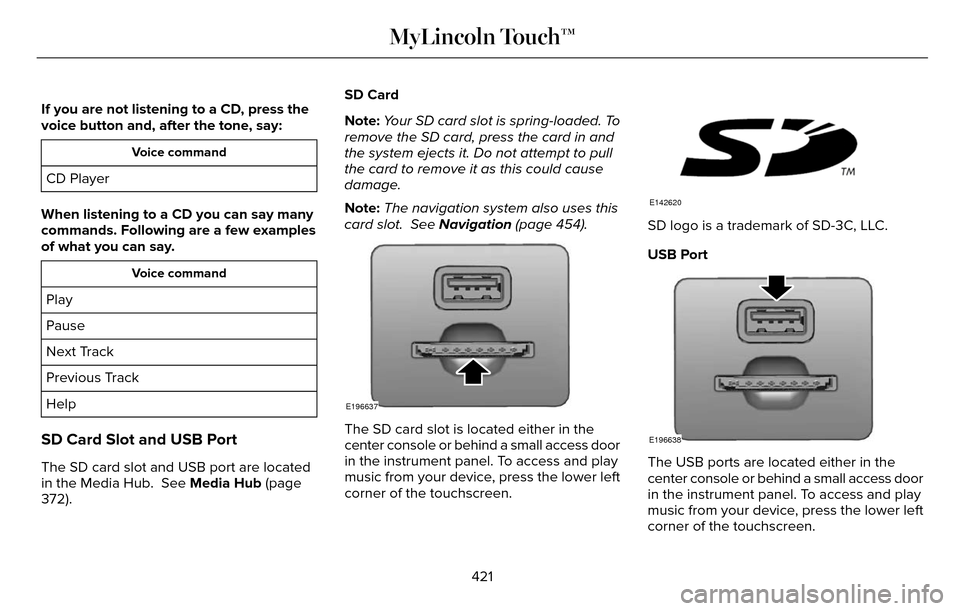
SD Card Slot and USB Port
The SD card slot and USB port are located
in the Media Hub. See Media Hub (page
372). SD Card
Note:
Your SD card slot is spring-loaded. To
remove the SD card, press the card in and
the system ejects it. Do not attempt to pull
the card to remove it as this could cause
damage.
Note: The navigation system also uses this
card slot. See Navigation (page 454).
E196637
The SD card slot is located either in the
center console or behind a small access door
in the instrument panel. To access and play
music from your device, press the lower left
corner of the touchscreen.
E142620
SD logo is a trademark of SD-3C, LLC.
USB Port
E196638
The USB ports are located either in the
center console or behind a small access door
in the instrument panel. To access and play
music from your device, press the lower left
corner of the touchscreen.
421
MyLincoln Touch™
Page 485 of 544
Make sure to change your vehicle’s oils and
fluids at the specified intervals or in
conjunction with a repair. Flushing is a viable
way to change fluid for many vehicle
sub-systems during scheduled maintenance.It is critical that systems are flushed only with
new fluid that is the same as that required
to fill and operate the system or using a
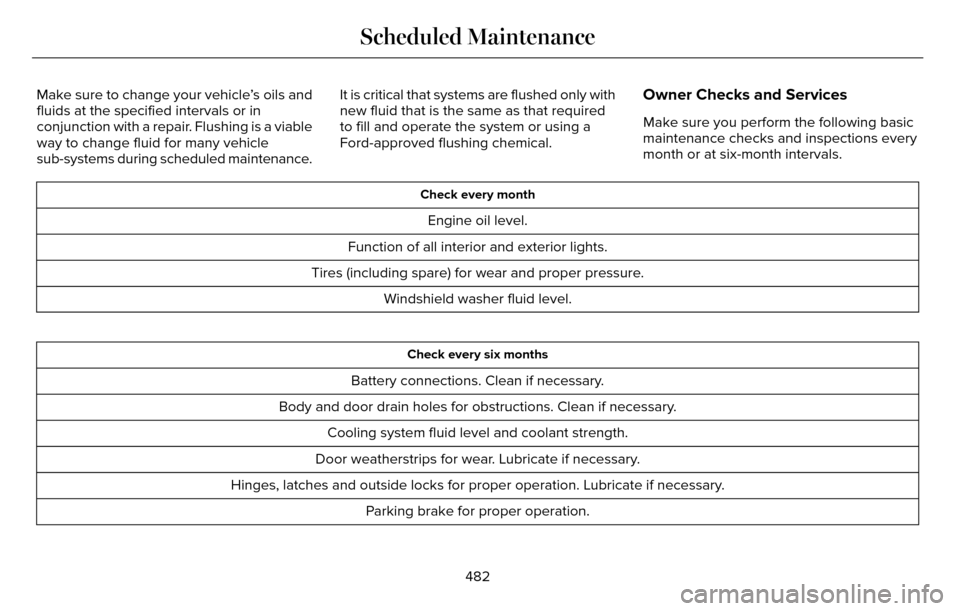
Ford-approved flushing chemical.Owner Checks and Services
Make sure you perform the following basic
maintenance checks and inspections every
month or at six-month intervals.
Check every month
Engine oil level.
Function of all interior and exterior lights.
Tires (including spare) for wear and proper pressure. Windshield washer fluid level.
Check every six months
Battery connections. Clean if necessary.
Body and door drain holes for obstructions. Clean if necessary. Cooling system fluid level and coolant strength.
Door weatherstrips for wear. Lubricate if necessary.
Hinges, latches and outside locks for proper operation. Lubricate if necessary. Parking brake for proper operation.
482
Scheduled Maintenance
Page 537 of 544
Essential Towing Checks............................243Before Towing a Trailer.....................................244
Hitches..................................................................243
Launching or Retrieving a Boat or PersonalWatercraft (PWC)............................................244
Safety Chains.......................................................243
Trailer Brakes.......................................................243
Trailer Lamps.......................................................243
When Towing a Trailer.......................................244
Event Data RecordingSee: Data Recording..............................................9
Export Unique Options...................................14
Extended Service Plan (ESP).....................477
SERVICE PLANS (CANADA ONLY).................478
SERVICE PLANS (U.S. Only).............................477
Exterior Mirrors................................................96Auto-Dimming Feature........................................97
Blind Spot Monitor................................................98
Fold-Away Exterior Mirrors.................................97
Heated Exterior Mirrors.......................................97
Integrated Blind Spot Mirrors............................98
Lincoln Welcome Mat..........................................98
Memory Mirrors.....................................................97
Power Exterior Mirrors.........................................96
Power-Folding Mirrors.........................................97
Signal Indicator Mirrors.......................................97
F
Fastening the Safety Belts...........................34Rear Inflatable Safety Belt..................................36
Safety Belt Extension Assembly........................37
Safety Belt Locking Modes................................35
Using Safety Belts During Pregnancy.............34
Flat Tire InflationSee: Temporary Mobility Kit..............................314
Floor Mats......................................................249
Front Parking Aid...........................................197
Front Passenger Sensing System..............46
Fuel and Refueling........................................166
Fuel Consumption..........................................171
Calculating Fuel Economy................................172
Filling the Tank.....................................................172
Fuel Filter.......................................................296
Fuel Quality.....................................................167
Choosing the Right Fuel....................................167
Fuel Shutoff...................................................252
Fuses...............................................................263
Fuse Specification Chart............................263
Passenger Compartment Fuse Panel............274
Power Distribution Box.....................................263
G
Garage Door OpenerSee: Universal Garage Door Opener.............152
Gauges............................................................102Engine Coolant Temperature Gauge.............104
Fuel Gauge...........................................................103\
Information Display.............................................103
General Information on Radio Frequencies...................................................54
Intelligent Access..................................................54
General Maintenance Information...........480Multi-Point Inspection........................................483
Owner Checks and Services...........................482
Protecting Your Investment.............................480
Why Maintain Your Vehicle?............................480
Why Maintain Your Vehicle at Your
Dealership?......................................................480
Getting Assistance Outside the U.S. andCanada.........................................................259
Getting the Services You Need................256
Away From Home..............................................256
Global Opening and Closing.......................96Closing the Windows...........................................96
Opening the Windows.........................................96
534
Index
Page 539 of 544
Information Messages..................................115Active Park.............................................................115
Adaptive Cruise Control.....................................116
Adaptive Headlamps...........................................117
AdvanceTrac™.........................................................117
Airbag......................................................................117
Alarm.......................................................................1\
18
Automatic Engine Shutdown.............................118
AWD........................................................................\
.119
Battery and Charging System..........................120
Blind Spot Information and Cross Traffic AlertSystem................................................................121
Doors and Locks...................................................121
Driver Alert............................................................\
122
Fuel........................................................................\
.122
Hill Start Assist.....................................................123
Keys and Intelligent Access..............................123
Lane Keeping System........................................124
Maintenance.........................................................125
MyKey.....................................................................126
Park Aid.................................................................\
.127
Park Brake.............................................................12\
7
Power Steering....................................................129
Pre-Collision Assist.............................................129
Remote Start.........................................................130
Seats.......................................................................1\
30
Starting System ...................................................130
Tire Pressure Monitoring System.....................131 Traction Control................................................131
Transmission.........................................................132
Installing Child Seats......................................18Child Seats.............................................................\
..18
Using Lap and Shoulder Belts............................18
Using Lower Anchors and Tethers for CHildren (LATCH).............................................24
Using Tether Straps..............................................25
Instrument Cluster........................................102
Instrument Lighting Dimmer........................88
Interior Lamps..................................................93
Front Interior Lamp...............................................93
Rear Interior Lamp................................................94
Rear Interior Lamp (If Equipped).......................94
Interior Luggage Compartment Release...........................................................75
Interior Mirror...................................................98
Auto-Dimming Mirror...........................................99
Introduction.........................................................7
J
Jump Starting the Vehicle..........................253Connecting the Jumper Cables......................254
Jump Starting......................................................254
Preparing Your Vehicle.....................................253
Removing the Jumper Cables........................255
K
Keyless Entry....................................................72SECURICODE™ KEYLESS ENTRY
KEYPAD...............................................................72
Keyless Starting..............................................161Ignition Modes......................................................161
Keys and Remote Controls...........................54
L
Lane Keeping System..................................215Switching the System On and Off...................216
Lighting Control...............................................87Headlamp Flasher.................................................87
High Beams............................................................87\
Lighting..............................................................87
Lincoln Automotive Financial Services......12
Load Carrying.................................................231
Load Limit........................................................231
Vehicle Loading - with and without aTrailer.................................................................231
536
Index
Page 540 of 544

Locking and Unlocking..................................67Activating Intelligent Access.............................68
Autolock ...............................................................\
..69
Auto Relock............................................................69
Battery Saver..........................................................7\
0
Illuminated Entry...................................................70
Illuminated Exit......................................................70\
Luggage Compartment.......................................70
Power Decklid.........................................................71
Power Door Locks................................................67
Remote Control.....................................................67
Smart Unlocks for Intelligent AccessKeys.....................................................................69
Locks..................................................................67
Lug Nuts
See: Changing a Road Wheel.........................346
M
Maintenance...................................................281General Information............................................281
Media Hub......................................................372
Memory Function..........................................145
Easy Entry and Exit Feature..............................147
Linking a PreSet Position to your RemoteControl or Intelligent Access Key Fob.......146
Saving a PreSet Position...................................146
Message CenterSee: Information Displays.................................109
MirrorsSee: Heated Windows and Mirrors.................138
See: Windows and Mirrors.................................95
Mobile Communications Equipment...........14
Moonroof.........................................................100
Bounce-Back.........................................................101
Opening and Closing the Moonroof..............100
Motorcraft Parts............................................354
MyKey Troubleshooting................................65
MyKey™..............................................................60
Principle of Operation.........................................60
MyLincoln Touch™.........................................373General Information...........................................373
MyLincoln Touch™ Troubleshooting.........467
N
Navigation ......................................................454cityseekr................................................................457
Destination Mode...............................................454
Map Mode............................................................462
Navigation Map Updates.................................466
Navigation Voice Commands.........................466
Point of Interest (POI) Categories..................456
Quick-touch Buttons..........................................465
Setting Your Navigation Preferences............458
Normal Scheduled Maintenance..............484Intelligent Oil-Life Monitor™..............................484
Maintenance Intervals.......................................486
O
Oil Change Indicator Reset.......................288
Oil Check
See: Engine Oil Check......................................287
Opening and Closing the Hood................281
Ordering Additional Owner's
Literature......................................................261
Obtaining a French Owner’s Manual.............261
Overhead Console.......................................160
P
Parking Aids....................................................196Principle of Operation........................................196
Passive Anti-Theft System............................77SecuriLock...............................................................77
PA T SSee: Passive Anti-Theft System.........................77
Perchlorate........................................................ 12
Personal Safety System™..............................43
How Does the Personal Safety System
Work?...................................................................43
537
Index