door LINCOLN MKZ 2016 Workshop Manual
[x] Cancel search | Manufacturer: LINCOLN, Model Year: 2016, Model line: MKZ, Model: LINCOLN MKZ 2016Pages: 544, PDF Size: 5.77 MB
Page 178 of 544
AUTOMATIC TRANSMISSION
WARNINGS
Always set the parking brake fully and
make sure your vehicle is in park (P).
Turn the ignition off whenever you leave your
vehicle.
Do not apply the brake pedal and
accelerator pedal simultaneously.
Applying both pedals simultaneously for
more than three seconds will limit engine
rpm, which may result in difficulty maintaining
speed in traffic and could lead to serious
injury.
Push Button Shift Transmission
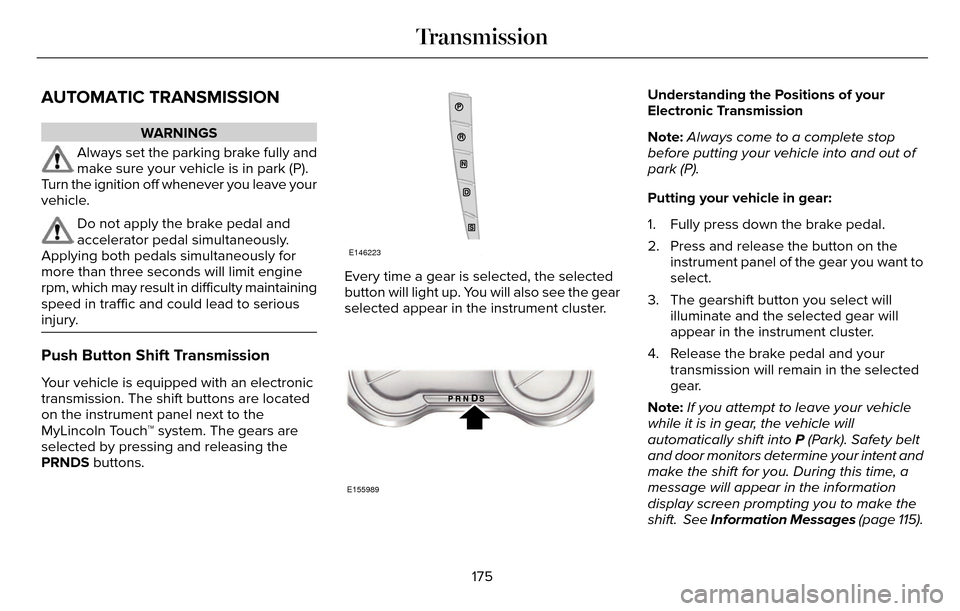
Your vehicle is equipped with an electronic
transmission. The shift buttons are located
on the instrument panel next to the
MyLincoln Touch™ system. The gears are
selected by pressing and releasing the
PRNDS buttons.
E146223
Every time a gear is selected, the selected
button will light up. You will also see the gear
selected appear in the instrument cluster.
E155989
Understanding the Positions of your
Electronic Transmission
Note: Always come to a complete stop
before putting your vehicle into and out of
park (P).
Putting your vehicle in gear:
1. Fully press down the brake pedal.
2. Press and release the button on the instrument panel of the gear you want to
select.
3. The gearshift button you select will illuminate and the selected gear will
appear in the instrument cluster.
4. Release the brake pedal and your transmission will remain in the selected
gear.
Note: If you attempt to leave your vehicle
while it is in gear, the vehicle will
automatically shift into P (Park). Safety belt
and door monitors determine your intent and
make the shift for you. During this time, a
message will appear in the information
display screen prompting you to make the
shift. See Information Messages (page 115).
175
Transmission
Page 179 of 544
Note:To put your vehicle in gear with the
door open, perform steps 1-4. See the
Automatic Return to Park section in this
chapter for more information on this feature.
Park (P)
With the transmission in park (P), your vehicle
locks the transmission and prevents the front
wheels from turning. Always come to a
complete stop before putting your vehicle
into and out of park (P). An audible chime
sounds once you select park (P).
When the ignition is turned off, the vehicle
will automatically shift into park (P). If the
ignition is turned off while the vehicle is
moving, it will first shift into neutral (N) until
a slow enough speed is reached. The vehicle
will then shift into park (P) automatically.
Automatic Return to Park
Note: This feature will not operate when your
vehicle is in Stay in Neutral mode or neutral
tow.
Your vehicle has a safety feature that will
automatically shift your vehicle into park (P)
when any of the following conditions occur: • You turn the ignition off
• You open the driver's door with your
safety belt unlatched
• Your safety belt is unlatched while the driver's door is open
If you turn the ignition off while your vehicle
is moving, your vehicle will first shift into
neutral (N) until it slows down enough to shift
into park (P) automatically.
Note: If you have waited an extended period
of time, (2-15 minutes) before starting your
vehicle, unlatching your safety belt will cause
this feature to activate, even with the driver's
door closed.
Note: This feature may not work properly if
the door ajar switch is malfunctioning. If your
door ajar indicator does not illuminate when
you open the driver’s door or the indicator
illuminates with the driver’s door closed. See
your authorized dealer. Reverse (R)
With the transmission in reverse (R), your
vehicle will move backward. Always come
to a complete stop before shifting into and
out of reverse (R).
Neutral (N)
With the transmission in neutral (N), you can
start your vehicle and it is free to roll. Hold
the brake pedal down while in this position.
Stay in Neutral mode
Stay in Neutral mode allows your vehicle to
stay in neutral (N) when you exit the vehicle.
Your vehicle must be stationary to enter this
mode.
To enter Stay in Neutral mode:
1. Press the neutral (N) button on your
shifter assembly.
2. A message will appear in your information display screen prompting you
to press the neutral (N) button.
3. Press the neutral (N) button again to enter Stay in Neutral mode.
176
Transmission
Page 193 of 544
To prevent this from happening, do the
following:
1. Pull the switch and hold it in this position.
2. Drive your vehicle, then release theswitch when you notice that the engine
has developed sufficient driving force.
Automatic release - drive away release
Your vehicle will automatically release the
parking brake if:
• The driver door is closed.
• The vehicle is accelerated.
• There are no faults detected in the parking brake system.
Note: If the electric parking brake warning
lamp stays illuminated, the electric parking
brake will not automatically release. You
must release the electric parking brake using
the electric parking brake switch.
The brake system warning lamp will go off
to confirm that you have released the electric
parking brake. Note:
The electric parking brake drive away
release makes starting on a hill easier. This
feature will release the parking brake
automatically when the vehicle has sufficient
drive force to move up the hill. To assure
drive away release when starting uphill,
press the accelerator pedal quickly.
Battery With No Charge
WARNING
You will not be able to apply or release
the electric parking brake if the battery
is low or has no charge.
If the battery is low or has no charge, use
jumper cables and a booster battery.
HILL START ASSIST
WARNINGS
The system does not replace the
parking brake. When you leave your
vehicle, always apply the parking brake.
Failure to leave your vehicle securely parked
may lead to a crash or injury. See Electric
Parking Brake (page 188).
You must remain in your vehicle when
the system turns on. At all times, you
are responsible for controlling your vehicle,
supervising the system and intervening, if
required. Failure to take care may result in
the loss of control of your vehicle, serious
personal injury or death.
The system will turn off if a malfunction
is apparent or if you rev the engine
excessively. Failure to take care may result
in the loss of control of your vehicle, serious
personal injury or death.
The system makes it easier to pull away
when your vehicle is on a slope without the
need to use the parking brake.
190
Brakes
Page 218 of 544
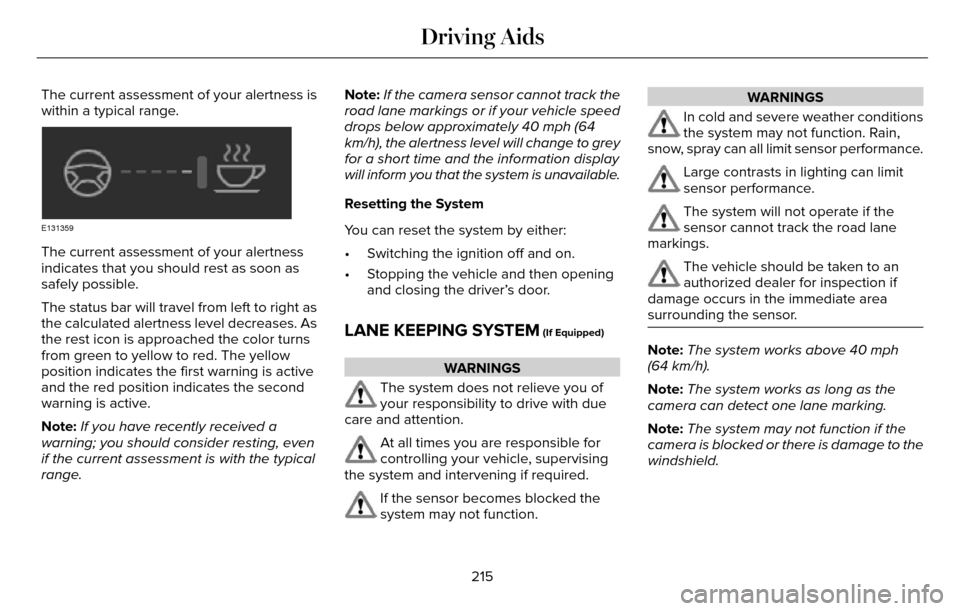
The current assessment of your alertness is
within a typical range.
E131359
The current assessment of your alertness
indicates that you should rest as soon as
safely possible.
The status bar will travel from left to right as
the calculated alertness level decreases. As
the rest icon is approached the color turns
from green to yellow to red. The yellow
position indicates the first warning is active
and the red position indicates the second
warning is active.
Note:If you have recently received a
warning; you should consider resting, even
if the current assessment is with the typical
range. Note:
If the camera sensor cannot track the
road lane markings or if your vehicle speed
drops below approximately 40 mph (64
km/h), the alertness level will change to grey
for a short time and the information display
will inform you that the system is unavailable.
Resetting the System
You can reset the system by either:
• Switching the ignition off and on.
• Stopping the vehicle and then opening and closing the driver’s door.
LANE KEEPING SYSTEM (If Equipped)
WARNINGS
The system does not relieve you of
your responsibility to drive with due
care and attention.
At all times you are responsible for
controlling your vehicle, supervising
the system and intervening if required.
If the sensor becomes blocked the
system may not function.
WARNINGS
In cold and severe weather conditions
the system may not function. Rain,
snow, spray can all limit sensor performance.
Large contrasts in lighting can limit
sensor performance.
The system will not operate if the
sensor cannot track the road lane
markings.
The vehicle should be taken to an
authorized dealer for inspection if
damage occurs in the immediate area
surrounding the sensor.
Note: The system works above 40 mph
(64 km/h).
Note: The system works as long as the
camera can detect one lane marking.
Note: The system may not function if the
camera is blocked or there is damage to the
windshield.
215
Driving Aids
Page 234 of 544
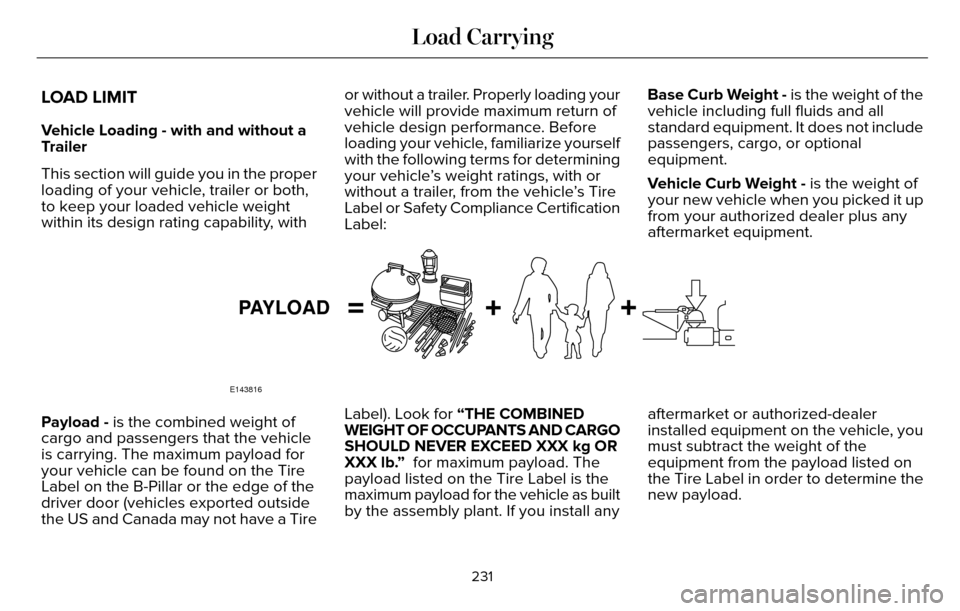
LOAD LIMIT
Vehicle Loading - with and without a
Trailer
This section will guide you in the proper
loading of your vehicle, trailer or both,
to keep your loaded vehicle weight
within its design rating capability, withor without a trailer. Properly loading your
vehicle will provide maximum return of
vehicle design performance. Before
loading your vehicle, familiarize yourself
with the following terms for determining
your vehicle’s weight ratings, with or
without a trailer, from the vehicle’s Tire
Label or Safety Compliance Certification
Label:Base Curb Weight - is the weight of the
vehicle including full fluids and all
standard equipment. It does not include
passengers, cargo, or optional
equipment.
Vehicle Curb Weight - is the weight of
your new vehicle when you picked it up
from your authorized dealer plus any
aftermarket equipment.
E143816
PAYLOAD
Payload - is the combined weight of
cargo and passengers that the vehicle
is carrying. The maximum payload for
your vehicle can be found on the Tire
Label on the B-Pillar or the edge of the
driver door (vehicles exported outside
the US and Canada may not have a Tire
Label). Look for “THE COMBINED
WEIGHT OF OCCUPANTS AND CARGO
SHOULD NEVER EXCEED XXX kg OR
XXX lb.”
for maximum payload. The
payload listed on the Tire Label is the
maximum payload for the vehicle as built
by the assembly plant. If you install any aftermarket or authorized-dealer
installed equipment on the vehicle, you
must subtract the weight of the
equipment from the payload listed on
the Tire Label in order to determine the
new payload.
231
Load Carrying
Page 237 of 544
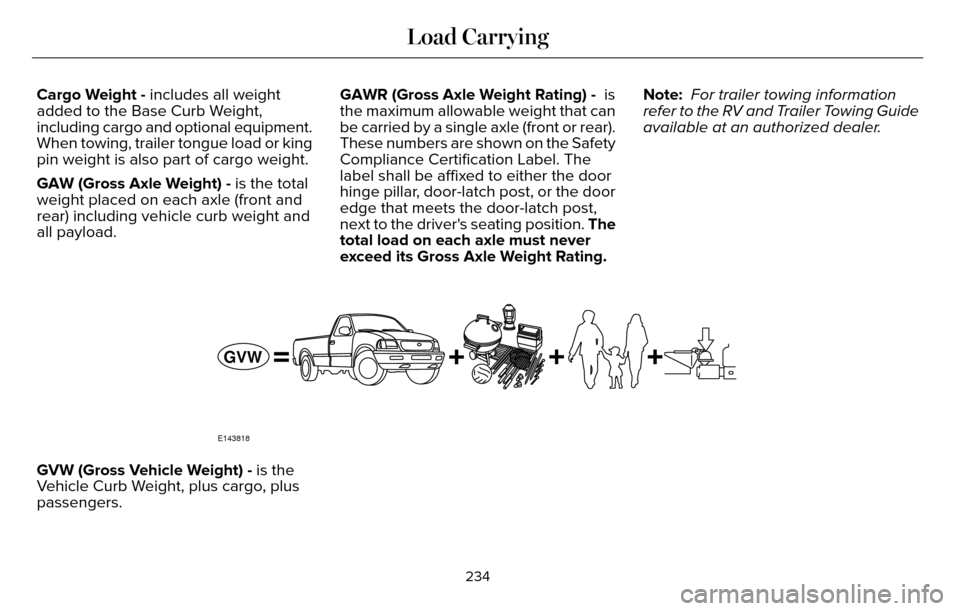
Cargo Weight - includes all weight
added to the Base Curb Weight,
including cargo and optional equipment.
When towing, trailer tongue load or king
pin weight is also part of cargo weight.
GAW (Gross Axle Weight) - is the total
weight placed on each axle (front and
rear) including vehicle curb weight and
all payload.GAWR (Gross Axle Weight Rating) - is
the maximum allowable weight that can
be carried by a single axle (front or rear).
These numbers are shown on the Safety
Compliance Certification Label. The
label shall be affixed to either the door
hinge pillar, door-latch post, or the door
edge that meets the door-latch post,
next to the driver's seating position. The
total load on each axle must never
exceed its Gross Axle Weight Rating.Note:
For trailer towing information
refer to the RV and Trailer Towing Guide
available at an authorized dealer.
E143818
GVW
GVW (Gross Vehicle Weight) - is the
Vehicle Curb Weight, plus cargo, plus
passengers.
234
Load Carrying
Page 238 of 544
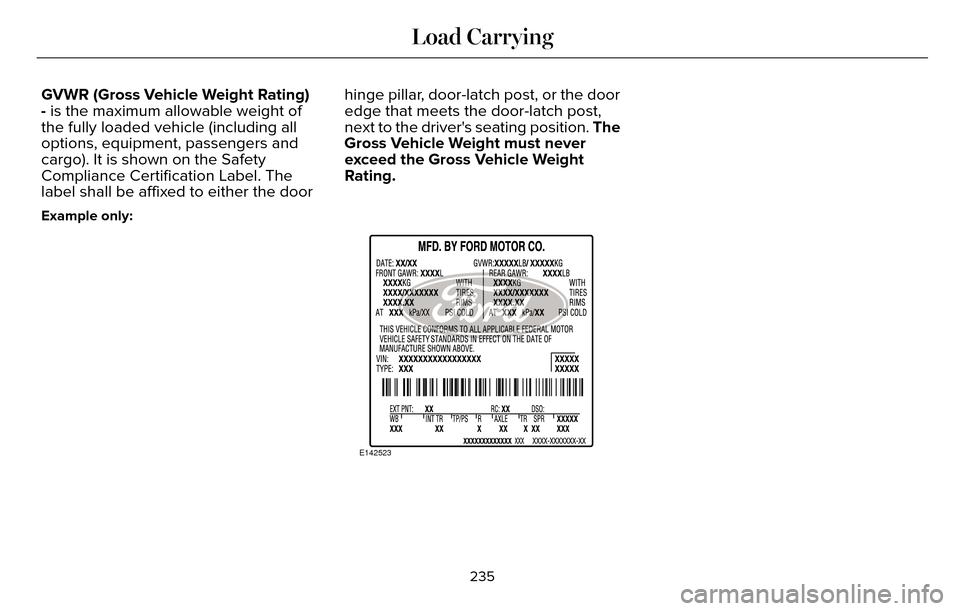
GVWR (Gross Vehicle Weight Rating)
- is the maximum allowable weight of
the fully loaded vehicle (including all
options, equipment, passengers and
cargo). It is shown on the Safety
Compliance Certification Label. The
label shall be affixed to either the doorhinge pillar, door-latch post, or the door
edge that meets the door-latch post,
next to the driver's seating position. The
Gross Vehicle Weight must never
exceed the Gross Vehicle Weight
Rating.
Example only:
E142523
235
Load Carrying
Page 242 of 544
*Suppose your vehicle has a 1400-pound
(635-kilogram) cargo and luggage
capacity. You and one of your friends
decide to pick up cement from the local
home improvement store to finish that
patio you have been planning for the
past two years. Measuring the inside of
the vehicle with the rear seat folded
down, you have room for twelve
100-pound (45-kilogram) bags of
cement. Do you have enough load
capacity to transport the cement to your
home? If you and your friend each weigh
220 pounds (99 kilograms), the
calculation would be: 1400 - (2 x 220) -
(12 x 100) = 1400 - 440 - 1200 = - 240
pounds. No, you do not have enough
cargo capacity to carry that much
weight. In metric units, the calculation
would be: 635 kilograms - (2 x 99
kilograms) - (12 x 45 kilograms) = 635 -
198 - 540 = -103 kilograms. You will need
to reduce the load weight by at least
240 pounds (104 kilograms). If you
remove three 100-pound (45-kilogram)
cement bags, then the load calculation
would be: 1400 - (2 x 220) - (9 x 100) =
1400 - 440 - 900 = 60 pounds. Now youhave the load capacity to transport the
cement and your friend home. In metric
units, the calculation would be: 635
kilograms - (2 x 99 kilograms) - (9 x 45
kilograms) = 635 - 198 - 405 = 32
kilograms.
The above calculations also assume that
the loads are positioned in your vehicle
in a manner that does not overload the
Front or the Rear Gross Axle Weight
Rating specified for your vehicle on the
Safety Compliance Certification Label.
The label shall be affixed to either the
door hinge pillar, door-latch post, or the
door edge that meets the door-latch
post, next to the driver's seating
position.
239
Load Carrying
Page 279 of 544
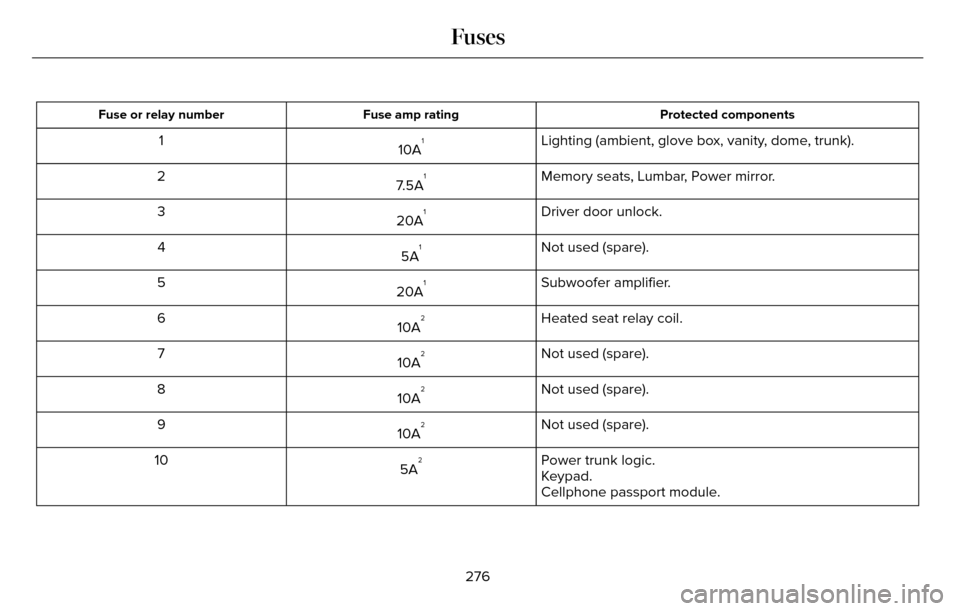
Protected components
Fuse amp rating
Fuse or relay number
Lighting (ambient, glove box, vanity, dome, trunk).
10A11
Memory seats, Lumbar, Power mirror.
7.5A
12
Driver door unlock.
20A
13
Not used (spare).
5A
14
Subwoofer amplifier.
20A
15
Heated seat relay coil.
10A
26
Not used (spare).
10A
27
Not used (spare).
10A
28
Not used (spare).
10A
29
Power trunk logic.
5A
210
Keypad.
Cellphone passport module.
276
Fuses
Page 281 of 544
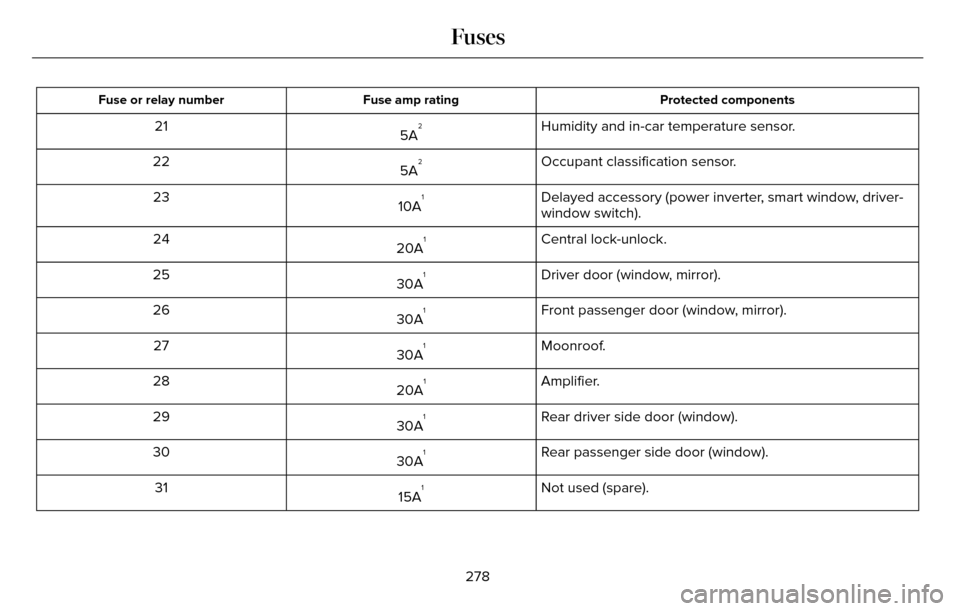
Protected components
Fuse amp rating
Fuse or relay number
Humidity and in-car temperature sensor.
5A221
Occupant classification sensor.
5A
222
Delayed accessory (power inverter, smart window, driver-
window switch).
10A
123
Central lock-unlock.
20A
124
Driver door (window, mirror).
30A
125
Front passenger door (window, mirror).
30A
126
Moonroof.
30A
127
Amplifier.
20A
128
Rear driver side door (window).
30A
129
Rear passenger side door (window).
30A
130
Not used (spare).
15A
131
278
Fuses