oil reset LINCOLN MKZ 2016 Owners Manual
[x] Cancel search | Manufacturer: LINCOLN, Model Year: 2016, Model line: MKZ, Model: LINCOLN MKZ 2016Pages: 544, PDF Size: 5.77 MB
Page 7 of 544
Towing the Vehicle on Four Wheels.......246
Driving Hints
Breaking-In.....................................................248
Economical Driving......................................248
Driving Through Water...............................248
Floor Mats......................................................249
Roadside Emergencies
Roadside Assistance....................................251
Hazard Warning Flashers...........................252
Fuel Shutoff...................................................252
Jump Starting the Vehicle..........................253
Post-Crash Alert System............................255
Customer Assistance
Getting the Services You Need................256
In California (U.S. Only)...............................257
The Better Business Bureau (BBB) AutoLine Program (U.S. Only)........................258
Utilizing the Mediation/Arbitration Program (Canada Only)...........................................259
Getting Assistance Outside the U.S. and Canada.......................................................259 Ordering Additional Owner's
Literature.....................................................261
Reporting Safety Defects (U.S. Only).......261
Reporting Safety Defects (Canada Only)............................................................262
Fuses
Fuse Specification Chart............................263
Changing a Fuse..........................................280
Maintenance
General Information......................................281
Opening and Closing the Hood................281
Under Hood Overview - 2.0LEcoBoost™..................................................283
Under Hood Overview - 3.7L....................285
Engine Oil Dipstick - 2.0L EcoBoost™......287
Engine Oil Dipstick - 3.7L............................287
Engine Oil Check..........................................287
Oil Change Indicator Reset.......................288
Engine Coolant Check................................289
Automatic Transmission Fluid Check......292
Brake Fluid Check.......................................296
Washer Fluid Check....................................296 Fuel Filter.......................................................296
Changing the 12V Battery..........................297
Checking the Wiper Blades.......................299
Changing the Wiper Blades......................299
Adjusting the Headlamps..........................299
Changing a Bulb............................................301
Bulb Specification Chart..............................301
Changing the Engine Air Filter.................303
Vehicle Care
General Information.....................................305
Cleaning Products.......................................305
Cleaning the Exterior..................................305
Waxing............................................................306
Cleaning the Engine....................................307
Cleaning the Windows and Wiper
Blades.........................................................307
Cleaning the Interior....................................308
Cleaning the Instrument Panel and Instrument Cluster Lens..........................310
Cleaning Leather Seats................................311
Repairing Minor Paint Damage...................311
Cleaning the Alloy Wheels...........................311
4
Table of Contents
Page 11 of 544
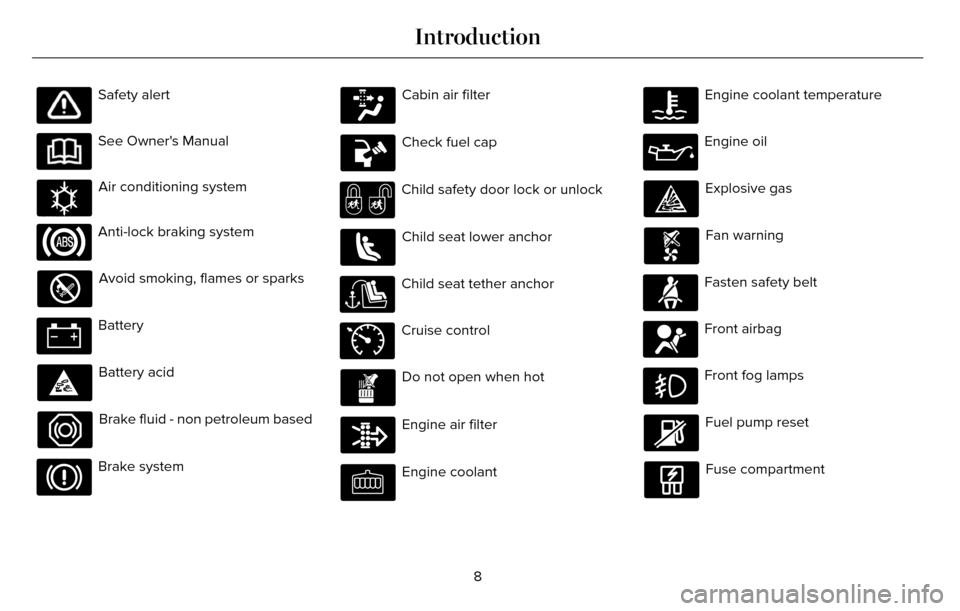
Safety alert
See Owner's Manual
E162384
Air conditioning system
Anti-lock braking system
Avoid smoking, flames or sparks
Battery
Battery acid
Brake fluid - non petroleum based
Brake system
Cabin air filter
Check fuel cap
Child safety door lock or unlock
Child seat lower anchor
Child seat tether anchor
E71340
Cruise control
Do not open when hot
Engine air filter
Engine coolant
Engine coolant temperature
Engine oil
Explosive gas
Fan warning
Fasten safety belt
Front airbag
Front fog lamps
Fuel pump reset
Fuse compartment
8
Introduction
Page 116 of 544
Settings
Traffic Setup
Auto Highbeam - check enabled or uncheck disabled Select time interval
Autolamp Delay
Daytime Lights - check enabled or uncheck disabled
Welcome Lighting - check enabled or uncheck disabled
Autolock - check enabled or uncheck disabled
Locks
Autounlock - check enabled or uncheck disabled
Mislock - check enabled or uncheck disabled
All doors or Driver door
Remote Unlocking
Switches Inhibit - check enabled or uncheck disabled
Hold OK to Initialize
Neutral Towing
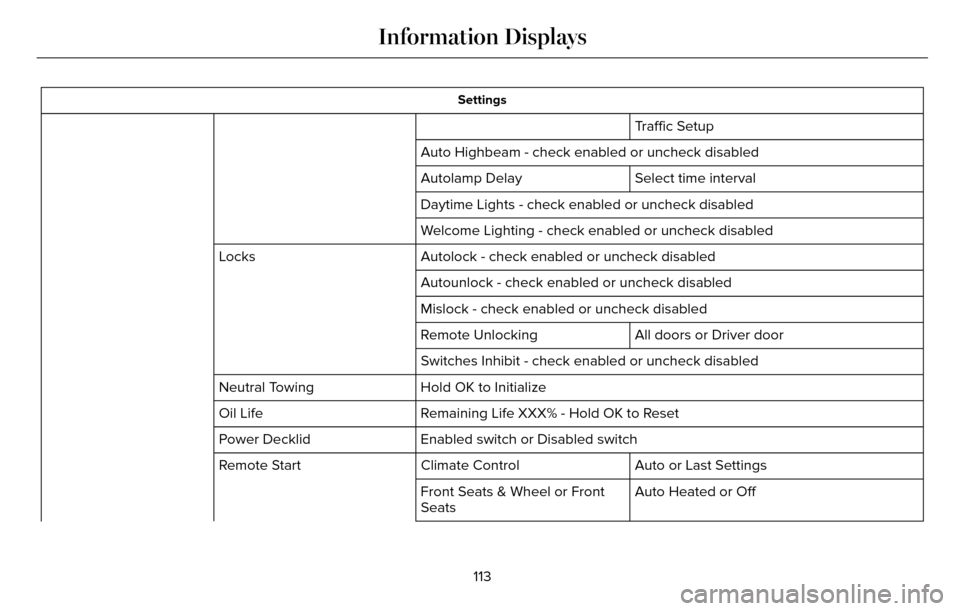
Remaining Life XXX% - Hold OK to Reset
Oil Life
Enabled switch or Disabled switch
Power Decklid
Auto or Last Settings
Climate Control
Remote Start
Auto Heated or Off
Front Seats & Wheel or Front
Seats
113
Information Displays
Page 291 of 544
E142732
Only use oils certified for gasoline engines
by the American Petroleum Institute (API).
An oil with this trademark symbol conforms
to the current engine and emission system
protection standards and fuel economy
requirements of the International Lubricants
Specification Advisory Council (ILSAC),
comprised of U.S. and Japanese automobile
manufacturers.
1. Remove the filler cap.
2. If the engine oil level is not within thenormal range, add engine oil that meets
Ford specifications. See Capacities and
Specifications (page 353). 3. Remove the engine oil filler cap and use
a funnel to pour the engine oil into the
opening.
4. Wipe off any spilled oil.
5. Replace the filler cap. Turn it until you feel a strong resistance.
OIL CHANGE INDICATOR RESET
Use the information display controls on the
steering wheel to reset the oil change
indicator.
From the main menu scroll to:
Action and description
Message
Press the right arrow button,
then from this menu scroll to
the following message.
Settings
Press the right arrow button,
then from this menu scroll to
the following message.
Vehicle
Press the right arrow button,
then from this menu scroll to
the following message.
Oil Life
Action and description
Message
Press and hold the OK button
until the instrument cluster
displays the following
message.
Hold OK to
Reset
Reset Successful
When the oil change indicator
resets the instrument cluster
displays 100%.
Remaining Life
{00}%
If the instrument cluster
displays one of the following
messages, repeat the
process.
Not Reset
Reset Cancelled
288
Maintenance
Page 316 of 544
Cooling system
• Protect against freezing temperatures.
• When removing your vehicle fromstorage, check coolant fluid level.
Confirm that there are no cooling system
leaks and that fluid is at the
recommended level.
Battery
• Check and recharge as necessary. Keepconnections clean.
• If storing your vehicle for more than 30 days without recharging the battery, we
recommend that you disconnect the
battery cables to maintain battery charge
for quick starting.
Note: It is necessary to reset memory
features if battery cables are disconnected.
Brakes
• Make sure the brakes and parking brake release fully.
Tires
• Maintain recommended air pressure.
Miscellaneous
• Make sure all linkages, cables, levers andpins under your vehicle are covered with
grease to prevent rust.
• Move vehicles at least 25 ft (7.5 m) every 15 days to lubricate working parts and
prevent corrosion.
Removing Vehicle From Storage
When your vehicle is ready to come out of
storage, do the following:
• Wash your vehicle to remove any dirt orgrease film build-up on window surfaces.
• Check windshield wipers for any deterioration.
• Check under the hood for any foreign material that may have collected during
storage such as mice or squirrel nests.
• Check the exhaust for any foreign material that may have collected during
storage.
• Check tire pressures and set tire inflation per the Tire Label. • Check brake pedal operation. Drive your
vehicle 15 ft (4.5 m) back and forth to
remove rust build-up.
• Check fluid levels (including coolant, oil and gas) to make sure there are no leaks,
and fluids are at recommended levels.
• If you remove the battery, clean the battery cable ends and check for
damage.
Contact an authorized dealer if you have any
concerns or issues.
313
Vehicle Care
Page 484 of 544
Your vehicle is equipped with the Intelligent
Oil-Life Monitor system, which displays a
message in the information display at the
proper oil change interval. This interval may
be up to one year or 10000 miles (16000
kilometers).
When the oil change message appears in
the information display, it is time for an oil
change. Make sure you perform the oil
change within two weeks or 500 miles (800
kilometers) of the message appearing. Make
sure you reset the Intelligent Oil-Life Monitor
after each oil change. See Information
Messages (page 115).
If your information display resets prematurely
or becomes inoperative, you should perform
the oil change interval at six months or 5000
miles (8000 kilometers) from your last oil
change. Never exceed one year or 10000
miles (16000 kilometers) between oil change
intervals.Your vehicle is very sophisticated and built
with multiple, complex, performance systems.
Every manufacturer develops these systems
using different specifications and
performance features. That is why it is
important to rely upon your dealership to
properly diagnose and repair your vehicle.
Ford Motor Company has recommended
maintenance intervals for various parts and
component systems based upon engineering
testing. Ford Motor Company relies upon this
testing to determine the most appropriate
mileage for replacement of oils and fluids to
protect your vehicle at the lowest overall cost
to you and recommends against
maintenance schedules that deviate from
the scheduled maintenance information.
We strongly recommend the use of only
genuine Ford, Motorcraft or Ford-authorized
re-manufactured replacement parts
engineered for your vehicle.Additives and Chemicals
This owner's manual and the Ford Workshop
Manual list the recommended additives and
chemicals for your vehicle. We do not
recommend using chemicals or additives not
approved by us as part of your vehicle’s
normal maintenance. Please consult your
warranty information.
Oils, Fluids and Flushing
In many cases, fluid discoloration is a normal
operating characteristic and, by itself, does
not necessarily indicate a concern or that the
fluid needs to be changed. However, a
qualified expert, such as the factory-trained
technicians at your dealership, should
inspect discolored fluids that also show signs
of overheating or foreign material
contamination immediately.
481
Scheduled Maintenance
Page 489 of 544
Maintenance Intervals
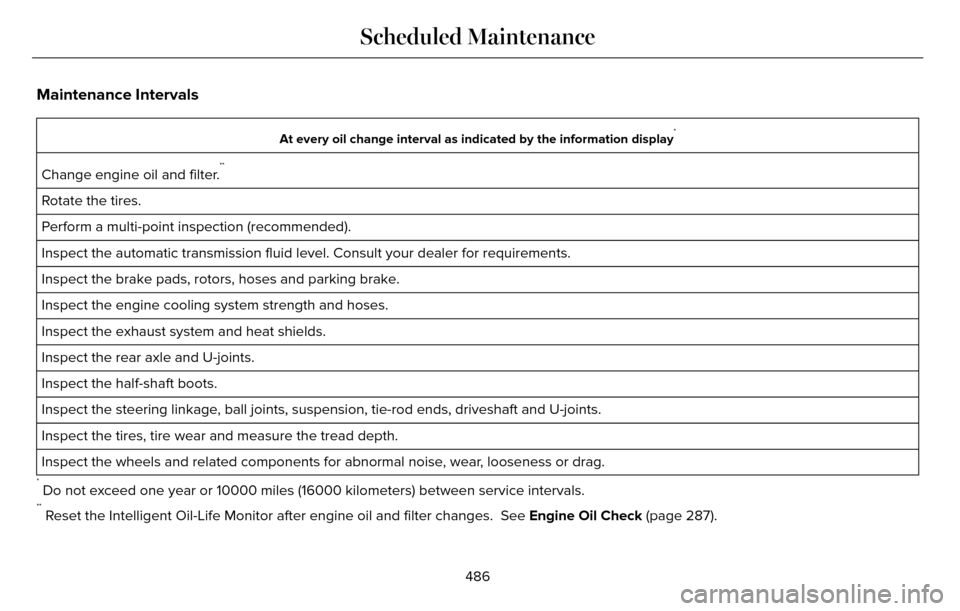
At every oil change interval as indicated by the information display*
Change engine oil and filter.**
Rotate the tires.
Perform a multi-point inspection (recommended).
Inspect the automatic transmission fluid level. Consult your dealer for \
requirements.
Inspect the brake pads, rotors, hoses and parking brake.
Inspect the engine cooling system strength and hoses.
Inspect the exhaust system and heat shields.
Inspect the rear axle and U-joints.
Inspect the half-shaft boots.
Inspect the steering linkage, ball joints, suspension, tie-rod ends, driveshaft and U-joints.
Inspect the tires, tire wear and measure the tread depth.
Inspect the wheels and related components for abnormal noise, wear, looseness or drag.
* Do not exceed one year or 10000 miles (16000 kilometers) between service interv\
als.** Reset the Intelligent Oil-Life Monitor after engine oil and filter change\
s. See Engine Oil Check (page 287).
486
Scheduled Maintenance
Page 491 of 544
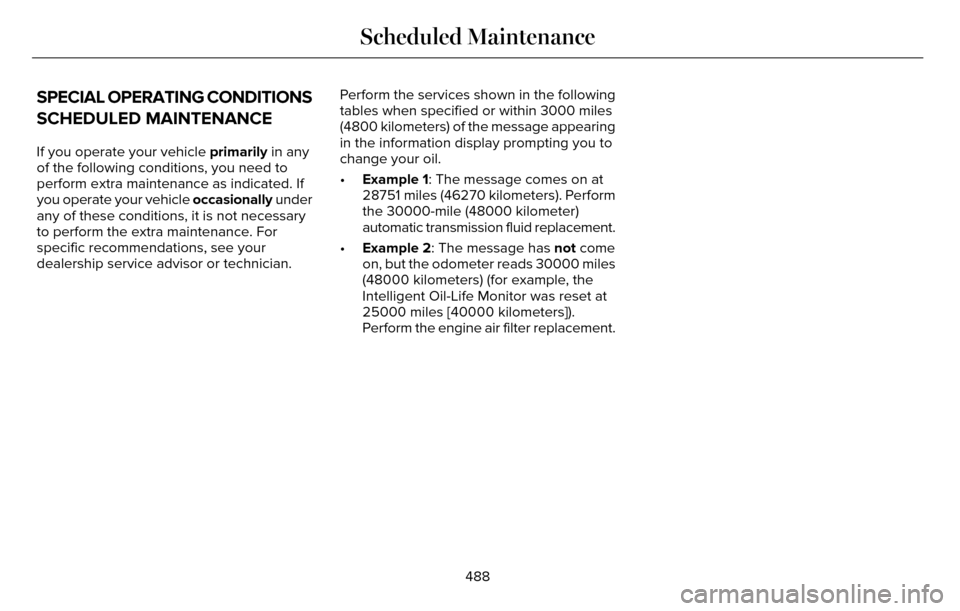
SPECIAL OPERATING CONDITIONS
SCHEDULED MAINTENANCE
If you operate your vehicle primarily in any
of the following conditions, you need to
perform extra maintenance as indicated. If
you operate your vehicle occasionally under
any of these conditions, it is not necessary
to perform the extra maintenance. For
specific recommendations, see your
dealership service advisor or technician. Perform the services shown in the following
tables when specified or within 3000 miles
(4800 kilometers) of the message appearing
in the information display prompting you to
change your oil.
•
Example 1: The message comes on at
28751 miles (46270 kilometers). Perform
the 30000-mile (48000 kilometer)
automatic transmission fluid replacement.
• Example 2: The message has not come
on, but the odometer reads 30000 miles
(48000 kilometers) (for example, the
Intelligent Oil-Life Monitor was reset at
25000 miles [40000 kilometers]).
Perform the engine air filter replacement.
488
Scheduled Maintenance
Page 494 of 544
\
Perform multi-point inspection.
Change automatic transmission fluid.
Every 30000 miles (48000
km)
*Reset your Intelligent Oil-")
Operating in dusty or sandy conditions (such as unpaved or dusty roads)\
Perform multi-point inspection.
Change automatic transmission fluid.
Every 30000 miles (48000
km)
*Reset your Intelligent Oil-Life Monitor after engine oil and filter chang\
es. See Engine Oil Check (page 287).
Exclusive use of E85 (flex fuel vehicles only)
If ran exclusively on E85, fill the fuel tank full with regular unleaded fuel.
Every oil change
Exceptions
There are several exceptions to the Normal
Schedule:
Axle Maintenance
Change the axle fluid anytime an axle is
submerged in water. California Fuel Filter Replacement
If you register your vehicle in California, the
California Air Resources Board has
determined that the failure to perform this
maintenance item does not nullify the
emission warranty or limit recall liability
before the completion of your vehicle's
useful life. Ford Motor Company, however,
urges you to have all recommended
maintenance services performed at the
specified intervals and to record all vehicle
service.Hot Climate Oil Change Intervals
Vehicles operating in the Middle East, North
Africa, Sub-Saharan Africa or locations with
similar climates using an American Petroleum
Institute (API) Certified for Gasoline Engines
(Certification mark) oil of SM or SN quality,
the normal oil change interval is 3000 miles
(5000 kilometers).
If the available API SM or SN oils are not
available, then the oil change interval is 1800
miles (3000 kilometers).
491
Scheduled Maintenance
Page 540 of 544

Locking and Unlocking..................................67Activating Intelligent Access.............................68
Autolock ...............................................................\
..69
Auto Relock............................................................69
Battery Saver..........................................................7\
0
Illuminated Entry...................................................70
Illuminated Exit......................................................70\
Luggage Compartment.......................................70
Power Decklid.........................................................71
Power Door Locks................................................67
Remote Control.....................................................67
Smart Unlocks for Intelligent AccessKeys.....................................................................69
Locks..................................................................67
Lug Nuts
See: Changing a Road Wheel.........................346
M
Maintenance...................................................281General Information............................................281
Media Hub......................................................372
Memory Function..........................................145
Easy Entry and Exit Feature..............................147
Linking a PreSet Position to your RemoteControl or Intelligent Access Key Fob.......146
Saving a PreSet Position...................................146
Message CenterSee: Information Displays.................................109
MirrorsSee: Heated Windows and Mirrors.................138
See: Windows and Mirrors.................................95
Mobile Communications Equipment...........14
Moonroof.........................................................100
Bounce-Back.........................................................101
Opening and Closing the Moonroof..............100
Motorcraft Parts............................................354
MyKey Troubleshooting................................65
MyKey™..............................................................60
Principle of Operation.........................................60
MyLincoln Touch™.........................................373General Information...........................................373
MyLincoln Touch™ Troubleshooting.........467
N
Navigation ......................................................454cityseekr................................................................457
Destination Mode...............................................454
Map Mode............................................................462
Navigation Map Updates.................................466
Navigation Voice Commands.........................466
Point of Interest (POI) Categories..................456
Quick-touch Buttons..........................................465
Setting Your Navigation Preferences............458
Normal Scheduled Maintenance..............484Intelligent Oil-Life Monitor™..............................484
Maintenance Intervals.......................................486
O
Oil Change Indicator Reset.......................288
Oil Check
See: Engine Oil Check......................................287
Opening and Closing the Hood................281
Ordering Additional Owner's
Literature......................................................261
Obtaining a French Owner’s Manual.............261
Overhead Console.......................................160
P
Parking Aids....................................................196Principle of Operation........................................196
Passive Anti-Theft System............................77SecuriLock...............................................................77
PA T SSee: Passive Anti-Theft System.........................77
Perchlorate........................................................ 12
Personal Safety System™..............................43
How Does the Personal Safety System
Work?...................................................................43
537
Index