lock LINCOLN MKZ 2017 Owners Manual
[x] Cancel search | Manufacturer: LINCOLN, Model Year: 2017, Model line: MKZ, Model: LINCOLN MKZ 2017Pages: 564, PDF Size: 5.54 MB
Page 305 of 564
Note:
The oil consumption of new engines
reaches its normal level after approximately
3,100 mi (5,000 km).
Adding Engine Oil WARNING
Do not remove the filler cap when the
engine is running.
Do not use supplemental engine oil additives
because they are unnecessary and could
lead to engine damage that may not be
covered by the vehicle Warranty. Only use oils certified for gasoline engines
by the American Petroleum Institute (API).
An oil with this trademark symbol conforms
to the current engine and emission system
protection standards and fuel economy
requirements of the International Lubricants
Specification Advisory Committee (ILSAC),
comprised of U.S. and Japanese automobile
manufacturers.
To top up the engine oil level do the
following:
Clean the area surrounding the engine oil
filler cap before you remove it.
1. Remove the engine oil filler cap.
See
Under Hood Overview (page 297). Turn
it counterclockwise and remove it.
2. Add engine oil that meets the correct specification.
See Capacities and
Specifications (page 374). You may have
to use a funnel to pour the engine oil into
the opening.
3. Recheck the oil level.
4. If the oil level is correct, replace the dipstick and make sure it is fully seated. 5. Replace the engine oil filler cap. Turn it
clockwise until you feel a strong
resistance.
Note: Do not add oil further than the
maximum mark. Oil levels above the
maximum mark may cause engine damage.
Note: Make sure you install the oil filler cap
correctly.
Note: Soak up any spillage with an
absorbent cloth immediately.
OIL CHANGE INDICATOR RESET
Use the information display controls on the
steering wheel to reset the oil change
indicator.
302
MKZ (CC9) Canada/United States of America, enUSA, First Printing MaintenanceE142732
Page 307 of 564
Maintain coolant concentration within 48%
to 50%, which equates to a freeze point
between -30°F (-34°C) and -34°F (-37°C).
Coolant concentration should be checked
using a refractometer. We recommend,
Robinair® Coolant and Battery Refractometer
75240 (Rotunda tool part number:
ROB75240). We do not recommend the use
of hydrometers or coolant test strips for
measuring coolant concentration.
Note:
Automotive fluids are not
interchangeable. Do not use coolant or
windshield washer fluid outside of its
specified function and vehicle location.
Note: Do not use stop leak pellets, cooling
system sealants, or non-specified additives
as they can cause damage to the engine
cooling or heating systems. Resulting
component damage may not be covered by
the vehicle Warranty.
Adding Coolant WARNING
Never remove the coolant reservoir
cap while the engine is running or hot. It is very important to use prediluted coolant
meeting the correct specification in order to
avoid plugging the small passageways in the
engine cooling system. See Capacities and
Specifications (page 374). Incorrect
prediluted coolant use can cause damage
not covered by the vehicle Warranty.
If the coolant level is at or below the
minimum mark, add prediluted coolant
immediately.
To top up the coolant level do the following:
1. Unscrew the cap slowly. Any pressure escapes as you unscrew the cap.
2. Add prediluted coolant meeting the correct specification. See Capacities and
Specifications
(page 367).
3. Add enough prediluted coolant to reach
the correct level.
4. Replace the coolant reservoir cap, turn it clockwise until you feel a strong
resistance.
5. Check the coolant level in the coolant reservoir the next few times you drive
your vehicle. Note:
During normal vehicle operation, the
coolant may change color from orange to
pink or light red. As long as the coolant is
clear and uncontaminated, this color change
does not indicate the coolant has degraded
nor does it require the coolant to be drained,
the system to be flushed, or the coolant to
be replaced.
Do not mix different colors or types of
prediluted coolant in your vehicle. Mixing of
prediluted coolant or using an incorrect
prediluted coolant may harm the engine or
cooling system components and may not be
covered by the vehicle Warranty.
In case of emergency, you can add a large
amount of water without prediluted coolant
in order to reach a vehicle service location.
On arrival do the following:
1. Drain the cooling system.
2. Chemically clean the cooling system. We
recommend Motorcraft Premium Cooling
System Flush.
3. Refill with prediluted coolant as soon as possible.
304
MKZ (CC9) Canada/United States of America, enUSA, First Printing Maintenance
Page 311 of 564
6F50/6F55 Transmission (If Equipped)
WARNINGS
The dipstick cap and surrounding
components may be hot; gloves are
recommended. Use gloves when moving the air filter
assembly. Components will be hot.
Note:
Automatic transmission fluid expands
when warmed. To obtain an accurate fluid
check, drive the vehicle until it is warmed up
(approximately 20 miles [30 kilometers]). If
your vehicle has been operated for an
extended period at high speeds, in city traffic
during hot weather or pulling a trailer, the
vehicle should be turned off until normal
operating temperatures are reached to allow
the fluid to cool before checking. Depending
on vehicle use, cooling times could take up
to 30 minutes or longer. Refer to your scheduled maintenance
information for scheduled intervals for fluid
checks and changes. Your transmission does
not consume fluid. However, the fluid level
should be checked if the transmission is not
working properly. For example, if the
transmission slips or shifts slowly or if you
notice some sign of fluid leakage.
1.
Drive the vehicle 20 miles (30 kilometers)
or until it reaches normal operating
temperature
2. Park the vehicle on a level surface and engage the parking brake.
3. With the parking brake engaged and your
foot on the brake pedal, start the engine
and move the gearshift lever through all
of the gear ranges. Allow a minimum of
10 seconds for each gear to engage.
4. Put the gearshift lever in
P (Park) and
leave the engine running.
Note: You will need to move the air filter
assembly to access the transmission
dipstick. 5.
Remove the dipstick, wiping it clean with
a clean, dry lint free rag. If necessary,
refer to Under hood overview in this
chapter for the location of the dipstick.
6. Install the dipstick making sure it is fully seated in the filler tube by turning it to
the locked position.
7. Remove the dipstick and inspect the fluid
level. The fluid should be in the
designated areas for normal operating
temperature.
Moving the Air Filter Assembly (Accessing
the Dipstick) WARNING
Do not run engine with the air filter
disconnected.
308
MKZ (CC9) Canada/United States of America, enUSA, First Printing Maintenance
Page 312 of 564
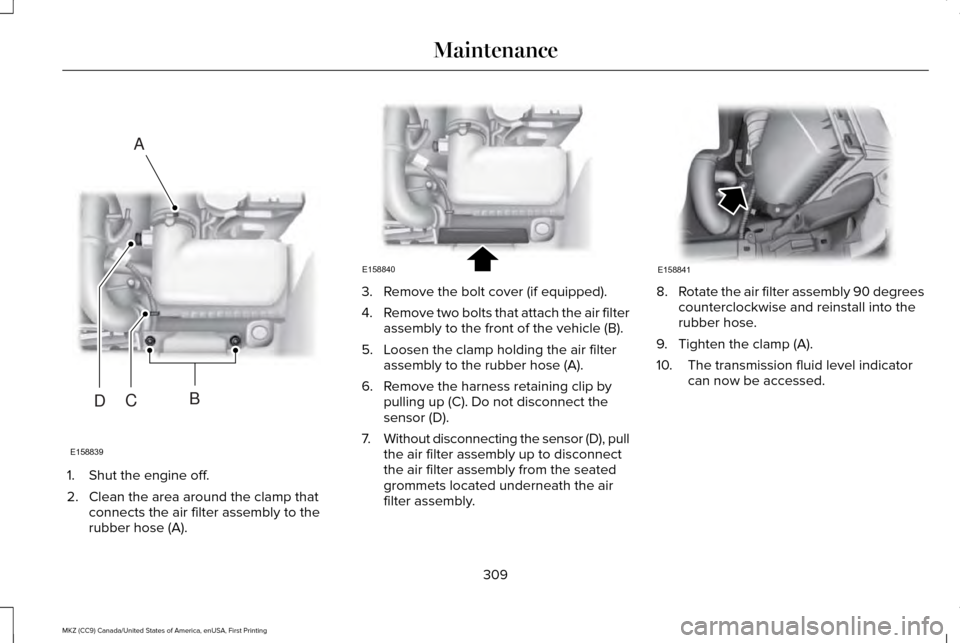
1. Shut the engine off.
2. Clean the area around the clamp that
connects the air filter assembly to the
rubber hose (A). 3. Remove the bolt cover (if equipped).
4.
Remove two bolts that attach the air filter
assembly to the front of the vehicle (B).
5. Loosen the clamp holding the air filter assembly to the rubber hose (A).
6. Remove the harness retaining clip by pulling up (C). Do not disconnect the
sensor (D).
7. Without disconnecting the sensor (D), pull
the air filter assembly up to disconnect
the air filter assembly from the seated
grommets located underneath the air
filter assembly. 8.
Rotate the air filter assembly 90 degrees
counterclockwise and reinstall into the
rubber hose.
9. Tighten the clamp (A).
10. The transmission fluid level indicator can now be accessed.
309
MKZ (CC9) Canada/United States of America, enUSA, First Printing MaintenanceE158839
A
BCD E158840 E158841
Page 314 of 564
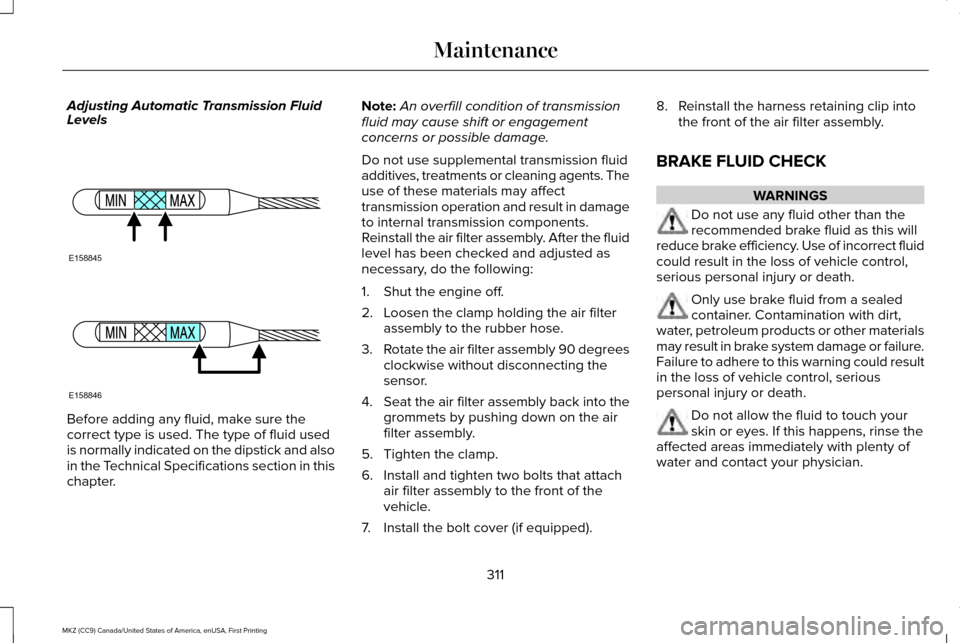
Adjusting Automatic Transmission Fluid
Levels
Before adding any fluid, make sure the
correct type is used. The type of fluid used
is normally indicated on the dipstick and also
in the Technical Specifications section in this
chapter. Note:
An overfill condition of transmission
fluid may cause shift or engagement
concerns or possible damage.
Do not use supplemental transmission fluid
additives, treatments or cleaning agents. The
use of these materials may affect
transmission operation and result in damage
to internal transmission components.
Reinstall the air filter assembly. After the fluid
level has been checked and adjusted as
necessary, do the following:
1. Shut the engine off.
2. Loosen the clamp holding the air filter assembly to the rubber hose.
3. Rotate the air filter assembly 90 degrees
clockwise without disconnecting the
sensor.
4. Seat the air filter assembly back into the
grommets by pushing down on the air
filter assembly.
5. Tighten the clamp.
6. Install and tighten two bolts that attach air filter assembly to the front of the
vehicle.
7. Install the bolt cover (if equipped). 8. Reinstall the harness retaining clip into
the front of the air filter assembly.
BRAKE FLUID CHECK WARNINGS
Do not use any fluid other than the
recommended brake fluid as this will
reduce brake efficiency. Use of incorrect fluid
could result in the loss of vehicle control,
serious personal injury or death. Only use brake fluid from a sealed
container. Contamination with dirt,
water, petroleum products or other materials
may result in brake system damage or failure.
Failure to adhere to this warning could result
in the loss of vehicle control, serious
personal injury or death. Do not allow the fluid to touch your
skin or eyes. If this happens, rinse the
affected areas immediately with plenty of
water and contact your physician.
311
MKZ (CC9) Canada/United States of America, enUSA, First Printing MaintenanceE158845 E158846
Page 316 of 564
WARNINGS
Keep batteries out of reach of children.
Batteries contain sulfuric acid. Avoid
contact with skin, eyes or clothing. Shield
your eyes when working near the battery to
protect against possible splashing of acid
solution. In case of acid contact with skin or
eyes, flush immediately with water for a
minimum of 15 minutes and get prompt
medical attention. If acid is swallowed, call a
physician immediately. Battery posts, terminals and related
accessories contain lead and lead
compounds. Wash hands after handling. Your vehicle is fitted with a Motorcraft
maintenance-free battery which normally
does not require additional water.
When a battery replacement is required, you
must use a recommended replacement
battery that matches the electrical
requirements of the vehicle.
Note:
If your vehicle has a battery cover,
after cleaning or replacing the battery, make
sure you reinstall it. Note:
See an authorized dealer for battery
access, testing, or replacement.
To make sure the battery management
system works correctly, do not connect an
electrical device ground connection directly
to the battery negative post. This can cause
inaccurate measurements of the battery
condition and potential incorrect system
operation.
Note: If you add electrical accessories or
components to the vehicle, it may adversely
affect battery performance and durability.
This may also affect the performance of
other electrical systems in the vehicle.
If you see any corrosion on the battery or
terminals, remove the cables from the
terminals and clean with a wire brush. You
can neutralize the acid with a solution of
baking soda and water.
Because your vehicle ’s engine is
electronically-controlled by a computer,
some engine control settings are maintained
by power from the battery. Some engine
computer settings, like the idle trim and fuel
trim strategy, optimize the driveability and performance of the engine. The clock and
radio station presets are also maintained in
memory by power from the low-voltage
battery. These settings are erased when a
technician disconnects and connects the
low-voltage battery.
To restore the settings, do the following:
Note:
Until you switch the ignition to the on
position, you will receive a message in your
information display stating that your vehicle
is not in park.
1. Apply the parking brake.
2. Shift into park (P) or neutral (N).
3. Switch off all accessories.
4. Press the brake pedal and start your vehicle.
5. Run the engine until it reaches normal operating temperature. While the engine
is warming up, complete the following:
Reset the clock. See Audio System
(page 386). Reset the power windows
bounce-back feature. See Windows and
Mirrors (page 93). Reset the radio station
presets. See Audio System (page 386).
313
MKZ (CC9) Canada/United States of America, enUSA, First Printing Maintenance
Page 317 of 564
6. Allow the engine to idle for at least one
minute.
7. Drive the vehicle at least 10 mi (16 km) to
completely relearn the idle trim and fuel
trim strategy.
Note: If you do not allow the engine to
relearn the idle and fuel trim strategy, the
idle quality of your vehicle may be adversely
affected until the engine computer
eventually relearns the idle trim and fuel trim
strategy.
Note: Certain features may not operate if
the battery monitor system is not reset with
a scan tool following a jump start or battery
replacement. Normal electrical accessory
operation should resume after your vehicle
is left undisturbed for 8 hours.
Make sure that you dispose of old batteries
in an environmentally friendly way. Seek
advice from your local authority about
recycling old batteries.
If storing your vehicle for more than 30 days
without recharging the battery, we
recommend that you disconnect the battery
cables to maintain battery charge for quick
starting. CHECKING THE WIPER BLADES
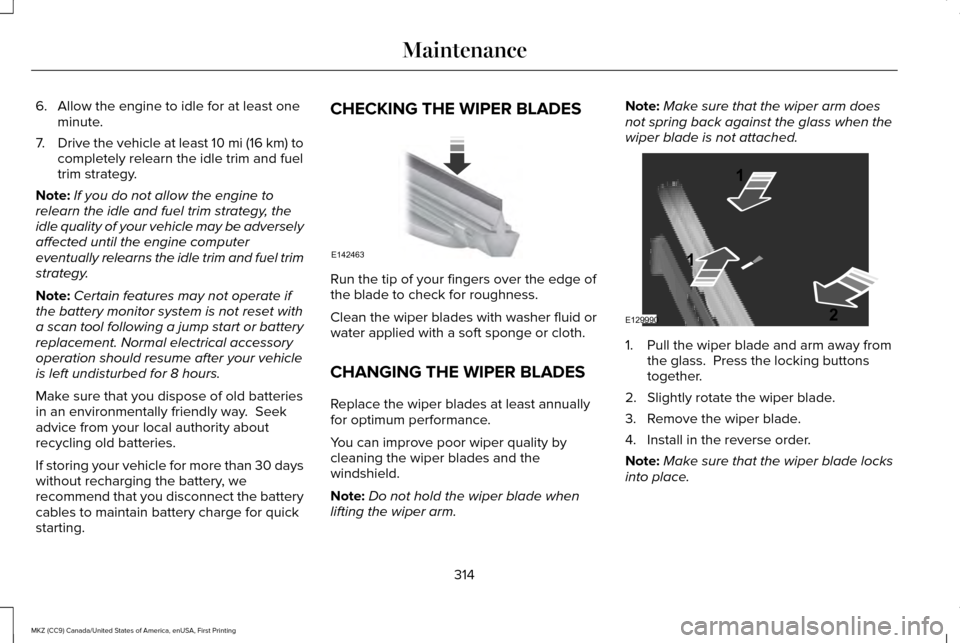
Run the tip of your fingers over the edge of
the blade to check for roughness.
Clean the wiper blades with washer fluid or
water applied with a soft sponge or cloth.
CHANGING THE WIPER BLADES
Replace the wiper blades at least annually
for optimum performance.
You can improve poor wiper quality by
cleaning the wiper blades and the
windshield.
Note:
Do not hold the wiper blade when
lifting the wiper arm. Note:
Make sure that the wiper arm does
not spring back against the glass when the
wiper blade is not attached. 1. Pull the wiper blade and arm away from
the glass. Press the locking buttons
together.
2. Slightly rotate the wiper blade.
3. Remove the wiper blade.
4. Install in the reverse order.
Note: Make sure that the wiper blade locks
into place.
314
MKZ (CC9) Canada/United States of America, enUSA, First Printing MaintenanceE142463 E129990
1
1 2
Page 318 of 564
ADJUSTING THE HEADLAMPS
Vertical Aim Adjustment
The headlamps on your vehicle are properly
aimed at the assembly plant. If your vehicle
has been in an accident, the alignment of
your headlamps should be checked by your
authorized dealer.
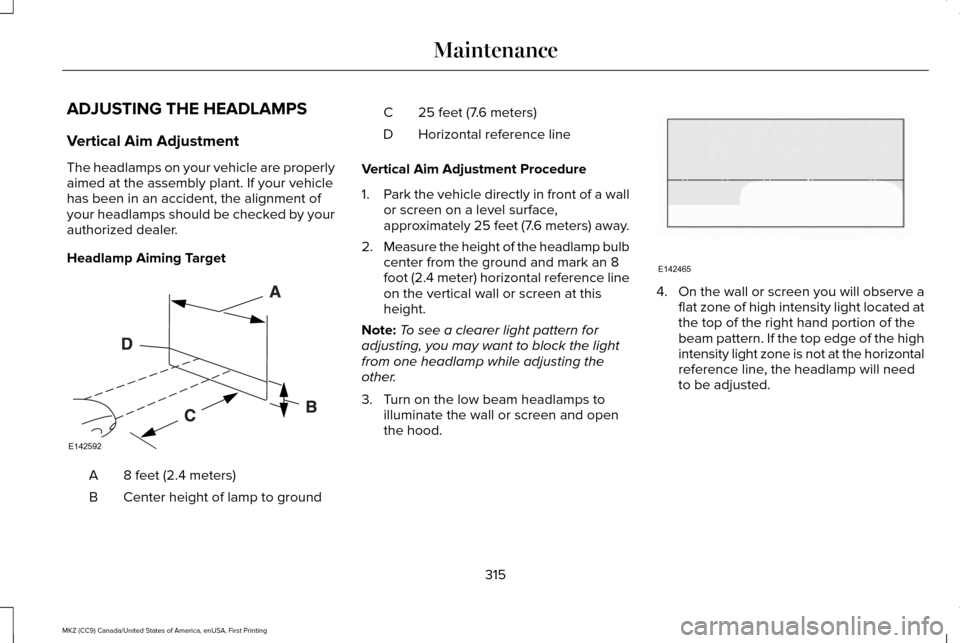
Headlamp Aiming Target
8 feet (2.4 meters)
A
Center height of lamp to ground
B 25 feet (7.6 meters)
C
Horizontal reference line
D
Vertical Aim Adjustment Procedure
1. Park the vehicle directly in front of a wall
or screen on a level surface,
approximately 25 feet (7.6 meters) away.
2. Measure the height of the headlamp bulb
center from the ground and mark an 8
foot (2.4 meter) horizontal reference line
on the vertical wall or screen at this
height.
Note: To see a clearer light pattern for
adjusting, you may want to block the light
from one headlamp while adjusting the
other.
3. Turn on the low beam headlamps to illuminate the wall or screen and open
the hood. 4.
On the wall or screen you will observe a
flat zone of high intensity light located at
the top of the right hand portion of the
beam pattern. If the top edge of the high
intensity light zone is not at the horizontal
reference line, the headlamp will need
to be adjusted.
315
MKZ (CC9) Canada/United States of America, enUSA, First Printing MaintenanceE142592 E142465
Page 319 of 564
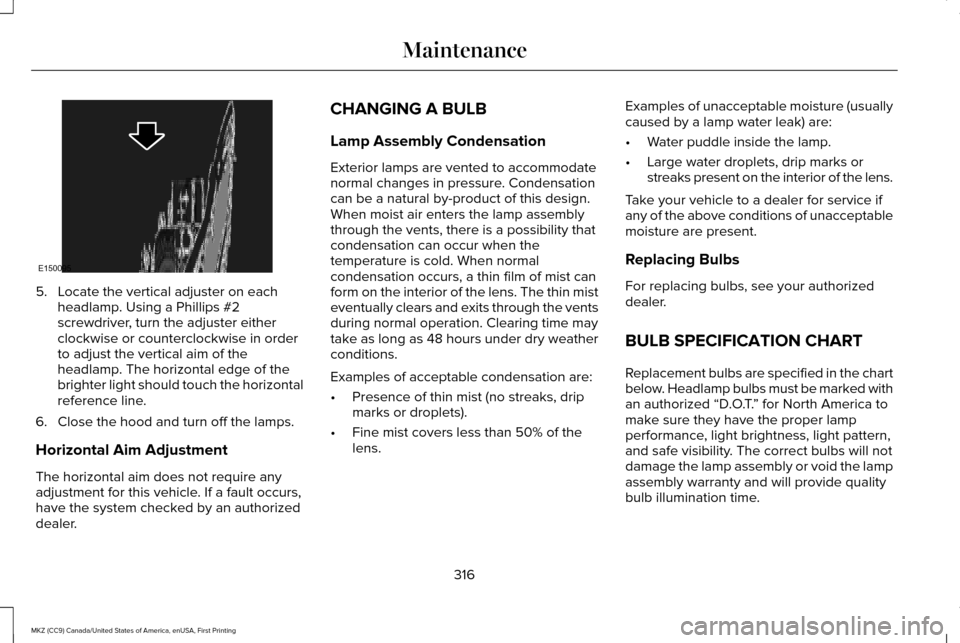
5. Locate the vertical adjuster on each
headlamp. Using a Phillips #2
screwdriver, turn the adjuster either
clockwise or counterclockwise in order
to adjust the vertical aim of the
headlamp. The horizontal edge of the
brighter light should touch the horizontal
reference line.
6. Close the hood and turn off the lamps.
Horizontal Aim Adjustment
The horizontal aim does not require any
adjustment for this vehicle. If a fault occurs,
have the system checked by an authorized
dealer. CHANGING A BULB
Lamp Assembly Condensation
Exterior lamps are vented to accommodate
normal changes in pressure. Condensation
can be a natural by-product of this design.
When moist air enters the lamp assembly
through the vents, there is a possibility that
condensation can occur when the
temperature is cold. When normal
condensation occurs, a thin film of mist can
form on the interior of the lens. The thin mist
eventually clears and exits through the vents
during normal operation. Clearing time may
take as long as 48 hours under dry weather
conditions.
Examples of acceptable condensation are:
•
Presence of thin mist (no streaks, drip
marks or droplets).
• Fine mist covers less than 50% of the
lens. Examples of unacceptable moisture (usually
caused by a lamp water leak) are:
•
Water puddle inside the lamp.
• Large water droplets, drip marks or
streaks present on the interior of the lens.
Take your vehicle to a dealer for service if
any of the above conditions of unacceptable
moisture are present.
Replacing Bulbs
For replacing bulbs, see your authorized
dealer.
BULB SPECIFICATION CHART
Replacement bulbs are specified in the chart
below. Headlamp bulbs must be marked with
an authorized “D.O.T. ” for North America to
make sure they have the proper lamp
performance, light brightness, light pattern,
and safe visibility. The correct bulbs will not
damage the lamp assembly or void the lamp
assembly warranty and will provide quality
bulb illumination time.
316
MKZ (CC9) Canada/United States of America, enUSA, First Printing MaintenanceE150095
Page 326 of 564
When washing:
•
Take care when using a power washer
to clean the engine. The high-pressure
fluid could penetrate the sealed parts
and cause damage.
• Do not spray a hot engine with cold water
to avoid cracking the engine block or
other engine components.
• Spray Motorcraft Engine Shampoo and
Degreaser on all parts that require
cleaning and pressure rinse clean. In
Canada, use Motorcraft Engine Shampoo.
• Never wash or rinse the engine while it
is hot or running; water in the running
engine may cause internal damage.
• Never wash or rinse any ignition coil,
spark plug wire or spark plug well, or the
area in and around these locations.
• Cover the battery, power distribution box,
and air filter assembly to prevent water
damage when cleaning the engine. CLEANING THE WINDOWS AND
WIPER BLADES
Car wash chemicals and environmental
fallout can result in windshield and wiper
blade contamination. Dirty windshield and
wipers will result in poor windshield wiper
operation. Keep the windshield and wiper
blades clean to maintain windshield wiper
performance.
To clean the windshield and wiper blades:
•
Clean the windshield with a non-abrasive
glass cleaner. When cleaning the interior
of the windshield, avoid getting any glass
cleaner on the instrument panel or door
panels. Wipe any glass cleaner off these
surfaces immediately.
• For windshields contaminated with tree
sap, chemicals, wax or bugs, clean the
entire windshield using steel wool (no
greater than 0000 grade) in a circular
motion and rinse with water.
• Clean the wiper blades with isopropyl
rubbing alcohol or windshield washer
concentrate. Note:
Do not use razor blades or other
sharp objects to clean or remove decals from
the inside of the heated rear window. The
vehicle warranty does not cover damage
caused to the heated rear window grid lines.
CLEANING THE INTERIOR WARNINGS
Do not use cleaning solvents, bleach
or dye on the vehicle
’s safety belts, as
these actions may weaken the belt webbing. On vehicles equipped with
seat-mounted airbags, do not use
chemical solvents or strong detergents. Such
products could contaminate the side airbag
system and affect performance of the side
airbag in a collision. Note:
Follow the same procedure for
cleaning leather seats when cleaning leather
interior. See Cleaning Leather Seats (page
326).
323
MKZ (CC9) Canada/United States of America, enUSA, First Printing Vehicle Care