Transmission LINCOLN MKZ 2017 User Guide
[x] Cancel search | Manufacturer: LINCOLN, Model Year: 2017, Model line: MKZ, Model: LINCOLN MKZ 2017Pages: 564, PDF Size: 5.54 MB
Page 91 of 564
3. The transmission is not in park (P) for
vehicles with automatic transmissions or
the parking brake is released for vehicles
with manual transmissions.
4. The lighting control is in the autolamps position.
5. The headlamps are off.
The other lighting control switch positions
do not activate the daytime running lamps,
and you can use them to temporarily override
autolamp control.
When switched off in the information display,
the daytime running lamps are off in all
lighting control switch positions. AUTOMATIC HIGH BEAM
CONTROL (If Equipped)
The system will automatically turn on your
high beams if it is dark enough and no other
traffic is present. When it detects the
headlights of an approaching vehicle, the tail
lamps of the preceding vehicle or street
lighting, the system will turn off the high
beams before they distract other drivers. The
low beams remain on.
Note: If it appears that automatic control of
the high beams is not functioning properly,
check the windshield in front of the camera
for a blockage. A clear view of the road is
required for proper system operation. Have
any windshield damage in the area of the
camera ’s field-of-view repaired.
Note: If the system detects a blockage, for
example bird droppings, bug splatter, snow
or ice, the system will go into low beam
mode until you clear the blockage. A
message may also appear in the instrument
cluster display noting the front camera is
blocked. Note:
Typical road dust, dirt and water spots
will not affect the performance of the
automatic high beam system. However, in
cold or inclement weather conditions, you
will notice a decrease in the availability of
the high beam system, especially at start up.
If you want to change the beam state
independently of the system, you may switch
the high beams on or off using the
multifunction switch. Automatic control will
resume when conditions are correct.
Note: Modification of the vehicle ride height
such as using much larger tires, may
degrade feature performance.
A camera sensor, centrally mounted behind
the windshield of your vehicle, continuously
monitors conditions to decide when to switch
the high beams off and on.
Once the system is active, the high beams
will switch on if:
• the ambient light level is low enough
• there is no traffic in front of the vehicle
• the vehicle speed is greater than
approximately
32 mph (52 km/h).
88
MKZ (CC9) Canada/United States of America, enUSA, First Printing Lighting
Page 98 of 564
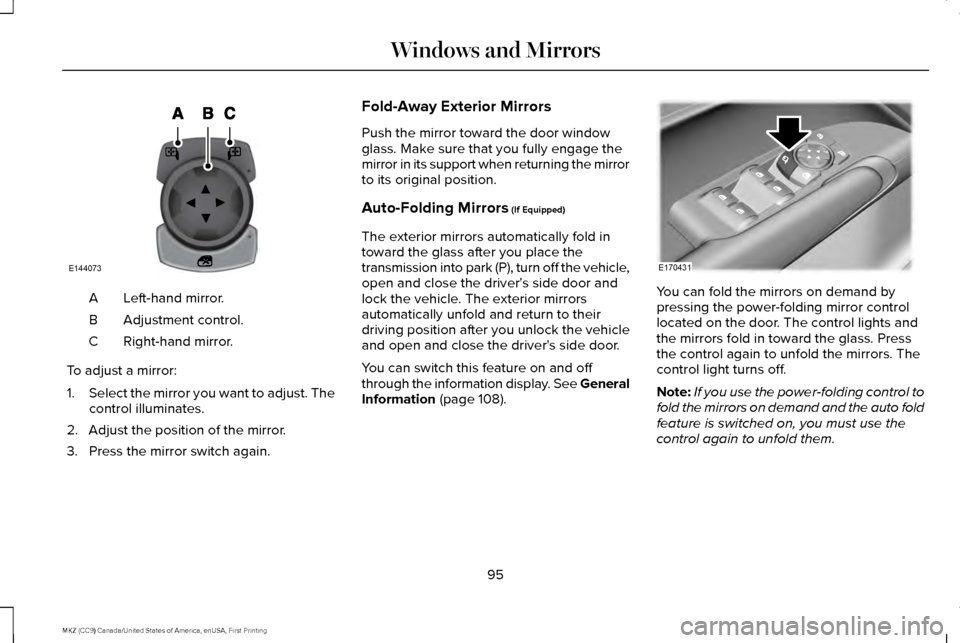
Left-hand mirror.
A
Adjustment control.
B
Right-hand mirror.
C
To adjust a mirror:
1. Select the mirror you want to adjust. The
control illuminates.
2. Adjust the position of the mirror.
3. Press the mirror switch again. Fold-Away Exterior Mirrors
Push the mirror toward the door window
glass. Make sure that you fully engage the
mirror in its support when returning the mirror
to its original position.
Auto-Folding Mirrors (If Equipped)
The exterior mirrors automatically fold in
toward the glass after you place the
transmission into park (P), turn off the vehicle,
open and close the driver's side door and
lock the vehicle. The exterior mirrors
automatically unfold and return to their
driving position after you unlock the vehicle
and open and close the driver's side door.
You can switch this feature on and off
through the information display. See General
Information
(page 108). You can fold the mirrors on demand by
pressing the power-folding mirror control
located on the door. The control lights and
the mirrors fold in toward the glass. Press
the control again to unfold the mirrors. The
control light turns off.
Note:
If you use the power-folding control to
fold the mirrors on demand and the auto fold
feature is switched on, you must use the
control again to unfold them.
95
MKZ (CC9) Canada/United States of America, enUSA, First Printing Windows and MirrorsE144073 E170431
Page 101 of 564
SUN VISORS
Rotate the sun visor toward the side window
and extend it rearward for extra shade.
Illuminated Vanity Mirror Lift the cover to switch the lamp on.
SUN SHADES (If Equipped)
Note: Do not try to move the sun shade
manually.
The power rear sun shade covers the rear
window of the vehicle. The control is in the overhead console.
The sun shade has a one-touch up and down
feature. Press and release the control to
move the sun shade. To stop motion, press
the control a second time.
The sun shade automatically retracts when
you shift the transmission into R (Reverse).
MOONROOF
(If Equipped) WARNINGS
Do not let children play with the
moonroof or leave them unattended in
the vehicle. They may seriously hurt
themselves.
98
MKZ (CC9) Canada/United States of America, enUSA, First Printing Windows and MirrorsE138666 E162197 E145986
Page 118 of 564
.
Adaptive Cruise Malfunction
Displayed wh")
Adaptive Cruise Control
Action
Message
Displayed when a radar malfunction is preventing the ACC from engaging. \
See Using Adaptive Cruise Control (page 216).
Adaptive Cruise Malfunction
Displayed when conditions exist such that the adaptive cruise cannot fun\
ction properly.
See
Using Adaptive Cruise Control (page 216).
Adaptive Cruise Not Available
Displayed when the radar is blocked because of poor radar visibility due to bad weather or ice/
mud/water in front of radar. Driver can typically clean the sensor to resolve. See Using AdaptiveCruise Control
(page 216).
Adaptive Cruise Not Available Sensor
Blocked See Manual
Displayed when the automatic braking has been disabled.
Normal Cruise Active Automatic Braking
Turned Off
Displayed when a radar malfunction is preventing the ACC from engaging.
Front Sensor Not Aligned
Displayed when the adaptive cruise has reinstated controls to the driver\
.
Adaptive Cruise - Driver Resume Control
Displays when the vehicle speed is too slow to activate the adaptive cru\
ise.
Adaptive Cruise Speed Too Low to
Activate
Displays when the adaptive cruise is automatically adjusting the gap dis\
tance and the driverneeds to shift the transmission into a lower gear.
Adaptive Cruise Shift Down
115
MKZ (CC9) Canada/United States of America, enUSA, First Printing Information Displays
Page 121 of 564

AWD
Action
Message
Displayed when the AWD system has been temporarily disabled to protect i\
tself from overheating.
AWD Temporarily Disabled
Displayed when the AWD system has been automatically disabled to protect\
itself. This is causedby operating the vehicle with the compact spare tire installed or if the\
system is overheating.
AWD OFF
The AWD system will resume normal function and clear this message after \
driving a short distancewith the road tire re-installed or after the system is allowed to cool.
AWD Restored
Displayed in conjunction with the Throttle Control/Transmission/AWD light when the AWD system
is not operating properly. If the warning stays on or continues to come on, contact your authoriz\
ed dealer as soon as possible.
AWD Malfunction Service Required
118
MKZ (CC9) Canada/United States of America, enUSA, First Printing Information Displays
Page 134 of 564
Transmission
Action
Message
See your authorized dealer.
Transmission Malfunction Service Now
The transmission is overheating and needs to cool. Stop in a safe place as soon as it’ s possible.
Transmission Overheating Stop Safely
The transmission has overheated and needs to cool. Stop in a safe place as soon as it’ s possible.
Transmission Over Temperature Stop
Safely
See your authorized dealer.
Transmission Service Required
Transmission is getting hot. Stop to let it cool.
Transmission Too Hot Press Brake
Displays when the transmission has overheated and has limited functional\
ity. See Automatic
Transmission (page 173).
Transmission Limited Function See Manual
Transmission is too cold. Wait for it to warm up before you drive.
Transmission Warming Up Please Wait
A reminder to shift into park. In addition, this message is typical afte\
r reconnecting or rechargingthe battery until you cycle the ignition to the on mode.
See Changing the 12V Battery (page
312).
Transmission Not in Park
Displays when the transmission has adjusted the shift strategy.
Transmission Adjusted
Displays when the transmission is adjusting the shift strategy.
Transmission AdaptMode
Displays when the transmission shift lever is locked and unable to select gears.
Transmission IndicatMode Lockup On
Displays when the transmission shift lever is unlocked and free to select gears.
Transmission IndicatMode Lockup Off
131
MKZ (CC9) Canada/United States of America, enUSA, First Printing Information Displays
Page 135 of 564
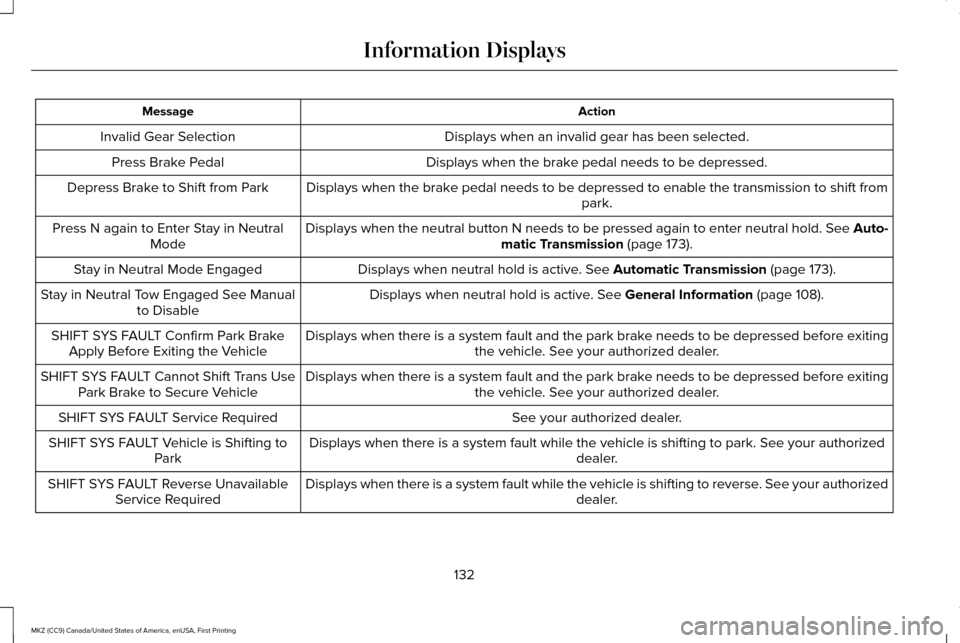
Action
Message
Displays when an invalid gear has been selected.
Invalid Gear Selection
Displays when the brake pedal needs to be depressed.
Press Brake Pedal
Displays when the brake pedal needs to be depressed to enable the transmission to shift from park.
Depress Brake to Shift from Park
Displays when the neutral button N needs to be pressed again to enter ne\
utral hold. See Auto-matic Transmission (page 173).
Press N again to Enter Stay in Neutral
Mode
Displays when neutral hold is active.
See Automatic Transmission (page 173).
Stay in Neutral Mode Engaged
Displays when neutral hold is active.
See General Information (page 108).
Stay in Neutral Tow Engaged See Manual
to Disable
Displays when there is a system fault and the park brake needs to be depressed before exiting the vehicle. See your authorized dealer.
SHIFT SYS FAULT Confirm Park Brake
Apply Before Exiting the Vehicle
Displays when there is a system fault and the park brake needs to be depressed before exitingthe vehicle. See your authorized dealer.
SHIFT SYS FAULT Cannot Shift Trans Use
Park Brake to Secure Vehicle
See your authorized dealer.
SHIFT SYS FAULT Service Required
Displays when there is a system fault while the vehicle is shifting to p\
ark. See your authorized dealer.
SHIFT SYS FAULT Vehicle is Shifting to
Park
Displays when there is a system fault while the vehicle is shifting to r\
everse. See your authorized dealer.
SHIFT SYS FAULT Reverse Unavailable
Service Required
132
MKZ (CC9) Canada/United States of America, enUSA, First Printing Information Displays
Page 148 of 564
MEMORY FUNCTION (If Equipped)
WARNINGS
Before activating the seat memory,
make sure that the area immediately
surrounding the seat is clear of obstructions
and that all occupants are clear of moving
parts. Do not use the memory function when
your vehicle is moving.
This feature automatically recalls the position
of the following features:
•
Driver seat.
• Power mirrors.
• Power steering column.
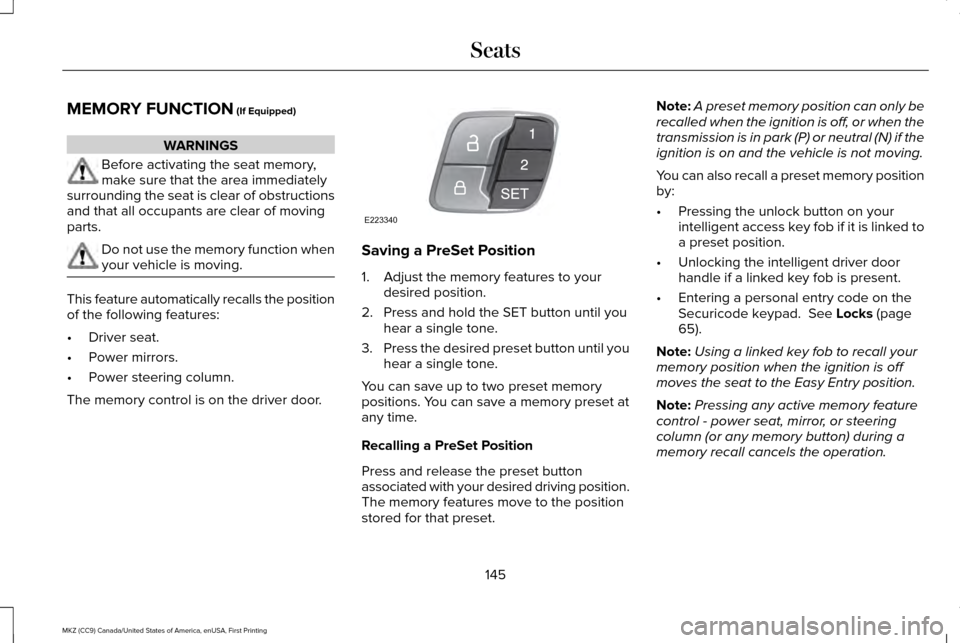
The memory control is on the driver door. Saving a PreSet Position
1. Adjust the memory features to your
desired position.
2. Press and hold the SET button until you hear a single tone.
3. Press the desired preset button until you
hear a single tone.
You can save up to two preset memory
positions. You can save a memory preset at
any time.
Recalling a PreSet Position
Press and release the preset button
associated with your desired driving position.
The memory features move to the position
stored for that preset. Note:
A preset memory position can only be
recalled when the ignition is off, or when the
transmission is in park (P) or neutral (N) if the
ignition is on and the vehicle is not moving.
You can also recall a preset memory position
by:
• Pressing the unlock button on your
intelligent access key fob if it is linked to
a preset position.
• Unlocking the intelligent driver door
handle if a linked key fob is present.
• Entering a personal entry code on the
Securicode keypad.
See Locks (page
65).
Note: Using a linked key fob to recall your
memory position when the ignition is off
moves the seat to the Easy Entry position.
Note: Pressing any active memory feature
control - power seat, mirror, or steering
column (or any memory button) during a
memory recall cancels the operation.
145
MKZ (CC9) Canada/United States of America, enUSA, First Printing SeatsE223340
Page 154 of 564
HomeLink Wireless Control System
WARNINGS
Make sure that the garage door and
security device are free from
obstruction when you are programming. Do
not program the system with the vehicle in
the garage. Do not use the system with any garage
door opener that does not have the
safety stop and reverse feature as required
by U.S. Federal Safety Standards (this
includes any garage door opener
manufactured before April 1, 1982). A garage
door opener which cannot detect an object,
signaling the door to stop and reverse, does
not meet current federal safety standards.
Using a garage door opener without these
features increases the risk of serious injury
or death. Note:
Make sure you keep the original
remote control transmitter for use in other
vehicles as well as for future system
programming. Note:
We recommend that upon the sale or
lease termination of your vehicle, you erase
the programmed function buttons for security
reasons. See Erasing the Function Button
Codes.
Note: You can program a maximum of three
devices. To change or replace any of the
three devices after it has been initially
programmed, you must first erase the current
settings. See
Erasing the Function Button
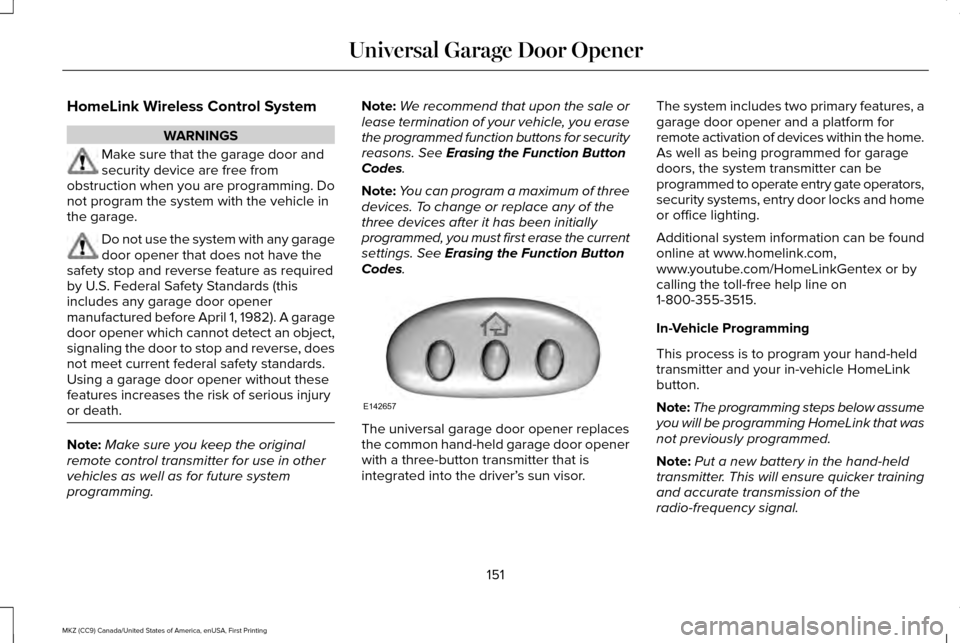
Codes. The universal garage door opener replaces
the common hand-held garage door opener
with a three-button transmitter that is
integrated into the driver’
s sun visor.The system includes two primary features, a
garage door opener and a platform for
remote activation of devices within the home.
As well as being programmed for garage
doors, the system transmitter can be
programmed to operate entry gate operators,
security systems, entry door locks and home
or office lighting.
Additional system information can be found
online at www.homelink.com,
www.youtube.com/HomeLinkGentex or by
calling the toll-free help line on
1-800-355-3515.
In-Vehicle Programming
This process is to program your hand-held
transmitter and your in-vehicle HomeLink
button.
Note:
The programming steps below assume
you will be programming HomeLink that was
not previously programmed.
Note: Put a new battery in the hand-held
transmitter. This will ensure quicker training
and accurate transmission of the
radio-frequency signal.
151
MKZ (CC9) Canada/United States of America, enUSA, First Printing Universal Garage Door OpenerE142657
Page 156 of 564
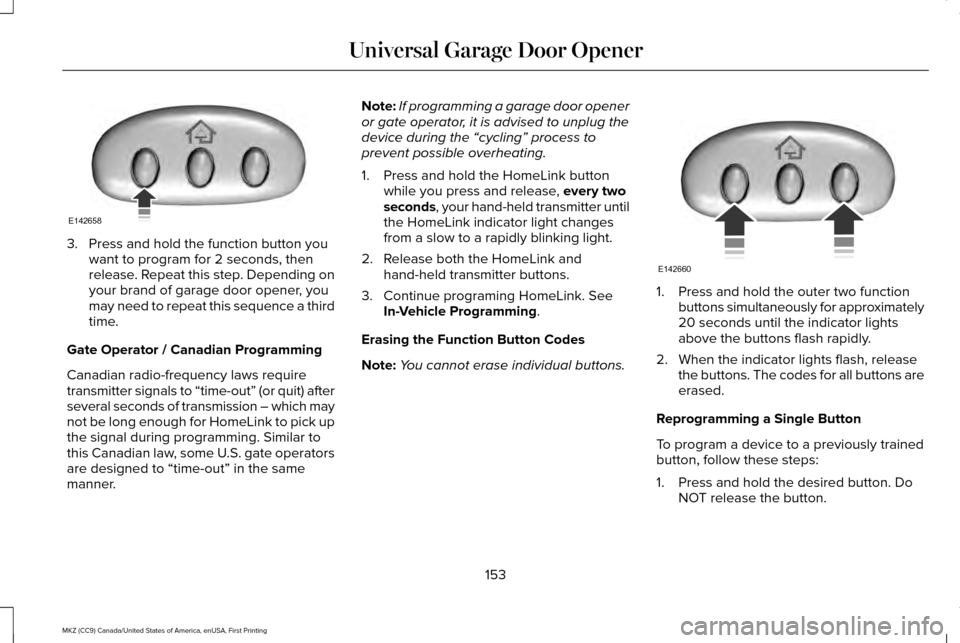
3. Press and hold the function button you
want to program for 2 seconds, then
release. Repeat this step. Depending on
your brand of garage door opener, you
may need to repeat this sequence a third
time.
Gate Operator / Canadian Programming
Canadian radio-frequency laws require
transmitter signals to “time-out” (or quit) after
several seconds of transmission – which may
not be long enough for HomeLink to pick up
the signal during programming. Similar to
this Canadian law, some U.S. gate operators
are designed to “time-out” in the same
manner. Note:
If programming a garage door opener
or gate operator, it is advised to unplug the
device during the “cycling” process to
prevent possible overheating.
1. Press and hold the HomeLink button while you press and release, every two
seconds, your hand-held transmitter until
the HomeLink indicator light changes
from a slow to a rapidly blinking light.
2. Release both the HomeLink and hand-held transmitter buttons.
3. Continue programing HomeLink. See In-Vehicle Programming
.
Erasing the Function Button Codes
Note: You cannot erase individual buttons. 1. Press and hold the outer two function
buttons simultaneously for approximately
20 seconds until the indicator lights
above the buttons flash rapidly.
2. When the indicator lights flash, release the buttons. The codes for all buttons are
erased.
Reprogramming a Single Button
To program a device to a previously trained
button, follow these steps:
1. Press and hold the desired button. Do NOT release the button.
153
MKZ (CC9) Canada/United States of America, enUSA, First Printing Universal Garage Door OpenerE142658 E142660