USB LINCOLN MKZ 2017 User Guide
[x] Cancel search | Manufacturer: LINCOLN, Model Year: 2017, Model line: MKZ, Model: LINCOLN MKZ 2017Pages: 564, PDF Size: 5.54 MB
Page 433 of 564
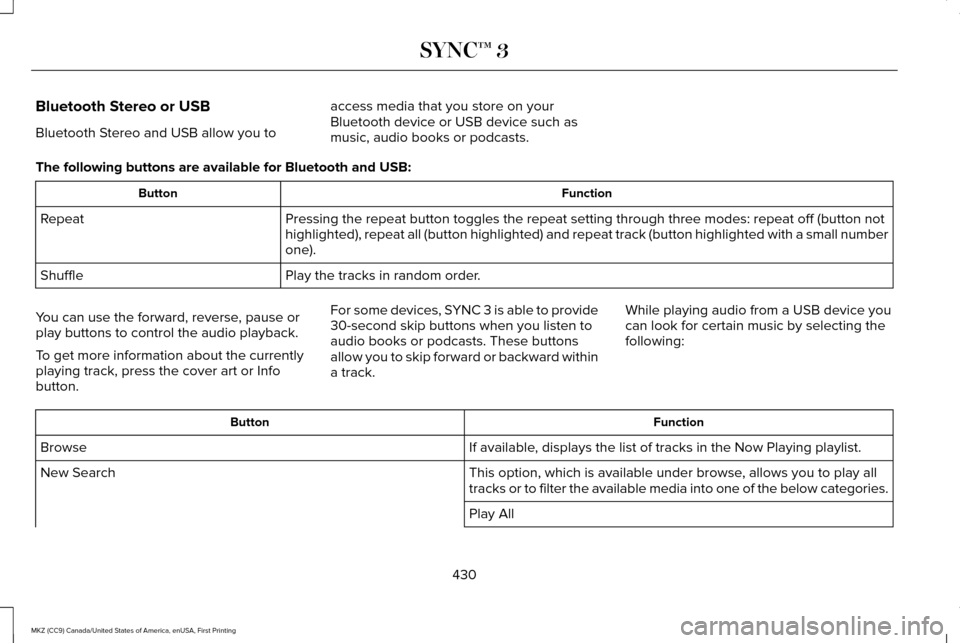
Bluetooth Stereo or USB
Bluetooth Stereo and USB allow you to
access media that you store on your
Bluetooth device or USB device such as
music, audio books or podcasts.
The following buttons are available for Bluetooth and USB: Function
Button
Pressing the repeat button toggles the repeat setting through three mode\
s: repeat off (button not
highlighted), repeat all (button highlighted) and repeat track (butt\
on highlighted with a small number
one).
Repeat
Play the tracks in random order.
Shuffle
You can use the forward, reverse, pause or
play buttons to control the audio playback.
To get more information about the currently
playing track, press the cover art or Info
button. For some devices, SYNC 3 is able to provide
30-second skip buttons when you listen to
audio books or podcasts. These buttons
allow you to skip forward or backward within
a track.
While playing audio from a USB device you
can look for certain music by selecting the
following: Function
Button
If available, displays the list of tracks in the Now Playing playlist.
Browse
This option, which is available under browse, allows you to play all
tracks or to filter the available media into one of the below categories\
.
New Search
Play All
430
MKZ (CC9) Canada/United States of America, enUSA, First Printing SYNC™ 3
Page 434 of 564
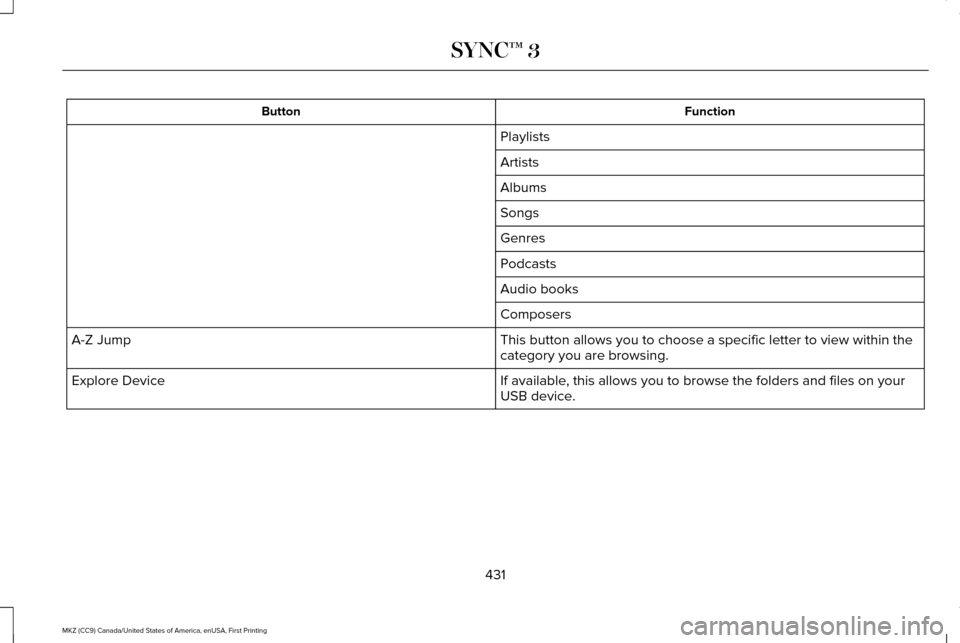
Function
Button
Playlists
Artists
Albums
Songs
Genres
Podcasts
Audio books
Composers
This button allows you to choose a specific letter to view within the
category you are browsing.
A-Z Jump
If available, this allows you to browse the folders and files on your
USB device.
Explore Device
431
MKZ (CC9) Canada/United States of America, enUSA, First Printing SYNC™ 3
Page 435 of 564
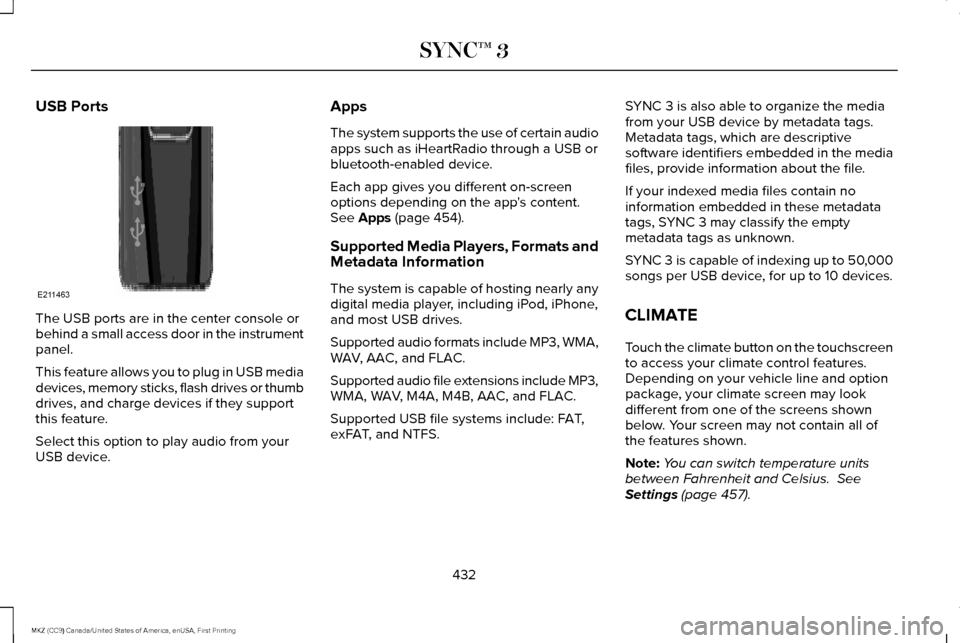
USB Ports
The USB ports are in the center console or
behind a small access door in the instrument
panel.
This feature allows you to plug in USB media
devices, memory sticks, flash drives or thumb
drives, and charge devices if they support
this feature.
Select this option to play audio from your
USB device. Apps
The system supports the use of certain audio
apps such as iHeartRadio through a USB or
bluetooth-enabled device.
Each app gives you different on-screen
options depending on the app's content.
See Apps (page 454).
Supported Media Players, Formats and
Metadata Information
The system is capable of hosting nearly any
digital media player, including iPod, iPhone,
and most USB drives.
Supported audio formats include MP3, WMA,
WAV, AAC, and FLAC.
Supported audio file extensions include MP3,
WMA, WAV, M4A, M4B, AAC, and FLAC.
Supported USB file systems include: FAT,
exFAT, and NTFS. SYNC 3 is also able to organize the media
from your USB device by metadata tags.
Metadata tags, which are descriptive
software identifiers embedded in the media
files, provide information about the file.
If your indexed media files contain no
information embedded in these metadata
tags, SYNC 3 may classify the empty
metadata tags as unknown.
SYNC 3 is capable of indexing up to 50,000
songs per USB device, for up to 10 devices.
CLIMATE
Touch the climate button on the touchscreen
to access your climate control features.
Depending on your vehicle line and option
package, your climate screen may look
different from one of the screens shown
below. Your screen may not contain all of
the features shown.
Note:
You can switch temperature units
between Fahrenheit and Celsius.
See
Settings (page 457).
432
MKZ (CC9) Canada/United States of America, enUSA, First Printing SYNC™ 3E211463
Page 446 of 564
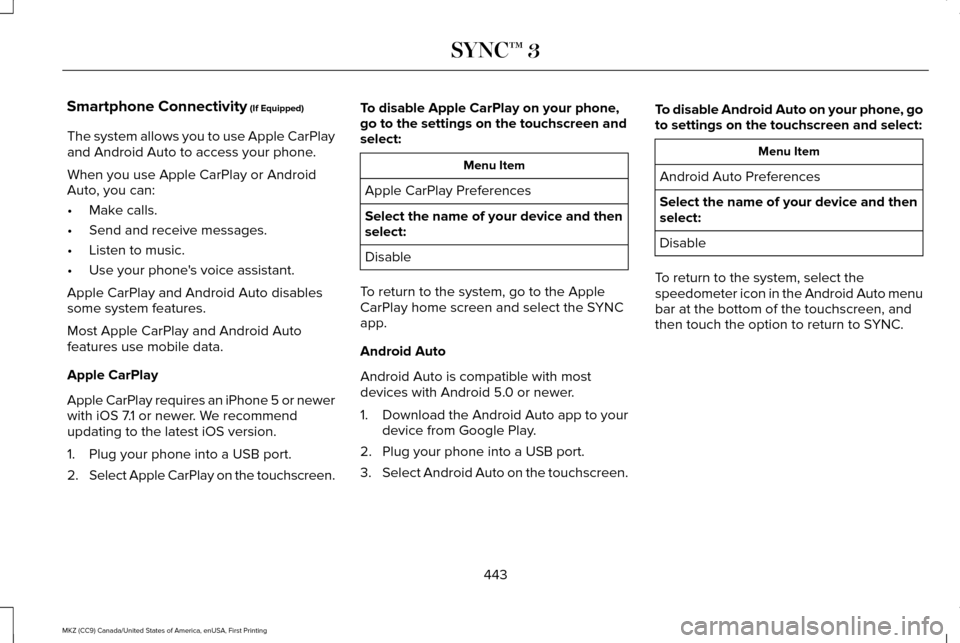
Smartphone Connectivity (If Equipped)
443
MKZ (CC9) Canada/United States of America, enUSA, First Printing SYNC™ 3
The system allows you to use Apple CarPlay
and Android Auto to access your phone.
When you use Apple CarPlay or Android
Auto, you can:
•
Make calls.
• Send and receive messages.
• Listen to music.
• Use your phone's voice assistant.
Apple CarPlay and Android Auto disables
some system features.
Most Apple CarPlay and Android Auto
features use mobile data.
Apple CarPlay
Apple CarPlay requires an iPhone 5 or newer
with iOS 7.1 or newer. We recommend
updating to the latest iOS version.
1. Plug your phone into a USB port.
2. Select Apple CarPlay on the touchscreen. To disable Apple CarPlay on your phone,
go to the settings on the touchscreen and
select: Menu Item
Apple CarPlay Preferences
Select the name of your device and then
select:
Disable
To return to the system, go to the Apple
CarPlay home screen and select the SYNC
app.
Android Auto
Android Auto is compatible with most
devices with Android 5.0 or newer.
1. Download the Android Auto app to your
device from Google Play.
2. Plug your phone into a USB port.
3. Select Android Auto on the touchscreen. To disable Android Auto on your phone, go
to settings on the touchscreen and select: Menu Item
Android Auto Preferences
Select the name of your device and then
select:
Disable
To return to the system, select the
speedometer icon in the Android Auto menu
bar at the bottom of the touchscreen, and
then touch the option to return to SYNC.
Page 457 of 564
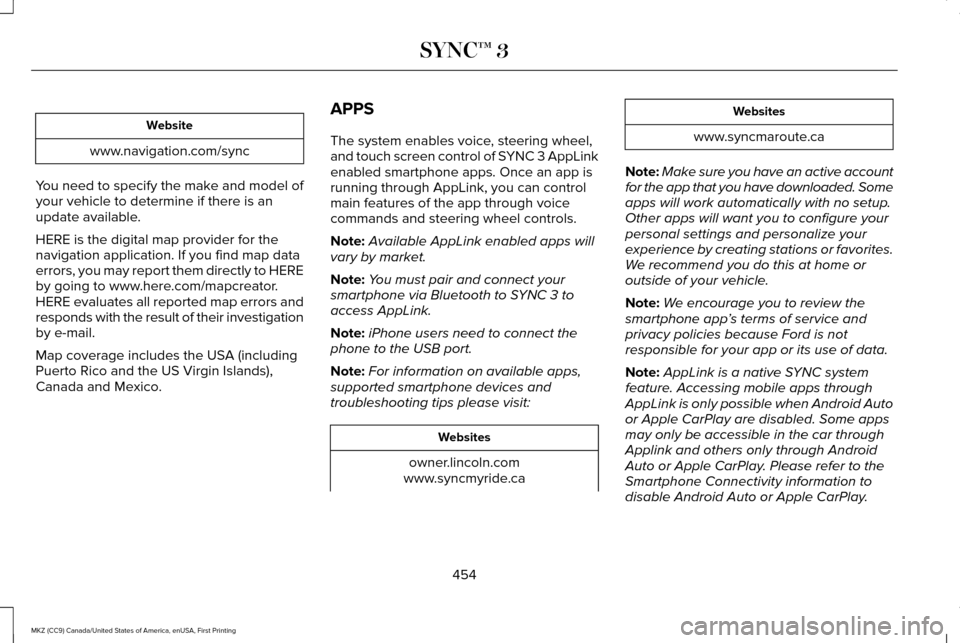
Website
www.navigation.com/sync
You need to specify the make and model of
your vehicle to determine if there is an
update available.
HERE is the digital map provider for the
navigation application. If you find map data
errors, you may report them directly to HERE
by going to www.here.com/mapcreator.
HERE evaluates all reported map errors and
responds with the result of their investigation
by e-mail.
Map coverage includes the USA (including
Puerto Rico and the US Virgin Islands),
Canada and Mexico. APPS
The system enables voice, steering wheel,
and touch screen control of SYNC 3 AppLink
enabled smartphone apps. Once an app is
running through AppLink, you can control
main features of the app through voice
commands and steering wheel controls.
Note:
Available AppLink enabled apps will
vary by market.
Note: You must pair and connect your
smartphone via Bluetooth to SYNC 3 to
access AppLink.
Note: iPhone users need to connect the
phone to the USB port.
Note: For information on available apps,
supported smartphone devices and
troubleshooting tips please visit: Websites
owner.lincoln.com
www.syncmyride.ca Websites
www.syncmaroute.ca
Note: Make sure you have an active account
for the app that you have downloaded. Some
apps will work automatically with no setup.
Other apps will want you to configure your
personal settings and personalize your
experience by creating stations or favorites.
We recommend you do this at home or
outside of your vehicle.
Note: We encourage you to review the
smartphone app ’s terms of service and
privacy policies because Ford is not
responsible for your app or its use of data.
Note: AppLink is a native SYNC system
feature. Accessing mobile apps through
AppLink is only possible when Android Auto
or Apple CarPlay are disabled. Some apps
may only be accessible in the car through
Applink and others only through Android
Auto or Apple CarPlay. Please refer to the
Smartphone Connectivity information to
disable Android Auto or Apple CarPlay.
454
MKZ (CC9) Canada/United States of America, enUSA, First Printing SYNC™ 3
Page 461 of 564
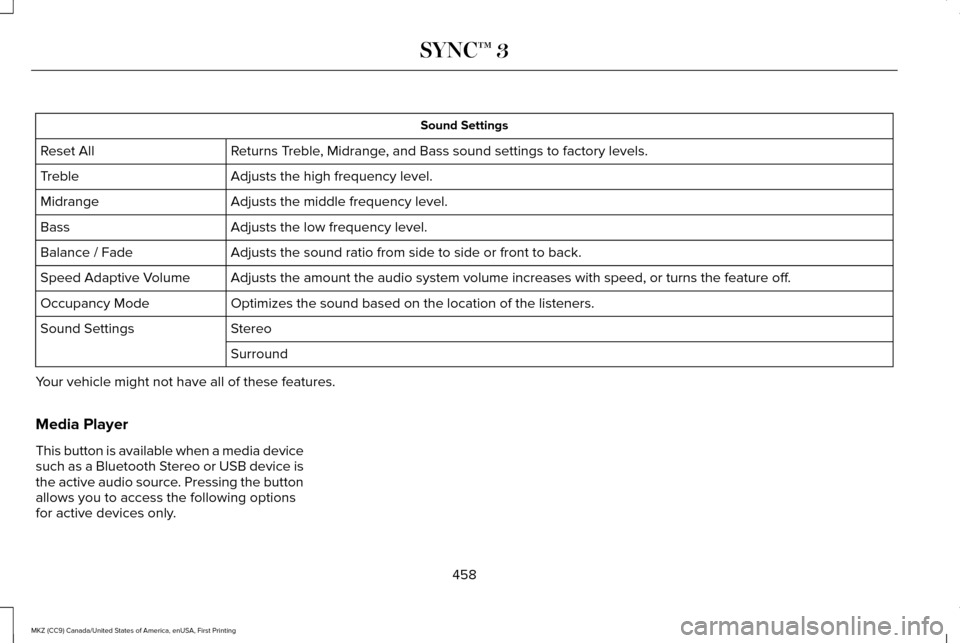
Sound Settings
Returns Treble, Midrange, and Bass sound settings to factory levels.
Reset All
Adjusts the high frequency level.
Treble
Adjusts the middle frequency level.
Midrange
Adjusts the low frequency level.
Bass
Adjusts the sound ratio from side to side or front to back.
Balance / Fade
Adjusts the amount the audio system volume increases with speed, or turn\
s the feature off.
Speed Adaptive Volume
Optimizes the sound based on the location of the listeners.
Occupancy Mode
Stereo
Sound Settings
Surround
Your vehicle might not have all of these features.
Media Player
This button is available when a media device
such as a Bluetooth Stereo or USB device is
the active audio source. Pressing the button
allows you to access the following options
for active devices only.
458
MKZ (CC9) Canada/United States of America, enUSA, First Printing SYNC™ 3
Page 471 of 564
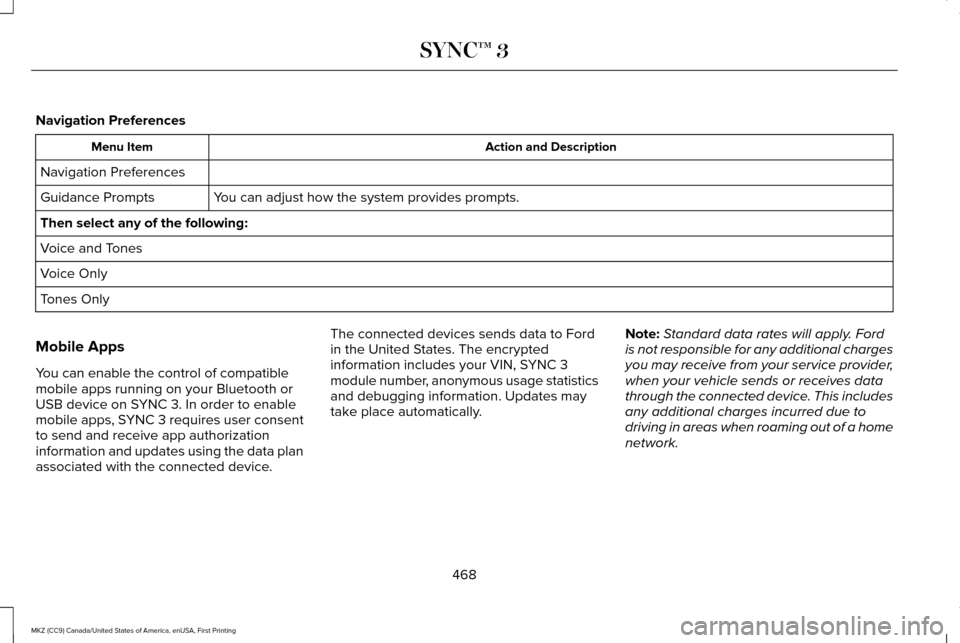
Navigation Preferences
Action and Description
Menu Item
Navigation Preferences You can adjust how the system provides prompts.
Guidance Prompts
Then select any of the following:
Voice and Tones
Voice Only
Tones Only
Mobile Apps
You can enable the control of compatible
mobile apps running on your Bluetooth or
USB device on SYNC 3. In order to enable
mobile apps, SYNC 3 requires user consent
to send and receive app authorization
information and updates using the data plan
associated with the connected device. The connected devices sends data to Ford
in the United States. The encrypted
information includes your VIN, SYNC 3
module number, anonymous usage statistics
and debugging information. Updates may
take place automatically.
Note:
Standard data rates will apply. Ford
is not responsible for any additional charges
you may receive from your service provider,
when your vehicle sends or receives data
through the connected device. This includes
any additional charges incurred due to
driving in areas when roaming out of a home
network.
468
MKZ (CC9) Canada/United States of America, enUSA, First Printing SYNC™ 3
Page 478 of 564
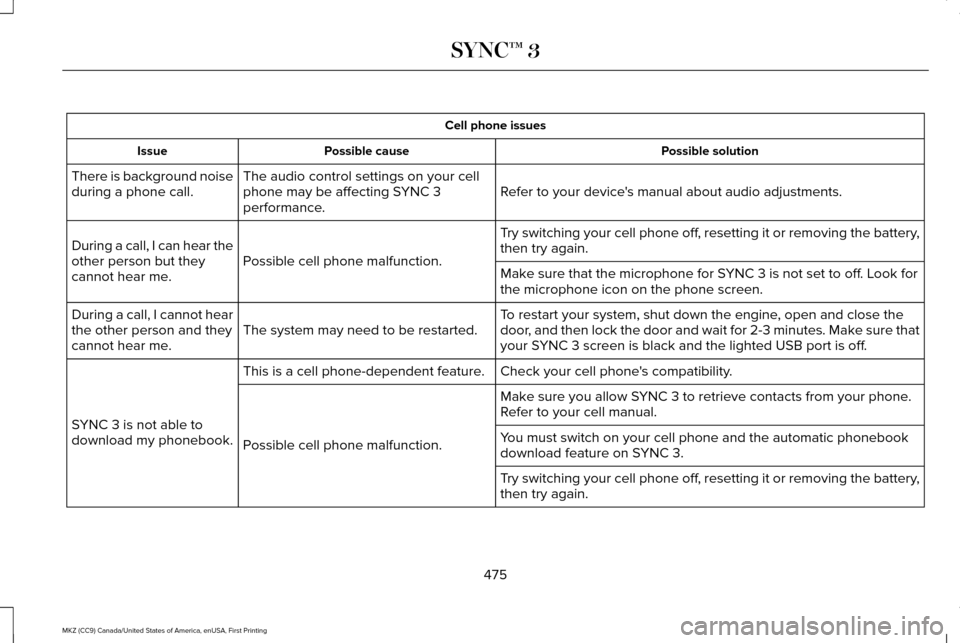
Cell phone issues
Possible solution
Possible cause
Issue
Refer to your device's manual about audio adjustments.
The audio control settings on your cell
phone may be affecting SYNC 3
performance.
There is background noise
during a phone call.
Try switching your cell phone off, resetting it or removing the battery,
then try again.
Possible cell phone malfunction.
During a call, I can hear the
other person but they
cannot hear me.
Make sure that the microphone for SYNC 3 is not set to off. Look for
the microphone icon on the phone screen.
To restart your system, shut down the engine, open and close the
door, and then lock the door and wait for 2-3 minutes. Make sure that
your SYNC 3 screen is black and the lighted USB port is off.
The system may need to be restarted.
During a call, I cannot hear
the other person and they
cannot hear me.
Check your cell phone's compatibility.
This is a cell phone-dependent feature.
SYNC 3 is not able to
download my phonebook. Make sure you allow SYNC 3 to retrieve contacts from your phone.
Refer to your cell manual.
Possible cell phone malfunction. You must switch on your cell phone and the automatic phonebook
download feature on SYNC 3.
Try switching your cell phone off, resetting it or removing the battery,
then try again.
475
MKZ (CC9) Canada/United States of America, enUSA, First Printing SYNC™ 3
Page 481 of 564
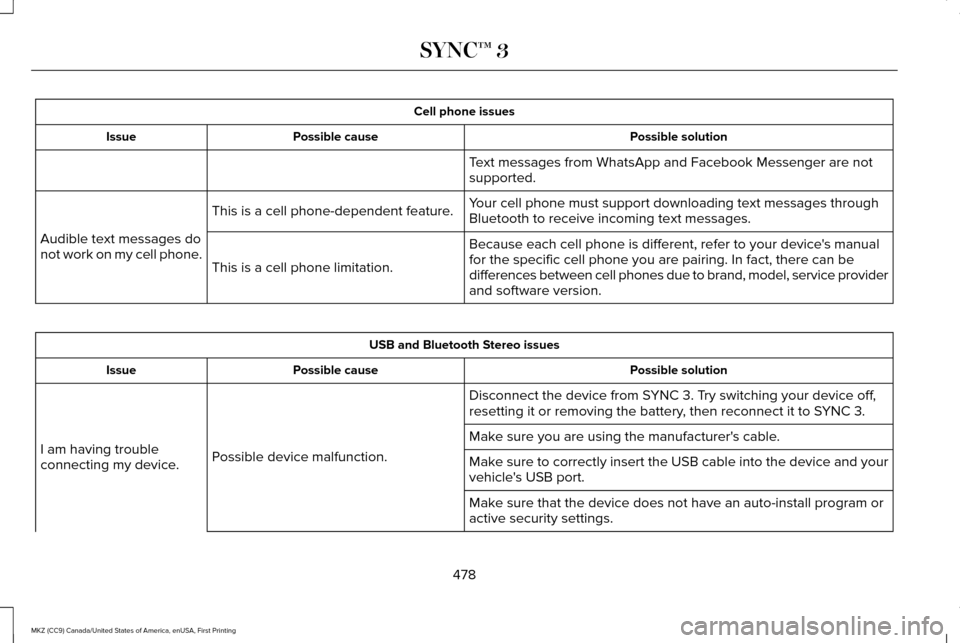
Cell phone issues
Possible solution
Possible cause
Issue
Text messages from WhatsApp and Facebook Messenger are not
supported.
Your cell phone must support downloading text messages through
Bluetooth to receive incoming text messages.
This is a cell phone-dependent feature.
Audible text messages do
not work on my cell phone. Because each cell phone is different, refer to your device's manual
for the specific cell phone you are pairing. In fact, there can be
differences between cell phones due to brand, model, service provider
and software version.
This is a cell phone limitation. USB and Bluetooth Stereo issues
Possible solution
Possible cause
Issue
Disconnect the device from SYNC 3. Try switching your device off,
resetting it or removing the battery, then reconnect it to SYNC 3.
Possible device malfunction.
I am having trouble
connecting my device. Make sure you are using the manufacturer's cable.
Make sure to correctly insert the USB cable into the device and your
vehicle's USB port.
Make sure that the device does not have an auto-install program or
active security settings.
478
MKZ (CC9) Canada/United States of America, enUSA, First Printing SYNC™ 3
Page 482 of 564
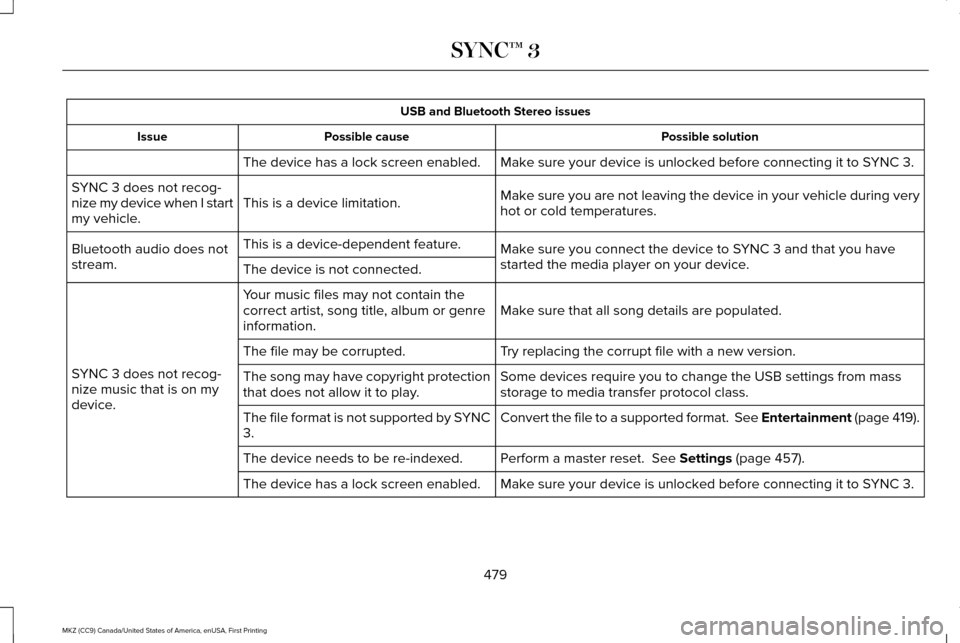
USB and Bluetooth Stereo issues
Possible solution
Possible cause
Issue
Make sure your device is unlocked before connecting it to SYNC 3.
The device has a lock screen enabled.
Make sure you are not leaving the device in your vehicle during very
hot or cold temperatures.
This is a device limitation.
SYNC 3 does not recog-
nize my device when I start
my vehicle.
Make sure you connect the device to SYNC 3 and that you have
started the media player on your device.
This is a device-dependent feature.
Bluetooth audio does not
stream. The device is not connected.
Make sure that all song details are populated.
Your music files may not contain the
correct artist, song title, album or genre
information.
SYNC 3 does not recog-
nize music that is on my
device. Try replacing the corrupt file with a new version.
The file may be corrupted.
Some devices require you to change the USB settings from mass
storage to media transfer protocol class.
The song may have copyright protection
that does not allow it to play.
Convert the file to a supported format. See Entertainment (page 419).
The file format is not supported by SYNC
3.
Perform a master reset.
See Settings (page 457).
The device needs to be re-indexed.
Make sure your device is unlocked before connecting it to SYNC 3.
The device has a lock screen enabled.
479
MKZ (CC9) Canada/United States of America, enUSA, First Printing SYNC™ 3