automatic transmission LINCOLN MKZ 2017 Owner's Manual
[x] Cancel search | Manufacturer: LINCOLN, Model Year: 2017, Model line: MKZ, Model: LINCOLN MKZ 2017Pages: 564, PDF Size: 5.54 MB
Page 192 of 564
The anti-lock braking system will not
eliminate the risks when:
•
You drive too closely to the vehicle in
front of you.
• Your vehicle is hydroplaning.
• You take corners too fast.
• The road surface is poor.
ELECTRIC PARKING BRAKE WARNING
Always set the parking brake and leave
your vehicle with the transmission in
park (P). Note:
When you apply the electric parking
brake in certain conditions, for example on
a steep hill, the electric parking brake may
reapply the brakes within three to ten
minutes. As a result, you may notice various
noises when you apply and release the
electric parking brake. This is normal and no
cause for concern. The electric parking brake replaces the
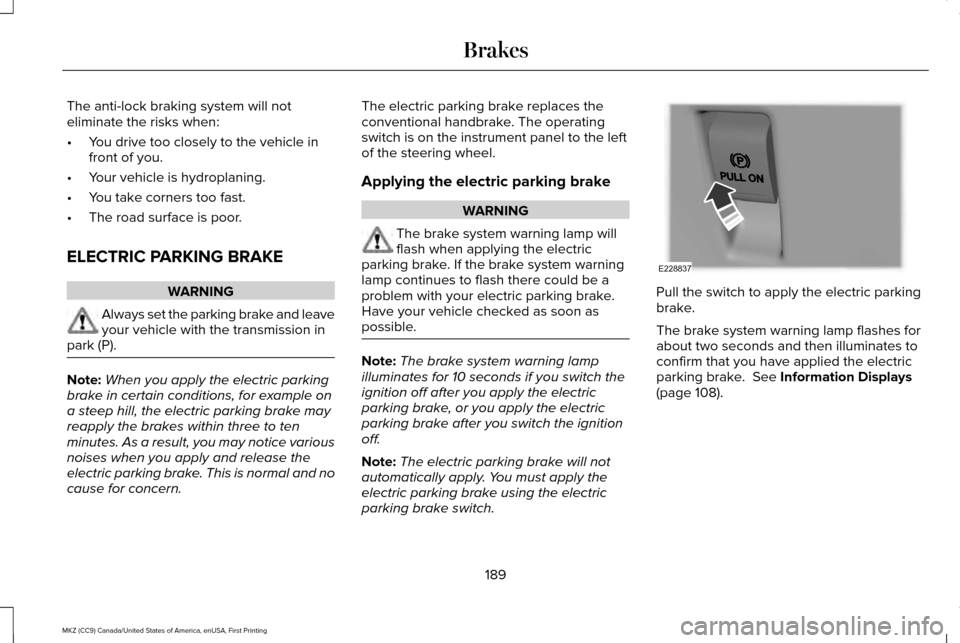
conventional handbrake. The operating
switch is on the instrument panel to the left
of the steering wheel.
Applying the electric parking brake WARNING
The brake system warning lamp will
flash when applying the electric
parking brake. If the brake system warning
lamp continues to flash there could be a
problem with your electric parking brake.
Have your vehicle checked as soon as
possible. Note:
The brake system warning lamp
illuminates for 10 seconds if you switch the
ignition off after you apply the electric
parking brake, or you apply the electric
parking brake after you switch the ignition
off.
Note: The electric parking brake will not
automatically apply. You must apply the
electric parking brake using the electric
parking brake switch. Pull the switch to apply the electric parking
brake.
The brake system warning lamp flashes for
about two seconds and then illuminates to
confirm that you have applied the electric
parking brake. See Information Displays
(page 108).
189
MKZ (CC9) Canada/United States of America, enUSA, First Printing BrakesE228837
Page 200 of 564
Electronic Stability Control
The system enhances your vehicle
’s ability
to prevent skids or lateral slides by applying
brakes to one or more of the wheels
individually and, if necessary, reducing
engine power.
Traction Control
The system enhances your vehicle ’s ability
to maintain traction of the wheels by
detecting and controlling wheel spin. See
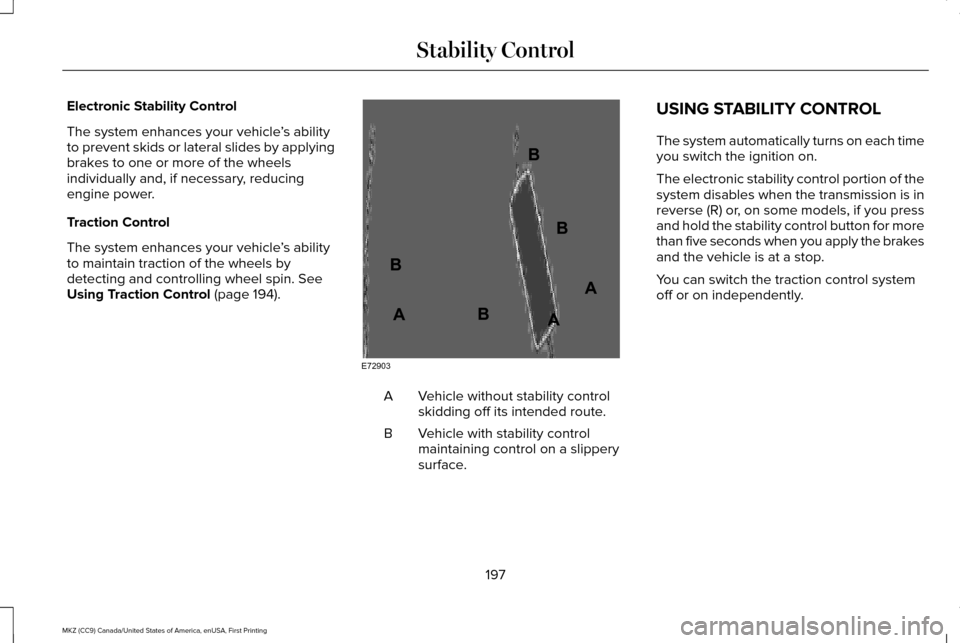
Using Traction Control (page 194). Vehicle without stability control
skidding off its intended route.
A
Vehicle with stability control
maintaining control on a slippery
surface.
B USING STABILITY CONTROL
The system automatically turns on each time
you switch the ignition on.
The electronic stability control portion of the
system disables when the transmission is in
reverse (R) or, on some models, if you press
and hold the stability control button for more
than five seconds when you apply the brakes
and the vehicle is at a stop.
You can switch the traction control system
off or on independently.
197
MKZ (CC9) Canada/United States of America, enUSA, First Printing Stability ControlE72903A
AA
B
BB
B
Page 202 of 564
PRINCIPLE OF OPERATION
WARNINGS
To help avoid personal injury, please
read and understand the limitations of
the system as contained in this section.
Sensing is only an aid for some (generally
large and fixed) objects when moving on a
flat surface at parking speeds. Certain
objects with surfaces that absorb ultrasonic
waves, surrounding vehicle's parking aid
systems, traffic control systems, fluorescent
lamps, inclement weather, air brakes, and
external motors and fans may also affect the
function of the sensing system; this may
include reduced performance or a false
activation. To help avoid personal injury, always
use caution when in reverse (R) and
when using the sensing system. WARNINGS
This system is not designed to prevent
contact with small or moving objects.
The system is designed to provide a warning
to assist the driver in detecting large
stationary objects to avoid damaging your
vehicle. The system may not detect smaller
objects, particularly those close to the
ground. Certain add-on devices such as large
trailer hitches, bike or surfboard racks
and any device that may block the normal
detection zone of the system, may create
false beeps. Note:
Keep the sensors, located on the
bumper or fascia, free from snow, ice and
large accumulations of dirt. If the sensors
are covered, the system’ s accuracy can be
affected. Do not clean the sensors with sharp
objects.
Note: If your vehicle sustains damage to the
bumper or fascia, leaving it misaligned or
bent, the sensing zone may be altered
causing inaccurate measurement of
obstacles or false alarms. Note:
The sensing system cannot be turned
off when a MyKey is present. See Principle
of Operation (page 60).
Note: If you attach certain add-on devices
such as a trailer or bike rack, the rear
sensing system may detect that add-on
device and therefore provide warnings. It is
suggested that you disable the rear sensing
system when you attach an add-on device
to your vehicle to prevent these warnings.
The sensing system warns the driver of
obstacles within a certain range of your
vehicle. The system turns on automatically
whenever you switch the ignition on. You can turn the system on or off
by pressing the parking aid button.
If your vehicle does not have a
parking aid button, the system can be
switched off through the information display
menu or from the pop-up message that
appears once you shift the transmission into
reverse (R).
See General Information (page
108).
If a fault is present in the system, a warning
message appears in the information display.
See
Information Messages (page 114).
199
MKZ (CC9) Canada/United States of America, enUSA, First Printing Parking AidsE139213
Page 206 of 564
(30 cm), or when obstacles are detected
within 12–24 in (30–60 cm) and are inside
the driving path of your vehicle. When you
stop your vehicle the audible warning stops
after 2 seconds and the visual distance
indication stops after 4 seconds.
Note: If the obstacle remains within
12 in
(30 cm) visual distance indication remains
on.
If the transmission is in neutral (N), the side
sensing system only provides visual distance
indication when your vehicle is moving at
7 mph (12 km/h) or below, for example when
moving on a slope, and obstacles are
detected within
12 in (30 cm). When you stop
your vehicle the visual distance indication
stops after 4 seconds.
If the side sensing system is not available,
the side distance indicator blocks will not be
present.
The side sensing system is not available
under the following condition:
• If you switch the traction control system
off. The side sensing system may not be
available until you have driven approximately
the length of your vehicle in order for the
system to reinitialize if:
•
You switch the ignition on, off and back
on.
• Your vehicle remains stationary for over
two minutes.
• The anti-lock brake system is activated.
• The traction control system is activated.
ACTIVE PARK ASSIST
(If Equipped)
Parallel Parking, Perpendicular
Parking, Parallel Park Out Assist WARNINGS
You must remain in your vehicle when
the system turns on. At all times, you
are responsible for controlling your vehicle,
supervising the system and intervening, if
required. Failure to take care may result in
the loss of control of your vehicle, serious
personal injury or death. WARNINGS
The sensors may not detect objects in
heavy rain or other conditions that
cause interference. Active park assist does not apply the
brakes under any circumstances.
At all times, you are responsible for
controlling your vehicle, supervising
the system and intervening, if required.
Failure to take care may result in the loss of
control of your vehicle, serious personal
injury or death. The system detects an available parallel or
perpendicular parking space and
automatically steers your vehicle into the
space (hands-free) while you control the
accelerator, gearshift and brakes. The system
visually and audibly guides you to park your
vehicle.
If you are uncomfortable with the proximity
to any vehicle or object, you may choose to
override the system.
203
MKZ (CC9) Canada/United States of America, enUSA, First Printing Parking Aids
Page 208 of 564
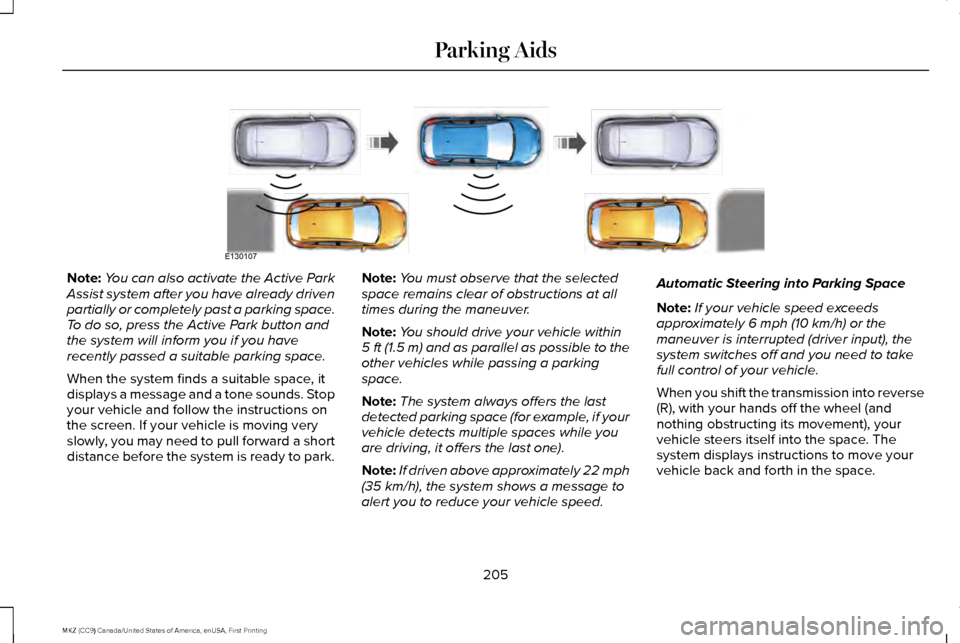
Note:
You can also activate the Active Park
Assist system after you have already driven
partially or completely past a parking space.
To do so, press the Active Park button and
the system will inform you if you have
recently passed a suitable parking space.
When the system finds a suitable space, it
displays a message and a tone sounds. Stop
your vehicle and follow the instructions on
the screen. If your vehicle is moving very
slowly, you may need to pull forward a short
distance before the system is ready to park. Note:
You must observe that the selected
space remains clear of obstructions at all
times during the maneuver.
Note: You should drive your vehicle within
5 ft (1.5 m) and as parallel as possible to the
other vehicles while passing a parking
space.
Note: The system always offers the last
detected parking space (for example, if your
vehicle detects multiple spaces while you
are driving, it offers the last one).
Note: If driven above approximately 22 mph
(35 km/h), the system shows a message to
alert you to reduce your vehicle speed. Automatic Steering into Parking Space
Note:
If your vehicle speed exceeds
approximately
6 mph (10 km/h) or the
maneuver is interrupted (driver input), the
system switches off and you need to take
full control of your vehicle.
When you shift the transmission into reverse
(R), with your hands off the wheel (and
nothing obstructing its movement), your
vehicle steers itself into the space. The
system displays instructions to move your
vehicle back and forth in the space.
205
MKZ (CC9) Canada/United States of America, enUSA, First Printing Parking AidsE130107
Page 211 of 564
When you shift the transmission into reverse
(R), with your hands off the wheel (and
nothing obstructing its movement), your
vehicle steers itself into the space. The
system displays instructions to move your
vehicle back and forth in the space.
When you think your vehicle is properly
parked, or you hear a solid tone from the
parking aid (accompanied by a display
message and a chime), bring your vehicle to
a complete stop.
When automatic steering is complete, the
system displays a message and a tone
sounds, indicating that the active park assist
process is finished. You are responsible for
checking the parking job and making any
necessary corrections before leaving your
vehicle.
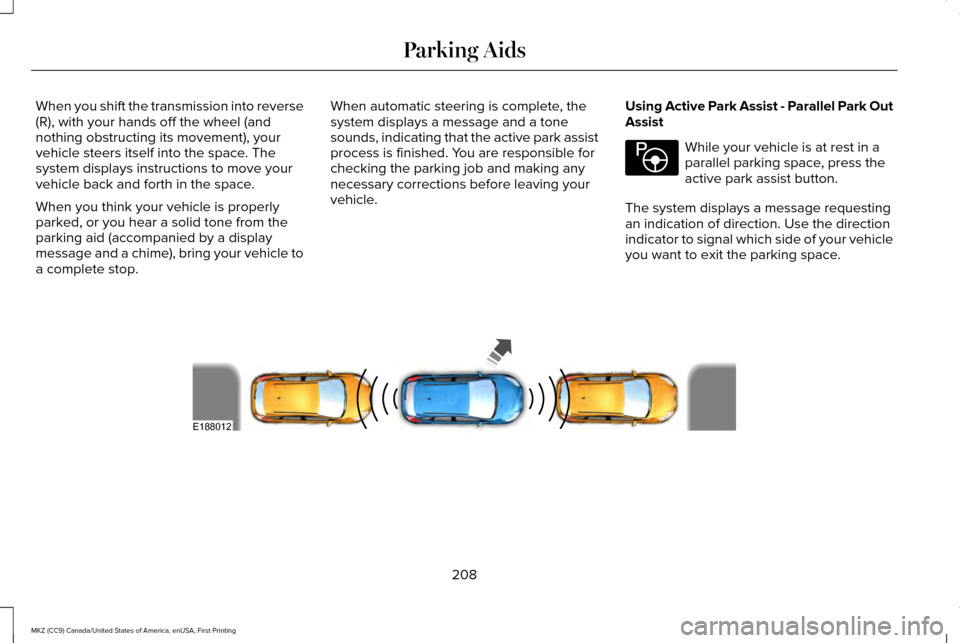
Using Active Park Assist - Parallel Park Out
Assist While your vehicle is at rest in a
parallel parking space, press the
active park assist button.
The system displays a message requesting
an indication of direction. Use the direction
indicator to signal which side of your vehicle
you want to exit the parking space. 208
MKZ (CC9) Canada/United States of America, enUSA, First Printing Parking AidsE146186 E188012
Page 212 of 564
The system determines the clearance to the
front and rear of your vehicle and
automatically steers your vehicle out of a
parallel parking space (hands-free) while you
control the accelerator, gearshift and brakes.
The system visually and audibly guides you
to enter traffic.
After the system has directed your vehicle
past the adjacent vehicle or object, it guides
you to take control of the steering to
complete the exit from the parking spot.
Note:
If the clearance in front of your vehicle
allows easy departure, the Parallel Park Out
Assist feature might not be available.
Note: You are responsible for controlling
your vehicle and making sure the path is
clear prior to pulling into traffic. Note:
This system is not intended to assist
in exiting perpendicular parking spaces,
damages to your vehicle may occur.
Note: If your vehicle speed exceeds 3 mph
(5 km/h) or the maneuver is interrupted
(driver input), the system switches off and
you need to take full control of your vehicle.
Deactivating the Active Park Assist
Feature
Manually deactivate the system by:
• Pressing the active park assist button
during an active maneuver.
• Grabbing the steering wheel during an
active maneuver. •
Driving above approximately
22 mph
(35 km/h) for 30 seconds during an active
park search.
• Driving above approximately
6 mph
(10 km/h) during automatic steering.
• Switching off the traction control system.
Certain vehicle conditions can also
deactivate the system, such as:
• Traction control has activated.
• There is an anti-lock brake system
activation or failure.
If a problem occurs with the system, a
warning message displays accompanied by
a tone. Occasional system messages may
occur in normal operation. For recurring or
frequent system faults, contact an authorized
dealer to have your vehicle serviced.
Troubleshooting the System The system does not look for a space
The traction control system may be off.
The transmission is in reverse (R). Your vehicle must be moving forward to be able to detect a parking space.
209
MKZ (CC9) Canada/United States of America, enUSA, First Printing Parking Aids
Page 217 of 564
Note:
Only the centerline shows when you
enable manual zoom.
This allows you to get a closer view of an
object behind your vehicle. The zoomed
image keeps the bumper in the image to
provide a reference. The zoom is only active
while the transmission is in reverse (R). When
you shift the transmission out of reverse (R),
the feature automatically turns off and you
must enable it to use it again.
Selectable settings for this feature are ON
and OFF.
Rear Camera Delay
When shifting the transmission out of reverse
(R) and into any gear other than park (P), the
camera image remains in the display until
your vehicle speed reaches 5 mph (8 km/h)
or until you select a radio button.
Selectable settings for this feature are ON
and OFF. The default setting for the rear
camera delay is OFF.
214
MKZ (CC9) Canada/United States of America, enUSA, First Printing Parking Aids
Page 224 of 564
Note:
If the engine speed drops too low, the
information display indicates low engine
speed. Shift to a lower gear (manual
transmission only) to avoid automatic
cancellation.
Park Brake Application
Automatic parking brake application and
cancellation occurs if:
• You unbuckle the seatbelt and open the
door while stopped.
• Holding the vehicle at a stop
continuously for more than two minutes.
Hilly Condition Usage
Note: An audible alarm sounds and the
system shuts down if it is applying brakes
for an extended period of time. This allows
the brakes to cool. The system functions
normally again when the brakes cool. Select a lower gear during prolonged
downhill driving on steep slopes, such as
mountainous areas, when the system is
active. In such situations, the system needs
additional engine braking to reduce the load
on the vehicle
’s regular brake system to
prevent the brakes from overheating.
Switching Adaptive Cruise Control Off
Press and release OFF when the system is
in stand by mode or switch the ignition off.
Note: You erase the set speed when you
switch the system off.
Detection Issues WARNING
On rare occasions, detection issues
can occur due to the road
infrastructures, for example bridges, tunnels
and safety barriers. In these cases, the
system may brake late or unexpectedly. At
all times, you are responsible for controlling
your vehicle, supervising the system and
intervening, if required. The radar sensor has a limited field of vision.
It may not detect vehicles at all or detect a
vehicle later than expected in some
situations. The lead vehicle graphic does not
illuminate if the system does not detect a
vehicle in front of you.
221
MKZ (CC9) Canada/United States of America, enUSA, First Printing Cruise Control
Page 234 of 564
BLIND SPOT INFORMATION
SYSTEM
WARNING
To help avoid injuries, NEVER use the
Blind Spot Information System as a
replacement for using the interior and
exterior mirrors or looking over your shoulder
before changing lanes. The Blind Spot
Information System is not a replacement for
careful driving. The Blind Spot Information System is
designed to aid you in detecting vehicles
that may have entered the blind spot zone
(A). The detection area is on both sides of
your vehicle, extending rearward from the
exterior mirrors to approximately 13 ft (4 m)
beyond the bumper. The system is designed
to alert you if certain vehicles enter the blind
spot zone while driving.
Note: The Blind Spot Information System
does not prevent contact with other vehicles
or objects; nor detect parked vehicles,
people, animals or infrastructure (fences,
guardrails, trees). It’ s only designed to alert
you to vehicles in the blind spot zones.
Note: When a vehicle passes quickly through
the blind spot zone, typically fewer than two
seconds, the system does not trigger.
Using the System
The Blind Spot Information System turns on
when you start the engine and you drive your
vehicle forward above
5 mph (8 km/h). For automatic transmissions, the Blind Spot
Information System remains on while the
transmission is in drive (D). If shifted into
reverse (R) or park (P) the Blind Spot
Information System turns off. Once shifted
back into drive (D), the Blind Spot Information
System turns back on when you drive your
vehicle above
5 mph (8 km/h).
For manual transmissions, the Blind Spot
Information System is on for all gears except
the reverse (R).
Note: The Blind Spot Information System
does not function in reverse (R) or park (P).
System Lights and Messages 231
MKZ (CC9) Canada/United States of America, enUSA, First Printing Driving AidsA
A
E124788 E142442