page 61 LINCOLN MKZ 2017 Owner's Manual
[x] Cancel search | Manufacturer: LINCOLN, Model Year: 2017, Model line: MKZ, Model: LINCOLN MKZ 2017Pages: 564, PDF Size: 5.54 MB
Page 67 of 564
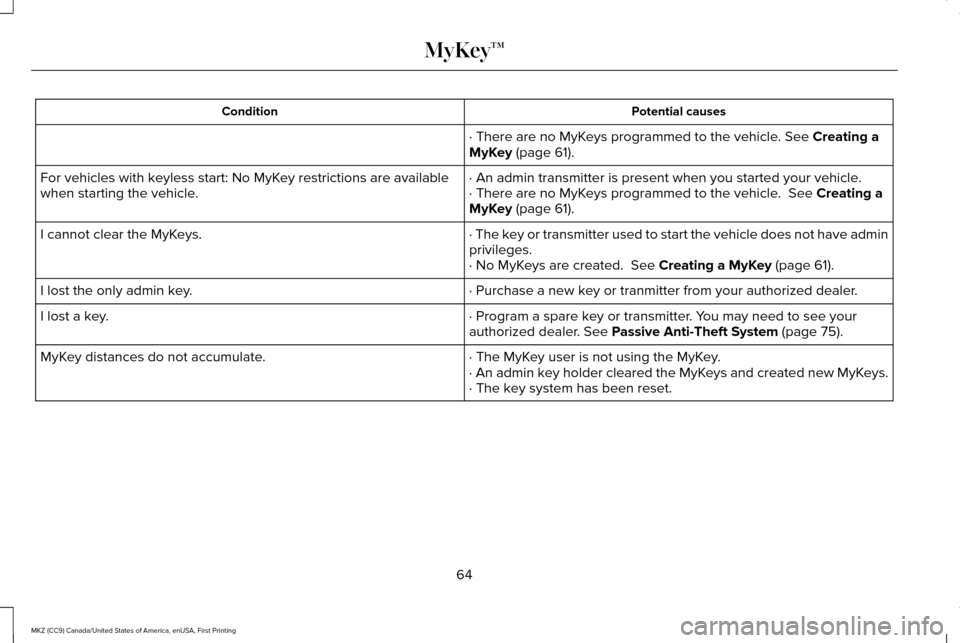
Potential causes
Condition
· There are no MyKeys programmed to the vehicle. See Creating a
MyKey (page 61).
· An admin transmitter is present when you started your vehicle.
For vehicles with keyless start: No MyKey restrictions are available
when starting the vehicle. · There are no MyKeys programmed to the vehicle.
See Creating a
MyKey (page 61).
· The key or transmitter used to start the vehicle does not have admin
privileges.
I cannot clear the MyKeys.
· No MyKeys are created.
See Creating a MyKey (page 61).
· Purchase a new key or tranmitter from your authorized dealer.
I lost the only admin key.
· Program a spare key or transmitter. You may need to see your
authorized dealer.
See Passive Anti-Theft System (page 75).
I lost a key.
· The MyKey user is not using the MyKey.
MyKey distances do not accumulate.
· An admin key holder cleared the MyKeys and created new MyKeys.
· The key system has been reset.
64
MKZ (CC9) Canada/United States of America, enUSA, First Printing MyKey™
Page 68 of 564
LOCKING AND UNLOCKING
You can use the power door lock control or
the remote control to lock and unlock your
vehicle.
Power Door Locks
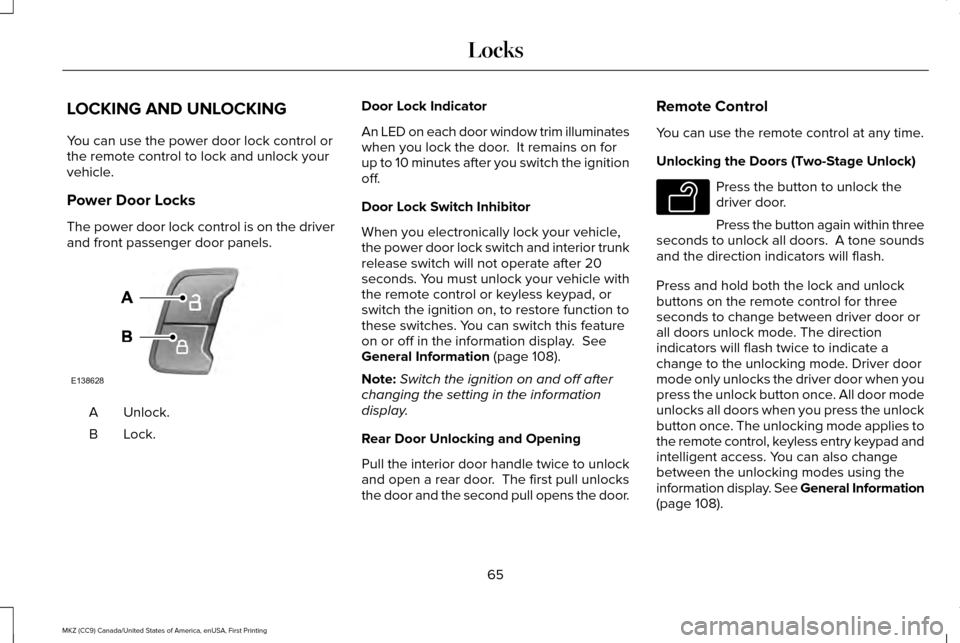
The power door lock control is on the driver
and front passenger door panels.
Unlock.
A
Lock.B Door Lock Indicator
An LED on each door window trim illuminates
when you lock the door. It remains on for
up to 10 minutes after you switch the ignition
off.
Door Lock Switch Inhibitor
When you electronically lock your vehicle,
the power door lock switch and interior trunk
release switch will not operate after 20
seconds. You must unlock your vehicle with
the remote control or keyless keypad, or
switch the ignition on, to restore function to
these switches. You can switch this feature
on or off in the information display. See
General Information (page 108).
Note: Switch the ignition on and off after
changing the setting in the information
display.
Rear Door Unlocking and Opening
Pull the interior door handle twice to unlock
and open a rear door. The first pull unlocks
the door and the second pull opens the door. Remote Control
You can use the remote control at any time.
Unlocking the Doors (Two-Stage Unlock) Press the button to unlock the
driver door.
Press the button again within three
seconds to unlock all doors. A tone sounds
and the direction indicators will flash.
Press and hold both the lock and unlock
buttons on the remote control for three
seconds to change between driver door or
all doors unlock mode. The direction
indicators will flash twice to indicate a
change to the unlocking mode. Driver door
mode only unlocks the driver door when you
press the unlock button once. All door mode
unlocks all doors when you press the unlock
button once. The unlocking mode applies to
the remote control, keyless entry keypad and
intelligent access. You can also change
between the unlocking modes using the
information display. See General Information
(page
108).
65
MKZ (CC9) Canada/United States of America, enUSA, First Printing LocksE138628 E138629
Page 69 of 564
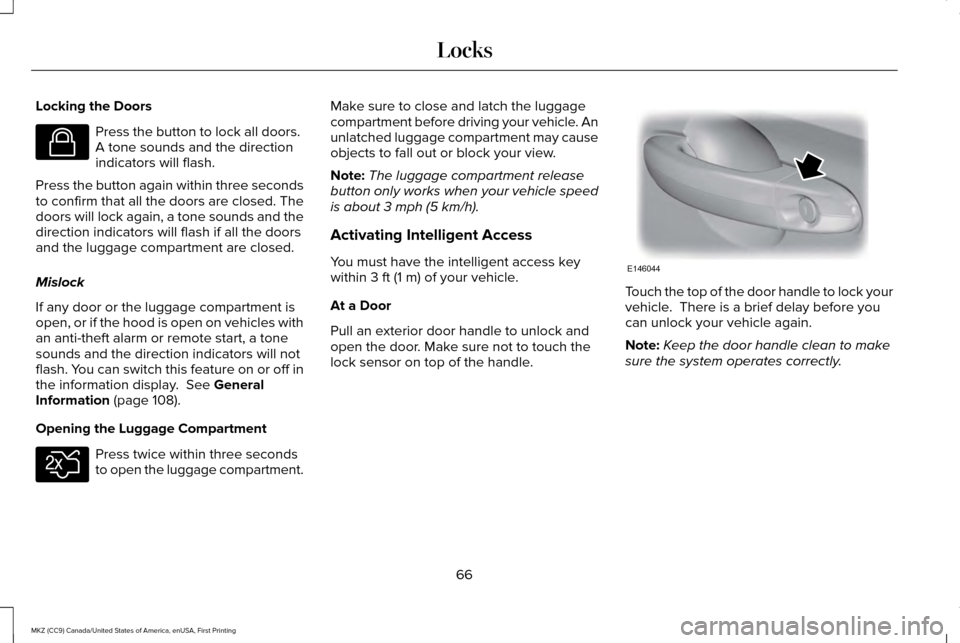
Locking the Doors
Press the button to lock all doors.
A tone sounds and the direction
indicators will flash.
Press the button again within three seconds
to confirm that all the doors are closed. The
doors will lock again, a tone sounds and the
direction indicators will flash if all the doors
and the luggage compartment are closed.
Mislock
If any door or the luggage compartment is
open, or if the hood is open on vehicles with
an anti-theft alarm or remote start, a tone
sounds and the direction indicators will not
flash. You can switch this feature on or off in
the information display. See General
Information (page 108).
Opening the Luggage Compartment Press twice within three seconds
to open the luggage compartment. Make sure to close and latch the luggage
compartment before driving your vehicle. An
unlatched luggage compartment may cause
objects to fall out or block your view.
Note:
The luggage compartment release
button only works when your vehicle speed
is about
3 mph (5 km/h).
Activating Intelligent Access
You must have the intelligent access key
within
3 ft (1 m) of your vehicle.
At a Door
Pull an exterior door handle to unlock and
open the door. Make sure not to touch the
lock sensor on top of the handle. Touch the top of the door handle to lock your
vehicle. There is a brief delay before you
can unlock your vehicle again.
Note:
Keep the door handle clean to make
sure the system operates correctly.
66
MKZ (CC9) Canada/United States of America, enUSA, First Printing LocksE138623 E138630 E146044
Page 71 of 564
When you open one of the front doors and
lock your vehicle using the power door lock
control, all doors will lock then unlock if:
•
The ignition is on.
• The ignition is off and the transmission
is not in park (P).
Autolock (If Equipped)
Autolock locks all the doors when:
• All doors are closed.
• The ignition is on.
• You shift into any gear putting your
vehicle in motion.
• Your vehicle reaches a speed greater
than
12 mph (20 km/h).
Autolock repeats when:
• You open then close any door while the
ignition is on and your vehicle speed is
9 mph (15 km/h)
or lower.
• Your vehicle reaches a speed greater
than
12 mph (20 km/h). Autounlock
Autounlock unlocks all the doors when:
•
The ignition is on, all the doors are
closed, and your vehicle has been
moving at a speed greater than
12 mph
(20 km/h).
• Your vehicle comes to a stop and you
switch the ignition off or to the accessory
position.
• You open the driver door within 10
minutes of switching the ignition off or to
accessory.
Note: The doors will not autounlock if you
electronically lock your vehicle after you
switch the ignition off and before you open
the driver door.
Enabling or Disabling Autolock and
Autounlock
Note: You can switch autounlock and
autolock on or off independently of each
other. Autolock is not configurable in all markets.
If the autolock settings are not available in
your information display, then the system is
not configurable.
See General Information
(page 108).
Illuminated Entry
The interior lamps and some exterior lamps
illuminate when you unlock the doors with
the remote control.
The illuminated entry system will turn off the
lights if:
• The ignition is on.
• You press the remote control lock button.
• After 25 seconds of illumination.
The lights do not turn off if:
• You turn them on with the lamp control.
• Any door is open.
Illuminated Exit
The interior lamps and some exterior lamps
illuminate when all doors are closed and you
switch the ignition off.
68
MKZ (CC9) Canada/United States of America, enUSA, First Printing Locks
Page 72 of 564
The lamps will turn off if all the doors remain
closed and:
•
25 seconds have elapsed.
• You press the push button ignition
switch.
Battery Saver
If you leave the courtesy lamps, interior
lamps or headlamps on, the battery saver
shuts them off 10 minutes after you switch
the ignition off.
Accessory Mode Battery Saver for
Intelligent Access Keys
If you leave the ignition switched on, it shuts
off when it detects a certain amount of
battery drain, or after 45 minutes.
Luggage Compartment
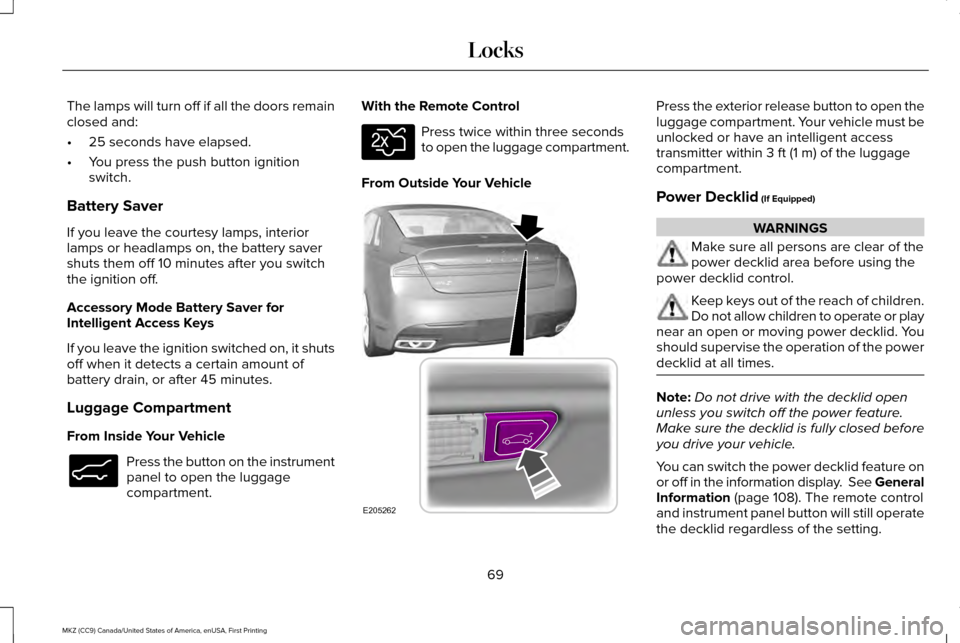
From Inside Your Vehicle Press the button on the instrument
panel to open the luggage
compartment. With the Remote Control Press twice within three seconds
to open the luggage compartment.
From Outside Your Vehicle Press the exterior release button to open the
luggage compartment. Your vehicle must be
unlocked or have an intelligent access
transmitter within 3 ft (1 m) of the luggage
compartment.
Power Decklid
(If Equipped) WARNINGS
Make sure all persons are clear of the
power decklid area before using the
power decklid control. Keep keys out of the reach of children.
Do not allow children to operate or play
near an open or moving power decklid. You
should supervise the operation of the power
decklid at all times. Note:
Do not drive with the decklid open
unless you switch off the power feature.
Make sure the decklid is fully closed before
you drive your vehicle.
You can switch the power decklid feature on
or off in the information display. See
General
Information (page 108). The remote control
and instrument panel button will still operate
the decklid regardless of the setting.
69
MKZ (CC9) Canada/United States of America, enUSA, First Printing LocksE138633 E138630 E205262
Page 75 of 564
•
press 3·4 to save personal code 2
• press
5·6 to save personal code 3
• press
7·8 to save personal code 4
• press
9·0 to save personal code 5.
You may also program a personal entry code
using the touchscreen.
See Settings (page
457).
Tips:
• Do not set a code that uses five of the
same number.
• Do not use five numbers in sequential
order.
• The factory-set code will work even if you
have set your own personal code.
Recalling Memory Positions
The programmed entry codes will recall
driver memory positions as follows:
• Entry code 1 will recall driver 1 memory
positions.
• Entry code 2 will recall driver 2 memory
positions.
• Entry code 3 will recall driver 3 memory
positions. Note:
Personal entry codes 4 and 5 will not
recall memory positions.
Erasing a Personal Code
1. Enter the factory-set 5-digit code.
2. Press and release
1·2 on the keypad
within five seconds.
3. Press and hold
1·2 for two seconds. You
must do this within five seconds of
completing Step 2.
All personal codes are now erased and only
the factory-set 5–digit code will work.
Anti-Scan Feature
The keypad will go into an anti-scan mode
if you enter the wrong code seven times (35
consecutive button presses). This mode
disables the keypad for one minute and the
keypad lamp will flash.
The anti-scan feature will turn off after:
• one minute of keypad inactivity
• pressing the unlock button on the remote
control •
switching the ignition on
• unlocking your vehicle using intelligent
access.
Unlocking and Locking the Doors
To Unlock the Driver Door
Enter the factory-set 5-digit code or your
personal code. You must press each number
within five seconds of each other. The
interior lamps will illuminate.
Note: All doors will unlock if you enable the
all-door unlocking mode.
See Locking and
Unlocking (page 65).
To Unlock All Doors
Enter the factory-set code or your personal
code, then press
3·4 within five seconds.
To Lock All Doors
Press and hold 7·8 and 9·0 at the same time
(with the driver door closed). You do not
need to enter the keypad code first.
72
MKZ (CC9) Canada/United States of America, enUSA, First Printing Locks
Page 81 of 564
ADJUSTING THE STEERING WHEEL
WARNING
Do not adjust the steering wheel when
your vehicle is moving.
Note:
Make sure that you are sitting in the
correct position. See Sitting in the Correct
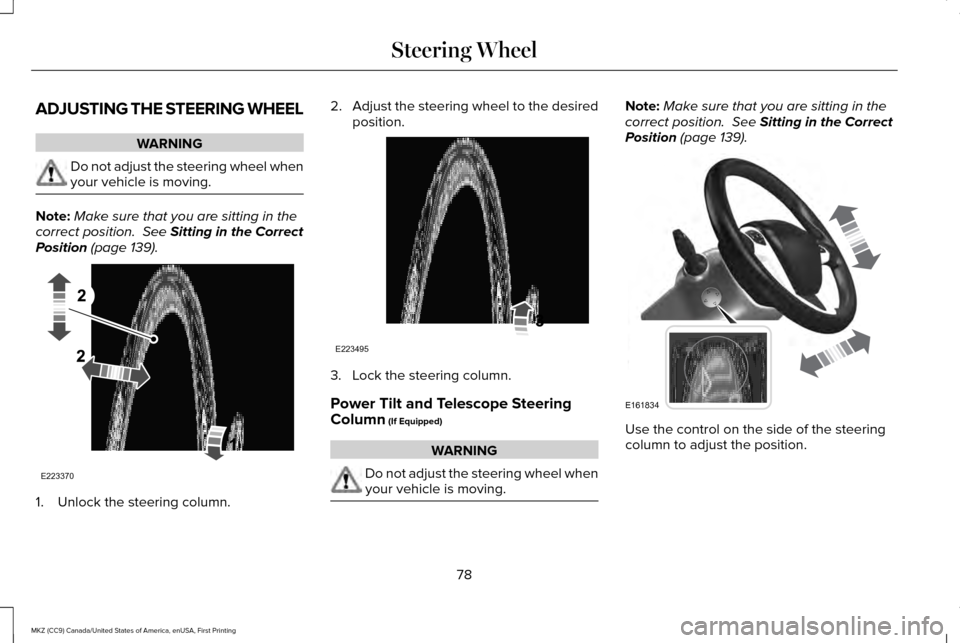
Position (page 139). 1. Unlock the steering column. 2.
Adjust the steering wheel to the desired
position. 3. Lock the steering column.
Power Tilt and Telescope Steering
Column
(If Equipped)
WARNING
Do not adjust the steering wheel when
your vehicle is moving. Note:
Make sure that you are sitting in the
correct position.
See Sitting in the Correct
Position (page 139). Use the control on the side of the steering
column to adjust the position.
78
MKZ (CC9) Canada/United States of America, enUSA, First Printing Steering WheelE223370 E223495 E161834
Page 82 of 564
To adjust:
•
Tilt: press the top or bottom of the
control.
• Telescope: press the front or rear of the
control.
The steering column sets a stopping position
just short of the end of the column position
to prevent damage to the steering column.
A new stopping position sets if the steering
column encounters an object when tilting or
telescoping.
To reset the steering column to its normal
stopping position:
1. Press the steering column control again after encountering the new stopping
position.
2. Continue pressing the control until it reaches the end of the column position.
A new stopping position is set. The next time
you tilt or telescope the steering column, it
will stop just short of the end of the column
position. Memory Feature
You can save and recall the steering column
position with the memory function. See
Memory Function (page 145).
Note: Pressing the adjustment control during
memory recall cancels the operation. The
column responds to the adjustment control.
Easy Entry and Exit Feature
When you switch the ignition off, the steering
column will move to the full up position to
allow extra room to exit your vehicle. The
column will return to the previous setting
when you switch the ignition on. You can
enable or disable this feature in the
information display.
See Information
Displays (page 108).
AUDIO CONTROL
(If Equipped)
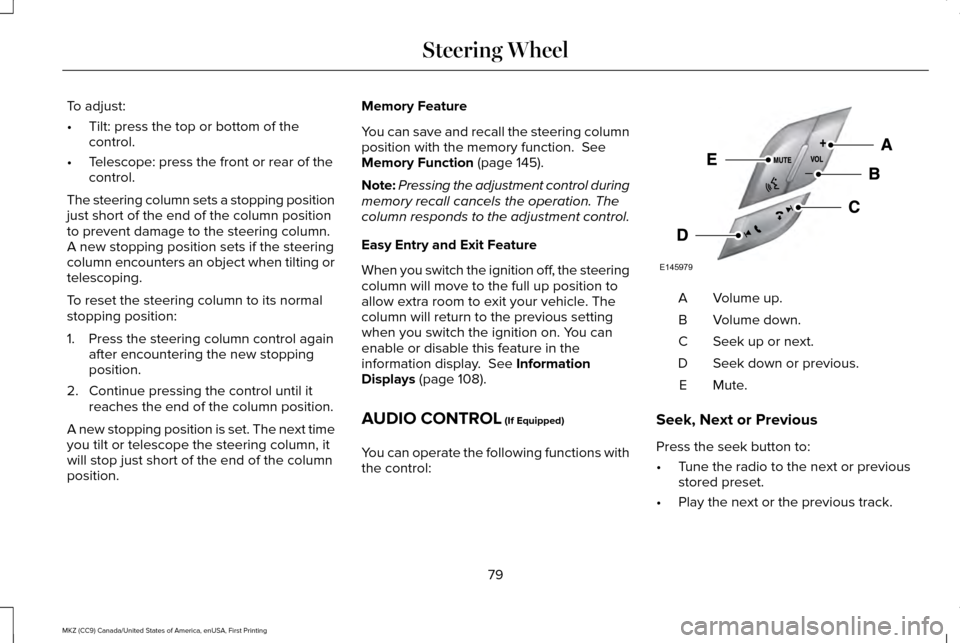
You can operate the following functions with
the control: Volume up.
A
Volume down.
B
Seek up or next.
C
Seek down or previous.
D
Mute.E
Seek, Next or Previous
Press the seek button to:
• Tune the radio to the next or previous
stored preset.
• Play the next or the previous track.
79
MKZ (CC9) Canada/United States of America, enUSA, First Printing Steering WheelE145979
Page 83 of 564
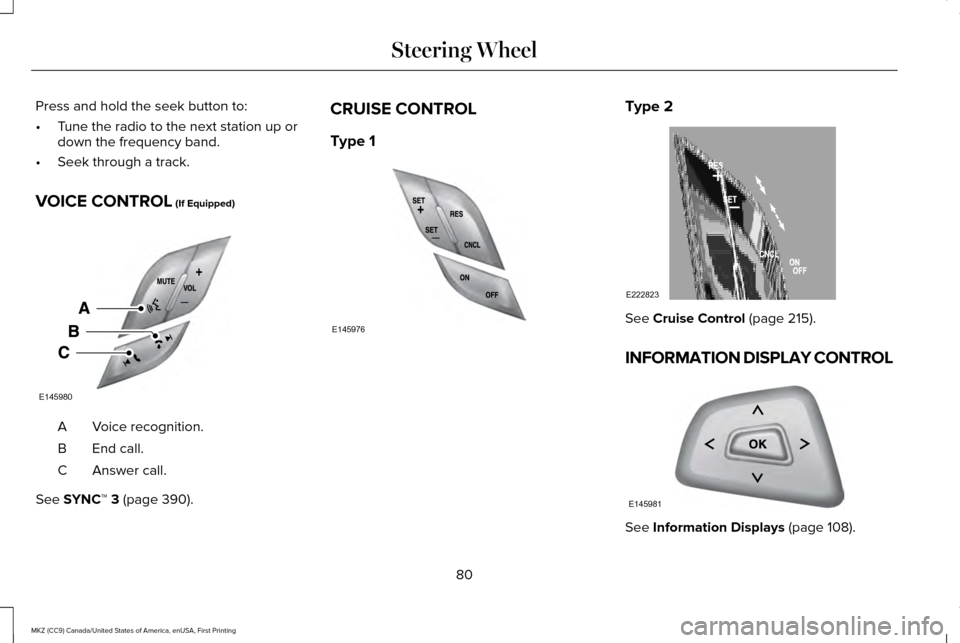
Press and hold the seek button to:
•
Tune the radio to the next station up or
down the frequency band.
• Seek through a track.
VOICE CONTROL (If Equipped) Voice recognition.
A
End call.
B
Answer call.
C
See
SYNC™ 3 (page 390). CRUISE CONTROL
Type 1 Type 2
See
Cruise Control (page 215).
INFORMATION DISPLAY CONTROL See
Information Displays (page 108).
80
MKZ (CC9) Canada/United States of America, enUSA, First Printing Steering WheelE145980 E145976 E222823 E145981
Page 85 of 564
WINDSHIELD WIPERS
Note:
Fully defrost the windshield before
you switch the windshield wipers on.
Note: If streaks or smears appear on the
windshield, clean the windshield and the
wiper blades. See Checking the Wiper
Blades (page 314). If that does not resolve
the issue, install new wiper blades. See
Changing the Wiper Blades (page 314).
Note: Do not operate the wipers on a dry
windshield. This may scratch the glass,
damage the wiper blades or cause the wiper
motor to burn out. Always use the windshield
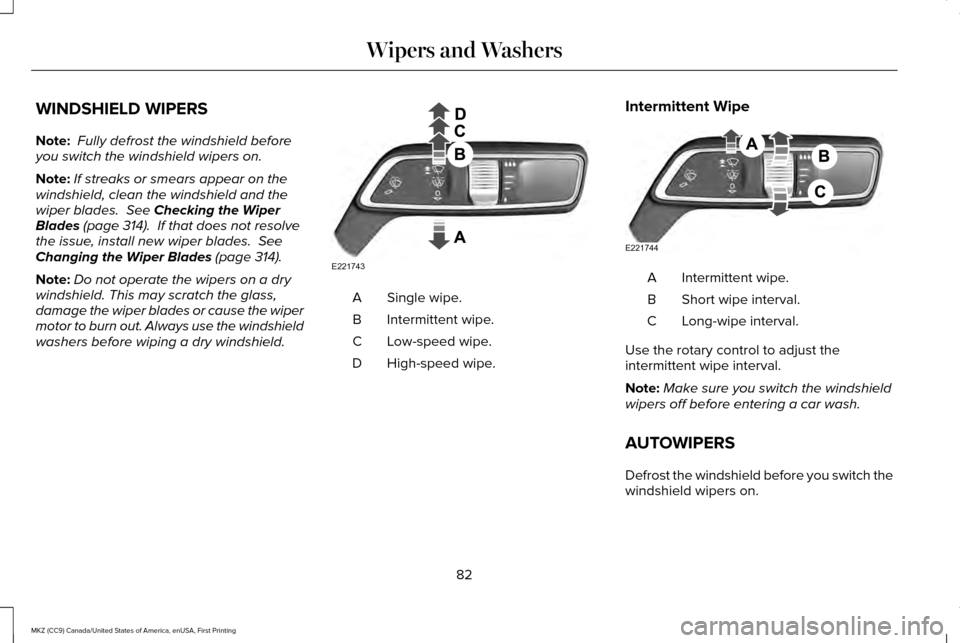
washers before wiping a dry windshield. Single wipe.
A
Intermittent wipe.
B
Low-speed wipe.
C
High-speed wipe.
D Intermittent Wipe Intermittent wipe.
A
Short wipe interval.
B
Long-wipe interval.
C
Use the rotary control to adjust the
intermittent wipe interval.
Note: Make sure you switch the windshield
wipers off before entering a car wash.
AUTOWIPERS
Defrost the windshield before you switch the
windshield wipers on.
82
MKZ (CC9) Canada/United States of America, enUSA, First Printing Wipers and WashersE221743 E221744