part LINCOLN MKZ 2017 Owner's Guide
[x] Cancel search | Manufacturer: LINCOLN, Model Year: 2017, Model line: MKZ, Model: LINCOLN MKZ 2017Pages: 564, PDF Size: 5.54 MB
Page 138 of 564
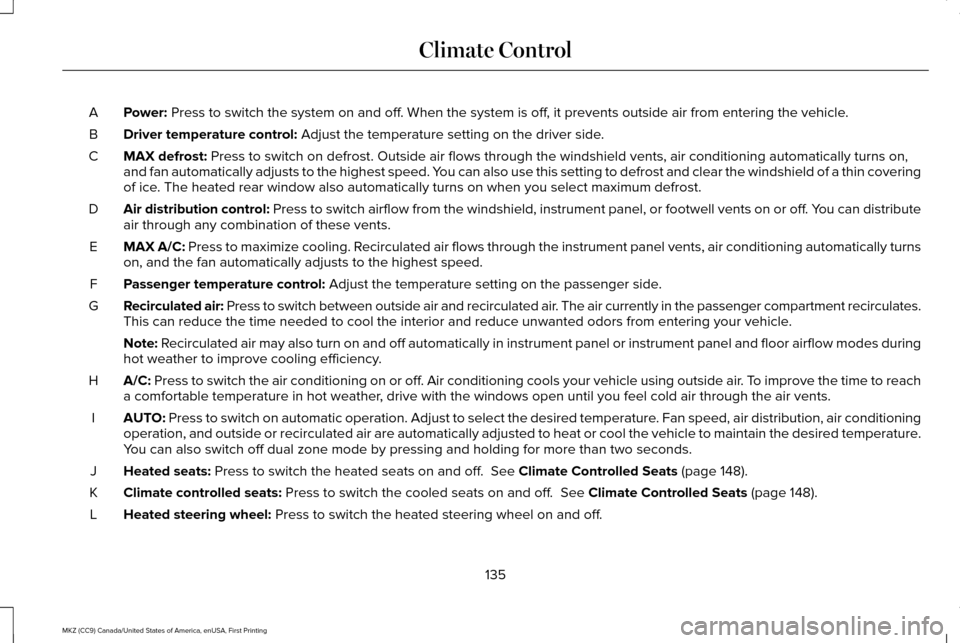
Power: Press to switch the system on and off. When the system is off, it prevents outside air from entering the vehicle.
A
Driver temperature control:
Adjust the temperature setting on the driver side.
B
MAX defrost:
Press to switch on defrost. Outside air flows through the windshield ve\
nts, air conditioning automatically turns on,
and fan automatically adjusts to the highest speed. You can also use this setting to defrost and clear the windshield of a th\
in covering
of ice. The heated rear window also automatically turns on when you select max\
imum defrost.
C
Air distribution control: Press to switch airflow from the windshield, instrument panel, or footw\
ell vents on or off. You can distribute
air through any combination of these vents.
D
MAX A/C:
Press to maximize cooling. Recirculated air flows through the instrument panel vents, air conditioni\
ng automatically turns
on, and the fan automatically adjusts to the highest speed.
E
Passenger temperature control:
Adjust the temperature setting on the passenger side.
F
Recirculated air: Press to switch between outside air and recirculated air. The air currently in the passenger compartment recirculates.
This can reduce the time needed to cool the interior and reduce unwanted\
odors from entering your vehicle.
G
Note:
Recirculated air may also turn on and off automatically in instrument pan\
el or instrument panel and floor airflow modes during
hot weather to improve cooling efficiency.
A/C:
Press to switch the air conditioning on or off. Air conditioning cools your vehicle using outside air. To improve the time to reach
a comfortable temperature in hot weather, drive with the windows open until you feel cold air through the air ve\
nts.
H
AUTO:
Press to switch on automatic operation. Adjust to select the desired te\
mperature. Fan speed, air distribution, air conditioning
operation, and outside or recirculated air are automatically adjusted to\
heat or cool the vehicle to maintain the desired temperature .
You can also switch off dual zone mode by pressing and holding for more t\
han two seconds.
I
Heated seats:
Press to switch the heated seats on and off. See Climate Controlled Seats (page 148).
J
Climate controlled seats:
Press to switch the cooled seats on and off. See Climate Controlled Seats (page 148).
K
Heated steering wheel:
Press to switch the heated steering wheel on and off.
L
135
MKZ (CC9) Canada/United States of America, enUSA, First Printing Climate Control
Page 141 of 564
Heated Wiper Park (If Equipped)
When you switch the heated rear window
on, the heated wiper park automatically turns
on.
CABIN AIR FILTER
Your vehicle is equipped with a cabin air
filter, which gives you and your passengers
the following benefits:
• It improves your driving comfort by
reducing particle concentration.
• It improves the interior compartment
cleanliness.
• It protects the climate control
components from particle deposits.
You can locate the cabin air filter behind the
glove box.
Note: Make sure you have a cabin air filter
installed at all times. This prevents foreign
objects from entering the system. Running
the system without a filter in place could
result in degradation or damage to the
system. Replace the filter at regular intervals. See
Scheduled Maintenance (page 495).
For additional cabin air filter information, or
to replace the filter, see an authorized dealer.
REMOTE START
The remote start feature allows you to
pre-condition the interior of your vehicle. The
climate control system works to achieve
comfort according to your pre-selected
settings.
Note: You cannot adjust the system during
remote start operation. You cannot switch
on the displays or indicators during remote
start.
Switch the ignition on to return the system
to its previous settings. The following
features remain on if they automatically
turned on during remote start, or remain off
if they did not turn on during remote start.
• Heated seats.
• Cooled seats.
• Heated steering wheel. •
Heated mirrors.
• Heated rear window.
Note: Passenger heated and cooled seats
only remain on during remote start if they
were on when you switched the vehicle off.
You can adjust the default remote start
settings using the information display
controls.
See Information Displays (page
108).
Automatic Settings
In hot weather, the system is set to 72°F
(22°C). The cooled seats are set to high (if
available, and selected to AUTO in the
information display).
In moderate weather, the system either heats
or cools (based on pre-selected settings).
The rear defroster, heated mirrors and
heated seats do not automatically switch on.
In cold weather, the system is set to 72°F
(22°C). The heated and cooled seats and
heated steering wheel are set to high (if
available, and selected to AUTO in the
information display). The rear defroster and
heated mirrors automatically switch on.
138
MKZ (CC9) Canada/United States of America, enUSA, First Printing Climate Control
Page 148 of 564
MEMORY FUNCTION (If Equipped)
WARNINGS
Before activating the seat memory,
make sure that the area immediately
surrounding the seat is clear of obstructions
and that all occupants are clear of moving
parts. Do not use the memory function when
your vehicle is moving.
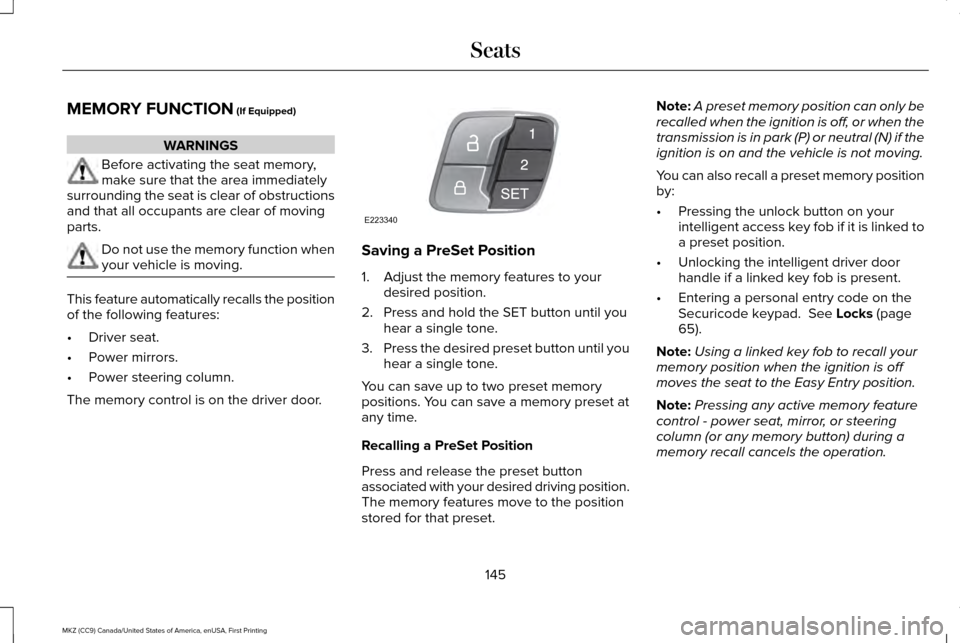
This feature automatically recalls the position
of the following features:
•
Driver seat.
• Power mirrors.
• Power steering column.
The memory control is on the driver door. Saving a PreSet Position
1. Adjust the memory features to your
desired position.
2. Press and hold the SET button until you hear a single tone.
3. Press the desired preset button until you
hear a single tone.
You can save up to two preset memory
positions. You can save a memory preset at
any time.
Recalling a PreSet Position
Press and release the preset button
associated with your desired driving position.
The memory features move to the position
stored for that preset. Note:
A preset memory position can only be
recalled when the ignition is off, or when the
transmission is in park (P) or neutral (N) if the
ignition is on and the vehicle is not moving.
You can also recall a preset memory position
by:
• Pressing the unlock button on your
intelligent access key fob if it is linked to
a preset position.
• Unlocking the intelligent driver door
handle if a linked key fob is present.
• Entering a personal entry code on the
Securicode keypad.
See Locks (page
65).
Note: Using a linked key fob to recall your
memory position when the ignition is off
moves the seat to the Easy Entry position.
Note: Pressing any active memory feature
control - power seat, mirror, or steering
column (or any memory button) during a
memory recall cancels the operation.
145
MKZ (CC9) Canada/United States of America, enUSA, First Printing SeatsE223340
Page 158 of 564
Programming HomeLink to the Genie
Intellicode Garage Door Opener Motor
Note:
You may need a ladder to access the
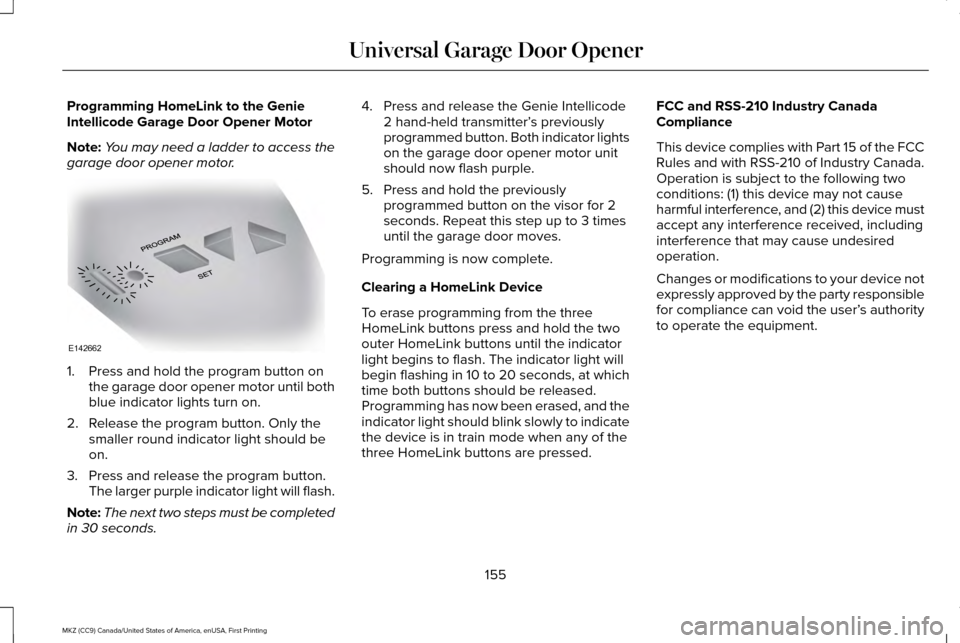
garage door opener motor. 1. Press and hold the program button on
the garage door opener motor until both
blue indicator lights turn on.
2. Release the program button. Only the smaller round indicator light should be
on.
3. Press and release the program button. The larger purple indicator light will flash.
Note: The next two steps must be completed
in 30 seconds. 4. Press and release the Genie Intellicode
2 hand-held transmitter’ s previously
programmed button. Both indicator lights
on the garage door opener motor unit
should now flash purple.
5. Press and hold the previously programmed button on the visor for 2
seconds. Repeat this step up to 3 times
until the garage door moves.
Programming is now complete.
Clearing a HomeLink Device
To erase programming from the three
HomeLink buttons press and hold the two
outer HomeLink buttons until the indicator
light begins to flash. The indicator light will
begin flashing in 10 to 20 seconds, at which
time both buttons should be released.
Programming has now been erased, and the
indicator light should blink slowly to indicate
the device is in train mode when any of the
three HomeLink buttons are pressed. FCC and RSS-210 Industry Canada
Compliance
This device complies with Part 15 of the FCC
Rules and with RSS-210 of Industry Canada.
Operation is subject to the following two
conditions: (1) this device may not cause
harmful interference, and (2) this device must
accept any interference received, including
interference that may cause undesired
operation.
Changes or modifications to your device not
expressly approved by the party responsible
for compliance can void the user’
s authority
to operate the equipment.
155
MKZ (CC9) Canada/United States of America, enUSA, First Printing Universal Garage Door OpenerE142662
Page 161 of 564
CENTER CONSOLE
Stow items in the cup holder carefully as
items may become loose during hard
braking, acceleration or crashes, including
hot drinks which may spill.
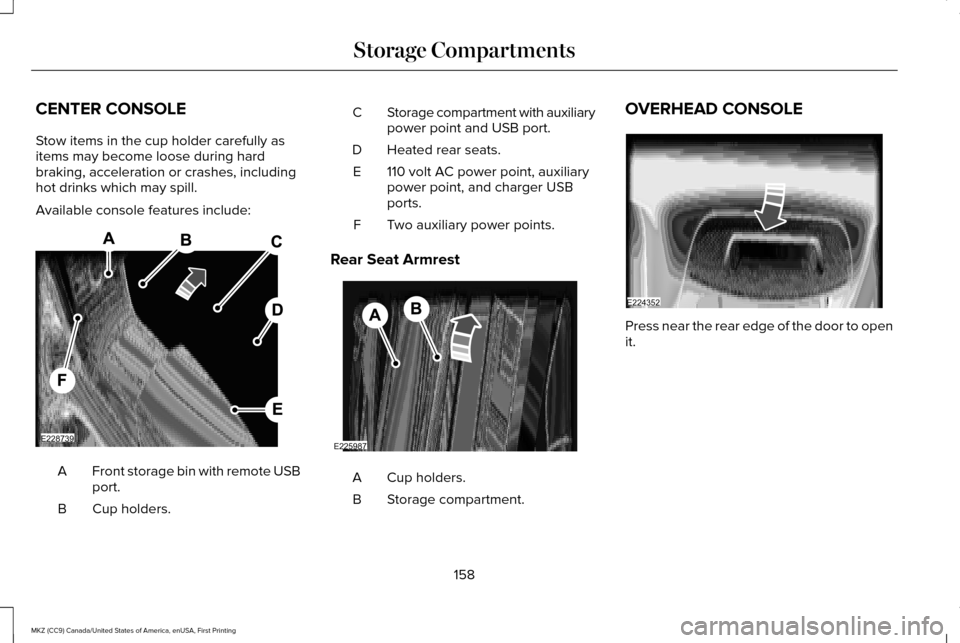
Available console features include:
Front storage bin with remote USB
port.
A
Cup holders.
B Storage compartment with auxiliary
power point and USB port.
C
Heated rear seats.
D
110 volt AC power point, auxiliary
power point, and charger USB
ports.
E
Two auxiliary power points.
F
Rear Seat Armrest Cup holders.
A
Storage compartment.
B OVERHEAD CONSOLE
Press near the rear edge of the door to open
it.
158
MKZ (CC9) Canada/United States of America, enUSA, First Printing Storage CompartmentsE228739 E225987 E224352
Page 162 of 564
GENERAL INFORMATION
WARNINGS
Extended idling at high engine speeds
can produce very high temperatures
in the engine and exhaust system, creating
the risk of fire or other damage. Do not park, idle or drive your vehicle
on dry grass or other dry ground cover.
The emission system heats up the engine
compartment and exhaust system, creating
the risk of fire. Do not start the engine in a closed
garage or in other enclosed areas.
Exhaust fumes can be toxic. Always open
the garage door before you start the engine. If you smell exhaust fumes inside your
vehicle, have your vehicle checked by
an authorized dealer immediately. Do not
drive your vehicle if you smell exhaust fumes. If you disconnect the battery, your vehicle
may exhibit some unusual driving
characteristics for approximately 5 miles (8
kilometers) after you reconnect it. This is
because the engine management system
must realign itself with the engine. You can
disregard any unusual driving characteristics
during this period.
The powertrain control system meets all
Canadian interference-causing equipment
standard requirements regulating the
impulse electrical field or radio noise.
When you start the engine, avoid pressing
the accelerator pedal before and during
operation. Only use the accelerator pedal
when you have difficulty starting the engine.
KEYLESS STARTING
Note:
The keyless starting system may not
function if the key is close to metal objects
or electronic devices such as cellular
phones.
Note: A valid key must be located inside
your vehicle to switch the ignition on and
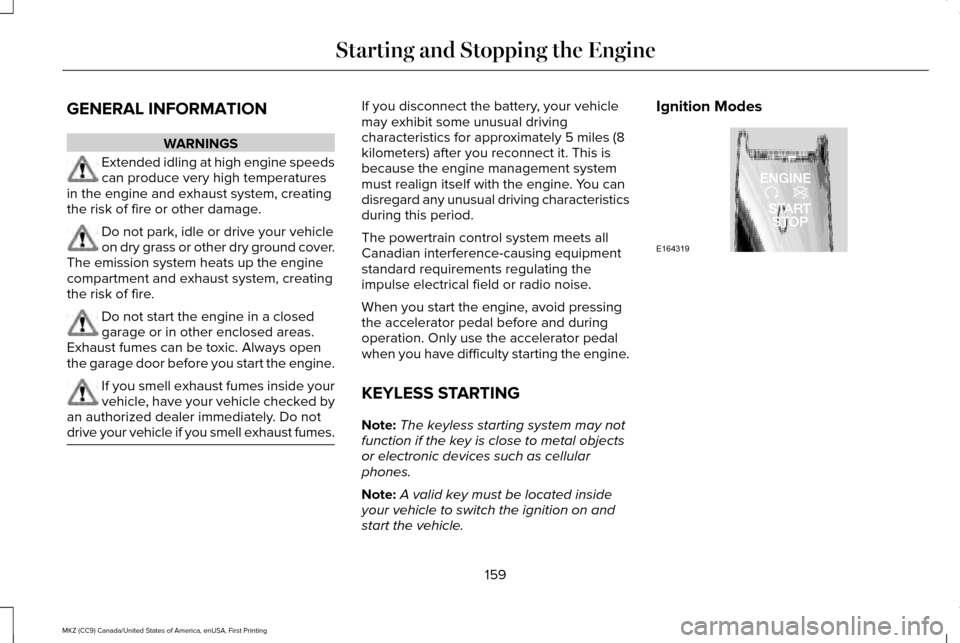
start the vehicle. Ignition Modes
159
MKZ (CC9) Canada/United States of America, enUSA, First Printing Starting and Stopping the EngineE164319
Page 168 of 564
•
Fuels can also be harmful if absorbed
through the skin. If fuel is splashed on
the skin, clothing or both, promptly
remove contaminated clothing and wash
skin thoroughly with soap and water.
Repeated or prolonged skin contact with
fuel liquid or vapor causes skin irritation.
• Be particularly careful if you are taking
Antabuse or other forms of Disulfiram for
the treatment of alcoholism. Breathing
gasoline vapors could cause an adverse
reaction, serious personal injury or
sickness. If fuel is splashed on the skin,
wash the affected areas immediately with
plenty of soap and water. Consult a
physician immediately if you experience
any adverse reactions. FUEL QUALITY
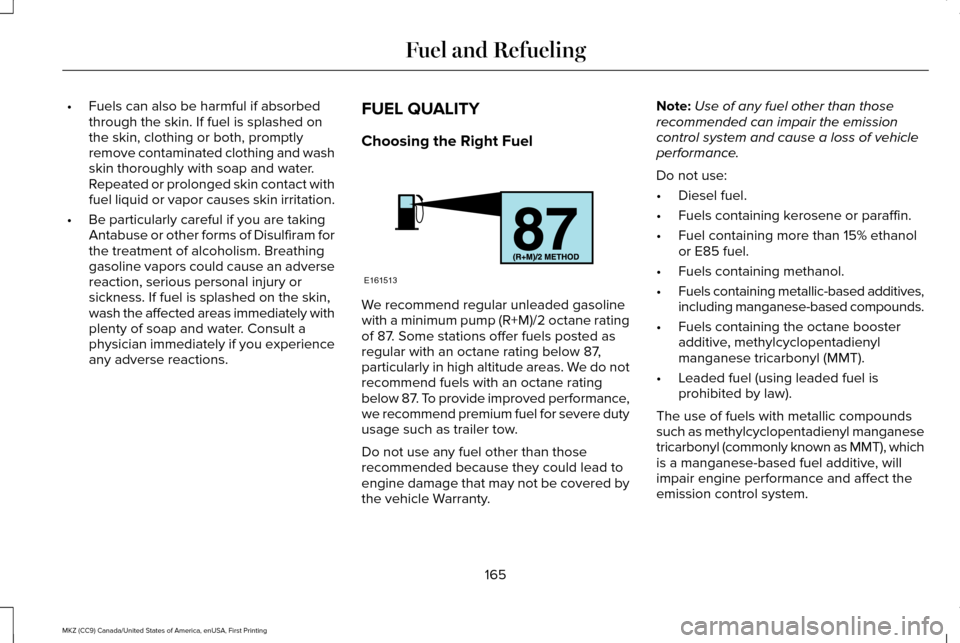
Choosing the Right Fuel We recommend regular unleaded gasoline
with a minimum pump (R+M)/2 octane rating
of 87. Some stations offer fuels posted as
regular with an octane rating below 87,
particularly in high altitude areas. We do not
recommend fuels with an octane rating
below 87. To provide improved performance,
we recommend premium fuel for severe duty
usage such as trailer tow.
Do not use any fuel other than those
recommended because they could lead to
engine damage that may not be covered by
the vehicle Warranty.Note:
Use of any fuel other than those
recommended can impair the emission
control system and cause a loss of vehicle
performance.
Do not use:
• Diesel fuel.
• Fuels containing kerosene or paraffin.
• Fuel containing more than 15% ethanol
or E85 fuel.
• Fuels containing methanol.
• Fuels containing metallic-based additives,
including manganese-based compounds.
• Fuels containing the octane booster
additive, methylcyclopentadienyl
manganese tricarbonyl (MMT).
• Leaded fuel (using leaded fuel is
prohibited by law).
The use of fuels with metallic compounds
such as methylcyclopentadienyl manganese
tricarbonyl (commonly known as MMT), which
is a manganese-based fuel additive, will
impair engine performance and affect the
emission control system.
165
MKZ (CC9) Canada/United States of America, enUSA, First Printing Fuel and RefuelingE161513
Page 173 of 564
•
Turn the ignition off before fueling; an
inaccurate reading results if the engine
is left running.
• Use the same fill rate (low-medium-high)
each time the tank is filled.
• Allow no more than two automatic
click-offs when filling.
Results are most accurate when the filling
method is consistent.
Calculating Fuel Economy
Do not measure fuel economy during the
first 1000 miles (1600 kilometers) of driving
(this is your engine ’s break-in period); a more
accurate measurement is obtained after
2000 miles - 3000 miles (3200 kilometers -
4800 kilometers). Also, fuel expense,
frequency of fill ups or fuel gauge readings
are not accurate ways to measure fuel
economy.
1. Fill the fuel tank completely and record the initial odometer reading.
2. Each time you fill the tank, record the amount of fuel added. 3.
After at least three to five tank fill ups, fill
the fuel tank and record the current
odometer reading.
4. Subtract your initial odometer reading from the current odometer reading.
5. Calculate fuel economy by dividing miles
traveled by gallons used (For Metric:
Multiply liters used by 100, then divide
by kilometers traveled).
Keep a record for at least one month and
record the type of driving (city or highway).
This provides an accurate estimate of the
vehicle ’s fuel economy under current driving
conditions. Additionally, keeping records
during summer and winter show how
temperature impacts fuel economy. In
general, lower temperatures mean lower fuel
economy. EMISSION CONTROL SYSTEM WARNINGS
Do not park, idle, or drive your vehicle
in dry grass or other dry ground cover.
The emission system heats up the engine
compartment and exhaust system, which can
start a fire. Exhaust leaks may result in entry of
harmful and potentially lethal fumes
into the passenger compartment. If you smell
exhaust fumes inside your vehicle, have your
dealer inspect your vehicle immediately. Do
not drive if you smell exhaust fumes. Your vehicle is equipped with various
emission control components and a catalytic
converter that will enable your vehicle to
comply with applicable exhaust emission
standards. To make sure that the catalytic
converter and other emission control
components continue to work properly:
•
Use only the specified fuel listed.
• Avoid running out of fuel.
170
MKZ (CC9) Canada/United States of America, enUSA, First Printing Fuel and Refueling
Page 174 of 564
•
Do not turn off the ignition while your
vehicle is moving, especially at high
speeds.
• Have the items listed in scheduled
maintenance information performed
according to the specified schedule.
The scheduled maintenance items listed in
scheduled maintenance information are
essential to the life and performance of your
vehicle and to its emissions system. See
Scheduled Maintenance (page 495).
If you use parts other than Ford, Motorcraft
or Ford-authorized parts for maintenance
replacements, or for service of components
affecting emission control, such non-Ford
parts should be the equivalent to genuine
Ford Motor Company parts in performance
and durability.
Illumination of the service engine soon
indicator, charging system warning light or
the temperature warning light, fluid leaks,
strange odors, smoke or loss of engine
power could indicate that the emission
control system is not working properly. An improperly operating or damaged exhaust
system may allow exhaust to enter the
vehicle. Have a damaged or improperly
operating exhaust system inspected and
repaired immediately.
Do not make any unauthorized changes to
your vehicle or engine. By law, vehicle
owners and anyone who manufactures,
repairs, services, sells, leases, trades
vehicles, or supervises a fleet of vehicles are
not permitted to intentionally remove an
emission control device or prevent it from
working. Information about your vehicle
’s
emission system is on the Vehicle Emission
Control Information Decal located on or near
the engine. This decal also lists engine
displacement
Please consult your warranty information for
complete details. On-Board Diagnostics (OBD-II)
Your vehicle has a computer known as the
on-board diagnostics system (OBD-II) that
monitors the engine
’s emission control
system. The system protects the environment
by making sure that your vehicle continues
to meet government emission standards. The
OBD-II system also assists a service
technician in properly servicing your vehicle. When the service engine soon
indicator illuminates, the OBD-II
system has detected a malfunction.
Temporary malfunctions may cause the
service engine soon indicator to illuminate.
Examples of temporary malfunctions are:
• the vehicle has run out of fuel—the
engine may misfire or run poorly
• poor fuel quality or water in the fuel—the
engine may misfire or run poorly
• the fuel fill inlet may not have closed
properly.
See Refueling (page 167).
• driving through deep water—the
electrical system may be wet.
171
MKZ (CC9) Canada/United States of America, enUSA, First Printing Fuel and Refueling
Page 189 of 564
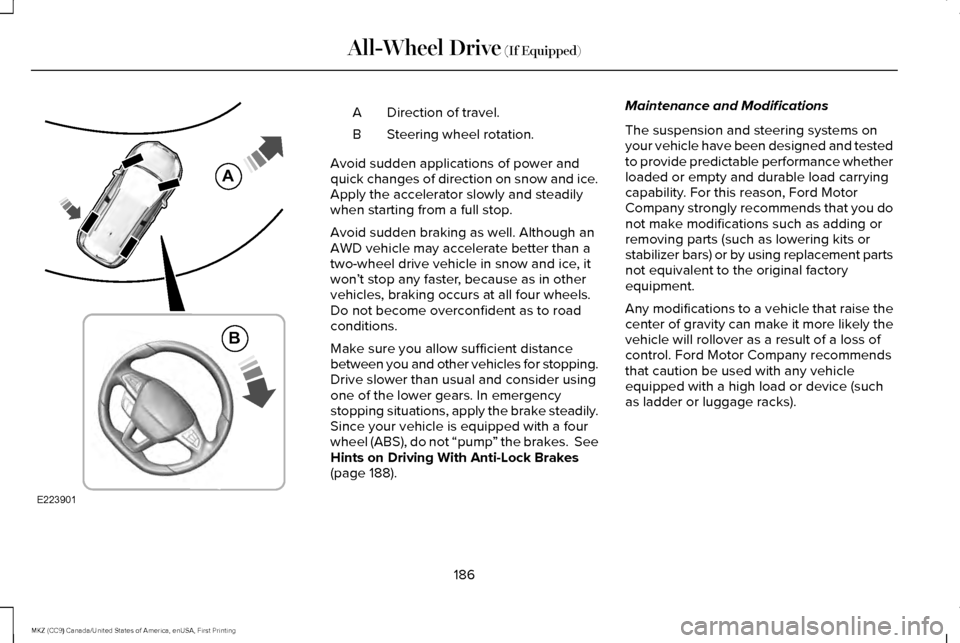
Direction of travel.
A
Steering wheel rotation.
B
Avoid sudden applications of power and
quick changes of direction on snow and ice.
Apply the accelerator slowly and steadily
when starting from a full stop.
Avoid sudden braking as well. Although an
AWD vehicle may accelerate better than a
two-wheel drive vehicle in snow and ice, it
won ’t stop any faster, because as in other
vehicles, braking occurs at all four wheels.
Do not become overconfident as to road
conditions.
Make sure you allow sufficient distance
between you and other vehicles for stopping.
Drive slower than usual and consider using
one of the lower gears. In emergency
stopping situations, apply the brake steadily.
Since your vehicle is equipped with a four
wheel (ABS), do not “pump ” the brakes. See
Hints on Driving With Anti-Lock Brakes
(page 188). Maintenance and Modifications
The suspension and steering systems on
your vehicle have been designed and tested
to provide predictable performance whether
loaded or empty and durable load carrying
capability. For this reason, Ford Motor
Company strongly recommends that you do
not make modifications such as adding or
removing parts (such as lowering kits or
stabilizer bars) or by using replacement parts
not equivalent to the original factory
equipment.
Any modifications to a vehicle that raise the
center of gravity can make it more likely the
vehicle will rollover as a result of a loss of
control. Ford Motor Company recommends
that caution be used with any vehicle
equipped with a high load or device (such
as ladder or luggage racks).
186
MKZ (CC9) Canada/United States of America, enUSA, First Printing All-Wheel Drive
(If Equipped)E223901
A
B