all LINCOLN MKZ 2017 Manual Online
[x] Cancel search | Manufacturer: LINCOLN, Model Year: 2017, Model line: MKZ, Model: LINCOLN MKZ 2017Pages: 564, PDF Size: 5.54 MB
Page 107 of 564
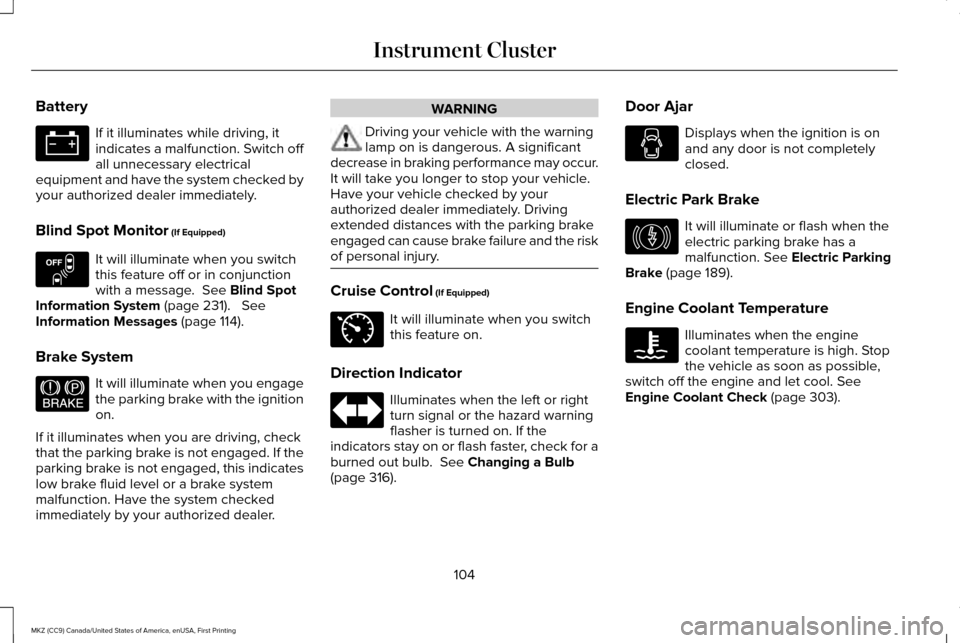
Battery
If it illuminates while driving, it
indicates a malfunction. Switch off
all unnecessary electrical
equipment and have the system checked by
your authorized dealer immediately.
Blind Spot Monitor (If Equipped) It will illuminate when you switch
this feature off or in conjunction
with a message.
See Blind Spot
Information System (page 231). See
Information Messages (page 114).
Brake System It will illuminate when you engage
the parking brake with the ignition
on.
If it illuminates when you are driving, check
that the parking brake is not engaged. If the
parking brake is not engaged, this indicates
low brake fluid level or a brake system
malfunction. Have the system checked
immediately by your authorized dealer. WARNING
Driving your vehicle with the warning
lamp on is dangerous. A significant
decrease in braking performance may occur.
It will take you longer to stop your vehicle.
Have your vehicle checked by your
authorized dealer immediately. Driving
extended distances with the parking brake
engaged can cause brake failure and the risk
of personal injury. Cruise Control
(If Equipped)
It will illuminate when you switch
this feature on.
Direction Indicator Illuminates when the left or right
turn signal or the hazard warning
flasher is turned on. If the
indicators stay on or flash faster, check for a
burned out bulb.
See Changing a Bulb
(page 316). Door Ajar Displays when the ignition is on
and any door is not completely
closed.
Electric Park Brake It will illuminate or flash when the
electric parking brake has a
malfunction.
See Electric Parking
Brake (page 189).
Engine Coolant Temperature Illuminates when the engine
coolant temperature is high. Stop
the vehicle as soon as possible,
switch off the engine and let cool.
See
Engine Coolant Check (page 303).
104
MKZ (CC9) Canada/United States of America, enUSA, First Printing Instrument Cluster E151262 E144522 E71340 E146190
Page 109 of 564
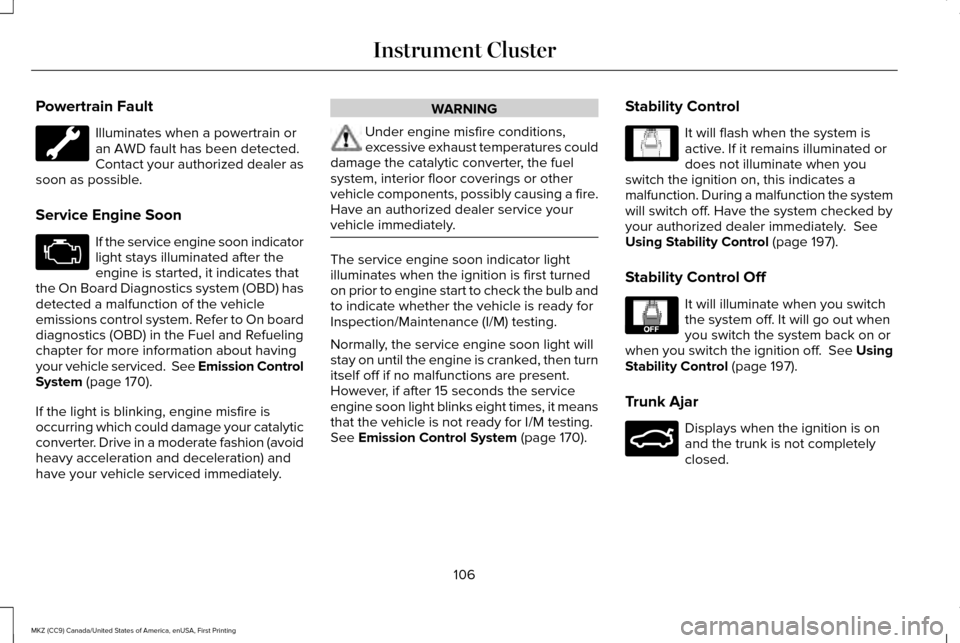
Powertrain Fault
Illuminates when a powertrain or
an AWD fault has been detected.
Contact your authorized dealer as
soon as possible.
Service Engine Soon If the service engine soon indicator
light stays illuminated after the
engine is started, it indicates that
the On Board Diagnostics system (OBD) has
detected a malfunction of the vehicle
emissions control system. Refer to On board
diagnostics (OBD) in the Fuel and Refueling
chapter for more information about having
your vehicle serviced. See Emission Control
System (page 170).
If the light is blinking, engine misfire is
occurring which could damage your catalytic
converter. Drive in a moderate fashion (avoid
heavy acceleration and deceleration) and
have your vehicle serviced immediately. WARNING
Under engine misfire conditions,
excessive exhaust temperatures could
damage the catalytic converter, the fuel
system, interior floor coverings or other
vehicle components, possibly causing a fire.
Have an authorized dealer service your
vehicle immediately. The service engine soon indicator light
illuminates when the ignition is first turned
on prior to engine start to check the bulb and
to indicate whether the vehicle is ready for
Inspection/Maintenance (I/M) testing.
Normally, the service engine soon light will
stay on until the engine is cranked, then turn
itself off if no malfunctions are present.
However, if after 15 seconds the service
engine soon light blinks eight times, it means
that the vehicle is not ready for I/M testing.
See
Emission Control System (page 170).
Stability Control It will flash when the system is
active. If it remains illuminated or
does not illuminate when you
switch the ignition on, this indicates a
malfunction. During a malfunction the system
will switch off. Have the system checked by
your authorized dealer immediately.
See
Using Stability Control (page 197).
Stability Control Off It will illuminate when you switch
the system off. It will go out when
you switch the system back on or
when you switch the ignition off. See Using
Stability Control
(page 197).
Trunk Ajar Displays when the ignition is on
and the trunk is not completely
closed.
106
MKZ (CC9) Canada/United States of America, enUSA, First Printing Instrument Cluster E138639 E130458 E159323
Page 111 of 564
GENERAL INFORMATION
WARNING
Driving while distracted can result in
loss of vehicle control, crash and injury.
We strongly recommend that you use
extreme caution when using any device that
may take your focus off the road. Your
primary responsibility is the safe operation
of your vehicle. We recommend against the
use of any hand-held device while driving
and encourage the use of voice-operated
systems when possible. Make sure you are
aware of all applicable local laws that may
affect the use of electronic devices while
driving. Various systems on your vehicle can be
controlled using the information display
controls on the steering wheel.
Corresponding information is displayed in
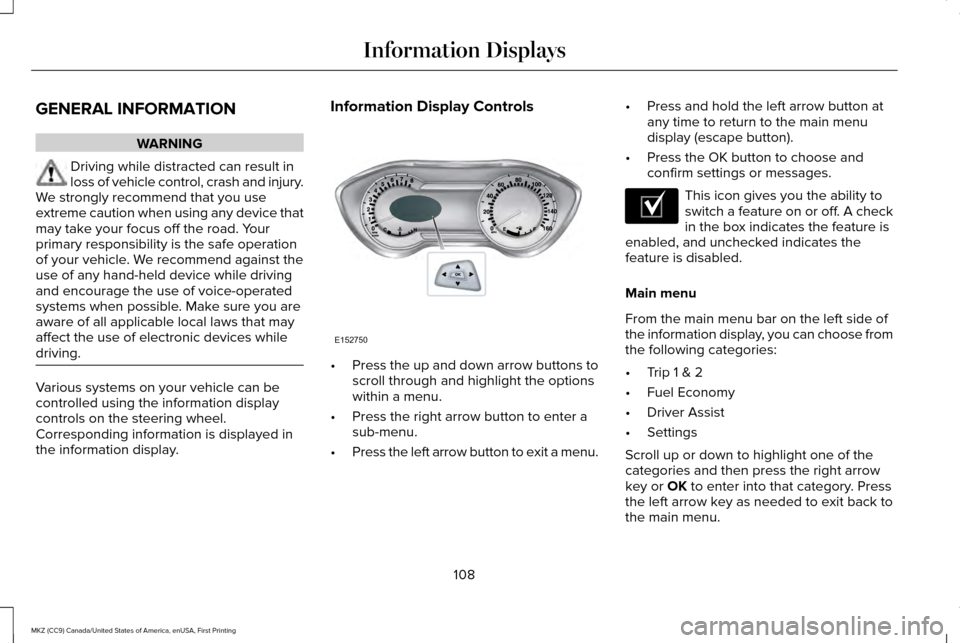
the information display. Information Display Controls
•
Press the up and down arrow buttons to
scroll through and highlight the options
within a menu.
• Press the right arrow button to enter a
sub-menu.
• Press the left arrow button to exit a menu. •
Press and hold the left arrow button at
any time to return to the main menu
display (escape button).
• Press the OK button to choose and
confirm settings or messages. This icon gives you the ability to
switch a feature on or off. A check
in the box indicates the feature is
enabled, and unchecked indicates the
feature is disabled.
Main menu
From the main menu bar on the left side of
the information display, you can choose from
the following categories:
• Trip 1 & 2
• Fuel Economy
• Driver Assist
• Settings
Scroll up or down to highlight one of the
categories and then press the right arrow
key or OK to enter into that category. Press
the left arrow key as needed to exit back to
the main menu.
108
MKZ (CC9) Canada/United States of America, enUSA, First Printing Information DisplaysE152750 E204495
Page 112 of 564
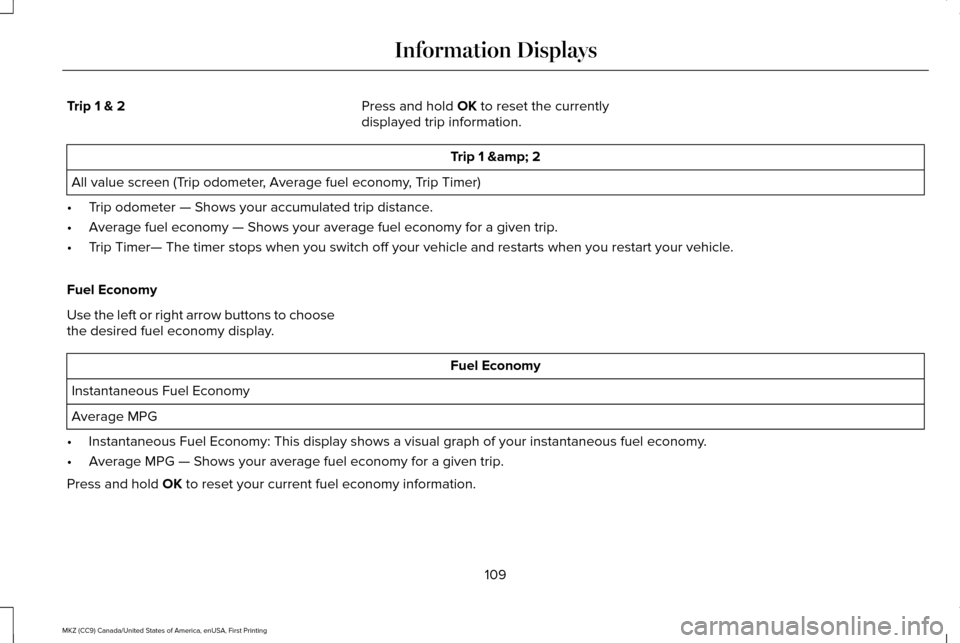
Trip 1 & 2
Press and hold OK to reset the currently
displayed trip information. Trip 1 & 2
All value screen (Trip odometer, Average fuel economy, Trip Timer)
• Trip odometer — Shows your accumulated trip distance.
• Average fuel economy — Shows your average fuel economy for a given trip.
• Trip Timer— The timer stops when you switch off your vehicle and restarts when you \
restart your vehicle.
Fuel Economy
Use the left or right arrow buttons to choose
the desired fuel economy display. Fuel Economy
Instantaneous Fuel Economy
Average MPG
• Instantaneous Fuel Economy: This display shows a visual graph of your in\
stantaneous fuel economy.
• Average MPG — Shows your average fuel economy for a given trip.
Press and hold
OK to reset your current fuel economy information.
109
MKZ (CC9) Canada/United States of America, enUSA, First Printing Information Displays
Page 115 of 564
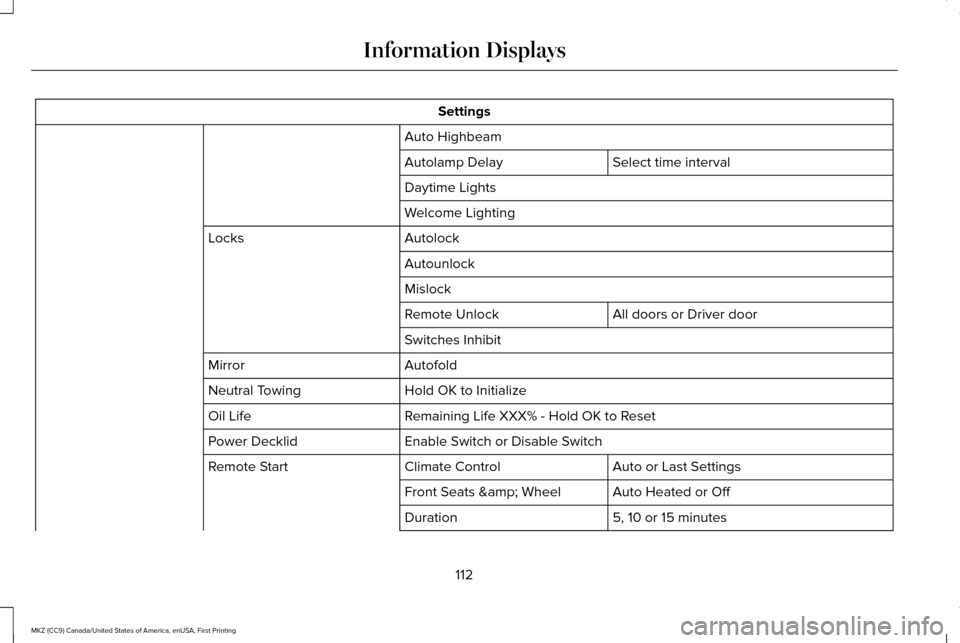
Settings
Auto Highbeam Select time interval
Autolamp Delay
Daytime Lights
Welcome Lighting
Autolock
Locks
Autounlock
Mislock All doors or Driver door
Remote Unlock
Switches Inhibit
Autofold
Mirror
Hold OK to Initialize
Neutral Towing
Remaining Life XXX% - Hold OK to Reset
Oil Life
Enable Switch or Disable Switch
Power Decklid
Auto or Last Settings
Climate Control
Remote Start
Auto Heated or Off
Front Seats & Wheel
5, 10 or 15 minutes
Duration
112
MKZ (CC9) Canada/United States of America, enUSA, First Printing Information Displays
Page 116 of 564
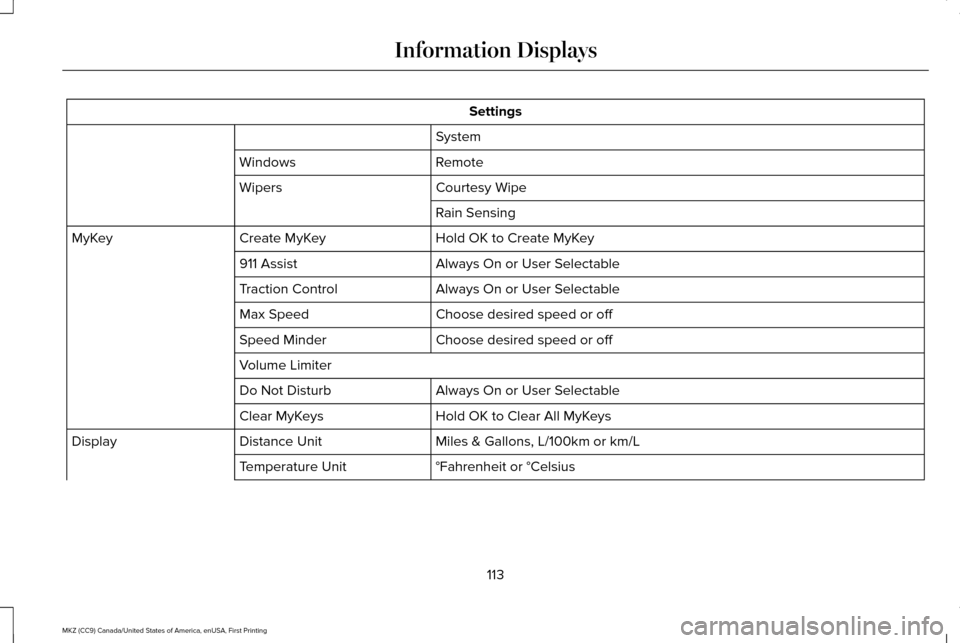
Settings
System
Remote
Windows
Courtesy Wipe
Wipers
Rain Sensing
Hold OK to Create MyKey
Create MyKey
MyKey
Always On or User Selectable
911 Assist
Always On or User Selectable
Traction Control
Choose desired speed or off
Max Speed
Choose desired speed or off
Speed Minder
Volume Limiter
Always On or User Selectable
Do Not Disturb
Hold OK to Clear All MyKeys
Clear MyKeys
Miles & Gallons, L/100km or km/L
Distance Unit
Display
°Fahrenheit or °Celsius
Temperature Unit
113
MKZ (CC9) Canada/United States of America, enUSA, First Printing Information Displays
Page 117 of 564
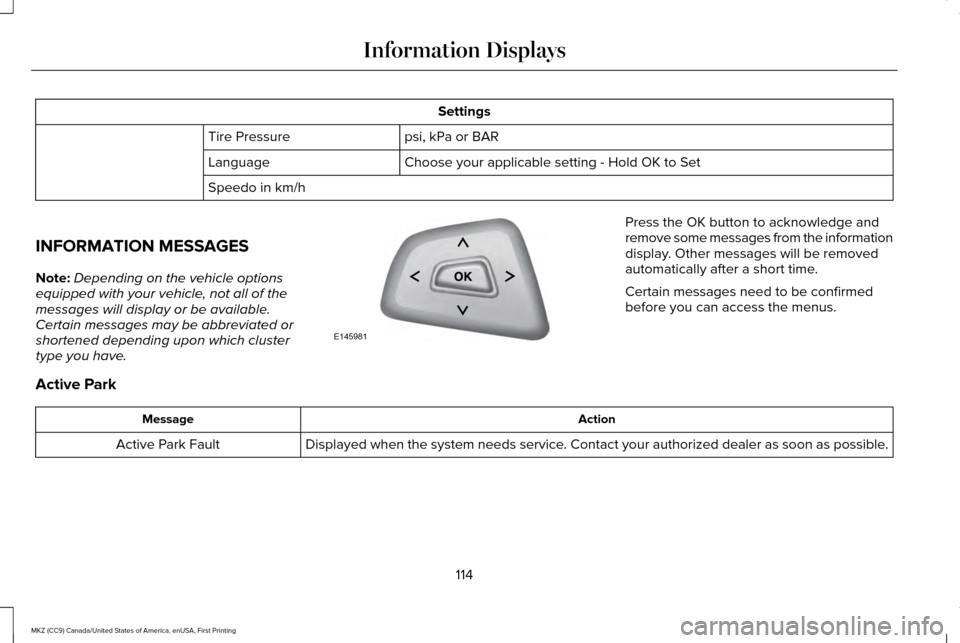
Settings
psi, kPa or BAR
Tire Pressure
Choose your applicable setting - Hold OK to Set
Language
Speedo in km/h
INFORMATION MESSAGES
Note: Depending on the vehicle options
equipped with your vehicle, not all of the
messages will display or be available.
Certain messages may be abbreviated or
shortened depending upon which cluster
type you have. Press the OK button to acknowledge and
remove some messages from the information
display. Other messages will be removed
automatically after a short time.
Certain messages need to be confirmed
before you can access the menus.
Active Park Action
Message
Displayed when the system needs service. Contact your authorized dealer as soon as possible.
Active Park Fault
114
MKZ (CC9) Canada/United States of America, enUSA, First Printing Information DisplaysE145981
Page 118 of 564
.
Adaptive Cruise Malfunction
Displayed wh")
Adaptive Cruise Control
Action
Message
Displayed when a radar malfunction is preventing the ACC from engaging. \
See Using Adaptive Cruise Control (page 216).
Adaptive Cruise Malfunction
Displayed when conditions exist such that the adaptive cruise cannot fun\
ction properly.
See
Using Adaptive Cruise Control (page 216).
Adaptive Cruise Not Available
Displayed when the radar is blocked because of poor radar visibility due to bad weather or ice/
mud/water in front of radar. Driver can typically clean the sensor to resolve. See Using AdaptiveCruise Control
(page 216).
Adaptive Cruise Not Available Sensor
Blocked See Manual
Displayed when the automatic braking has been disabled.
Normal Cruise Active Automatic Braking
Turned Off
Displayed when a radar malfunction is preventing the ACC from engaging.
Front Sensor Not Aligned
Displayed when the adaptive cruise has reinstated controls to the driver\
.
Adaptive Cruise - Driver Resume Control
Displays when the vehicle speed is too slow to activate the adaptive cru\
ise.
Adaptive Cruise Speed Too Low to
Activate
Displays when the adaptive cruise is automatically adjusting the gap dis\
tance and the driverneeds to shift the transmission into a lower gear.
Adaptive Cruise Shift Down
115
MKZ (CC9) Canada/United States of America, enUSA, First Printing Information Displays
Page 121 of 564

AWD
Action
Message
Displayed when the AWD system has been temporarily disabled to protect i\
tself from overheating.
AWD Temporarily Disabled
Displayed when the AWD system has been automatically disabled to protect\
itself. This is causedby operating the vehicle with the compact spare tire installed or if the\
system is overheating.
AWD OFF
The AWD system will resume normal function and clear this message after \
driving a short distancewith the road tire re-installed or after the system is allowed to cool.
AWD Restored
Displayed in conjunction with the Throttle Control/Transmission/AWD light when the AWD system
is not operating properly. If the warning stays on or continues to come on, contact your authoriz\
ed dealer as soon as possible.
AWD Malfunction Service Required
118
MKZ (CC9) Canada/United States of America, enUSA, First Printing Information Displays
Page 122 of 564

Battery and Charging System
Action
Message
Displayed when the charging system needs servicing. If the warning stays\
on or continues tocome on, contact your authorized dealer as soon as possible.
Check Charging System
Displayed when the battery management system detects an extended low-vol\
tage condition.Various vehicle features will be disabled to help preserve the battery. Turn off as many of the electrical loads as soon as possible to improve system voltage. If the system voltage has recovered, the disabled features will operate again as normal.
Low Battery Features Temporarily Turned
Off
Displayed when the battery management system determines that the battery\
is at a low state ofcharge. Turn the ignition off as soon as possible to protect the battery. This message will clear once the vehicle has been started and the battery state of charge has re\
covered. Turning off unnecessary electrical loads will allow faster battery state-of-charge r\
ecovery.
Turn Power Off To Save Battery
119
MKZ (CC9) Canada/United States of America, enUSA, First Printing Information Displays