lock LINCOLN MKZ 2018 Owners Manual
[x] Cancel search | Manufacturer: LINCOLN, Model Year: 2018, Model line: MKZ, Model: LINCOLN MKZ 2018Pages: 595, PDF Size: 5.06 MB
Page 341 of 595
What to do when a Tire Is Punctured
A tire puncture within the tire's tread areacan be repaired in two stages with the kit:
•In the first stage, the tire will be reinflatedwith a sealing compound and air. Afterthe tire has been inflated, you will needto drive the vehicle about 3.7 mi (6 km)to distribute the sealant in the tire.
•In the second stage, you will need tocheck the tire pressure and adjust, ifnecessary, to the vehicle's specified tireinflation pressure.
First Stage: Reinflating the Tire withSealing Compound and Air
WARNING
Do not stand directly beside the tirewhile the compressor is operating. Thiscould cause personal injury if the tire bursts.
Note:If the tire does not inflate to therecommended tire pressure within 15minutes, stop and call roadside assistance.
WARNINGS
Watch the sidewall of the tire wheninflating. If any cracks, bumps or similardamage appears, switch the compressor offand let the air out by means of the pressurerelief valve. Do not continue driving with thistire. This could cause loss of vehicle control.
Do not run the engine when operatingthe air compressor unless the vehicleis outdoors or in a well-ventilated area.
Preparation: Park the vehicle in a safe, leveland secure area, away from moving traffic.
Turn the hazard lights on. Apply the parkingbrake and turn the engine off. Inspect theflat tire for visible damage.
Sealant compound contains latex. Useappropriate precautions to avoid any allergicreactions.
Do not remove any foreign object that haspierced the tire. If a puncture is located inthe tire sidewall, stop and call roadsideassistance.
1.Remove the valve cap from the tire valve.
2. Unwrap the dual purpose hose (blacktube) from the back of the compressorhousing.
3. Fasten the hose to the tire valve byturning the connector clockwise. Tightenthe connection securely.
338
MKZ (CC9) Canada/United States of America, enUSA, Edition date: 201706, First Printing
Wheels and Tires
Page 342 of 595
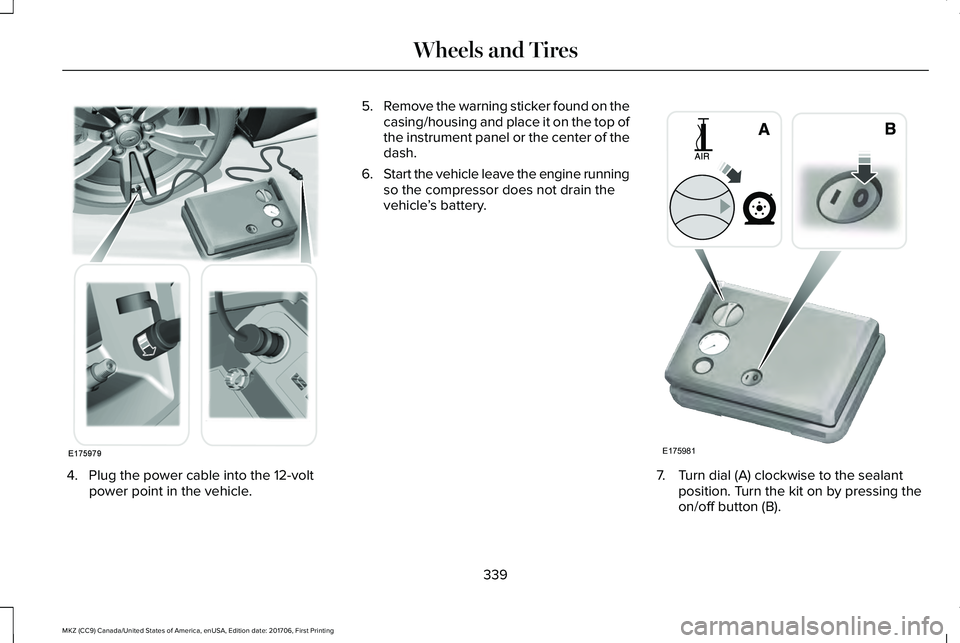
4. Plug the power cable into the 12-voltpower point in the vehicle.
5.Remove the warning sticker found on thecasing/housing and place it on the top ofthe instrument panel or the center of thedash.
6.Start the vehicle leave the engine runningso the compressor does not drain thevehicle’s battery.
7. Turn dial (A) clockwise to the sealantposition. Turn the kit on by pressing theon/off button (B).
339
MKZ (CC9) Canada/United States of America, enUSA, Edition date: 201706, First Printing
Wheels and TiresE175979 E175981
Page 344 of 595
Note:If you experience any unusualvibration, ride disturbance or noise whiledriving, do not proceed to the second stageof this operation.
Second Stage: Checking Tire Pressure
If you have injected sealant in the tire andthe pressure is below 20 psi (1.4 bar),continue to the next step.
Note:If the tire does not inflate to therecommended tire pressure within 15minutes, stop and call roadside assistance.
WARNING
The air compressor power plug maybe hot after use. Allow it to cool beforehandling. Failure to do so could result inpersonal injury.
Check the air pressure of your tires asfollows:
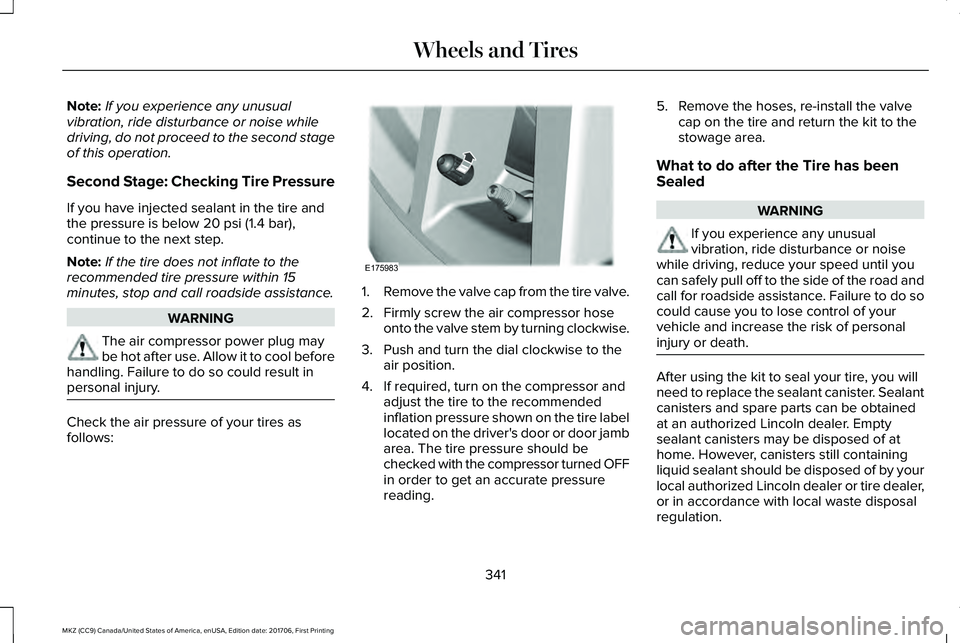
1.Remove the valve cap from the tire valve.
2. Firmly screw the air compressor hoseonto the valve stem by turning clockwise.
3. Push and turn the dial clockwise to theair position.
4. If required, turn on the compressor andadjust the tire to the recommendedinflation pressure shown on the tire labellocated on the driver's door or door jambarea. The tire pressure should bechecked with the compressor turned OFFin order to get an accurate pressurereading.
5. Remove the hoses, re-install the valvecap on the tire and return the kit to thestowage area.
What to do after the Tire has beenSealed
WARNING
If you experience any unusualvibration, ride disturbance or noisewhile driving, reduce your speed until youcan safely pull off to the side of the road andcall for roadside assistance. Failure to do socould cause you to lose control of yourvehicle and increase the risk of personalinjury or death.
After using the kit to seal your tire, you willneed to replace the sealant canister. Sealantcanisters and spare parts can be obtainedat an authorized Lincoln dealer. Emptysealant canisters may be disposed of athome. However, canisters still containingliquid sealant should be disposed of by yourlocal authorized Lincoln dealer or tire dealer,or in accordance with local waste disposalregulation.
341
MKZ (CC9) Canada/United States of America, enUSA, Edition date: 201706, First Printing
Wheels and TiresE175983
Page 368 of 595
•Use commercial car washing equipment.
•Use snow chains on the end of thevehicle with the dissimilar spare wheeland tire assembly.
Use of the above dissimilar spare wheel atany one wheel location can lead toimpairment of the following:
•Handling, stability and brakingperformance.
•Comfort and noise.
•Ground clearance and parking at curbs.
•Winter weather driving capability.
•Wet weather driving capability.
•All-wheel driving capability.
Give additional caution to the following whendriving with the full-size dissimilar sparewheel and tire assembly:
•Towing a trailer.
•Driving vehicles equipped with a camperbody.
•Driving vehicles with a load on the cargorack.
Drive cautiously when using a full-sizedissimilar spare wheel and tire assembly andseek service as soon as possible.
Changing a Road Wheel Procedure
WARNINGS
When one of the front wheels is off theground, the transmission alone will notprevent the vehicle from moving or slippingoff the jack, even if the transmission is in park(P).
To help prevent your vehicle frommoving when changing a wheel, shiftthe transmission into park (P), set the parkingbrake and use an appropriate block or wheelchock to secure the wheel diagonallyopposite to the wheel being changed. Forexample, when changing the front left wheel,place an appropriate block or wheel chockon the right rear wheel.
Do not work on your vehicle when thejack is the only support. If the vehicleslips off the jack, you or someone else couldbe seriously injured.
WARNINGS
Do not attempt to change a tire on theside of the vehicle close to movingtraffic. Pull far enough off the road to avoidthe danger of being hit when operating thejack or changing the wheel.
Always use the jack provided asoriginal equipment with your vehicle.If using a jack other than the one provided,make sure the jack capacity is adequate forthe vehicle weight, including any vehiclecargo or modifications. If you are unsure ifthe jack capacity is adequate, contact theauthorized dealer.
Note:Passengers should not remain in yourvehicle when the vehicle is being jacked.
1. Park on a level surface, set the parkingbrake and activate the hazard flashers.
2. Place the transmission in park (P) andturn the engine off. For vehicles with amanual transmission, place thetransmission in reverse (R) after theengine is turned off.
365
MKZ (CC9) Canada/United States of America, enUSA, Edition date: 201706, First Printing
Wheels and Tires
Page 369 of 595
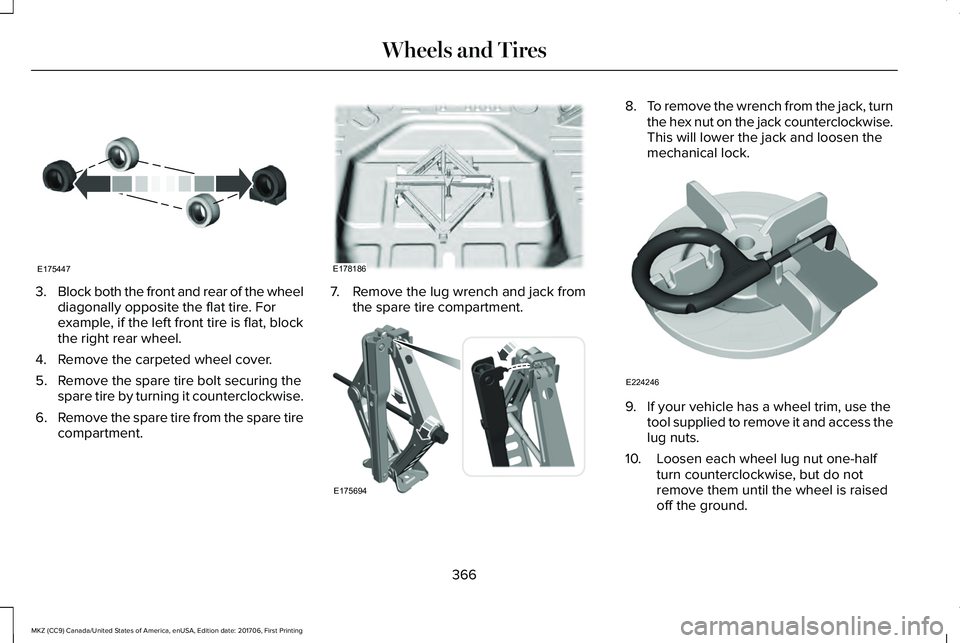
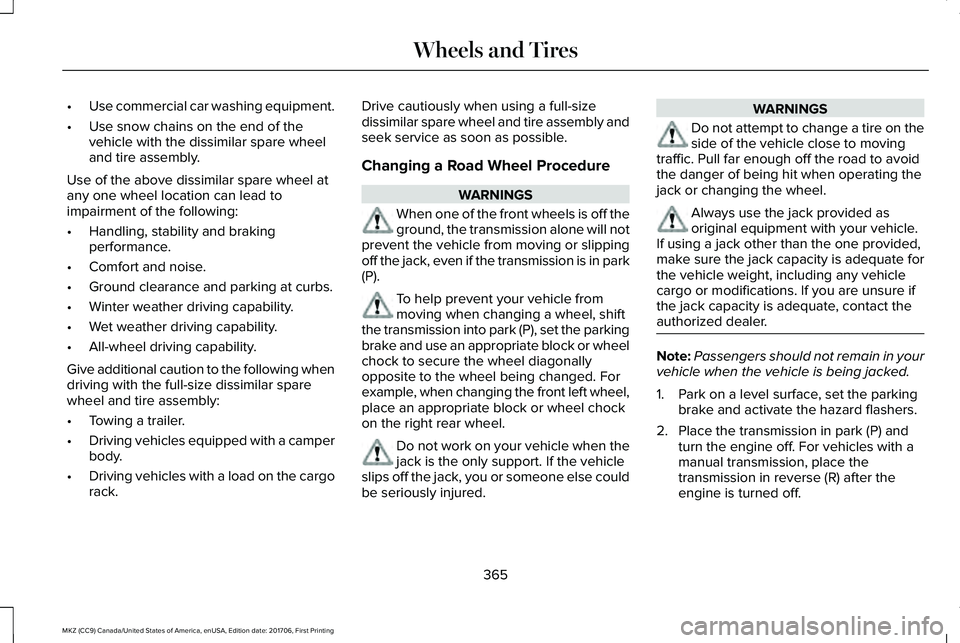
3.Block both the front and rear of the wheeldiagonally opposite the flat tire. Forexample, if the left front tire is flat, blockthe right rear wheel.
4. Remove the carpeted wheel cover.
5. Remove the spare tire bolt securing thespare tire by turning it counterclockwise.
6.Remove the spare tire from the spare tirecompartment.
7. Remove the lug wrench and jack fromthe spare tire compartment.
8.To remove the wrench from the jack, turnthe hex nut on the jack counterclockwise.This will lower the jack and loosen themechanical lock.
9. If your vehicle has a wheel trim, use thetool supplied to remove it and access thelug nuts.
10. Loosen each wheel lug nut one-halfturn counterclockwise, but do notremove them until the wheel is raisedoff the ground.
366
MKZ (CC9) Canada/United States of America, enUSA, Edition date: 201706, First Printing
Wheels and TiresE175447 E178186 E175694 E224246
Page 370 of 595
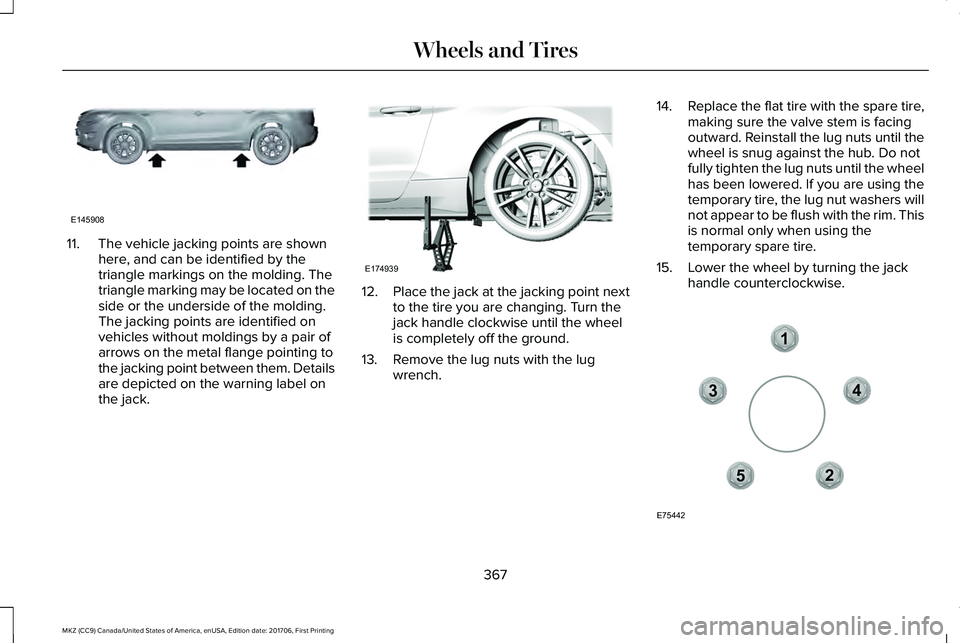
11. The vehicle jacking points are shownhere, and can be identified by thetriangle markings on the molding. Thetriangle marking may be located on theside or the underside of the molding.The jacking points are identified onvehicles without moldings by a pair ofarrows on the metal flange pointing tothe jacking point between them. Detailsare depicted on the warning label onthe jack.
12.Place the jack at the jacking point nextto the tire you are changing. Turn thejack handle clockwise until the wheelis completely off the ground.
13. Remove the lug nuts with the lugwrench.
14.Replace the flat tire with the spare tire,making sure the valve stem is facingoutward. Reinstall the lug nuts until thewheel is snug against the hub. Do notfully tighten the lug nuts until the wheelhas been lowered. If you are using thetemporary tire, the lug nut washers willnot appear to be flush with the rim. Thisis normal only when using thetemporary spare tire.
15. Lower the wheel by turning the jackhandle counterclockwise.
367
MKZ (CC9) Canada/United States of America, enUSA, Edition date: 201706, First Printing
Wheels and TiresE145908 E174939 12
3
4
5
E75442
Page 371 of 595
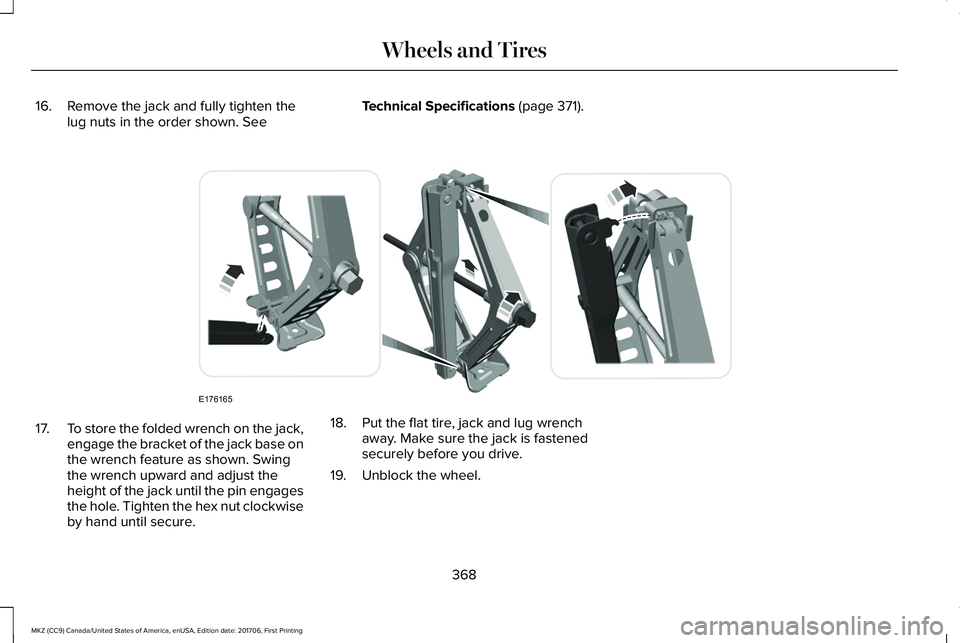
16. Remove the jack and fully tighten thelug nuts in the order shown. SeeTechnical Specifications (page 371).
17.To store the folded wrench on the jack,engage the bracket of the jack base onthe wrench feature as shown. Swingthe wrench upward and adjust theheight of the jack until the pin engagesthe hole. Tighten the hex nut clockwiseby hand until secure.
18. Put the flat tire, jack and lug wrenchaway. Make sure the jack is fastenedsecurely before you drive.
19. Unblock the wheel.
368
MKZ (CC9) Canada/United States of America, enUSA, Edition date: 201706, First Printing
Wheels and TiresE176165
Page 387 of 595
SpecificationName
MYN-19
WSS-M2C300-A2A/C refrigerant compressor oil (U.S. and Canada):Motorcraft® R-1234yf PAG Refrigerant Compressor OilYN-35
WSH-M1C231-BA/C refrigerant compressor oil (Mexico):Motorcraft® R-134a PAG Refrigerant Compressor OilYN-12-D
ESB-M1C93-BMulti-purpose grease:Motorcraft® Multi-Purpose Grease SprayXL-5-A
--Lock cylinders (U.S. and Mexico):Penetrating and Lock LubricantXL-1
--Lock cylinders (Canada):Penetrating FluidCXC-51-A
384
MKZ (CC9) Canada/United States of America, enUSA, Edition date: 201706, First Printing
Capacities and Specifications
Page 394 of 595
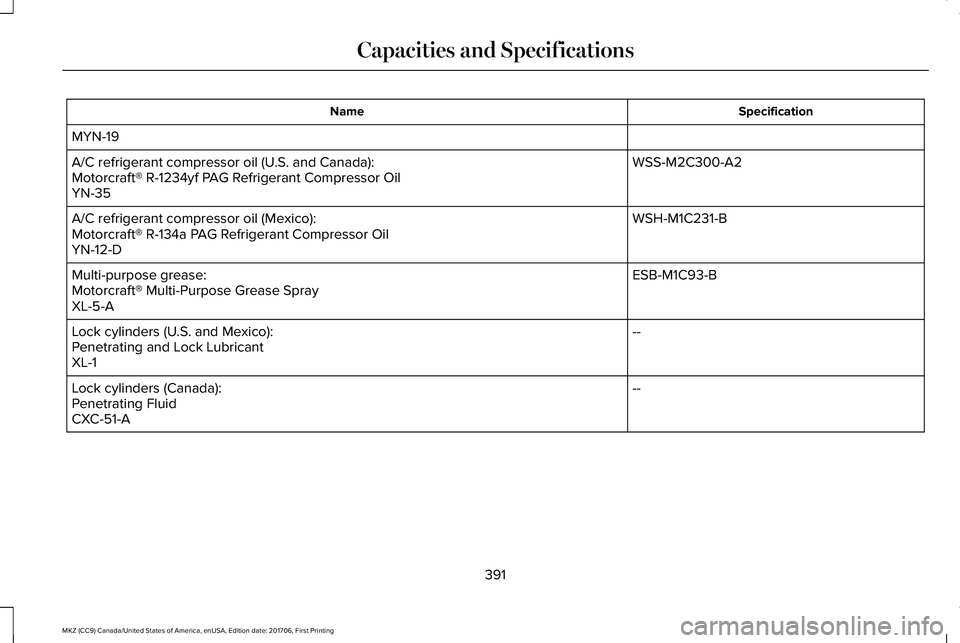
SpecificationName
MYN-19
WSS-M2C300-A2A/C refrigerant compressor oil (U.S. and Canada):Motorcraft® R-1234yf PAG Refrigerant Compressor OilYN-35
WSH-M1C231-BA/C refrigerant compressor oil (Mexico):Motorcraft® R-134a PAG Refrigerant Compressor OilYN-12-D
ESB-M1C93-BMulti-purpose grease:Motorcraft® Multi-Purpose Grease SprayXL-5-A
--Lock cylinders (U.S. and Mexico):Penetrating and Lock LubricantXL-1
--Lock cylinders (Canada):Penetrating FluidCXC-51-A
391
MKZ (CC9) Canada/United States of America, enUSA, Edition date: 201706, First Printing
Capacities and Specifications
Page 403 of 595
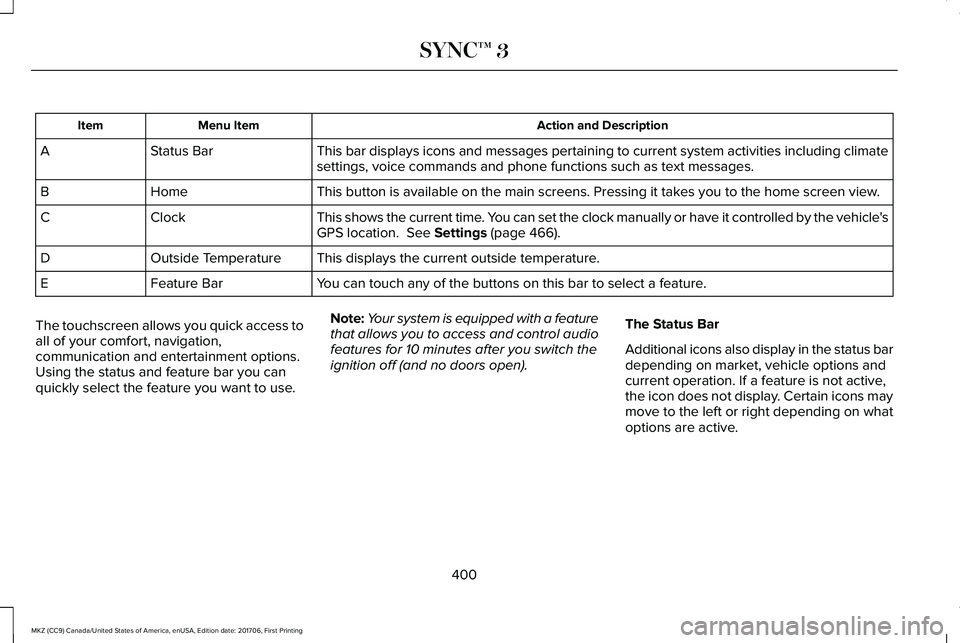
Action and DescriptionMenu ItemItem
This bar displays icons and messages pertaining to current system activities including climatesettings, voice commands and phone functions such as text messages.Status BarA
This button is available on the main screens. Pressing it takes you to the home screen view.HomeB
This shows the current time. You can set the clock manually or have it controlled by the vehicle'sGPS location. See Settings (page 466).ClockC
This displays the current outside temperature.Outside TemperatureD
You can touch any of the buttons on this bar to select a feature.Feature BarE
The touchscreen allows you quick access toall of your comfort, navigation,communication and entertainment options.Using the status and feature bar you canquickly select the feature you want to use.
Note:Your system is equipped with a featurethat allows you to access and control audiofeatures for 10 minutes after you switch theignition off (and no doors open).
The Status Bar
Additional icons also display in the status bardepending on market, vehicle options andcurrent operation. If a feature is not active,the icon does not display. Certain icons maymove to the left or right depending on whatoptions are active.
400
MKZ (CC9) Canada/United States of America, enUSA, Edition date: 201706, First Printing
SYNC™ 3